

Pricing
from $2.40 / 1,000 videos
YouTube Scraper
YouTube crawler and video scraper. Alternative YouTube API with no limits or quotas. Extract and download channel name, likes, number of views, and number of subscribers.
Pricing
from $2.40 / 1,000 videos
Rating
4.8
(172)
Developer

Actor stats
2K
Bookmarked
89K
Total users
7.6K
Monthly active users
5 days
Issues response
6 hours ago
Last modified
Categories
Share
What does YouTube Scraper do?
YouTube Scraper extracts public data from YouTube pages, beyond what the YouTube Data API allows.
- Find all kinds of data points in bulk, from video titles to their description to the metadata associated with them
- Quickly discover vital points such as view count, number of comments, and snapshot the like counter
- Can also break down playlists, streams, and search results
- Export data in multiple formats: JSON, CSV, Excel, or HTML
- Export via SDKs (Python & Node.js), use API Endpoints, webhooks, or integrate with workflows
Use cases for YouTube data
You can use this YouTube API to scrape data in order to:
- Monitor your brand on YouTube: track YouTube mentions of your brand in video titles, descriptions, comments, and transcripts
- Use scraped profile data for lead generation, finding new opportunities your competitors haven't discovered yet
- Find YouTube trending topics and opinions shared by content creators and commenting users
- Analyze YouTube competitors: get insights into competitors' activity, comments, and engagement metrics
- Identify harmful or illegal content
- Scrape subtitles which can be fed to AI and used to make your own scripts
- Accumulate information on products and services from video reviews and automate your buying decisions
- Filter your search results based on more advanced criteria
What data can you scrape from YouTube?
| 📺 Channel name | 👍 Number of likes |
| 📱 Social media links | 💬 Comments count |
| 📝 Video title | 🔗 Video URL |
| 🖍 Subtitles | 📍 Channel location |
| 📼 Total videos | 🌐 Channel URL |
| 👀 Number of views | 👁️ Video view count |
| 🧿 Total views | 📈 Number of subscribers |
| ⏱️ Duration | 📅 Release date |
| #️⃣ Hashtags | 📽️ Thumbnails |
How to scrape YouTube data
YouTube Scraper is designed with users in mind. This means anybody can get started in just minutes, even if they’ve never scraped data before.
- Create a free Apify account using your email.
- Open YouTube Scraper.
- Add one or more YouTube URLs or search terms
- Click the “Start” button and wait for the data to be extracted.
- Download your data in JSON, XML, CSV, Excel, or HTML.
For more information, watch our short video tutorial.
⬇️ Input example
For input, you can either use the fields in Apify Console or enter it directly via JSON. You can also use this scraper locally — head over to the input schema tab for technical details.
You can scrape YouTube by search term or by direct URL and further refine your search by specifying whether you want to scrape full videos, shorts, or streams. You can also scrape subtitles from videos (this is done in a separate tab). Finally, it’s possible to also add filters and date ranges to searches.
👁 YouTube Scraper input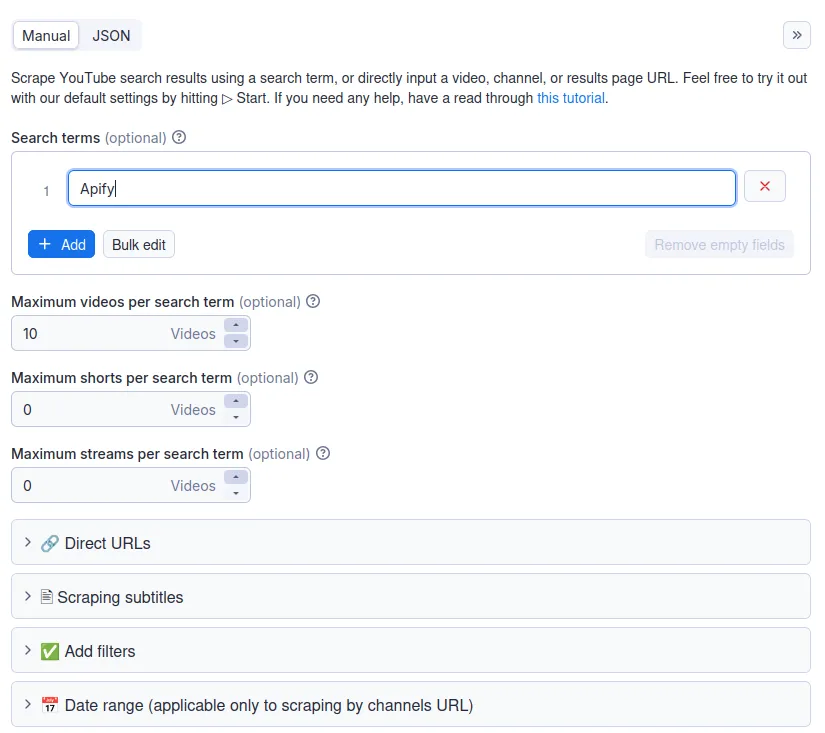
🔗 How to scrape YouTube by URL or search term
- Scraping by URL 🔗 will get you data from any video, channel, playlist, or search results. You can add as many URLs as you want.
- Scraping by search term 🔑 will get you data from YouTube search results. You can add as many search terms as you want.
| Scraping by URL | Paste a YouTube link to a , , , or . You can also import a CSV file or Google Sheet with a prepared list of URLs. Then choose how many results you would like to extract and click Start. |
| Scraping using search term | Type in keywords as you would normally do it in the YouTube search bar. Then choose how many results you would like to extract and click Start. |
How to scrape YouTube shorts and streams
You determine the type of video you want to scrape through the main interface. In the fields that state the maximum number of each video type (regular videos, shorts, and streams), type 0 for each type you do not want to include. This also allows you to determine how many videos of each type to include in your search.
⚠️ Note that this filter only works when scraping by search term, not when scraping by URL.
👁 YouTube Scraper video type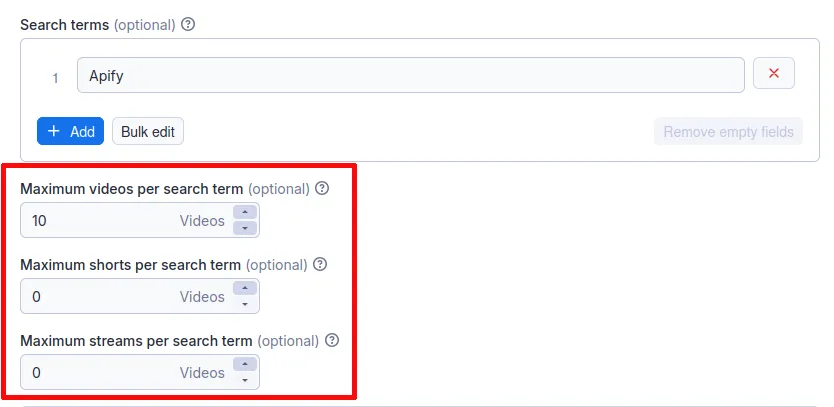
How to filter YouTube videos by date
There are two ways to filter by date, depending on whether you’re scraping videos by URL or by search term.
When scraping by search term
To filter videos by date when using search terms, go to the “Add filters” section, and then under “Sorting order” choose “Upload date.”
Alternatively, you can also select videos published in the last hour, day, week, month, or year by selecting the appropriate option under the “Date filter” menu.
👁 YouTube Scraper date filter by search term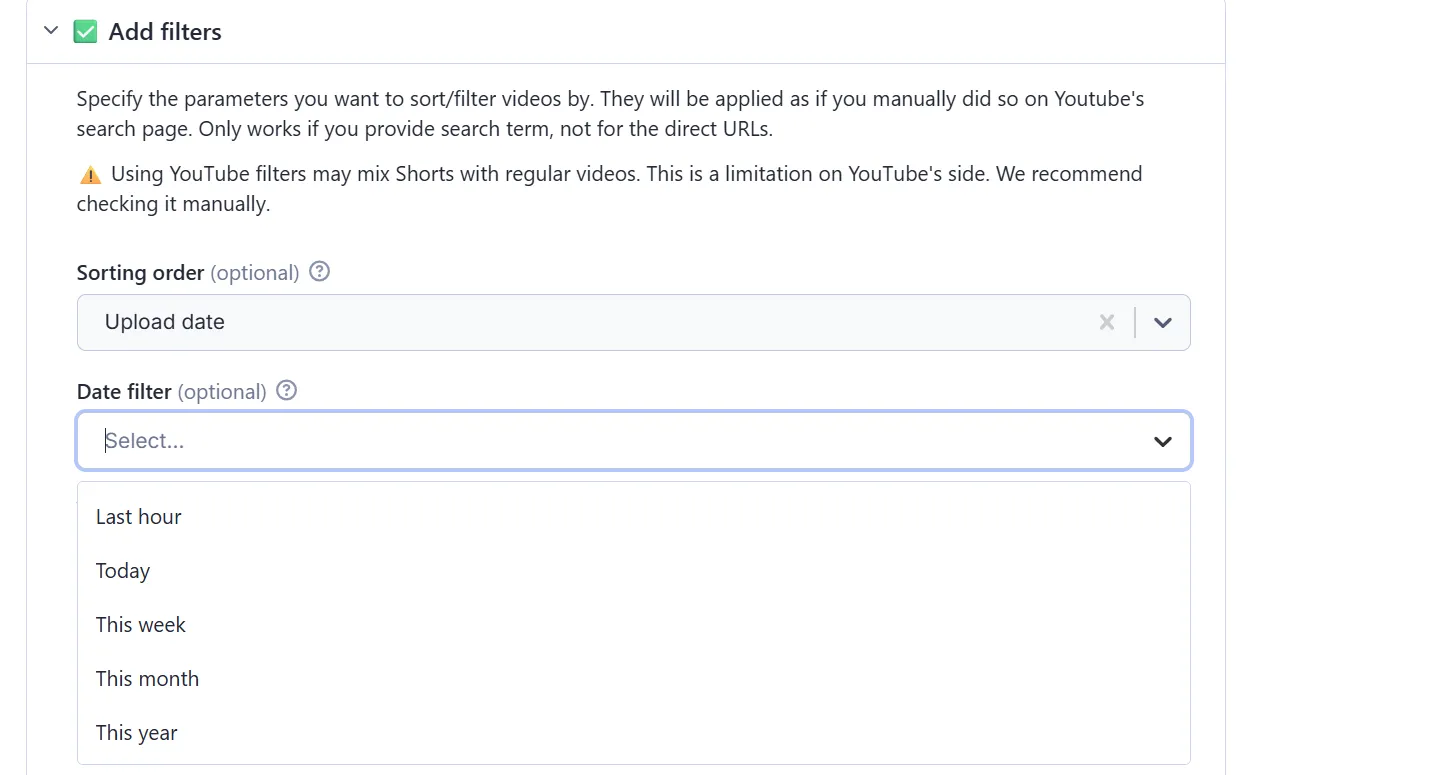
When scraping by URL
When scraping by URL, go to the input field that says “Date range (applicable only to scraping by channels URL).” There, type in (in absolute or relative numbers) by which date you want to filter the data and whether you want to sort the videos by newest, most popular, or oldest.
👁 YouTube Scraper date filter by URL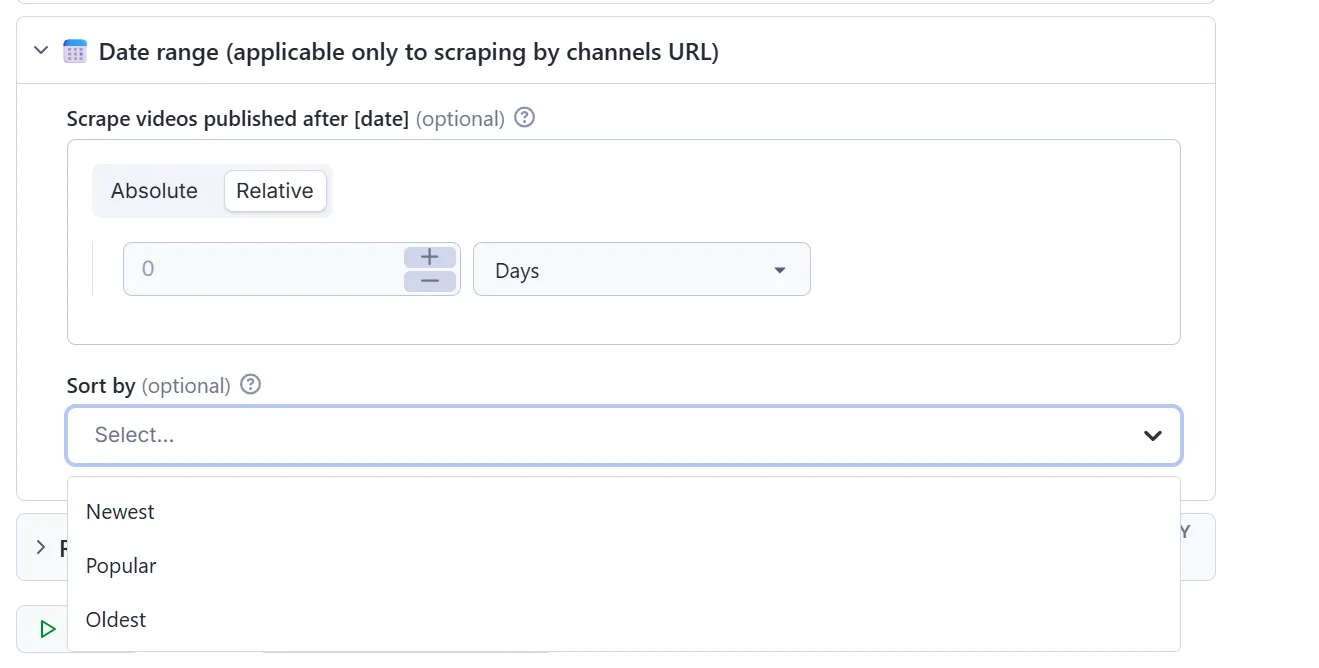
How to scrape YouTube transcript and subtitles
If a video has subtitles, you can also download its transcript. There are two options for scraping subtitles from YouTube videos. The simplest way is to click on the “Subtitles” toggle under the “Add filters” section of the input schema.
Alternatively, if you’re scraping by search term, you can go to the “Scraping subtitles” section and there switch on the toggles for “Download subtitles.” You can also save them to your Apify storages (for later use in other Actors or automations) by toggling “Save subtitles to key-value store.”
👁 YouTube Scraper subtitles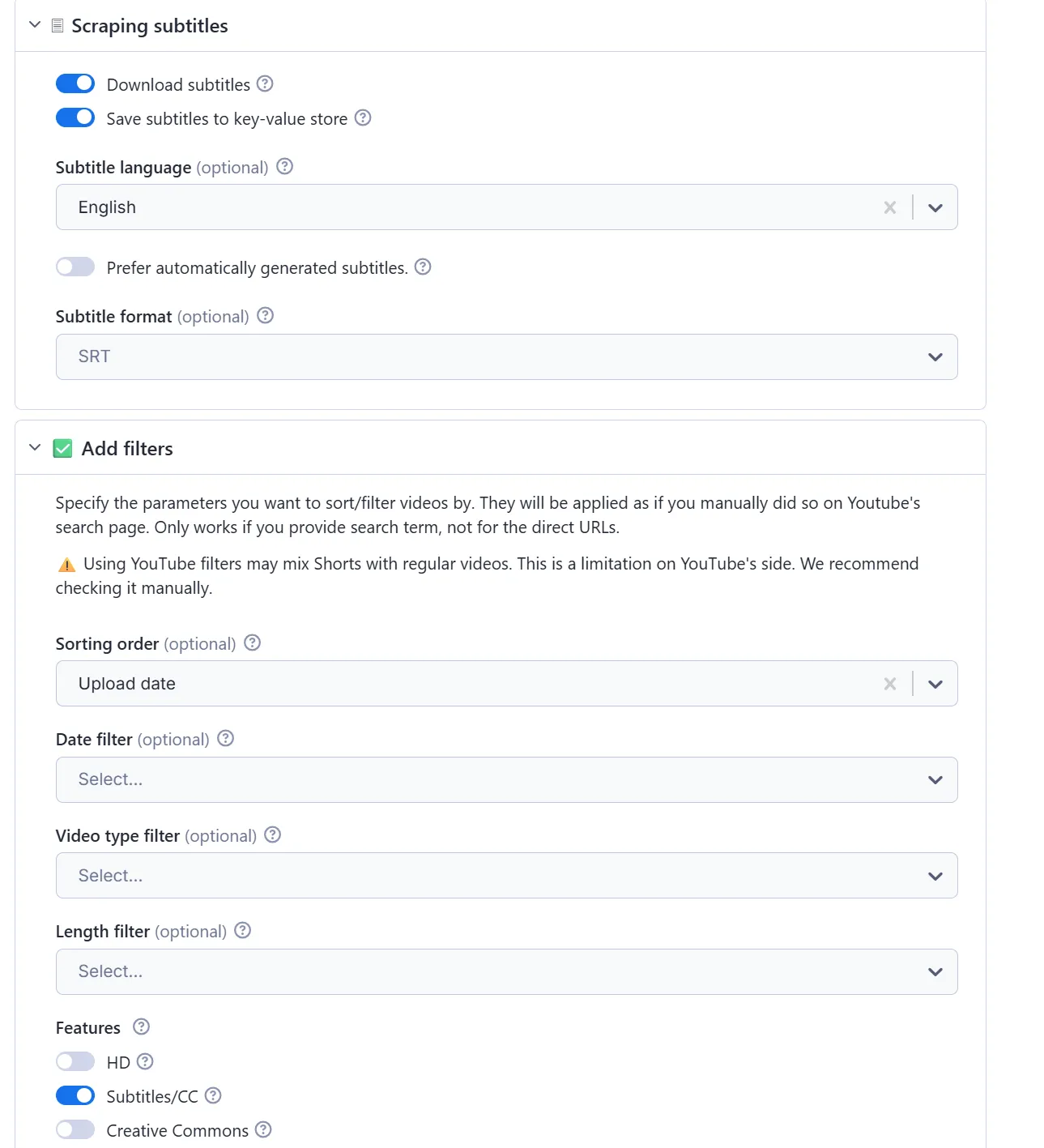
⬆️ Output example
The scraped results will be shown as a dataset which you can find in the Storage tab. Note that the output is organized as a table for viewing convenience, but it doesn’t show all the fields:
👁 YouTube Scraper output
You can preview all the fields and download the file with YouTube data in various formats (JSON, CSV, Excel, and more). Here’s a few JSON examples of different YouTube scraping cases:
💁♂️ Channel info
📹 A single video
🎧 YouTube playlist
🔎 YouTube search results
YouTube subtitles
Need to scrape YouTube comments or Shorts?
If you want to extract specific YouTube data, you can use one of the specialized scrapers below:
- 💬 YouTube Comments Scraper
- 🏎 Fast YouTube Channel Scraper
- ▶️ YouTube Shorts Scraper
- 📽️ YouTube Video Scraper by Hashtag
- 📹 YouTube Video Downloader.
You can also combine YouTube data with that from other social networks. For example you can gather data with our other social media scrapers:
You can also use AI agents to do multiple tasks at one. For example, our Comments Analyzer Agent can perform sentiment analysis of YouTube videos, or you could try our Influencer Discovery Agent for lead generation on TikTok videos.
Error items
When the scraper cannot retrieve data for a given input — for example a video is unavailable or a channel does not exist — it pushes an error item to the dataset instead of silently skipping it. Normal output items are never affected; you can tell them apart by the presence of an error field.
Error item structure
Error codes reference
error | Meaning |
|---|---|
CHANNEL_DOES_NOT_EXIST | Channel URL points to a channel that does not exist |
NOT_FOUND | Page was not found |
VIDEO_UNAVAILABLE | Video is not available (deleted, region-blocked, etc.) |
AGE_RESTRICTED | Channel is age-restricted and cannot be accessed without login |
CHANNEL_HAS_NO_VIDEOS | Channel exists but has no uploaded videos |
CHANNEL_HAS_NO_LIVE_VIDEOS | Channel exists but has no live videos |
CHANNEL_HAS_NO_SHORTS | Channel exists but has no Shorts |
DATE_FILTER_TOO_STRICT | Videos exist but none match the active date filter |
NO_VIDEOS | No videos found on the page |
NO_RESULTS | No results collected — check that video-type limits are set above 0 |
NO_VALID_START_URLS | All provided start URLs were invalid or malformed |
INVALID_INPUT | Actor failed due to bad configuration (run is also terminated) |
NO_COMMENTS | No comments found for the video |
❓FAQ
Can I scrape dislikes from YouTube videos?
No. Both dislike and details properties have been removed altogether from new versions. Dislikes are not public info so you cannot scrape them.
Can I scrape subtitles from YouTube videos?
Yes. You can scrape all publicly available data from YouTube using a web scraper, including subtitles. Using this scraping tool, you can extract both autogenerated and added subtitles in SRT, WEBVTT, XML, or plain text format.
How much will scraping YouTube cost you?
YouTube Scraper uses our price-per-result model. Currently, it costs $5.00 for 1,000 videos, giving you a price of $0.005 per result. For more information, visit the pricing tab.
How many videos can you scrape with YouTube Scraper?
YouTube Scraper can extract up to 20,000 videos per URL. However, you have to keep in mind that scraping youtube.com has many variables to it and may cause the results to fluctuate case by case. There’s no one-size-fits-all-use-cases number. The maximum number of results may vary depending on the complexity of the input, location, and other factors.
Therefore, while we regularly run scraper tests to keep the benchmarks in check, the results may also fluctuate without our knowing. The best way to know for sure for your particular use case is to do a test run yourself
Can I integrate this YouTube scraper with other apps?
YouTube Scraper can be connected with almost any cloud service or web app thanks to integrations on the Apify platform. These include Make, Zapier, Slack, Airbyte, GitHub, Google Drive, and plenty more.
Alternatively, you can use webhooks to carry out an action whenever an event occurs, e.g. get a notification whenever YouTube Scraper successfully finishes a run, or initiate a new process, like ordering your data.
Can I use YouTube Scraper with the API?
The Apify API gives you programmatic access to the Apify platform. The API is organized around RESTful HTTP endpoints that enable you to manage, schedule, and run Apify actors. The API also lets you access any datasets, monitor actor performance, fetch results, create and update versions, and more.
To access the API using Node.js, use the apify-client NPM package. To access the API using Python, use the apify-client PyPI package.
Check out the docs for full details or click on the for code examples.
Can I use YouTube Scraper through an MCP Server?
With Apify API, you can use almost any Actor in conjunction with an MCP server. You can connect to the MCP server using clients like ClaudeDesktop and LibreChat, or even build your own. Read all about how you can set up Apify Actors with MCP.
For YouTube Scraper, go to the MCP tab and then go through the following steps:
- Start a Server-Sent Events (SSE) session to receive a
sessionId - Send API messages using that
sessionIdto trigger the scraper - The message starts the Amazon ASINs Scraper with the provided input
- The response should be:
Accepted
Should I use a proxy when scraping YouTube?
Just like with other social media-related actors, using a proxy is essential if you want your scraper to run properly. You can either use your own proxy or stick to the default Apify Proxy servers. Datacenter proxies are recommended for use with this Actor.
Is it legal to scrape data from YouTube?
Scraping YouTube is legal as long as you adhere to regulations concerning copyright and personal data.
Personal data is protected by GDPR (EU Regulation 2016/679), and by other regulations around the world. You should not scrape personal data unless you have a legitimate reason to do so. If you're unsure whether your reason is legitimate, please consult your lawyers. You can also read our blog post on the legality of web scraping.
Your feedback
We're always working on improving the performance of our Actors. If you've got any technical feedback on YouTube Scraper, or simply found a bug, please create an issue on the Actor's Issues tab.


