

Pricing
from $2.40 / 1,000 shorts
YouTube Shorts Scraper
Extract YouTube Shorts data from one or multiple YouTube channels. Get video URL, caption, timestamp, likes, dislikes, views and comments count, basic channel info, and more. This alternative YouTube API has no limits or quotas. Download the data in JSON, CSV, and Excel.
Pricing
from $2.40 / 1,000 shorts
Rating
4.7
(19)
Developer

Actor stats
186
Bookmarked
50K
Total users
1.1K
Monthly active users
4 hours ago
Last modified
Categories
Share
What is YouTube Shorts Scraper?
YouTube Shorts Scraper is a powerful and easy-to-use tool that allows you to extract Shorts data from chosen YouTube channels. Using this tool, you will be able to scrape:
- YouTube Shorts data: video URL, caption, duration, view count, availability of subtitles and comments, thumbnail URL, time of posting, number of likes/dislikes.
- Basic channel details: channel name, channel URL, number of subscribers.
How to use data extracted from YouTube Shorts videos?
The data extracted from YouTube Shorts can be used for a variety of purposes, including:
- 🤔 Finding current trends and opinions shared by content creators
- 💲 Generating leads by topics, engagement metrics, hasthags and more
- 👹 Identifying harmful or illegal content
- 💯 Accumulating information on products and services from video reviews
- 👁 Monitoring the market for brand mentions and position of your content in search results
- 🤺 Getting insights into competitors’ activity
How do I use YouTube Shorts Scraper?
YouTube Shorts Scraper is designed to be user-friendly, offering a smooth start for those who have never extracted data from the web before. Here’s how you can get started with YouTube Shorts Scraper to extract video data:
- Create a free Apify account using your email
- Open YouTube Shorts Scraper
- Add one or more YouTube channels to scrape Shorts they post
- Click the “Start” button and wait for the data to be extracted
- Download your data in JSON, XML, CSV, Excel, or HTML
Input example
The input for YouTube Shorts Scraper should be one or multiple YouTube channels (with or without the @ symbol) and the number of Shorts you want to scrape.
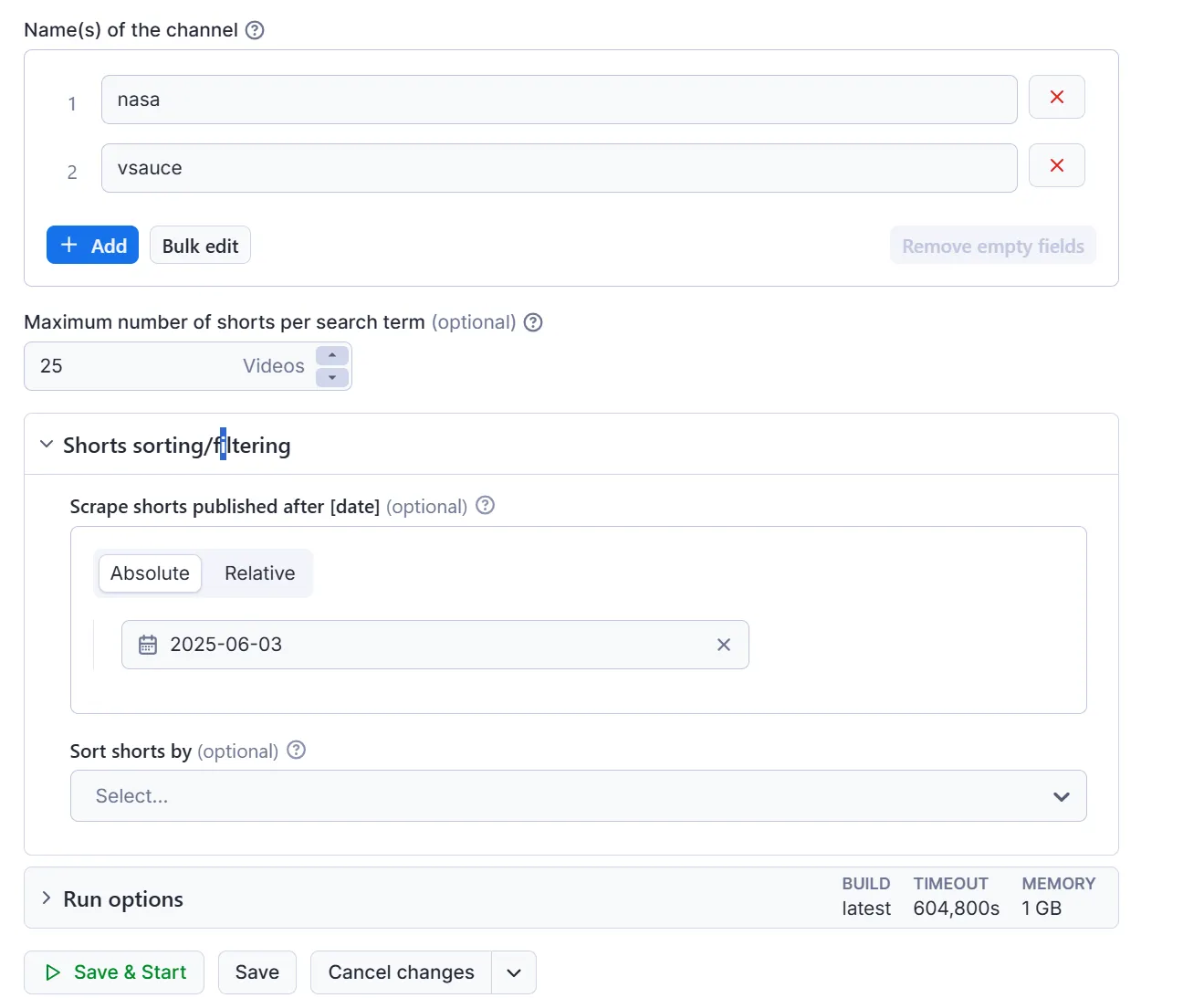
Click on the input tab for a fuller explanation of input in JSON.
Output example
The results will be wrapped into a dataset which you can find in the Storage tab. Here's an excerpt from the data you'd get if you apply the input parameters above:
👁 YouTube Shorts Scraper output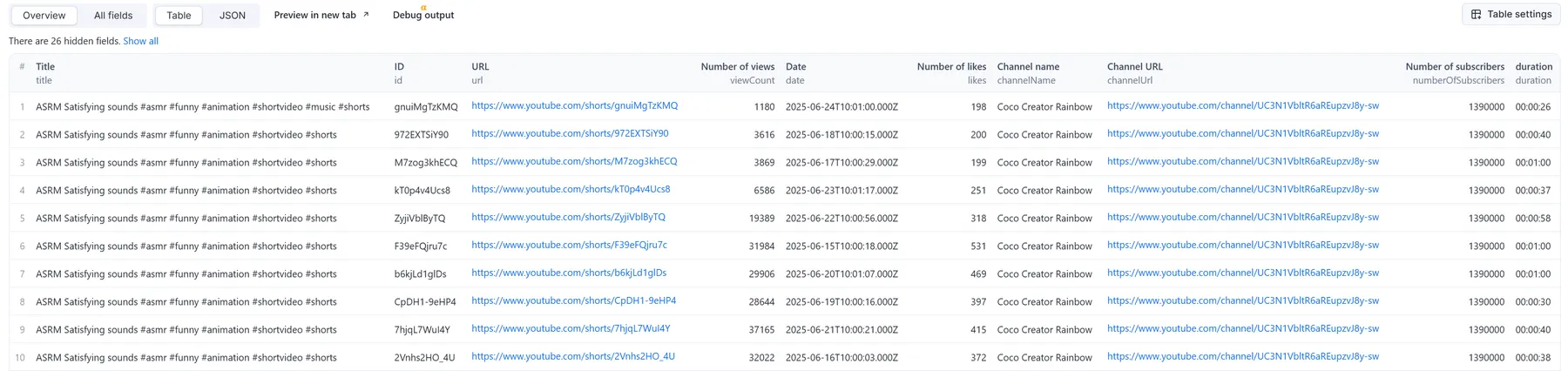
And here is the same data but in JSON. You can choose in which format to download your YouTube Shorts video data: JSON, JSONL, Excel spreadsheet, HTML table, CSV, or XML.
Want to scrape YouTube comments or channels?
If you want to extract specific YouTube data beyond just Shorts, you can use one of the specialized scrapers below:
- ▶️ YouTube Scraper
- 💬 YouTube Comments Scraper
- 🏎 Fast YouTube Channel Scraper
- 📽️ YouTube Video Scraper by Hashtag
Need to download scraped YouTube videos? Use YouTube Video Downloader.
You can also combine YouTube data with that from other social networks. Try:
Furthermore, you can use the power of AI agents to do multiple tasks at once. For example, our Comments Analyzer Agent can perform sentiment analysis of YouTube videos, or you could try our Influencer Discovery Agent for lead generation on TikTok videos.
Integrating YouTube Shorts Scraper with other apps
YouTube Scraper can be connected with almost any cloud service or web app thanks to integrations on the Apify platform. These include Make, Zapier, Slack, Airbyte, GitHub, Google Drive, and plenty more.
Alternatively, you can use webhooks to carry out an action whenever an event occurs, e.g. get a notification whenever YouTube Scraper successfully finishes a run, or initiate a new process, like ordering your data.
Error items
When the scraper cannot retrieve data for a given input — for example a channel has no Shorts or does not exist — it pushes an error item to the dataset instead of silently skipping it. Normal output items are never affected; you can tell them apart by the presence of an error field.
Error item structure
Error codes reference
error | Meaning |
|---|---|
CHANNEL_DOES_NOT_EXIST | Channel URL points to a channel that does not exist |
NOT_FOUND | Page was not found |
VIDEO_UNAVAILABLE | Video is not available (deleted, region-blocked, etc.) |
AGE_RESTRICTED | Channel is age-restricted and cannot be accessed without login |
CHANNEL_HAS_NO_VIDEOS | Channel exists but has no uploaded videos |
CHANNEL_HAS_NO_LIVE_VIDEOS | Channel exists but has no live videos |
CHANNEL_HAS_NO_SHORTS | Channel exists but has no Shorts |
DATE_FILTER_TOO_STRICT | Videos exist but none match the active date filter |
NO_VIDEOS | No videos found on the page |
NO_RESULTS | No results collected — check that video-type limits are set above 0 |
NO_VALID_START_URLS | All provided start URLs were invalid or malformed |
INVALID_INPUT | Actor failed due to bad configuration (run is also terminated) |
NO_COMMENTS | No comments found for the video |
❓ FAQ
Can I use YouTube Shorts Scraper with the Apify API?
Yes. You can use the Apify API which will give you programmatic access to the Apify platform. The API is organized around RESTful HTTP endpoints that enable you to manage, schedule, and run Apify Actors. The API also lets you access any datasets, monitor actor performance, fetch results, create and update versions, and more.
You can use the apify-client NPM package to access the API using Node.js, or the apify-client PyPI package to access the API using Python.
Check out the Apify API reference docs for full details, or click on the API tab for code examples.
Can I use YouTube Scraper through an MCP Server?
With Apify API, you can use almost any Actor in conjunction with an MCP server. You can connect to the MCP server using clients like ClaudeDesktop and LibreChat, or even build your own. Read all about how you can set up Apify Actors with MCP.
For YouTube Scraper, go to the MCP tab and then go through the following steps:
- Start a Server-Sent Events (SSE) session to receive a
sessionId - Send API messages using that
sessionIdto trigger the scraper - The message starts the Amazon ASINs Scraper with the provided input
- The response should be:
Accepted
Is it legal to scrape data from YouTube videos?
Scraping YouTube is legal as long as you adhere to regulations concerning copyright and personal data. Our YouTube scrapers are ethical and do not extract any private user data, such as email addresses, gender, or location.
Personal data is protected by GDPR (EU Regulation 2016/679), and by other regulations around the world. You should not scrape personal data unless you have a legitimate reason to do so. If you’re unsure whether your reason is legitimate, consult your lawyers. You can also read our blog post on the legality of web scraping and ethical scraping.
Your feedback
We’re always working on improving the performance of our Actors. So if you’ve got any technical feedback for YouTube Shorts Scraper or simply found a bug, please create an issue on the actor’s Issues tab.


