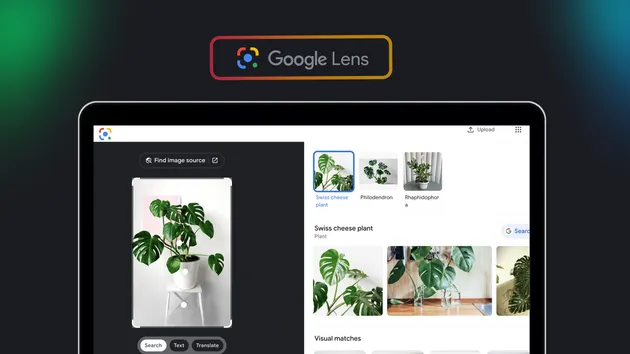
Google Lens | AI Mode | Reverse image search | Translation+OCR
Under maintenancePricing
Pay per event
Google Lens | AI Mode | Reverse image search | Translation+OCR
Under maintenanceGoogle Lens | Reverse image search | AI Mode🌟 Seamlessly identify text, translate in real time 🌐, recognize and classify objects 🎁, reverse search images 🔍, and extract detailed structured data 📚. It’s fast, reliable, and affordable—your essential tool for all visual intelligence needs! 🚀
Pricing
Pay per event
Rating
5.0
(2)
Developer
Actor stats
9
Bookmarked
1.2K
Total users
114
Monthly active users
a month ago
Last modified
Categories
Share
📸 Google Lens Actor
Welcome to the Google Lens Actor! This unofficial Google Lens API empowers you to analyze images programmatically, just like Google Lens does, but with added flexibility. Whether you're identifying text, recognizing objects, performing reverse image searches, or getting AI-powered insights, this Actor has got you covered!
🤝 Contribute: Feel free to open issues or pull requests to suggest new features or report bugs!
✨ What Does the Google Lens Actor Do?
This Actor allows you to process images in multiple powerful ways, delivering programmatic access to:
- 🔍 OCR and Text Recognition: Extract text from images with high accuracy
- 🌐 Text Translation: Translate extracted text into any supported language
- 🖼️ Reverse Image Search: Discover similar images and their sources
- 🎯 Exact Match Search: Find exact matches of images across the web
- 👁️ Visual Match Search: Find visually similar images
- 🛍️ Product Search: Identify and find products in images
- 📚 Homework Help: Get educational assistance for images with questions or problems
- 🤖 AI Mode: Ask questions about images and get AI-powered answers
💡 Why Use the Google Lens Actor?
- 🧠 Bootstrap AI Training: Build robust AI models with curated datasets
- 🛍️ Find Similar Products: Enhance shopping experiences with visual matches
- 🔦 Detect Web Content: Discover hidden or related content online
- 📖 Extract Text: Convert images to searchable, translatable text
- 🤖 AI-Powered Insights: Get intelligent answers about image content
🛠️ How to Use the Google Lens Actor
Step 1: Prepare Your Input
Provide the Actor with one or more image URLs and select which search types you want to perform. These images can come from blogs, social media, e-commerce sites, or anywhere on the web.
Input Example:
Input Parameters:
| Field | Type | Required | Description |
|---|---|---|---|
searchTypes | array | Yes | Array of search modes to perform. Available options: all, ai-mode, ocr, translate-ocr, exact-match, visual-match, products, homework |
imageUrls | array | Yes | List of image URLs to process |
aiModeQuestions | array | Conditional | Questions to ask about the images (required if ai-mode is selected) |
translateLanguage | string | No | Target language code for translation (default: "en"). Used with translate-ocr mode |
language | string | No | Language for search results (default: "en") |
Available Search Types:
all- All search results from Google Lensai-mode- AI-powered answers to questions about the imageocr- Extract text from imagestranslate-ocr- Extract and translate text from imagesexact-match- Find exact matches of the imagevisual-match- Find visually similar imagesproducts- Search for products in the imagehomework- Get educational help for homework questions
Step 2: Review the Output
After processing, the Actor generates structured data that can be downloaded in various formats, such as JSON, CSV, Excel, or HTML.
Dataset Views
The Actor provides organized dataset views for easy access to your results. Each search type has its own view in the Apify console:
- All Results - All search results with individual rows per result
- AI Mode - AI-powered answers to your questions
- OCR Text - Extracted text segments
- Translated OCR - Translated text with original and translated versions
- Exact Match - Exact image matches found across the web
- Visual Match - Visually similar images
- Products - Product information and shopping links
- Homework - Educational assistance and explanations
- Global Errors - Any processing errors or issues
Access these views in the Storage tab of your Actor run on the Apify console.
🎯 Output Examples
All Results / Visual Match / Exact Match
Find similar images, exact matches, or general search results:
OCR - Text Extraction
Extract text from images with position information:
Translate OCR - Text Translation
Extract and translate text from images:
AI Mode
Get AI-powered answers about your images:
Products
Find and identify products in images:
🔦 Real-World Use Cases
- 📊 Data Analysis: Extract text and data from images for research and reporting
- 🎨 Creative Inspiration: Use visual matches to fuel your designs
- 🛍️ E-commerce: Identify and find similar products from images
- 🧠 AI Training: Build robust datasets for machine learning models
- 📚 Education: Get help with homework and learning materials
- 🌐 Content Discovery: Find the source and context of images
- 🤖 Intelligent Image Analysis: Ask questions and get AI-powered insights about any image
🏁 Ready to Start?
- Create a free Apify account at apify.com
- Find the Google Lens Actor in the Apify Store
- Configure your input:
- Add image URLs
- Select search types (
all,ai-mode,translate-ocr, etc.) - Add optional parameters like AI questions or translation language
- Click "Start" to process your images
- View results in the Storage tab using the convenient dataset views
- Download results in your preferred format (JSON, CSV, Excel, HTML)
📖 Advanced Features
Multiple Search Types
Run multiple search types simultaneously to get comprehensive image analysis:
Language Support
The Actor supports 100+ languages for both search results and text translation. Specify your preferred language:
Dataset Views
Results are organized into convenient views in the Apify console. Each view shows data in a tabular format with individual rows for easy analysis and export. Access views directly from the Storage tab or via the Apify API.
For additional guidance, refer to the Apify documentation or contact support for assistance. Happy scraping! 🚀