Google AI Overview Scraper: Extract AI Summaries & Sources
Pricing
from $11.99 / 1,000 queries
Google AI Overview Scraper: Extract AI Summaries & Sources
Extract Google's AI Overview summaries, cited sources, and organic results for any search query. Works best with question-style searches. Supports 52 countries and up to 10 queries per run.
Pricing
from $11.99 / 1,000 queries
Rating
1.0
(1)
Developer
Actor stats
2
Bookmarked
105
Total users
42
Monthly active users
7 days ago
Last modified
Categories
Share
Google AI Overview Scraper on Apify.
No Google account. No API key. Just a search query.
Extract AI Overview summaries, cited sources, and organic search results from Google Search. Works best with question-style queries ("how does X work", "is X good for you"). Supports 52 countries.
Copy to your AI assistant
Copy this block into ChatGPT, Claude, Cursor, or any LLM to start using this actor.
How It Works
- Enter a search query (or paste a Google Search URL)
- The Actor searches Google and extracts AI Overview + organic results
- Structured JSON result is pushed to Apify's default dataset
That's it. No setup, no login, no browser needed on your end.
Quick Start — Google AI Overview Examples
Simple query
With Google Search URL
Germany with AI Overview only
Which Queries Get AI Overviews?
Google generates AI Overviews mainly for question-style queries that ask "how", "what", "why", "is", etc. Not every search produces one.
Phrasing your query as a question significantly increases the chance of getting an AI Overview.
| Query type | Example | AI Overview? |
|---|---|---|
| Health / science questions | "is coffee good or bad for you" | Yes |
| How-to questions | "how to make pasta from scratch" | Yes |
| Explainers | "what is quantum computing" | Yes |
| Recent events | "who won the world series 2024" | Yes |
| Shopping / products | "nike air max 90" | No |
| Weather / conversions | "weather in new york", "USD to EUR" | No |
| Local searches | "best restaurants in paris" | No |
When no AI Overview is available, the Actor still returns organic search results (if enabled).
Input Parameters
| Parameter | Type | Description | Default |
|---|---|---|---|
query | string | A search query to look up on Google. | — |
url | string | Or a full Google Search URL to scrape directly. | — |
countryCode | string | Country for the search location. 52 countries supported (US, GB, DE, FR, and more). | US |
includeOrganicResults | boolean | Return organic search results alongside the AI Overview. | true |
Provide either query or url, not both. For multiple queries, schedule separate runs or use the Apify API.
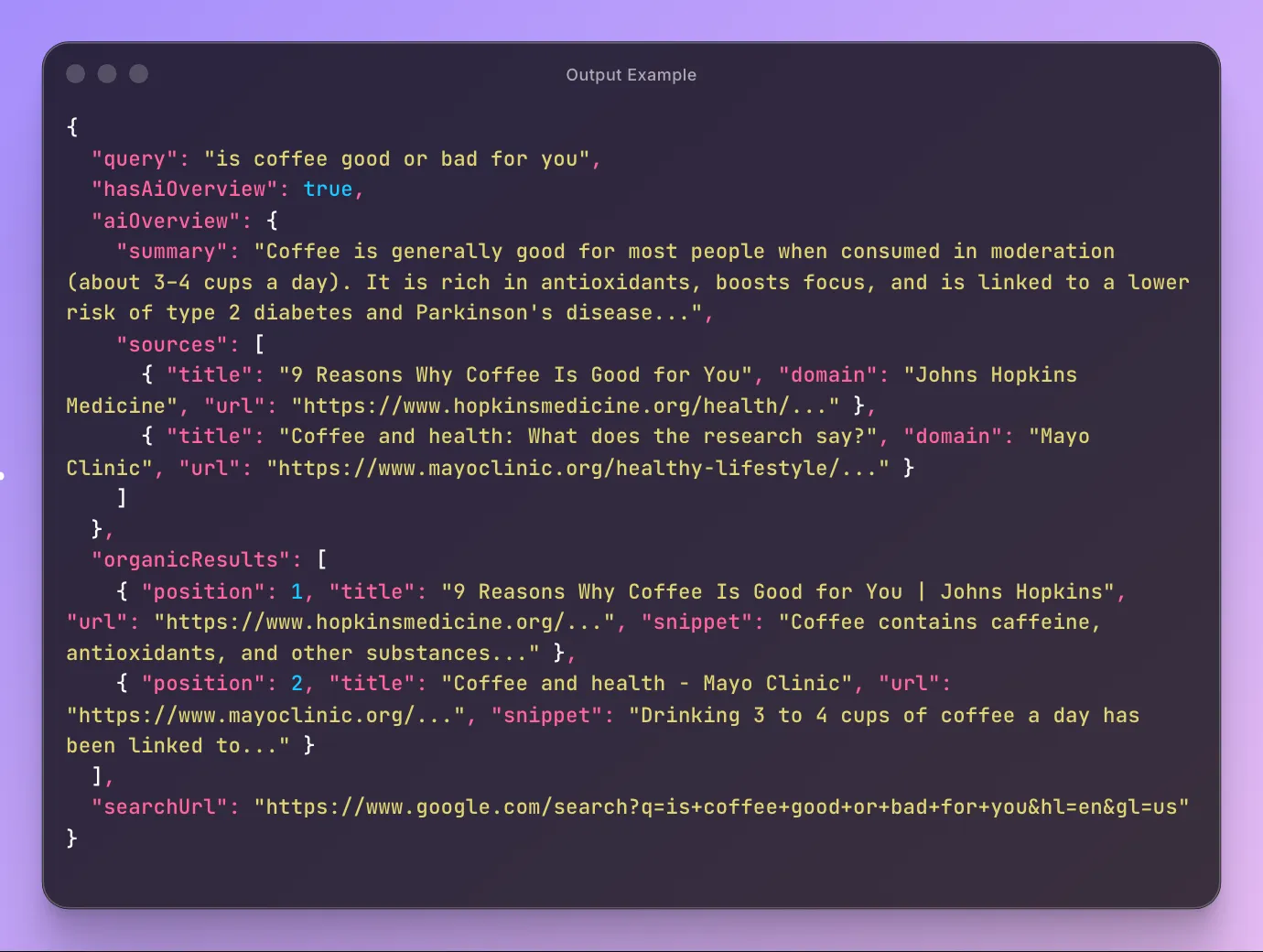
Output — Structured JSON
Always returned:
query— the executed search queryhasAiOverview— whether Google returned an AI OverviewsearchUrl— the full Google Search URL used
AI Overview (when available):
aiOverview.summary— full AI-generated summary textaiOverview.sources— cited sources with title, snippet, domain, and URL
Organic results (per result):
position— ranking position on the pagetitle— result titleurl— result URLsnippet— text snippet
Output example
When no AI Overview is available, hasAiOverview is false and aiOverview is null.
Pricing — Pay Per Event (PPE)
| Event | Description | Price |
|---|---|---|
| Actor start | Charged once per run | $0.09 |
| Query | Charged per search query | from $0.012 |
Volume discounts available for Bronze, Silver, and Gold Apify plans.
Cost example — single query
| No discount | Bronze | Silver | Gold | |
|---|---|---|---|---|
| 1× Actor start | $0.09 | $0.09 | $0.09 | $0.09 |
| 1× Query | $0.015 | $0.014 | $0.013 | $0.012 |
| Total | $0.105 | $0.104 | $0.103 | $0.102 |
Free tier: 3 runs for non-paying users to try the Actor.
Who Is This For?
-
SEO professionals — track how Google's AI Overview answers queries in your niche, monitor which sources get cited
-
Content marketers — find gaps between AI Overview answers and your content
-
Researchers — collect structured AI-generated summaries across topics at scale
-
Competitive intelligence — monitor how competitors appear in AI Overview citations
API Integration
Python
JavaScript
Use with AI Assistants (Claude, GPT, etc.)
Connect this Actor to AI assistants via Apify's MCP server.
Ask your assistant to search Google and extract AI Overviews in natural language.
Setup
- Go to mcp.apify.com and add
clearpath/google-ai-overviewto your MCP server - Connect the MCP server to your AI assistant (Claude Desktop, Cursor, Windsurf, etc.)
Claude Desktop example
Add Apify's MCP server to claude_desktop_config.json:
Then ask Claude:
"Search Google for 'is intermittent fasting safe' and extract the AI Overview"
"Compare Google's AI Overview answers for 'best programming language' across US, UK, and Germany"
Export
- JSON — Programmatic analysis and pipeline integration
- CSV — Spreadsheet reporting
- Excel — Data visualization and dashboards
Export directly from the Apify Console or via API.
Automation
- Scheduled runs — Daily, weekly, or custom cron schedules
- Webhooks — Trigger workflows when scraping completes
- API — Integrate into existing data pipelines
FAQ
Q: Does every Google search have an AI Overview?
A: No. Google generates AI Overviews for many queries, but not all. When no AI Overview is available, the Actor returns hasAiOverview: false with organic results.
Q: What countries are supported? A: 52 countries including US, UK, Germany, France, Canada, Australia, Japan, Brazil, India, and many more.
Q: Can I use my own Google Search URLs?
A: Yes. Use the url field to paste a full Google Search URL with custom parameters like language (hl), location (gl), or filters.
Q: How fast is it? A: Each query takes about 15-25 seconds.
Q: Is a Google account required? A: No. The Actor searches Google without any login.
Q: How do I export the data? A: Results are available as JSON, CSV, or Excel from the Actor's dataset. Use the Apify API for programmatic access.
Support
- Email: max@mapa.slmail.me
- Bugs: Issues tab
Legal Compliance
This Actor extracts publicly available data from Google Search results. Users are responsible for complying with Google's Terms of Service and applicable data protection regulations (GDPR, CCPA).
Structured Google AI Overview data for SEO, research, and competitive intelligence.