

Pricing
from $0.30 / 1,000 scraped reviews
Google Maps Reviews Scraper
Extract all reviews of Google Maps places using place URLs. Get review text, published date, response from owner, review URL, and reviewer's details. Download scraped data, run the scraper via API, schedule and monitor runs or integrate with other tools.
Pricing
from $0.30 / 1,000 scraped reviews
Rating
4.8
(169)
Developer

Actor stats
675
Bookmarked
44K
Total users
4.7K
Monthly active users
1.3 days
Issues response
3 hours ago
Last modified
Categories
Share
What is Google Maps Review Scraper?
Google Maps Review Scraper allows you to get detailed information from reviews on Google Maps, including the following:
- Read the text of a review and check its rating
- See who wrote the review and how many others they've written
- View the response of the place's owner, if any
- Find the URL of the review and the reviewer
- Check out any images attached to the review
- See the Google Maps Place data of a location (categories, category type, location, etc.)
- Export all scraped data to the format of your choosing: JSON, XML, CSV, Excel, HTML
Which Google reviews data can I extract?
Below is an overview of the review data you can scrape with this Actor:
| 📝 Review text | 📅 Published date |
| 🌟 Stars | 🆔 Review ID & URL |
| ✅ Response from the owner - text | 📷 List of review images |
| 💬 Review context | 📊 Detailed rating per service |
| 🧛 Reviewer’s name | ✍️ Reviewer’s number of reviews |
| 🖼 Reviewer’s ID, URL & photo | 👋 Local guide status |
Need more Google Maps data?
If you need more detailed data from Google Maps, try our Google Maps Scraper, which allows you to get almost any data from Google Maps.
How to scrape Google Reviews
Google Maps Review Scraper is designed with users in mind, even those who have never extracted data from the web before. Using it takes just a few steps.
- Create a free Apify account using your email
- Open Google Maps Review Scraper
- Add one or more place URLs or place IDs
- Click the “Start” button and wait for the data to be extracted
- Download your data in JSON, XML, CSV, Excel, or HTML
We have a full video tutorial if you’d like to know more about using this Actor:
Getting fewer hotel reviews? Try the Reviews Origin option
The new "Reviews Origin" input option lets you specify which review sources to scrape. The default All Reviews setting collects reviews from both Google and third-party sites like TripAdvisor. However, recent Google updates have reduced the number of Google reviews available through this option, particularly for hotel reviews.
To maintain complete Google review coverage, set Reviews origin to Google. This setting targets only Google-native reviews, matching previous collection volumes and reliability.
⬇️ Input
Input is simple, all you need to do is enter the place URL or place ID of the location you want reviews of. You can add URLs/IDs one by one or paste a prepared list. Then set any run options you need, and the Actor will get to work.
👁 Google Maps Review Scraper input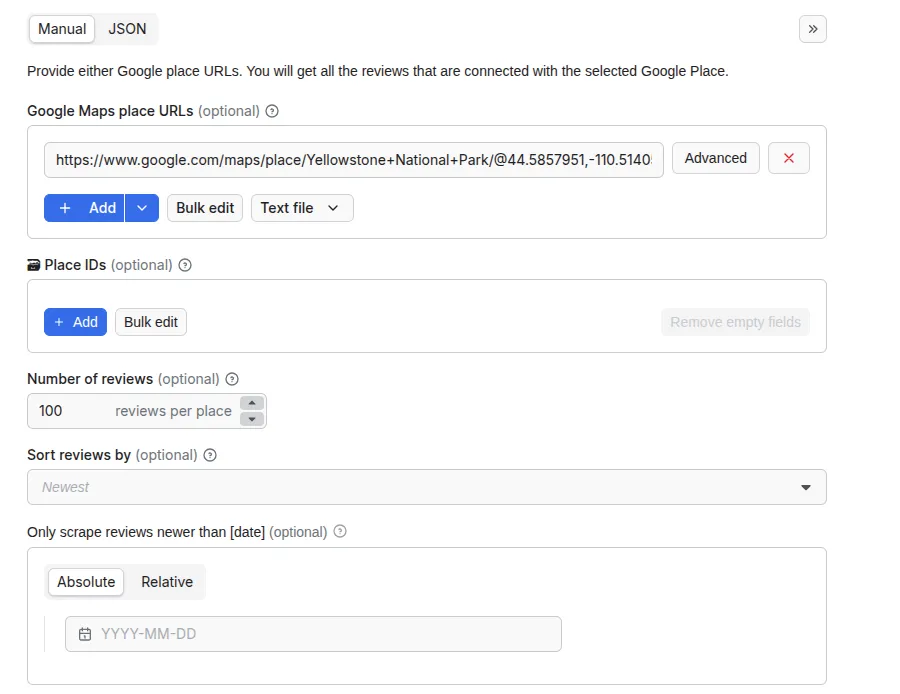
⚠️ Note about review sorting
Currently, when sorting reviews by date using the filter in the input section, you can only select the “Newest” toggle. If you filter by date with any other option, it will stop scraping and not get you the desired number of reviews.
Note that you can use the other filters, too, you just can’t add a date as well.
👁 Google Maps Review Scraper filter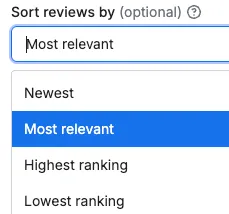
⬆️ Output
The results will be wrapped into a dataset which you can find in the Output or Storage tab. Note that the output is organized in tables and tabs for viewing convenience. You can view results as a table, JSON, or as a map.
Once the run is finished, you can also download the dataset in various data formats (JSON, CSV, Excel, XML, HTML). Before exporting, you can pick or omit specific output fields; alternatively, you can also choose to download the whole view, which includes thematically connected data.
👁 Google Maps Review Scraper output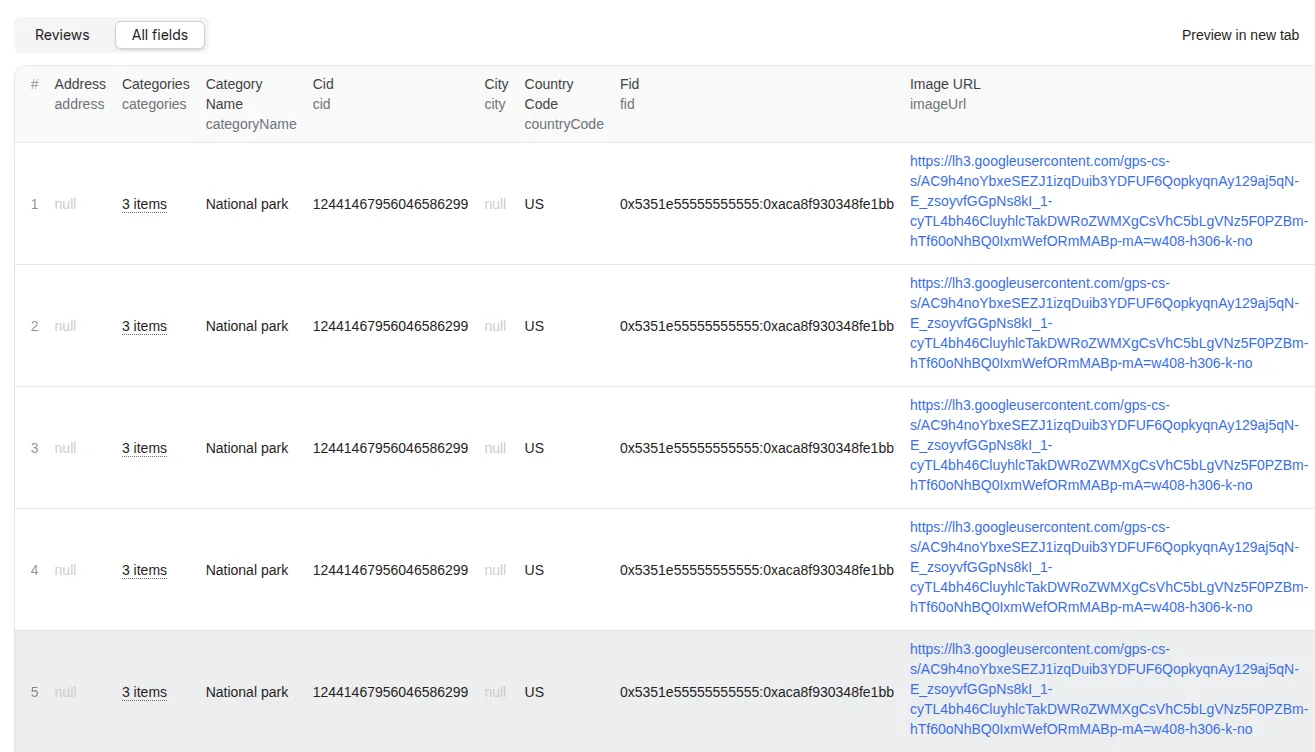
Here is that same output, but in JSON:
How many results can you scrape with Google Maps Reviews scraper?
Google Maps Reviews Scraper can return thousands of results. However, you have to keep in mind that scraping maps.google.com has many variables to it and may cause the results to fluctuate case by case. There’s no one-size-fits-all-use-cases number. The maximum number of results may vary depending on the complexity of the input, location, and other factors. Some of the most frequent cases are:
- Website gives a different number of results depending on the type/value of the input
- Website has an internal limit that no scraper can cross
- Scraper has a limit that we are working on improving
Therefore, while we regularly run Actor tests to keep the benchmarks in check, the results may also fluctuate without our knowing. The best way to know for sure for your particular use case is to do a test run yourself.
How much does scraping Google Maps Reviews cost?
Google Maps Reviews scraper uses a pay-per-event pricing model, where you're charged based on specific actions taken during scraping. This provides transparent, predictable pricing based on actual usage. For more information about the exact prices and events check the pricing tab.
With the Apify Free plan, you get $5 free usage credits every month.
If you need regular data extraction, we recommend the $29/month Starter plan, which lets you scrape 58,000 Google reviews every month.
Frequently asked questions
Why scrape reviews from Google Maps?
So what can you do with the Google Maps data you collect by web scraping? Here are just some ideas:
- Customer sentiment analysis: Identify what people like or dislike about a business, brand, or location
- Competitive intelligence: Compare competitors’ strengths and weaknesses
- Market research: Discover customer expectations, trends, and needs in specific industries or locations
- Lead generation: Find potential business opportunities
- Reputation management: Monitor and respond to reviews
- Product improvement: Use feedback to identify recurring issues or areas for improvement
- Content generation: Extract authentic customer quotes or testimonials for marketing materials
- Brand monitoring: Track mentions of a specific brand across different locations
- Location performance tracking: Compare performance across multiple branches or franchise locations
What are the limits of scraping reviews from Google Maps?
We recommend using the “number of reviews” field to limit the number of reviews to scrape. We recommend setting this to 1,000 (or fewer) reviews to limit resource consumption. Google tends to push reviews with text and pictures to the top so they are usually among the first ones to be scraped.
Need to do sentiment analysis using Google reviews?
You can combine the powers of this review scraping tool with AI Text Analyzer for Google Reviews. This text analyzer tool allows to identify the most commonly used keywords in each review. See how we did it for 500 disappointing reviews on Google Maps.
Can I integrate Google Maps Reviews Scraper with other apps?
Yes. Google Maps Reviews Scraper can be connected with almost any cloud service or web app thanks to integrations on the Apify platform. You can integrate with Make, Zapier, Slack, Airbyte, GitHub, Google Sheets, Google Drive, and more. Or you can use webhooks to carry out an action whenever an event occurs, e.g. get a notification whenever Google Maps Reviews Scraper successfully finishes a run.
Can I use Google Maps Reviews Scraper with the API?
Yes, using Apify API which will give you programmatic access to the Apify platform. The API is organized around RESTful HTTP endpoints that enable you to manage, schedule, and run Apify actors. The API also lets you access any datasets, monitor actor performance, fetch results, create and update versions, and more.
To access the API using Node.js, use the apify-client NPM package. To access the API using Python, use the apify-client PyPI package.
Check out the Apify API reference docs for full details or click on the API tab for code examples.
Can I use Google Maps Review Scraper through an MCP Server?
With Apify API, you can use almost any Actor in conjunction with an MCP server. You can connect to the MCP server using clients like ClaudeDesktop and LibreChat, or even build your own. Read all about how you can set up Apify Actors with MCP.
For Google Maps Review Scraper, go to the MCP tab and then go through the following steps:
- Start a Server-Sent Events (SSE) session to receive a
sessionId - Send API messages using that
sessionIdto trigger the scraper - The message starts the Google Maps Review Scraper with the provided input
- The response should be:
Accepted
Your feedback
We’re always working on improving the performance of our Actors. So if you’ve got any technical feedback for Google Maps Reviews Scraper or simply found a bug, please create an issue on the Actor’s Issues tab in Apify Console.
![👁 Google Maps Reviews [From $0.25💰] Scraper avatar](https://images.apifyusercontent.com/0PJb6Fl_ZldMZnrfFA5CkWu0sun4ITQXiyPrfotofMI/rs:fill:76:76/cb:1/aHR0cHM6Ly9hcGlmeS1pbWFnZS11cGxvYWRzLXByb2QuczMudXMtZWFzdC0xLmFtYXpvbmF3cy5jb20vbmduOHZSRVNUa3NleVdFNnAtYWN0b3Ita0EyWkxORGZwT3VOaDdtS24tQWh0ZURwTEN2ei1nb29nbGVfbWFwcy5qcGc.webp)


