
Pricing
from $3.00 / 1,000 scraped results
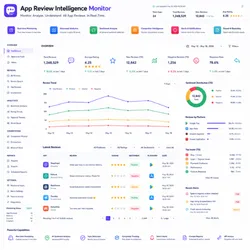
App Review Intelligence Monitor
Google Play Review Intelligence Scraper* collects app reviews from Google Play and performs automated sentiment analysis, keyword extraction, rating trends, and review insights. Extracts ratings, authors, app versions, replies, installs, and engagement data, generating actionable summaries
Pricing
from $3.00 / 1,000 scraped results
Rating
0.0
(0)
Developer

Actor stats
0
Bookmarked
2
Total users
1
Monthly active users
10 days ago
Last modified
Share
📱 App Review Intelligence Monitor is a powerful Apify Actor designed to extract, analyze, and monitor comprehensive App Review data from Google Play Store. This tool provides detailed App Review sentiment analysis, keyword extraction, and intelligence metrics. Whether you're monitoring brand reputation, analyzing user feedback, or conducting market research, the App Review Intelligence Monitor delivers actionable App Review insights efficiently.
With native Google Play Store integration, advanced NLP-based sentiment analysis, keyword extraction, rating trend analysis, and PPE billing support, the App Review Intelligence Monitor ensures comprehensive analysis of App Review data. It focuses on key App Review metrics including sentiment scores, keyword patterns, and temporal trends, making it an essential tool for App Review research and reputation management.
📋 Table of Contents
- Features
- How It Works
- Input
- Output
- Technical Stack
- Data Fields
- Sentiment Analysis
- Analysis Metrics
- Use Cases
- Quick Start
- Configuration
- Performance
- Billing
- Important Notes
- Keywords
- Changelog
- Support
🔥 Features
- Google Play Store Integration – Direct extraction of App Review from official Google Play Store.
- Review Fetching – Fetches reviews sorted by newest first for current sentiment.
- Sentiment Analysis – Advanced NLP-based sentiment classification (positive/negative/neutral).
- Sentiment Scoring – Quantitative sentiment score based on word signals.
- Confidence Scoring – Confidence metric for sentiment predictions.
- Keyword Extraction – Automatically extracts top keywords from each App Review.
- Rating Analysis – Correlates star ratings with sentiment analysis.
- Rating Labels – Categorizes ratings (excellent, good, average, poor, terrible).
- Author Information – Captures reviewer username and profile information.
- Thumbs Up Tracking – Tracks helpful votes on App Review.
- Version Information – Records app version reviewed.
- Reply Detection – Captures developer replies to App Review.
- Date Tracking – Records review publication date.
- App Metadata – Extracts app title, developer, category, install count.
- Summary Analysis – Generates comprehensive analysis summaries.
- Sentiment Distribution – Calculates sentiment percentages.
- Rating Trends – Tracks rating evolution over time.
- Top Reviews – Identifies top positive and negative reviews.
- Keyword Trending – Extracts and ranks top keywords.
- PPE Billing Integration – Pay-per-event billing per App Review analyzed.
- Charge Limit Handling – Respects user's maximum PPE charge limits.
- Proxy Support – Apify residential proxy support for reliability.
- Real-Time Dataset Push – Pushes results to Apify Dataset with metadata.
- Detailed Logging – Comprehensive logging of charges and progress.
- Asyncio-Friendly – Non-blocking async/await architecture.
⚙️ How It Works
The App Review Intelligence Monitor takes a Google Play Store app ID as input and fetches reviews using the google-play-scraper library. For each review, it performs advanced sentiment analysis using NLP techniques with positive/negative word matching and confidence scoring. Keywords are extracted, rated, and analyzed. All reviews are optionally charged via PPE billing. A comprehensive summary including sentiment distribution, rating trends, and top reviews is generated and pushed to the dataset.
Key Processing Steps:
- Input Parsing – Accept app ID and configuration
- Proxy Setup – Configure Apify residential proxy if available
- App Metadata Fetch – Retrieve app information (title, developer, rating)
- Review Fetching – Fetch reviews using google-play-scraper with pagination
- Sentiment Analysis – Analyze sentiment for each review
- Keyword Extraction – Extract and rank keywords per review
- Rating Classification – Categorize ratings by quality labels
- Review Processing – Process all review fields and metadata
- PPE Charging – Charge per-event for each review
- Charge Limit Check – Check if user's PPE limit reached
- Summary Generation – Build comprehensive analysis summary
- Dataset Push – Push individual reviews and summary
- Reporting – Log final statistics and completion
Key Benefits:
- Monitor App Review sentiment in real-time
- Track user satisfaction and sentiment trends
- Identify common issues via keyword analysis
- Respond to high-impact negative reviews
- Track improvement efforts over time
- Understand user needs and requests
- Conduct competitive app analysis
- Guide product development priorities
📥 Input
The Actor accepts the following input parameters:
| Field | Type | Default | Description |
|---|---|---|---|
googlePlayId | string | required | Google Play Store app ID (e.g., "com.example.app") |
reviewCount | integer | 300 | Maximum App Review to fetch and analyze (1-2000) |
pushIndividualReviews | boolean | true | Push individual App Review records |
pushSummary | boolean | true | Push comprehensive analysis summary |
useApifyProxy | boolean | true | Enable Apify residential proxies |
apifyProxyGroups | array | ["RESIDENTIAL"] | Proxy group configuration |
Example Input:
Small Sample:
Summary Only:
📤 Output
The Actor pushes App Review records with the following structure:
Individual Review Record:
| Field | Type | Description |
|---|---|---|
store | string | Store (Google Play) |
app_id | string | App ID |
review_id | string | Unique review ID |
author | string | Reviewer username |
rating | integer | Star rating (1-5) |
rating_label | string | Quality label (excellent/good/average/poor/terrible) |
review | string | Review text (500 chars max) |
sentiment | string | Sentiment classification (positive/negative/neutral) |
sentiment_score | integer | Quantitative sentiment score |
confidence | float | Sentiment confidence (0-1) |
pos_signals | integer | Positive word count |
neg_signals | integer | Negative word count |
keywords | string | Comma-separated top keywords |
thumbs_up | integer | Helpful votes |
app_version | string | App version reviewed |
date | string | Review publication date (YYYY-MM-DD) |
reply | string | Developer reply if available |
scraped_at | string | ISO 8601 scrape timestamp |
Summary Record:
Comprehensive analysis including:
- App metadata and overall rating
- Total reviews analyzed
- Average rating across all reviews
- Rating distribution
- Sentiment summary with percentages
- Top 20 keywords
- Rating trend over time by month
- Top 5 positive reviews with highest engagement
- Top 5 negative reviews with highest engagement
Example Individual Review Record:
Example Summary Record:
🧰 Technical Stack
- App Store Integration: google-play-scraper library
- NLP/Sentiment: Custom word-based sentiment analysis
- Keyword Extraction: Counter and regex for text processing
- Trend Analysis: Temporal analysis with grouping
- Async: asyncio for non-blocking operations
- Proxy: Apify Proxy with RESIDENTIAL configuration
- Logging: Apify Actor logging system
- Platform: Apify Actor serverless environment
- Billing: Apify PPE (Pay-Per-Event) system
📊 Sentiment Analysis
Methodology
The Actor uses multi-factor sentiment analysis:
- Positive Words – Detects words like "great", "excellent", "amazing", "love", "perfect"
- Negative Words – Detects words like "bad", "terrible", "bug", "crash", "slow"
- Rating Correlation – 4-5 stars boost positive, 1-2 stars boost negative
- Confidence Scoring – Higher signal count = higher confidence
- Stop Word Filtering – Ignores common words
Sentiment Categories
- Positive: More positive than negative signals
- Negative: More negative than positive signals
- Neutral: Equal positive/negative or insufficient signals
Examples
Positive sentiment:
Negative sentiment:
Neutral sentiment:
📊 Analysis Metrics
Sentiment Distribution
Percentage breakdown of positive, negative, neutral reviews showing overall user satisfaction.
Rating Trend
Monthly trends showing:
- Review count per month
- Average rating evolution
- Positive/negative sentiment per month
Top Keywords
Most frequently mentioned topics in reviews indicating common themes (features, bugs, performance, etc.).
Top Reviews
Most helpful positive and negative reviews showing what users appreciate or dislike most.
🎯 Use Cases
- Reputation Monitoring – Monitor brand reputation via App Review sentiment
- Sentiment Analysis – Track user satisfaction over time
- Issue Identification – Identify common problems via keyword analysis
- Product Feedback – Understand feature requests and improvements
- Competitive Analysis – Compare your app with competitors
- Review Response – Identify and respond to high-impact reviews
- Trend Tracking – Track sentiment changes and improvements
- Quality Assurance – Identify bugs and issues from user feedback
- Marketing Intelligence – Use positive reviews for marketing
- Development Priorities – Prioritize features based on user mentions
- Crisis Management – Detect reputation crises early
- Performance Monitoring – Track performance complaints
- User Satisfaction – Measure overall user happiness
- Engagement Analysis – Track helpful vote counts
- Release Impact – Analyze impact of app updates
🚀 Quick Start
1. Prepare Input
Go to Apify Console and enter:
2. Run the Actor
Click Start button. The Actor will:
- Connect to Google Play Store
- Fetch app metadata
- Fetch reviews with pagination
- Analyze sentiment for each
- Extract keywords
- Charge per review
- Generate summary
- Push to Dataset
3. Monitor Progress
Console shows:
4. View & Download Results
- Results Tab: All App Review records + summary
- Export: JSON, CSV, Excel
- Filter: By sentiment or rating
- Sort: By engagement or date
⚙️ Configuration
Review Count
Small sample (50 reviews):
Comprehensive (500+ reviews):
Output Options
Individual reviews only:
Summary only:
📈 Performance
Processing Speed
- ~1-2 seconds per review analysis
- ~50-100 reviews per minute
- ~500 reviews per 10-15 minutes
Resource Usage
- Memory: ~80-150MB
- CPU: ~30-40% during processing
- Network: ~1-3MB per run
- API calls: Depends on review count
Limitations
- Google Play rate limits apply
- Maximum ~500-1000 reviews typical per run
- Sentiment analysis is statistical, not perfect
- Some reviews may not be in English
💰 Billing
PPE (Pay-Per-Event) Billing
- Event Name: "scraped-result"
- Charge: 1 credit per App Review analyzed
- Billing Trigger: Per review analyzed and pushed
- Limit Handling: Stops when user's PPE limit reached
Cost Calculation
⚠️ Important Notes
Legal & Compliance
- Terms of Service: Complies with Google Play ToS
- Fair Use: Respects rate limits and platform policies
- User Privacy: Only analyzes publicly available reviews
- Attribution: Respects reviewer and developer content
- Rate Limiting: Includes appropriate delays
Data Quality
- Completeness: Most reviews captured
- Accuracy: Sentiment analysis based on keyword matching
- Currency: Fresh data from Google Play
- Availability: Depends on app and review availability
- Verification: Always verify findings independently
Best Practices
- Use residential proxies
- Respect Google Play rate limits
- Verify sentiment analysis results
- Review top keywords for accuracy
- Follow up with app teams on issues
- Use for actionable intelligence
- Respect user privacy
- Follow app store guidelines
📦 Changelog
v1.0.0 (February 2025)
Initial Release:
- Google Play Store app review fetching
- Pagination support for large review sets
- Sentiment analysis (positive/negative/neutral)
- Sentiment scoring algorithm
- Confidence metric calculation
- Keyword extraction with ranking
- Rating label classification (excellent/good/average/poor/terrible)
- Author information capture
- Thumbs up/helpful vote tracking
- App version information
- Developer reply detection
- Review date tracking
- App metadata extraction (title, developer, rating, installs)
- Comprehensive summary generation
- Sentiment distribution percentages
- Rating trend analysis over time
- Top positive and negative reviews
- Top keywords extraction and ranking
- PPE billing per review
- Charge limit detection and stopping
- Configurable review count limit
- Apify proxy support
- Real-time Dataset push
- Detailed progress logging
- Comprehensive error handling
🧑💻 Support & Feedback
- Issues: Submit via Apify console with app ID
- Documentation: Check Actor details page
- Community: Apify forum discussions
- Feature Requests: Suggest improvements
- Bug Reports: Include app ID and error details
📄 License & Legal
Terms of Use:
- Use for legitimate business and research
- Respect Google Play ToS and policies
- Respect reviewer and developer content
- Don't harass or target individuals
- Verify all findings independently
- Comply with applicable laws
- Use data ethically and responsibly
Disclaimer: App Review Intelligence Monitor is provided as-is for research purposes. Users are responsible for compliance with Google Play ToS and applicable laws. Always verify analysis with original sources.
🎉 Get Started Today
Deploy now for App Review analysis!
Use for:
- 📊 Sentiment Analysis
- 🔍 Reputation Monitoring
- 💡 Issue Identification
- 📈 Trend Tracking
- 🎯 Feedback Collection
Perfect for:
- App Developers
- Product Managers
- Marketing Teams
- Brand Managers
- Data Analysts
Last Updated: February 2025
Version: 1.0.0
Status: Production Ready
Platform: Apify Actor
Architecture: Async/Await
Python: 3.8+
Library: google-play-scraper
Billing: Pay-Per-Event (PPE)
📚 Related Tools
- YouTube Comment Scraper
- Meta Threads Scraper
- Business Social Media Finder
- Developer Tools Scraper
Your complete Apify-powered App Review intelligence solution! 🚀✨
📱 App Review Excellence
This Actor is optimized for App Review analysis with:
- ✅ Google Play Store integration
- ✅ Advanced sentiment analysis
- ✅ Keyword extraction
- ✅ Trend analysis
- ✅ Summary generation
- ✅ PPE billing support
- ✅ Real-time Dataset push
- ✅ Error recovery
- ✅ Production-ready code
Analyze app reviews effortlessly! 💎🚀


