Pricing
$0.10 / 1,000 results
Advanced Product Matcher Pro
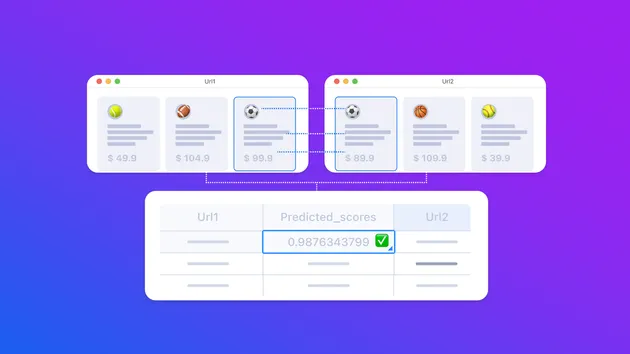
A powerful AI Apify Actor that intelligently matches products between two datasets using advanced machine learning algorithms and configurable similarity scoring. Perfect for e-commerce catalog matching, product deduplication, and inventory reconciliation.
Pricing
$0.10 / 1,000 results
Rating
5.0
(1)
Developer

Actor stats
0
Bookmarked
2
Total users
0
Monthly active users
4 months ago
Last modified
Categories
Share
AI Product Matcher Actor
A powerful Apify Actor that intelligently matches products between two datasets using advanced machine learning algorithms and configurable similarity scoring. Perfect for e-commerce catalog matching, product deduplication and inventory reconciliation.
Features
- Multi-format Support: Works with both CSV files (KeyValueStore) and JSON datasets
- Flexible Data Sources: Load data directly from Apify Datasets or KeyValueStore
- Intelligent Matching: Uses Sentence Transformers and cosine similarity for semantic product matching
- Configurable Attributes: Weight different product attributes based on importance
- Text Preprocessing: Built-in word removal, replacement, regex cleaning, and normalization
- Performance Optimization: Group products by categories or other attributes for faster processing
- Multilingual Support: Supports English, Spanish, French, German, Italian, Portuguese, Dutch, and multilingual models
- Flexible Output: Customizable match results with similarity scores, original values, and additional output fields
- Error Reporting: Structured error types for input validation, data loading, attribute configuration, model loading, and processing errors
Quick Start
Basic Configuration Example
Core Input Parameters
| Parameter | Type | Description | Default |
|---|---|---|---|
dataFormat | string | Data format: "csv" or "json" | "json" |
dataSource | string | Source type: "datasets" or "keyvaluestore" | "datasets" |
keyValuestoreNameOrId | string | Name or ID of KeyValueStore (if dataSource: keyvaluestore) | none |
dataset1 | string | First dataset key/ID (CSV filename or Dataset ID) | required |
dataset1Name | string | Friendly name for dataset 1 | "Dataset1" |
dataset1PrimaryKey | string | Primary key field name in dataset 1 | "ProductId" |
dataset2 | string | Second dataset key/ID | required |
dataset2Name | string | Friendly name for dataset 2 | "Dataset2" |
dataset2PrimaryKey | string | Primary key field name in dataset 2 | "ProductId" |
threshold | number | Minimum overall similarity score for matches (0.0–1.0) | 0.5 |
maxMatches | integer | Maximum number of matches returned per item | 2 |
language | string | Embedding model selection: "en", "multilingual", "es", "fr", "de", "it", "pt", "nl" | "en" |
groupByAttribute | string | Attribute name to group by for efficient matching (optional) | none |
csvSeparator | string | CSV delimiter (only when dataFormat: csv) | "," |
includeOriginalValues | boolean | Include original attribute values in the output records | true |
dataset1OutputFields | array | Include specific attribute values in the output records from dataset 1 | ["Field1"] |
dataset2OutputFields | array | Include specific attribute values in the output records from dataset 2 | ["Field1", "Field2"] |
attributes | array | Required. List of attribute configurations (see below) | required |
Attribute Configuration
Each attribute in attributes supports:
name(string, required) — Column name (CSV) or attribute key (JSON)weight(number) — Importance weight for matching (higher = more important)useForMatching(boolean) — Whether to include in similarity calculationjsonPath(string) — JSON path expression for nested datawordsToRemove(array) — List of words to strip before matchingwordReplacements(object) — Mapping of terms to replace prior to matchingregex(string) — Regex to apply during preprocessingnormalizationRegex(string) — Regex applied before similarity calculationnormalizationReplacement(string) — Replacement for normalization regex
Text Preprocessing example
| Property | Type | Description |
|---|---|---|
wordsToRemove | array | Words to remove from text |
wordReplacements | object | Word substitution mapping |
regex | string | Regex pattern for text cleaning |
normalizationRegex | string | Regex for similarity calculation normalization |
normalizationReplacement | string | Replacement for normalization regex |
Real-World Examples
1. E-commerce Catalog Matching
2. Fashion Product Matching with Complex JSON
Matching fashion products from different suppliers with nested JSON data:
Example 3: Home & Garden Products
Advanced Configuration
JSON Path Expressions
- Dot notation:
"product.details.name" - Array search:
"Attributes[Name=Color].Value" - Nested arrays/objects for complex structures
Complex Nested Structures
Corresponding JSON paths:
- Color:
"ProductAttributes[Type=Color].Value" - Size:
"ProductAttributes[Type=Size].Value" - MSRP:
"Details.Pricing.MSRP" - Weight:
"Details.Specifications.Weight"
Regular Expression Patterns
- Size cleaning: remove non-digits
{"regex": "\\D"} - Model normalization: keep alphanumeric
{"normalizationRegex": "[^A-Za-z0-9]", "normalizationReplacement": ""} - Price extraction: strip currency symbols
{"regex": "[^0-9.]"}
Size Normalization
regex: Removes all non-digit characters during preprocessingnormalizationRegex: For similarity calculation, keeps only numbers and X, L, S
Model Number Cleaning
- Removes common model prefixes
- Normalizes to alphanumeric only for comparison
Price Extraction
- Extracts numeric price values
- Removes currency symbols and commas
Brand Standardization
Performance Optimization
- Grouping by attribute reduces N×M comparisons to subsets
- Note Ensure the group by field if in nested JSON is also included in the attributes
- Use English model (
all-MiniLM-L6-v2) for English-only to speed up - Limit
maxMatchesfor large catalogs - Disable matching (
useForMatching: false) on grouping fields
Grouping Strategy
Use groupByAttribute to partition products into smaller groups:
Benefits:
- Reduces comparison matrix size from N×M to smaller subsets
- Improves processing speed significantly for large datasets
- More accurate matches within similar product categories
Language Model Selection
Choose appropriate models based on your data:
- English:
"en"- Fastest, best for English-only data - Multilingual:
"multilingual"- Slower but handles mixed languages - Specific Languages:
"es","fr","de"- Optimized for specific languages
Output Format
The Actor generates matches with the following structure:
Reading the SUMMARY
After execution, a SUMMARY record is saved to KeyValueStore containing:
- Total products per dataset
- Number of matches and unique matches
- Match rate
- Model and data format used
- Any collected errors with
type,code,message, andsuggestions
Review this summary to diagnose configuration or data issues quickly.
Best Practices
- Attribute Weighting:
- High Weight (1.5-2.0): Unique identifiers (model numbers, SKUs)
- Medium Weight (0.8-1.2): Important descriptors (brand, title)
- Low Weight (0.3-0.7): Secondary attributes (color, price)
- Threshold Selection:
- High Precision (0.8-0.9): Few false positives, may miss some matches
- Balanced (0.6-0.8): Good balance of precision and recall
- High Recall (0.4-0.6): Catches more matches, requires manual review
- Text Preprocessing:
- Start with simple
wordReplacements - Add
regexfor cleaning patterns - Use
normalizationRegexonly for similarity calculation - Validate on sample data
- Scaling to Large Datasets:
- Always use
groupByAttributewhen > 10,000 items - Adjust
maxMatchesand disable output of original values to reduce output dataset size
- Always use
Troubleshooting & Error Handling
Common Issues
- No matches found
- Lower the
thresholdvalue - Verify attribute names and JSON paths
- Adjust text preprocessing rules
- Lower the
- Too many false positives
- Increase
thresholdto 0.8–0.9 - Add stricter
wordsToRemoveor regex - Increase weights for unique identifiers
- Increase
- Performance bottlenecks
- Enable
groupByAttributefor large datasets - Use the English model for English-only data
- Reduce
maxMatches
- Enable
Error Types
This Actor uses structured error classes to surface actionable messages and suggestions. All errors are collected in the final SUMMARY.
| Error Class | Code | Description |
|---|---|---|
| InputValidationError | PME-100 | Schema or type validation failed for actor input |
| DataLoadingError | PME-200 | CSV/JSON file not found, unreadable, or unparseable |
| AttributeConfigError | PME-300 | Issues in the attributes section (missing columns, bad JSON paths, invalid weights) |
| ModelLoadingError | PME-400 | Sentence-Transformer model fetch or cache failure |
| ProcessingError | PME-500 | Failures during matching workflow (e.g., zero vectors, similarity computation errors) |