

Pricing
$20.00/month + usage
Instacart Product Search Scraper
Extract comprehensive product data from Instacart.com including prices, sizes, and images across food categories. Perfect for market research, competitive analysis, and inventory tracking with structured JSON output.
Pricing
$20.00/month + usage
Rating
0.0
(0)
Developer

Actor stats
0
Bookmarked
21
Total users
0
Monthly active users
10 months ago
Last modified
Categories
Share
Contact
If you encounter any issues or need to exchange information, please feel free to contact us through the following link: My profile
Instacart.com Scraper: Extract Product Data & Pricing Intelligence
Introduction
Instacart stands as the leading grocery delivery service in the United States, connecting customers with over 100,000 grocery stores through 1,800+ retail partners. This massive marketplace contains valuable product data across multiple categories including frozen foods, pantry items, deli products, and more. For businesses, researchers, and analysts, accessing this wealth of product information manually would be time-consuming and inefficient.
The Instacart Product Search Scraper addresses this challenge by automating data extraction from Instacart's extensive product catalog. Whether you're conducting market research, tracking competitor pricing, analyzing product availability, or building comprehensive databases, this scraper provides structured access to essential product information that drives informed business decisions.
Overview of the Instacart Scraper
The Instacart Product Search Scraper is a sophisticated data extraction tool designed to systematically collect product information from specific Instacart category pages. The scraper works across various food categories, extracting products that are typically delivered within 1 hour or available for curbside pickup.
This scraper stands out for its ability to handle multiple product categories simultaneously while maintaining data accuracy and structure. It's particularly valuable for businesses in the food industry, market researchers, price comparison services, and inventory management systems. The tool respects website policies through built-in retry mechanisms and proxy support, ensuring reliable data collection without overwhelming the target servers.
Key advantages include automated data collection from multiple categories, structured output format for easy integration, proxy support for enhanced reliability, and configurable limits to control data volume and processing time.
Input and Output Details
Example url 1: https://www.instacart.com/categories/316-food/627-frozen-food?page=2
Example url 2: https://www.instacart.com/categories/316-food/844-pantry
Example url 3: https://www.instacart.com/categories/316-food/1268-deli
Example Screenshot of product information page:
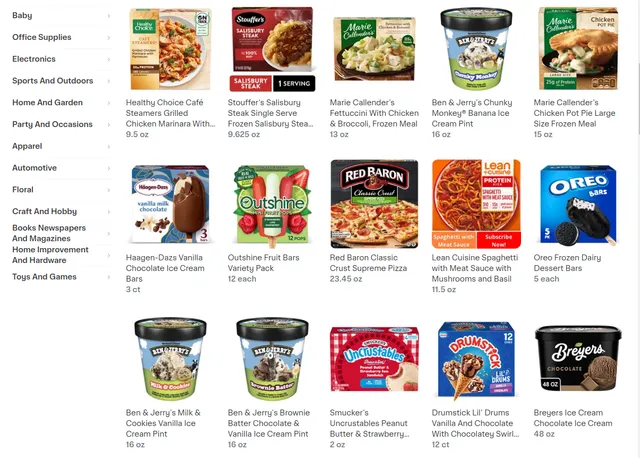
Input Format
The scraper accepts JSON configuration with several key parameters:
Input:
Input Parameters Explained:
- max_retries_per_url: Controls how many times the scraper attempts to access each URL if initial requests fail, preventing data loss from temporary network issues
- proxy configuration: Essential for avoiding bot detection and ensuring consistent access to Instacart's servers
- max_items_per_url: Limits the number of products extracted per category page, helping manage processing time and data volume
- urls array: Contains specific Instacart category URLs targeting different food sections like frozen foods, pantry items, and deli products
Output Format
You get the output from the Instacart.com Product Search Scraper stored in a tab. The following is an example of the Information Fields collected after running the Actor.
The scraper returns structured data for each product found, providing six key fields:
- ID: Unique product identifier within Instacart's system, essential for tracking specific items and avoiding duplicates in databases
- URL: Direct link to the product page, enabling detailed product examination and providing source verification for extracted data
- Name: Complete product title as displayed on Instacart, including brand name, product description, and any relevant specifications
- Size (pricing): Product size information often combined with pricing details, crucial for price-per-unit calculations and inventory planning
- Landing param: Technical parameter used for product categorization and internal routing, valuable for understanding Instacart's product organization
- Image: Product image URL providing visual reference, essential for product identification and catalog creation
Sample Output:
How to Use the Scraper
Step 1: Configuration Setup Begin by defining your target categories and setting appropriate limits. Choose specific Instacart category URLs that align with your research objectives. Set max_items_per_url based on your data needs - use lower values for quick sampling or higher values for comprehensive analysis.
Step 2: Proxy Configuration Configure the proxy settings to match your target market geography. For US-based data collection, consider using US residential proxies, while international research might require proxies from specific countries where Instacart operates.
Step 3: URL Selection Select category URLs strategically. Focus on active categories with regular product updates such as frozen foods, pantry items, or fresh deli sections. Include page parameters if you need to access products beyond the first page of results.
Step 4: Data Processing Once extraction completes, process the output data according to your needs. The structured format allows easy integration with spreadsheets, databases, or analytics tools. Use the unique ID field to prevent duplicate entries when combining data from multiple scraping sessions.
Best Practices: Run the scraper during off-peak hours to reduce load on servers, implement data validation to ensure quality, and regularly update your URL list as Instacart's category structure evolves.
Benefits and Applications
The Instacart Product Search Scraper delivers significant time savings by automating what would otherwise require hours of manual data collection. Instead of browsing through hundreds of products manually, users can extract comprehensive product information in minutes.
Practical Applications:
- Market Research: Track product trends, pricing patterns, and availability across different categories
- Competitive Analysis: Monitor competitor products, pricing strategies, and market positioning
- Inventory Management: Keep track of product offerings and identify potential supply opportunities
- Price Monitoring: Establish baseline pricing data for products across multiple categories
- Business Intelligence: Create comprehensive databases for strategic decision-making
The structured output format ensures data can be easily integrated into existing business systems, while the proxy support and retry mechanisms provide reliability necessary for production use cases.
Conclusion
The Instacart Product Search Scraper transforms the complex task of product data collection into a streamlined, automated process. By providing structured access to Instacart's extensive product catalog, it empowers businesses and researchers to make data-driven decisions based on comprehensive market intelligence.
Ready to streamline your product research process? Configure the scraper with your specific category URLs and start extracting valuable Instacart product data today.
Related Actors
- Instacart.com Product Details Scraper: A specialized data extraction solution engineered to harvest comprehensive product information from Instacart.com's.
Your feedback
We are always working to improve Actors' performance. So, if you have any technical feedback about Instacart.com Product Search Scraper or simply found a bug, please create an issue on the Actor's Issues tab in Apify Console.


