
Pricing
$15.00/month + usage
Kmart Product Search Scraper
Automate product data extraction from Kmart Australia's online store. Extract pricing, inventory, product variations, ratings, and seller information for competitive analysis, price monitoring, and market research across Kmart's extensive retail catalog.
Pricing
$15.00/month + usage
Rating
0.0
(0)
Developer

Actor stats
0
Bookmarked
13
Total users
0
Monthly active users
5 months ago
Last modified
Categories
Share
Contact
If you encounter any issues or need to exchange information, please feel free to contact us through the following link: My profile
Kmart.com.au Product Search Scraper: Comprehensive Australian Retail Data Extraction Tool
Introduction
Kmart Australia (kmart.com.au) is one of Australia's largest discount department store chains, offering an extensive range of products across categories including clothing, homewares, electronics, toys, and everyday essentials. With millions of products available online and competitive pricing that changes frequently, Kmart's e-commerce platform represents a valuable data source for retailers, market researchers, and business analysts operating in the Australian market.
Manual collection of product data from Kmart's website is impractical for large-scale competitive analysis, price monitoring, or inventory research. The Kmart.com.au Product Search Scraper automates this process, enabling systematic extraction of detailed product information including pricing, variations, availability, and seller details across Kmart's entire catalog.
Scraper Overview
The Kmart.com.au Product Search Scraper is a specialized data extraction tool designed to collect comprehensive product information from Kmart Australia's online store. It navigates search results, extracts detailed product specifications, and captures pricing variations across different product attributes.
Key capabilities include support for multiple search parameters, configurable sorting options (price, relevance, newest), flexible pagination controls, and comprehensive data extraction covering product details, variations, inventory status, and multimedia content. The scraper is valuable for e-commerce analysts, retail competitors, pricing strategists, and market researchers focused on the Australian retail landscape.
Input and Output Details
Example url 1: https://www.kmart.com.au/search/?searchTerm=shoe
Example url 2: https://www.kmart.com.au/product/maseur-shoe-horn-41785997/
Example url 3: https://www.kmart.com.au/search/?searchTerm=shoe&sortBy=price-high-to-low&f.Available%20in%20NSW=True&f.Product%20Type=Shoe%20Storage
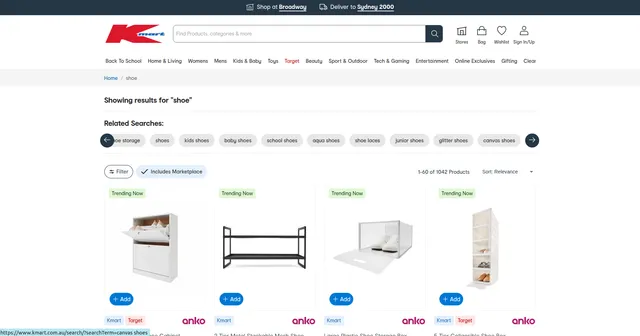
Example Screenshot of product information page:
Input Format
Scrape with URLs:
The urls parameter: Add product search page URLs from kmart.com.au. Include any search filters or sorting parameters in the URL. URLs can be added individually or via bulk edit.
The ignore_url_failures parameter: When true, the scraper continues even if some URLs fail, ensuring comprehensive data collection across multiple search queries.
When providing URLs, search filter options are disabled. The scraper collects data only from specified URLs.
Scrape with Search Filters:
The keyword parameter: Search term for products (e.g., "shoe", "furniture", "toys", "clothing").
The sort_by parameter: Sorting options for results:
""- Relevance (default)"price-low-to-high"- Lowest price first"price-high-to-low"- Highest price first"newest"- Most recent products
The page parameter: Starting page number for pagination control.
When using search filters, leave the urls field empty.
General Options:
The max_items_per_url parameter: Limit items per URL or search query. Default: 20.
The max_retries_per_url parameter: Retry attempts for failed requests. Default: 2.
The proxy parameter: Proxy configuration for access reliability. Australian proxies recommended for optimal performance.
Output Format
The scraper returns detailed product data with each field serving specific analytical purposes:
-
ID: Unique product identifier. Essential for tracking products, detecting duplicates, and database management.
-
URI: Product URI path. Used for constructing full URLs and product reference.
-
URL: Complete product page URL. Direct link for verification, additional research, and customer redirection.
-
Video: Product video URLs if available. Indicates premium product presentation and marketing investment.
-
Badges: Product badges (e.g., "New", "Exclusive"). Identifies promotional items, new arrivals, and special product classifications.
-
Image URL: Primary product image URL. Essential for visual product identification and catalog building.
-
Alt Images: Array of alternative product images. Provides comprehensive visual product documentation.
-
Free Shipping: Boolean indicating free shipping availability. Critical for total cost analysis and competitive comparison.
-
Merch Department: Merchandise department classification. Enables category-based analysis and department-level insights.
-
Assorted Products: Related or bundled products. Identifies product relationships and cross-selling opportunities.
-
Is Pre Order Active: Boolean showing pre-order status. Identifies upcoming products and launch timing.
-
Free Shipping Metro: Free shipping for metropolitan areas. Indicates location-based shipping policies.
-
Primary Category ID: Main product category identifier. Used for category-level analysis and taxonomy understanding.
-
National Inventory: National stock availability indicator. Critical for inventory monitoring and stock-out analysis.
-
Fulfilment Channel: How products are fulfilled (store, warehouse, marketplace). Reveals logistics strategy and seller operations.
-
Ratings: Customer rating scores. Indicates product quality perception and customer satisfaction.
-
Badges Marketplace: Marketplace-specific badges. Identifies third-party sellers and marketplace dynamics.
-
Group IDs: Product grouping identifiers. Links related products and variations.
-
APN: Australian Product Number barcode. Standard product identifier for retail systems integration.
-
Size: Available product sizes. Critical for apparel and size-variant products.
-
Price: Current product price. Primary metric for pricing analysis and competitive monitoring.
-
Colour: Available colors. Important for fashion and design products.
-
Seller: Seller information for marketplace items. Identifies third-party sellers vs Kmart direct.
-
Prices: Price variations across different attributes. Comprehensive pricing data for multi-variant products.
-
Clearance: Boolean indicating clearance status. Identifies discounted and end-of-line products.
-
Is Default: Default variant indicator. Shows which variation is displayed by default.
-
Variation ID: Specific variation identifier. Tracks individual SKU-level variants.
-
Variant Video: Videos specific to variants. Variant-specific multimedia content.
-
Variant Badges: Badges specific to product variants. Variant-level promotional indicators.
-
Secondary Colour: Additional color options. Extended color variant information.
Example Output:
Usage Guide
Option 1: Scraping with URLs
Navigate to kmart.com.au, perform searches with desired filters (category, price range, sorting), then copy the resulting URLs. This method provides precise control over which product sets to extract.
Best practices:
- Test URLs individually before batch processing
- Include sorting parameters in URLs for consistent results
- Monitor for URL structure changes in Kmart's platform
- Use Australian proxies to avoid geographic restrictions
Troubleshooting:
- Verify URL format matches current Kmart site structure
- Check for blocked requests and adjust proxy settings
- Reduce retry counts if experiencing persistent timeouts
Option 2: Scraping with Search Filters
Use search filters for automated query generation across product categories.
Step 1: Define Search Keyword
Enter specific product terms:
- Apparel: "shoes", "dresses", "jeans", "shirts"
- Home: "furniture", "bedding", "kitchenware", "decor"
- Electronics: "headphones", "speakers", "chargers"
- Kids: "toys", "school supplies", "children's clothing"
Step 2: Configure Sorting
Select appropriate sorting:
- Relevance: Best for broad exploratory searches
- Price low to high: Identify budget options and pricing floors
- Price high to low: Find premium products and pricing ceilings
- Newest: Track new product launches and seasonal items
Step 3: Set Pagination
Configure page parameter to:
- Start from page 1 for complete coverage
- Resume from specific pages for interrupted scrapes
- Target specific result ranges for sampling
Best Practices:
Keyword Strategy:
- Use specific terms for targeted extraction
- Start broad, then narrow based on results
- Test keywords on Kmart's site first
Sorting for Analysis:
- Price-based sorting for competitive pricing analysis
- Newest sorting for trend monitoring
- Relevance for comprehensive category coverage
Systematic Coverage:
- Identify target product categories
- Create keyword lists per category
- Run searches with consistent sorting
- Track coverage across categories
- Schedule regular updates for price monitoring
Data Validation:
Verify that:
- Product categories match search keywords
- Pricing data is current and complete
- Inventory status is accurately reflected
- Product variations are fully captured
- No duplicate products in results
Common Issues:
Empty Results:
- Verify keyword spelling and relevance
- Check if products exist in that category
- Try broader search terms
Incomplete Variations:
- Some products may have limited variant data
- Verify variation extraction in output
- Re-scrape if variations appear missing
Proxy Configuration:
- Use Australian proxies for best access
- Rotate proxies if rate-limited
- Monitor success rates by proxy location
Benefits and Applications
The Kmart.com.au Product Scraper significantly reduces manual data collection time, transforming days of research into hours of automated extraction.
Primary Applications:
Competitive Price Monitoring: Track Kmart's pricing across categories, identify pricing strategies and patterns, monitor promotional pricing and clearance events, and benchmark against competitor pricing.
Market Research: Analyze product range and category coverage, identify trending products through "Newest" sorting, assess market positioning across price segments, and understand Australian retail market dynamics.
Inventory Intelligence: Monitor product availability nationally, track stock-outs and restocking patterns, identify popular products through availability trends, and forecast demand based on inventory changes.
Product Sourcing: Discover new products for reselling opportunities, identify clearance items for bargain purchasing, analyze product variations and specifications, and compare supplier options for retail operations.
Competitive Advantages:
- Comprehensive product data including all variations and pricing
- Real-time inventory and availability tracking
- Multimedia content extraction for product catalogs
- Seller information for marketplace dynamics analysis
- Scalable extraction across entire Kmart catalog
Data integrates with pricing tools, inventory management systems, competitive intelligence platforms, and business analytics software.
Conclusion
The Kmart.com.au Product Search Scraper automates comprehensive data extraction from one of Australia's largest retailers, enabling data-driven decisions for pricing, inventory, and competitive strategy in the Australian retail market.
Whether monitoring competitor pricing, researching product trends, or building retail intelligence databases, this scraper provides systematic data collection capabilities essential for Australian e-commerce and retail operations.
Ready to streamline your Kmart product data collection? Start extracting valuable retail insights today and enhance your competitive intelligence capabilities in the Australian market.
Related Actors
- Kmart.com.au Product Details Scraper: A specialized data extraction solution engineered to harvest comprehensive product information from Kmart.com.au's.
Your feedback
We are always working to improve Actors' performance. So, if you have any technical feedback about Kmart.com Product Search Scraper or simply found a bug, please create an issue on the Actor's Issues tab in Apify Console.


![👁 [NO COOKIES] LinkedIn Search Posts Scraper avatar](https://images.apifyusercontent.com/ysMJeBWzmpBpgahs7snygGyaNsYHeQp_MDXLLFU6FTE/rs:fill:76:76/cb:1/aHR0cHM6Ly9hcGlmeS1pbWFnZS11cGxvYWRzLXByb2QuczMudXMtZWFzdC0xLmFtYXpvbmF3cy5jb20vMFV6Z1BsTjFPZ3RzU2RkVVQtYWN0b3ItYXM2T0hrS1ZmQlpRRU8xcmstaFBkdVJJR1k0Ty1saW5rZWRpbi1zdmdyZXBvLWNvbS5zdmcucG5n.webp)


