Pricing
from $1.99 / 1,000 results
Google Image Downloader
Google Image Downloader scrapes Google Images for any keyword and returns full-size image URLs, thumbnails, source pages, and dimensions, so you can build datasets, run SEO audits, or collect images without writing a single line of code.
Pricing
from $1.99 / 1,000 results
Rating
0.0
(0)
Developer

Actor stats
0
Bookmarked
8
Total users
2
Monthly active users
a month ago
Last modified
Categories
Share
Google Image Downloader
Extract structured image data from Google Images for any search keyword. Returns direct image URLs, thumbnail URLs, source page URLs, image dimensions, and domain information. No browser or manual work required.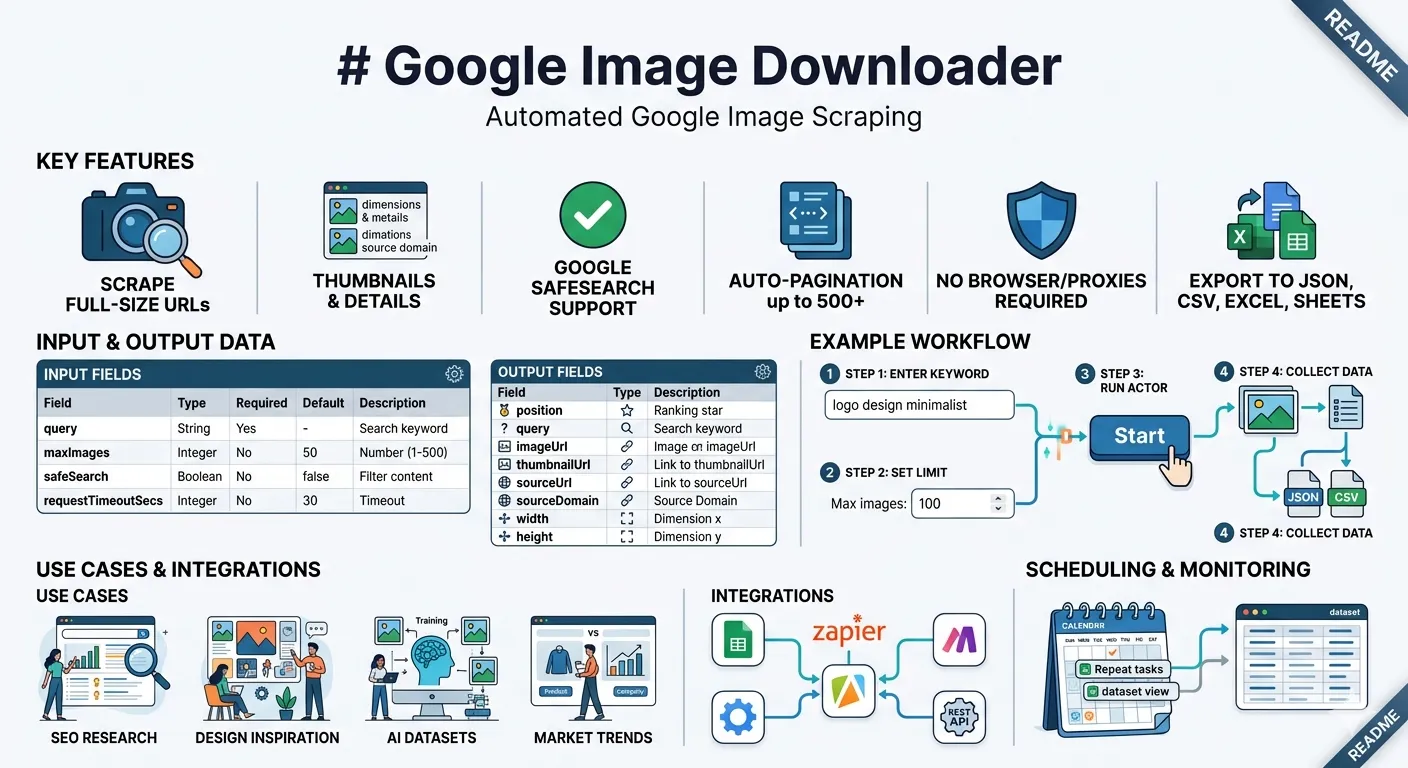
Commonly used for SEO audits, competitor research, content curation, AI dataset labeling, and visual trend analysis.
Features
- Scrapes full-size image URLs and thumbnail URLs for any keyword
- Returns the source page URL and domain for each image
- Captures image width and height in pixels
- Supports Google SafeSearch filter
- Paginates automatically to collect up to 500 results
- No browser required and no proxy configuration needed
- Exports to JSON, CSV, Excel, or Google Sheets
Output fields
| Field | Type | Description |
|---|---|---|
position | Integer | Rank in search results (1 = first result) |
query | String | The search keyword used |
imageUrl | String | Direct URL to the full-size image |
thumbnailUrl | String | Google-proxied thumbnail URL |
sourceUrl | String | URL of the page hosting the image |
sourceDomain | String | Domain of the source website |
width | Integer | Image width in pixels |
height | Integer | Image height in pixels |
Input fields
| Field | Type | Required | Default | Description |
|---|---|---|---|---|
queries | Array of strings | Yes | — | One or more search keywords. Each keyword is scraped independently. |
maxImages | Integer | No | 50 | Max images per keyword (1–500). Paginated automatically. |
safeSearch | Boolean | No | false | Filter explicit content via Google SafeSearch |
requestTimeoutSecs | Integer | No | 30 | Per-request timeout in seconds (10–120) |
How to use
Step 1 — Enter one or more keywords
In the Search keywords field, add each keyword you want to search. Each keyword is scraped as a separate Google Images search and returns its own set of results.
Examples:
logo design minimalistlandscape photography golden hourproduct packaging coffeeinterior design scandinavian
You can add as many keywords as you need. The actor processes them one by one.
Step 2 — Set result limit per keyword
Use the Max images per keyword field to control how many results to collect for each keyword. Default is 50. Google Images typically returns up to 200 unique results per search, so setting maxImages above 200 may return fewer results than requested. The total dataset size will be approximately number of keywords × maxImages.
Step 3 — Configure optional settings
- Safe search — turn on to filter adult content from results
- Request timeout — increase this if you see timeout errors on slow connections
Step 4 — Start the run
Click Start. The actor fetches and parses results page by page, then saves everything to the Dataset tab. Runs typically complete in under a minute for 50–100 images.
Example input
This runs three separate Google Images searches and returns up to 50 images each, giving up to 150 results total in the dataset.
Example output
Use cases
SEO and competitive research Search any keyword and see which domains rank in Google Images. Useful for understanding who owns the visual search results for your niche, spotting competitors, and identifying link-building opportunities from high-ranking image sources.
Content and design research Collect reference images for mood boards, presentations, design briefs, or creative projects without manually saving each image.
AI and machine learning datasets Gather labeled image URLs at scale for training image classifiers, object detection models, or visual search systems. The structured output includes dimensions and source metadata.
Market and product research Search product categories and see which brands, styles, and designs appear most in image search. Useful for identifying visual trends before launching a product or campaign.
Monitoring Run the actor on a schedule to track how image search results change over time for a given keyword. Compare runs to detect when new competitors enter the space or existing ones lose visibility.
Scheduling
To monitor a keyword over time, use Apify's built-in Schedule feature:
- Go to Schedules in the Apify console
- Click Add schedule
- Select this actor and set your input
- Choose a frequency (daily, weekly, etc.)
- Results from each run accumulate in the dataset automatically
Integrations
| Integration | How to use |
|---|---|
| Google Sheets | Connect via the Apify Google Sheets integration to push results directly to a spreadsheet |
| Zapier | Trigger Zaps when new results are saved to the dataset |
| Make (Integromat) | Build automated workflows using new dataset items as triggers |
| REST API | Access results programmatically via the Apify API using your API token |
| CSV / Excel | Download from the Dataset tab using the Export button |
Limits and notes
- Google Images returns up to approximately 200 unique results per search query. Setting
maxImagesabove this will collect as many results as Google provides. - Duplicate images (the same file hosted on multiple pages) are deduplicated automatically.
- Results reflect what Google returns at the time of the run. Image rankings change over time.
- The
sourceUrlfield is the page where the image is hosted, not a direct download link. - Some images may not have a detectable source URL if Google does not expose one in its result data.
Support
If you find a bug or want to request a feature, open an issue on the actor page in the Apify console.