
Pricing
Pay per event
Premium Studio Style Render Generator
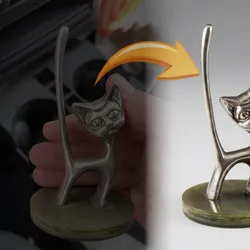
Transform your product photos, portraits, and images into stunning professional studio-quality renders with this premium AI-powered tool. Perfect for e-commerce, jewelry photography, fashion, food photography, and more. Upload up to 3 images and get polished, commercial-grade studio renders.
Pricing
Pay per event
Rating
5.0
(2)
Developer

Actor stats
2
Bookmarked
15
Total users
3
Monthly active users
13 days ago
Last modified
Categories
Share

🎨 Studio Style Render Generator
🚀 Transform photos into professional studio-quality renders in seconds. Customize lighting, backgrounds, camera angles, and styles. No coding, no expensive photoshoots required.
🕒 Last updated: 2026-04-23 · 📊 8 fields · 🔄 Runs on Apify cloud or locally · 📁 Export: JSON, CSV, Excel
The Studio Style Render Generator transforms your product photos, jewelry shots, portraits, and other images into professional studio-quality renders using AI. Upload 1-3 images and choose from multiple style presets (luxury, cinematic, editorial, high-contrast), background options (white, black, gradient, textured), and lighting setups (softbox, spotlight, window, dramatic). Each render is delivered as a high-quality image URL ready for e-commerce listings, marketing materials, or portfolio presentations.
Built for e-commerce sellers who need professional product photos without hiring a photographer, jewelry brands creating catalog images, content creators producing polished visuals, and marketing teams generating campaign assets at scale. The generator supports 28 target types from jewelry and watches to cars and architecture, with fully customizable style, background, lighting, camera distance, and camera angle settings.
| Target Audience | Use Cases |
|---|---|
| E-commerce Sellers | Product listing photos, catalog images |
| Jewelry Brands | Ring, necklace, and bracelet studio shots |
| Content Creators | Social media visuals, portfolio pieces |
| Marketing Teams | Campaign assets, ad creatives |
| Real Estate Agents | Property and interior renders |
| Fashion Brands | Lookbook and editorial images |
📋 What the Studio Style Render Generator does
- 🖼️ Generates studio-quality renders from your uploaded photos with professional lighting, clean backgrounds, and polished composition
- 🎯 Optimizes for your subject type across 28 categories including jewelry, watches, products, food, cosmetics, electronics, furniture, clothing, cars, portraits, and more
- 🎨 Applies professional styles like luxury elegance, classic photography, editorial fashion, high-contrast drama, or cinematic film looks
- 🌈 Customizes backgrounds with white seamless, black dramatic, grey neutral, gradient, textured, or your own custom description
- 💡 Configures lighting setups including softbox, spotlight, window light, clamshell, dramatic, or custom lighting descriptions
- 📐 Controls camera perspective with adjustable distance (close, medium, far) and angle (eye-level, high-angle, low-angle, side, overhead)
The generator processes your uploaded images through AI vision models that understand studio photography principles. It applies your chosen style, background, lighting, and camera settings to produce a professionally rendered version of your subject.
💡 Why it matters: Professional product photography typically costs $25-$100+ per image and requires studio equipment, lighting rigs, and post-production. This tool delivers similar results in seconds at a fraction of the cost.
🎬 Full Demo
🚧 Coming soon...
⚙️ Input
| Field | Type | Required | Description |
|---|---|---|---|
| inputImages | array | Yes | Upload 1-3 images to transform. Supports JPEG, PNG, WebP. |
| targetType | string | No | Subject type: jewelry, watch, product, food, cosmetics, electronics, furniture, clothing, car, portrait, pet, architecture, and more. |
| style | string | No | Studio style: luxury, classic-photography, editorial, high-contrast, cinematic, or custom. |
| customStyle | string | No | Custom style description (used when style is set to "custom"). |
| background | string | No | Background: white, black, grey, seamless, textured, or custom. |
| customBackground | string | No | Custom background description (used when background is set to "custom"). |
| lighting | string | No | Lighting: softbox, spotlight, window, clamshell, dramatic, or custom. |
| customLighting | string | No | Custom lighting description (used when lighting is set to "custom"). |
| cameraDistance | string | No | Camera distance: close, medium, or far. |
| cameraAngle | string | No | Camera angle: eye-level, high-angle, low-angle, side, or overhead. |
| additionalInstructions | string | No | Extra instructions for the render (e.g., "add subtle reflections"). |
| temperature | number | No | Creativity level (0.0-1.0). Lower = more faithful to input. Default: 0.1. |
Example 1: Luxury jewelry render
Example 2: Custom product render
⚠️ Good to Know: You can upload up to 3 images per run. Lower temperature values (closer to 0.0) produce renders more faithful to the original image, while higher values allow more creative interpretation. The "none" option for style, background, or lighting lets the AI decide the best setting.
📊 Output
🧾 Schema
| Emoji | Field | Type | Description |
|---|---|---|---|
| 🖼️ | renderedImageUrl | string | URL of the generated studio render |
| 📝 | targetType | string | Subject type that was rendered |
| 🎨 | styleApplied | string | Studio style used for the render |
| 🌈 | backgroundStyle | string | Background treatment applied |
| 💡 | lightingSetup | string | Lighting configuration used |
| 📐 | cameraDistance | string | Camera distance setting |
| 📐 | cameraAngle | string | Camera angle setting |
| ❌ | error | string | Error message if rendering failed |
📦 Sample records
✨ Why choose this Actor
| Feature | Details |
|---|---|
| 🎯 28 target types | Jewelry, watches, products, food, cosmetics, electronics, cars, portraits, and more |
| 🎨 6 studio styles | Luxury, classic photography, editorial, high-contrast, cinematic, custom |
| 🌈 6 background options | White, black, grey, seamless, textured, custom |
| 💡 6 lighting setups | Softbox, spotlight, window, clamshell, dramatic, custom |
| 📐 Full camera control | Distance (close/medium/far) and angle (5 options) |
| ⚡ Fast processing | Renders complete in under 2 minutes |
| 🔧 Custom descriptions | Write your own style, background, and lighting descriptions |
📈 Typical performance: Generates 1 render in 30-90 seconds. A batch of 3 images completes in about 2 minutes.
📈 How it compares to alternatives
| Feature | This Actor | Professional Photography | Generic AI Tools |
|---|---|---|---|
| Studio-quality output | ✅ | ✅ | Partial |
| 28 subject type optimization | ✅ | Manual | ❌ |
| Custom lighting and backgrounds | ✅ | ✅ (expensive) | Partial |
| Results in under 2 minutes | ✅ | Hours/days | ✅ |
| Cost per image | Low | $25-$100+ | Varies |
| No equipment needed | ✅ | ❌ | ✅ |
| API automation | ✅ | ❌ | Partial |
Purpose-built for studio-quality product and subject renders, with fine-grained control over every aspect of the output.
🚀 How to use
- Create a free Apify account - Sign up here (includes free credits)
- Open the Studio Style Render Generator - Navigate to the Actor page and click "Start"
- Upload your images - Add 1-3 image URLs to the inputImages field
- Configure your render - Choose target type, style, background, lighting, and camera settings
- Run and download - Click "Start", wait for the render, then download your studio-quality image
⏱️ Your render is ready in under 2 minutes. Most single-image renders complete in 30-60 seconds.
💼 Business use cases
|
E-commerce & Retail
|
Jewelry & Luxury Goods
|
|
Real Estate & Architecture
|
Content & Marketing
|
🌟 Beyond business use cases
Data like this powers more than commercial workflows. The same structured records support research, education, civic projects, and personal initiatives.
🎓 Research and academia
|
🎨 Personal and creative
|
🤝 Non-profit and civic
|
🧪 Experimentation
|
🤖 Ask an AI assistant about this scraper
Open a ready-to-send prompt about this ParseForge actor in the AI of your choice:
- 💬 ChatGPT
- 🧠 Claude
- 🔍 Perplexity
- 🅒 Copilot
❓ Frequently Asked Questions
🔌 Automating Studio Style Render Generator
Node.js
Python
Schedules: While renders are typically triggered on demand, you can set up Apify Schedules to process image batches at regular intervals for automated catalog generation.
🔌 Integrate with any app
- 🔗 Make (Integromat) - Automate render generation in your product listing workflow
- 🔗 Zapier - Trigger renders when new product images are uploaded
- 🔗 Slack - Get notified when renders are complete
- 🔗 Airbyte - Sync rendered image URLs to your product database
- 🔗 GitHub - Automate image processing pipelines with GitHub Actions
- 🔗 Google Drive - Save rendered images directly to Google Drive
🔗 Recommended Actors
| Actor | Description |
|---|---|
| 💍 Jewelry Hand Model Image Generator | Generate realistic hand model photos wearing your jewelry |
| 🖼️ Watermark Image API | Add watermarks to your rendered images for protection |
| 🔄 Image Converter API | Convert image formats and resize for different platforms |
| 🏠 Virtual Staging Actor | Virtually stage empty rooms with furniture and decor |
| 🎨 Pixel Art Generator | Transform images into pixel art style |
💡 Pro Tip: Generate your product renders with this tool, then use the Watermark Image API to add your brand watermark before publishing to e-commerce platforms.
🆘 Need Help? Open our contact form and we will get back to you within 24 hours. For bug reports, feature requests, or integration help, we are here to assist.
Disclaimer: This Actor is provided as-is, without warranty. AI-generated renders are approximations and may not perfectly replicate professional photography results. The authors are not responsible for how the generated images are used. Always review renders before using them in commercial applications.


