
Pricing
from $0.90 / 1,000 ads
Google Ads Scraper
Extract up to 400 ads per minute along with text, image and video ads from Google Ads, scraped from the ad library provided by the Google Ads Transparency Center. Gain access to ad details, ad copy, locations and more for a faster competitive edge.
Pricing
from $0.90 / 1,000 ads
Rating
4.9
(18)
Developer

Actor stats
196
Bookmarked
3.4K
Total users
136
Monthly active users
17 hours
Issues response
a day ago
Last modified
Categories
Share
⚡ Fetch up to 400 ads per minute with this powerful and efficient Google Ads scraper.
🔎 What is Google Ads Scraper?
It's a simple and powerful tool that allows you to extract data from Google Ads by reading data from its official public ad library, the Google Ads Transparency Center.
To get that data, just insert the intended URL from the Google Ads Transparency Center and click the "Save & Start" button.
📊 What Google Ads data can I extract?
All ad formats are supported by this Google Ads API, meaning that it can extract text, image, and video ads. With this API, you will be able to extract the following data:
🔐 Core ad details
- Ad format (text, image, video)
- Full ad URL
- Preview image URL
- Headline and description
- Call-to-action label
- Ad variations
🌍 Reach & targeting (when available)
- Geo-regions where the ad is displayed
- Number of impressions (with breakdown by region and platform)
- First seen and last seen dates
- Audience selections
🖼 Media assets
- Image URL (for image ads)
- Video URL (for video ads)
📖 How to use
⬇️ Input
The input for the Google Ads Scraper should be a Google Ads Transparency Center URL after a specific advertiser has been selected.
It is important to ensure that the input URL starts with https://adstransparency.google.com/advertiser/AR<advertiser_id>/....
Example start URL: https://adstransparency.google.com/advertiser/AR08888592736429539329?authuser=0®ion=CH&preset-date=Last+30+days
You can obtain an input start URL in one of two ways:
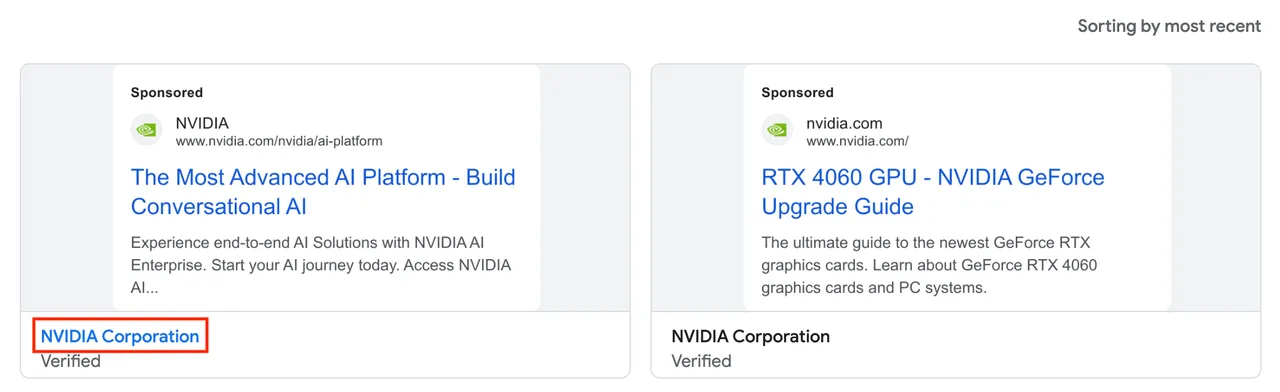
Option 1 - Selecting an advertiser from the list of ads:
- Start at the Google Ads Transparency Center.
- Search for ads from the advertiser you are interested in.
- In the list view, click the intended advertiser's name, which should be displayed at the bottom of the card corresponding to each ad.
- Copy the current browser URL and use it as input in this scraper.
👁 selecting an advertiser from the list of ads
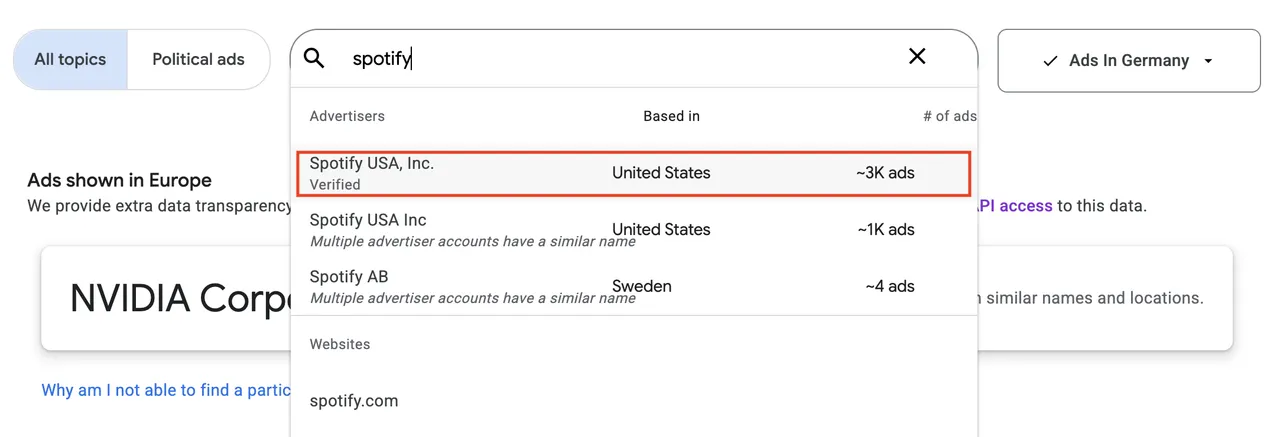
Option 2 - Searching for an advertiser or domain:
- Start at the Google Ads Transparency Center.
- Using the search feature of the Google Ads Transparency Center, type the name of your advertiser.
- From the search dropdown, choose a result that corresponds to a single advertiser or a domain name. If you see an entry mentioning that "multiple advertiser accounts have a similar name", do not select it — instead use Option 1 above (selecting an advertiser from the list of ads).
- Copy the current browser URL and use it as input in this scraper.
👁 searching for an advertiser or domain directly
⬆️ Output
The extracted ad data is stored in a dataset, accessible in the Storage tab. It’s available in JSON, JSONL, Excel, HTML, CSV, or XML and allows seamless integration with tools like Clay, ChatGPT, n8n, or your automation workflows.
Each item will contain an ad, as shown in the following example:
❓ Frequently Asked Questions (FAQs)
How many ads can you scrape with Google Ads Scraper?
This scraper has an unlimited appetite for ads and will automatically scroll down the list of results until it reaches the end. You can fetch up to 400 ads per minute when the "Skip details" input option is active, providing exceptional speed for large-scale data collection. Without this optimization, the scraper will still extract all ads with full details at a more comprehensive pace.
Happy scraping and may your data flow freely! 🚀😄
Why am I missing some ads in the results?
If you notice that some ads are missing, try running a search in an incognito/private browsing window. If the missing ads are age-restricted, they won’t appear unless you’re logged in. Since the scraper runs without authentication by default, these ads won’t be included.
If the issue persists and isn’t related to age restrictions, please report it via the Issues tab. Most issues are resolved within 24 hours.
What types of ads and data does the scraper extract?
Google Ads Scraper extracts all types of ads—text, image, and video — along with all relevant data, including ad copy, advertiser details, locations, and more. If you notice that something is missing, please report it via the Issues tab, and we’ll look into it.
Can I integrate this scraper with Clay?
Yes! You can integrate Google Ads Scraper with Clay to automatically pull ad data into your Clay workflows. Clay users can connect the scraper via Apify’s API and retrieve ad insights directly into their automation.
To set up Google Ads Scraper with Clay, follow this official Clay guide on integrating Apify.
Watch our step-by-step video tutorial to learn how to:
- Connect Google Ads Scraper to your Clay workspace
- Set up automated data collection
- Transform and analyze your ad data in Clay
- Create powerful automations with your ad insights
If you need help integrating Google Ads Scraper with Clay, feel free to open an issue via the Issues tab, and we'll be happy to assist!
Can I integrate this scraper with n8n?
Yes! You can integrate Google Ads Scraper with n8n using the dedicated n8n node for seamless automation.
The n8n node for Google Ads Scraper is available on npm: n8n-nodes-google-ads-scraper.
If you need help integrating Google Ads Scraper with n8n, feel free to open an issue via the Issues tab, and we'll be happy to assist!
Is this the best Google Ads Scraper for you?
This is the fastest, most cost-effective, and most complete Google Ads Scraper available. It provides more data per ad at a lower cost per result than any alternative. With performance reaching up to 400 ads per minute (when "Skip details" is enabled), you can collect large datasets in minutes instead of hours.
If you have any concerns or questions before subscribing, feel free to reach out through any contact method listed in our profile — we'll be happy to clarify anything! Most questions, issues, and feature requests are handled in less than 24 hours.
Is it legal to scrape Google Ads data?
Scraping Google Ads is legal as long as you adhere to regulations concerning scraping, copyright, and personal data.
If you're unsure whether your reason is legitimate, consult your lawyers. You should not scrape data unless you have a legitimate reason to do so. You can also read Apify's blog post on the legality of web scraping and ethical scraping.
👥 Scrape LinkedIn Ads
If you are also interested in scraping ads from LinkedIn, please check out our LinkedIn Ads Scraper.
🎵 Scrape TikTok Ads
Looking to extract ads from TikTok as well? Try our TikTok Ads Scraper.
💬 Your feedback
Let us know if you have any feedback or feature requests through the Issues tab. Your input helps drive future improvements.


