VOOZH about

URL: https://apify.com/tri_angle/sentiment-analysis-online-tool

⇱ πŸͺΆ Sentiment Analysis Online Tool Β· Apify


Pricing

Pay per usage

Go to Apify Store

Sentiment Analysis Online Tool

Type in or paste text to get sentiment analysis evaluation using a tool with built-in AI model. Get the sentiment score (0 to 1) and classification (positive, negative, neutral) for each phrase. Export analyzed data, run this tool via API, schedule ad monitor runs or integrate with other tools.

Pricing

Pay per usage

Rating

4.7

(2)

Developer

πŸ‘ Tri⟁angle

Tri⟁angle

Maintained by Apify

Actor stats

10

Bookmarked

148

Total users

0

Monthly active users

9 months ago

Last modified

Categories

Share

πŸ€” What is Sentiment Analysis Online Tool?

Sentiment Analysis Online Tool is an AI-driven Actor designed to analyze the sentiment of any text you provide. This tool can classify text as positive πŸ‘, neutral 😐, or negative πŸ‘Ž and offers a confidence score to indicate how certain the classification is.

πŸ₯ How does this sentiment analysis tool work?

πŸ“ Input your text β†’ πŸ€– The AI model processes it β†’ πŸ“Š Classifies the sentiment as positive, neutral, or negative β†’ πŸ… Get a confidence score for the classification

With this tool, you can:

  1. Monitor sentiment across social media platforms πŸ•΅οΈβ€β™‚οΈ
  2. Analyze product reviews to understand customer satisfaction 🌟
  3. Track brand mentions online to get quick insights into public perception πŸ—£οΈ

If you're looking for more tools on how sentiment analysis can help your research or business, take a look at our scraping use cases for sentiment analysis.

πŸ’Έ Is this online tool for sentiment analysis free?

Apify offers $5 in free usage credits every month with the Apify Free plan, which allows you to analyze at least 1,000 texts each month for free.

For more frequent or extensive analysis, consider upgrading to the $49/month Starter plan, which provides even more analysis capacity.

πŸ§™β€β™‚οΈ How to use Sentiment Analysis Online Tool

Using this text analysis tool is simple. Here’s how:

  1. Find Sentiment Analysis Online Tool on Apify Store and click Try for free.
  2. Enter or paste the text you want to analyze.
  3. Click Run to start the text analysis.
  4. View the sentiment classification and confidence score in the Dataset tab.
  5. Download, export with an API, or integrate your results into other apps.

Tips for using Sentiment Analysis Online Tool

  • Use texts written in English
  • Ensure that the texts you provide are clear and concise
  • This Actor works best for texts that are not longer than approximately 250 characters (if longer, the text will be trimmed)
  • Review the final classification and score to understand the sentiment of each text

If you need to perform sentiment analysis on comments specifically, you might be better off with our Bundle Actor, πŸ€” Social Media Sentiment Analysis Tool. It combines this Sentiment Analysis Tool with our social media scrapers, and allows to scrape and analyse comments from TikTok, Facebook and Instagram in one go!

πŸ“‚ Output sample

The results will be wrapped into a dataset which you can find in the Output tab.
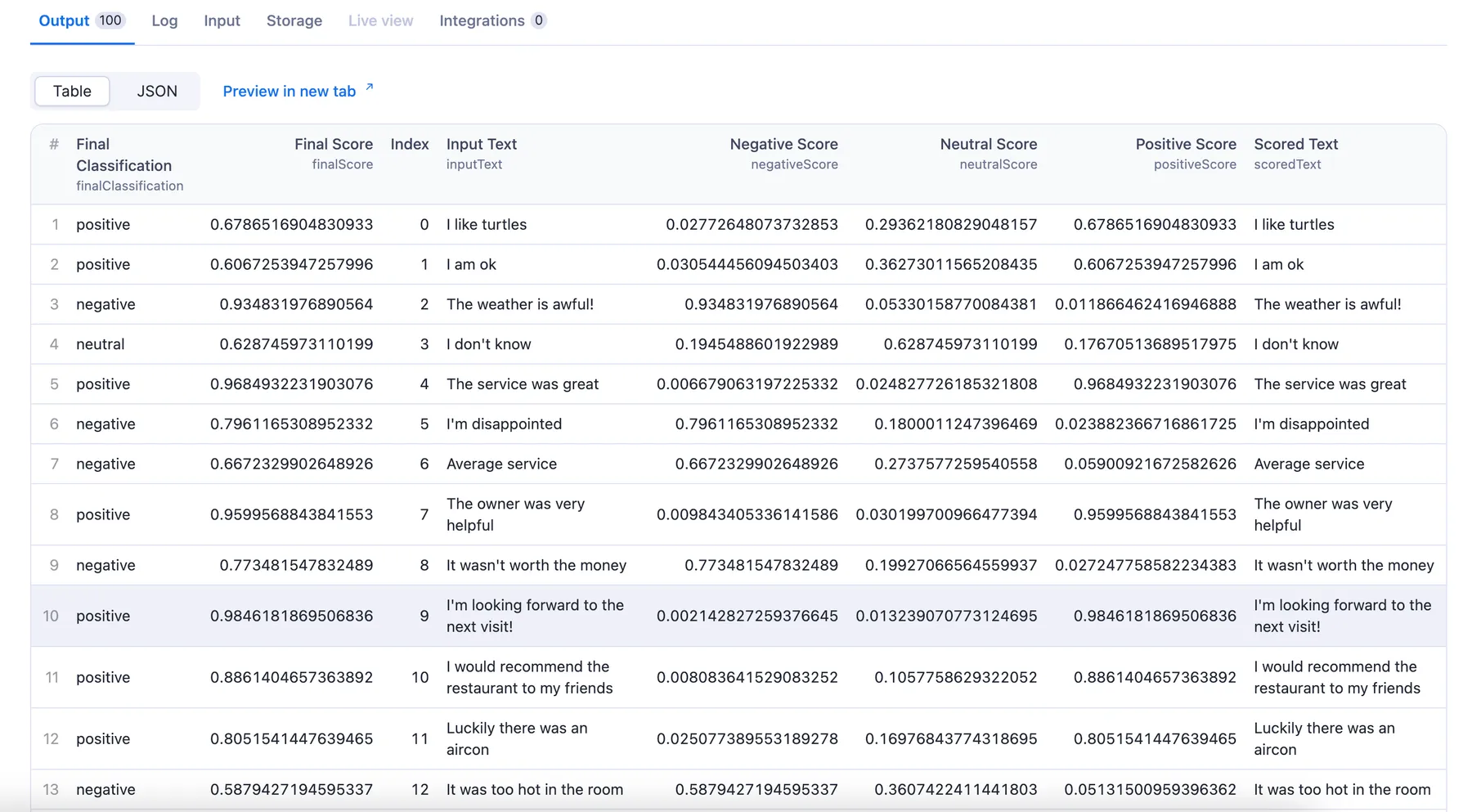
πŸ‘ text analysis API

You can preview all the fields in the Storage tab and choose the format in which to export the restaurant reviews you've extracted: JSON, CSV, Excel, or HTML table. Here below is the same sample dataset in JSON:

[
{
"index":0,
"inputText":"I like turtles",
"scoredText":"I like turtles",
"finalClassification":"positive",
"finalScore":0.6786516904830933,
"negativeScore":0.02772648073732853,
"neutralScore":0.29362180829048157,
"positiveScore":0.6786516904830933
},
{
"index":1,
"inputText":"I am ok",
"scoredText":"I am ok",
"finalClassification":"positive",
"finalScore":0.6067253947257996,
"negativeScore":0.030544456094503403,
"neutralScore":0.36273011565208435,
"positiveScore":0.6067253947257996
},
{
"index":2,
"inputText":"The weather is awful!",
"scoredText":"The weather is awful!",
"finalClassification":"negative",
"finalScore":0.934831976890564,
"negativeScore":0.934831976890564,
"neutralScore":0.05330158770084381,
"positiveScore":0.011866462416946888
},
{
"index":3,
"inputText":"I don't know",
"scoredText":"I don't know",
"finalClassification":"neutral",
"finalScore":0.628745973110199,
"negativeScore":0.1945488601922989,
"neutralScore":0.628745973110199,
"positiveScore":0.17670513689517975
},
{
"index":4,
"inputText":"The service was great",
"scoredText":"The service was great",
"finalClassification":"positive",
"finalScore":0.9684932231903076,
"negativeScore":0.006679063197225332,
"neutralScore":0.024827726185321808,
"positiveScore":0.9684932231903076
},
{
"index":5,
"inputText":"I'm disappointed",
"scoredText":"I'm disappointed",
"finalClassification":"negative",
"finalScore":0.7961165308952332,
"negativeScore":0.7961165308952332,
"neutralScore":0.1800011247396469,
"positiveScore":0.023882366716861725
},
{
"index":6,
"inputText":"Average service",
"scoredText":"Average service",
"finalClassification":"negative",
"finalScore":0.6672329902648926,
"negativeScore":0.6672329902648926,
"neutralScore":0.2737577259540558,
"positiveScore":0.05900921672582626
},
{
"index":7,
"inputText":"The owner was very helpful",
"scoredText":"The owner was very helpful",
"finalClassification":"positive",
"finalScore":0.9599568843841553,
"negativeScore":0.009843405336141586,
"neutralScore":0.030199700966477394,
"positiveScore":0.9599568843841553
},
{
"index":8,
"inputText":"It wasn't worth the money",
"scoredText":"It wasn't worth the money",
"finalClassification":"negative",
"finalScore":0.773481547832489,
"negativeScore":0.773481547832489,
"neutralScore":0.19927066564559937,
"positiveScore":0.027247758582234383
},
{
"index":9,
"inputText":"I'm looking forward to the next visit!",
"scoredText":"I'm looking forward to the next visit!",
"finalClassification":"positive",
"finalScore":0.9846181869506836,
"negativeScore":0.002142827259376645,
"neutralScore":0.013239070773124695,
"positiveScore":0.9846181869506836
},
{
"index":10,
"inputText":"I would recommend the restaurant to my friends",
"scoredText":"I would recommend the restaurant to my friends",
"finalClassification":"positive",
"finalScore":0.8861404657363892,
"negativeScore":0.008083641529083252,
"neutralScore":0.1057758629322052,
"positiveScore":0.8861404657363892
},
{
"index":11,
"inputText":"Luckily there was an aircon",
"scoredText":"Luckily there was an aircon",
"finalClassification":"positive",
"finalScore":0.8051541447639465,
"negativeScore":0.025077389553189278,
"neutralScore":0.16976843774318695,
"positiveScore":0.8051541447639465
},
{
"index":12,
"inputText":"It was too hot in the room",
"scoredText":"It was too hot in the room",
"finalClassification":"negative",
"finalScore":0.5879427194595337,
"negativeScore":0.5879427194595337,
"neutralScore":0.3607422411441803,
"positiveScore":0.05131500959396362
},

The results are provided in the same order and position as the provided texts on Input.

  • index: number showing the order of the input text.
  • inputText: the original text you provided.
  • scoredText: your text after processing (limited to 512 tokens).
  • finalClassification: the overall result (positive, neutral, or negative).
  • finalScore: the highest score, matching the final result (ranges between 0 and 1).
  • negativeScore, neutralScore, positiveScore: scores for each classification (between 0 and 1).

πŸ¦‹ Want more tools for sentiment analysis?

Use the scrapers below to extract various types of reviews and comments from different platforms. Each tool is designed for specific tasks, including social media sentiment analysis, restaurant and product reviews, and comments from TikTok, YouTube, Facebook, and Instagram. Feel free to explore these options:

πŸ“Š Sentiment & text analysis tools Social Media Sentiment Analysis Tool
Reviews Text NLP Analyzer
⭐️ Review scrapers Restaurant Review Aggregator
TripAdvisor Reviews Scraper
Amazon Reviews Scraper
Facebook Reviews Scraper
πŸ’¬ Comment scrapers TikTok Comments Scraper
YouTube Comments Scraper
Facebook Comments Scraper
Instagram Comments Scraper

❓ FAQ

How does this text analysis tool work?

Sentiment Analysis Online Tool processes your input text using an AI model. The tool then classifies the sentiment as either "positive", "neutral", or "negative" and provides a confidence score ranging from 0 to 1. The highest score determines the finalClassification.

Is it legal to analyze sentiment using this tool?

Yes, but keep in mind that data protection regulations may apply, especially when analyzing texts containing personal information. Make sure you have the necessary permissions to process the data. For more details, check out our blog post on web scraping legality.

Can I use this text analysis tool as a text analysis API?

Yes, you can use the Apify API to access data scraped by Sentiment Analysis Online Tool programmatically. The API allows you to manage, schedule, and run your text analysis tool, access datasets, monitor performance, get results, update Actor versions, and more.

To access the API using Node.js or Python, you can use the apify-client in the NPM package or PyPI package. You can also access your data using API Endpoints. For detailed information and code examples, refer to the Apify API documentation.

Can I integrate this text analysis tool with other apps?

Absolutely! Sentiment Analysis Online Tool can be integrated with various cloud services and web apps through Apify's platform integrations. You can connect it with Zapier, Slack, Make, Airbyte, LangChain, and more.

You can also use webhooks to carry out an action whenever an event occurs, e.g., get a notification whenever Social Media Sentiment Analysis Tool successfully finishes a run.

Your feedback

We’re always working on improving the performance of our Actors. If you have any technical feedback for this text analysis tool or found a bug, please create an issue on the Issues tab.

You might also like

Social Media Sentiment Analysis Tool

tri_angle/social-media-sentiment-analysis-tool

Add a profile name and find this social profile on Facebook, Instagram, and TikTok, scrape its recent posts and comments, and perform sentiment analysis for each comment. All in one go. Export results in JSON, CSV, HTML, use API, schedule runs, integrate with other tools.

πŸ‘ User avatar

Tri⟁angle

2.2K

4.9

Facebook URL posts and comments scraper

plum_protractor/techiesdata-lp-puller

Scrapes Facebook posts and comments using Playwright. It requires **logged-in cookies** to access search results consistently.

Sentiment Analysis Text Classification πŸ“ˆ

scrapestorm/sentiment-analysis-text-classification

Paste your text to receive a sentiment analysis evaluation using an AI-powered tool. 🌟 Get the sentiment score and the classification (positive, negative, neutral) for each phrase. πŸ“Š Export the analyzed data, run the tool through an API, schedule automatic checks, or integrate with other toolsπŸ”„πŸ“ˆ

50

Extended GPT Scraper

drobnikj/extended-gpt-scraper

Extract data from any website and feed it into GPT via the OpenAI API. Use ChatGPT to proofread content, analyze sentiment, summarize reviews, extract contact details, and much more.

πŸ‘ User avatar

Jakub DrobnΓ­k

1.6K

4.8

Facebook Posts/Comments Scraper

alien_force/facebook-posts-comments-scraper

Facebook Post Scraper with Comments extracts Facebook post details, including text, author info, likes, shares, and media. It also scrapes comments with user details, engagement metrics, and timestamps. Ideal for social media monitoring, sentiment analysis, and audience insights.

774

5.0

Facebook Posts Search

scraper_one/facebook-posts-search

✨ Search for Facebook posts using keywords or hashtags. Retrieve post URLs, content, publication dates, author details, and engagement metrics. Ideal for monitoring brand mentions on Facebook over time.

2K

4.7

Facebook Comments Scraper

parseforge/facebook-comments-scraper

Collect public Facebook post comments at scale. Export author name, profile link, comment text, timestamp, reaction counts, reply threads, verified badges, attached media, mentions and language. Pass any post URL and pull thousands of comments into clean JSON, CSV or Excel files.

Facebook Post Search Scraper

powerai/facebook-post-search-scraper

Extract Facebook posts by keyword with advanced filters, supporting auto-pagination and up to 5000 results per run. Ideal for social media research and content analysis.

1.8K

5.0

GIF Scroll Animation

glenn/gif-scroll-animation

Free tool to automatically create an animated GIF of any scrolling web page. Useful for testing UX, showcasing your work, and capturing any website as a GIF, including clickable elements and animations. Includes settings to adjust speed, wait before scrolling, slow down on-page animations, and more.

πŸ‘ User avatar

Glenn Goossens

5.4K

2.0

Related articles

How to automate sentiment analysis (plus the best sentiment analysis tools)
Read more
How to build an automated Facebook sentiment analysis workflow
Read more