
Pricing
$2.00 / 1,000 scraped place results
Fast Booking Scraper
Scrape Booking with this hotel scraper and get data about accommodation on Booking.com. Extract data by keywords or URLs for hotel prices, ratings, location, number of reviews, stars. Scrape and download data from Booking.com in JSON, Excel, HTML ,and CSV.

🏎 What does Fast Booking Scraper do?
This web scraping tool expands Booking data extraction beyond the official Booking.com limitations. Our Fast Booking Scraper allows you to scrape over 1,000 basic listings data at once from the Booking.com search. To scrape the full details of each listing separately, use our dedicated Booking Scraper.
🧳 What data can I scrape from Booking search?
| 🏖 Hotel name | 📍 Location |
| 💵 Price and currency | 🌆 Image URLs |
| ✍️ Number of reviews | ⭐️ Rating and stars |
| 🛏 Room types | 🧑🦰 Number of persons |
💸 How much will it cost to scrape Booking search results?
This scraper uses the pay-per-event pricing model, so your costs are easy to predict. You're charged $2 per 1,000 scraped place results, so $0.002 per result, with no extra platform usage fees.
Apify’s Free plan provides $5 free usage credits every month. For those credits, you can get up to 2,500 results from Booking search results for free.
If you need to get more Booking listings regularly, you should grab an Apify subscription. We recommend our $49/month Starter plan - that one could get you up to 24,000 hotel results every month.
⬇️ Input
For input, you can either specify a Destination ✈️ or use specific URLs from Booking.com website 🔗 (you can apply all the necessary filters beforehand).
You can apply extra filters on which content you want to scrape (property type, minimum rating, price range, currency, language, etc.) You can also set the range of check-in and check-out dates and how many results you want.
If you want a step-by-step tutorial on how to scrape Booking, read our blog post on how to scrape Booking.com or watch this quick video tutorial.
Tips for scraping Booking hotels
1️⃣ Booking.com website will only display a maximum of 1,000 results so that’s how much the scraper can get at once. If you need more than that, you can use the Get more than 1000 results toggle. However, in that case, you won’t be able to apply any limiting filters in URLs because the scraper will override them. Scraping by Destination will not be affected by the toggle.
2️⃣ If you need to get detailed data about pricing or specific rooms, you need to provide checkIn and checkOut dates. The reason for this is that Booking.com only shows complete room and pricing info when dates are indicated.
3️⃣ Sometimes Booking.com may return some suggested hotels outside of the expected city/region as a recommendation. The scraper will return all of them in the data results, so you may get more results than expected for your search.
⬆️ Output example
The scraped Booking listings will be shown as a dataset which you can find in the Storage tab. Note that the output is organized as a table for viewing convenience:
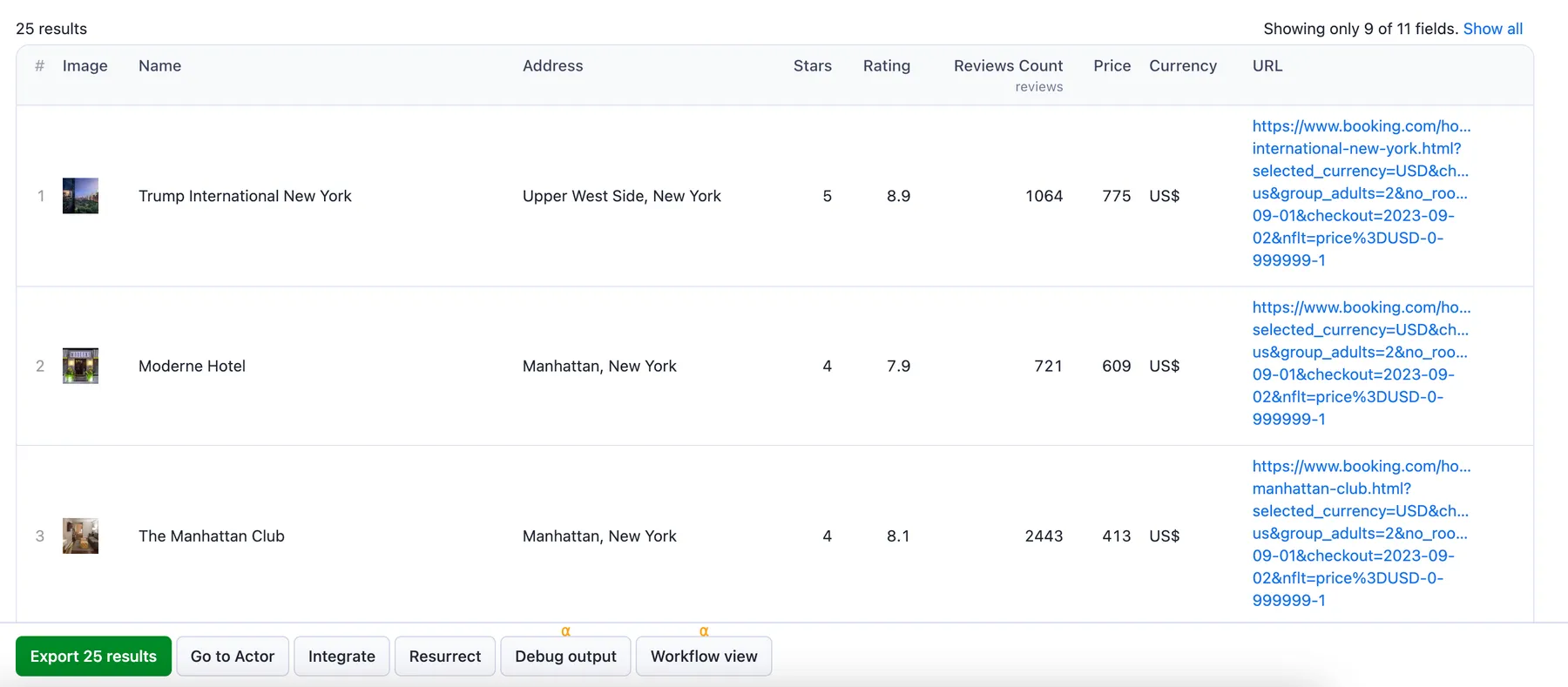
You can preview all the fields and choose in which format to download the data you’ve extracted: JSON, Excel, HTML table, CSV, or XML. Here below is the same dataset in JSON:
⭐️ Need to scrape reviews from Booking.com?
Use a dedicated ⭐️ Booking Reviews Scraper. It was built to extract review text, ratings, stars, basic reviewer info, length of stay, liked/disliked parts, room info, date of stay, and more for each listing.
❓FAQ
What are the disadvantages of the Booking API?
The Booking.com API interface is quite user-friendly, but getting that data in machine-processable format is no easy task. Booking.com places a lot of restrictions on how data can be collected from its listings, one of them being that Booking.com will display a maximum of 1,000 results for any given search. Our Fast Booking Scraper doesn't impose any limitations on your results, so you can scrape data from Booking.com at scale.
Is it legal to scrape listings on Booking.com?
Yes. However, you should note that personal data is protected by GDPR in the European Union and by other regulations around the world. You should not scrape personal data unless you have a legitimate reason to do so. If you're unsure whether your reason is legitimate, consult your lawyers. We also recommend that you read our blog post: is web scraping legal?
Can I integrate Fast Booking Scraper with other apps?
Yes. Fast Booking Scraper can be connected with almost any cloud service or web app thanks to integrations on the Apify platform. You can integrate with Zapier, Slack, Make, LangChain, Airbyte, GitHub, Google Sheets, Google Drive, and and with other Actors. Or you can use webhooks to carry out an action whenever an event occurs, e.g. get a notification whenever this scraper successfully finishes a run.
Can I use Fast Booking Scraper with API?
Yes. You can use Apify API to get programmatic access to the Apify platform. The API is organized around RESTful HTTP endpoints that enable you to manage, schedule, and run Apify actors. The API also lets you access any datasets, monitor Actor performance, fetch results, create and update versions, and more.
To access the API using Node.js, use the apify-client NPM package. To access the API using Python, use the apify-client PyPI package.
Check out the Apify API reference docs for full details or click on the API tab for code examples. You can also follow this video guide.


