

Xiaohongshu (RedNote) Live Stream Recorder - MP4 + Chat
Pricing
from $1.20 / 1,000 recording (per second)s
Xiaohongshu (RedNote) Live Stream Recorder - MP4 + Chat
Record Xiaohongshu (RedNote) live streams to MP4 video, with room metadata, host profile, viewer counts, and the live chat stream. Auto-pick a live room or target a specific broadcast, up to 4 hours per run.
Pricing
from $1.20 / 1,000 recording (per second)s
Rating
0.0
(0)
Developer

Actor stats
0
Bookmarked
2
Total users
1
Monthly active users
2 days ago
Last modified
Categories
Share
RedNote (Xiaohongshu / 小红书) Live Recorder | Record Live Streams to MP4, Chat + Room Data (2026)
Segmented MP4 recording, room metadata, host profile, and live chat from any Xiaohongshu (小红书) live broadcast, unattended for up to 4 hours per run. Auto-pick a live room or target a specific stream.
| Zen Studio · RedNote (小红书) suite • Search, note detail, comments, profiles, and live recording from Xiaohongshu | |||
|
👁 Image RedNote Live Recorder ➤ You are here |
👁 Image RedNote Note Detail Full note, video streams |
👁 Image RedNote Search 500 notes / 30s, 24 fields |
👁 Image RedNote Comments Nested replies, IP city |


Copy to your AI assistant
Key Features
- MP4 recording, saved as you go: the broadcast is recorded to video segments that land in your storage while the stream is still live, so nothing is lost if the run ends early
- Room metadata + host profile: title, cover, host nickname and id, viewer / member / like counts, and the available quality ladder (codec and bitrate per stream)
- Optional live chat: capture chat messages into the dataset, one row per message, with sender, fan-club badge, and language
- Auto or targeted: paste a live-stream URL or numeric room id, or use
autoto record a currently-live room - Free tier: 5 lifetime runs, 60 seconds each, no credit card
How to Record a Xiaohongshu Live Stream
Basic: auto-pick a currently-live room
Record a specific live stream
Record with live chat, capped at 30 minutes
Long unattended recording into a reusable store
Where Do I Get a Live-Stream Link?
Open a live room in the Xiaohongshu app or on the web and copy the link. Any of these work:
| Format | Example | Works |
|---|---|---|
| Live-stream URL | https://www.xiaohongshu.com/livestream/570305058583373361 | ✅ |
| Numeric room id | 570305058583373361 | ✅ |
auto keyword | auto | ✅ picks a live room for you |
A broadcast has to be live at the moment the run starts. If it has already ended, there is nothing to record.
Input Parameters
| Parameter | Type | Default | Description |
|---|---|---|---|
liveUrls | array | ["auto"] | One or more live streams: a xiaohongshu.com/livestream/<id> URL, a numeric room id, or auto. The first entry is recorded. |
runTime | integer | 0 | How long to record, in minutes. 0 = until the broadcaster ends the stream (capped at the 4-hour platform limit). |
recordVideo | boolean | true | Save the broadcast as MP4 video segments to your storage. |
videoQuality | string | highest | highest for the best available resolution, or lowest for smaller files. |
uploadEvery | integer | 5 | Minutes of footage per MP4 segment. Shorter segments appear in your storage sooner; longer segments mean fewer files. |
recordingsKvStore | string | "" | Name of a storage to save recordings to. Named storages persist beyond the default 7-day cleanup. Leave blank for the run's default storage. |
captureChat | boolean | false | Also capture live chat messages into the dataset, one row per message. |
What Data Do You Get?
The dataset holds three kinds of rows, and the run's key-value store holds the MP4 files plus an OUTPUT manifest that lists them.
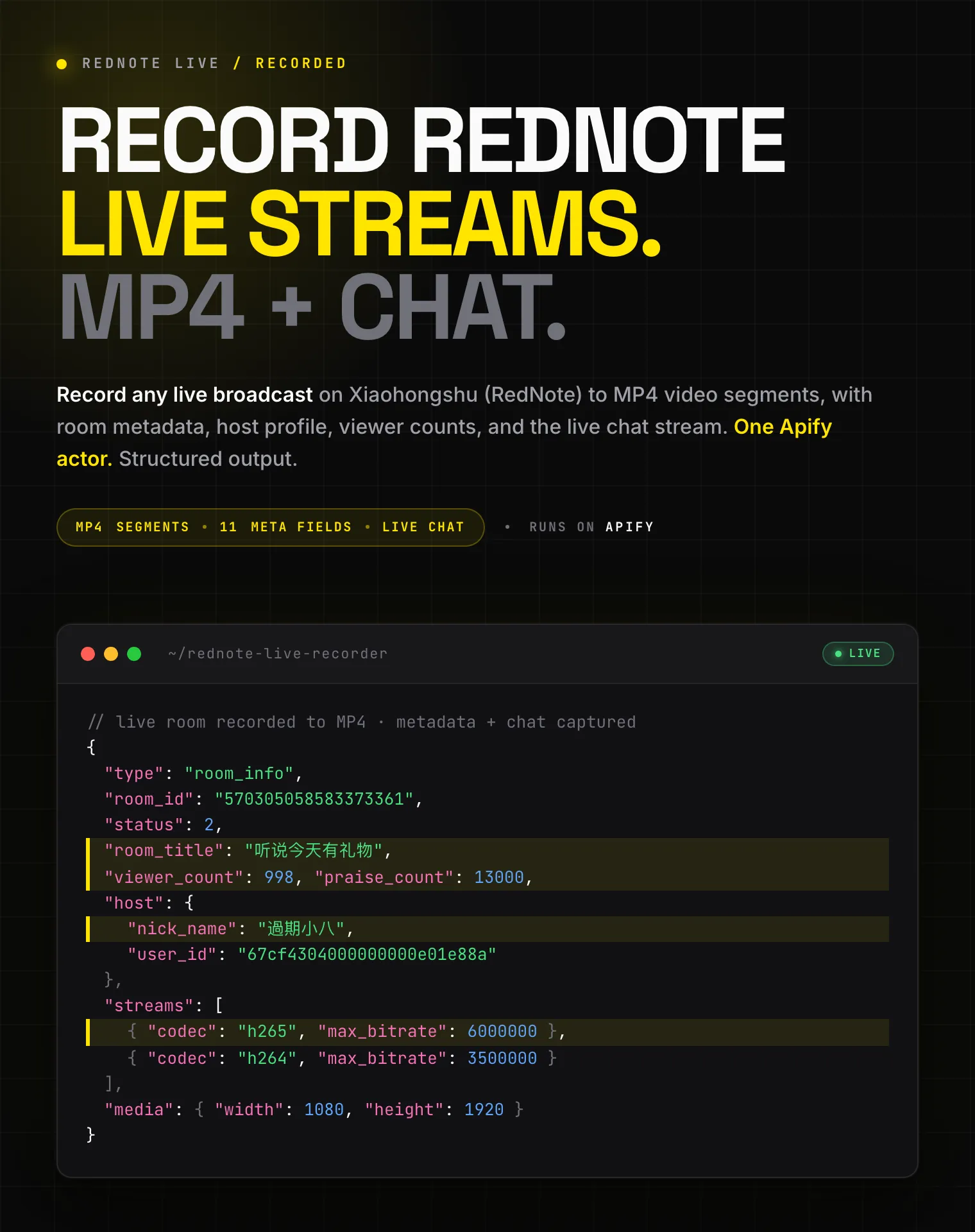
Room info (one row): room_id, status, room_title, room_cover, viewer_count, member_count, praise_count, host (nickname, id, avatar), streams[] (quality name, codec, bitrate), and media (width, height).
Chat (one row per message, when captureChat is on): comment_id, user_id, nick_name, msg, fans_group, role, at_users, origin_language.
Summary (one row): the run outcome, including segment count, total bytes, recorded duration, chat message count, and reason_for_exit.
Recordings manifest (OUTPUT record): one entry per saved MP4 with key, seq, started_at_ms, ended_at_ms, duration_s, bytes, quality, codec, and kv_url (a direct download link).
Output Example
Room info row:
Chat row:
Summary row, and the recordings manifest from the OUTPUT record:
Advanced Usage
Record the whole broadcast, however long it runs
Capture only the live chat, no video
Smaller files for a long session
Pricing: Pay Per Event (PPE)
You are billed for connected time, by the second, with no per-file or per-message charge. Two events:
- Recording accrues while video is being captured.
- Live chat accrues only while chat capture is on. A video-only run never incurs it.
Rates drop with your Apify plan:
| Your Apify plan | Recording / hour | Live chat / hour |
|---|---|---|
| Free | $5.40 | $3.60 |
| Bronze | $5.04 | $3.35 |
| Silver | $4.68 | $3.13 |
| Gold and above | $4.32 | $2.88 |
A 30-minute recording with live chat on the Free plan is about $4.50 ($2.70 recording + $1.80 chat). Video only is about $2.70.
Free tier: 5 lifetime runs, 60 seconds each. No credit card.
FAQ
What is RedNote (Xiaohongshu / Little Red Book)? RedNote is the international name of Xiaohongshu (小红书, literally "Little Red Book", often abbreviated XHS), China's leading lifestyle and social-commerce platform. Creators and shops there run live broadcasts for product launches, sales, and Q&A sessions, which is what this actor records.
How long can I record?
Up to 4 hours per run. Set runTime in minutes, or 0 to record until the broadcaster ends the stream.
What video format do I get? Standard MP4 files, playable in any modern player. Long broadcasts are split into segments so they appear in your storage while the stream is still live.
Where do the recordings go?
Into your run's key-value store by default, or a named store you set with recordingsKvStore. The OUTPUT record lists every segment with a direct download link.
Can I record without saving video?
Yes. Set recordVideo to false and captureChat to true to collect just the live chat.
What does auto do?
It picks a currently-live room for you, useful when you just want a sample or don't have a specific stream in mind.
What happens when the stream ends?
The run finishes cleanly, saves the final segment, and writes the summary. The reason_for_exit field tells you whether it ended because the broadcast stopped, the run time was reached, or the stream went quiet.
Are the viewer and like counts exact?
They are returned as integers. Counts that Xiaohongshu rounds for display (e.g. 1.3万) become best-effort integers (13000).
Why did a recording stop early? A broadcast can end at any time, or briefly drop out. The recorder confirms the room is offline before stopping, so short network blips do not cut the recording short.
What's the free tier? 5 lifetime runs, each capped at 60 seconds of recording, one room. Enough to see a real MP4 sample and the data shape.
How fresh is the data? Live from the broadcast at run time. There is no cache.
Do I need a Xiaohongshu account or cookies?
No. Paste a live-stream URL, a room id, or auto and run; no account, cookie export, or QR login is involved.
Can I scrape regular notes, comments, or profiles too? Not with this actor; it records live broadcasts only. Use RedNote Search Scraper for keyword search, RedNote Note Detail Scraper for full notes, and RedNote User Profile Scraper for creator back-catalogues.
Is it legal to record Xiaohongshu live streams? The actor records publicly broadcast streams only, nothing behind a login. You are responsible for complying with Xiaohongshu's terms of service, broadcasters' rights, and applicable data protection law (GDPR, CCPA, PIPL), especially before republishing recordings or chat data.
More Zen Studio scrapers for Chinese platforms
🎬 Short-video & social



🛒 E-commerce




🏠 Real estate & autos



Support
- Bugs: Issues tab
- Features: Issues tab
Legal Compliance
Extracts publicly available data. Users must comply with Xiaohongshu's terms and data protection regulations (GDPR, CCPA, PIPL).
Record any Xiaohongshu (小红书) live broadcast to MP4 video segments, with room metadata, host profile, viewer counts, and the live chat stream, unattended for up to 4 hours per run.


![👁 TikTok Live Status Monitor - Stream URLs [NO LOGIN] ✅ avatar](https://images.apifyusercontent.com/5m9bqNVHYQMHy-cOJHsF1euOfoDMUT2aQwlmHLW0a-c/rs:fill:76:76/cb:1/aHR0cHM6Ly9hcGlmeS1pbWFnZS11cGxvYWRzLXByb2QuczMudXMtZWFzdC0xLmFtYXpvbmF3cy5jb20vc0NDU2R3bm1LTUoxUTJzVG4tYWN0b3ItYm1SMEdMeDJnMVBmUHp2Y0QtcTUyTmFhQmJUZS1jYW52YS10aWstdG9rLWxvZ28tTUFHek5nb0lIancucG5n.webp)


