VOOZH about

URL: https://apify.com/zuzka/slack-download-all-messages

⇱ Slack Download All Messages βœ… Β· Apify


πŸ‘ Slack Download All Messages βœ… avatar

Slack Download All Messages βœ…

Pricing

from $0.10 / 1,000 posts

Go to Apify Store

Slack Download All Messages βœ…

Download Slack messages from all public channels in your workspace in a selected time frame. Extract message text, image URL, timestamp, reply count, user ID, reply user IDs, and more. Export Slack data in JSON, CSV, and Excel and use it for archives, backups, and automated reports.

Pricing

from $0.10 / 1,000 posts

Rating

0.0

(0)

Developer

πŸ‘ Zuzka PelechovΓ‘

Zuzka PelechovΓ‘

Maintained by Community

Actor stats

0

Bookmarked

1

Total users

0

Monthly active users

6 months ago

Last modified

Categories

Share

What is Slack Messages Downloader?

It's a simple and powerful tool that allows you to download Slack message history from a public channel of your choosing. You can choose how far into the channel history to go (for instance, 2 weeks) and download up to 1,000 Slack messages. To get that data, just insert the channel ID, Slack bot token, and click "Save & Start" button.

Why download Slack message history?

πŸ“š Create a specific Slack channel archive
πŸ“‡ Automate export of Slack conversations and threads
πŸ’Ύ Back up Slack channel data
πŸ“’ Save and keep track of important reports

How to download messages from Slack?

Slack Messages Downloader was designed to be easy to start with even if you've never extracted data from Slack before. Here's how you can scrape Slack channel data with this tool:

  1. Create a free Apify account using your email.
  2. Open Slack Messages Downloader.
  3. Add the public Slack channel ID to exact messages from.
  4. Add a Slack bot token.
  5. Choose how far into the Slack message history to go.
  6. Click "Start" and wait for the data to be extracted.
  7. Download your data in JSON, XML, CSV, Excel, or HTML.

Input

The input for Slack Messages Downloader should be Slack channel ID, Slack bot token and number of days of how far into the channel history to go.

The Slack channel ID can be found in URL (if you're using Slack in browser) or at the bottom of channel details (if you're using Slack app).

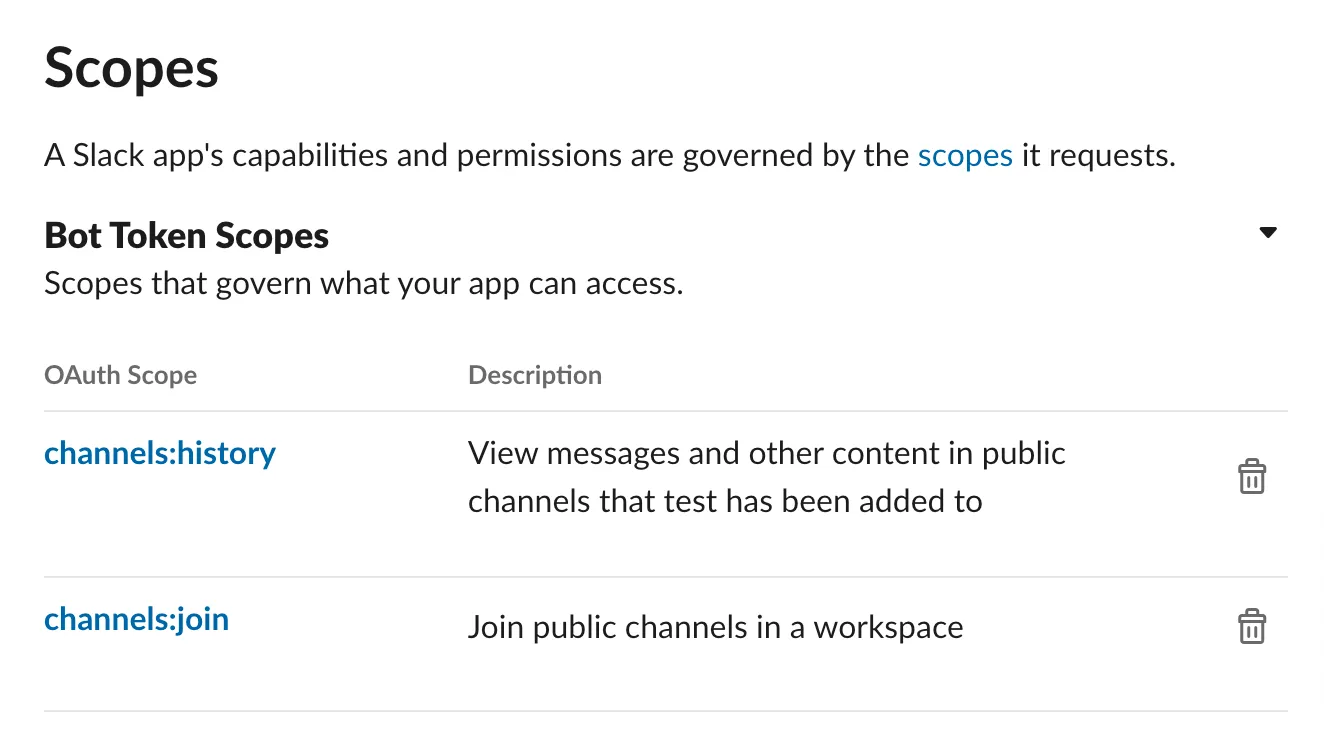
The Slack bot token should include the permissions to download the following scopes: channels:history and channels:join. You can add those scopes and generate your token in OAuth & Permissions -> Scopes in Slack API settings.

πŸ‘ Apify - Download Slack messages input

Click on the input tab for a detailed list of input parameters in JSON. Here's an input example:

{
"channel":"ABC33ABC",
"oldest":10,
"token":"ENCRYPTED_VALUE:12345678900987654321Token"
}

Output

This actor will deliver results in a dataset. You can choose in which format to download it: JSON, Excel, HTML, CSV, or XML. Here's an excerpt from the JSON dataset you'd get if you apply the input parameters above:

{
"type":"message",
"text":"Another bug report! Seems that we’re missing some origins in the run tooltip. It would also be nice to explain what each of them means. Adding screenshot:",
"files":[
{
"id":"IDCODEHERE890",
"created":1671110278,
"timestamp":1671110278,
"name":"CleanShot.png",
"title":"CleanShot.png",
"mimetype":"image/png",
"filetype":"png",
"pretty_type":"PNG",
"user":"USERCODE567",
"user_team":"USERTEAMCODE089",
"editable":false,
"size":56857,
"mode":"hosted",
"is_external":false,
"external_type":"",
"is_public":true,
"public_url_shared":false,
"display_as_bot":false,
"username":"",
"url_private":"https://files.slack.com/files-pri/USERTEAMCODE089-IDCODEHERE890/cleanshot.png",
"url_private_download":"https://files.slack.com/files-pri/USERTEAMCODE089-IDCODEHERE890/download/cleanshot.png",
"media_display_type":"unknown",
"thumb_64":"https://files.slack.com/files-tmb/USERTEAMCODE089-IDCODEHERE890-7c602634c2/cleanshot.png",
"original_w":824,
"original_h":290,
"thumb_tiny":"AwAQADCmq7gTnZfukilLF/vN+dMB5TPJcH/gQqPj1NBAHcOKdlvVvzpuAe+KDjtQB/9k=",
"permalink":"https://apifier.slack.com/files/USERCODE567/IDCODEHERE890/cleanshot.png",
"permalink_public":"https://slack-files.com/USERTEAMCODE089-IDCODEHERE890-f28j88h1f7",
"is_starred":false,
"has_rich_preview":false,
"file_access":"visible",
"media_progress":null
}
],
"upload":false,
"user":"USERCODE567",
"display_as_bot":false,
"ts":"1902710306.621639",
"blocks":[
{
"type":"rich_text",
"block_id":"5be",
"elements":[
{
"type":"rich_text_section",
"elements":[
{
"type":"text",
"text":"Another bug report! Seems that we’re missing some origins in the run tooltip. It would also be nice to explain what each of them means. Adding screenshot:"
}
]
}
]
}
],
"client_msg_id":"59a221e1-62df-481d-93ca-8b28fchtf2dd",
"thread_ts":"1671940306.621069",
"reply_count":8,
"reply_users_count":4,
"latest_reply":"1674777410.645369",
"reply_users":[
"USERCODE501",
"USERCODE567",
"USERCODE234",
"USERCODE000"
],
"is_locked":false,
"subscribed":false,
"reactions":[
{
"name":"pull-request",
"users":[
"US98SKW4W"
],
"count":1
}
],
"date":"2023-2-31"
},
...

Want to automate Slack notifications or messages?

You can use the simple automation tools below. Each of them is built particularly for the relevant Slack notification case that you can set up for GitHub, Toggl, and other platforms. Feel free to browse them:

πŸ’Œ Slack Message Generator | 🐈 GitHub Issues to Slack
⚠️ Slack Notification Webhook | πŸ‘€ Monitoring Reporter Slack

You might also like

Slack Messages Downloader

zuzka/slack-messages-downloader

Download message history from a public Slack channel. Extract message text, timestamps, user IDs, reactions, thread metadata, and files. Automatically paginates results and exports data in JSON, CSV, Excel, XML, or HTML for backups and reports.

πŸ‘ User avatar

Zuzka PelechovΓ‘

69

Slack Message Scraper

jungle_synthesizer/slack-message-scraper

Extract messages from Slack channels using browser tokens. Supports public/private channels, DMs, threads, and reactions. No OAuth app required.

πŸ‘ User avatar

BowTiedRaccoon

8

Slack Summary Reporter

marko.kubrachenko/slack-summary-reporter

A simple Python Actor that fetches recent Slack messages, summarizes them via OpenAI, and posts the summary back to Slack.

πŸ‘ User avatar

Marko Kubrachenko

1

Slack MCP Server

constant_quadruped/slack-mcp-server

MCP server for Slack workspaces. Read channel history, search messages, fetch thread replies, list users and channels, and post messages. Supports OAuth, Bot, and browser token authentication. Based on korotovsky/slack-mcp-server with 600+ GitHub stars.

Slack Scraper

leadspicker/slack-scraper

This Apify actor scrapes members from any Slack workspace and matches them to their LinkedIn profiles using image search and AI-based relevance classification.

Slack MCP SERVER

bhansalisoft/slack-mcp-server

Slack AI MCP SERVER unique tool for integration slack tool into AI based automation.

Slack Message Generator

katerinahronik/slack-message

This actor sends messages to Slack automatically. It can be used instead of email notifications and is ideal to combine with other actors monitoring successful runs, errors, etc.

πŸ‘ User avatar

KateΕ™ina HronΓ­kovΓ‘

146

Slack MCP

parseforge/slack-mcp

Model Context Protocol server that lets AI copilots list channels, pull message history, send updates, manage membership, and fetch metadata from your Slack workspace using scoped bot tokens.

2

5.0

Slack Bot Poster

alizarin_refrigerator-owner/slack-poster

Send automated messages to Slack workspaces using your bot token. Perfect for notifications, alerts, scheduled updates, and team automation. Simple Message. Rich Blocks, Attachments, Multi-Channel, Thread Replies, Custom Branding & Validation Mode