
CockroachDB TIL: Volume 2

This is a new series of articles covering short "Today I learned" topics as I peel the layers on CockroachDB. This is meant to resemble release notes. I decided to mix it up with the format for these posts as they may not justify an entire blog.
Previous articles
Topics
Topic 1 $COCKROACH_URL environment variable to save typing with connection strings
- Saves typing
- Can store password instead of passing in the prompt every time
- Pass additional session parameters instead of retyping them all the time
I find myself opening multiple command prompts and accessing the same cluster each time. $COCKROACH_URL is a handy trick to save myself time typing the connection string each time. Let's take CockroachDB Free Tier for example, it comes with a long connection string, which by the way also includes a password. One way to approach this is to save the connection string in an environment variable. The added benefit here is that password is stored with the variable and yes it is not secure but it's certainly better than typing the password out each time in clear text. It works similar to PGPASSWORD environment variable and yes it is not a best practice.
Given my connection string for Free Tier
postgresql://user:password@free-tier.gcp-us-central1.cockroachlabs.cloud:26257/defaultdb?sslmode=verify-full&sslrootcert='$HOME'/.postgresql/root.crt&options=--cluster%3Dclustername
Setting the variable
export COCKROACH_URL='postgresql://user:password@free-tier.gcp-us-central1.cockroachlabs.cloud:26257/defaultdb?sslmode=verify-full&sslrootcert='$HOME'/.postgresql/root.crt&options=--cluster%3Dclustername'
Connecting to the cluster
cockroach sql --url $COCKROACH_URL
#
# Enter \? for a brief introduction.
#
username@free-tier.gcp-us-central1.cockroachlabs.cloud:26257/defaultdb>
So this is great and you can pass additional session variables like application_name or timezone
export COCKROACH_URL="postgresql://user:password@free-tier.gcp-us-central1.cockroachlabs.cloud:26257/defaultdb?sslmode=verify-full&sslrootcert=$HOME/.postgresql/root.crt&options=--cluster%3Dclustername&application_name=demopurposes&timezone=America/New_York"
Something I touched on earlier is being able to view the password stored in an environment variable if you run ps command. The preferred method to caching passwords is via .pgpass file. This is what we're going to look at next.
Topic 2 Using .pgpass with CockroachDB
CockroachDB binary does not support a password file today but we can still leverage psql to access CockroachDB with password authentication in a secure way. Set up the password file according to the requirements
hostname:port:database:username:password
CockroachDB Free Tier connection modal conveniently displays all of the connection parameters necessary in the Connection parameters tab.
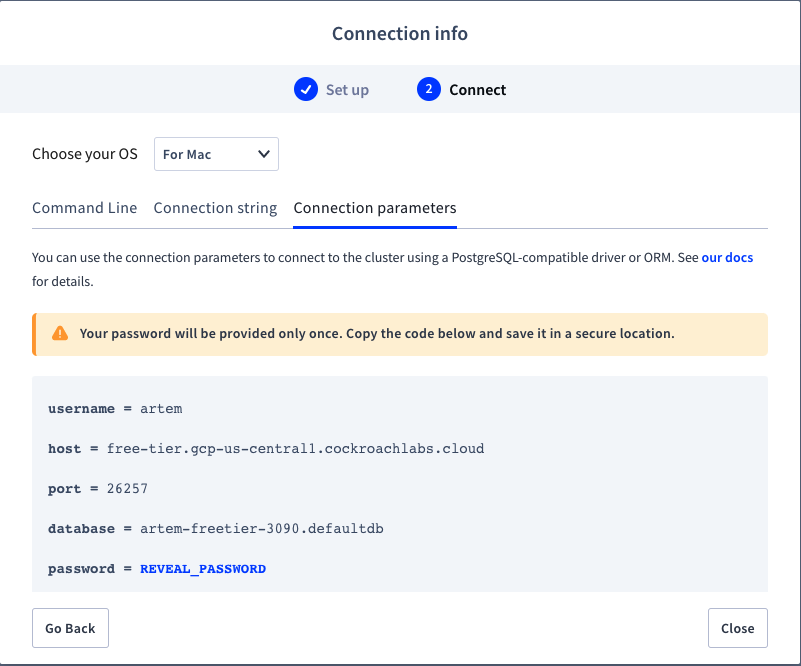
So the end result will look like
free-tier.gcp-us-central1.cockroachlabs.cloud:26257:artem-freetier-3090.defaultdb:artem:thepassword
Save the file, store it in your home directory apply proper permissions and export the PGPASSFILE environment variable.
vi ~/.pgpass
chmod 600 ~/.pgpass
export PGPASSFILE='/Users/artem/.pgpass'
Then you can connect to CockroachDB
psql -h free-tier.gcp-us-central1.cockroachlabs.cloud -p 26257 -d artem-freetier-3090.defaultdb
psql (13.4, server 13.0.0)
SSL connection (protocol: TLSv1.3, cipher: TLS_AES_256_GCM_SHA384, bits: 256, compression: off)
Type "help" for help.

artem-freetier-3090.defaultdb=>
Notice I didn't pass the password. The database name is necessary in CockroachDB Free Tier as its unique to my cluster. Also notice I'm using psql instead of cockroach binary as the latter does not currently support .pgpass.
Topic 3 Lookup application_name programmatically
Say you'd like to view the application_name session variable while connected to the active session, you can do that using the following query:
select current_setting('application_name');
Let's use the `$COCKROACH_URL from the first topic using our Free Tier Cluster
export COCKROACH_URL="postgresql://user:password@free-tier.gcp-us-central1.cockroachlabs.cloud:26257/defaultdb?sslmode=verify-full&sslrootcert=$HOME/.postgresql/root.crt&options=--cluster%3Dclustername&application_name=demopurposes&timezone=America/New_York"
cockroach sql --url $COCKROACH_URL
I used the following application_name variable &application_name=demopurposes. We can fetch the session variable like so
artem@free-tier.gcp-us-central1.cockroachlabs.cloud:26257/defaultdb> SELECT current_setting('application_name');
 current_setting
-------------------
 demopurposes
In fact, we can fetch any variable from within the session using SELECT current_setting('timezone');.
 current_setting
--------------------
 America/New_York
Topic 4 Force a retry
Application developers working with CockroachDB soon realize there's effort needed working around transaction retries in databases operating in SERIALIZABLE isolation. We have extensive documentation on the topic of retries and I leave it to you to read up on it. One item that always escapes initial effort is how to reproduce contention and code around it. We have interest in making this available for development purposes but I can't speak to how soon we are going to see this. In lieu of that, we can force transaction retries in CockroachDB in sql.
BEGIN TRANSACTION; SAVEPOINT cockroach_restart; SELECT 1;
SELECT crdb_internal.force_retry('1h':::INTERVAL);
This will produce a 40001 error which are safe to retry in CockroachDB. Now you can code around it in your application.
root@localhost:26257/defaultdb> BEGIN TRANSACTION; SAVEPOINT cockroach_restart; SELECT 1;
 ?column?
------------
 1
(1 row)

Note: timings for multiple statements on a single line are not supported. See https://go.crdb.dev/issue-v/48180/v21.1.

root@localhost:26257/defaultdb OPEN> SELECT crdb_internal.force_retry('1h':::INTERVAL)
;
ERROR: restart transaction: crdb_internal.force_retry(): TransactionRetryWithProtoRefreshError: forced by crdb_internal.force_retry()
SQLSTATE: 40001
HINT: See: https://www.cockroachlabs.com/docs/v21.1/transaction-retry-error-reference.html
Your sql shell will hold the transaction open for the remainder of the interval, in our case 1 hour. We can release the shell by issuing a rollback.
root@localhost:26257/? ERROR> rollback;
ROLLBACK
Topic 5 Force a panic, failure injection
CockroachDB does not have an official fault injection tool to assist in chaos testing CockroachDB. The following is the next best thing to force kernel panic and inject failure programmatically. A customer had a question on how to test for impact to query performance in the face of disaster when you're running CockroachDB in a Kubernetes StatefulSet. StatefulSet will make sure CockroachDB pods will maintain the replica minimum and create new pods when some pods fail. Given the following command, you can inject failure and test query performance while a new pod is coming back online.
SELECT crdb_internal.force_panic('some message');
I'd use caution using this command as it will terminate the node from which it is executed. In my single node instance, I see the following output
ERROR: driver: bad connection
warning: connection lost!
opening new connection: all session settings will be lost
warning: error retrieving the transaction status: dial tcp [::1]:26257: connect: connection refused
warning: connection lost!
opening new connection: all session settings will be lost
warning: error retrieving the database name: dial tcp [::1]:26257: connect: connection refused
root@localhost:26257/? ?> \q
ERROR: driver: bad connection
Failed running "sql"
and the logs
I210823 18:44:06.077245 292 2@gossip/gossip.go:567 ⋮ [n1] 167 +gossip server (0/3 cur/max conns, infos 0/0 sent/received, bytes 0B/0B sent/received)
I210823 18:44:06.188169 65 2@server/status/runtime.go:569 ⋮ [n1] 168 runtime stats: 320 MiB RSS, 266 goroutines (stacks: 3.8 MiB), 52 MiB/91 MiB Go alloc/total (heap fragmentation: 7.6 MiB, heap reserved: 10 MiB, heap released: 183 MiB), 36 MiB/40 MiB CGO alloc/total (0.6 CGO/sec), 1.1/1.0 %(u/s)time, 0.0 %gc (0x), 58 KiB/33 KiB (r/w)net
*
* ERROR: [n1,client=[::1]:52686,hostnossl,user=root] a SQL panic has occurred while executing the following statement:
* SELECT crdb_internal.force_panic('some message')
*
*
* ERROR: [n1,client=[::1]:52686,hostnossl,user=root] a panic has occurred!
* panic: some message
* (1) attached stack trace
* -- stack trace:
* | github.com/cockroachdb/cockroach/pkg/sql.(*Server).ServeConn.func1
* | 	/go/src/github.com/cockroachdb/cockroach/pkg/sql/conn_executor.go:482
* | [...repeated from below...]
* Wraps: (2) while executing: SELECT crdb_internal.force_panic(_)
* Wraps: (3) attached stack trace
Now I have to restart my instance, which is probably a good point to wrap up this post.
