|
VOOZH | about |
|
VOOZH | about |
Editor’s note: As of 5 October 2023, this article has been updated to include information about security considerations, performance optimization with Electron.js, scalability, and modular design.
👁 Advanced Electron.js ArchitectureA while back, I began working on a side project called taggr, a completely offline, interactive photo exploration app. Developing taggr required me to navigate up from the lowest level of app complexity, trying out multiple architectural approaches and exploring the limitations of each.
In this article, we’ll discuss the trade-offs of different architectural approaches for building desktop applications with Electron.js. We’ll analyze the shortcomings of each and introduce an architecture that aims to tackle them.
The blueprint presented in this article is the outcome of an ongoing effort to find an approach that enables me, a solo developer, to manage the complexity of the app and meet performance requirements by leveraging standard web tooling. You can follow along with this GitHub repository. Let’s dive in!
Jump ahead:
In the last few years, JavaScript usage has dramatically increased within the browser realm, largely with the help of libraries and frameworks like React, Vue, and Angular. Similarly, we’ve seen JavaScript grow beyond the browser with Node.js, Deno, and React Native.
Electron.js is one of these frameworks. Since its release in 2013, Electron has grown to become one of the most-used frameworks for building cross-platform desktop applications. VS Code, Slack, Twitch, and many other popular desktop applications are built using Electron.
Electron embeds Chromium and Node.js in its binary, enabling web developers to write desktop applications without writing native code. Electron implements a multi-process model composed of the main and renderer processes, which is similar to the Chromium browser.
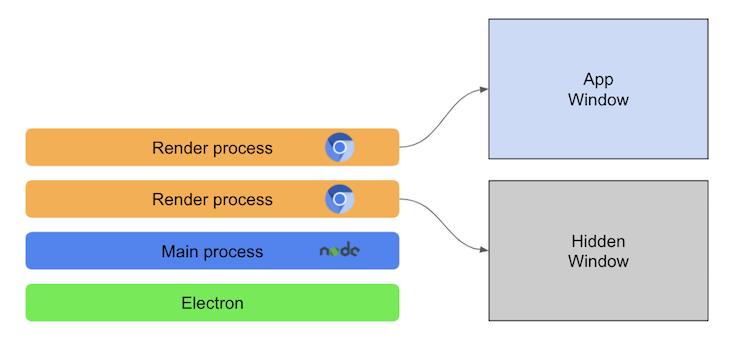
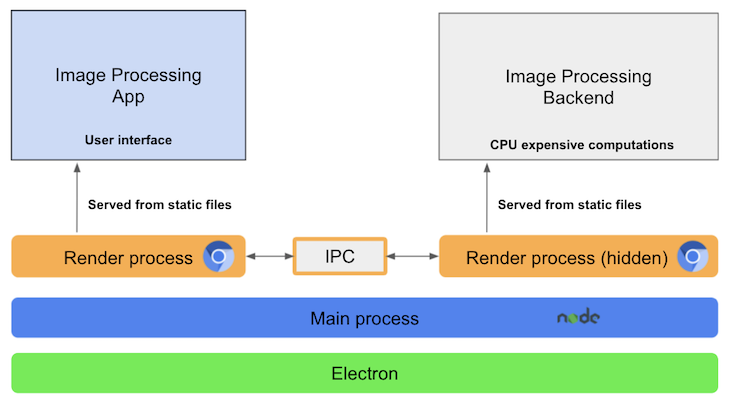
Each application’s window is a render process, which isolates the code execution at the window level. The main process is responsible for the application lifecycle management, window management or render process, and native APIs like system menus, notifications, and tray icons.
Each app is composed of one main process and a variable number of render processes. Render processes can be used for JavaScript code execution and can be hidden without a UI:
👁 High Level Electron Arch Two Render Processes
Note: Electron is not the only option for building cross-platform desktop applications. Other alternatives offer less resource consumption and lighter executables, but none share the community, learning resources, or widespread adoption of Electron.
If you aren’t already familiar with Electron, it’s pretty easy to get started, especially because knowledge of Node.js and JavaScript is transferrable.
Electron provides abstractions and a familiar language, reducing the time to market and development costs. Essentially, what Electron does for desktop app development is similar to what React Native does for mobile development.
Electron also manages building and deploying app updates, making it easy to keep cross-platform apps in a synced version. You can achieve this with auto-updates and by loading remote assets at runtime.
However, it’s essential to consider the trade-offs, as Electron apps (by embedding Chromium and Node.js environments) tend to consume more resources than native implementations, but the continuous improvements and fixes are working towards mitigating these concerns and enhancing performance and resource efficiency.
In addition, complex Electron apps present performance and developer experience challenges related to the underlying architecture. Let’s consider these trade-offs in depth by analyzing three different app examples.
Let’s examine the high-level architectures of three fictional apps with varying complexity. Bear in mind that our app analysis does not aim to be exhaustive, rather, it aims to tease potential apps that you can build with Electron.
Let’s start with a low-complexity app. For our example, we’ll consider packaging a webpage as a desktop application. Examples can include instant messaging apps, data analysis dashboards, and online streaming apps.
Many businesses provide desktop versions of their successful web-based apps, making ours a common use case. We’ll use Electron to run the app on Chromium, eliminating unnecessary polyfills and providing a unified UI instead of a heterogeneous browser landscape.
The main features of the low-complexity app will include the following:
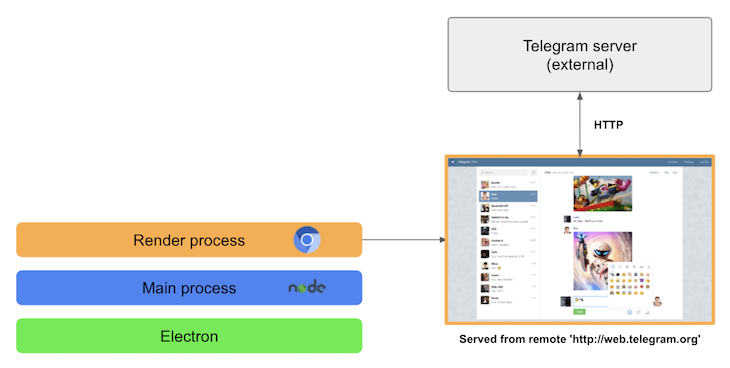
As an example architecture, we’ll use a desktop app for the Telegram chat web app. Electron will act as a wrapper for the existing web app without requiring any changes to the backend:
👁 Low Complexity App Electron Architecture
Setting up Electron is easy for this type of app! There are no changes needed at the web app codebase level.
A music streaming app like Spotify, which offers offline streaming support using a local cache, is a typical example of an app with a medium level of complexity. The desktop app can use Electron to build a local cache layer.
Similar to low-complexity apps, a medium-complexity app may also complement a web app. The main difference is the ability to provide offline support. Therefore, these apps are conceptually related to progressive web apps (PWAs) with offline support.
The main features of these apps include:
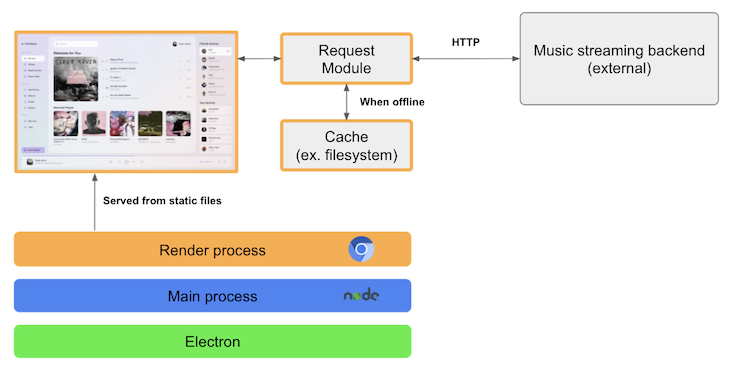
Let’s imagine that our streaming app plays a song of the day. If there is no internet connection, it will serve the available cached song:
👁 Medium Complexity App Electron Architecture
As outlined in the schema above, the UI will be served from local assets instead of a CDN, and the request layer has to be customized to support caching. While the example is relatively simple, the code-sharing and caching requirements will eventually increase in complexity, requiring custom Electron code.
For the highest level of complexity, let’s look at a batch image processing app like sharp. The app must be able to process thousands of images and work entirely offline.
Offline apps are significantly different from the previous two examples. Specifically, the typical backend workloads, like image processing, will execute within Electron by creating an offline application.
Main features include:
For the architecture proposal, let’s consider the offline image processing app described above, and demonstrated in the following diagram:
👁 High Complexity Electron App Architecture
The schema structures the app following the Electron documentation, which has some limitations. For one, there is noticeable performance degradation when running long-lived, CPU-intensive operations in a hidden renderer process.
Note that you should never run the operations in the main process. Doing so may block the main process, causing your application to freeze or crash.
Additionally, coupling the business logic and transport layers to Electron APIs limits the options to reuse standard web development tooling. Communications between the main processes and renderer processes use IPC, which requires a main process roundtrip when communicating between two render processes.
If your app falls in the low or medium-complexity categories, congrats! Many of the headaches that arise in offline apps won’t apply to you. However, if your app requirements fall in the high complexity range, there is still hope!
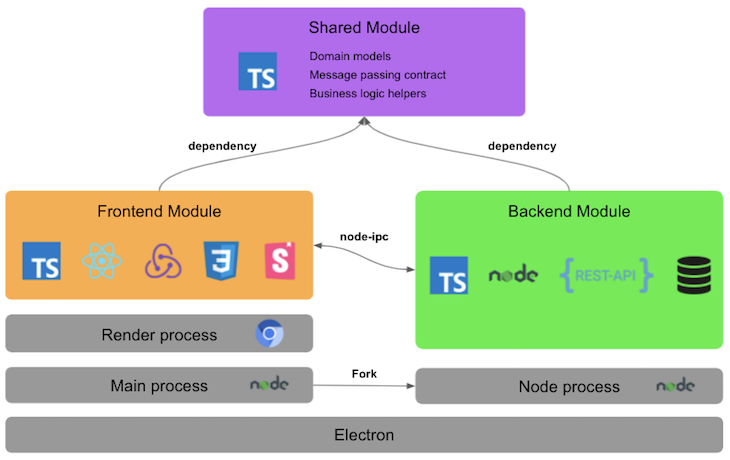
When we consider issues in offline apps like performance degradation, roundtrip communication between render processes, and the overall developer experience, we need a specialized architecture:
👁 Advanced Modularized Architecture Proposal
The proposed architecture is built on the following pillars:
Let’s go through each of the modules in detail!
Note: parts of the stack are chosen purely due to personal preference and are interchangeable. For example, you can swap TypeScript for JavaScript, React for Vue, Redux for MobX, or npm packages for code sharing instead of Yarn workspaces. As long as the pillars mentioned above are respected, you have freedom of choice across the stack.
The shared module is responsible for the code and types shared by both the frontend and backend modules. It enables you to develop both modules as separate entities while still sharing the domain-relevant code and types.
Codesharing is achieved using Yarn workspaces, a simple alternative to publishing the module as an npm package, releasing, and versioning it.
Main features include:
The frontend module is responsible for all things UI. It contains the components and animations of our app but not the business logic. In production, Electron serves it from generated static files.
Main features include:
The backend module contains the backend codebase and the Electron setup code. The business logic and long-running operations, like image processing, will run in a separate Node.js process so that the UI doesn’t suffer from degraded performance.
Main features include:
The frontend and backend communicate using interprocess message passing with node-ipc. The message passing allows for async and event-based communication.
async communication is best suited for short-lived operations. The frontend can wait until the backend processes the message to get the result right away.
Event-based communication is better suited for long-lived operations, like batch processing. As the task processes in the backend, it sends events that will modify the frontend’s app state in Redux. The backend can asynchronously complete long-running tasks and periodically update the progress displayed by the UI.
Main features include:
node-ipc as the communication libraryElectron is a powerful tool, but like any other, you’ve got to use it the right way following all best practices so you don’t miss out on both security and speed.
Let’s look at some of the security and performance best practices that will help you build secured and performant applications with Electron. Let’s start with the security best practices:
Now let’s look at the performance best practices:
IPC in Electron is a critical component, that facilitates the communication between the application’s main and renderer processes. Let’s look at the types of inter-process communication in Electron.js:
Asynchronous IPC: This is a type of IPC that allows processes to send and receive messages without having to wait for the other process. It doesn’t block the sender from continuing its operations while it waits for a response. Instead, the sender can continue processing other tasks. It uses ipcRenderer.send and ipcMain.on for asynchronous messaging between the renderer and main processes.
Synchronous IPC: This is another type of IPC where the sender sends a message and waits for a response before continuing the next operation. In this type of communication, the sender is blocked until a response is received from the recipient, which ensures that certain operations are carried out in a specific sequence and that specific tasks are completed before the next one begins.
However, while it provides more control over the order of operations, it can potentially lead to performance issues, especially if the receiver takes a long time to respond or if there’s a high volume of synchronous requests. So use synchronous IPC carefully or only when needed.
Finally, below are some best practices I would recommend when working with inter-process communication:
Understanding the importance of scalability and modular design is important when designing an advanced Electron.js architecture because it ensures that the application remains adaptable and maintainable as the system grows. This type of architectural design approach not only increases the performance of the system but also makes future updates or upgrades easier. Module interactions are classified as follows:
Modular integration and interaction: This is the process of combining or integrating several modules or components of an application to perform as a cohesive entity. It focuses on how modules are designed and integrated, ensuring that the entire program functions effectively. This includes things like dependency resolution, modular interface design, and ensuring that data flows consistently between modules.
Inter-module communication: This refers to the processes and protocols that modules use to share information or signals with one another. This could include techniques like inter-process communication (IPC) for synchronous and asynchronous messaging. Inter-module communication enables modules to work together, share data, and trigger actions based on events or conditions in other modules.
With the knowledge of how modules interact with each other, let’s move forward to understanding how decoupling a system can allow for maintainability and scalability.
Decoupling to improve maintainability: The deliberate decoupling of modules is an essential component of advanced Electron.js architecture. This intentional separation guarantees that each module operates as a separate entity, minimizing interwoven dependencies. The following are some of the strategies to decouple a system to achieve maintainability:
Decoupling for scalability: As systems grow, their design must allow the easy integration of new features and modules without requiring major system overhauls. The following are some of the strategies to achieve it:
Electron is a great choice for building cross-platform desktop applications using different web technologies. Although Electron is easy to use in low-complexity apps, performance and developer experience limitations will surface as the complexity increases.
The proposed architecture aims to provide a sound conceptual foundation for high-complexity apps. Of course, it may need to be extended depending on the use case, but I’ve found that it serves as a good foundation for many types of apps.
Install LogRocket via npm or script tag. LogRocket.init() must be called client-side, not
server-side
$ npm i --save logrocket

// Code:

import LogRocket from 'logrocket';
LogRocket.init('app/id');
// Add to your HTML:

<script src="https://cdn.lr-ingest.com/LogRocket.min.js"></script>
<script>window.LogRocket && window.LogRocket.init('app/id');</script>
We built the same app in TanStack Start RSC and Next.js RSC. TanStack shipped 40% less JS and built 4x faster — but Next.js is still the safer production bet.
From RSC vulnerabilities and the Vercel breach to TypeScript 7.0 Beta and AI agents — the nine frontend storylines that defined H1 2026, ranked.
AI tools generate working React code fast, but miss race conditions, empty states, debouncing, and accessibility. Here’s how to catch bugs before production.
Learn how to use Gemini CLI subagents to delegate frontend, backend, testing, and docs tasks to specialized agents with guardrails and clear ownership.
Hey there, want to help make our blog better?
Join LogRocket’s Content Advisory Board. You’ll help inform the type of content we create and get access to exclusive meetups, social accreditation, and swag.
Sign up now