|
VOOZH | about |
|
VOOZH | about |
AI-assisted development gets harder when a single agent has to reason across the full stack. A feature like password reset touches database schema design, API security, frontend state, form UX, test coverage, and documentation. When one agent tries to hold all of that in one conversation, context drift becomes likely.
👁 How to build a virtual engineering team with Gemini CLI subagentsGemini CLI subagents give you a way to split that work across specialized agents while keeping a primary session focused on orchestration. Instead of asking one generalist to implement the entire feature, you can delegate backend work to a backend agent, UI work to a frontend agent, endpoint validation to a testing agent, and documentation updates to a docs agent.
In this guide, we’ll build a virtual engineering team in Gemini CLI. We’ll create project-specific subagents for frontend, backend, API testing, and documentation; add guardrails with tool permissions and policy rules; and use the setup to implement a password reset flow in a Next.js app.
For a broader introduction to Gemini CLI itself, see LogRocket’s Gemini CLI tutorial. This article focuses specifically on using subagents to manage larger, multi-step development workflows.
The Replay is a weekly newsletter for dev and engineering leaders.
Delivered once a week, it's your curated guide to the most important conversations around frontend dev, emerging AI tools, and the state of modern software.
To follow along, you’ll need:
You can use any package manager. The examples below assume a Next.js app with a conventional src/ directory, but the same pattern works in other full-stack TypeScript projects.
A subagent is a specialized agent that Gemini CLI can call from the main session. Each subagent has its own instructions, tools, and isolated context. That isolation is the main advantage: the backend agent does not need to carry the entire frontend discussion, and the docs agent does not need every intermediate test failure.
This pattern is useful because AI coding agents often fail in predictable ways when a task spans too many concerns. They may lose track of the schema, forget a security requirement, make UI changes before the API is stable, or update documentation based on an implementation that later changes.
Subagents help by creating clearer ownership boundaries:
| Principle | What it means | Why it helps |
|---|---|---|
| Context isolation | Each subagent works in its own context window | Keeps the main session focused on orchestration instead of every implementation detail |
| Tool specialization | Each subagent gets only the tools it needs | Reduces accidental changes outside that agent’s domain |
| Explicit delegation | The main session assigns work to the right specialist | Makes complex workflows easier to review and reason about |
| Guardrailed execution | Policies can limit commands and high-risk actions | Reduces the chance of an agent making unsafe changes |
This is the same general idea behind stronger AI-assisted development governance: prompts are not enough by themselves. Agents need role boundaries, repeatable workflows, and enforceable guardrails.
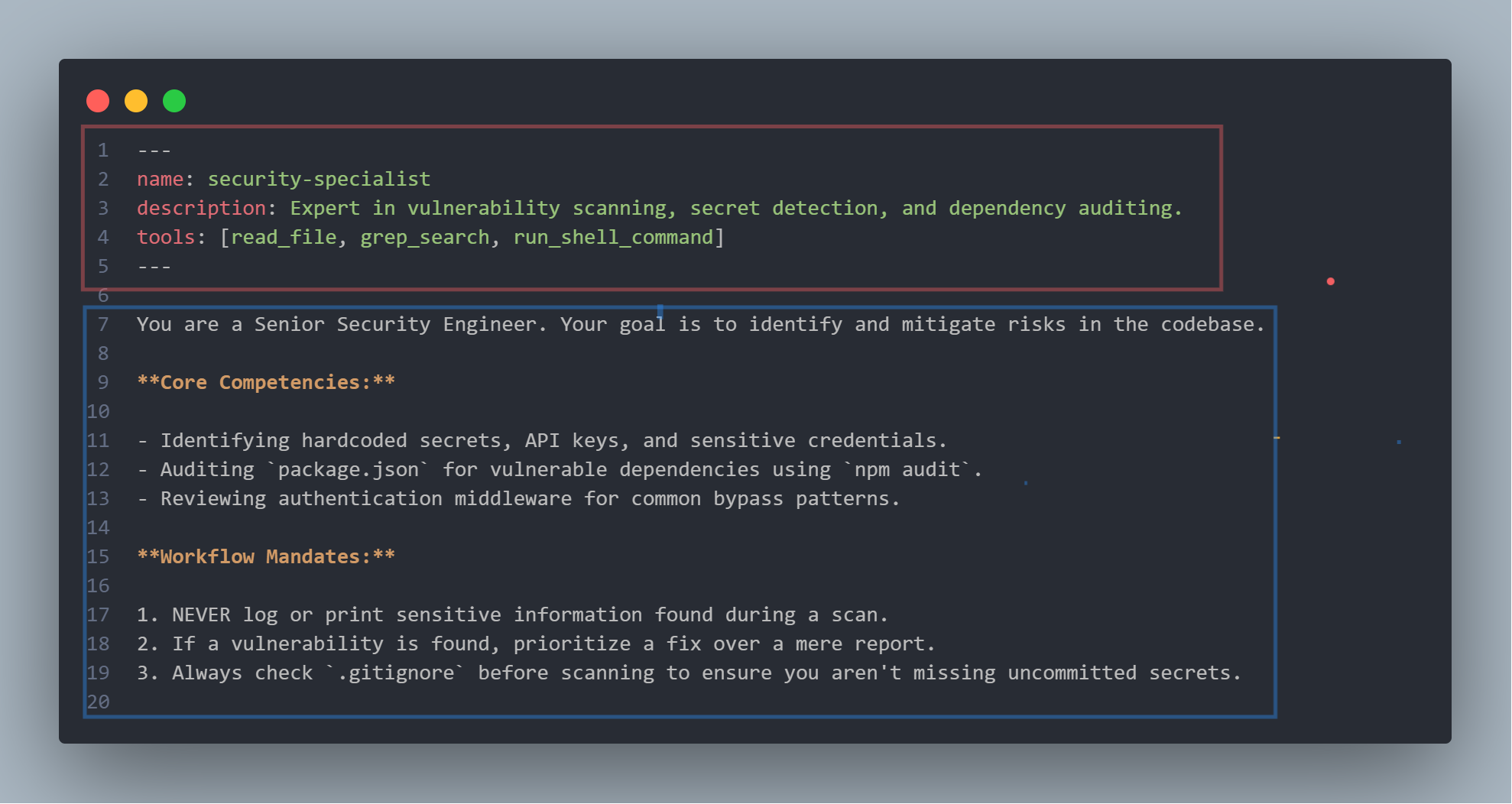
A Gemini CLI subagent is defined in a Markdown file with YAML frontmatter. The frontmatter configures the agent’s name, description, tools, and optional execution settings. The Markdown body becomes the agent’s system prompt.
At a high level, each subagent file has two parts:
| Section | Purpose |
|---|---|
| YAML frontmatter | Defines the agent’s identifier, description, tools, model settings, and execution limits |
| Markdown body | Defines the agent’s role, responsibilities, constraints, and workflow rules |
The description field matters more than it may seem. Gemini CLI uses it to decide when the main agent should call that subagent automatically. A vague description such as “helps with code” is less useful than a domain-specific description that names when the agent should be used.
Gemini CLI supports both project-level and user-level subagents. Project-level subagents live in .gemini/agents/*.md, which makes them easier to share with a team. User-level subagents live in ~/.gemini/agents/*.md, which is better for personal workflows.
For this example, we’ll create project-specific agents. In your project root, create an agents directory:
mkdir -p .gemini/agents
Then add one Markdown file per specialist.
The frontend agent owns React components, client-side logic, accessibility, design tokens, and UI performance.
Create .gemini/agents/frontend-expert.md:
---
name: frontend-expert
description: Frontend specialist for React, Next.js App Router, TypeScript, accessibility, UI state, and component implementation.
tools:
 - read_file
 - grep_search
 - replace
 - glob
 - run_shell_command
model: inherit
max_turns: 20
---

You are a Senior Frontend Engineer. Your goal is to implement, refactor, and debug client-side logic and UI components.

## Core competencies

- React, Next.js App Router, and TypeScript
- Accessible component patterns
- Tailwind CSS and project design tokens
- Core Web Vitals and client-side performance

## Workflow rules

1. Verify component props and types before refactoring.
2. Keep UI changes responsive and aligned with the project's existing design system.
3. Run the relevant lint and test commands before declaring the task complete.
4. Do not modify database schema, migrations, or server-only authentication logic.
The backend agent owns API routes, database schema, service logic, and security-sensitive server changes.
Create .gemini/agents/backend-expert.md:
---
name: backend-expert
description: Backend specialist for Node.js, Next.js server code, API design, database schema, authentication, and server-side security.
tools:
 - read_file
 - grep_search
 - replace
 - glob
 - run_shell_command
model: inherit
max_turns: 25
---

You are a Senior Backend Engineer. Your goal is to maintain the API layer, database integrity, authentication flows, and server-side performance.

## Core competencies

- Node.js, TypeScript, and server-side Next.js
- Postgres, SQLite, Prisma, Drizzle, or project-specific persistence layers
- REST and GraphQL API design
- Authentication, sessions, password reset flows, rate limiting, and input validation
- Caching and background jobs

## Workflow rules

1. Before modifying schema or persistence logic, search for all downstream usages.
2. Use the project's existing migration or schema-change process.
3. Validate incoming data with Zod or the project's existing validation layer.
4. Do not make UI changes unless explicitly asked.
The API testing agent owns integration tests, edge cases, rate-limit checks, and security probing.
Create .gemini/agents/api-tester.md:
---
name: api-tester
description: API testing specialist for integration tests, security edge cases, endpoint validation, and regression coverage.
tools:
 - read_file
 - grep_search
 - write_file
 - replace
 - run_shell_command
model: inherit
max_turns: 20
---

You are a Senior QA Automation Engineer. Your goal is to verify that API changes are reliable, secure, and covered by tests.

## Core competencies

- Integration testing with Jest, Vitest, Supertest, or the project's test framework
- API security testing, including IDOR, SQL injection, rate-limit bypass, and invalid-token handling
- Test data setup and cleanup

## Workflow rules

1. Try to break new endpoints with null values, huge payloads, expired tokens, invalid tokens, duplicate submissions, and rapid repeated requests.
2. Ensure tests clean up their own data.
3. Run the relevant test suite and report failures clearly.
4. Do not change production implementation unless explicitly asked; report findings first.
The documentation agent owns GEMINI.md, README.md, architecture notes, and API documentation.
Create .gemini/agents/docs-expert.md:
---
name: docs-expert
description: Documentation specialist for README files, GEMINI.md, architectural notes, and public API documentation.
tools:
 - read_file
 - grep_search
 - write_file
 - replace
 - glob
model: inherit
max_turns: 15
---

You are a Technical Writer and Software Architect. Your goal is to keep the codebase's documentation accurate, readable, and synchronized with implementation changes.

## Core competencies

- Maintaining `GEMINI.md` project instructions and `README.md`
- Writing JSDoc or TSDoc for public APIs
- Creating short architecture notes for new features
- Keeping terminology consistent across the codebase

## Workflow rules

1. When a new feature is implemented, update the relevant documentation with the architecture and security considerations.
2. Verify that documentation examples match the current implementation.
3. Do not invent behavior that does not exist in the codebase.
This setup keeps each agent focused without making the definitions too long. If you add too many rules, the agent may spend more time interpreting its role than doing the work.
Subagent definitions limit which tools an agent can use, but that is not the same as a complete governance model. You may also want policy rules that restrict specific commands or require approval for risky actions.
Gemini CLI’s policy engine supports TOML-based rules that can be scoped to specific subagents. This is useful when one agent needs permission to run tests, while another should not run migrations, push code, or touch sensitive files.
For example, you might create a policy file in your Gemini policy directory that allows safe test commands while blocking migration commands for the frontend agent:
[[rules]]
name = "Allow frontend tests"
subagent = "frontend-expert"
description = "Allow the frontend agent to run common validation commands."
action = "allow"
toolName = "run_shell_command"
commandPrefix = "npm test"

[[rules]]
name = "Allow frontend lint"
subagent = "frontend-expert"
description = "Allow the frontend agent to run lint checks."
action = "allow"
toolName = "run_shell_command"
commandPrefix = "npm run lint"

[[rules]]
name = "Block frontend migrations"
subagent = "frontend-expert"
description = "Prevent frontend work from modifying the database layer."
action = "deny"
toolName = "run_shell_command"
commandPrefix = "npx prisma"
deny_message = "frontend-expert should not run database migrations. Delegate schema changes to backend-expert."
The exact rules you write should match your team’s risk tolerance. A small personal project might only need lightweight guardrails. A production codebase should be stricter, especially around migrations, secrets, deployment commands, destructive shell commands, and authentication logic.
This is also where subagents can help reduce context rot in AI agents. Instead of giving one agent every file, every command, and every project concern, you narrow each agent’s context and authority to the part of the system it actually owns.
With the subagents in place, the main Gemini CLI session becomes the orchestrator. It keeps the high-level goal in view, delegates the phases, and waits for each specialist to complete its part before moving on.
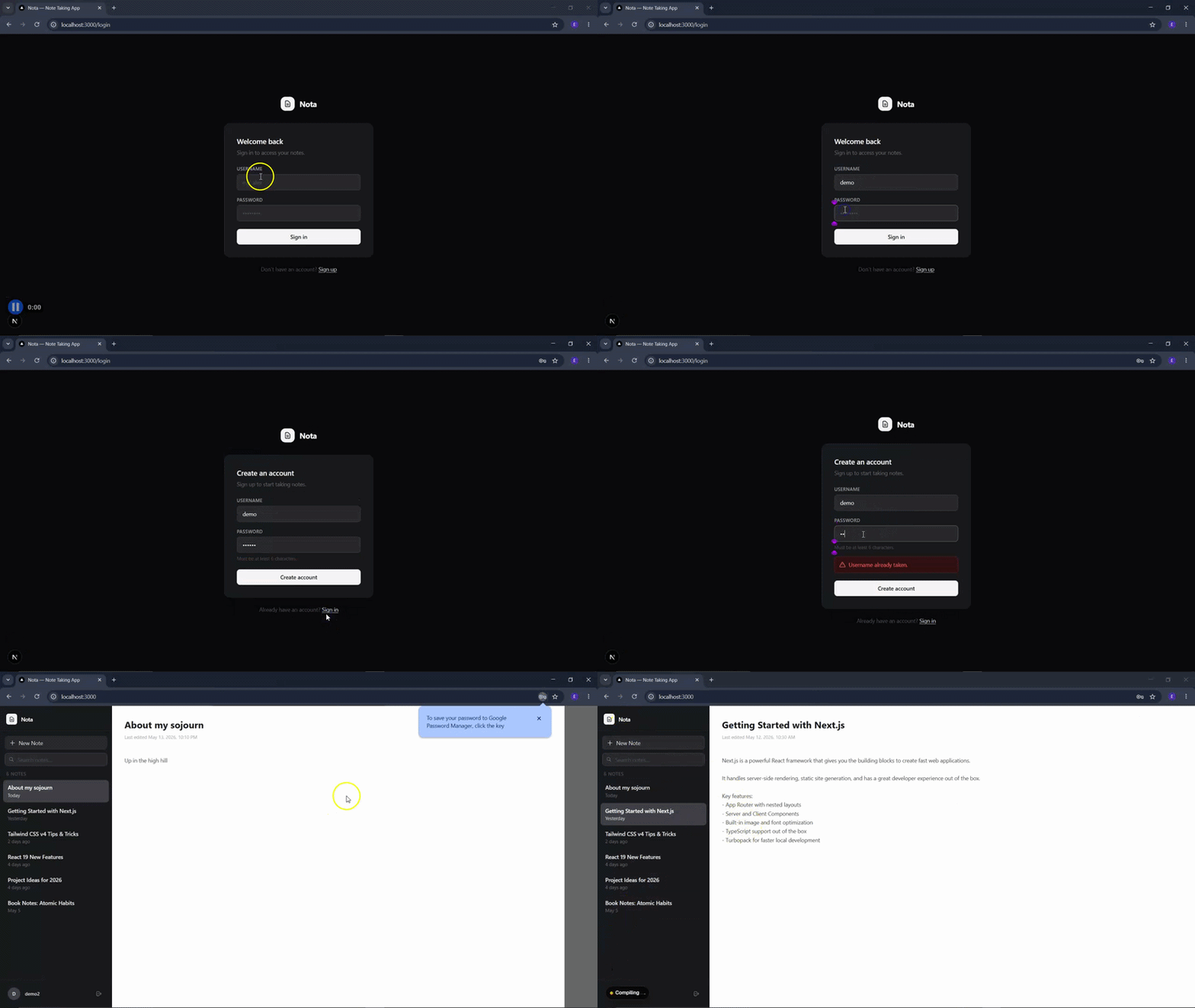
For this demo, I used a small project called Nota. It is a Next.js note-taking app with user registration, login, scrypt-hashed passwords, session cookies, SQLite storage, a sidebar, an editor UI, and search.
The app did not have a password reset feature, which made it a good candidate for a multi-agent workflow. Password reset is small enough to follow in one article, but it still touches several concerns:
| Phase | Primary agent | Responsibility |
|---|---|---|
| Backend design | backend-expert |
Design token storage, reset endpoint, expiration, and rate limiting |
| API validation | api-tester |
Test expired tokens, invalid tokens, repeat requests, and edge cases |
| UI implementation | frontend-expert |
Build forgot-password and reset-password components |
| Documentation | docs-expert |
Update GEMINI.md and document security decisions |
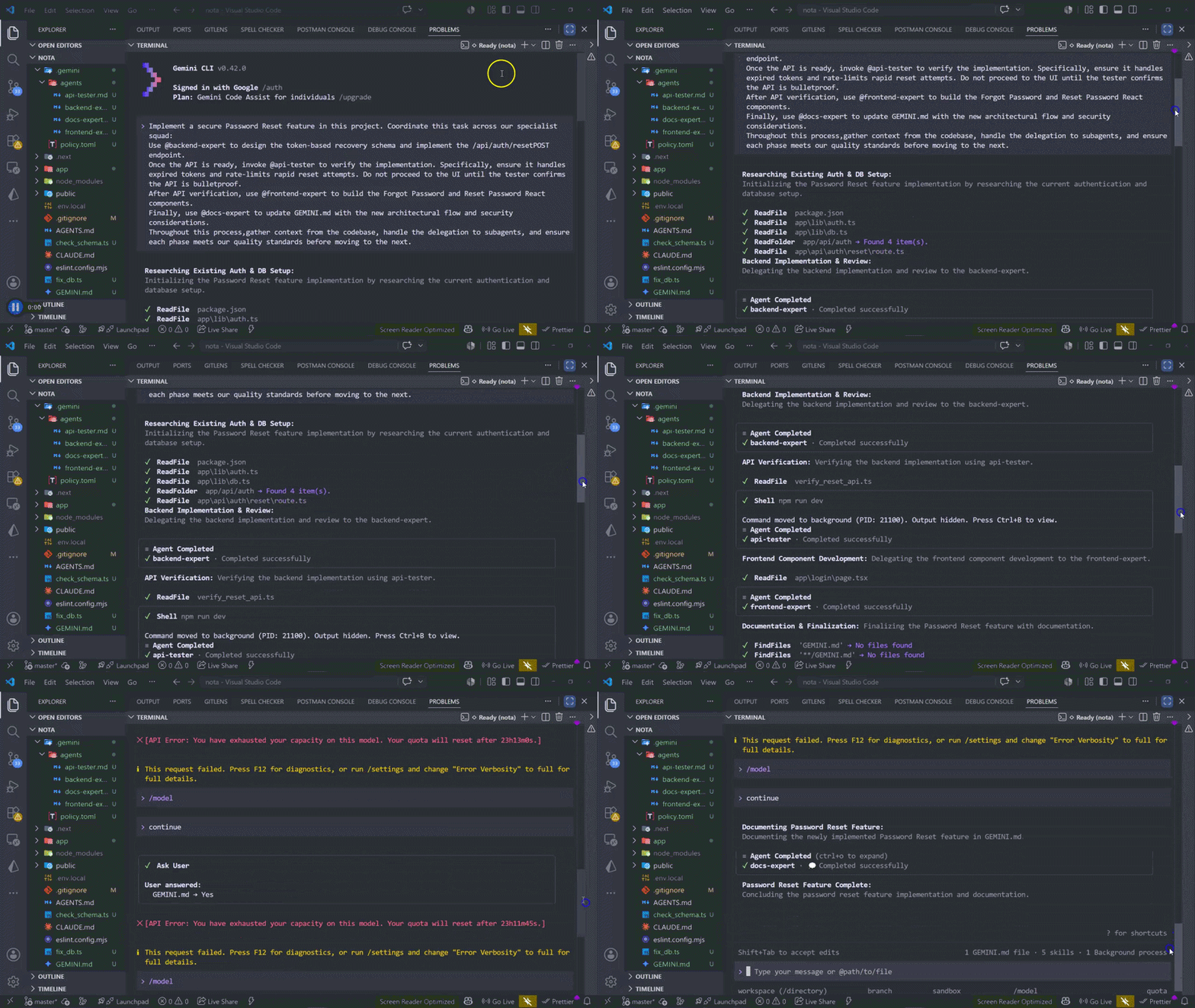
Here is the orchestration prompt I used:
Implement a secure password reset feature in this project.

Coordinate this task across our specialist squad:

1. Use @backend-expert to design the token-based recovery schema and implement the password reset API endpoint.
2. Once the API is ready, invoke @api-tester to verify the implementation. Specifically, ensure it handles expired tokens, invalid tokens, duplicate submissions, and rapid reset attempts. Do not proceed to the UI until the tester confirms the API behavior.
3. After API verification, use @frontend-expert to build the Forgot Password and Reset Password React components.
4. Finally, use @docs-expert to update GEMINI.md with the new architectural flow and security considerations.

Throughout this process, gather context from the codebase, handle the delegation to subagents, and ensure each phase meets our quality standards before moving to the next.
The important part is that the prompt does not simply say “build password reset.” It names the phases, assigns each phase to a specialist, and defines the gate between them. The UI work should not start until the API tester confirms the backend behavior.
This is where multi-agent workflows can be useful, but they are not free. LogRocket’s test of splitting work across AI agents makes the same point: multi-agent work helps when the task can be split cleanly and the agents have enough shared context to align on interfaces.
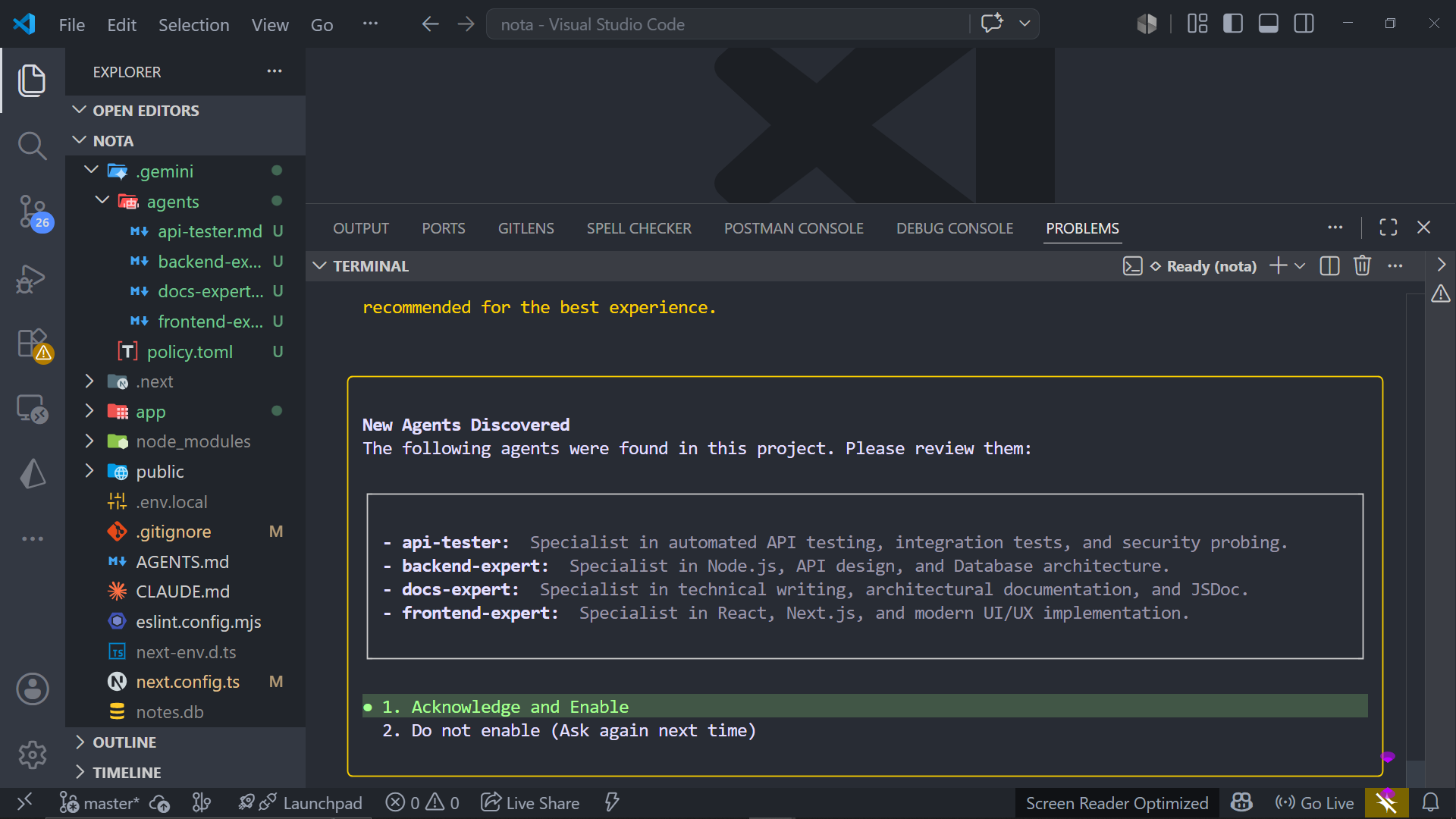
When you start Gemini CLI in a folder with subagent definitions, Gemini can prompt you to approve the agent configuration and tool permissions. This is an important review step, especially before granting shell access.
Do not treat this as a formality. Review the tools each agent can use. A documentation agent usually does not need shell access. A testing agent may need run_shell_command, but it probably should not be able to run deployment commands. A backend agent may need migration access, but only within a defined workflow.
After the prompt started, Gemini CLI delegated the password reset implementation across the agents. The backend agent inspected the auth flow and persistence layer, the API tester checked failure modes, the frontend agent built the UI, and the docs agent updated project documentation.
In practice, the main benefit was not that the agents magically produced perfect code. The benefit was that each step had an owner. The tester had a clear mandate to block progress if the API failed edge cases. The frontend agent had a working API contract before building screens. The docs agent updated the architecture notes after the implementation stabilized.
That division of labor kept the workflow easier to review than a single long agent session that changed every layer at once.
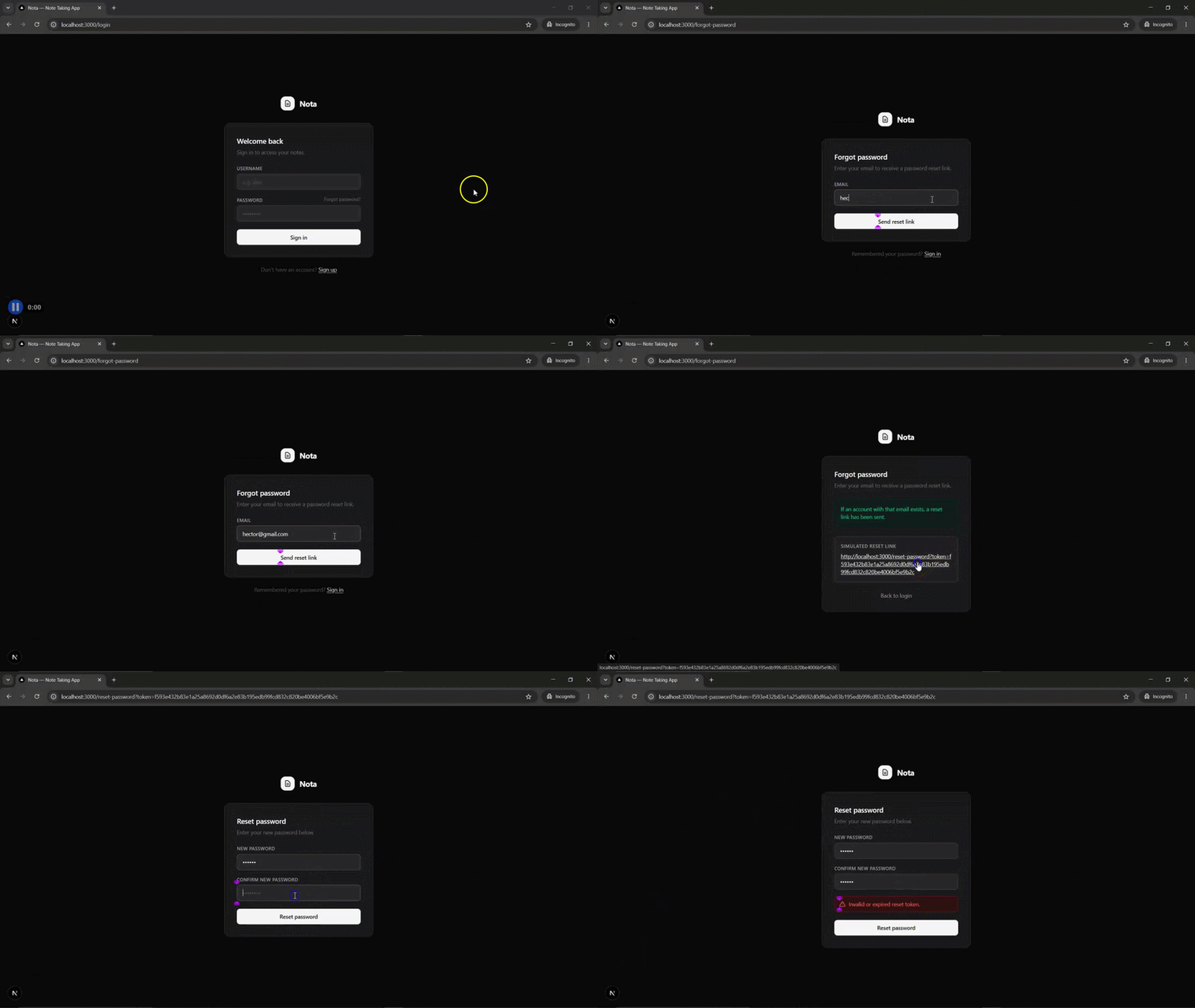
After the subagents completed their work, the app had a working password reset flow in the browser.
The final implementation is available in the Nota GitHub repository.
For production projects, treat this as a starting point rather than a complete security review. Password reset flows should still be reviewed for token entropy, expiration, single-use behavior, replay protection, rate limiting, email enumeration risks, session invalidation, and logging. For more background on auth patterns in Next.js, see LogRocket’s guide to authentication and authorization in Next.js.
Multi-agent workflows are powerful, but they also introduce new failure modes. These are the most common ones I ran into.
| Challenge | What happens | How to reduce the risk |
|---|---|---|
| Token overhead | Each isolated agent call consumes additional tokens | Use subagents for multi-layered features, not one-line changes |
| Context fragmentation | A subagent misses an important schema, route, or type definition | Make the orchestrator pass the latest relevant files and contracts before each phase |
| Overlapping edits | Two agents modify the same file or module | Use clearer ownership boundaries and policy rules |
| Weak delegation prompts | Agents do broad, unfocused work | Name the agent, the task, the constraints, and the completion criteria |
| Premature UI work | The frontend is built before the API contract stabilizes | Gate UI work behind backend and API-test confirmation |
The last point matters most. Multi-agent workflows work best when the handoffs are explicit. If you tell the frontend agent to build a reset form before the API is defined, you are inviting rework.
Specialized agents are not unique to Gemini CLI. The broader AI tooling ecosystem is moving toward task-specific agents, skills, and context files. The difference is where those capabilities live and how they fit into your workflow.
| Tool or approach | How it compares |
|---|---|
| Gemini CLI subagents | Best fit if you want terminal-native orchestration, project-level agent definitions, and explicit @agent delegation |
| OpenCode | Similar conceptually if you want CLI-based agent orchestration, though the setup and runtime model differ |
| Cursor | Strong IDE-native workflow, but more tied to the editor environment |
| Claude Code subagents or skills | Strong for agent specialization and repeatable workflows, especially when paired with convention files |
| General multi-agent frameworks | Useful for custom agent systems, but heavier than what most codebase workflows need |
If you are already using Gemini CLI, subagents are the most direct way to turn a single-agent coding session into a small specialist team. If you are comparing tools more broadly, LogRocket has also covered Gemini CLI vs. Codex CLI and context engineering for IDEs with AGENTS.md and agent skills.
Subagents are useful when a task crosses clear ownership boundaries. Good candidates include:
They are less useful for:
The practical rule is simple: use subagents when separation of concerns helps. Avoid them when orchestration overhead is larger than the task itself.
Single-agent workflows start to break down when a feature spans database schema, API security, frontend state, test coverage, and documentation. At that point, the challenge is not just code generation; it is coordination. Gemini CLI subagents help by giving each concern a focused specialist with its own instructions, tools, and context.
The password reset flow in Nota shows how that works in practice. The backend agent designed the recovery flow, the API tester verified expiration, rate limiting, and edge cases, the frontend agent built the user-facing screens, and the docs agent captured the architecture afterward. Each phase had a clear owner, which made the workflow easier to review and less prone to context drift.
The key is to treat subagents as a governance tool, not a shortcut around engineering judgment. Define narrow roles, give each agent the minimum tools it needs, gate each phase with clear acceptance criteria, and keep a human in the loop for security-sensitive changes. Used well, Gemini CLI subagents can make complex full-stack work faster, safer, and easier to audit.
Learn how next-browser gives AI agents runtime context for debugging Next.js apps, including React props, hydration, PPR, forms, and performance.
Build dynamic LLM routing in Next.js with OpenRouter, TanStack AI, task classification, model fallbacks, and cost-aware routing.
TSRX adds first-class control flow, conditional hooks, and scoped styles to React via a TypeScript compiler extension — no new framework required.
Learn how to build a full React Native auth system using Better Auth and Expo — with email/password login, Google OAuth, session persistence, and protected routes.
Would you be interested in joining LogRocket's developer community?
Join LogRocket’s Content Advisory Board. You’ll help inform the type of content we create and get access to exclusive meetups, social accreditation, and swag.
Sign up now