|
VOOZH | about |
|
VOOZH | about |
React Hooks, first introduced in the React 16.8.0 release, are new APIs that allow developers to supercharge functional components. Hooks make it possible for us to do with functional components things we could only do with classes.
Consequently, we can use states and other React features without writing classes.
Since their introduction, Hooks have had a seismic effect in the React ecosystem. And they have forever changed the way React apps are built.
In this article, we’ll look at practical applications of the reusable Hook pattern. As we consider these, it’s important to mention that Hooks are composable, meaning you can call another Hook inside your custom Hook.
The Replay is a weekly newsletter for dev and engineering leaders.
Delivered once a week, it's your curated guide to the most important conversations around frontend dev, emerging AI tools, and the state of modern software.
Hook patternsLet’s consider some reusable Hook pattern below:
useIsMounted HookIn React, once a component is unmounted, it will never be mounted again, which is why we do not set state in an unmounted component. This is because it will never be re-rendered.
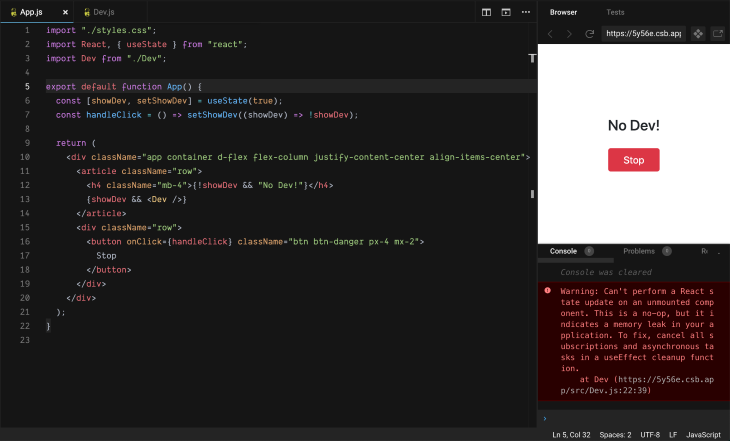
👁 An Example of an App That Is Unmounted
The image above features a small contrived example app with this issue.
In the app above, the Dev component is only rendered when the showDev state is true. And clicking the stop button toggles the value of the showDev state. Consequently, unmounting the Dev component happens when showDev is false.
Below is the implementation of the Dev component.
function Dev() {
 const [devProfile, setDevProfile] = useState("Fetching Dev...");
 const getDevProfile = () => {
 setTimeout(() => setDevProfile("Lawrence Eagles"), 4000);
 };
 useEffect(() => {
 getDevProfile();
 });
 return (
 <div className="mb-4 text-center">
 <p>{devProfile}</p>
 </div>
 );
}
From the code above, we can see that once the component mounts, the getDevProfile function is called. This takes 4000 milliseconds to run and thereafter updates the devProfile state with Lawrence Eagles.
If we unmount the Dev component (by clicking the stop button) before 4000 milliseconds, React displays the warning error seen in the image above.
Although this error does not break the UI, it is known to cause memory leaks, which hinders performance.
To avoid this issue, some developers do this:
if (this.isMounted()) { // This is bad.
 this.setState({...});
}
But the React team considers using the isMounted function an antipattern, so they recommend you track the mounted status yourself.
 useEffect(() => {
 let isMounted = true; // sets mounted flag true
 return () => {
 // simulate an api call and update state here
 isMounted = false;
 }; // use effect cleanup to set flag false, if unmounted
 }, []);
 return isMounted;
};
Our goal is to abstract the above logic into a custom Hook which we can reuse in our code; consequently, we keep our code DRY.
To do this, encapsulate all the boilerplate code above into a custom Hook (useIsMounted Hook), as seen below:
import { useEffect, useState } from "react";
const useIsMounted = () => {
 const [isMounted, setIsMouted] = useState(false);
 useEffect(() => {
 setIsMouted(true);
 return () => setIsMouted(false);
 }, []);
 return isMounted;
};
export default useIsMounted;
Now we can use it in our app like this:
function Dev() {
 const isMounted = useIsMounted();
 const [devProfile, setDevProfile] = useState("Fetching Dev...");
 useEffect(() => {
 function getDevProfile() {
 setTimeout(() => {
 if (isMounted) setDevProfile("Lawrence Eagles");
 }, 4000);
 }
 getDevProfile();
 });
 return (
 <div className="mb-4 text-center">
 <p>{devProfile}</p>
 </div>
 );
}
The above code ensures that the state is only updated when the component is still mounted.
useLoading HookThis is a well thought-out reusable Hook that can be a time saver in a scenario where you have a number of buttons that link to a resource that is loaded once the component mounts.
Typically, there’s a Loading.. spinner of some sort when the async call is running to get the resource.
The challenge is that the number of these buttons increases as the resource increases, which can clutter our component with different loading states.
Consider this code:
import "./styles.css";
import React, { useState, useEffect } from "react";
export default function App() {
 const delay = (ms) => new Promise((resolve) => setTimeout(resolve, ms));
 const [isLoadingDev, setIsLoadingDev] = useState(true);
 const [isLoadingStack, setIsLoadingStack] = useState(true);
 const fetchDevs = async () => {
 console.log("this might take some time....");
 await delay(4000);
 setIsLoadingDev(false);
 console.log("Done!");
 };
 const fetchStacks = async () => {
 console.log("this might take some time....");
 await delay(5000);
 setIsLoadingStack(false);
 console.log("Done!");
 };
 useEffect(() => {
 fetchDevs();
 fetchStacks();
 }, []);

 return (
 <div className="app
 container
 d-flex
 flex-column
 justify-content-center
 align-items-center"
 >
 <article className="d-flex flex-column my-2">
 <p className="text-center">Welcome to Dev Hub</p>
 </article>
 <article className="d-flex flex-column">
 <button className="m-2 p-3 btn btn-success btn-sm">
 {isLoadingDev ? "Loading Devs..." : "View Devs"}
 </button>
 <button className="m-2 p-3 btn btn-success btn-sm">
 {isLoadingStack ? "Loading Stacks..." : "View Stacks"}
 </button>
 </article>
 </div>
 )
}
In the code above, the fetchDev and fetchStacks functions are contrived to simulate an async request. Once the component mounts, they are called and the message in the buttons changes when these function finishes.
The loading status of each button is handled by a useState initialization and would increase in number as we load more resources.
This code is not DRY and the repetition is a recipe for bugs.
We can refactor the code above by creating a reusable useLoading Hook, as shown here:
import { useState } from "react";
const useLoading = (action) => {
 const [loading, setLoading] = useState(false);
 const doAction = (...args) => {
 setLoading(true);
 return action(...args).finally(() => setLoading(false));
 };
 return [doAction, loading];
};
export default useLoading;
This hook takes an async function and returns an array containing that function and the loading status.
We have also been able to abstract our useState logic to this component and we only need one initialization.
We can use it in our code, like this:
import "./styles.css";
import React, { useEffect } from "react";
import useLoading from "./useLoading";
export default function App() {
 const delay = (ms) => new Promise((resolve) => setTimeout(resolve, ms));
 const fetchDevs = async () => {
 console.log("this might take some time....");
 await delay(4000);
 console.log("Done!");
 };
 const fetchStacks = async () => {
 console.log("this might take some time....");
 await delay(5000);
 console.log("Done!");
 };
 const [getDev, isLoadingDev] = useLoading(fetchDevs);
 const [getStacks, isLoadingStack] = useLoading(fetchStacks);
 useEffect(() => {
 getDev();
 getStacks();
 }, []);
 return (
 <div className="app
 container
 d-flex
 flex-column
 justify-content-center
 align-items-center"
 >
 <article className="d-flex flex-column my-2">
 <p className="text-center">Welcome to Dev Hub</p>
 </article>
 <article className="d-flex flex-column">
 <button className="m-2 p-3 btn btn-success btn-sm">
 {isLoadingDev ? "Loading Devs..." : `View Devs`}
 </button>
 <button className="m-2 p-3 btn btn-success btn-sm">
 {isLoadingStack ? "Loading Stacks..." : "View Stacks"}
 </button>
 </article>
 </div>
 );
}
Here, we used array destructuring to get the async action function and the loading status.
 const [getDev, isLoadingDev] = useLoading(fetchDevs);
 const [getStacks, isLoadingStack] = useLoading(fetchStacks);
These are then used in the useEffect Hook and in the view. The result is a clean code that is DRY and easier to maintain.
Also, after all loading status is completed, we can now easily do things like render a component, update state, etc.
if(isLoadingDev && isLoadingStack) {
 // do somthing
}

return {
 // normal component view
}
I hope after this discourse you appreciate the need to keep your codes DRY and are ready to start writing custom reusable Hooks.
These are just two examples of advanced patterns of creating reusable custom Hooks, now hopefully you can create your own advanced pattern.
You can read more on building your own Hooks here.
Install LogRocket via npm or script tag. LogRocket.init() must be called client-side, not
server-side
$ npm i --save logrocket

// Code:

import LogRocket from 'logrocket';
LogRocket.init('app/id');
// Add to your HTML:

<script src="https://cdn.lr-ingest.com/LogRocket.min.js"></script>
<script>window.LogRocket && window.LogRocket.init('app/id');</script>
Learn how next-browser gives AI agents runtime context for debugging Next.js apps, including React props, hydration, PPR, forms, and performance.
Build dynamic LLM routing in Next.js with OpenRouter, TanStack AI, task classification, model fallbacks, and cost-aware routing.
TSRX adds first-class control flow, conditional hooks, and scoped styles to React via a TypeScript compiler extension — no new framework required.
Learn how to build a full React Native auth system using Better Auth and Expo — with email/password login, Google OAuth, session persistence, and protected routes.
Would you be interested in joining LogRocket's developer community?
Join LogRocket’s Content Advisory Board. You’ll help inform the type of content we create and get access to exclusive meetups, social accreditation, and swag.
Sign up now