|
VOOZH | about |
|
VOOZH | about |
Duplex streams are a fundamental category of streams in Node.js. However, they’re often misunderstood, including the Duplex stream.
👁 Creating Duplex streams nodejsThis type of stream is hybrid, meaning it expects a read and write method while it’s implemented.
In this article, we’ll review Duplex streams and how to create one. But before that, let’s refresh ourselves on what streams are.
For this post, knowledge of JavaScript and Node.js can help but it is not necessary.
The Replay is a weekly newsletter for dev and engineering leaders.
Delivered once a week, it's your curated guide to the most important conversations around frontend dev, emerging AI tools, and the state of modern software.
Streams are data collected from a source and brought to another location in a sequence. Streaming a video online is an example: while the video content is passed to you in a sequence, the full content is not available yet.
Streams are divided into four categories: Writable, Readable, Duplex, and Transform.
Readable streams read data from a file or source and pass it to the main application. A buffer then stores the data in case there is a delay passing the data to the application.
When Writable streams, the functionality is opposite. The data is read from the application to the file. There is also a buffer if the data transfer slows, and it then stores it there.
Duplex streams, on the other hand, are a mixture of both the readable and writable streams where both streams are independent of each other.
Transform streams are also like Duplex, but both the readable and writable streams are connected.
The connection enables the application to write data to the application, but there the data must be manipulated before passing to the readable stream.
Just as we explained earlier, the Duplex stream is basically a mixture of the Readable and Writable streams.
An example of a Duplex stream is a Socket, which provides two channels to send and receive data.
Other examples of the Duplex streams are:
To create a Duplex stream in Node.js, begin importing the required methods from the stream module:
const { PassThrough } = require('stream')
const tunnel = new PassThrough()
The PassThrough stream is a basic type of Duplex stream that acts as a tunnel to pipe our Readable stream to the Writable stream.
So, with this tunnel, we can check the data processing to the Writable stream.
Next, let’s read a file using the Readable stream and write it into a Writable stream using writeStream now:
const { PassThrough } = require("stream");
const { createReadStream, createWriteStream } = require("fs");
const readStream = createReadStream("./README.md"); // read data from this file
const writeStream = createWriteStream("./copy.txt"); // write data to this file
Next, we can check what is in the buffer to see if the data is passing in the tunnel:
const { PassThrough } = require("stream");
const { createReadStream, createWriteStream } = require("fs");
const readStream = createReadStream("./README.md");
const writeStream = createWriteStream("./copy.txt");

const tunnel = new PassThrough();

tunnel.on("data", (chunk) => {
 console.log("bytes:", chunk); // bytes: <Buffer 23 20 4a 61 76 61 53 63 72 69 70 74 20 41 6c 67 6f 72 69 74 68 6d 73 20 61 6e 64 20 44 61 74 61 20 53 74 72 75 63 74 75 72 65 73 0a 0a 54 68 69 73 20 ... 1767 more bytes>
});

readStream.pipe(tunnel).pipe(writeStream);
Besides PassThrough, we have Throttle to delay how long data passes from one source to another in the pipeline. We can use Duplex streams to set a delay of when the data is brought into our application:
const { PassThrough, Duplex } = require("stream");
const { createReadStream, createWriteStream } = require("fs");
const readStream = createReadStream("./movie.mp4");
const writeStream = createWriteStream("./copy.mp4");

class Throttle extends Duplex {
 /*
 * Class constructor will receive the injections as parameters.
 */
 constructor(time) {
 super();
 this.delay = time;
 }
 _read() {}

 // Writes the data, push and set the delay/timeout
 _write(chunk, encoding, callback) {
 this.push(chunk);
 setTimeout(callback, this.delay);
 }

 // When all the data is done passing, it stops.
 _final() {
 this.push(null);
 }
}

const tunnel = new PassThrough();
const throttle = new Throttle(500);

let amount = 0;
tunnel.on("data", (chunk) => {
 amount += chunk.length;
 console.log("bytes:", amount);
});

readStream.pipe(throttle).pipe(tunnel).pipe(writeStream);
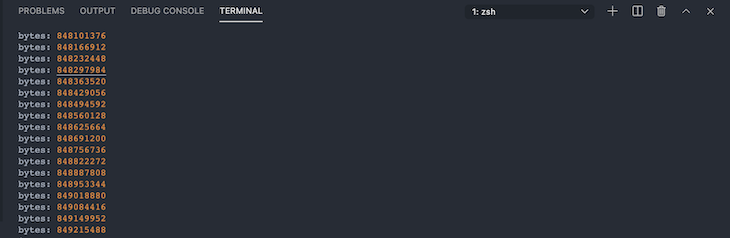
With this code above, we created a Duplex stream that creates throttle(delay) for our piped data. This sets a delay of 500 milliseconds, and the method within the Throttle class pushes the chunk.
The _final() method only pushes null when the data transfer completes.
We also modified our PassThrough stream to add up the length of every chunk it reads.
This is how the response renders in the terminal in increments of 500 milliseconds:
👁 Response Renders In Terminal At 500 Millisecond Increments
By working with Duplex streams in Node.js, we saw how we can delay passing data from one stream to another.
Duplex streams are quite important in our digital world and are used most of the time without us knowing, especially in Socket. These are powerful features because of how they implement both the Readable and Writable streams together.
Deploying a Node-based web app or website is the easy part. Making sure your Node instance continues to serve resources to your app is where things get tougher. If you’re interested in ensuring requests to the backend or third-party services are successful, try LogRocket.
👁 LogRocket Network Request MonitoringLogRocket lets you replay user sessions, eliminating guesswork around why bugs happen by showing exactly what users experienced. It captures console logs, errors, network requests, and pixel-perfect DOM recordings — compatible with all frameworks.
LogRocket's Galileo AI watches sessions for you, instantly identifying and explaining user struggles with automated monitoring of your entire product experience.
LogRocket instruments your app to record baseline performance timings such as page load time, time to first byte, slow network requests, and also logs Redux, NgRx, and Vuex actions/state. Start monitoring for free.
Learn how next-browser gives AI agents runtime context for debugging Next.js apps, including React props, hydration, PPR, forms, and performance.
Build dynamic LLM routing in Next.js with OpenRouter, TanStack AI, task classification, model fallbacks, and cost-aware routing.
TSRX adds first-class control flow, conditional hooks, and scoped styles to React via a TypeScript compiler extension — no new framework required.
Learn how to build a full React Native auth system using Better Auth and Expo — with email/password login, Google OAuth, session persistence, and protected routes.
Hey there, want to help make our blog better?
Join LogRocket’s Content Advisory Board. You’ll help inform the type of content we create and get access to exclusive meetups, social accreditation, and swag.
Sign up now