|
VOOZH | about |
|
VOOZH | about |
JavaScript is one of the world’s most popular programming languages, and the language of the web. However, because it’s not strongly typed, there is a possibility of introducing bugs into our code inadvertently. This is where TypeScript comes in.
👁 ImageTypeScript is a strongly typed subset of JavaScript, and it provides the necessary tooling to create type guards for our application. Functions are one of the main paradigms in both JavaScript and TypeScript, and the building blocks of any application. Therefore, it is essential for TypeScript developers to understand how to build and use strongly typed functions in their day-to-day work.
This article is a guide on how to create and use strongly typed functions. We will use plenty of examples to outline the many functions TypeScript devs can build.
In order to be able to follow this tutorial, you’ll need:
The Replay is a weekly newsletter for dev and engineering leaders.
Delivered once a week, it's your curated guide to the most important conversations around frontend dev, emerging AI tools, and the state of modern software.
When we build applications, our aim is always to make them stable, reliable, available, maintainable, and scalable. Having and using typed functions helps us move closer to that ultimate goal.
Typed functions help us catch bugs that we might miss without type guards. TypeScript, and by extension typed functions, have helped many companies reduce bugs that ship with their product, helping them reduce development or support time that could have resulted otherwise.
In this section, we are going to be creating functions and then adding type guards to them.
Below is a simple function called subtraction:
function subtraction(foo, bar){
 return foo - bar;
}
This subtraction function takes in two parameters: foo and bar, and then returns the difference between them.
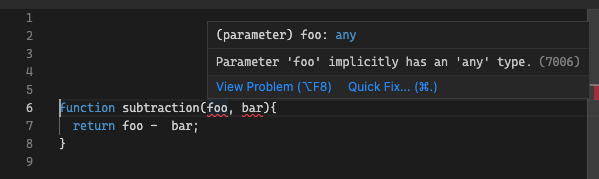
When we paste this code within our TypeScript playground, we get an error about our parameters having an implicit type of any.
We’ll need to add types to our parameters as seen below:
function subtraction(foo: number, bar: number){
 return foo - bar;
}
We have added a number type for our parameters above. This makes sure that our parameters are number values. If we try to assign a parameter that isn’t a number to this function (as I have done below), we’ll get an error: Argument of type 'string' is not assignable to parameter of type 'number':
subtraction(10, 'string')
TypeScript implicitly recognizes the type for the return value from the type of the params, but we can also add a type to the return value. This is shown in the example below:
function subtraction(foo: number, bar: number): number{
 return foo - bar;
}
We can also declare functions using type interfaces. Here, we declare an attribute interface to pass into the functions:
interface Attribute {
 age: number,
 sentence: string
}

function personality(attribute: Attribute): string{
 return `${attribute.sentence} ${attribute.age}`;
}

const attribute: Attribute = {
 age: 18,
 sentence: "My age is"
}

const getPersonality = personality(attribute);
If we paste this code into our TypeScript playground, we’ll see it passes our type checks and no errors are shown.
Let’s now turn to typed arrow functions, and how to create them. The syntax for adding types to arrow functions is very similar to that of normal functions.
I’m going to refactor our last function into an arrow function and apply type guards to it:
interface Attribute {
 age: number,
 sentence: string
}

const personality = (attribute: Attribute): string => {
 return `${attribute.sentence} ${attribute.age}`;
}

const attribute: Attribute = {
 age: 18,
 sentence: "My age is"
}

const getPersonality = personality(attribute);
The same rules that apply to normal functions also apply to arrow functions.
Now that we have learned how to create normal and arrow functions, we are going to look at how to create asynchronous typed functions. There’s a difference between typing asynchronous functions and normal functions: the return type of an async function must be the Promise<T> generic.
This generic represents the promise object being returned by the async function, where the <T> represents the type of the value to which the promise resolves. Below is an example of a typed asynchronous function:
interface Fruit {
 id: number,
 name: string
}

const fruits: Fruit[] = [
 {id: 1, name: "apple"},
 {id: 2, name: "Orange"}
]

async function getFruitById(fruitId: number): Promise<Fruit | null> {
 const findFruit = fruits.find(fruit => fruit.id === fruitId);
 if(!findFruit) return null;
 return findFruit;
}

async function runAsyncFunction() {
 const getFruit = await getFruitById(1);
}
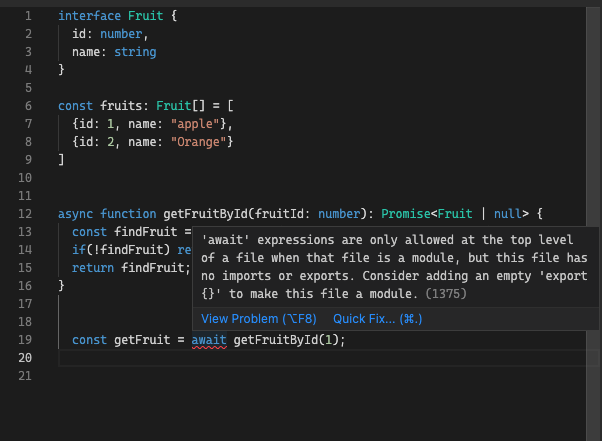
In the above example, we created a fruit interface to handle the types for the params. We also created the getFruitById function, and set the return type to be the Promise generic with Fruit or null as the type of the return value. Finally, we had to wrap the getFruitById call into the runAsyncFunction, because we cannot use await in the top level of a file or we’ll get the the error below from the TypeScript compiler.
Wrapping it in another async function fixes this error.
We’ve seen how to pass typed parameters into typed functions from our examples above, but these cases only cover the instances in which we are sure about the number and exact type of each parameter. There are times in which we aren’t sure, and we need to cater to such a situation as well:
interface Fruit {
 id: number,
 name: string | null ,
 type?: string
}
Above is an example of declaring optional parameters using an interface. The name param can take a value that has a type string or null.
We use the ? to make the type param optional, which means we don’t need to pass the param into our function, and when we do pass it, the value has to be a type of string.
We can also declare the params and types directly inside the function as seen below:
function returnUser(firstName: string, lastName?: stringl) {
 return `My name is ${firstName} ${lastName}`;
}
In the above example, the firstName param is required, while the lastName param isn’t, but if passed, must be a type string.
We can also define types for rest parameters. Rest parameters are a feature in JavaScript that passes many parameters as a single array into the function. The example below shows how to do this:
function addition(...args: number[]) {
 let result: number = 0;
 for(let i = 0; i < args.length; i++){
 result += args[i];
 }
 return result;
}
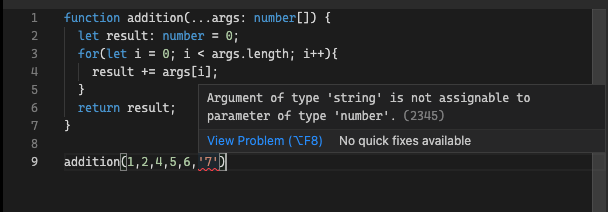
The args param is an array of number types; this helps us typecheck our args params and prevents us from passing any param that isn’t a type of Number as seen in the image below.
The TypeScript compiler throws an error if the type of the param passed isn’t a number.
The number and type of arguments can vary when calling certain JavaScript functions. An example would be writing a function that returns a user from either an ID (one argument) or phone number (one argument), or a combination of address and name (two arguments).
The overload signatures in TypeScript permit a function to be called multiple ways. This is achieved by writing a few function signatures (usually two or more), then the body of the function, like so:
interface User {
 id: number;
 phoneNumber: string;
 fullName: string;
 address: string;
};

const users: User[] = [
 { id: 1, phoneNumber: "08100000000", fullName: "First User" , address: "Santa fe, florida" },
 { id: 2, phoneNumber: "08111111111", fullName: "Second User", address: "San Fransisco, California" }
];

function getUser(id: number): User | undefined;
function getUser(phoneNumber: string): User | undefined;
function getUser(address: string, fullName: string): User | undefined;

function getUser(idOrPhoneNumber: number | string, address?: string): User | undefined {
 if (typeof idOrPhoneNumber === "string") {
 return users.find(user => user.phoneNumber === idOrPhoneNumber);
 }

 if (typeof address === "string") {
 return users.find(user => user.address === address);
 } else {
 return users.find(user => user.id === idOrPhoneNumber);
 }
}

const userById = getUser(1);
const userByPhoneNumber = getUser("08100000000");
const userByAddress = getUser("San Fransisco, California", "Jon Doe");
In the code above, we declare the input parameters and types that will be passed into the function in a UI. In addition, two overloads accept one argument, while one overload accepts two arguments; these are referred to as overload signatures.
We then developed a function implementation with a compatible signature. Each function has an implementation signature, but this signature cannot be directly called.
Class constructors are very similar to functions in the sense that we can add parameters with different types, default values, and overloads. We can also type our constructors using a normal signature with default values or overloads.
Normal signature with overloads:
 class Example {
 a: number;
 b: number;

 constructor(a = 1, b = 4) {
 this.a = a;
 this.b = b
 }
 }
Overloads:
class Example {
 constructor(a:number, b:string);
 constructor(xs: any, y?: any) {
 }
}
There are a couple of differences between typed functions and typed constructors:
In this article, we’ve gone through the various types of typed functions, including how to create and use them. Typed functions help us create safeguards, and write code that is highly reliable and easy to debug. I hope this article has given you some more context for why strongly typed functions are imperative to understand as a TypeScript developer, and information that can help you build faster, safer, and better TypeScript applications.
LogRocket lets you replay user sessions, eliminating guesswork by showing exactly what users experienced. It captures console logs, errors, network requests, and pixel-perfect DOM recordings — compatible with all frameworks, and with plugins to log additional context from Redux, Vuex, and @ngrx/store.
With Galileo AI, you can instantly identify and explain user struggles with automated monitoring of your entire product experience.
Modernize how you understand your web and mobile apps — start monitoring for free.
Learn how next-browser gives AI agents runtime context for debugging Next.js apps, including React props, hydration, PPR, forms, and performance.
Build dynamic LLM routing in Next.js with OpenRouter, TanStack AI, task classification, model fallbacks, and cost-aware routing.
TSRX adds first-class control flow, conditional hooks, and scoped styles to React via a TypeScript compiler extension — no new framework required.
Learn how to build a full React Native auth system using Better Auth and Expo — with email/password login, Google OAuth, session persistence, and protected routes.
Hey there, want to help make our blog better?
Join LogRocket’s Content Advisory Board. You’ll help inform the type of content we create and get access to exclusive meetups, social accreditation, and swag.
Sign up now