|
VOOZH | about |
|
VOOZH | about |
The rapid adoption of AI in recent times proves that software products can take advantage of AI where necessary to create richer experiences for users. In this article, I would like you to grab a coffee, set up your Python playground, and get ready to explore different providers that offer AI speech-to-text (STT) services.
👁 Exploring AI speech-to-text services with PythonThere are a couple of these providers, such as:
But in this article, I will consider only the first three providers because they do not require proprietary software and make it easy to set up an account.
To explore these powerful STT service providers, we will use a 40-second audio recording as input to interact with their APIs. Our comparison will be based on the following metrics:
Accuracy becomes important when you consider that many languages, including English, can be spoken with over 160 accents. Commonly, accuracy is measured by the Word Error Rate (WER). This refers to the number of word insertions, deletions, and/or substitutions a transcribed text contains, with respect to the original text.
To get started, I will transcribe sample audio manually to serve as our reference text for calculating WER:
I am proud of a verbal data gathering tool which I built, particularly because, one, the use case, it empowered researchers to collect qualitative data which had richer insights. And secondly, for the architecture we used, we were thinking of reusability, so we approached building UIs and other business logic in a functional style such that functions are pure without side effects. This way our logic were deterministic and reusable. Lastly, the team which I worked with was truly amazing. We were committed to producing excellent work.
As much as we can perform WER calculations by hand, we will not do that in this article. Instead, we will use a Python library, JiWER, which is optimized to efficiently perform WER calculations in a fraction of the time it would take us to do the manual approach.
Without any further ado, let us dive in and see some Automatic Speech Recognition (ASR) in action. 💪😄
OpenAI is a US company well-known for the introduction of ChatGPT. They offer an audio transcription service, which is based on their public AI audio model, Whisper. This model is priced at $0.006/min for pre-recorded audio. As per their documentation, the Whisper API limits the input file to a maximum of 25MB per audio file, and supports transcription in over 66 languages.
Whisper provides the ability to attach simple prompts that can guide the model to produce quality transcripts, such as audio recordings with custom words and phrases that are not easily recognizable. You can also get better punctuation and capitalization using this handy feature.
To use Whisper, install the Python library using pip, like so:
$ pip install openai
You should note two things:
Now, we proceed to perform transcription!
import openai
import time

openai.api_key = "{OPEN_AI_API_KEY}"

start_time = time.time() # Start measuring the time

with open("audio_sample.m4a", "rb") as audio_file:
 transcript = openai.Audio.transcribe("whisper-1", audio_file)
 print(transcript['text'])

duration = time.time() - start_time # Calculate the duration in seconds
print(f"Request duration: {duration} seconds")
The code block above is a fairly simple Python program. Line 8 opens an audio file named audio_sample.m4a in binary read mode and assigns it to the local variable audio_file.
Importantly, the with block is used to ensure proper resource management. It guarantees that audio_sample.m4a is closed after execution is completed.
We received a result for the above program in 3.9 seconds:
I am proud of Enverbal Data Gathering tool which I built, particularly because one, the use case, it empowered researchers to collect qualitative data which had richer insights. And secondly, for the architecture we used, we were thinking of reusability, so we approached building UIs and other business logic in a functional style such that functions are pure without side effects. This way our logic were deterministic and reusable. Lastly, the team which I worked with was truly amazing. We are committed to producing excellent work.
After multiple trials with the same input, the result remained same, which is good because it means the library is deterministic.
The same cannot be said for the processing time. The API responded within the range of 2-6 seconds for each of our otherwise identical trials.
Now it’s time to take the result from Whisper and compare it to the reference transcript I provided earlier to determine the word error rate.
Let’s install the JiWER library for this purpose. Open your terminal and execute the command below:
pip install jiwer
Run the following code to determine the WER:
from jiwer import wer

reference = "I am proud of a verbal data gathering tool which I built, particularly because one, the use case, it empowered researchers to collect qualitative data which had richer insights. And secondly, for the architecture we used, we were thinking of reusability, so we approached building UIs and other business logic in a functional style such that functions are pure without side effects. This way our logic were deterministic and reusable. Lastly, the team which I worked with was truly amazing. We were committed to producing excellent work."

hypothesis = "I am proud of Enverbal Data Gathering tool which I built, particularly because one, the use case, it empowered researchers to collect qualitative data which had richer insights. And secondly, for the architecture we used, we were thinking of reusability, so we approached building UIs and other business logic in a functional style such that functions are pure without side effects. This way our logic were deterministic and reusable. Lastly, the team which I worked with was truly amazing. We are committed to producing excellent work."

error = wer(reference, hypothesis)

print(error)
The result from the above computation is 0.0574, indicating a 5.74% word error rate.
Deepgram is a robust audio transcription service provider that accepts both pre-recorded and live-streamed audio. Setting up a developer account on Deepgram is free and it comes with a $200 credit for interacting with their different AI models.
Deepgram also has a rich set of features that allow you to influence the output of the transcription, such as transcript quality and text format. There are quite a number of them, so If you are unsure of the various options, leaving it at the default works fine.
To use Deepgram, install the Python library using pip, like so:
$ pip install deepgram-sdk
Again, we open an audio file named audio_sample.m4a in binary read mode and assign it to the local variable audio_file:
from deepgram import Deepgram
import time


DEEPGRAM_API_KEY = 'SECRETE_KEY'

dg_client = Deepgram(DEEPGRAM_API_KEY)

start_time = time.time() # Start measuring the time

with open("audio_sample.m4a", "rb") as audio_file:
 response = dg_client.transcription.sync_prerecorded(
 {
 'buffer': audio_file,
 'mimetype': 'audio/m4a'

 },
 {
 "model": "nova",
 "language": "en",
 "smart_format": True,
 },
 )
 print(response\["results"\]["channels"]\[0\]["alternatives"]\[0\]["transcript"])
 duration = time.time() - start_time # Calculate the duration in seconds
 print(f"Request duration: {duration} seconds")
It took Deepgram about 3.9 seconds to generate the transcript in the block below:
I am proud of a verbal data gathering tool, which I doubt, particularly because when the use case, it empowered researchers to collect qualitative data, which had reached our insights. And secondly, for the architectural use, we're thinking of reusability. So we approached building UIs and other business logic in a functional style such that functions are pure. It outside effect. This way, our logic were deterministic and reusable. Lastly, the team which I worked with was truly amazing. We are committed to producing excellent work.
Now let’s calculate the WER for the above transcription:
from jiwer import wer

reference = "I am proud of a verbal data gathering tool which I built, particularly because one, the use case, it empowered researchers to collect qualitative data which had richer insights. And secondly, for the architecture we used, we were thinking of reusability, so we approached building UIs and other business logic in a functional style such that functions are pure without side effects. This way our logic were deterministic and reusable. Lastly, the team which I worked with was truly amazing. We were committed to producing excellent work."

hypothesis = "I am proud of a verbal data gathering tool, which I doubt, particularly because when the use case, it empowered researchers to collect qualitative data, which had reached our insights. And secondly, for the architectural use, we're thinking of reusability. So we approached building UIs and other business logic in a functional style such that functions are pure. It outside effect. This way, our logic were deterministic and reusable. Lastly, the team which I worked with was truly amazing. We are committed to producing excellent work."

error = wer(reference, hypothesis)

print(error)
The result from the above computation is 0.2184, indicating a 21.84% WER.
Aside from generating transcripts from audio files, Deepgram provides transcript summaries as well. To enable this feature, we simply specify it as a JSON argument to the Python SDK, like so:
from deepgram import Deepgram

DEEPGRAM_API_KEY = 'YOUR_SECRETE_KEY'

dg_client = Deepgram(DEEPGRAM_API_KEY)

with open("audio_sample.m4a", "rb") as audio_file:
 response = dg_client.transcription.sync_prerecorded(
 {
 'buffer': audio_file,
 'mimetype': 'audio/m4a'

 },
 {
 "model": "nova",
 "language": "en",
 "smart_format": True,
 "summarize": "v2"
 },
 )
 print(response)
The output from the code above looks like this:
{
...
 "results" : {
 "summary":{
 "result":"success",
 "short":"The speaker discusses a verbal data collection tool and introduces a architectural use of UIs and business logic in a functional style. They also mention the team's amazing work and commitment to producing high-quality work."
 }
}
}
The summary clearly reflects what the speaker was communicating. In my opinion, this feature is very useful and has a strong compelling use case for audio-based note-taking apps.
Rev AI combines the intelligence of machines and humans to produce high-quality speech-to-text transcriptions. Its AI transcriptions support 36 languages and can produce results in a matter of minutes. Rev’s AI engine supports custom vocabulary, which means that you can add words or phrases that would not be in the average dictionary to help the speech engine identify them.
There is also support for topic extraction and sentiment analysis. These latter features are very handy for businesses that want to draw insights from what their customers are saying.
To use Rev, install the SDK using pip, like so:
$ pip install rev-ai
Let’s take a look at the code for the transcription now:
from rev_ai import apiclient

token = "API_KEY"
filePath = "audio_sample.m4a"

# create your client
client = apiclient.RevAPIClient(token)

# send a local file
job = client.submit_job_local_file(filePath)

# retrieve transcript as text
transcript_text = client.get_transcript_text(job.id)
print(transcript_text)
Rev AI executes asynchronously. That is, when you request to perform a transcription, Rev creates a job that is executed off the main program flow. At a later time, you can poll the server with the job ID to check for its status and, ultimately, get the result of the transcription when it completes.
Polling the server works but it is not recommended in a production environment. A better way is to register a webhook that triggers a notification when the task completes.
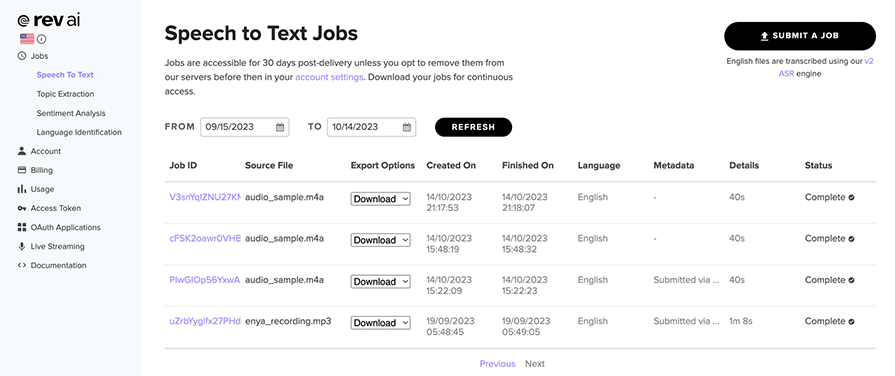
Due to the asynchronicity of the API, we are not able to use the Python time library to calculate the total execution time. Luckily for us, we have access to that information from Rev’s dashboard:
The last three jobs take the same input and perform transcription in about 13 seconds. Find below the result of the transcription:
I am proud of a verbal data gathering tool, which I built particularly because, one, the use case, it empowered researchers to collect qualitative data, which had richer insight. And secondly, for the architectural use, we were thinking of reusability. So we approached building UIs and other business logic in a functional style such that functions are pure without side effects. This way, our logic were deterministic and reusable. Lastly, the team which I worked with was truly amazing. Were committed to producing excellent work.
Now let’s calculate the WER for the transcription:
from jiwer import wer

reference = "I am proud of a verbal data gathering tool which I built, particularly because one, the use case, it empowered researchers to collect qualitative data which had richer insights. And secondly, for the architecture we used, we were thinking of reusability, so we approached building UIs and other business logic in a functional style such that functions are pure without side effects. This way our logic were deterministic and reusable. Lastly, the team which I worked with was truly amazing. We were committed to producing excellent work."

hypothesis = "I am proud of a verbal data gathering tool, which I built particularly because, one, the use case, it empowered researchers to collect qualitative data, which had richer insight. And secondly, for the architectural use, we were thinking of reusability. So we approached building UIs and other business logic in a functional style such that functions are pure without side effects. This way, our logic were deterministic and reusable. Lastly, the team which I worked with was truly amazing. Were committed to producing excellent work."

error = wer(reference, hypothesis)

print(error)
The result from the above computation is 0.1494, indicating a 14.94% error rate.
If you’ve made it this far, well done! We have covered a lot in exploring these different AI speech-to-text providers. Next, let’s let’s see how they perform based on the metrics we set at the get-go.
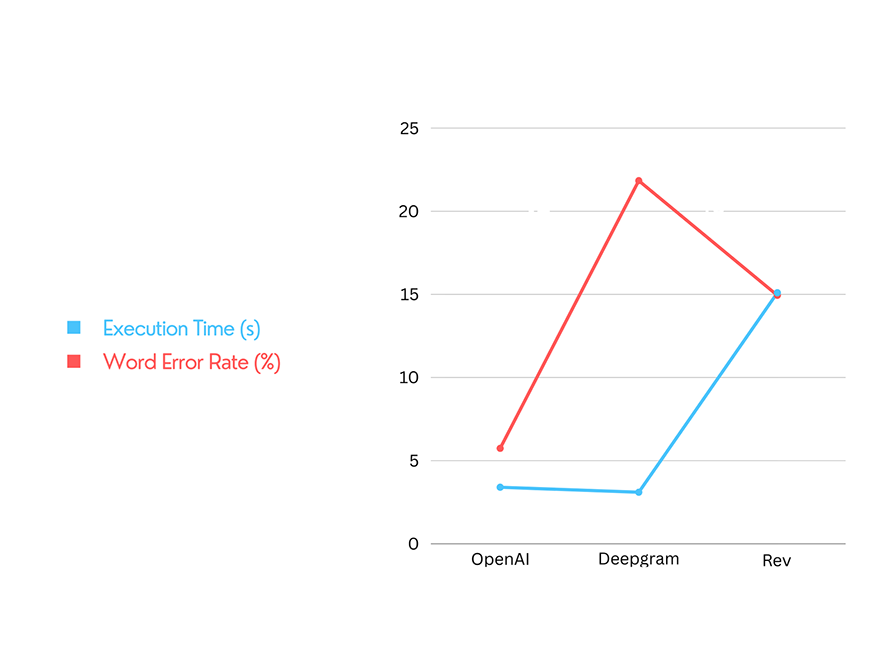
To be fair in this, I executed the transcription process 20 times for each of the service providers. Here’s the output:
| STT Provider | WER | Avg Exection Time |
|---|---|---|
| OpenAI | 5.74% | 3.4s |
| DeepGram | 21.84% | 3.1s |
| Rev | 14.94% | 15.1s |
👁 Word error rate comparison chart
The speech-to-text (STT) service providers covered in this article deliver diverse solutions. OpenAI excels in accuracy, with a 5.74% Word Error Rate (WER). Deepgram provides rapid results in just 3.1 seconds, making it suitable for time-sensitive tasks. Rev combines human and AI transcription for high-quality outputs.
Choosing the right STT provider depends on your priorities — be they precision, speed, or a balance of both. Keep an eye on the evolving AI landscape for new features and possibilities.
Install LogRocket via npm or script tag. LogRocket.init() must be called client-side, not
server-side
$ npm i --save logrocket

// Code:

import LogRocket from 'logrocket';
LogRocket.init('app/id');
// Add to your HTML:

<script src="https://cdn.lr-ingest.com/LogRocket.min.js"></script>
<script>window.LogRocket && window.LogRocket.init('app/id');</script>
We built the same app in TanStack Start RSC and Next.js RSC. TanStack shipped 40% less JS and built 4x faster — but Next.js is still the safer production bet.
From RSC vulnerabilities and the Vercel breach to TypeScript 7.0 Beta and AI agents — the nine frontend storylines that defined H1 2026, ranked.
AI tools generate working React code fast, but miss race conditions, empty states, debouncing, and accessibility. Here’s how to catch bugs before production.
Learn how to use Gemini CLI subagents to delegate frontend, backend, testing, and docs tasks to specialized agents with guardrails and clear ownership.
Would you be interested in joining LogRocket's developer community?
Join LogRocket’s Content Advisory Board. You’ll help inform the type of content we create and get access to exclusive meetups, social accreditation, and swag.
Sign up now