|
VOOZH | about |
|
VOOZH | about |
You might already be familiar with the set of built-in Hooks that React offers, such as useState, useEffect, useMemo, and many others. Among these is the useSyncExternalStore Hook, which is quite commonly used among library authors but is rarely seen in client-side React projects.
In this article, we’ll explore the useSyncExternalStore Hook to get a better understanding of what it is, how it works, why it’s useful, and when you should leverage it in your frontend projects. We’ll also build a mini demo project to explore a simple practical use case — you can explore the code on GitHub.
The Replay is a weekly newsletter for dev and engineering leaders.
Delivered once a week, it's your curated guide to the most important conversations around frontend dev, emerging AI tools, and the state of modern software.
useSyncExternalStoreuseSyncExternalStore can be the perfect API if you want to subscribe to an external data store. Most of the time, developers opt for the useEffect Hook. However, useSyncExternalStore can be more appropriate if your data exists outside the React tree.
A basic useSyncExternalStore API takes in three parameters:
useSyncExternalStore(subscribe, getSnapshot, getServerSnapshot)
Let’s take a closer look at these parameters:
subscribe is a callback that takes in a function that subscribes to the external store datagetSnapshot is a function that returns the current snapshot of external store datagetServerSnapshot is an optional parameter that sends you a snapshot of the initial store data. you can use it during the initial hydration of the server datauseSyncExternalStore returns the current snapshot of the external data you’re subscribed to.
Consider a situation where you have external data that is not in your React tree — in other words, it exists outside of your frontend code or the app in general. In that case, you can use useSyncExternalStore to subscribe to that data store.
To understand the useSyncExternalStore Hook better, let’s look at a very simple implementation. You can assign it to a variable — like list in the case below — and render it to the UI as required:
import { useSyncExternalStore } from 'react';
import externalStore from './externalStore.js';

function Home() {
const list = useSyncExternalStore(externalStore.subscribe, externalStore.getSnapshot);

 return (
 <>
 <section>
 {list.map((itm, index) => (
 <div key={index}>
 <div>{itm?.title}</div>
 </div>
 ))}
 </section>
 </>
 );
}
As you can see, the externalStore is now subscribed and you will get real-time snapshots of any changes that’s being performed on the externalStore data. You can use the list to further map down the items from the external source and have a real-time UI rendering.
Any changes in the external store will be immediately reflected, and React will re-render the UI based on snapshot changes.
useSyncExternalStoreThe useSyncExternalStore Hook is an ideal solution for a lot of niche use cases, such as:
localStorage — and the application’s state, you can use useSyncExternalStore to subscribe to updates in the external storeThere could be many such cases where this Hook could be very useful and easier to manage than the ever-popular useEffect Hook. Let’s compare these two Hooks in the next section.
useSyncExternalStore vs. useEffectYou might opt for the more commonly used useEffect Hook to achieve something similar to the example above:
const [list, setList] = useState([]);

 useEffect(() => {
 const fetchData = async () => {
 try {
 // assuming externalStore has a fetchData method or it is an async operation
 const newList = await externalStore.fetchData();
 setList(newList);
 } catch (error) {
 console.error(error);
 }
 };
 // calling the async function here
 fetchData();
 }, []);
However, the useEffect Hook doesn’t provide current snapshots for each state update, and it’s more prone to errors than the useSyncExternalStore Hook. Additionally, it suffers from its infamous re-rendering problem. Let’s briefly review this problem next.
A major issue you’re likely to encounter when dealing with the useEffect Hook is the sequence of rendering. After the browser finishes painting, only the useEffect Hook will fire. This delay — although intentional — introduces unexpected bugs and challenges in managing the correct chain of events.
Consider the following example:
function Counter() {
 const [count, setCount] = useState(0);

 useEffect(() => {
 console.log('count- ', count);
 // Imagine some asynchronous task here, like fetching data from an API
 // This could introduce a delay between the state update and the effect running
 // afterwards.
 }, [count]);

 const increment = () => {
 setCount(count + 1);
 };

 console.log('outside the effect count - ', count);

 return (
 <div>
 <div>Counter</div>
 <div>Count: {count}</div>
 <button onClick={increment}>Increment</button>
 </div>
 );
}

export default Counter;
You might expect the counter app to run in a straightforward way where the state updates, the component re-renders, and then finally, the effect runs. However, things gets a little tricky here due to the delay with the API calls, and the sequence of events might not be what we expect.
Now consider an app with many such side effects and different dependency arrays. In that case, it will be a nightmare to track the state updates with correct sequences.
If your data is located externally and doesn’t depend on existing React APIs to process, then you can avoid all of that and use the useSyncExternalStore Hook to fix this performance gap. This Hook fires immediately, causing no delays, unlike the useEffect Hook.
useSyncExternalStore also prevents the previously mentioned re-rendering problem that you are likely to face with useEffect whenever the state changes. Interestingly, states subscribed with useSyncExternalStore won’t re-render twice, fixing huge performance problems.
useSyncExternalStore vs. useStateWhile using the useSyncExternalStore Hook, you might feel that you’re simply subscribing to a state and assigning it to a variable, similar to using the useState Hook. However, useSyncExternalStore goes further than simply assigning states.
One limitation of the useState Hook is that it’s designed to manage state in a “per-component” way. In other words, the state you define is restricted to its own React component and cannot be accessed globally. You could use callbacks, force states globally, or even use prop-drilling states across the component, but that‘s likely to slow down your React app.
The useSyncExternalStore Hook prevents this issue by setting up a global state that you can subscribe to from any React component, no matter how deeply nested it is. Even better, if you’re dealing with a non-React codebase, all you have to care about is the subscription event.
useSyncExternalStore will send you proper snapshots of the current state of the global storage that you can consume in any React component.
useSyncExternalStoreLet’s see how useful the useSyncExternalStore Hook can be in a real project by building a demo to-do app. First, create a store.js file that will act as an external global state. We will later subscribe to this state for our to-dos:
let todos = [];
let subscribers = new Set();

const store = {
 getTodos() {
 // getting all todos
 return todos;
 },

 // subscribe and unsubscribe from the store using callback
 subscribe(callback) {
 subscribers.add(callback);
 return () => subscribers.delete(callback);
 },

// adding todo to the state
 addTodo(text) {
 todos = [
 ...todos,
 {
 id: new Date().getTime(),
 text: text,
 completed: false,
 },
 ];

 subscribers.forEach((callback) => {
 callback();
 });
 },
// toggle for todo completion using id
 toggleTodo(id) {
 todos = todos.map((todo) => {
 return todo.id === id ? { ...todo, completed: !todo.completed } : todo;
 });
 subscribers.forEach((callback) => callback());
 },
};

// exporting the default store state
export default store;
Your store is now ready to subscribe to within the React component. Go ahead and create a simple Todo component that will render the to-do items to the UI by subscribing to the store you created earlier:
import { useSyncExternalStore } from "react";
import store from "./store.js";

function Todo() {
// subscribing to the store
const todosStore = useSyncExternalStore(store.subscribe, store.getTodos);

 return (
 <div>
 {todosStore.map((todo, index) => (
 <div key={index}>
 <input
 type="checkbox"
 value={todo.completed}
 onClick={() => store.toggleTodo(todo.id)}
 />
 // toggle based on completion logic
 {todo.completed ? <div>{todo.text}</div> : todo.text}
 </div>
 ))}
 </div>
 );
}

export default Todo;
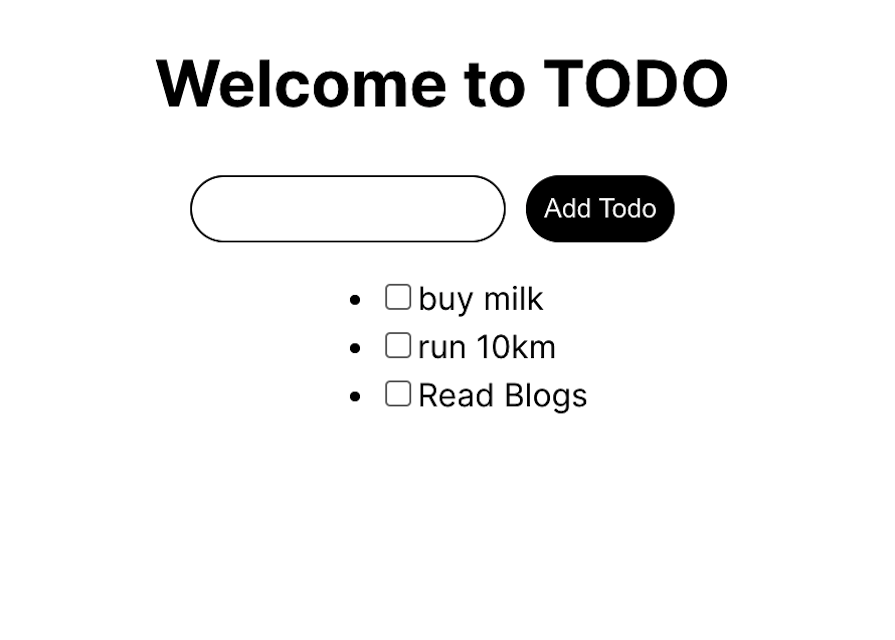
With that, our mini demo project using useSyncExternalStore is complete. The result should look something like the below:
👁 Simple Demo To Do App Built Using Use Sync External Store Hook
You can check out the project code in this GitHub repository.
React provides a lot of built-in Hooks, some of which are pretty commonly used among developers. However, really useful Hooks like useSyncExternalStore often get overshadowed.
In this post, you’ve seen how there are many excellent use cases for this Hook that not only improve the overall app experience but can prevent pesky bugs you might encounter with the useEffect Hook.
If you are a JavaScript library author, you might already be using this for performance gains that you can’t achieve with either the useEffect Hook or the useState Hook. As we explored in this article, when used correctly, the useSyncExternalStore Hook can save you a ton of development time.
Install LogRocket via npm or script tag. LogRocket.init() must be called client-side, not
server-side
$ npm i --save logrocket

// Code:

import LogRocket from 'logrocket';
LogRocket.init('app/id');
// Add to your HTML:

<script src="https://cdn.lr-ingest.com/LogRocket.min.js"></script>
<script>window.LogRocket && window.LogRocket.init('app/id');</script>
Learn how next-browser gives AI agents runtime context for debugging Next.js apps, including React props, hydration, PPR, forms, and performance.
Build dynamic LLM routing in Next.js with OpenRouter, TanStack AI, task classification, model fallbacks, and cost-aware routing.
TSRX adds first-class control flow, conditional hooks, and scoped styles to React via a TypeScript compiler extension — no new framework required.
Learn how to build a full React Native auth system using Better Auth and Expo — with email/password login, Google OAuth, session persistence, and protected routes.
Would you be interested in joining LogRocket's developer community?
Join LogRocket’s Content Advisory Board. You’ll help inform the type of content we create and get access to exclusive meetups, social accreditation, and swag.
Sign up now