|
VOOZH | about |
|
VOOZH | about |
Since the advent of artificial intelligence (AI), developers in different fields have explored it for various use cases; in October 2021, GitHub released the Copilot AI tool, which shipped with IDE extensions for code autocompletion. Since its debut, Copilot has garnered great popularity for its effectiveness.
👁 Exploring Ghostwriter, A GitHub Copilot AlternativeReplit is one of the most popular online-based IDEs, and in September 2022, it announced that it had added support for an AI Mode that incorporated modern AI into its IDE features. Among other functions that aim to increase your productivity, AI Mode includes a machine learning-enabled pair programmer to complete your code.
In this article, we’ll explore Replit’s Ghostwriter, discuss its features, and learn how you can use Ghostwriter in your REPLs. We’ll also compare Ghostwriter to a few other code generation tools.
Jump ahead:
The Replay is a weekly newsletter for dev and engineering leaders.
Delivered once a week, it's your curated guide to the most important conversations around frontend dev, emerging AI tools, and the state of modern software.
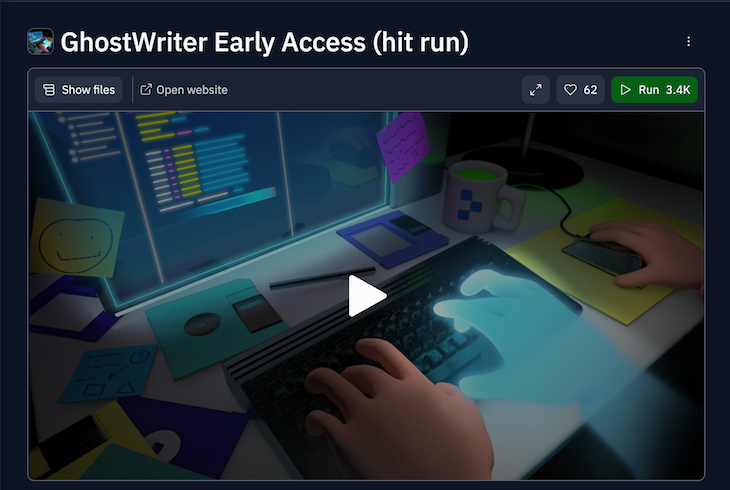
👁 Ghostwriter AI Engine Replit IDE
Ghostwriter is an AI engine for the online Replit IDE that helps with code autocompletion by recommending code based on your operations. The experience of working with Ghostwriter is similar to Replit’s Multiplayer mode, however, you collaborate with the AI as a pair programmer that recommends code to fit your use case.
Ghostwriter is rumored to be over twice as fast as GitHub’s Copilot AI, reducing much of the hassle of web development while increasing speed and productivity. As part of the Replit AI Mode, Ghostwriter was publicly released on 31 October 2022. Like Copilot, Ghostwriter is a paid service.
Ghostwriter suggests your subsequent code by analyzing the previous lines you’ve written in the language and the packages you installed, among other things.
Replit built Ghostwriter based on Salesforce’s Codegen by using Nvidia’s FasterTransformer and Triton server for highly optimized decoders, as well as the knowledge distillation process of the CodeGen model, from two billion parameters to a faster model of one billion parameters.
Ghostwriter is similar to many other programming AI applications, some of which we’ll discuss later. But, it offers some improvements and features that you won’t find in other AI tools. Below are a few of the features Ghostwriter enables you to use in your code REPLs.
Ghostwriter suggests autocompletions for your code and functions for speedy development in a simple and interactive manner, similar to using a regular pair programming tool.
With Ghostwriter, you can generate lines of code, functions, files, and programs. Replit introduced the “Generate code” feature in June 2022, featuring an AI that generates code from your word specification. With Ghostwriter, you can describe the program’s behavior or function, and the AI returns the code for your app’s development.
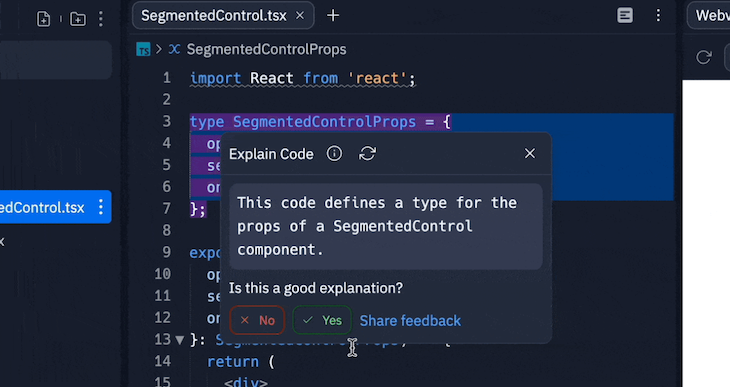
Powered by OpenAI’s codex, Replit offers an Explain Code button for code explanations:
Select the code in your editor, and then choose the Explain Code feature, which presents an explanation of your specified line of code, function, or any other parts of your code.
Semantic search is one of the most useful features in Replit’s AI Mode. With semantic search, you can enter a query for code and retrieve code results that match your query. It returns multiple results of code snippets from popular open source repositories that you can use in your project.
Ghostwriter and the other AI Mode features are among the most significant upgrades to Replit over the years, especially for speedy development. With Ghostwriter as your pair programmer, you’ll eventually reduce your development time.
Ghostwriter’s code explanation feature boosts collaboration among teams because you can easily use it to check for code functionalities without dealing with the hassle of communication.
Replit doesn’t share your code from the AI Mode features, and Ghostwriter is just a code recommendation tool. Therefore, you can use the AI for critical purposes. Replit only asks for feedback so it can improve the AI for you and for other users. Depending on the license of your REPL, you retain the right of your REPLs.
At the time of writing, Ghostwriter is available for public use as part of Replit’s AI Mode, meaning you can use it in any of your REPLs regardless of the license.
Replit aims to improve Ghostwriter’s features for better productivity and workflows. Features for learning new concepts, code analysis, and more will be available in the AI Mode. In the future, Ghostwriter will also include post-training quantization of weights, activation to int8 precision, optimized kernels for reduced latency, and, eventually, higher model accuracy.
Replit also plans for Ghostwriter to feature autoregressive language models for improved interactivity and further training of the LLMs (Large Language Models), with deep reinforcement learning for features like user feedback, test accuracy, and runtime errors.
Just like Ghostwriter, Copilot supports automatic code completion. It has a feature similar to Replit’s Codegen for generating code based on specific queries. Both tools support code generation and code explanations with OpenAI’s codex, however, each has distinct features.
Copilot supports extra features like unit testing and generating complex algorithms to match conventions and contexts, however, Ghostwriter does not. Ghostwriter is only available on Replit’s editor, unlike Copilot, which is available on many IDEs and editors, from VS Code to all JetBrains IDEs, including WebStorm, GoLand, etc.
Designed to work with popular stack technologies from React to Angular and Vue, Captain Stack is a VS Code extension that provides code suggestions to improve code efficiency and productivity for developers.
Captain Stack provides context-aware code suggestions based on supported technology stacks, inline documentation for suggestions, and support for TypeScript and JSX.
Getting started with Captain Stack is easy; you’ll need to have VS Code installed on your computer. You can install the extension from the VS Code marketplace, and it will automatically provide suggestions as you type.
You can customize Captain Stack from the extension settings page to work with your preferred technology stack and enable or disable certain tool features.
Microsoft IntelliCode is an AI-assistant development tool that provides intelligent suggestions and code completions in Microsoft’s Visual Studio IDE and Visual Studio Code editor. IntelliCode uses machine learning to grasp the patterns and structure of codebases and suggest the appropriate code snippets and API methods for the given context.
To improve productivity and reduce code errors, IntelliCode provides context-aware suggestions during development. It also helps with code reviews by highlighting potential issues and suggesting code improvements.
To use the IntelliCode extension, you’ll need to have Visual Studio or Visual Studio Code installed. IntelliCode provides code style enforcements, model-based code analysis, collaborative development, and useful context-aware suggestions.
YouCompleteMe (YCM) is a fast, “as-you-type” code completion tool for the Vim editor that works with various programming languages including C, C++, Python, Java, Rust, Go, and a generic language server protocol implementation for other languages.
YCM uses information from a codebase to semantically provide accurate completion suggestions. It integrates easily with other Vim plugins, thereby enhancing the development workflow.
Getting started with YCM is easy. First, you’ll need to install the plugin, following the instructions on the GitHub page. Then, you’ll need to configure YCM for your specific environment by editing the .ycm_extra_conf.py file in your project directory.
TabNine is an AI-powered code auto-completion tool that supports multiple programming languages and environments. It supports various programming languages including C++, Python, JavaScript, Java, and Go. It also supports a variety of text editors and IDEs like VS Code, Sublime Text, IntelliJ IDEA, and more.
Some of TabNine’s key features include semantic code autocompletion, support for multiple programming languages, customizable settings and configuration, and offline support.
Code Intelligence by Sourcegraph is a code search and navigation tool that helps you understand and navigate large codebases. It uses advanced code analysis and indexing techniques to provide powerful code search and navigation functionality across multiple languages like Go, SQL, JavaScript, Kotlin, C++, PHP, Python, Ruby, and TypeScript, as well as environments like JetBrains IDEs, Visual Studio, Visual Studio Code, Jenkins, etc.
Code Intelligence supports multiple code hosting platforms like GitHub, GitLab, Bitbucket, and self-hosted code repositories, as well as inline documentation, type information, and code intelligence for code reviews and pull requests.
To get started with Code Intelligence, you can sign up for a free trial on the website and install the Sourcegraph browser extension. For more advanced features, you can integrate Sourcegraph with your code hosting platform and start using it for code reviews and pull requests.
| Code completion | Availability | Code generation | Other features | |
|---|---|---|---|---|
| Replit Ghostwriter | Yes | Replit | Yes | |
| GitHub Copilot | Yes | VS Code, JetBrains IDEs, and more | Yes | Testing and complex algorithm generation |
| Captain Stack | Yes | VS Code | No | |
| Microsoft IntelliCode | Yes | VS Code and Visual Studio | No | |
| Code intelligence | No | JetBrains IDEs, Visual Studio, Visual Studio Code, and more | No | Understanding and navigating large codebases |
| TabNine | Yes | JetBrains Editors, Sublime Text, VS Code and more | No | |
| YouCompleteMe | Yes | Vim | No |
In this article, we explored the features of Replit’s Ghostwriter, an AI engine that helps with code auto-completion. We also considered a few alternatives to Ghostwriter, including GitHub’s Copilot, Captain Stack, Microsoft Intellicode, Code Intelligence by Sourcegraph, TabNine, and YouCompleteMe.
Ghostwriter is only available on Replit, so you can use the AI when you use Replit and choose Copilot when using your favorite IDE apps. Hopefully, this article gave you a better sense of which code generation tool is right for your project. Happy coding!
Install LogRocket via npm or script tag. LogRocket.init() must be called client-side, not
server-side
$ npm i --save logrocket

// Code:

import LogRocket from 'logrocket';
LogRocket.init('app/id');
// Add to your HTML:

<script src="https://cdn.lr-ingest.com/LogRocket.min.js"></script>
<script>window.LogRocket && window.LogRocket.init('app/id');</script>
Learn how next-browser gives AI agents runtime context for debugging Next.js apps, including React props, hydration, PPR, forms, and performance.
Build dynamic LLM routing in Next.js with OpenRouter, TanStack AI, task classification, model fallbacks, and cost-aware routing.
TSRX adds first-class control flow, conditional hooks, and scoped styles to React via a TypeScript compiler extension — no new framework required.
Learn how to build a full React Native auth system using Better Auth and Expo — with email/password login, Google OAuth, session persistence, and protected routes.
Hey there, want to help make our blog better?
Join LogRocket’s Content Advisory Board. You’ll help inform the type of content we create and get access to exclusive meetups, social accreditation, and swag.
Sign up now