|
VOOZH | about |
|
VOOZH | about |
Errors are an inevitable part of development. They always seem to pop up at the most inopportune times to make sure our apps don’t work as intended. Regardless of how they find their way into our code, error handling is the antidote to these unintentional dev snafus, better known as exceptions.
👁 JavaScript Errors React Error BoundariesIn regular JavaScript, the try…catch statement offers an API with which we can try and gracefully catch potentially error-prone code:
try {
 console.log(p)
} catch (error) {
 console.log(`Error: ${error}`) // ReferenceError: p is not defined
}
Any error detected in the try block is thrown as an exception and caught in the catch block, keeping our applications more resilient to errors. In React, this construct works fine for handling JavaScript errors as below, wherein we’re fetching data with useEffect:
useEffect(() => {
 try {
 fetchUsers();
 } catch(error) {
 setError(error);
 }
}, []);
But this doesn’t work so well in React components.
The Replay is a weekly newsletter for dev and engineering leaders.
Delivered once a week, it's your curated guide to the most important conversations around frontend dev, emerging AI tools, and the state of modern software.
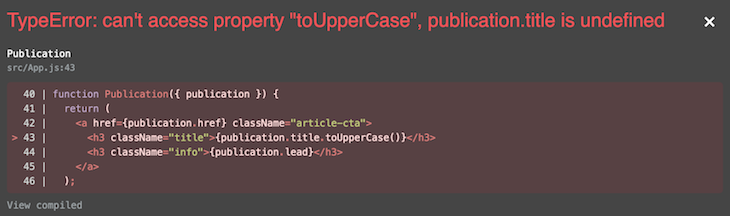
try...catch doesn’t catch JavaScript errors in React componentsIt’s wrong to think that by virtue of what it does and how it works that the try...catch statement can be used to catch JavaScript errors in React components. This is because the try...catch statement only works for imperative code, as opposed to the declarative code we have in components.
function ErrorFallbackUI({ errorMessage }) {
 return (
 <div className="article-error">
 <h3>There was a problem displaying the article:</h3>
 <h3 className="error">{errorMessage}</h3>
 </div>
 );
}

// There's an attempt to uppercase each publication title
function Publication({ publication }) {
 return (
 <a href={publication.href} className="article-cta">
 <h3 className="title">{publication.title.toUpperCase()}</h3>
 <h3 className="info">{publication.lead}</h3>
 </a>
 );
}

// Map over the list of publications and try to render a <Publication/>
function Publications({ publications }) {
 try {
 return publications.map((publication, index) => (
 <div key={index}>
 <Publication {...{ publication }} />
 </div>
 ));
 } catch (error) {
 return <ErrorFallbackUI {...{ errorMessage: error.errorMessage }} />;
 }
}
It’s important to note that the errors above will only show up in development. In production, the UI will be corrupted, and the user will be served a blank screen. How can we solve for this? Enter error boundaries.
N.B., tools like create-react-app and Next.js have an error overlay component that blocks the UI whenever there is an error, overshadowing your own error boundaries. In create-react-app, which this tutorial uses, we need to dismiss or close the overlay with the X mark in the upper right-hand corner to view our own error boundaries in use.
Error boundaries are React components that offer a way to gracefully handle JavaScript errors in React components. With them, we can catch JavaScript runtime errors in our components, act on those errors, and display a fallback UI.
import ErrorBoundary from "error-boundary";

function Users() {
 return (
 <div>
 <ErrorBoundary>
 {/* the rest of your application */}
 </ErrorBoundary/>
 </div>
 )
}
Error boundaries operate like the catch block in the JavaScript try...catch statement with a couple exceptions: they are declarative and, perhaps needless to say, only catch errors in React components.
More specifically, they catch errors in their child component(s), during the rendering phase, and in lifecycle methods. Errors thrown in any of the child components of an error boundary will be delegated to the closest error boundary in the component tree.
In contrast, error boundaries do not catch errors for, or that occur in:
There are a few rules to follow for a component to act as an error boundary:
static getDerivedStateFromError() or componentDidCatch()The rule of thumb is that static getDerivedStateFromError() should be used to render a fallback UI after an error has been thrown, while componentDidCatch() should be used to log those error(s).
The <PublicationErrorBoundary/> component below is an error boundary since it satisfies the necessary criteria:
class PublicationErrorBoundary extends Component {
 state = { error: false, errorMessage: '' };

 static getDerivedStateFromError(error) {
 // Update state to render the fallback UI
 return { error: true, errorMessage: error.toString() };
 }

 componentDidCatch(error, errorInfo) {
 // Log error to an error reporting service like Sentry
 console.log({ error, errorInfo });
 }

 render() {
 const { error, errorMessage } = this.state;
 const { children } = this.props;

 return error ? <ErrorFallbackUI {...{ error, errorMessage }} /> : children;
 }
}
The <PublicationErrorBoundary/> replaces the try...catch block from the <Publications/> component above with the following update:
function Publications({ publications }) {
 return publications.map((publication, index) => (
 <div key={index}>
 <PublicationErrorBoundary>
 <Publication {...{ publication }} />
 </PublicationErrorBoundary>
 </div>
 ));
}
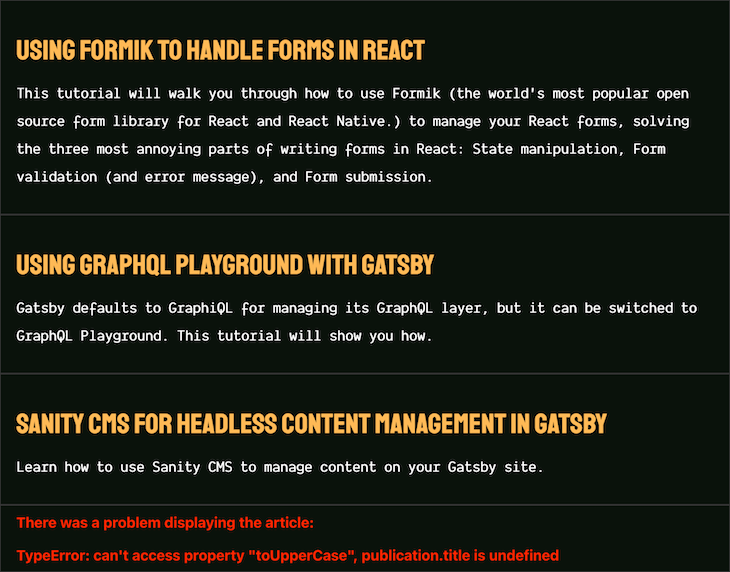
Now, the error thrown from <Publication/> trying to uppercase each publication title allows for graceful exception handling. The error has been isolated and a fallback UI displayed.
You can see this example on CodeSandbox.
The Next.js documentation does a good job of explaining the general rule of thumb: error boundaries shouldn’t be too granular; they are used by React in production and should always be designed intentionally.
Error boundaries are special React components and should be used to catch errors only where appropriate. Different error boundaries can be used in different parts of an application to handle contextual errors, though they can be generic — for example, a network connection error boundary.
Notice that in the prior example, the <PublicationErrorBoundary/> is used in Publications instead of Publication. If used otherwise, the error thrown from the attempt to uppercase each publication title won’t be caught by the <PublicationErrorBoundary/> because the children of <PublicationErrorBoundary/> will be a hyperlink and not a component. However, using it in <Publications/> solves for this.
// This won't work because the children of `PublicationErrorBoundary`
// aren't components
function Publication({ publication }) {
 return (
 <PublicationErrorBoundary>
 <a href={publication.href} className="article-cta">
 <h3 className="title">{publication.title.toUpperCase()}</h3>
 <h3 className="info">{publication.lead}</h3>
 </a>
 </PublicationErrorBoundary>
 );
}
Also, notice that each publication has an error boundary listening for it to err. What if it makes sense to display no publications at all if there’s an error with at least one of them? <Publications/> can be updated:
// Before
function Publications({ publications }) {
 return publications.map((publication, index) => (
 <div key={index}>
 <PublicationErrorBoundary>
 <Publication {...{ publication }} />
 </PublicationErrorBoundary>
 </div>
 ));
}

// After. Notice the location of `PublicationErrorBoundary`
function Publications({ publications }) {
 return (
 <PublicationErrorBoundary>
 {publications.map((publication, index) => (
 <div key={index}>
 <Publication {...{ publication }} />
 </div>
 ))}
 </PublicationErrorBoundary>
 );
}
The UI will be updated to show the fallback UI:
👁 Error Boundary Fallback UI Updated Notice
Similarly to how the catch block works, if an error boundary fails trying to render the error message, the error will propagate to the closest error boundary above it. If errors thrown are not caught by any of the error boundaries, the whole component tree will be unmounted.
This is a new behavior as of React 16, with the argument being that it is better to completely remove a corrupted UI than to leave it in place, and that it provides a better user experience in the event of an error.
<AppErrorBoundary>
 <App>
 <PublicationsErrorBoundary>
 <Publications>
 <PublicationErrorBoundary>
 <Publication />
 <PublicationErrorBoundary>
 </Publications>
 </PublicationsErrorBoundary>
 </App>
</AppErrorBoundary>
Take the contrived component tree above as an example. If an error is caught in <Publication/>, the closest error boundary, <PublicationErrorBoundary/>, will be responsible for it. In the event that it fails in its responsibility, <PublicationsErrorBoundary/> will act as a fallback. If that fails as well, <AppErrorBoundary/> will attempt to handle the error before the component is completely unmounted.
This is one of the edge cases I find in using error boundaries. Typically, this is done by resetting the UI state and recovering the UI from corruption.
Say a user loses connection, and a connection error boundary has succeeded in displaying a fallback UI alerting the user to check their connection. Can we recover the UI when the connection state becomes active? The simple answer is yes, and the other is that it depends.
Errors can be tricky, dynamic, and non-deterministic, and it is better you look into data fetching tools like SWR or React Query, or the react-error-boundary package, which alleviates these kinds of problems.
Wherever it is rational to do so, you should be using error boundaries to handle runtime errors in your React applications. The more familiar you get with them, the more you understand the reason for their existence.
With the react-error-boundary package specifically, you can reduce the amount of redundant code and uncertainty you encounter with a well-tested abstraction — which, as Kent Dodds puts it, is the last error boundary component anyone needs.
Install LogRocket via npm or script tag. LogRocket.init() must be called client-side, not
server-side
$ npm i --save logrocket

// Code:

import LogRocket from 'logrocket';
LogRocket.init('app/id');
// Add to your HTML:

<script src="https://cdn.lr-ingest.com/LogRocket.min.js"></script>
<script>window.LogRocket && window.LogRocket.init('app/id');</script>
Learn how next-browser gives AI agents runtime context for debugging Next.js apps, including React props, hydration, PPR, forms, and performance.
Build dynamic LLM routing in Next.js with OpenRouter, TanStack AI, task classification, model fallbacks, and cost-aware routing.
TSRX adds first-class control flow, conditional hooks, and scoped styles to React via a TypeScript compiler extension — no new framework required.
Learn how to build a full React Native auth system using Better Auth and Expo — with email/password login, Google OAuth, session persistence, and protected routes.
Would you be interested in joining LogRocket's developer community?
Join LogRocket’s Content Advisory Board. You’ll help inform the type of content we create and get access to exclusive meetups, social accreditation, and swag.
Sign up now