|
VOOZH | about |
|
VOOZH | about |
This article introduces an experimental Vue feature called Hooks.
👁 ImageThe Replay is a weekly newsletter for dev and engineering leaders.
Delivered once a week, it's your curated guide to the most important conversations around frontend dev, emerging AI tools, and the state of modern software.
This post is suited for developers of all stages including beginners. Here are a few things you should already have before going through this article.
You will need the following in your pc:
node -v
npm uninstall -g vue-cli
then install the new one:
npm install -g @vue/cli
npm install
Initially, React components that contain state logic must be a class component. Even though there were already stateless functional components in React there was a need to create components that accommodate state logic without being classes. That was when Hooks was born. Hooks are a way to use state logic inside functional components, thereby eliminating the need for writing classes.
There is nothing wrong with classes, to begin with, but the React team found out that understanding how classes work has been a drawback to React adoption. It can be difficult to understand and can become ambiguous as your project increases in size and complexity.
If you are a Vue developer, you might wonder why classes are being discussed as you do not use classes by default in your Vue projects. While this is true, Vue.js lets you use functional components that are stateless with mixins. With Vue mixins you can define logic or a functionality in a particular file and use and even re-use it in a functional component.
In a blog post some months back, Sarah Drasner, a very popular Vue core team member, wrote about her conversation with Evan You, the creator of Vue.js. Sarah revealed that a mixin cannot consume or use state from another mixin, which makes chaining of encapsulated logic difficult to achieve. This is the mixin limitation that the Vue Hooks solves for.
Vue Hooks are basically an enhanced version of mixins, if you do not know what mixins are, they are a platform in Vue used to re-use logic between components (you will see a quick demo of mixins in this post). Vue Hooks lets you pass logic from one Hook to another and you can also use state in a Hook from another Hook. So just like in React, Hooks in Vue are defined in functions which can be a cleaner and more flexible way to define and share logic and can return state.
If you have followed this post from the start, you must have downloaded the starter project file and opened it up in your VS Code application. We are going to create a mixin that contains a counter logic and then import it into any component of choice. First, create a folder called mixins in the root directory and create a new file, call it clickMixin.js and copy the code block below inside it:
export default {
 data (){
 return{
 count: 1,
 double: 2
 }
 },
 methods: {
 clicked(){
 this.count++;
 this.double = this.count*2;
 }
 }
 }
This mixin contains counter logic and also contains a variable that returns double the count, you see the export statement because it has to be imported into your component of choice. Open your Test.vue component and copy the code block below inside it:
<template>
 <div>
 <button v-on:click="clicked()">Button 1</button>
 <h2>{{this.count}}</h2>
 <h2>{{this.double}}</h2>
 </div>
</template>
<script>
import clickMixin from '../Mixins/clickMixin'
export default {
 name: 'Test',
 mixins: [clickMixin]
}
</script>
Here you see how mixins are imported and registered under the name, it is a Vue instance property just like data or methods or computed properties. You also see that inside the template that you have access to this in JavaScript as it relates to the mixins (almost like the mixin was defined right inside the component). If you run the application in your dev server it should look like this:
👁 application with mixin included
When you click button 1, the counter is increased by 1 and the lower figure is double the counter figure just as the template in your code suggests.
You can recreate this logic with Vue Hooks easily, the point of the Hooks is to potentially replace mixins in the future. First of all, you have to install the vue-hooks package with npm. Open a new terminal in VS Code and run:
npm install vue-hooks
Then open up your main.js file and initialize Hooks with a line of command before the new Vue statement:
Vue.use(hooks);
Open the components folder and create a new file inside it, call it Modal.vue then navigate back to the root directory and create a new folder called Hooks. Inside the Hooks folder create a new file called Hooks.js and copy this code block below into it:
import { useData, useMounted, useEffect, useComputed, useUpdated} from 'vue-hooks'
export default function clickedHook(){
const data = useData({ count:1 })
const double = useComputed(() => data.count * 2)
useMounted(()=> {console.log('mounted')});
useUpdated(()=> {console.log('updated')});
useEffect(()=> {
 console.log('DOM re-renders....')
 });
return {
 data, double
 }
}
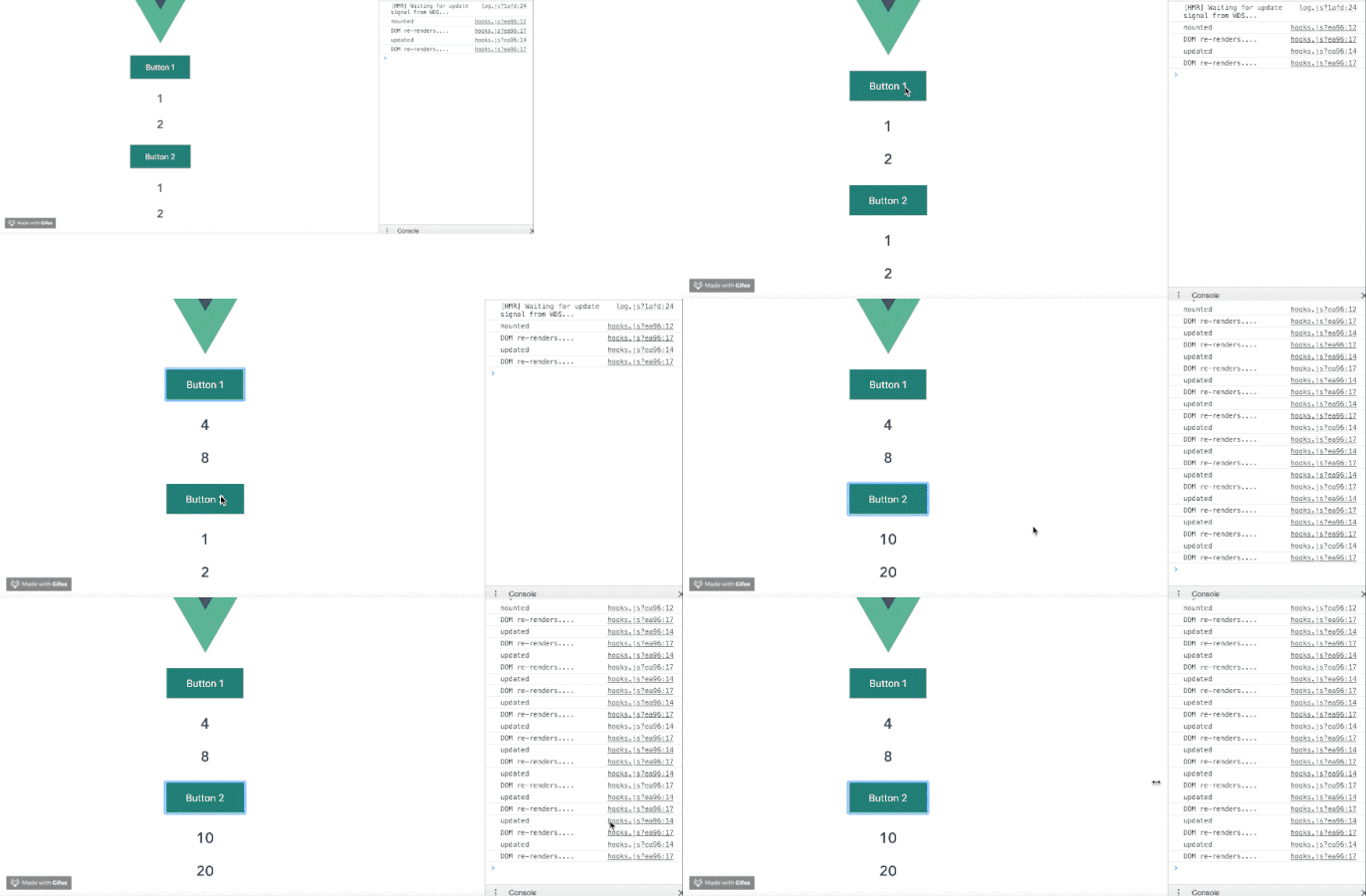
Just like in React, Vue Hooks borrows the use-prefix syntax and uses it in the Vue way. You also notice that the lifecycle Hooks available for every Vue instance is accessible inside Vue Hooks, some of them are:
useData: handles initialization of data inside your Hook, so the count is initialized inside ituseComputed: this is more like computed properties inside your Hook, so the double computation is done inside ituseMounted: acts exactly like the mounted lifecycle Hook in your Vue instance but for HooksuseUpdated: acts exactly like the updated lifecycle Hook in your Vue instance but for HooksuseEffect: this handles logic on DOM re-renderThere are other properties you can import, the whole list can be found here on GitHub. You will notice it is exported as a function, open the Modal.vue file you created earlier and copy this code block below inside it:
<template>
 <div>
 <button v-on:click="data.count++">Button 2</button>
 <h2>{{data.count}}</h2>
 <h2>{{double}}</h2>
 </div>
</template>
<script>
import clickedHook from '../Hooks/Hooks'
export default {
 name: 'Modal',
 Hooks(){
 return clickedHook();
 }
}
</script>
Notice that after importing the Hooks file, you can access the data and the double constants earlier defined in the Hook inside this component. We also see that Hooks registration has the same syntax with data registration, with the function set up and the return object inside it.
You can use npm or just go to GitHub with this link to get the project repository.
Debugging Vue.js applications can be difficult, especially when there are dozens, if not hundreds of mutations during a user session. If you’re interested in monitoring and tracking Vue mutations for all of your users in production, try LogRocket. 👁 LogRocket Dashboard Free Trial Banner
https://logrocket.com/signup/
LogRocket is like a DVR for web apps, recording literally everything that happens on your site. Instead of guessing why problems happen, you can aggregate and report on what state your application was in when an issue occurred.
The LogRocket Vuex plugin logs Vuex mutations to the LogRocket console, giving you context around what led to an error, and what state the application was in when an issue occurred.
Modernize how you debug your Vue apps – Start monitoring for free.
This has been a quick overview of Hooks in Vue.js and how they might differ from the React Hooks that inspired it. We also highlighted mixins for readers who have not been introduced to the concept and we looked at an illustration using Hooks. Are you excited about Vue Hooks?
Debugging Vue.js applications can be difficult, especially when users experience issues that are difficult to reproduce. If you’re interested in monitoring and tracking Vue mutations and actions for all of your users in production, try LogRocket.
👁 LogRocket Dashboard Free Trial BannerLogRocket lets you replay user sessions, eliminating guesswork by showing exactly what users experienced. It captures console logs, errors, network requests, and pixel-perfect DOM recordings — compatible with all frameworks.
With Galileo AI, you can instantly identify and explain user struggles with automated monitoring of your entire product experience.
Modernize how you debug your Vue apps — start monitoring for free.
Learn how next-browser gives AI agents runtime context for debugging Next.js apps, including React props, hydration, PPR, forms, and performance.
Build dynamic LLM routing in Next.js with OpenRouter, TanStack AI, task classification, model fallbacks, and cost-aware routing.
TSRX adds first-class control flow, conditional hooks, and scoped styles to React via a TypeScript compiler extension — no new framework required.
Learn how to build a full React Native auth system using Better Auth and Expo — with email/password login, Google OAuth, session persistence, and protected routes.
Would you be interested in joining LogRocket's developer community?
Join LogRocket’s Content Advisory Board. You’ll help inform the type of content we create and get access to exclusive meetups, social accreditation, and swag.
Sign up now