|
VOOZH | about |
|
VOOZH | about |
Markdown format is a longtime staple of the developer community. Since 2004, we have been using Markdown to create content for various platforms including blogs, web forums, chat apps, WYSIWYG editors, and much more.
👁 React Logo Over a Pink BackgroundIn this tutorial, we’ll show you how to safely render Markdown from a React component using react-markdown.
The Replay is a weekly newsletter for dev and engineering leaders.
Delivered once a week, it's your curated guide to the most important conversations around frontend dev, emerging AI tools, and the state of modern software.
react-markdown is a React component that converts Markdown text into the corresponding HTML code. It is built on remark, which is a Markdown preprocessor.
react-markdown enables you to safely render markdown because it does not rely on the dangerouslySetInnerHTML prop. Instead, it uses a syntax tree to build the virtual DOM.
Using the dangerouslySetInnerHTML prop to parse HTML is dangerous because if you’re unsure of the source, it could inject malicious scripts. This could make your software vulnerable to cross-site scripting (XSS) attacks in which bad actors inject code into otherwise benign apps and websites to send malicious scripts to unsuspecting users.
Markdown language was designed to help you create editorial content easily. That’s why it only includes basic tags. react-markdown does not support HTML by default and therefore prevents script injections. This makes it safe to use.
You can install the react-markdown library using npm:
npm install react-markdown
Alternatively, you can install the library using yarn:
yarn add react-markdown
You don’t need to install any other library to work with react-markdown. However, there are few plugins you could optionally use to enhance its features. We’ll get to these plugins later.
Since the react-markdown library provides a component, we need to place our Markdown text as children in it. This will then return the converted HTML code.
Here’s an example:
import React from 'react'
import ReactMarkdown from 'react-markdown'
export default function MarkdownToHtml(){
 return(
 <ReactMarkdown>*React-Markdown* is **Awesome**</ReactMarkdown>
 )
}
The rendered output will be “React-Markdown is Awesome.”
Below is a list of Markdown syntax that react-markdown supports without the need to use any external plugin.
If you want to go beyond the syntax described above, remark, the parent project of react-Markdown, has created a number of plugins you can use to enhance the functionality of the library.
For example, react-markdown doesn’t support auto links, strikethrough, tables, task lists, etc. by default. If you’ve ever created a readme file on GitHub, you might have created task lists and tables using Markdown. To cater to this need, remark created remark-gfm, which stands for Github Flavored Markdown.
To use plugins, react-markdown provides two props — remarkPlugins and rehypePlugins — which accept an array of all the plugins you wish to use. You would put remark plugins such as remark-gfm and remark-maths in the remarkPlugin prop and rehype plugins such as rehype-katex in the rehypePlugins prop.
If you want to support the strikethrough feature, for example, you’ll need to use remark-gfm. Let’s create a quick demo to show how this works.
First, install remark-gfm:
npm install remark-gfm
Now you can use it in your code:
import React from 'react'
import ReactMarkdown from 'react-markdown'
import gfm from 'remark-gfm'
export default function MarkdownToHtml(){
 return(
 <ReactMarkdown remarkPlugins={[gfm]}>*React-Markdown* now supports ~strikethrough~. Thanks to gfm plugin.</ReactMarkdown>
 )
}
Now, thanks to the remark-gfm plugin, the output will be “React-Markdown now supports .”
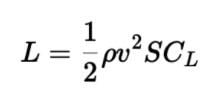
If you want to support mathematical expressions (such as written formulas, equations, fractions, etc.) or KaTeX, a popular math typesetting library, you might consider using remark-math and rehype-katex. These plugins enable you to convert notation in general language into human-readable mathematical formats.
Here’s an example:
$$
L = \frac{1}{2} \rho v^2 S C_L
$$
The above example parsed with KaTeX would look like this:
Head to the official docs for a full list of remark plugins you can use with react-markdown.
remark-gfm pluginThe table below shows the special functionalities you can enable using the remark-gfm plugin, including the ability to create tables, strikethrough text, and to-do lists.
Check out the live demo below:
React-Markdown Table using Remark-gfm by Akash Mittal (@akash-mittal)
on CodePen.
In this react-markdown tutorial, we learned how to safely render Markdown syntax to the appropriate HTML. We also reviewed how to use various plugins, including remark-gfm, with react-markdown by passing them to the provided component.
Install LogRocket via npm or script tag. LogRocket.init() must be called client-side, not
server-side
$ npm i --save logrocket

// Code:

import LogRocket from 'logrocket';
LogRocket.init('app/id');
// Add to your HTML:

<script src="https://cdn.lr-ingest.com/LogRocket.min.js"></script>
<script>window.LogRocket && window.LogRocket.init('app/id');</script>
Learn how next-browser gives AI agents runtime context for debugging Next.js apps, including React props, hydration, PPR, forms, and performance.
Build dynamic LLM routing in Next.js with OpenRouter, TanStack AI, task classification, model fallbacks, and cost-aware routing.
TSRX adds first-class control flow, conditional hooks, and scoped styles to React via a TypeScript compiler extension — no new framework required.
Learn how to build a full React Native auth system using Better Auth and Expo — with email/password login, Google OAuth, session persistence, and protected routes.
Hey there, want to help make our blog better?
Join LogRocket’s Content Advisory Board. You’ll help inform the type of content we create and get access to exclusive meetups, social accreditation, and swag.
Sign up now