|
VOOZH | about |
|
VOOZH | about |
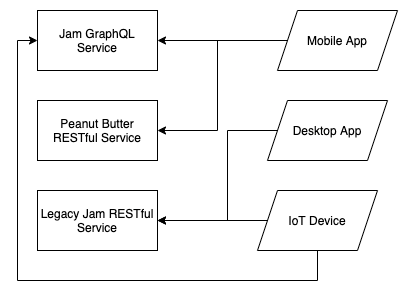
As your organization grows, it’s common for multiple API services to be created, each one providing its own feature set. Alongside these services, you’ll want to provide different client apps for your users to use your product. Eventually, your architecture might look like this:
👁 improve microservice architecture graphql api gateways feature imageThere are many reasons why this happens. Over time, team structure may have directed service creation, and at the time, it was easier to have a single team own a single codebase instead of having a web of teams to service ownership.
Another reason could be that different features in your product had different scaling concerns. For example, your analytics stack may have drastically different needs than your user login stack, and it doesn’t make sense to combine the two.
Whatever the reasons are, this type of architecture will slow down future development for both the backend service teams and frontend client teams. Client apps will need to interface with multiple protocols, use different authentication strategies, worry about which API gives them what type of data, and potentially make multiple API calls to retrieve data for a single page.
Instead of refactoring every API service or re-building the entire architecture — which is costly and risky — API gateways can help in this situation.
The Replay is a weekly newsletter for dev and engineering leaders.
Delivered once a week, it's your curated guide to the most important conversations around frontend dev, emerging AI tools, and the state of modern software.
API gateways are nothing new to microservices. I’ve seen many developers use them to provide a single interface (and protocol) for client apps to get data from multiple sources.
They can solve the problems previously described by providing a single API protocol, a single auth mechanism, and ensuring that clients only need to speak to one team when developing new features.
Using GraphQL API gateways, on the other hand, is a relatively new concept that has become popular lately. This is because GraphQL has a few properties that lend themselves beautifully to API gateways.
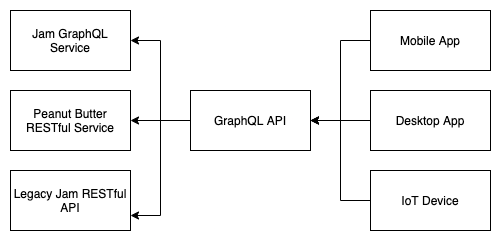
A GraphQL API gateway can have a single-defined schema and source data from across many different microservices, so clients can query a combination of fields without knowing where the data is coming from.
With this feature, discovering how to retrieve data isn’t a question of who to talk to, but where it lives in the GraphQL schema.
👁 A chart depicting graphQL schema data retrieval
There are many JavaScript packages that help with development. Some provide a layer of abstraction for implementing a GraphQL API gateway, while others can do much more for you.
We now need an API gateway service that will be responsible for receiving operations and returning data from both new and legacy services. We can do this in two different ways: schema stitching or federation.
For the sake of time, we will look more closely at schema stitching, but you can learn more about GraphQL federation in this article.
In terms of which JavaScript package to use, we could write our own custom Node.js GraphQL server with the likes of Apollo Server or Mercurius, where we write code to interpret the GraphQL operations coming in from the clients, send it to downstream APIs, and return data mapped to what the client expects.
This approach is time-intensive but may make sense depending on your situation. The advantage is that it can be tuned specifically to your organization and best practices.
Libraries like GraphQL Mesh, on the other hand, automatically stitch multiple data sources into one single GraphQL API. This can save development time, but, like libraries that do a lot for you, you may need to provide custom overrides.
GraphQL Mesh will not only act as our GraphQL API gateway but also as our data mapper. It supports different data sources, such as OpenAPI/Swagger REST APIs, gRPC APIs, databases, GraphQL (obviously), and more. It will take these data sources, transform them into GraphQL APIs, and then stitch them together.
To demonstrate the power of a library like this, we will create a simple SpaceX Flight Journal API. Our app will record all the SpaceX launches we attended over the years. Here’s the GitHub repo for this project.
Our app will use two data sources: a public GraphQL API that tells us about SpaceX launches and a local MongoDB database.
The GraphQL SpaceX API will be available to us via a proxy (all operation names are the same), but GraphQL Mesh will give us new operations for our MongoDB database connection. It will let us create users and mark the launches we attended.
First, install the libraries:
npm install @graphql-mesh/cli @graphql-mesh/graphql @graphql-mesh/mongoose graphql mongoose
Now, create basic Mongoose models that describe our MongoDB schema:
// ./src/models.js
const { model, Schema } = require("mongoose");
const UserSchema = new Schema(
 {
 name: {
 type: String,
 },
 },
 {
 collection: "users",
 }
);
const User = model("User", UserSchema);
const LaunchesAttendedSchema = new Schema(
 {
 spacexLaunchID: {
 type: String,
 },
 userId: { type: "ObjectId", ref: "User" },
 },
 {
 collection: "launches_attended",
 }
);
const LaunchesAttended = model("LaunchesAttended", LaunchesAttendedSchema);
module.exports = {
 User,
 LaunchesAttended,
};
Next, create a GraphQL Mesh config file, .meshrc.yaml:
// .meshrc.yml
sources:
 - name: SpaceX
 handler:
 graphql:
 endpoint: https://api.spacex.land/graphql/
 method: POST
 - name: Mongoose
 handler:
 mongoose:
 connectionString: mongodb://admin:password@localhost:27017/test?authSource=admin&readPreference=primary&appname=MongoDB%20Compass&directConnection=true&ssl=false
 models:
 - name: User
 path: ./src/models.js#User
 - name: LaunchesAttended
 path: ./src/models.js#LaunchesAttended
Up the MongoDB database with Docker Compose (example docker-compose.yml here):
docker-compose up mongo
And that’s it! Serve up our new GraphQL server with:
./node_modules/.bin/graphql-mesh serve
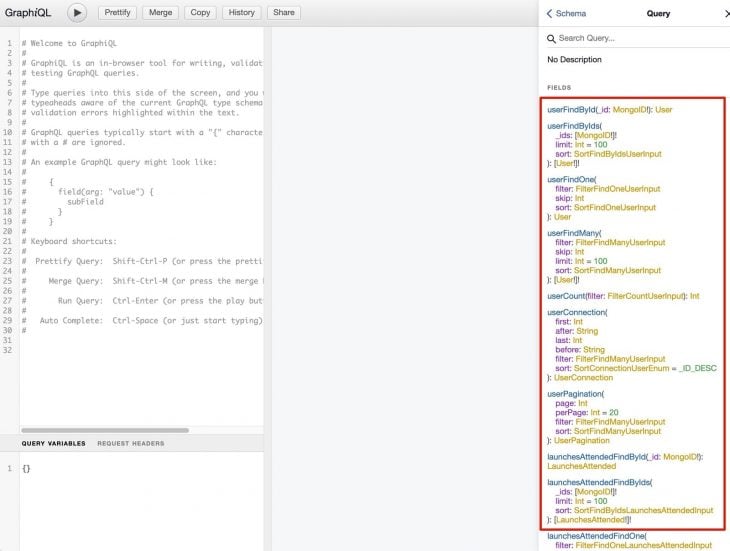
This will take you to a GraphiQL instance, which is a nice interface for querying GraphQL servers. Click on the doc’s sidebar and explore what options we have available. You will notice we have a way to see past launches.
👁 GraphiQI past launches sidebar
To test our new capabilities, we can query for past launches, pick an id from the list, and create a row in the MongoDB database for the user to SpaceX launch reference.
First, create a user:
mutation CreateUser($input: CreateOneUserInput!) {
 userCreateOne(record: $input) {
 recordId
 }
}
Now, get past launches:
query PastLaunches {
 launchesPast(limit: 10) {
 mission_name
 id
 launch_date_local
 }
}
Mark a launch as attended:
mutation LaunchesAttendedCreateOne($input: CreateOneLaunchesAttendedInput!) {
 launchesAttendedCreateOne(record: $input) {
 recordId
 }
}
Finally, see all the previous launches that you attended:
query LaunchesAttended {
 launchesAttendedFindMany {
 spacexLaunchID
 userId
 }
}
In a short time (and after a few config files), we were able to build our own GraphQL API gateway, which stitched together the SpaceX GraphQL API, and a generated GraphQL API from a local MongoDB database, allowing us to create an app that records which launches we attended. This use case was a demonstration of how powerful GraphQL gateways can be for a client’s developer experience.
Without this gateway, the client would have needed to query two APIs separately. Instead, GraphQL Mesh helped us quickly generate basic CRUD operations we could perform on our Mongo Database, making our app have user-specific features.
Overall, there are many ways to use API gateways and a plethora of libraries to choose from to assist you in building a distributed system that can be fine-tuned for performance, security, and multi-team organizations.
While GraphQL has some features for debugging requests and responses, making sure GraphQL reliably serves resources to your production app is where things get tougher. If you’re interested in ensuring network requests to the backend or third party services are successful, try LogRocket.
👁 LogRocket Dashboard Free Trial BannerLogRocket lets you replay user sessions, eliminating guesswork around why bugs happen by showing exactly what users experienced. It captures console logs, errors, network requests, and pixel-perfect DOM recordings — compatible with all frameworks.
LogRocket's Galileo AI watches sessions for you, instantly aggregating and reporting on problematic GraphQL requests to quickly understand the root cause. In addition, you can track Apollo client state and inspect GraphQL queries' key-value pairs.
Learn how next-browser gives AI agents runtime context for debugging Next.js apps, including React props, hydration, PPR, forms, and performance.
Build dynamic LLM routing in Next.js with OpenRouter, TanStack AI, task classification, model fallbacks, and cost-aware routing.
TSRX adds first-class control flow, conditional hooks, and scoped styles to React via a TypeScript compiler extension — no new framework required.
Learn how to build a full React Native auth system using Better Auth and Expo — with email/password login, Google OAuth, session persistence, and protected routes.
Would you be interested in joining LogRocket's developer community?
Join LogRocket’s Content Advisory Board. You’ll help inform the type of content we create and get access to exclusive meetups, social accreditation, and swag.
Sign up now