|
VOOZH | about |
|
VOOZH | about |
Most developers know to look for SQL injection, exposed API keys, and unsafe authentication logic in their own code. The harder problem is the code they did not write.
👁 Why your dependencies are a bigger security risk than your codeA modern JavaScript app can depend on hundreds or thousands of packages after transitive dependencies are included. Many of those packages can run code during installation, execute inside CI, and access the same environment variables, npm tokens, cloud credentials, and build artifacts your application uses. That makes dependencies a security boundary, not just a convenience layer.
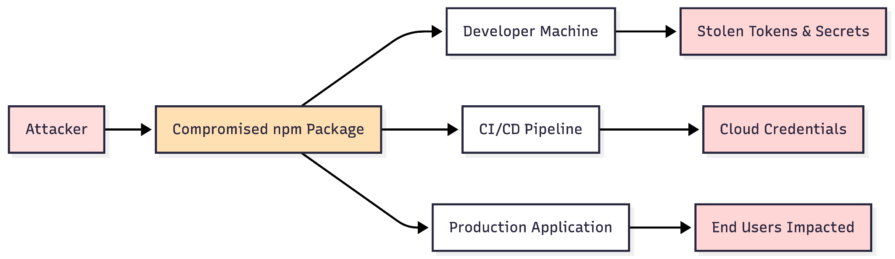
Supply chain attacks take advantage of that trust. Instead of breaking into your app directly, attackers compromise a package, maintainer account, build workflow, registry token, or release pipeline that your app already trusts. If you install the compromised version during the attack window, malicious code can run before your application even starts.
In this article, we’ll look at how npm supply chain attacks work, why transitive dependencies make the blast radius so large, why JavaScript projects are especially exposed, and what teams can do to reduce dependency risk. For a broader overview of the threat model, see LogRocket’s guide to JavaScript supply chain security.
| Risk area | Why it matters | Practical defense |
|---|---|---|
| Transitive dependencies | Packages you did not install directly can still run in your environment | Inspect dependency trees and reduce unnecessary packages |
| Install-time scripts | postinstall, preinstall, and prepare can execute code during installation |
Use --ignore-scripts where possible and review packages that require scripts |
| Flexible version ranges | New package versions can enter your build without explicit review | Commit lockfiles, use npm ci, and review dependency updates |
| CI/CD secrets | A compromised package can try to read tokens and environment variables | Limit CI permissions and scope secrets tightly |
| Maintainer compromise | Trusted packages can become malicious after account takeover | Use scanning, provenance, 2FA, and dependency approval workflows |
A software supply chain attack happens when attackers compromise a trusted part of the development or delivery pipeline instead of attacking the final application directly. In JavaScript projects, that trusted component might be:
Once that component is compromised, the malicious code can spread through every project that installs or updates it. Attackers usually look for high-value secrets: npm tokens, GitHub tokens, CI/CD credentials, API keys, cloud credentials, database URLs, SSH keys, and crypto wallet data.
Supply chain attacks are especially dangerous because they abuse normal developer behavior. Installing a package, merging a Dependabot PR, running npm install, or letting CI publish a release are all ordinary actions. The attack succeeds because the system treats the compromised package or workflow as trusted.
The npm ecosystem has seen several high-profile compromises in the past year, and the pattern is clear: attackers are moving toward maintainers, CI systems, and developer machines because those targets often have more privilege than application code.
In September 2025, the compromise of a prolific npm maintainer account affected widely used packages such as debug and chalk. Security researchers tied the attack to a phishing campaign that used fake npm 2FA reset messaging, then published malicious package versions targeting cryptocurrency transactions and developer environments.
Separately, the Shai-Hulud and Mini Shai-Hulud campaigns showed how npm malware can behave more like a worm than a one-off malicious package. Unit 42 described Shai-Hulud as a self-replicating npm worm that stole secrets and attempted to spread through package publishing access. In May 2026, TanStack disclosed that an attacker published 84 malicious versions across 42 @tanstack/* packages by chaining a pull_request_target pattern, GitHub Actions cache poisoning, and runtime extraction of an OIDC token from a GitHub Actions runner.
That TanStack incident is a useful example because no npm tokens were stolen and the publish workflow itself was not directly compromised. The malicious versions were published by the legitimate release pipeline, which made them harder to distinguish from normal releases. OpenAI later confirmed that two employee devices in its corporate environment were affected through the compromised packages, while stating that no production systems or customer data were breached.
If your first reaction is, “I don’t use those packages,” that is not enough. Many developers never install a compromised package directly. Instead, it enters through a transitive dependency buried several levels deep.
Most packages in your app are not the packages you intentionally chose. They are dependencies installed by other dependencies.
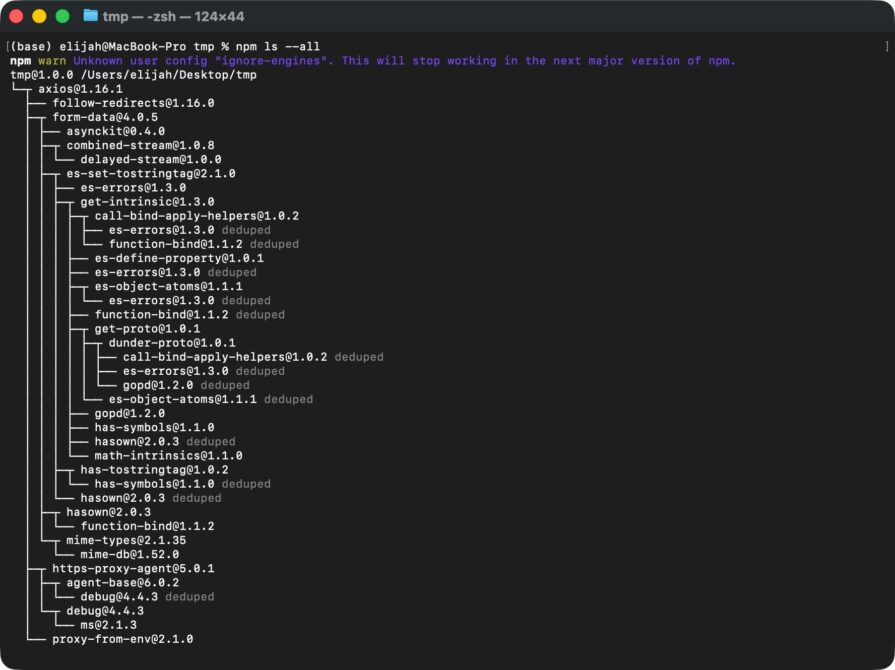
For example, you might install one familiar package:
npm install axios
That package can pull in other packages, and those packages can pull in more. Before long, even a small app can include hundreds of packages across production dependencies, development dependencies, test tooling, build tooling, and framework internals.
This is why supply chain risk scales so quickly. You might review the top-level package, check its README, and trust its maintainer. But you probably do not manually review every nested package, every install script, every maintainer account, and every release workflow underneath it.
Attackers understand this. Small utility packages are attractive targets because they are widely reused, rarely audited, and often maintained by one person. A tiny package deep in the tree may not look important, but if it runs during install or executes inside CI, it can still access the environment around it.
Every ecosystem has supply chain risk, but npm has a few traits that make the risk more visible.
The npm registry contains millions of packages, and JavaScript projects often depend on many small packages. That modular culture has real benefits. It makes reuse easy and helps teams move quickly.
The tradeoff is trust sprawl. Every dependency adds another maintainer, release process, repository, package manifest, install script, and potential compromise path.
npm packages can run lifecycle scripts such as preinstall, install, postinstall, and prepare. That means package code can execute during installation, before you import it and before your application runs.
For legitimate packages, these scripts can compile native modules, prepare artifacts, or generate files. For malicious packages, they can inspect environment variables, read local files, make network requests, or attempt credential theft.
Install-time execution is one of the most important differences between “this package is sitting in my dependency tree” and “this package can run code on my machine.”
Tools like Dependabot, Renovate, and automated release workflows are useful, but they also change the threat model. If a dependency update is merged and deployed without human review, a compromised version can move from npm to production quickly.
Automation should reduce toil. It should not remove review from high-risk changes. Dependency updates, especially major version changes or packages with install scripts, should be treated like code changes.
Many important packages are maintained by volunteers. Some have millions of downloads and very little institutional support. Attackers do not need to defeat your security team if they can phish a maintainer, hijack a token, or compromise a release workflow upstream.
That does not mean open source is unsafe. It means open-source trust needs operational controls around it.
There is no perfect defense against supply chain attacks. The goal is to reduce exposure, make builds reproducible, limit what dependencies can access, and detect suspicious behavior earlier.
Before adding a package, ask whether you really need it. If the dependency replaces five lines of native JavaScript, it may not be worth the extra trust relationship.
This matters most for small utilities. A large, actively maintained framework is not automatically safe, but it usually has more scrutiny than a tiny abandoned helper package. The deeper and wider your dependency tree becomes, the harder it is to reason about what your app is actually running.
Run this periodically to inspect your full tree. LogRocket also has a separate guide on securing open source Node.js dependencies if you want to go deeper on package-auditing tools:
npm ls --all
You do not need to audit every line of every package manually. Start by looking for unexpected packages, abandoned packages, duplicate versions, packages with install scripts, and dependencies that seem disproportionate to the problem they solve.
For applications, commit your lockfile. A lockfile is not just a convenience artifact; it records the exact package versions your app installs.
Use clean installs in CI:
npm ci
Unlike npm install, npm ci installs from the lockfile and fails if package.json and the lockfile are out of sync. That makes builds more reproducible and reduces the chance that a new transitive version enters CI without review.
It also helps to understand version ranges in package.json. This matters for app dependencies and for packages you publish yourself; if you maintain packages, prepublish checks such as Publint package validation can catch packaging mistakes before they reach consumers:
| Version range | What it allows | Supply chain implication |
|---|---|---|
^1.2.3 |
Minor and patch updates within 1.x.x |
Most flexible, more automatic change |
~1.2.3 |
Patch updates within 1.2.x |
Narrower, but still allows automatic change |
1.2.3 |
Only that exact version | Most controlled for direct dependencies |
Exact pins can reduce surprise for direct dependencies, but the lockfile is what controls the full installed tree for an application. Treat every dependency update as something to review, test, and merge intentionally.
If a package does not need install scripts, do not let it run them. For one-off installs, use:
npm install --ignore-scripts package-name
For CI, consider:
npm ci --ignore-scripts
This can break packages that legitimately need install scripts, especially native modules. That is the point of testing it deliberately. If a package requires install-time execution, document why and make sure you trust it enough to grant that permission.
For production builds, avoid letting CI pull directly from the public npm registry without any control point. Instead, route dependency installs through a registry proxy or artifact repository such as Artifactory, Nexus, GitHub Packages, Azure Artifacts, or Verdaccio.
In that setup:
This gives teams a practical approval layer. Smaller projects may not need a full private registry, but teams handling sensitive data, regulated workloads, or high-value infrastructure should strongly consider it.
Assume a compromised dependency will try to read whatever the environment exposes. That means your CI pipeline should not have broad credentials available by default.
Review:
This is where supply chain security overlaps with CI/CD security. If a malicious package runs inside a privileged build, the dependency is not the only problem. The surrounding environment determines the blast radius.
Use tools such as Dependabot, Snyk, Socket, OSV-Scanner, npm audit, and package manager security features to catch known vulnerabilities and suspicious package behavior.
These tools are necessary, but they are not sufficient. Most scanners are reactive. They are good at detecting known issues after a vulnerability, malicious package, or compromised version has been reported. They are less effective during the first hours of a live compromise, when the malicious release may still look new and trusted.
Use scanners as a baseline, then add process controls around them: dependency review, lockfile discipline, CI isolation, registry controls, and secret minimization.
During review, look for dependency updates that introduce new behavior unrelated to the package’s purpose. Red flags include:
You will not catch everything manually. But a short review habit catches more than blind trust.
Use this checklist before adding a new package or approving a meaningful dependency update:
| Check | Question to ask |
|---|---|
| Need | Do we need this package, or can we use native platform APIs? |
| Maintenance | Is the package actively maintained, and does it have recent legitimate activity? |
| Ownership | Did the maintainer, repository, or package ownership recently change? |
| Install scripts | Does it run preinstall, install, postinstall, or prepare? |
| Dependency tree | Does it pull in a large or surprising number of transitive dependencies? |
| Release timing | Was this version published unusually recently or after a long dormant period? |
| Secrets | Would this package run in an environment with production credentials? |
| Lockfile | Is the exact installed version captured in the lockfile? |
| CI permissions | Does the relevant CI job use least privilege? |
| Rollback | Can we quickly revert if the package is later flagged as compromised? |
This does not need to become a heavyweight process for every patch. The goal is to make risk visible before a package becomes part of your build.
The days of treating npm packages as automatically safe are over. Dependencies are executable code written by people outside your team, often maintained through infrastructure you do not control. That does not mean you should stop using open source. It means open source needs the same review, observability, and operational discipline you apply to your own code.
The industry is moving in that direction. Provenance, package signing, registry policy, SBOMs, dependency review, and CI hardening are all becoming more important. But those tools only help if teams use them intentionally.
Start with the basics: install fewer packages, commit lockfiles, use reproducible installs, block unnecessary install scripts, review dependency updates, and limit what CI secrets are exposed. Those steps will not stop every supply chain attack, but they make compromise harder, detection easier, and the blast radius smaller.
Enabled React Compiler v1.0 on a production Next.js app. Here’s every warning, breakage, and silent opt-out I documented — and what actually worked.
We built the same app in TanStack Start RSC and Next.js RSC. TanStack shipped 40% less JS and built 4x faster — but Next.js is still the safer production bet.
From RSC vulnerabilities and the Vercel breach to TypeScript 7.0 Beta and AI agents — the nine frontend storylines that defined H1 2026, ranked.
AI tools generate working React code fast, but miss race conditions, empty states, debouncing, and accessibility. Here’s how to catch bugs before production.
Would you be interested in joining LogRocket's developer community?
Join LogRocket’s Content Advisory Board. You’ll help inform the type of content we create and get access to exclusive meetups, social accreditation, and swag.
Sign up now