|
VOOZH | about |
|
VOOZH | about |
In October 2025, the React compiler v1.0 was released as a stable version with the promise that we would no longer need to litter our codebases with useMemo, or useCallback. This change brought out mixed reactions in the React community, with some saying “finally, we get to delete our useMemo and callback hooks” and others saying “I’m definitely not doing that to my app until someone does that first”. This article is for the second half and will walk you through how I enabled the React Compiler on a production Next.js codebase and documented every warning, every breakage, and every component the compiler quietly opted out of without telling me why.
The short version: most of it worked. But “most” is doing a lot of work in the sentence, and the things that broke were subtle enough that, without tests, they would have shipped. Here’s exactly what happened.
Before we get into the good stuff, it helps to understand what the compiler is actually doing under the hood for your React application. The React compiler is a Babel plugin that maps your application data flow, analyzes the code, and gracefully handles memoization automatically. Here is a code snippet you would write before the compiler:
function ProductList({ products, onSelect }) {
 const sorted = useMemo(
 () => [...products].sort((a, b) => a.name.localeCompare(b.name)),
 [products]
 );

 const handleSelect = useCallback(
 (id) => onSelect(id),
 [onSelect]
 );

 return (
 <ul>
 {sorted.map((p) => (
 <ProductItem key={p.id} product={p} onSelect={handleSelect} />
 ))}
 </ul>
 );
}
Here is that same code snippet after the React compiler introduction:
function ProductList({ products, onSelect }) {
 const sorted = [...products].sort((a, b) => a.name.localeCompare(b.name));
 const handleSelect = (id) => onSelect(id);

 return (
 <ul>
 {sorted.map((p) => (
 <ProductItem key={p.id} product={p} onSelect={handleSelect} />
 ))}
 </ul>
 );
}
And that’s it! The compiler reads your code and generates the memoized version for you.
“React Compiler automatically applies the optimal memoization, ensuring your app only re-renders when necessary.”
— The React Compiler docs
What makes this possible is that the compiler pre-allocates a flat cache array per component to store values which is accessed by an internal hook _c (formerly known as useMemoCache).
import { c as _c } from "react/compiler-runtime";

function ProductItem({ product }) {
 const $ = _c(2);

 let t0;
 if ($[0] !== product.name) {
 t0 = <h2>{product.name}</h2>;
 $[0] = product.name;
 $[1] = t0;
 } else {
 t0 = $[1];
 }
 return t0;
}
The code above demonstrates how the React compiler turns a standard component into an optimized low-level output that is more granular than using React.memo.
The catch here is that your code has to follow React rules for the compiler to work well because your code that worked well even when they broke some rules like mutating an object directly or relying on unstable references, now manifests as real bugs after enabling the compiler. This is because the compiler strictly assumes that your code is pure and predictable so it may either expose those as bugs or opt out of optimizing them.
Before enabling the compiler, it’s advised that you install the lint rules first. This helps to catch components that break React rules before the compiler opts out silently. I used this command:
npm install --save-dev eslint-plugin-react-hooks@latest
Then created an eslint.config.mjs file and put the code below:
import { FlatCompat } from "@eslint/eslintrc";
import { fileURLToPath } from "node:url";
import path from "node:path";
import reactHooks from "eslint-plugin-react-hooks";
const __filename = fileURLToPath(import.meta.url);
const __dirname = path.dirname(__filename);
const compat = new FlatCompat({
 baseDirectory: __dirname,
});
const config = [
 {
 ignores: [".next/**", "node_modules/**", "dist/**", "build/**"],
 },
 ...compat.extends("next/core-web-vitals", "next/typescript"),
 reactHooks.configs.flat.recommended,
 {
 rules: {
 "react-hooks/unsupported-syntax": "error",
 "react-hooks/incompatible-library": "error",
 "react-hooks/set-state-in-effect": "error",
 },
 },
];
export default config;
The important thing to note is that the lint rules work even when the compiler is disabled and is actually a good idea as it made things easier when migrating to the compiler, as most of the cleanups happened here.
The next step is to enable the compiler, which in my case was as follows:
import type { NextConfig } from "next";

const nextConfig: NextConfig = {
 experimental: {
 reactCompiler: true,
 },
};
export default nextConfig;
Another very important thing to note is that you shouldn’t add a manual babel.config.js unless you absolutely need one. Adding a custom Babel config can break some Next and React features in your application.
By far the most serious issue I hit was the live preview freeze in the UserForm component of the application. The code looks something like this:
 function UserInviteForm() {
 const {
 register,
 handleSubmit,
 watch,
 formState: { errors },
 } = useForm({
 defaultValues: {
 name: '',
 email: '',
 role: 'viewer',
 },
 });

 const watchedName = watch('name');

 return (
 <form onSubmit={handleSubmit(onSubmit)}>
 <input {...register('name')} />

 <aside>
 <p>{watchedName || 'Name will appear here'}</p>
 </aside>
 </form>
 );
}
The preview updated correctly on every keystroke when the compiler was disabled. However, upon enabling the compiler, the preview froze, the form still submitted, validation still worked, but the watched values of the form stopped triggering re-renders consistently.
After debugging for a while, I found that this is a documented issue from React: incompatible libraries that rely on interior mutability. I confirmed this after running npx eslint ., where I got this error:
React Hook Form's useForm() API returns a watch() function
which cannot be memoized safely.
The workaround I used was to opt-out of the compiler memoization by using the "use no memo" directive as shown below:
function useFormCompat(props) {
 "use no memo";

 return useForm(props);
}
And use it in the form component as shown below:
function UserInviteForm() {
 const { register, watch } = useFormCompat({
 defaultValues: {
 name: '',
 email: '',
 },
 });

 const watchedName = watch('name');

 return (
 <>
 <input {...register('name')} />
 <p>{watchedName}</p>
 </>
 );
}
With that fix, the live preview of the application updated correctly once again.
During my migration, I was cleaning up the useMemo and useCallback hooks and noticed an interesting situation when I tried to remove the useCallback hook that was used in the click handler for a chart component, as shown below:
const handleClick = useCallback(
 (event) => {
 const point = data[event.index];
 onPointClick(point);
 },
 [data, onPointClick]
);

useEffect(() => {
 const chart = new Chart(chartRef.current, {
 type: "line",
 data,
 options: { onClick: handleClick },
 });
 return () => chart.destroy();
}, [handleClick, data]);
After deleting the useCallback, I started seeing stale data in click handlers under load. Clicks occasionally referenced previous data. Updates to the dataset didn’t always align with the timing of click interactions.
I should note that this isn’t a compiler bug; rather, it just showed a timing issue that the useCallback had been hiding. The useCallback was stabilizing the handler’s identity, which made the Chart.js effect re-registration predictable. If you’re interested in how useEffect timing can cause subtle bugs, that pattern shows up in other contexts too.
With that in mind, I took a conscious step after much digging and looking for a workaround, to put the useCallback hook back.
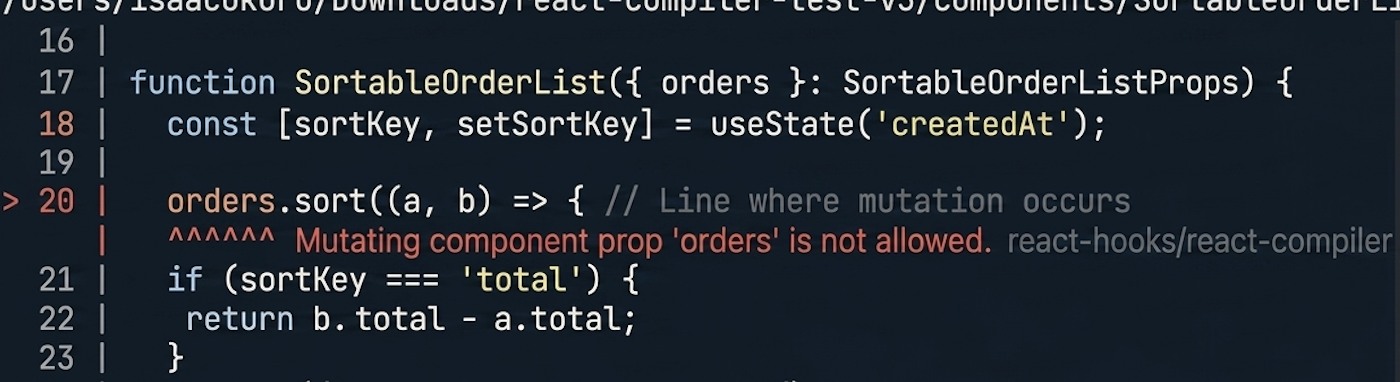
Before I started this fix, I did some research with various sources saying how the DevTools Memo ✨ badge was supposed to be the signal to know if the compiler opted out of the component. Turns out that the badge isn’t that signal. One of the components in my code was flouting a React rule as shown below:
function SortableOrderList({ orders }) {
 const [sortKey, setSortKey] = useState('createdAt');

 orders.sort((a, b) => {
 if (sortKey === 'total') {
 return b.total - a.total;
 }

 return (
 new Date(b.createdAt).getTime() -
 new Date(a.createdAt).getTime()
 );
 });

 return (/* rows */);
}
Anyone who has worked in older React codebases has probably seen this pattern before. This pattern works because the array came from a fresh fetch or because nothing else relied on the original ordering. Running the linter produced this error:
error Mutating component prop 'orders' is not allowed. react-hooks/react-compiler
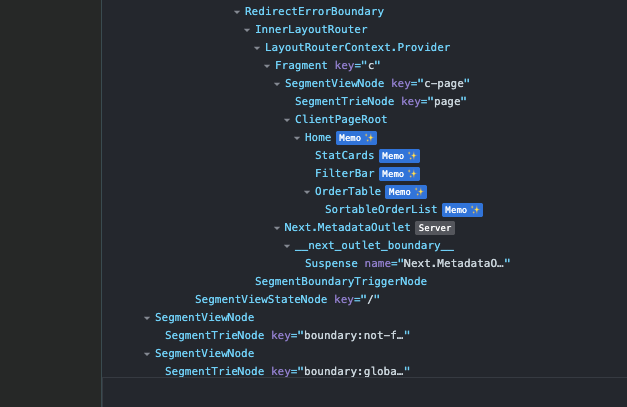
However, the badge still showed for the SortableOrderList component, as shown in the image below:
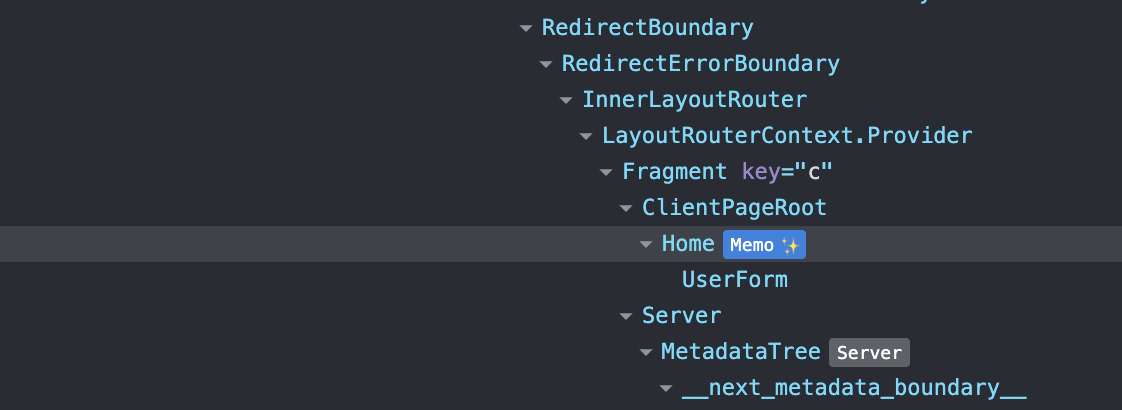
From what I could figure out, the badge means the compiler processed the component — not that optimization succeeded. The only point that the badge didn’t show was on the UserForm, where we added the "use no memo" directive as shown below:
The badge tells you the compiler is wired up. It doesn’t tell you what it actually did, or if the component is being optimized.
The short version: yes, but not all at once. The compiler doesn’t delete your existing hooks — it works around them. Your useMemo and the compiler’s optimization of the rest of the component coexist fine. So the app won’t break if you leave them in. But you’re leaving performance on the table, because the compiler’s memoization is more granular than what a hand-written useMemo produces. You get the most benefit when you let the compiler make the decision.
That said, there are cases where you should keep them. Some of those cases include:
useCallback with a comment explaining why, exactly like the chart handler above. If you use React chart libraries, this is especially worth checking before removing any identity-stabilizing hooks.Keep useMemo when:
Everything else: delete it. The compiler handles derived state, inline callbacks, sorted and filtered arrays, and formatted values — all of it. If you find yourself reaching for useMemo on anything not in that list, you’re doing it out of habit, not necessity.
The mindset shift is the actual change here. You stop asking “where should I memoize this?” and start asking “does this cross a boundary the compiler can’t see?” If the answer is no, leave it alone. If the answer is yes — an imperative library, an external event system, a proven performance hotspot — keep the hook and document why it’s there.
Every useMemo and useCallback that stays in your codebase in 2026 should have a reason that a future developer can read. If it doesn’t have one, the compiler probably handles it, and the hook is just noise.
If I were doing this again, here’s the order I’d follow without shortcuts:
eslint-plugin-react-hooks to v7+ and adopt recommended. Do this before touching the compiler — it’s a lower-risk step and where most of the visible cleanup happens.babel-plugin-react-compiler with --save-exact so a patch can’t change behavior mid-migration.watch(), TanStack Table, TanStack Virtual, MobX, some chart and canvas libraries — these need "use no memo" or a wrapper hook for now. The linter will catch the common cases."use no memo" directives periodically. Treat them as TODOs, not permanent markers. The count should trend down over time.Enabling the React Compiler in an existing codebase isn’t a one-command migration. It’s a process, and the process has a specific shape.
The lint rules come first. Promote unsupported-syntax, incompatible-library, and set-state-in-effect to error before you enable the compiler itself. Fix what they surface. Then enable the compiler. If you’re also evaluating AI-generated React code, it’s worth knowing that compilers and AI assistants can surface different classes of bugs — both are worth having in your workflow.
The two failure modes I hit — the frozen form preview with RHF’s watch(), and the stale chart click handler — are patterns I’d been shipping for years without issue. Performance problems like the React patterns that quietly kill performance often hide in plain sight, and the compiler has a way of making them visible. Similarly, keeping an eye on memory leaks in React applications is a good companion practice when doing this kind of deep optimization work.
Install LogRocket via npm or script tag. LogRocket.init() must be called client-side, not
server-side
$ npm i --save logrocket

// Code:

import LogRocket from 'logrocket';
LogRocket.init('app/id');
// Add to your HTML:

<script src="https://cdn.lr-ingest.com/LogRocket.min.js"></script>
<script>window.LogRocket && window.LogRocket.init('app/id');</script>
We built the same app in TanStack Start RSC and Next.js RSC. TanStack shipped 40% less JS and built 4x faster — but Next.js is still the safer production bet.
From RSC vulnerabilities and the Vercel breach to TypeScript 7.0 Beta and AI agents — the nine frontend storylines that defined H1 2026, ranked.
AI tools generate working React code fast, but miss race conditions, empty states, debouncing, and accessibility. Here’s how to catch bugs before production.
Learn how to use Gemini CLI subagents to delegate frontend, backend, testing, and docs tasks to specialized agents with guardrails and clear ownership.
Would you be interested in joining LogRocket's developer community?
Join LogRocket’s Content Advisory Board. You’ll help inform the type of content we create and get access to exclusive meetups, social accreditation, and swag.
Sign up now