|
VOOZH | about |
|
VOOZH | about |
Editor’s note: This post was updated 25 January 2022 to include news on the future of Pinia and Vue. You can read more about it in the section The future of Pinia, Vuex, and Vue.
👁 Pinia vs. VuexThe Replay is a weekly newsletter for dev and engineering leaders.
Delivered once a week, it's your curated guide to the most important conversations around frontend dev, emerging AI tools, and the state of modern software.
Pinia, a lightweight state management library for Vue.js, has gained recent popularity. It uses the new reactivity system in Vue 3 to build an intuitive and fully typed state management library.
Pinia’s success can be attributed to its unique features (extensibility, store module organization, grouping of state changes, multiple stores creation, and so on) for managing stored data.
On the other hand, Vuex is also a popular state management library built for the Vue framework, and it is the recommended library for state management by the Vue core team. Vuex is highly focused on application scalability, developer ergonomics, and confidence. It is based on the same flux architecture as Redux.
In this article, we will make a comparison between Pinia and Vuex. We will analyze the setup, community strengths, and performance of both frameworks. We’ll also look at new changes in Vuex 5 compared to Pinia 2.
The code snippets used in this article are based on the Vue 3 Composition API.
It is easy to get started with Pinia because it only requires installation and creating a store.
To install Pinia, you can run the following command in your terminal:
yarn add pinia@next
# or with npm
npm install pinia@next
This version is compatible with Vue 3. If you are looking for the version compatible with Vue 2.x, check the v1 branch.
Pinia is a wrapper around the Vue 3 Composition API. Hence you don’t have to initialize it as a plugin unless there’s a situation where you want Vue devtools support, SSR support, and webpack code splitting:
//app.js
import { createPinia } from 'pinia'
app.use(createPinia())
In the snippet above, you add Pinia to the Vue.js project so that you can use Pinia’s global object in your code.
To create a store, you call the defineStore method with an object containing the states, actions, and getters needed to create a basic store:
// stores/todo.js
import { defineStore } from 'pinia'

export const useTodoStore = defineStore({
 id: 'todo',
 state: () => ({ count: 0, title: "Cook noodles", done:false })
})
Vuex is also easy to set up, requiring installation and creating a store.
To install Vuex, you can run the following commands in your terminal:
npm install vuex@next --save
# or with yarn
yarn add vuex@next --save
To create a store, you call the createStore method with an object containing the states, actions, and getters needed to create a basic store:
//store.js
import {createStore} from 'vuex'
const useStore = createStore({
 state: {
 todos: [
 { id: 1, title: '...', done: true }
 ]
 },
 getters: {
 doneTodos (state) {
 return state.todos.filter(todo => todo.done)
 }
 }
})
To access the Vuex global object, you need to add Vuex to the root Vue.js project file as follows:
//index.js
import { createApp } from 'vue'
import App from './App.vue'
import {useStore} from './store'
createApp(App).use(store).mount('#app')
Vuex and Pinia access their stores slightly differently.
Using Pinia, the store can be accessed as follows:
export default defineComponent({
 setup() {
 const todo = useTodoStore()

 return {
 // gives access only to specific state
 state: computed(() => todo.title),
 }
 },
})
Notice that the state object of the store is omitted while accessing its properties.
Using Vuex, the store can be accessed as follows:
import { computed } from 'vue'
export default {
 setup () {
 const store = useStore()

 return {
 // access a state in computed function
 count: computed(() => store.state.count),

 // access a getter in computed function
 double: computed(() => store.getters.double)
 }
 }
}
Pinia has a small community at the time of writing this article, which results in few contributions and fewer solutions on Stack Overflow.
Due to Pinia’s popularity beginning early last year, and its progress so far, its community is fast growing. Hopefully, there will be more contributors and solutions on Pinia soon.
Vuex, being the recommended state management library by the Vue.js core team, has a large community with major contributions from the core team members. Solutions to Vuex bugs are readily available on Stack Overflow.
Both state management libraries are fairly easy to learn since they have great documentation and learning resources on YouTube and third-party blogs. Their learning curve is easier for developers with previous experience working with Flux architecture libraries like Redux, MobX, Recoil, and more.
Both libraries’ documentations are great and written in a manner friendly to both experienced and new developers.
At the time of writing this article, Pinia has two major releases: v1 and v2, with v2 having over 1.6k stars on GitHub. It’s inarguably one of the fastest growing state management libraries in the Vue.js ecosystem, given that it was initially released in 2019 and it’s relatively new.
Meanwhile, from the creation date of Vuex until now, the Vuex library has made five stable releases. Although v5 is in its experimental stage, Vuex’s v4 is the most stable release so far and has about 26.3k stars on GitHub.
Both Pinia and Vuex are super fast, and in some cases your web application will be faster when using Pinia compared to Vuex. This performance boost can be attributed to Pinia’s extremely light weight. Pinia weighs around 1KB.
Although Pinia is built with Vue devtools support, some features like time traveling and editing are still not supported because Vue devtools doesn’t expose the necessary APIs. This is worth noting when developmental speed and debugging are of more preference for your project.
Pinia draws these comparisons to Vuex 3 and 4:
Mutations no longer exist. They were very often perceived as extremely verbose. They initially brought devtools integration but that is no longer an issue.
No need to create custom complex wrappers to support TypeScript, everything is typed and the API is designed in a way to leverage TS type inference as much as possible.
These are additional insights Pinia makes in the comparison between its state management library and Vuex:
$patch:
this.$patch((state) => {
 state.posts.push(post)
 state.user.postsCount++
 })
 .catch(error){
 this.errors.push(error)
 }
Comparing Pinia 2 (currently in alpha) with Vuex, we can deduce that Pinia is ahead of Vuex 4.
The Vue.js core team has an open RFC for Vuex 5 similar to the one used by Pinia. Currently, Vuex goes through RFC to gather as much feedback from the community as possible. Hopefully, the stable release of Vuex 5 will outperform Pinia 2.
According to the creator of Pinia (Eduardo San Martin Morote), who is also part of the Vue.js core team and actively participates in the design of Vuex, Pinia and Vuex have more similarities than differences:
Pinia tries to stay as close to Vuex’s philosophy as possible. It was designed to test out a proposal for the next iteration of Vuex and it was a success as we currently have an open RFC for Vuex 5 with an API very similar to the one used by Pinia. My personal intention with this project is to redesign the experience of using a global Store while keeping the approachable philosophy of Vue. I keep the API of Pinia as close as Vuex as it keeps moving forward to make it easy for people to migrate to Vuex or to even fusion both projects (under Vuex) in the future.
Although Pinia is good enough to replace Vuex, replacing Vuex was not its aim. But then it just got so good that the Vue.js core team decided to make it Vuex 5.
dispatch method or MapAction helper function, which is common in VuexFrom my personal experience, due to Pinia’s light weight, it is suitable for small- and medium-scale applications. It is also suitable for low-complexity Vue.js projects since some debugging features like time traveling and editing are still not supported.
Using Vuex for small- to medium-scale Vue.js projects is overkill because its weight contributes heavily to performance reduction. Hence, Vuex is suitable for large-scale and high-complexity Vue.js projects.
At the time of writing this article, Pinia had been the top contender with the Vuex state management library, having enough qualities to replace Vuex as the official Vue state management library.
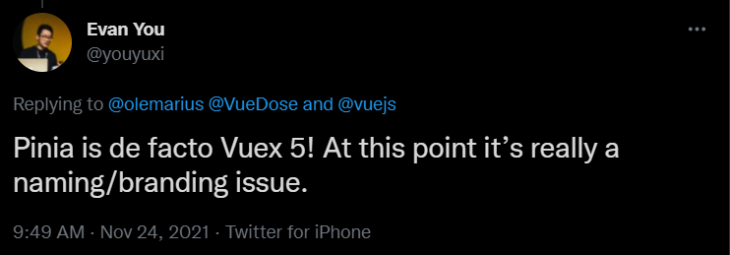
According to Evan You’s recent tweet about Pinia:
👁 Evan You's Tweet About Pinia and Vuex
This means that Pinia has a dominant position by Vue.js developers and the core team’s acceptance although it’s not officially announced.
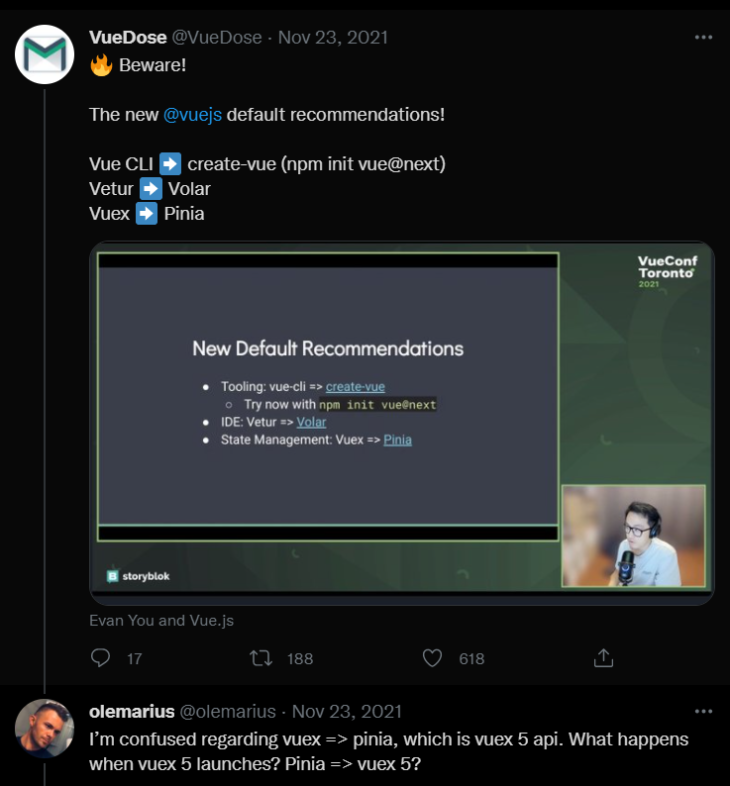
Evan You’s recent tweet about Pinia was a reply to @olemarius’s uncertainty on the effect of launching Vuex 5 as Pinia.
👁 Vuedose Vue.js Pinia
Since the Vue core team has decided to make Pinia the new Vuex 5, we should be anticipating an announcement with Pinia as the official state management library for Vue applications.
In this article, we drew comparisons between Vuex and Pinia and highlighted their best features, documentation, community strength, learning curves, and some pitfalls discovered in both libraries at the time of writing.
Vuex 4 and Pinia are similar in most ways, and they can be used to accomplish the same tasks.
Overall, one is not better than the other — they both achieve the desired goal. It all depends on your use case and preference.
Also, keep in mind that the creator of Pinia has stated that the aim of Pinia is not to replace Vuex. Rather, it aims to make it easy for developers to migrate to Vuex or to even fuse both projects (under Vuex) in the future.
Debugging Vue.js applications can be difficult, especially when users experience issues that are difficult to reproduce. If you’re interested in monitoring and tracking Vue mutations and actions for all of your users in production, try LogRocket.
👁 LogRocket Dashboard Free Trial BannerLogRocket lets you replay user sessions, eliminating guesswork by showing exactly what users experienced. It captures console logs, errors, network requests, and pixel-perfect DOM recordings — compatible with all frameworks.
With Galileo AI, you can instantly identify and explain user struggles with automated monitoring of your entire product experience.
Modernize how you debug your Vue apps — start monitoring for free.
Learn how next-browser gives AI agents runtime context for debugging Next.js apps, including React props, hydration, PPR, forms, and performance.
Build dynamic LLM routing in Next.js with OpenRouter, TanStack AI, task classification, model fallbacks, and cost-aware routing.
TSRX adds first-class control flow, conditional hooks, and scoped styles to React via a TypeScript compiler extension — no new framework required.
Learn how to build a full React Native auth system using Better Auth and Expo — with email/password login, Google OAuth, session persistence, and protected routes.
Would you be interested in joining LogRocket's developer community?
Join LogRocket’s Content Advisory Board. You’ll help inform the type of content we create and get access to exclusive meetups, social accreditation, and swag.
Sign up now