|
VOOZH | about |
|
VOOZH | about |
Qwik is a relatively new framework for building high-performance web applications. It aims to address some of the longstanding performance challenges faced by traditional frontend frameworks.
👁 Qwik Adoption Guide Overview Examples And AlternativesNow, I know you may be thinking that Qwik is just another JavaScript framework. But as you’ll see in this article, Qwik’s approach using resumability makes it stand out from the pack as one of the best options to create performance-critical web applications.
In this article, we’ll talk about everything related to Qwik: why you should choose Qwik, key features, how to use and deploy it, and more. We’ll also compare it to other similar frameworks. At the end of this article, you will understand why Qwik is becoming more popular and why you should consider it for your next project.
Without further ado, let’s dive right in.
Qwik is an innovative web framework designed to tackle a major web development pain point: slow-loading web applications. It was created by the team at Builder.io — Misko Hevery, the father of Angular, also helped create Qwik.
Most traditional JavaScript frameworks are great, and they’ve helped revolutionize web development.
However, they all have performance limitations, such as the overhead of Virtual DOM diffing and reconciliation that cause slower initial load times in complex applications. This leads to bad UX and also hinders SEO because page load speed is a ranking factor for search engines like Google.
Qwik bridges this gap by offering a framework that prioritizes speed without sacrificing functionality.
The initial v0.1.0 release of Qwik was announced in October 2022, introducing the core concepts of fine-grained updates, resumability, and isomorphic rendering. Since then, Qwik has undergone several updates. The latest v0.17.0 released in April 2024 brought DX improvements, better TypeScript support, and performance optimizations.
However great Qwik may be, it’s not all roses and daisies. There are some drawbacks to consider before choosing Qwik. Let’s explore them now.
Qwik’s resumability feature, which allows applications to be serialized and resumed from the same state on the client, relies on the ability to serialize and deserialize the application state. You may encounter issues with Qwik’s serialization process if your application heavily relies on complex data structures, such as:
This can lead to bugs, unexpected behavior, or even complete failures during serialization or deserialization.
In cases like this, you simply need to implement workarounds or find alternative ways to structure your data to make it more serializable, like flattening nested data structures, breaking circular references, or using serializable proxies/replacements for non-serializable values.
As a relatively new framework, Qwik has a smaller community and less documentation compared to established options like React or Vue. This means there will be fewer established articles or resources to help you learn and solve any problems you face.
Due to the lack of resources available, you might need to invest more time in understanding concepts like fine-grained updates, resumability, and serialization, as these are not commonly used patterns in many existing frameworks.
Additionally, Qwik’s unique approach to rendering and state management may require developers to unlearn certain assumptions and mental models from working with other frameworks.
The good news is, Qwik’s “small” community and dev team are very supportive, with lots of check-ins and super fast responses to any issues raised. Any problem encountered will likely be addressed very…Qwikly.
The JSX templating of Qwik is also very similar to React, with only minor differences like class instead of className, and appending $ to click handler names — e.g., onClick$. If you have experience working with React, you may find the learning curve more manageable.
Despite avoiding virtual DOM diffing, Qwik still needs to create virtual nodes representing the component tree. We all know that creating and maintaining these virtual nodes can have a performance cost, especially in complex applications with deeply nested component hierarchies or frequent updates.
To mitigate the performance impact of virtual nodes, Qwik employs a technique called lazy node creation. This involves moving the creation of virtual nodes to the end of the HTML rendering process, allowing for additional tree-shaking opportunities.
Deferring the creation of virtual nodes until after the initial HTML render allows Qwik to eliminate the creation of virtual nodes for components that are never rendered, thus reducing overhead and improving performance.
Despite having some drawbacks, the advantages of using Qwik far exceed its disadvantages. None of its potential drawbacks are deal-breakers, and there are solutions to all of those problems.
But the most important reason why you should use Qwik is because it solves the main problem of web development today.
Let’s face it: web development is all about creating fast, interactive experiences for users. While other established frameworks have their place, I think Qwik offers a different, better alternative with its focus on performance and a fresh approach — ditching hydration.
Qwik ditches hydration by rendering all components on the server and serializing the resulting HTML along with the application’s current state. The client then receives a minimal amount of JavaScript, allowing for incredibly fast page loads.
When the HTML reaches the browser and its user, it can resume execution from where the server left off. This makes the application instantly interactive and eliminates the need for hydration, which is a problem for most established frameworks.
For performance-focused websites and apps, this is a dream come true in so many ways because it leads to:
The result? Faster load times, happier users, and vastly improved SEO.
Qwik is compatible with many existing libraries and tools like AuthJS, Supabase, Tailwind, Prisma, Jest, and Vitest, allowing developers to leverage their existing knowledge and integrate familiar libraries into their Qwik applications.
Qwik provides a straightforward quickstart process to help you set up a new Qwik project and get familiar with its core concepts.
First, ensure you have Node.js (version 16.8 or later) installed on your system. Next, open up an IDE of your choice, create a folder, and run any of the following:
npm create qwik@latest
pnpm create qwik@latest
yarn create qwik
bun create qwik@latest
I’m an npm guy, so that’s what I’ll be using for the rest of this article. Once you do that, the CLI will guide you through a very interactive menu that lets you set the project name, select a starter, and install the dependencies.
Once everything is installed, you can then run this command:
npm start
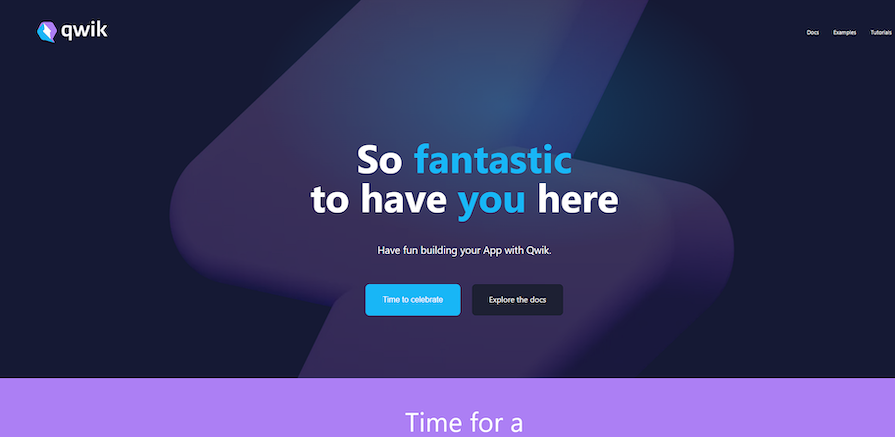
Since I selected the Basic App (Qwik City + Qwik), here’s what it looks like.
With this, you’re good to go. To start editing the app, you can simply open src/routes/index.tsx and modify the code within. For instance, if you want to create a simple “Hello World” file, you can simply replace the entire code in the index.tsx file with the following:
export default function Index() {
 return Hello World from Qwik!;
}
Qwik offers a unique approach to building web applications by prioritizing speed. If you choose to use it, there are some key features you should know about.
In Qwik, the Optimizer tool splits your application into small pieces called symbols, which can be parts of components. A special $ suffix is used to mark these divisions for both the optimizer and developer.
The Optimizer, which runs during bundling, creates separate files for these sections. This allows for lazy loading and faster performance, letting you use the $ suffix to indicate which functions should be optimized and potentially create custom optimization rules. Here’s an example:
import { component$, useStore } from '@builder.io/qwik';

export const Counter = component$(() => {
 const store = useStore({ count: 0 });

return (

 Count: {store.count}


 );
});
In this example, onClick$ is a Symbol that attaches an event listener to the button.
Unlike traditional frameworks that rely on hydration, Qwik uses a technique called “resumability” to improve performance. When a user navigates between pages or revisits the application, Qwik can resume the application from a serialized state instead of re-rendering everything from scratch.
This approach can significantly reduce the amount of work required during page transitions or revisits, leading to faster load times and better perceived performance.
Qwik employs fine-grained lazy loading, which means that only the code required for the current view is loaded initially. This results in smaller bundle sizes and faster initial load times.
As the user interacts with the application and navigates to different routes or components, additional code is loaded as needed.
Qwik includes a smart prefetching mechanism that can anticipate the user’s next actions and preload the required code in the background. This feature helps to further improve the perceived performance of the application by reducing the latency when navigating between routes or components.
Although Qwik primarily focuses on client-side rendering, it also supports server-side rendering (SSR) for improved SEO. By rendering the initial UI on the server, Qwik can ensure that search engines can crawl and index the application’s content effectively.
When performance and efficient updates are critical requirements for a project, then consider using Qwik. Here are some practical business and technical scenarios where Qwik is a suitable solution:
Because of its innovative approach to updates and rendering, Qwik is a superb choice for most performance-critical applications across various domains. It’s perfect for content-heavy web applications, and it also thrives in low-bandwidth or high-latency environments.
When it comes to styling and animating Qwik components, developers have a range of options to choose from. Your options include native support for CSS Modules, inline styles, and built-in animation hooks, as well as the ability to integrate with popular third-party tools and libraries like Tailwind CSS, Emotion, Framer Motion, and more
Qwik aims to be compatible with existing libraries and tools. However, it’s important to note that some additional configuration or custom integrations may be required due to Qwik’s unique rendering approach and serialization model.
The Qwik community is actively working on improving integration guides and providing solutions for common styling and animation use cases.
Deploying a Qwik app is pretty much the same as any other modern frontend framework, so you can use most popular static site hosting platforms, like Netlify, Vercel, and GitHub Pages, to deploy Qwik applications.
We’ll use Vercel for this article because it’s simple and easy to use. First, we need to integrate the vercel-edge adapter using the add command:
npm run qwik add vercel-edge
This will add all the additional files you need for deployment, and update all the necessary files needed for deploying the app on Vercel. It’s quick and easy, taking only a couple of moments.
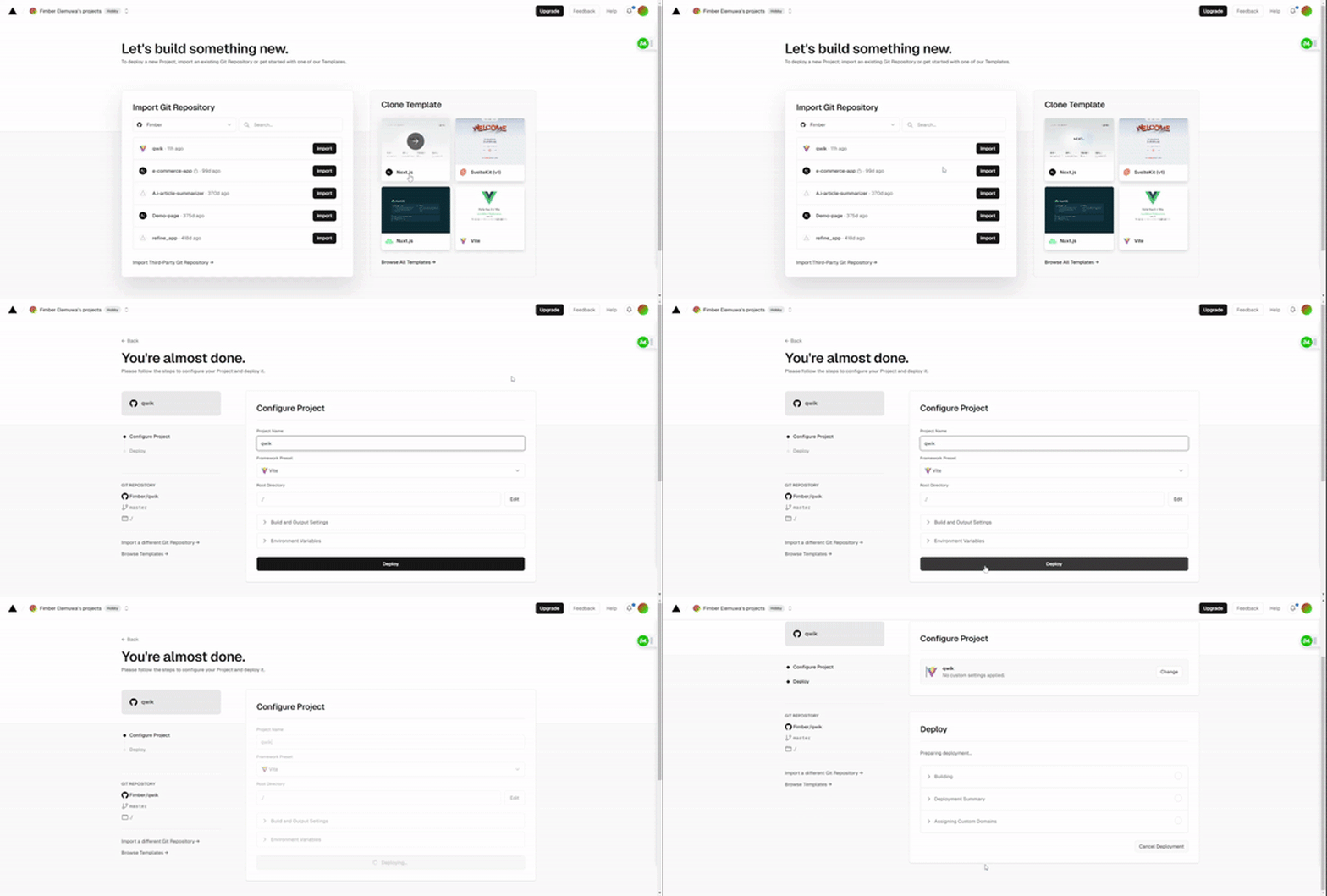
Next, you’ll upload your Qwik project to GitHub, and then move over to Vercel. Once you’ve signed up and connected your Vercel account to GitHub, you can then import your project directly and deploy it, as shown below:
👁 Importing A Qwik Project Directly And Deploying It To Vercel After Connecting Account To Github
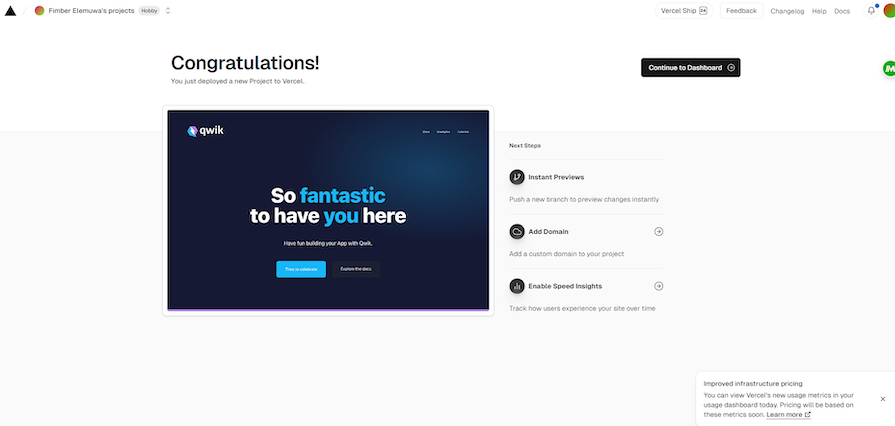
Once it finishes building, your Qwik app will go live, and you’re good to go:
👁 Live Qwik App Adapted From Basic Setup
Make sure you follow best practices such as the following when deploying a Qwik app:
While Qwik has a unique approach to building high-performance web applications, it’s not a one-trick pony and is still comparable to most other frameworks in many aspects. Here’s how Qwik compares to some of the more popular alternatives in terms of features, performance, community, and documentation/resources:
| Qwik | React | Svelte | Vuejs | |
|---|---|---|---|---|
| Performance | Prioritizes minimal bundle size and fast initial load times regardless of application size or complexity. | Highly performant, but bundle size can grow with complex applications. | Known for good performance due to the lack of a virtual DOM and small bundle sizes. | Generally performant, but requires greater performance optimization for large applications. |
| Features | Fine-grained updates, resumability, lazy loading, isomorphic rendering, reactive programming model with hooks. Has Client-side rendering (CSR) with optional SSR. | Virtual DOM diffing, a large ecosystem of third-party libraries, and a functional programming model with hooks. Relies mostly on Client-side rendering (CSR) with optional SSR. | Ahead-of-time compilation, no virtual DOM, reactive data binding, component-based architecture. Also has Client-side rendering (CSR) with optional SSR. |
Virtual DOM, reactive data binding, component-based architecture, templates. Client-side rendering (CSR) with optional SSR. |
| Community support | Growing community, but still relatively small compared to more established frameworks. | Massive community, widely adopted, and supported by popular companies like Facebook, Instagram, and Netflix. | Smaller community compared to React and Vue, but growing in popularity. | Large and active community, backed by companies like Gitlab, Alibaba, and others. |
| Documentation/Resources | Comprehensive official documentation, but fewer third-party resources and learning materials due to its recent introduction. | Extensive official and third-party documentation, tutorials, courses, and learning resources available | Official documentation is thorough, but like Qwik, fewer third-party resources compared to React and Vue. | Well-documented, with official and community-driven resources, including books, courses, and video tutorials. |
All things considered, Qwik is a strong contender in the front-end framework landscape because it’s not just another framework, but a new and dare I say, better solution.
Qwik’s focus on performance through minimal bundle sizes, innovative features like resumability and fine-grained lazy loading, and commitment to DX make it a fantastic choice for building high-performance web applications.
Here’s a quick recap of Qwik’s strengths:
As the framework continues to evolve and gain adoption, its ecosystem and community support are likely to grow, potentially mitigating some of the current limitations. Additionally, the Qwik team’s ongoing efforts to improve documentation, provide learning resources, and foster community engagement will play a crucial role in the framework’s long-term success.
Ultimately, the decision to adopt Qwik should be based on a careful evaluation of your project’s specific requirements, performance needs, team expertise, and willingness to embrace a new and evolving framework.
For applications where performance is a critical concern, Qwik presents an intriguing alternative to traditional frameworks, offering a fresh perspective on building efficient and responsive web applications.
Install LogRocket via npm or script tag. LogRocket.init() must be called client-side, not
server-side
$ npm i --save logrocket

// Code:

import LogRocket from 'logrocket';
LogRocket.init('app/id');
// Add to your HTML:

<script src="https://cdn.lr-ingest.com/LogRocket.min.js"></script>
<script>window.LogRocket && window.LogRocket.init('app/id');</script>
We built the same app in TanStack Start RSC and Next.js RSC. TanStack shipped 40% less JS and built 4x faster — but Next.js is still the safer production bet.
From RSC vulnerabilities and the Vercel breach to TypeScript 7.0 Beta and AI agents — the nine frontend storylines that defined H1 2026, ranked.
AI tools generate working React code fast, but miss race conditions, empty states, debouncing, and accessibility. Here’s how to catch bugs before production.
Learn how to use Gemini CLI subagents to delegate frontend, backend, testing, and docs tasks to specialized agents with guardrails and clear ownership.
Hey there, want to help make our blog better?
Join LogRocket’s Content Advisory Board. You’ll help inform the type of content we create and get access to exclusive meetups, social accreditation, and swag.
Sign up now