|
VOOZH | about |
|
VOOZH | about |
In software development, we’re generally obsessed with performance gains and how to make our applications perform faster to give users a better experience.
👁 React LogoMemoization is one of the ways to optimize performance. In this article, we’ll explore how it works in React.
The Replay is a weekly newsletter for dev and engineering leaders.
Delivered once a week, it's your curated guide to the most important conversations around frontend dev, emerging AI tools, and the state of modern software.
In simple terms, memoization is a process that allows us to cache the values of recursive/expensive function calls so that the next time the function is called with the same argument(s), the cached value is returned rather than having to re-compute the function.
This ensures that our applications run faster because we avoid the time it would usually take to re-execute the function by returning a value that’s already stored in memory.
In React functional components, when props within a component change, the entire component re-renders by default. In other words, if any value within a component updates, the entire component will re-render, including functions/components that have not had their values/props altered.
Let’s look at a simple example where this happens. We’ll build a basic app that tells users what wine goes best with the cheese they’ve selected.
We’ll start by setting up two components. The first component will allow the user to select a cheese. It’ll then display the name of the wine that goes best with that cheese. The second component will be a child of the first component. In this component, nothing changes. We’ll use this component to keep track of how many times React re-renders.
Let’s start with our parent component: <ParentComponent />.
N.B., the
classNamesused in this example come from Tailwind CSS.
// components/parent-component.js
import Counts from "./counts";
import Button from "./button";
import { useState, useEffect } from "react";
import constants from "../utils";
const { MOZARELLA, CHEDDAR, PARMESAN, CABERNET, CHARDONAY, MERLOT } = constants;

export default function ParentComponent() {
 const [cheeseType, setCheeseType] = useState("");
 const [wine, setWine] = useState("");
 const whichWineGoesBest = () => {
 switch (cheeseType) {
 case MOZARELLA:
 return setWine(CABERNET);
 case CHEDDAR:
 return setWine(CHARDONAY);
 case PARMESAN:
 return setWine(MERLOT);
 default:
 CHARDONAY;
 }
 };
 useEffect(() => {
 let mounted = true;
 if (mounted) {
 whichWineGoesBest();
 }
 return () => (mounted = false);
 }, [cheeseType]);

 return (
 <div className="flex flex-col justify-center items-center">
 <h3 className="text-center dark:text-gray-400 mt-10">
 Without React.memo() or useMemo()
 </h3>
 <h1 className="font-semibold text-2xl dark:text-white max-w-md text-center">
 Select a cheese and we will tell you which wine goes best!
 </h1>
 <div className="flex flex-col gap-4 mt-10">
 <Button text={MOZARELLA} onClick={() => setCheeseType(MOZARELLA)} />
 <Button text={CHEDDAR} onClick={() => setCheeseType(CHEDDAR)} />
 <Button text={PARMESAN} onClick={() => setCheeseType(PARMESAN)} />
 </div>
 {cheeseType && (
 <p className="mt-5 dark:text-green-400 font-semibold">
 For {cheeseType}, <span className="dark:text-yellow-500">{wine}</span>{" "}
 goes best.
 </p>
 )}
 <Counts />
 </div>
 );
}
The second component is a <Counts /> component that keeps track of how many times the entire <ParentComponent /> component re-renders.
// components/counts.js
import { useRef } from "react";
export default function Counts() {
 const renderCount = useRef(0);
 return (
 <div className="mt-3">
 <p className="dark:text-white">
 Nothing has changed here but I've now rendered:{" "}
 <span className="dark:text-green-300 text-grey-900">
 {(renderCount.current ++)} time(s)
 </span>
 </p>
 </div>
 );
}
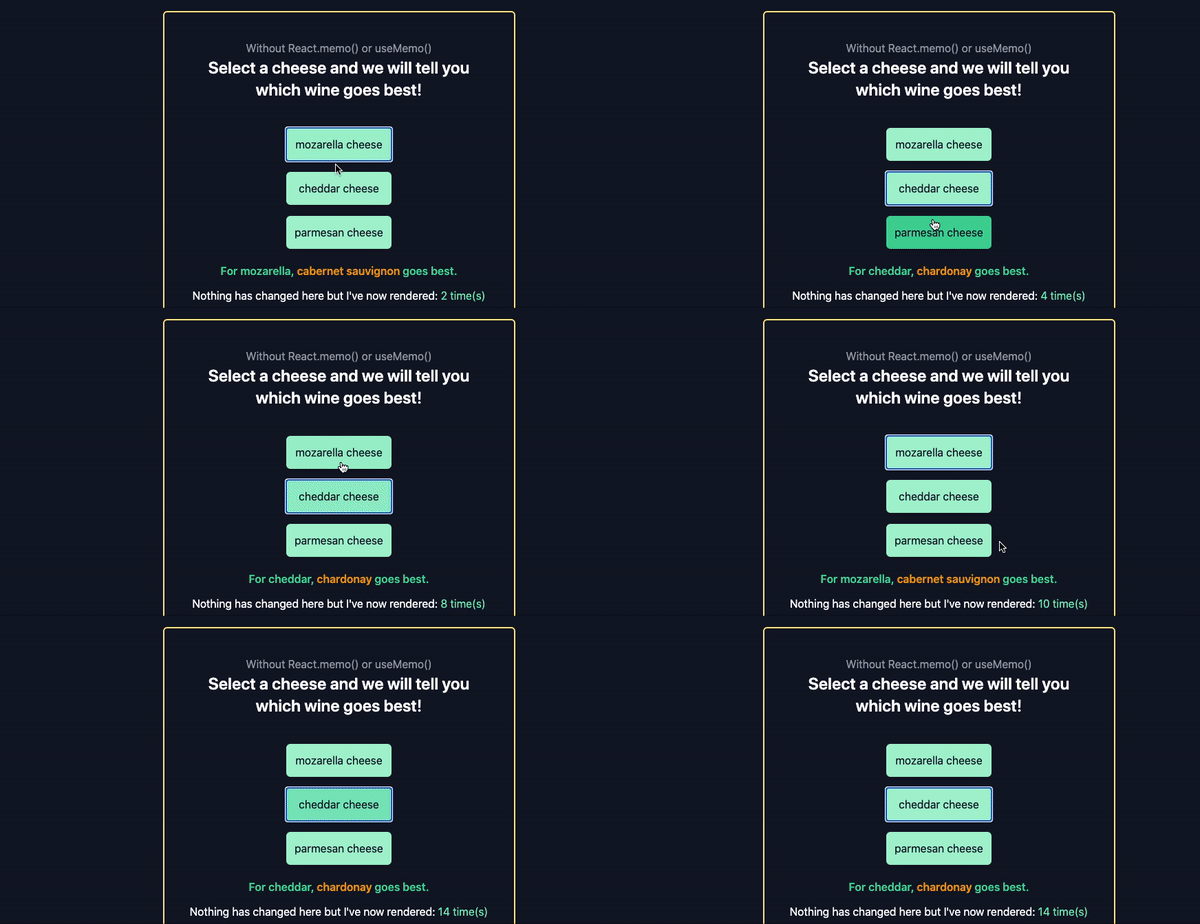
Here’s the example above at work when we click on the name of a cheese:
👁 Example of React Without Memoization
Our <Counts /> component within our <ParentComponent /> counts how many times changes to the <ParentComponent /> forces the <Counts /> component to re-render.
Currently, clicking on the name of a cheese will update the name of the cheese to be displayed. It’ll also update the name of the wine to be displayed. Not only will the <ParentComponent /> re-render, but the <Counts /> component will also re-render even though nothing within it has changed.
Imagine having a component displaying thousands of data, and each time the user clicks a button, every piece of data in that component or tree re-renders when they don’t need to. This is where React.memo() or useMemo() becomes necessary to give us performance optimizations.
Now, let’s explore React.memo, then useMemo(). Afterward, we’ll compare the differences between them and learn when you should use one over the other.
React.memo()?React.memo() was released with React v16.6. While class components already allowed you to control re-renders with the use of PureComponent or shouldComponentUpdate, React 16.6 introduced the ability to do the same with functional components.
React.memo() is a higher-order component (HOC), which is a fancy name for a component that takes a component as a prop and returns a component that prevents a component from re-rendering if the props (or values within it) have not changed.
We’ll take the same example above but use React.memo() in our <Counts /> component. All we need to do is wrap our <Counts /> component with React.memo() like below:
import { useRef } from "react";
function Counts() {
 const renderCount = useRef(0);
 return (
 <div className="mt-3">
 <p className="dark:text-white">
 Nothing has changed here but I've now rendered:{" "}
 <span className="dark:text-green-300 text-grey-900">
 {(renderCount.current ++)} time(s)
 </span>
 </p>
 </div>
 );
}
export default React.memo(Counts);
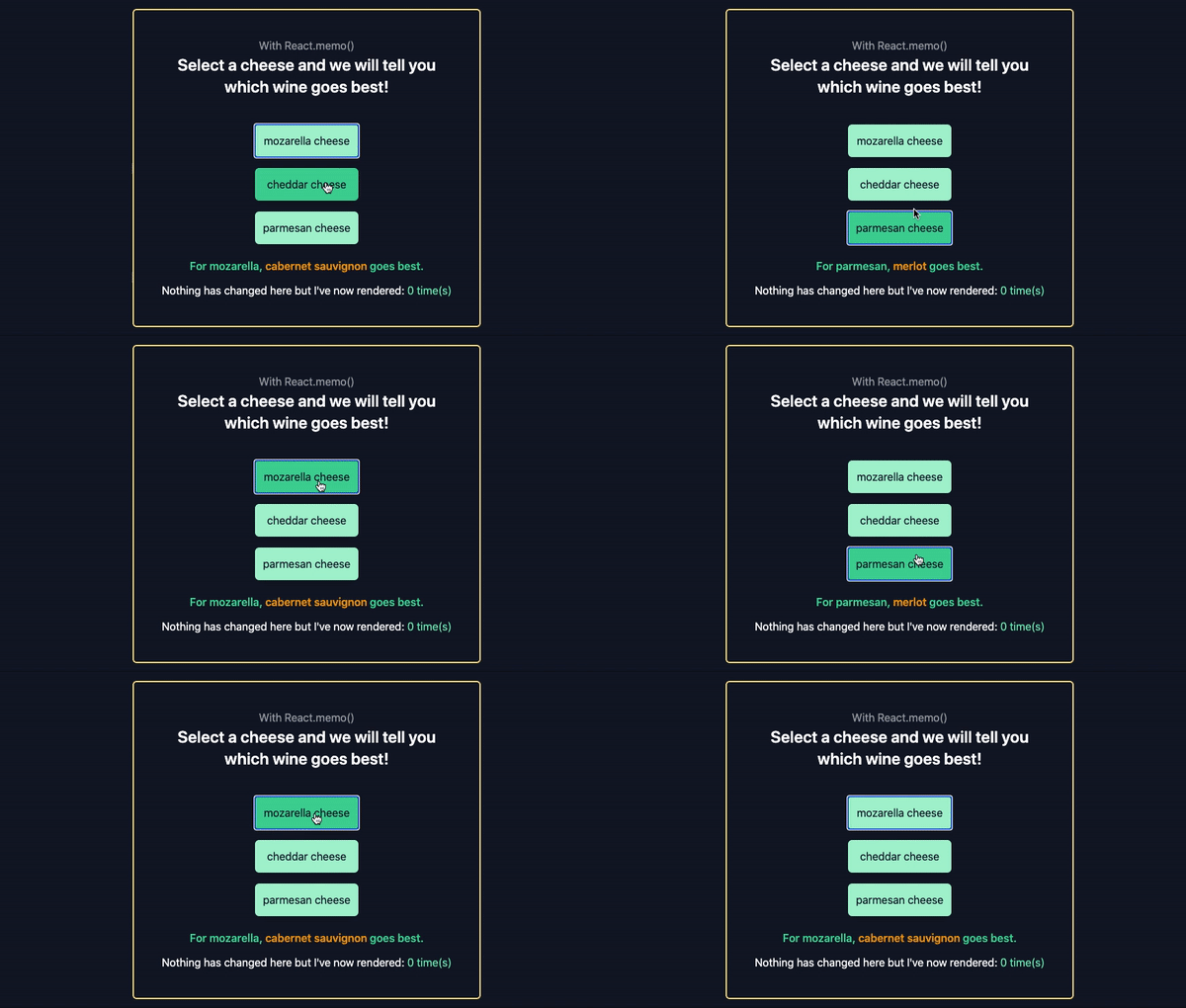
Now, when we select a cheese type by clicking on it, our <Counts /> component will not re-render.
useMemo()?While React.memo() is a HOC, useMemo() is a React Hook. With useMemo(), we can return memoized values and avoid re-rendering if the dependencies to a function have not changed.
To use useMemo() within our code, React developers have some advice for us:
useMemo() as a performance optimization, not as a semantic guaranteeFor our next example, we’ll make some changes to our <ParentComponent />. The code below only shows the new changes to the <ParentComponent /> we previously created.
// components/parent-component.js
.
.
import { useState, useEffect, useRef, useMemo } from "react";
import UseMemoCounts from "./use-memo-counts";

export default function ParentComponent() {
 .
 .
 const [times, setTimes] = useState(0);
 const useMemoRef = useRef(0);

 const incrementUseMemoRef = () => useMemoRef.current++;

 // uncomment the next line to test that <UseMemoCounts /> will re-render every t ime the parent re-renders.
 // const memoizedValue = useMemoRef.current++;

// the next line ensures that <UseMemoCounts /> only renders when the times value changes
const memoizedValue = useMemo(() => incrementUseMemoRef(), [times]);

 .
 .

 return (
 <div className="flex flex-col justify-center items-center border-2 rounded-md mt-5 dark:border-yellow-200 max-w-lg m-auto pb-10 bg-gray-900">
 .
 .
 <div className="mt-4 text-center">
 <button
 className="bg-indigo-200 py-2 px-10 rounded-md"
 onClick={() => setTimes(times+1)}
 >
 Force render
 </button>

 <UseMemoCounts memoizedValue={memoizedValue} />
 </div>
 </div>
 );
}
First, we’re bringing in the all-important useMemo() Hook. We’re also bringing in the useRef() Hook to help us track how many re-renders have occurred in our component. Next, we declare a times state that we will later update in order to trigger/force a re-render.
Afterward, we declare a memoizedValue variable that stores the value returned by the useMemo() Hook. The useMemo() Hook calls our incrementUseMemoRef function, which increments the value of our useMemoRef.current by one each time there is a change in the dependencies, i.e., the times value changes.
We then create a button that updates the value of times when clicked. Clicking this button will cause our useMemo() Hook to be triggered, the value of memoizedValue to update, and our <UseMemoCounts /> component to re-render.
For this example, we’ve also renamed our <Counts /> component to <UseMemoCounts />, and it now takes a memoizedValue prop.
Here’s what it looks like:
// components/use-memo-counts.js

function UseMemoCounts({memoizedValue}) {
 return (
 <div className="mt-3">
 <p className="dark:text-white max-w-md">
 I'll only re-render when you click <span className="font-bold text-indigo-400">Force render.</span>
 </p>
 <p className="dark:text-white">I've now rendered: <span className="text-green-400">{memoizedValue} time(s)</span> </p>
 </div>
 );
}
export default UseMemoCounts;
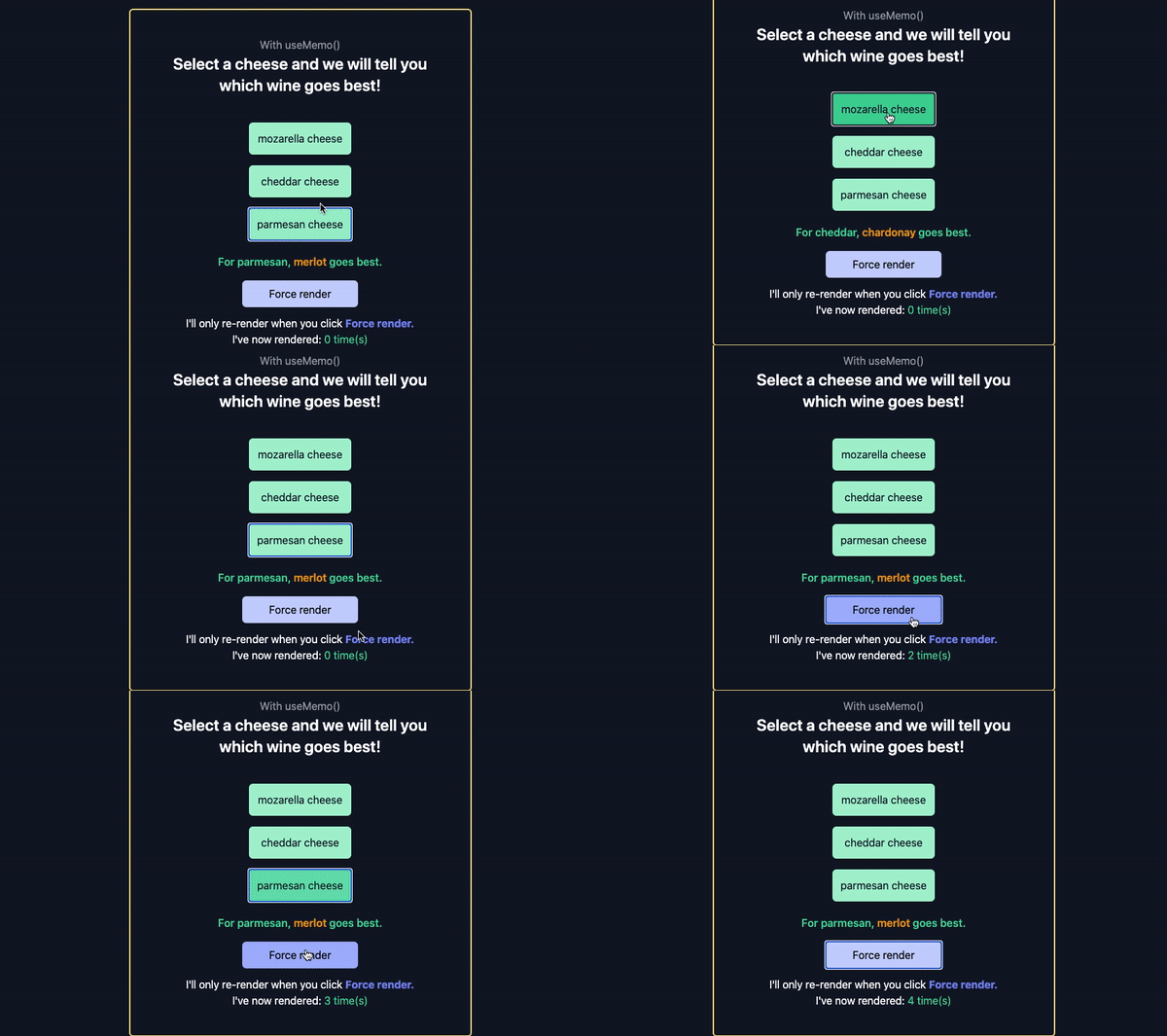
Now, when we click any of the cheese buttons, our memoizedValue does not update. But when we click the Force render button, we see that our memoizedValue updates and the <UseMemoCounts /> component re-renders.
If you comment out our current memoizedValue line, and uncomment out the line above it:
const memoizedValue = useMemoRef.current++;
…you’ll see that the <UseMemoCounts /> component will re-render each time the <ParentComponent /> renders.
React.memo() and useMemo()From the example above, we can see the major differences between React.memo() and useMemo():
React.memo() is a higher-order component that we can use to wrap components that we do not want to re-render unless props within them changeuseMemo() is a React Hook that we can use to wrap functions within a component. We can use this to ensure that the values within that function are re-computed only when one of its dependencies changeWhile memoization might seem like a neat little trick to use everywhere, you should use it only when you absolutely need those performance gains. Memoization uses up memory space on the machine it’s being run on and, as such, may lead to unintended effects.
And that wraps up this article!
You can access the full code for this example on GitHub and a live example here.
Install LogRocket via npm or script tag. LogRocket.init() must be called client-side, not
server-side
$ npm i --save logrocket

// Code:

import LogRocket from 'logrocket';
LogRocket.init('app/id');
// Add to your HTML:

<script src="https://cdn.lr-ingest.com/LogRocket.min.js"></script>
<script>window.LogRocket && window.LogRocket.init('app/id');</script>
Learn how next-browser gives AI agents runtime context for debugging Next.js apps, including React props, hydration, PPR, forms, and performance.
Build dynamic LLM routing in Next.js with OpenRouter, TanStack AI, task classification, model fallbacks, and cost-aware routing.
TSRX adds first-class control flow, conditional hooks, and scoped styles to React via a TypeScript compiler extension — no new framework required.
Learn how to build a full React Native auth system using Better Auth and Expo — with email/password login, Google OAuth, session persistence, and protected routes.
Would you be interested in joining LogRocket's developer community?
Join LogRocket’s Content Advisory Board. You’ll help inform the type of content we create and get access to exclusive meetups, social accreditation, and swag.
Sign up now