|
VOOZH | about |
|
VOOZH | about |
Node.js recently introduced an experimental feature to generate run-time user-land (user scripts) snapshots in v18.8.0. In this post, we’ll look at the importance of this feature, and some of the options it provides. We’ll also compare this snapshot feature to other packaging solutions, such as pkg.
👁 Introduction To Snapshot Flags In Node.js v18.8.0To jump ahead:
--snapshot-blob and —build-snapshot vs. --node-snapshot-mainThe Replay is a weekly newsletter for dev and engineering leaders.
Delivered once a week, it's your curated guide to the most important conversations around frontend dev, emerging AI tools, and the state of modern software.
To understand the need for generating run-time user-land snapshots, we need to understand the way Node.js starts up.
Node.js builds a v8::Isolate, v8::context, and node::Environment at startup. It then constructs a process object and launches bootstrap Node.js to prepare the environment. Node.js only executes user script once all of this is complete.
The new snapshot flags feature enables the Node executable to create a single binary that contains both Node.js and an embedded snapshot without building Node.js from the source. This means that the binary file already contains Node, so there is no need for another initialization (such as creating the v8::Isolate, v8::context, and all the other processes usually required to start a user script), which would have increased the start-up time of the scripts.
To enable the Node.js executable to achieve this feature, a couple of new flags were introduced: the --snapshot-blob and --build-snapshot flags. In this section, we’ll see how to use these new flags.
--build-snapshot flagThe --build-snapshot flag tells Node.js to build a snapshot of the file supplied as an argument to the flag:
--build-snapshot snapshot.js
Snapshot.js serves as the entry point script.
--snapshot-blob flagThe --snapshot-blob flag allows us to tell the Node.js executable file what to save the snapshot blob to. If the snapshot blob file exists, Node simply overrides its content with the new blob, and if it is non-existent, Node creates a new blob file and saves it to the disk in the current working directory:
--snapshot-blob snapshot.blob
snapshot.blob serves as the name of the binary file where the generated blob is saved.
Now that the function of these flags is understood, we can attempt to build a snapshot of our own.
snapshot_test foldersnapshot_test folder in your favorite code editor and initialize npm using npm init -ysnapshot.jssnapshot.js:
const path = require('path')

console.log(process.cwd())
globalThis.path = process.cwd()
globalThis.file = __dirname
const name = 'I am geezy'

console.log(process.argv)
globalThis.firstArg = process.argv[2]
globalThis.secondArg = process.argv[3]
This is a simple script that sets a couple of global variables using the globalThis. The globalThis provides us with a way to access global variables(global object).
To build a snapshot of this script along with its current Node.js run-time environment, run the following command:
node --snapshot-blob snapshot.blob --build-snapshot snapshot.js name home
The extra name and home arguments given to the commands are available to us through process.argv.
This is the output:
/home/phantom/Documents/node_js_projects/node_testing
[
 '/home/phantom/.nvm/versions/node/v18.9.1/bin/node',
 '/home/phantom/Documents/node_js_projects/node_testing/snapshot.js',
 'name',
 'home'
]
Node.js executes Snapshot.js as usual, then it creates a snapshot of the script’s state.
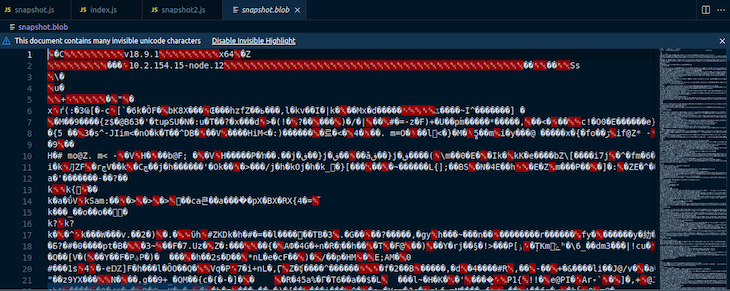
Inspecting the current working directory, we find the snapshot.blob file that Node.js generated. When we open up the file, we see gibberish:
This prompts the question: How do we execute the generated blob?
This new feature makes it easy to run a snapshot blob — all we need is to create an entry file for our snapshot.blob file. This file will attempt to read from the Global Object.
Create an index.js file in the snapshot_test directory, and add the following lines of code to it:
console.log('current working directory', globalThis.path)
console.log('First Arg', globalThis.firstArg)
console.log('Second Argument', globalThis.secondArg)
console.log('current process Argv', process.argv)
console.log('Global Object', globalThis)
Then, run the following command:
node --snapshot-blob snapshot.blob index.js
This is the output:
current working directory /home/phantom/Documents/node_js_projects/node_testing
First Arg name
Second Argument home
current process Argv [
 '/home/phantom/.nvm/versions/node/v18.9.1/bin/node',
 '/home/phantom/Documents/node_js_projects/node_testing/index.js'
]
Global Object <ref *1> Object [global] {
 global: [Circular *1],
 queueMicrotask: [Function: queueMicrotask],
 clearImmediate: [Function: clearImmediate],
 setImmediate: [Function: setImmediate] {
 [Symbol(nodejs.util.promisify.custom)]: [Getter]
 },
 structuredClone: [Function: structuredClone],
 clearInterval: [Function: clearInterval],
 clearTimeout: [Function: clearTimeout],
 setInterval: [Function: setInterval],
 setTimeout: [Function: setTimeout] {
 [Symbol(nodejs.util.promisify.custom)]: [Getter]
 },
 atob: [Function: atob],
 btoa: [Function: btoa],
 performance: Performance {
 nodeTiming: PerformanceNodeTiming {
 name: 'node',
 entryType: 'node',
 startTime: 0,
 duration: 99.07323400303721,
 nodeStart: 3.987049002200365,
 v8Start: 31.41652700304985,
 bootstrapComplete: 89.83720200136304,
 environment: 66.75902900099754,
 loopStart: -808954.4995539971,
 loopExit: -808949.1088810004,
 idleTime: 0
 },
 timeOrigin: 1665479964732.965
 },
 fetch: [AsyncFunction: fetch],
 path: '/home/phantom/Documents/node_js_projects/node_testing',
 file: '/home/phantom/Documents/node_js_projects/node_testing',
 firstArg: 'name',
 secondArg: 'home'
}
Although we didn’t run the snapshot.js file, by running the blob file with an entry point, the globalThis.path, globalThis.firstArg, and globalThis.secondArg variables are assigned values as though we ran the snapshot.js file. This goes to prove that the state of our application is captured in the snapshot.blob file.
To know if the snapshot.blob file is being run, we can attempt to run the index.js file without specifying a blob.
Run the following command:
node index.js
This is the output:
current working directory undefined
First Arg undefined
Second Argument undefined
current process Argv [
 '/home/phantom/.nvm/versions/node/v18.9.1/bin/node',
 '/home/phantom/Documents/node_js_projects/node_testing/index.js'
]
Global Object <ref *1> Object [global] {
 global: [Circular *1],
 queueMicrotask: [Function: queueMicrotask],
 clearImmediate: [Function: clearImmediate],
 setImmediate: [Function: setImmediate] {
 [Symbol(nodejs.util.promisify.custom)]: [Getter]
 },
 structuredClone: [Function: structuredClone],
 clearInterval: [Function: clearInterval],
 clearTimeout: [Function: clearTimeout],
 setInterval: [Function: setInterval],
 setTimeout: [Function: setTimeout] {
 [Symbol(nodejs.util.promisify.custom)]: [Getter]
 },
 atob: [Function: atob],
 btoa: [Function: btoa],
 performance: Performance {
 nodeTiming: PerformanceNodeTiming {
 name: 'node',
 entryType: 'node',
 startTime: 0,
 duration: 104.0962289981544,
 nodeStart: 15.742054000496864,
 v8Start: 21.813469998538494,
 bootstrapComplete: 88.35036600008607,
 environment: 66.38047299906611,
 loopStart: -1,
 loopExit: -1,
 idleTime: 0
 },
 timeOrigin: 1665480382060.152
 },
 fetch: [AsyncFunction: fetch]
}
Inspecting both outputs, we notice some differences:
globalThis.path, globalThis.firstArg, and globalThis.secondArg values are undefined, because those values are only set when snapshot.js is runGlobal Object does not contain the extra key-value pairs that we initialized in the snapshot.js fileWe can restore our application state without the use of an entry script by using the v8.startupSnapshot API to specify an entry point as the snapshot is being built.
In the current directory, create a second_snapshot.js file and add the following lines of code:
const path = require('path')

console.log(process.cwd())
globalThis.path = process.cwd()
globalThis.file = __dirname
const name = 'I am geezy'

console.log(process.argv)
globalThis.firstArg = process.argv[2]
globalThis.secondArg = process.argv[3]

require('v8').startupSnapshot.setDeserializeMainFunction(() => {
 console.log('firstArg', this.firstArg)
 console.log('secondArg', this.secondArg)
 console.log('I am from the second snapshot')
})
Build the snapshot blob using this command:
node --snapshot-blob second_snapshot.blob --build-snapshot second_snapshot.js name home
To restore the script state from second_snapshot.blob, run the following command:
node --snapshot-blob second_snapshot.blob
This is the output:
firstArg name
secondArg home
I am from the second snapshot
Notice how we didn’t have to specify an entry script when trying to restore our application state.
--snapshot-blob and --build-snapshot vs. --node-snapshot-mainThese new flags allow for run-time snapshots, but the ability to take snapshots has existed since node v18.0.0 by using the --node-snapshot-main flag. However, this flag only supports build-time snapshots. It also requires building Node from the source, which is not user friendly and takes a considerable amount of time depending on the host machine.
To understand the difference in performance when running run-time snapshots and build-time snapshots, let’s look at the metrics from the author of both features:
Looking at the metrics above, it’s easy to see that the run-time snapshot (--snapshot-blob) version, which performs 19 runs, outperforms the build-time snapshot (11 runs) while taking much less time.
| Support | --snapshot-blob and --build-snapshot |
--node-snapshot-main |
|---|---|---|
| Run-time snapshots | Yes | No |
| Uses configure script | No | Yes |
| User-land modules | No | No |
| Requires separate startup script | Not necessary | Yes |
| Building Node from source | No | Yes |
| Build-time snapshots | No | Yes |
Using packaging solutions (such as pkg), the app source can be bundled into a binary. But in order to launch the app once the binary is loaded, you still need to parse the source.
On the other hand, using the Node.js snapshot, the heap state that was initialized by the code is included in the binary, negating the requirement to run the initialization code during load time.
The Node.js snapshot feature is highly experimental and limited at the time of writing this article, but more features will be added as time goes on. The feature is a promising prospect for the Node.js community and hopefully you have a better understanding of the topic after reading this article.
Deploying a Node-based web app or website is the easy part. Making sure your Node instance continues to serve resources to your app is where things get tougher. If you’re interested in ensuring requests to the backend or third-party services are successful, try LogRocket.
👁 LogRocket Network Request MonitoringLogRocket lets you replay user sessions, eliminating guesswork around why bugs happen by showing exactly what users experienced. It captures console logs, errors, network requests, and pixel-perfect DOM recordings — compatible with all frameworks.
LogRocket's Galileo AI watches sessions for you, instantly identifying and explaining user struggles with automated monitoring of your entire product experience.
LogRocket instruments your app to record baseline performance timings such as page load time, time to first byte, slow network requests, and also logs Redux, NgRx, and Vuex actions/state. Start monitoring for free.
Learn how next-browser gives AI agents runtime context for debugging Next.js apps, including React props, hydration, PPR, forms, and performance.
Build dynamic LLM routing in Next.js with OpenRouter, TanStack AI, task classification, model fallbacks, and cost-aware routing.
TSRX adds first-class control flow, conditional hooks, and scoped styles to React via a TypeScript compiler extension — no new framework required.
Learn how to build a full React Native auth system using Better Auth and Expo — with email/password login, Google OAuth, session persistence, and protected routes.
Hey there, want to help make our blog better?
Join LogRocket’s Content Advisory Board. You’ll help inform the type of content we create and get access to exclusive meetups, social accreditation, and swag.
Sign up now