|
VOOZH | about |
|
VOOZH | about |
The Replay is a weekly newsletter for dev and engineering leaders.
Delivered once a week, it's your curated guide to the most important conversations around frontend dev, emerging AI tools, and the state of modern software.
There has always been a need to share data with different components when working with React. This can be achieved in the most basic way using prop drilling. Prop drilling allows for unidirectional data sharing between components. The data passed or shared in the form of props.
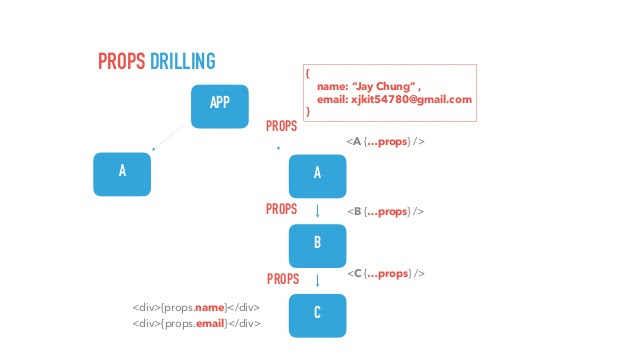
👁 React logo against a construction background.Let’s consider the diagram below:
👁 A diagram explaining how props drilling works.
For the data in the A component to be accessed in the C component, it has to be passed down as prop to the B component, and then finally the C component. This is known as threading.
From the above explanation, you can understand the basics of what prop drilling is and why we need it.
Now let’s go ahead and create a simple application using what we learned above. All the code for this tutorial can be found here.
First, let’s create two files in the src folder of our React application and name them app.js and name.js, respectively.
Next, we’ll copy the code below into the name.js file:
import React from 'react';
const Name = () =>{
 return(
 <div>
 {/* names should be here*/}
 </div>
 )
}
export default Name;
Now, let’s add the code below to the app.js file:
import React,{useState} from 'react';
import Name from './Names'
const App = () =>{
 const [data , setData] = useState([
 {
 name:'Ijeoma Belinda',
 age: 13,
 },
 {
 name:'Ozioko Chioma',
 age: 17,
 }
 ])
 return(
 <Name data = {data} />
 )
}
export default App;
Notice that the data we need to display in name.js is stored in the app.js file as a state. For it to be passed down as props, we need to replace the code in line 16 with this:
<Name data = {data} />
Now, we can use it in our name.js file as follows:
import React from 'react';
const Name = (props) =>{
 return(
 <div>
 {props.data.map( unitData => <h1>{unitData.name}</h1>)}
 </div>
 )
}
export default Name;
Our final code for both app.js and name.js should look like this:
import React,{useState} from 'react';
import Name from './Names'
const App = () =>{
 const [data , setData] = useState([
 {
 name:'Ijeoma Belinda',
 age: 13,
 },
 {
 name:'Ozioko Chioma',
 age: 17,
 }
 ])
 return(
 <Name data = {data} />
 )
}
export default App;
name.js file below:
import React from 'react';
const Name = (props) =>{
 return(
 <div>
 {props.data.map( unitData => <h1>{unitData.name}</h1>)}
 </div>
 )
}
export default Name;
Note that props is added as a parameter to the functional component.
If everything is done correctly, the data stored in the state should now be displayed in the browser.
When working with small applications, prop drilling can serve as a fast and easy method of data transfer between components. Unlike other common methods of data transfer, prop drilling is relatively easy to learn and implement.
In addition to this, data passed as props can easily be updated on state change to reflect the new changes.
To understand this more, let’s go back to our app.js file and update the state with a new user’s data like this:
import React,{useState , useEffect} from 'react';
import Name from './Names'
const App = () =>{
 const [data , setData] = useState([
 {
 name:'Ijeoma Belinda',
 age: 13 },
 {
 name:'Ozioko Chioma',
 age: 17
 }
 ])
 useEffect(() => {
 setData([
 ...data,
 {
 name:'Eze ifechi',
 age: 17,
 }
 ])
 },[])
 return(
 <Name data = {data} />
 )
}
export default App;
You’ll notice that the rendered page in the browser has been instantly updated to reflect the new changes without adding any extra code or logic.
Prop drilling does have its downsides, and in some cases it isn’t worth it. As your codebase increases, prop drilling can make your code overly complicated, and this can only get worse with more additions.
In addition to this, props can be passed down to components that don’t necessarily need it just for the data to get to the child component, leading to an unnecessary increase in the codebase.
To demonstrate this, lets adjust our code by adding a new file known as singleName.js and then rendering it in our name.js file as shown below:
import React from 'react';
import SingleName from './singleName'
const Name = (props) =>{
 return(
 <div>
 {props.data.map( unitData => <SingleName unitData = {unitData} />)}
 </div>
 )
}
export default Name;
Next let’s add the following code to our new file (singleName.js):
import React from 'react';
const SingleName = (props) =>{
 return(
 <div>
 <h1>{props.data.name}</h1>
 </div>
 )
}
export default SingleName;
Notice that the data is passed to the name.js file even though it isn’t needed there in order for it to get to the child component, which in this case is singleName.js. The above may not be a problem to some, especially when your project is relatively small.
With an increase in codebase, it may become difficult to keep track of props names, especially in a case where a props is renamed halfway through the thread.
If you run into this situation, it may prove difficult to resolve.
The first thing to do is to use less components. Avoid adding unnecessary components that will require prop drilling to keep your codebase from getting too big.
Now, it’s important to note that this doesn’t mean that you should congest your code to only one component. However, there may be a situation where you really don’t need to add an extra component. In this case, keep in mind that you don’t want to overly complicate your code.
Another thing you can do is always use a default props name so that it will be easy to keep track of it.
There are other alternatives to prop drilling that you can use in your application. In a situation where your data is needed in nearly all parts of your application, you can use Context API. Context API can supply all the data you need for different parts of your application without all the complications that come with prop drilling.
Prop drilling, even with its downsides, is still a viable method of data transfer between components and should be used for relatively small applications. However, it is not recommended as the major method of data transfer when you are working with larger applications.
Install LogRocket via npm or script tag. LogRocket.init() must be called client-side, not
server-side
$ npm i --save logrocket

// Code:

import LogRocket from 'logrocket';
LogRocket.init('app/id');
// Add to your HTML:

<script src="https://cdn.lr-ingest.com/LogRocket.min.js"></script>
<script>window.LogRocket && window.LogRocket.init('app/id');</script>
Learn how next-browser gives AI agents runtime context for debugging Next.js apps, including React props, hydration, PPR, forms, and performance.
Build dynamic LLM routing in Next.js with OpenRouter, TanStack AI, task classification, model fallbacks, and cost-aware routing.
TSRX adds first-class control flow, conditional hooks, and scoped styles to React via a TypeScript compiler extension — no new framework required.
Learn how to build a full React Native auth system using Better Auth and Expo — with email/password login, Google OAuth, session persistence, and protected routes.
Hey there, want to help make our blog better?
Join LogRocket’s Content Advisory Board. You’ll help inform the type of content we create and get access to exclusive meetups, social accreditation, and swag.
Sign up now