|
VOOZH | about |
|
VOOZH | about |
TypeScript has the ability to define classes as abstract. This means they cannot be instantiated directly; only nonabstract subclasses can be. Let’s take a look at what this means when it comes to constructor usage.
👁 TypeScript, Abstract Classes, and ConstructorsThe Replay is a weekly newsletter for dev and engineering leaders.
Delivered once a week, it's your curated guide to the most important conversations around frontend dev, emerging AI tools, and the state of modern software.
To dig into this, let’s create a scratchpad project to work with. We’re going to create a Node.js project and install TypeScript as a dependency.
mkdir ts-abstract-constructors
cd ts-abstract-constructors
npm init --yes
npm install typescript @types/node --save-dev
We now have a package.json file set up. We need to initialize a TypeScript project as well:
npx tsc --init
This will give us a tsconfig.json file that will drive configuration of TypeScript. By default, TypeScript transpiles to an older version of JavaScript that predates classes. So we’ll update the config to target a newer version of the language that does include them:
 "target": "es2020",
 "lib": ["es2020"],
Let’s create a TypeScript file called index.ts. The name is not significant; we just need a file to develop in.
Finally we’ll add a script to our package.json that compiles our TypeScript to JavaScript and then runs the JS with node:
"start": "tsc --project \".\" && node index.js"
Now we’re ready. Let’s add an abstract class with a constructor to our index.ts file:
abstract class ViewModel {
 id: string;

 constructor(id: string) {
 this.id = id;
 }
}
Consider the ViewModel class above. Let’s say we’re building some kind of CRUD app; we’ll have different views. Each view will have a corresponding viewmodel, which is a subclass of the ViewModel abstract class.
The ViewModel class has a mandatory id parameter in the constructor. This is to ensure that every viewmodel has an id value. If this were a real app, id would likely be the value with which an entity was looked up in some kind of database.
Importantly, all subclasses of ViewModel should either:
ViewModel base class constructorNow let’s see what we can do with our abstract class.
First of all, can we instantiate our abstract class? We shouldn’t be able to do this:
const viewModel = new ViewModel('my-id');

console.log(`the id is: ${viewModel.id}`);
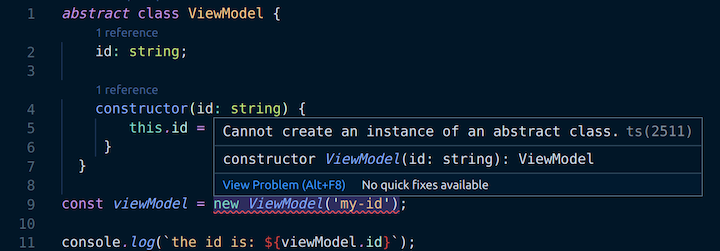
Sure enough, running npm start results in the following error (which is also being reported by our editor, VS Code).
index.ts:9:19 - error TS2511: Cannot create an instance of an abstract class.

const viewModel = new ViewModel('my-id');
👁 Cannot Create an Instance of an Abstract Class Error in VS Code
Tremendous. However, it’s worth remembering that abstract is a TypeScript concept. When we compile our TS, although it’s throwing a compilation error, it still transpiles an index.js file that looks like this:
"use strict";
class ViewModel {
 constructor(id) {
 this.id = id;
 }
}
const viewModel = new ViewModel('my-id');
console.log(`the id is: ${viewModel.id}`);
As we can see, there’s no mention of abstract; it’s just a straightforward class. In fact, if we directly execute the file with node index.js we can see an output of:
the id is: my-id
So the transpiled code is valid JavaScript even if the source code isn’t valid TypeScript. This all reminds us that abstract is a TypeScript construct.
Let’s now create our first subclass of ViewModel and attempt to instantiate it:
class NoNewConstructorViewModel extends ViewModel {
}

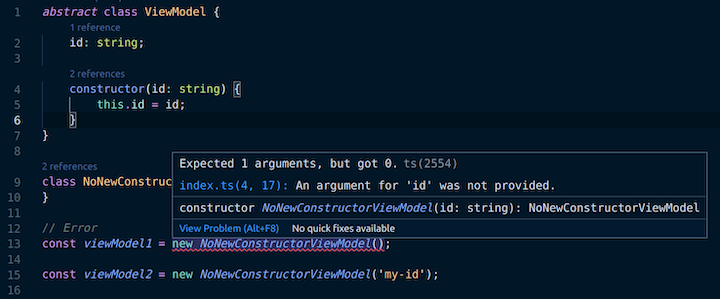
// error TS2554: Expected 1 arguments, but got 0.
const viewModel1 = new NoNewConstructorViewModel();

const viewModel2 = new NoNewConstructorViewModel('my-id');
👁 Error TS2554: Expected 1 Arguments But Got 1 Error in VS Code
👁 Error TS2554: Expected 1 Arguments But Got 0 Error in VS Code
As the TypeScript compiler tells us, the second of these instantiations is legitimate because it relies on the constructor from the base class. The first is not because there is no parameterless constructor.
Having done that, let’s try subclassing and implementing a new constructor that has two parameters (to differentiate from the constructor we’re overriding):
class NewConstructorViewModel extends ViewModel {
 data: string;
 constructor(id: string, data: string) {
 super(id);
 this.data = data;
 }
}

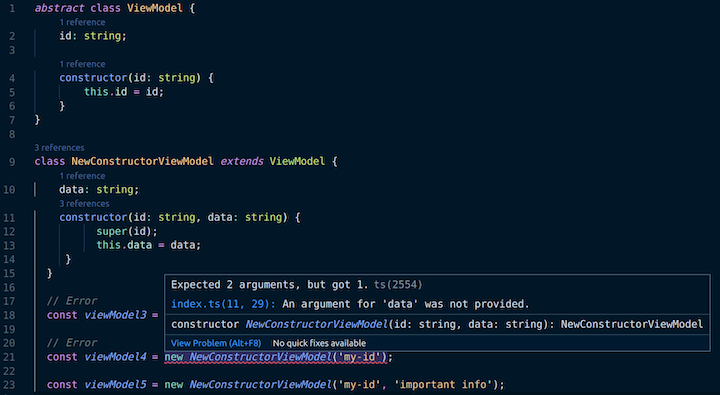
// error TS2554: Expected 2 arguments, but got 0.
const viewModel3 = new NewConstructorViewModel();

// error TS2554: Expected 2 arguments, but got 1.
const viewModel4 = new NewConstructorViewModel('my-id');

const viewModel5 = new NewConstructorViewModel('my-id', 'important info');
👁 Error TS2554: Expected 1 Arguments But Got 1 Error in VS Code
Again, only one of the attempted instantiations is legitimate. viewModel3 is not because there is no parameterless constructor. viewModel4 is not because we have overridden the base class constructor with our new one, which has two parameters. Hence, viewModel5 is our “Goldilocks” instantiation — it’s just right!
It’s also worth noting that we’re calling super in the NewConstructorViewModel constructor. This invokes the constructor of the ViewModel base (or “super”) class. TypeScript enforces that we pass the appropriate arguments (in our case a single string).
We’ve seen that TypeScript ensures correct usage of constructors when we have an abstract class. Importantly, all subclasses of abstract classes either:
LogRocket lets you replay user sessions, eliminating guesswork by showing exactly what users experienced. It captures console logs, errors, network requests, and pixel-perfect DOM recordings — compatible with all frameworks, and with plugins to log additional context from Redux, Vuex, and @ngrx/store.
With Galileo AI, you can instantly identify and explain user struggles with automated monitoring of your entire product experience.
Modernize how you understand your web and mobile apps — start monitoring for free.
Learn how next-browser gives AI agents runtime context for debugging Next.js apps, including React props, hydration, PPR, forms, and performance.
Build dynamic LLM routing in Next.js with OpenRouter, TanStack AI, task classification, model fallbacks, and cost-aware routing.
TSRX adds first-class control flow, conditional hooks, and scoped styles to React via a TypeScript compiler extension — no new framework required.
Learn how to build a full React Native auth system using Better Auth and Expo — with email/password login, Google OAuth, session persistence, and protected routes.
Hey there, want to help make our blog better?
Join LogRocket’s Content Advisory Board. You’ll help inform the type of content we create and get access to exclusive meetups, social accreditation, and swag.
Sign up now