|
VOOZH | about |
|
VOOZH | about |
In a dynamic industry like software development, there is a constant demand for tools that increase development efficiency. Initialization tools like gonew shine during rapid development cycles since they promise a smooth ride through project initialization and setup.
Initialization tools guide developers by establishing ground rules through predefined structures that save time and infuse best practices in the early stages of a project. As languages and tools evolve, tools like gonew can help encapsulate these benefits for language-specific nuances.
gonew ensures you spend less time on boilerplate setup and more on what truly matters: developing outstanding Go applications. In this article, we will explore gonew and its features to understand how we can use this tool to streamline Go application development.
Jump ahead:
gonew?gonewgonewgonew features
gonewgonewgonewgonew?gonew is a command-line tool designed by the official Go team to streamline project initialization. Using gonew, you can efficiently set up standardized project structures, minimize manual setup, and ensure that your project aligns with best practices throughout your development process.
Imagine the early stages of Go project setup. Typically, you’d have to create folders manually, initialize modules, or set up essential test files. gonew simplifies these steps, allowing you to set up with a single command.
gonewTo use gonew, you’ll need Go installed on your device. After installing Go, you can initialize your project like so:
go mod init
You’ll need to set your $GOPATH environment variable, which Go uses to identify the desired path to your workspace. Here’s how you can set your $GOPATH on UNIX-based systems:
export GOPATH=$HOME/path_to_your_workspace
Then, you can install gonew with a simple go install command. Run this command to install the gonew command line tool:
go install golang.org/x/tools/cmd/gonew@latest
gonewAfter installing gonew, you can use and access the gonew command. You can use this command to create a new module like so:
gonew [options] srcmod dstmod
The srcmod argument specifies the path to the template module you want to copy. The dstmod argument is the path of the new module you’re creating.
For example, you can use the gonew command to create a new module named myproject by copying the template module golang.org/x/example/helloserver:
gonew golang.org/x/example/helloserver myproject
gonew supports additional options that you can use to customize processes. These include:
dir specifies the directory where the new module will be created. If this option is not specified, the new module will be created in the current directoryv is the verbose output. This option will print more information about creating the new moduleSee an example of these in action below:
gonew -dir /my/projects/dir -v golang.org/x/example/helloserver myproject
This updated command will create a new Go module named myproject in the directory /my/projects/dir. The -v option will print more information about creating the new module.
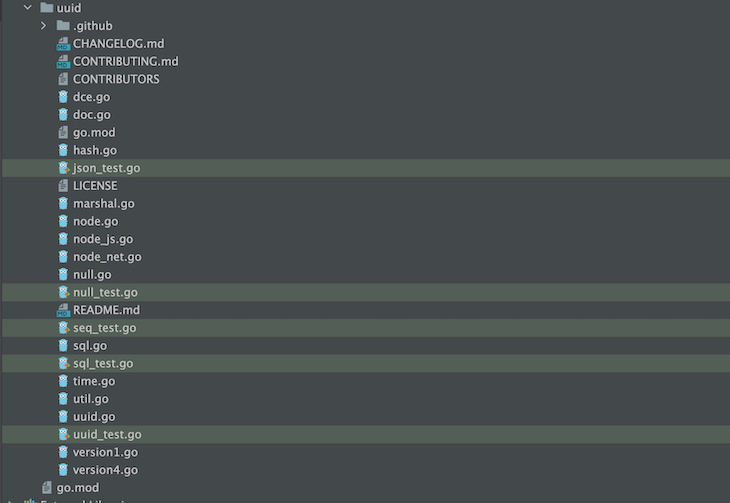
In the example below, you can see the result of my attempt to use the project structure of the popular google/uuid package:
👁 Example Of Using Gonew To Set Up Project Structure Of Google Uuid Package
As you can see, gonew has set the directory structure of the google/uuid package for use in the specified project directory.
gonew featuresAlthough gonew is simple to set up and use, this simplicity doesn’t compromise its feature set and core functionality. gonew can simplify project initialization, use tailored templates for different project types and workflows, and improve your dependency management integration.
gonew isn’t just a tool — it’s like having a personal assistant for starting Go projects. With a single command, you can initialize new modules, create a directory structure that adheres to good practices, and add default configuration files and dependencies.
Maintaining a consistent file structure and naming convention across projects can have many benefits, whether you’re doing so for personal preferences or as a best practice in a team setting.
When it comes to recreating the same structures or files across different Go projects, gonew has you covered. With the gonew templating feature, you can use predefined templates for various project types, including web apps, CLIs, and more.
You can even customize gonew templates to match your workflow. These templates are easy to share across teams, ensuring consistency and efficiency during the development process.
Go has built-in functionality for dependency management. However, gonew takes this a step further by suggesting popular packages based on your project type. It also offers insights into dependency stats to help you choose the right dependencies for your needs.
gonewThere are many benefits of using gonew to streamline Go application development. For example, you can use gonew to:
gonew can automate this process so that you can get started on your code fastergonew creates projects with a consistent structure. This can make your code easier to maintain and understand, especially for large or complex projectsgonew creates projects with empty files, which means you can add your code and features without worrying about overwriting existing code. This gives you a blank slate that you can customize further as neededAutomating these aspects of Go project setup with gonew allows you to focus less on configuration and more on coding. This can enhance productivity while still ensuring your project follows best practices from the very beginning.
gonewgonew is handy for both new and experienced Go developers.
Frontend developers just getting started with Go can enjoy a simplified setup process that saves time by automating the creation of necessary files and structures. This also provides a great way to learn about structuring Go projects.
Meanwhile, gonew can help advanced Go developers start projects quickly and ensure consistency in project structure, which is particularly crucial in a professional or team environment.
For more complex projects, features like tailored templates and integrated dependency management can provide better organization, easier maintenance, and a more streamlined, efficient workflow.
Some typical use cases for gonew include:
gonew to create a simple web application quicklygonew to create new libraries for other Go apps is a great way to interoperate your code with other necessary functionalitiesgonew to create test suites for your application to ensure your code’s qualityNo matter what kind of Go application you want to develop, Go can help you establish a well-organized foundation and write quality code throughout your whole project.
gonewgonew is highly experimental and subject to change as newer versions of Go and the package itself roll out. Although it’s already a useful tool, there is still room for improvement.
Here’s a list of potential improvements that could benefit Go developers using gonew:
gonew creates projects with a fixed structure. This limitation can impede users who want to customize the structure to their project specificationsgonew supported more features, such as unit testing, continuous integration, and deploymentYou can contribute to gonew by proposing your ideas for functionalities you want to see and use.
The software industry is constantly evolving, which makes it critical for developers to have efficient tools that help enhance their workflow. gonew is a standout tool in this regard, especially for Go developers.
gonew can be the difference between a good and great start in developing Go projects. It can provide a head start in creating standardized, efficient, and scalable applications.
It’s also important to keep in mind that gonew is still evolving as well. Make sure you stay adaptable should the tool undergo major changes in the future, such as the potential improvements suggested above.
In essence, gonew is not just a tool but a companion for Go developers, making the development journey smoother and more efficient from the get-go. If you’re a Go developer looking to streamline project initialization and adhere to best practices, gonew is a tool worth considering.
Install LogRocket via npm or script tag. LogRocket.init() must be called client-side, not
server-side
$ npm i --save logrocket

// Code:

import LogRocket from 'logrocket';
LogRocket.init('app/id');
// Add to your HTML:

<script src="https://cdn.lr-ingest.com/LogRocket.min.js"></script>
<script>window.LogRocket && window.LogRocket.init('app/id');</script>
We built the same app in TanStack Start RSC and Next.js RSC. TanStack shipped 40% less JS and built 4x faster — but Next.js is still the safer production bet.
From RSC vulnerabilities and the Vercel breach to TypeScript 7.0 Beta and AI agents — the nine frontend storylines that defined H1 2026, ranked.
AI tools generate working React code fast, but miss race conditions, empty states, debouncing, and accessibility. Here’s how to catch bugs before production.
Learn how to use Gemini CLI subagents to delegate frontend, backend, testing, and docs tasks to specialized agents with guardrails and clear ownership.
Hey there, want to help make our blog better?
Join LogRocket’s Content Advisory Board. You’ll help inform the type of content we create and get access to exclusive meetups, social accreditation, and swag.
Sign up now