|
VOOZH | about |
|
VOOZH | about |
Managing state when building complex tasks was quite a pain in the neck until Redux came along. Inspired by Flux an application design pattern, Redux is designed to manage the state of data in JavaScript applications. Although it’s used chiefly with React, you can use Redux with different frameworks and libraries such as jQuery, Angular, or Vue.
With a very small size, (only 2KB including dependencies), Redux ensures that each component of your application can have direct access to the state of the application without having to send props down to child components or using callback functions to send data back up to a parent.
In this post, I’m going to discuss Redux, how it’s deeply rooted in the concepts of functional programming, and how to decide if you need it in your application.
It’s only common sense not to jump on every new and shiny tool out there and include it in your project. After all, don’t components have their state? Why would you need a tool to help you manage that state?
Don’t get me wrong; React is great alone. Yes, it’s possible to write a complete application using nothing but a framework. But as your application gets more complex, with more and more components, using just a framework to manage this can get very tricky.
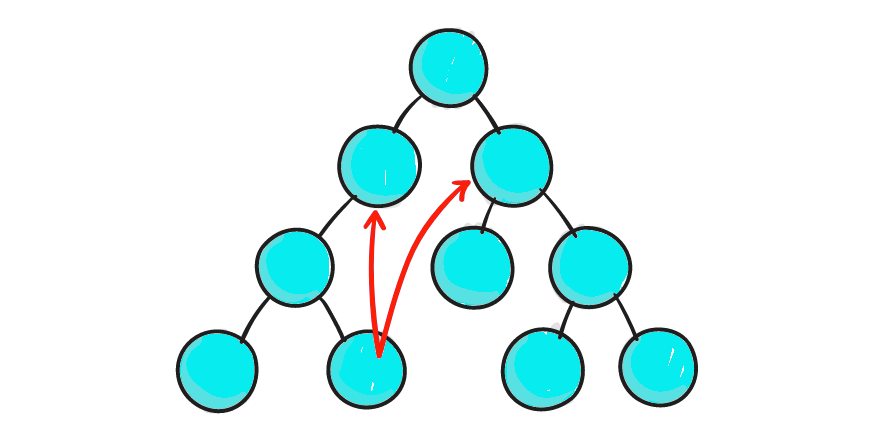
That’s where Redux saves the day for you; it eases the complexities that spring up in such applications. If you’ve got some experience in React, you’ll know that React’s data flow is such that parent components pass down props to child components. In a huge application with data flowing through so many components via state and props, communication tends to become error-prone and believe me — your code will become very difficult to read and even improve.
Check out the diagram below to see what I’m talking about:
In React (and other frameworks as well), communication between two components that don’t have a parent-child relationship is discouraged. React advises that if you must do this, you can build your global event system following Flux’s pattern — and that’s where Redux comes in.
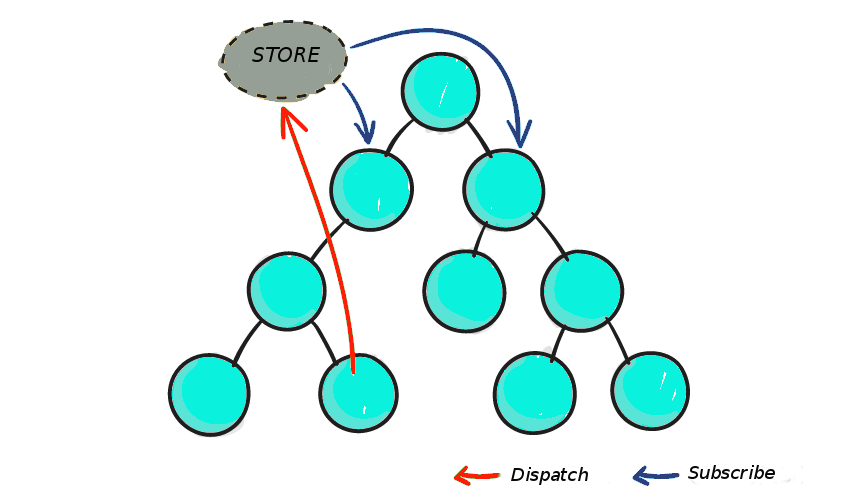
With Redux, you’ve got a store where you can keep all your application state. If a state change occurs in Component A, it is then relayed to the store and other components B and C that need to be aware of this change of state in Component A can subscribe to the store:
See? It’s so much better than we imagined. If we had left our components communicating with each other, we would have created an error prone and unreadable codebase. Redux makes the story different.
Component A sends its state changes to the store, if Component B and C need this state change, they can get it from the store. Thus, our data flow logic is seamless.
Aside from its primary mission, a lot of benefits come with using Redux, I’d just like to put out there what I feel are the most important three which are:
With only one source of truth present (the store), you’ve got little problems with syncing your current state with actions and other parts of the application.
2. Maintainability
The Replay is a weekly newsletter for dev and engineering leaders.
Delivered once a week, it's your curated guide to the most important conversations around frontend dev, emerging AI tools, and the state of modern software.
Redux has strict guidelines about how code should be organized; this further ensures a predictable outcome which makes code easier to maintain.
3. Ease of testing
Writing code in Redux involves pure functions that are isolated which correlates with the golden rule of writing testable code: Write small functions that do only one thing and are independent.
This may seem obvious to you, but I’ll mention it anyway. You don’t necessarily have to use Redux. Sometimes it makes more sense not to. If any of these scenarios are true for you, you probably don’t need Redux at all:
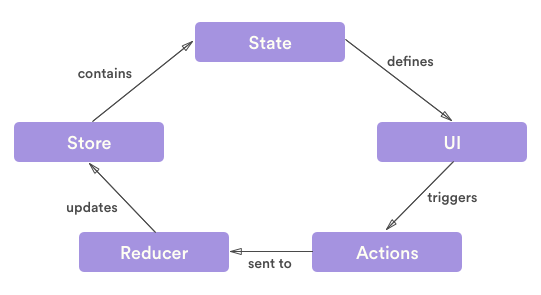
For a tool whose methods can be confusing for beginners at first, Redux’s library is just 2KB and the tool itself is composed of three parts: actions, stores and reducers.
Actions are simply events that are created using functions and send data from the application to the store. Data may be sent via different ways such as submitting a form, calling an API or basic user interaction. Every action in Redux has a type property that describes the type of action as well as the “payload” of information being sent to the store. Let’s see the most basic example of an action at work:
// The action
 {
 type: ADD_USER,
 payload: {
 username: ‘Chris’,
 email: ‘redux @frameworks.io’
 }
 }
 // The function that creates the action
 function signUpUser(data) {
 return {
 type: ADD_USER,
 payload: data
 }
 }
To call an action anywhere in your app, Redux employs the dispatch() method which sends actions to the Redux store to indicate a change of state:
dispatch(signUpUser(data));
Since Redux doesn’t allow your application to make changes to the state and uses dispatch() to do that instead. dispatch() just indicates an intent to change the state, it doesn’t actually change it… that’s where Reducers come in.
Reducers are functions that take the current state of the application through a dispatched action and then return a new state. Check out the reducer below that takes the current state and an action as arguments and then returns the next state:
function handleAuth(state, action) {
 return _.assign({}, state, {
 auth: action.payload
 });
 }
When building more complex apps, it’s recommended to use Redux’s combineReducers() method. This method combines all the reducers in your app into one list of reducers where every reducer handles its part of the app’s state, and the state parameter is different for every reducer:
const indexReducer = combineReducers({
 signUp: signUp,
 editProfile: editProfile,
 makePayment: makePayment
 });
It’s also worthy to note here that Reducers should be written with pure functions. Below I’ve listed a few characteristics of such functions:
The Store is like the heart of Redux. It’s that single source of truth that holds all your application’s state and provides access to the state via a few methods, dispatch actions, and register listeners. Any dispatched action returns a new state to the store via reducers. Check out this basic example of a Redux store:
import { createStore } from‘ redux’;
 let store = createStore(indexReducer);
 let signUpInfo = {
 username: ‘Chris’,
 email: ‘redux @frameworks.io’
 };
 store.dispatch(signUpUser(signUpInfo));
If you’re going to use Redux you should know how functional programming works. Redux was built on the principles of functional programming and understanding functional programming concepts will give you insight on how Redux operates the way it does.
Let’s walk through the key guidelines for functional programming:
Functional programming involves writing simpler, smaller and isolated functions. By following this pattern, code maintenance, testing and debugging is made easier. Since the functions are small and isolated, that makes them reusable thus they can be copied and pasted anywhere they are needed.
This also eliminates the need to write more code, which is awesome in my opinion. When working with functional programming, it’s important to understand concepts like pure functions, anonymous functions, closures and higher order functions just to mention a few.
It’s true that Redux is a great library for managing the state of your application, it’s also true that Redux has gained a lot of traction. So what else do you need to know?
Besides being used extensively by companies like Uber and Twitter, Redux has also been implemented successfully on projects such as WordPress. Sure the argument that Redux isn’t a great fit for every application out there exists, and that’s true.
Applications that perform mainly simple actions and do not require server-side rendering probably don’t need Redux; their actions can be handled at the component level.
Either way, Redux is an awesome tool, and I think you should check it out, especially if you’re working with React.
Install LogRocket via npm or script tag. LogRocket.init() must be called client-side, not
server-side
$ npm i --save logrocket

// Code:

import LogRocket from 'logrocket';
LogRocket.init('app/id');
// Add to your HTML:

<script src="https://cdn.lr-ingest.com/LogRocket.min.js"></script>
<script>window.LogRocket && window.LogRocket.init('app/id');</script>
Learn how next-browser gives AI agents runtime context for debugging Next.js apps, including React props, hydration, PPR, forms, and performance.
Build dynamic LLM routing in Next.js with OpenRouter, TanStack AI, task classification, model fallbacks, and cost-aware routing.
TSRX adds first-class control flow, conditional hooks, and scoped styles to React via a TypeScript compiler extension — no new framework required.
Learn how to build a full React Native auth system using Better Auth and Expo — with email/password login, Google OAuth, session persistence, and protected routes.
Would you be interested in joining LogRocket's developer community?
Join LogRocket’s Content Advisory Board. You’ll help inform the type of content we create and get access to exclusive meetups, social accreditation, and swag.
Sign up now