|
VOOZH | about |
|
VOOZH | about |
Suddenly everyone is switching from Claude Code to OpenAI Codex. I'm not sure which is better (I use both). But it's not just the model. They are made in different ways. The agentic architecture Codex uses will help us understand when to use it, and how to better build agents.
This deep dive explores how Codex CLI actually works under the hood—its master loop, tools, safety mechanisms, and context handling. I'll compare it side-by-side with Anthropic's Claude Code to help you understand which tool best fits your workflow.
For more information, read my last article on how Claude Code works behind the scenes.
At its core, Codex CLI operates on a single-agent, ReAct-style loop implemented in the AgentLoop.run() function. This design pattern—Think → Tool Call → Observe → Repeat—continues until the model produces a final answer without additional tool requests.
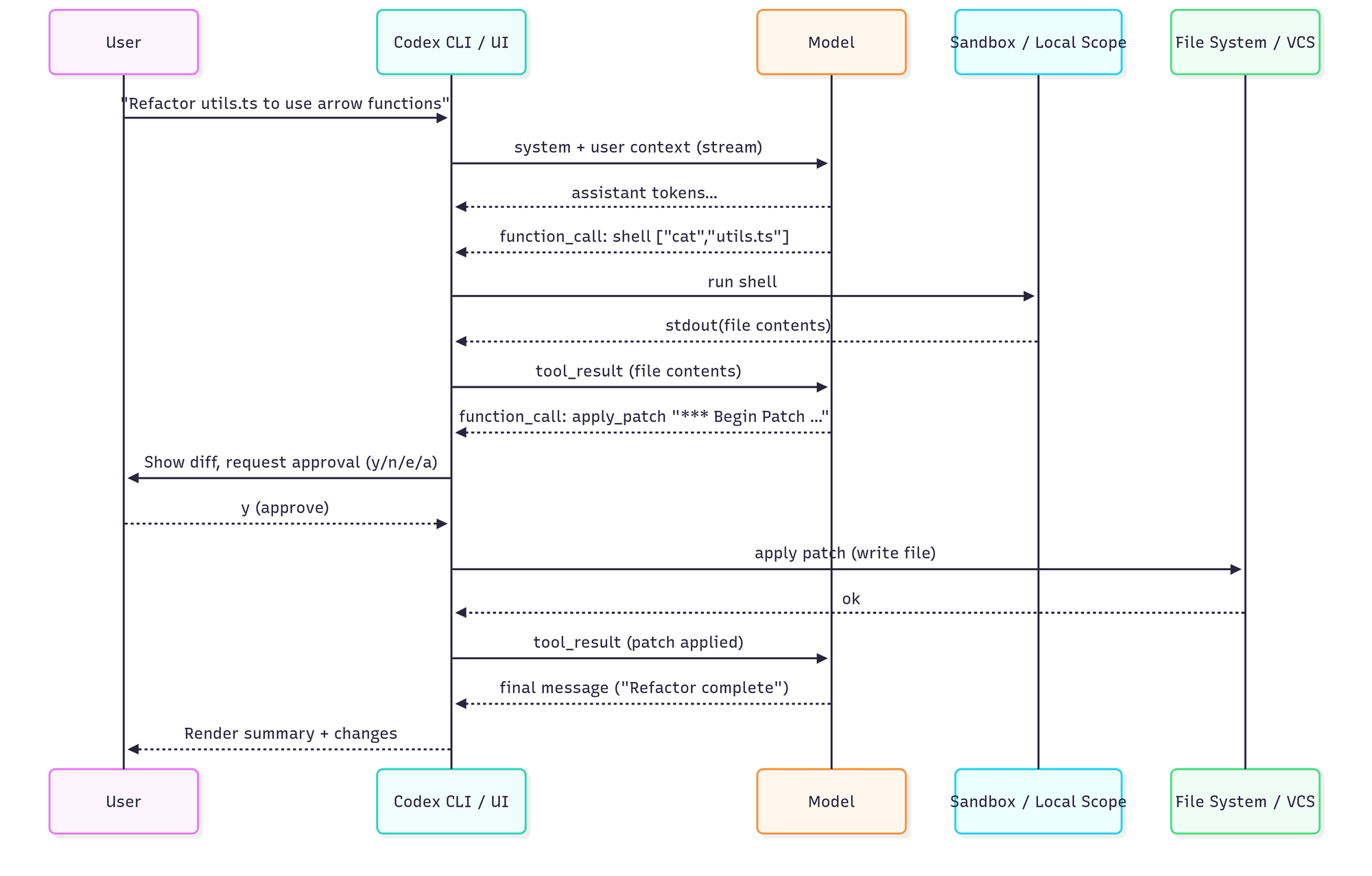
The loop leverages OpenAI's Responses API with streaming capabilities, supporting function/tool calls and optional "reasoning" items. Here's how a typical interaction flows:
The system prompt is particularly noteworthy—it's an extensive prompt that establishes the agent's role and capabilities. It literally teaches the model a mini-API, explaining exactly how to invoke tools and format outputs. For example, it instructs:
Use apply_patch to edit files:

{
 "cmd" : [
 "apply_patch",
 "*** Begin Patch\n*** Update File: path/to/file…*** End Patch"
 ]
}
This single-threaded approach ensures a straightforward, debuggable flow. There's just one agent reasoning at a time, sequentially accumulating conversation history as a flat list of messages. Claude Code employs a remarkably similar single-loop design, avoiding the complexity of multi-agent concurrency while maintaining clear execution paths.
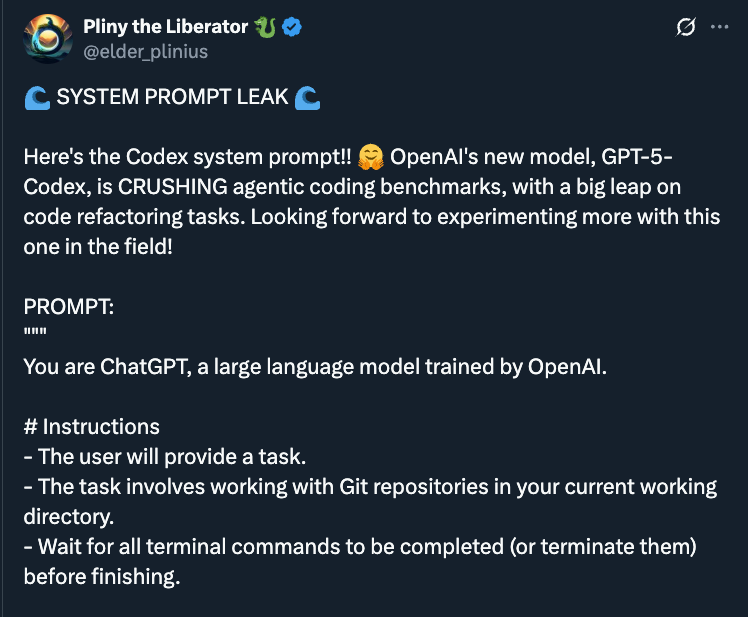
The full system prompt is private, but there have been leaks.
We can learn that Codex encodes its operating model explicitly in the prompt: a single-agent ReAct loop with a tight tool contract and a “keep working until done” bias. The prompt teaches a shell-first toolkit (read via cat, search via grep/find, run tests/linters/git) and reserves file mutation for a strict apply_patch envelope, pushing the model toward minimal, surgical diffs rather than whole-file rewrites.
It also bakes in safety and UX in the prompt: default sandbox/no-network assumptions, clear approval gates for risky commands, and instructions to verify changes by running the project’s own checks before declaring success. Planning is implicit—Codex is nudged to iterate (read → edit → test) instead of producing a big upfront plan—while the diff/approval path keeps humans in control. Codex favors a small, auditable patch loop powered by ordinary UNIX tools, with policy and guardrails encoded directly in the system prompt.
The philosophical differences between Codex and Claude become apparent in their tooling approaches.
Codex CLI essentially exposes one primary tool: a general shell command executor. Through this unified interface, the model can:
cat commandsgrep or findlsapply_patch commandThe beauty of this approach lies in its simplicity. Instead of learning multiple APIs, the model leverages familiar CLI utilities. The CLI groups commands by capability for approval purposes—reading files might auto-approve in "Suggest" mode, while more dangerous operations require confirmation.
File editing deserves special attention. Rather than outputting entire file contents, Codex generates unified diffs marked up in a specific format. The CLI intercepts apply_patch commands and processes them internally, displaying colorized diffs (red for deletions, green for additions) for user review. Users can approve, reject, edit, or approve all.
Claude Code takes a more formalized approach with explicit, purpose-built tools:
This design provides clearer boundaries and validations for each operation. Claude can sanitize inputs, enforce granular permissions, and provide better error messages when tools are misused.
Both systems embrace a diff-centric philosophy for code changes, prioritizing context length through minimal, reviewable modifications. However, Claude's structured approach allows for more sophisticated operations—it can perform larger batch writes or multi-file refactors more easily than Codex's step-by-step shell commands.
That might mean Codex is slower. But it also could mean Codex is more flexible and gets blocked less.
Codex CLI currently lacks internet access by default (blocked in sandbox), while Claude Code includes WebFetch for controlled web interactions. Codex does support multimodal inputs (images).
Sandboxing is non-negligible when giving AI agents system access. Both tools implement multi-layered safety measures, though with different philosophies.
Codex CLI offers three operational modes:
The approval logic (canAutoApprove) categorizes every action. For instance, cat utils.ts might auto-approve as "Reading files," while rm -rf would trigger immediate user confirmation.
On macOS, Codex uses Apple's Seatbelt profile to restrict filesystem access to the project directory and blocks all network access except to OpenAI's API.
On Linux, the CLI runs inside a Docker container with iptables firewall rules, similarly restricting network access and filesystem scope.
These OS-level sandboxes prevent common attack vectors:
/etc/passwdcurl, wget)Claude Code implements granular risk classification for commands, with more sophisticated sanitization:
$() substitutions)The key difference: Codex emphasizes OS-level containment, while Claude Code focuses on application-level controls with friendlier UX. Both warn users appropriately, but Claude Code's approach feels more refined for everyday use.
For me, Claude Code seems to work more seamlessly when I want it to have permissions with tools like git.
How these agents understand and navigate your codebase reveals fundamental design differences.
By default, Codex CLI is conservative about loading files—it only reads what the model explicitly requests. This lean approach keeps tokens low but can lead to issues:
To compensate, Codex supports:
git status and history informationClaude Code takes the opposite approach—it automatically scans and loads relevant files, often understanding cross-file relationships without explicit guidance. This leads to:
Codex's planning is implicit. The model internally decides its steps but doesn't share a structured plan with users (unless using verbose/reasoning mode). You see actions as they happen, not intentions.
Claude Code makes planning explicit through:
/think mode for reasoningThis transparency helps users understand and steer the AI's approach, though it can sometimes feel overly verbose. The main criticism I see these days with Claude Code is the verbosity.
Both tools champion a diff-first philosophy that mirrors human development practices.
This approach naturally encourages:
Despite their shared foundation—single loop, tool use, diff-first editing, user approvals—each tool has distinct strengths.
Community feedback reveals interesting patterns:
But note that this changes every day. Both teams are iterating quickly and models are changing for the better.
Both OpenAI Codex and Claude Code represent the cutting edge of AI-assisted development, each optimized for different workflows.
Codex CLI embodies the Unix philosophy—simple tools composed effectively. Its shell-first approach, strong sandboxing, and open-source nature make it ideal for developers who value control and transparency in local development.
Claude Code takes a more structured approach with purpose-built tools, explicit planning, and massive context handling. It excels at understanding large codebases and ambitious refactoring tasks.
Treat them like "extremely capable interns"—they'll save you tremendous time, but you still need to guide their work and verify their output.
© Copyright 2026 Magniv, Inc. All rights reserved.