|
VOOZH | about |
|
VOOZH | about |
If your app sends the same long system prompt, policy text, tool schema, or retrieved context on every request, prompt caching stops your provider — or your own application layer — from reprocessing identical content each time. It pays off when prompts are large, repeated, and stable, making chatbots faster, agents cheaper, and RAG systems less expensive to run.
If the concept is new, PromptLayer’s glossary entry on prompt caching gives a quick definition. This article focuses on techniques you can use in production.
In production, a prompt is rarely just a user message. It bundles a system prompt, developer instructions, tool schemas, few-shot examples, retrieved documents, conversation history, and the latest request. Caching pays off when part of that payload is identical across calls. A support agent sending the same 2,000-token system prompt and 4,000-token policy doc every time only has to process the new message if those stable sections are cached.
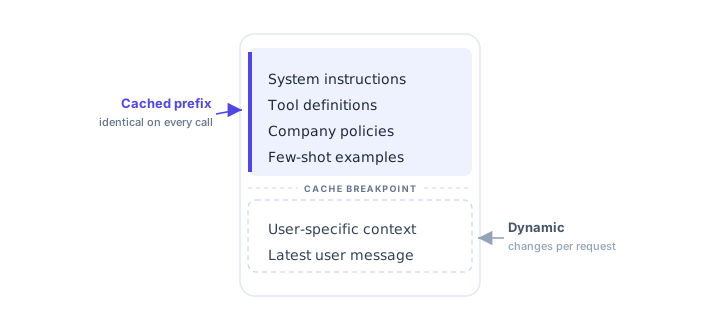
Structure the prompt so repeated content comes first and stays byte-for-byte identical between calls:
Prompt structure and cache boundarySystem instructions, tool definitions, company policies and few-shot examples form the cached prefix that is identical on every call. User-specific context and the latest user message are the dynamic tail that changes per request, below the cache breakpoint.System instructionsTool definitionsCompany policiesFew-shot examplesCACHE BREAKPOINTUser-specific contextLatest user messageCached prefixidentical on every callDynamicchanges per request
The static prefix runs down through the examples; the dynamic tail is user context and the latest message. Most provider caches key on the repeated prefix, so a timestamp, request ID, or user name near the top will break it. Keep dynamic values at the end.
Don’t assemble prompts as one big string. Keep components separate in code or in a prompt management system:
This also helps with versioning and rollout. A dedicated prompt management workflow — like PromptLayer’s Prompt Registry — tracks versions, labels, and release state so you always know which prompt produced a given response.
Cache keys are sensitive to small differences. Use consistent newlines, sort JSON keys, strip trailing whitespace, and avoid random list ordering. These two objects hold the same data but can produce different keys:
{"role":"admin","region":"us-east"}
{"region":"us-east","role":"admin"}
If an object like this sits inside a cached section, sort keys before rendering.
To cache fragments in your own app, build the stable fragment, normalize it, hash it (e.g. SHA-256), and use the hash as the key:
prompt_prefix:v3:sha256:8f14e45fceea167a5a36dedd4bea2543Always include a version. When you change instructions, format, or business rules, bump it so old content can’t leak into new behavior.
RAG gets expensive when every request fetches, ranks, and formats large chunks. Stable context — formatted docs pages, policy sections, API reference snippets, long-document summaries — is a good candidate. But anything permissioned must include the user, tenant, role, and scope in the key, so one customer’s context never appears in another’s response:
rag_context:tenant_482:user_991:doc_abc123:v7 (permissioned)
rag_context:docs:api_authentication:v12 (public)An agent with 20 tools can burn thousands of tokens on schemas before it sees the request. Keep schemas stable and ordered, and group users into fixed tool sets instead of generating schemas per request:
Each set gets its own cached prefix.
In a multi-step workflow, each step can have its own template and cache strategy: a classifier (low benefit), a query generator (some), and an answer generator with long formatting rules (high). With prompt chaining — and PromptLayer Workflows to trace each step — you get more control than one giant prompt, and evals get easier because you test steps in isolation.
Some prompt augmentation — a daily user-profile summary, a long-document summary, an active-rules list — is expensive to build but rarely changes. Cache these with a clear expiry: a profile summary might last 24 hours; a document summary, until the source changes.
Provider-side caching (automatic or explicit) cuts input cost and latency with no storage on your end, but you get less control over keys, expiration, and debugging — and each provider has its own rules on minimum length, prefix handling, and cache-control markers. Application-level caching is more work but more control: cache rendered fragments, retrieved context, summaries, or even full responses. Redis suits short-lived fragments, Postgres versioned summaries, object storage large sections.
All three advertise roughly 90% off cached input on their current flagship models. What differs is who controls the cache, whether you pay to write it, and how long it lives — choose on those three, not the headline.
| Dimension | OpenAI | Anthropic | Google Gemini |
|---|---|---|---|
| Control model | Automatic only | Explicit breakpoints (≤4) | Implicit (auto) + explicit (managed object) |
| Write cost | None | 1.25x input (5m) / 2.0x input (1h) | Implicit: none. Explicit: write fee + hourly storage |
| Read discount (current flagships) | Up to ~90% | 90% (0.10x input) | 90% (75% on 2.0 models) |
| Cache lifetime | ~5–10 min idle, ≤1h, no control | 5 min or 1h, resets on each hit | Explicit: you set TTL (default 60 min). Implicit: uncontrolled |
| Hit guarantee | Best-effort | Guaranteed on marked prefix | Implicit best-effort; explicit guaranteed |
| Minimum tokens | 1,024 | ~1,024 (up to 4,096 on some models) | Implicit ~1–2K; explicit ~32K |
| Cacheable content | Messages, images, tools, schemas | System, tools, messages | Text, PDF, image, audio, video |
OpenAI is automatic on gpt-4o and newer — no code, no write premium — kicking in at 1,024 tokens across messages, images, tools, and schemas. The cost is control: no TTL knob (evicts after ~5–10 min idle) and best-effort routing, so hits aren’t guaranteed. An optional prompt_cache_key steers shared-prefix traffic to the same cache.
Anthropic is opt-in via cache_control: {"type": "ephemeral"} (up to four breakpoints) on a strict prefix where order matters and a changed tool definition invalidates everything after it. Reads cost 0.10x input, but writes cost more — 1.25x for the 5-minute TTL, 2.0x for the 1-hour — and the TTL resets on every hit. You pay that premium for guaranteed hits and predictable latency.
Gemini has two modes. Implicit caching is on by default for 2.5+ with no storage cost and ~90% off. Explicit caching is a named CachedContent object you create with a TTL and reference by name for a guaranteed discount — but it adds a write fee plus hourly storage (~$1 per million tokens/hour on Flash). It’s also the only one of the three that caches full multimodal content.
The prefix discipline above applies to all three. What changes is the second-order cost: managing write cost (Anthropic), or a cache object plus storage (Gemini explicit), versus free-but-uncontrolled savings (OpenAI, Gemini implicit). Take the paid path only on high-reuse routes where guaranteed hits or predictable latency justify the bookkeeping.
Beyond input tokens, you can cache whole responses for deterministic, repeatable tasks — classifying the same ticket text, extracting fields from unchanged docs, summarizing static KB articles, or running evals on fixed cases. Avoid it for anything personalized, time-sensitive (legal, medical, financial), side-effecting (refunds, account changes), or creative where users expect variation. Key on model, prompt version, temperature, and an input hash:
llm_response:gpt-4.1:prompt_v18:temp_0:input_7b3f2cVague invalidation is where caching breaks. Define triggers up front:
Use shorter TTLs for sensitive data, longer for public docs.
Track caching with real numbers: cache hit rate, latency saved, input tokens saved, cost saved, and the error rate from stale content. At 10,000 requests/day with 4,000 repeated tokens each at a 70% hit rate, that’s ~28M repeated tokens affected per day — savings that scale with how large your stable sections are. PromptLayer observability captures cost, latency, and token counts per request, so you see the hit rate instead of guessing at it.
Treat prompts as structured production assets, not one-off strings. Stable prefixes, normalized components, versioned keys, and clear invalidation cut cost without making the system harder to debug. Start with one high-volume prompt: measure the repeated token count, cache the stable sections, and compare latency and cost before expanding the pattern.
PromptLayer helps teams version, test, and monitor every prompt and workflow — tracing requests, evaluating changes, and managing prompt versions in production. If you want better control over prompt caching, prompt management, and evals, create a PromptLayer account.
© Copyright 2026 Magniv, Inc. All rights reserved.