|
VOOZH | about |
|
VOOZH | about |
Empowering over 60,000 Websites Worldwide, Ultra Addons is the Must-Have Contact Form 7 addons Plugin. With 50+ essential features, it's the all-in-one solution for your WordPress forms, covering everything from basic to advanced needs.
The Form Generator Addon helps generating contact forms with the power of AI.
Easily create two columns, three Columns; even Four columns form using this feature.
Show or hide Contact Form 7 fields based on Conditional Logic, compatible with Checkbox and Range Slider.
Add a country dropdown list with flags to your form, automatically populating with country names.
The Database addon helps store form data, view data in the admin backend, and export data in CSV format.
Add a digital signature feature to your forms.
Dynamic text retrieves dynamic data from a website for use in hidden fields, including URL, blog, post, user info, and custom fields.
Style your entire form without any CSS coding, including colors, margins, button styles, and font sizes.
Integrate Contact Form 7 with Mailchimp. Add submissions to Mailchimp lists automatically.
Create stunning multi-step forms with Contact Form 7. Ideal for long forms and surveys.
This addon helps transferring form data to third-party services like Pabbly or Zapier via webhooks.
The pre-populate field sends data from one form to another, redirecting after the first form submission.
Generate PDFs through Contact Form 7; PDFs are sent to the admin and submitter email upon form submission.
Style form placeholders, like text color and background color, without writing any CSS.
Redirect users to a Thank You page or external page after form submission, with an option to open in a new tab.
Add beautiful Range slider fields to Contact Form 7, with multiple preview layouts available.
Get customer feedback by adding a star rating field to your Contact Form 7.
Before sending a form, you can make people solve math problems or recognize pictures. This helps cut down on spam.
Add an unique id to every form submission. The ID can be added on the "Subject Line" of your form.
Forward form submission data to Telegram with the Telegram integration feature.
Easily show WooCommerce products with a dropdown, allowing customers to select and inquire about products.
Coming soon - Incorporate Material Design principles into form design, offering various Material Types for customization.
Create a booking or appointment form using Contact Form 7, including calendar and time options, with WooCommerce payment support.
Set form columns at desired widths, like creating a form with columns of 12%, 27%, and 61% widths.
Advanced Conditional Logic for elements like Range Slider, Star Rating, Country Dropdown, and IP Geolocation.
Redirect user to a specific page after submission based on condition. e.g. Condition A user goes to abc.com and Condition B user goes to xyz.com
Ultimate Conversational Forms create interactive, engaging forms that mimic a conversational experience.
The Drag & Drop File Upload addon brings a smooth and modern way for users to upload multiple files directly through your Contact Form 7 form.
Your can directly respond to inquiries from your dashboard. It simplifies data management with options to export in PDF, CSV, or Excel formats and includes a convenient print feature.
Email Piping improves Contact Form 7 by automatically capturing email replies in your WordPress dashboard.
Automatically publish submitted forms as new posts and display them on the front end, with custom field support.
Style all your forms from one place without any CSS code.
Google reCAPTCHA adds a strong layer of protection to your Contact Form 7 forms by blocking spam and bots.
Google Sheets Integration lets you automatically send Contact Form 7 submissions to a Google Sheet.
Set up IP Geolocation-based Auto Complete for Country, City, State, Zip Fields on Contact Form 7.
A key feature of Mailchimp Pro is the ability to add an acceptance checkbox to your forms. It will give users the choice to opt-in to receiving emails
Choose from premium skins for multi-step forms, automatically generating pre-designed forms.
It allows users to review and verify the information they've entered thoroughly before confidently confirming their submission.
It enables users to generate and download a PDF immediately after submitting a form.. There will be a download button to download the submitted form.
The Prevent Duplicate Entries feature in Contact Form 7 allows you to block repeated submissions of the same data, protecting the integrity of your form submissions.
Add a repeater field to Contact Form 7 to repeat various fields, like text, files, checkboxes, text-areas, etc., with mail tag support.
Choose from 3 premium pre-built Range Slider layouts for Contact Form 7.
With this feature, every time someone submits a Contact Form 7 form, the data is sent directly to Salesforce account.
Choose from 5 built-in Star Rating styles, or use any Font Awesome icon for custom styles.
This feature offers users the flexibility to save their progress on a form and resume it later, ensuring a smoother and more convenient experience.
The Spam Protection Pro feature for Contact Form 7 helps prevent spam submissions on your website’s forms with enhanced functionality.
With Slack Integration for Contact Form 7, you can instantly send notifications to your Slack channels whenever a form is submitted.
Twilio Integration for Contact Form 7 allows you to send SMS or WhatsApp notifications directly from your form submissions.
Ability to choose Multiple WooCommerce Product from the Dropdown Field. Connect with Cart/Checkout If Needed.
Email Summaries, will allow users to receive detailed daily or weekly reports on the number of entries their Contact Form 7 forms are generating.
Add specific WooCommerce Product as Dropdown. Add the Products based on Product ID. Connect with Cart/Checkout If Needed.
Tag support for CF7 fields to be used on redirect URL to pass data. You can also pass submission data to Whatsapp.
Show your Products with a Stunning Grid View & Thumbnails. Products can be added based on ID/Category/Tags.
Show Product Drop-down field based on specific WooCommerce Category. Connect with Cart/Checkout If Needed.
Choose a product from the dropdown field, submit the form, and get redirected to the WooCommerce Cart page with the product added automatically.
Through the intuitive settings panel managing your addons couldn’t be simpler. With the ability to easily enable or disable specific addons, you ensure that your site is free from the burden of unnecessary resources.
This guarantees optimal performance by loading only what you need, when you need it.
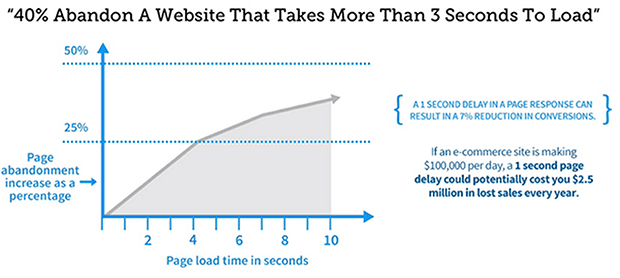
It’s time for you to reconsider. According to Experts, “The more plugins you have installed on your site, the slower it will be. For every plugin that you add to your site, more code is added to the browser. That’s more to process, so the less code there is, the better your loading speeds will be.“
Ultra Addons for Contact Form 7 (formerly Ultimate Addons for Contact Form 7), also known as UACF7, enhances your WordPress-based forms with a collection of over 30 addons. These addons significantly improve the functionality and aesthetics of Contact Form 7, enabling you to create complex online forms quickly and easily.
No coding skills are required to use Ultra Addons. You can effortlessly create and manage forms without any knowledge of coding, making it the most beginner-friendly contact form solution available in the market.
Please refer to our detailed step-by-step documentation to understand the complete installation process for both the free and pro versions.
No, Ultra Addons will not slow down your website. If you don’t require all 30 addons, you have the flexibility to enable or disable each one according to your needs. This ensures that only the necessary assets are loaded, optimizing performance.
It is meticulously designed with performance as a priority. Our development approach adheres to best practices and modern standards, ensuring smooth and swift operation.
You can conveniently make payments using PayPal or choose from major credit cards such as Visa, MasterCard, American Express, and Discover, all processed securely through the Paddle payment gateway.
We offer a hassle-free, ‘No Questions Asked’ 30-day refund policy. For more details, please review our Refund Policy.
No need to worry! Our Superhero support team is available to assist you with technical issues and provide additional guidance. If you’re using the free version, you can submit a ticket here. For Pro users, you can open a ticket here.
| Cookie | Duration | Description |
|---|---|---|
| cookielawinfo-checkbox-analytics | 11 months | This cookie is set by GDPR Cookie Consent plugin. The cookie is used to store the user consent for the cookies in the category "Analytics". |
| cookielawinfo-checkbox-functional | 11 months | The cookie is set by GDPR cookie consent to record the user consent for the cookies in the category "Functional". |
| cookielawinfo-checkbox-necessary | 11 months | This cookie is set by GDPR Cookie Consent plugin. The cookies is used to store the user consent for the cookies in the category "Necessary". |
| cookielawinfo-checkbox-others | 11 months | This cookie is set by GDPR Cookie Consent plugin. The cookie is used to store the user consent for the cookies in the category "Other. |
| cookielawinfo-checkbox-performance | 11 months | This cookie is set by GDPR Cookie Consent plugin. The cookie is used to store the user consent for the cookies in the category "Performance". |
| viewed_cookie_policy | 11 months | The cookie is set by the GDPR Cookie Consent plugin and is used to store whether or not user has consented to the use of cookies. It does not store any personal data. |