Clean Architecture in .NET organizes your code into four layers - Domain, Application, Infrastructure, and Presentation - where dependencies only point inward, toward the business rules. The Domain layer knows nothing about databases or HTTP. The outer layers depend on the inner ones, never the reverse. That single rule is what keeps a large codebase changeable for years.
In this guide I will build a real movie management Web API on .NET 10 using Clean Architecture, from an empty folder to a running app orchestrated by .NET Aspire. I tested every line on .NET 10.0.203 with EF Core 10.0.8 and Aspire 13.3.5. Nothing here is pseudo-code. You can clone the repo, run one command, and watch it work.
TL;DR. Clean Architecture in .NET 10 means four projects with a strict dependency direction:
Domain(entities and rules, zero dependencies) ←Application(use cases, DTOs, anIApplicationDbContextinterface) ←Infrastructure(EF CoreDbContext, configurations) ←Api(Minimal API endpoints, the composition root). UseDbContextdirectly through an interface instead of a repository pattern. Pin versions with Central Package Management, share style with.editorconfig, and orchestrate the API plus PostgreSQL with .NET Aspire. The full source builds green and ships with an EF Core migration.
This is part of my free .NET Web API Zero to Hero series, so the movie domain will feel familiar if you have followed along.
What Is Clean Architecture?
Clean Architecture is a way of structuring an application so that the business rules sit at the center, completely independent of frameworks, databases, and the UI. It was popularized by Robert C. Martin in 2012 and is the architecture Microsoft demonstrates in its own common web application architectures guide. The idea is older than the name - it is the same goal behind Hexagonal Architecture and Onion Architecture.
The promise is simple. Your core logic - what a movie is, what makes a rating valid, how a booking gets confirmed - should not change just because you switched from SQL Server to PostgreSQL, or from Controllers to Minimal APIs. Frameworks are details. Details should depend on your business rules, not the other way around.
Here is how the layers fit together. The closer to the center, the more stable and the fewer dependencies:
👁 Clean Architecture dependency layers in .NET - dependencies point inward
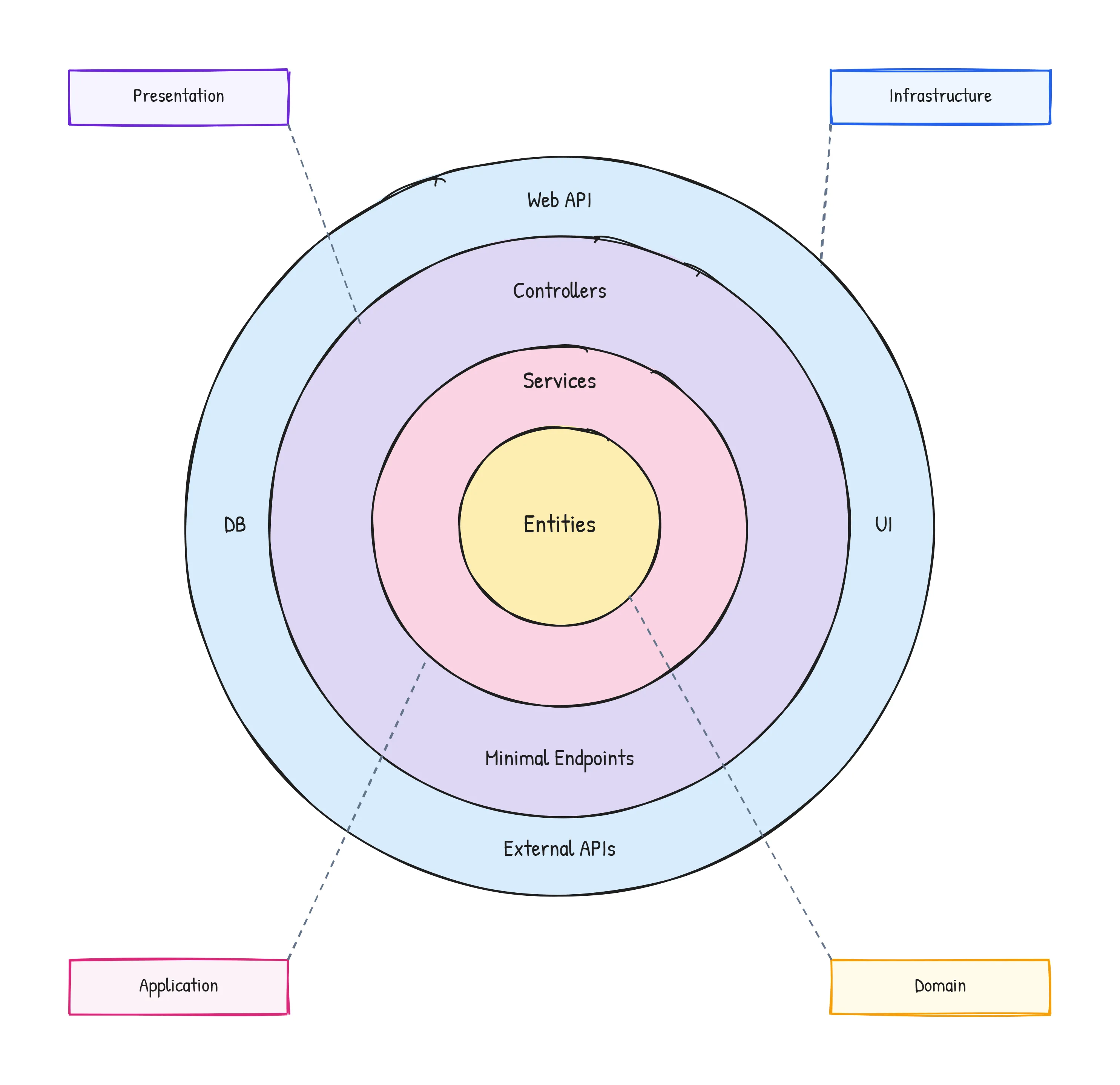
The arrows in any Clean Architecture diagram always point inward. The database, the web framework, and external APIs live on the outside. The entities live at the core. Nothing in the core is allowed to reference anything in an outer ring.
What is the Dependency Rule?
The Dependency Rule states that source code dependencies must only point inward, toward higher-level policies. A class in the Domain layer can never reference a class in the Infrastructure or API layer. The Application layer can reference the Domain, but not the Infrastructure. This is the one rule that makes Clean Architecture “clean” - break it and you get a normal tangled codebase with extra folders.
In .NET, the compiler enforces this for you through project references. If the Domain project has no reference to the Infrastructure project, you simply cannot write using MovieManagement.Infrastructure; inside the Domain - the code will not compile. The build protects the architecture for you, so it does not depend on everyone remembering the rule. That is a big reason Clean Architecture works well in C#.
The Four Layers Explained
Each layer has one job. Here is what goes where, from the inside out.
👁 Clean Architecture layers explained
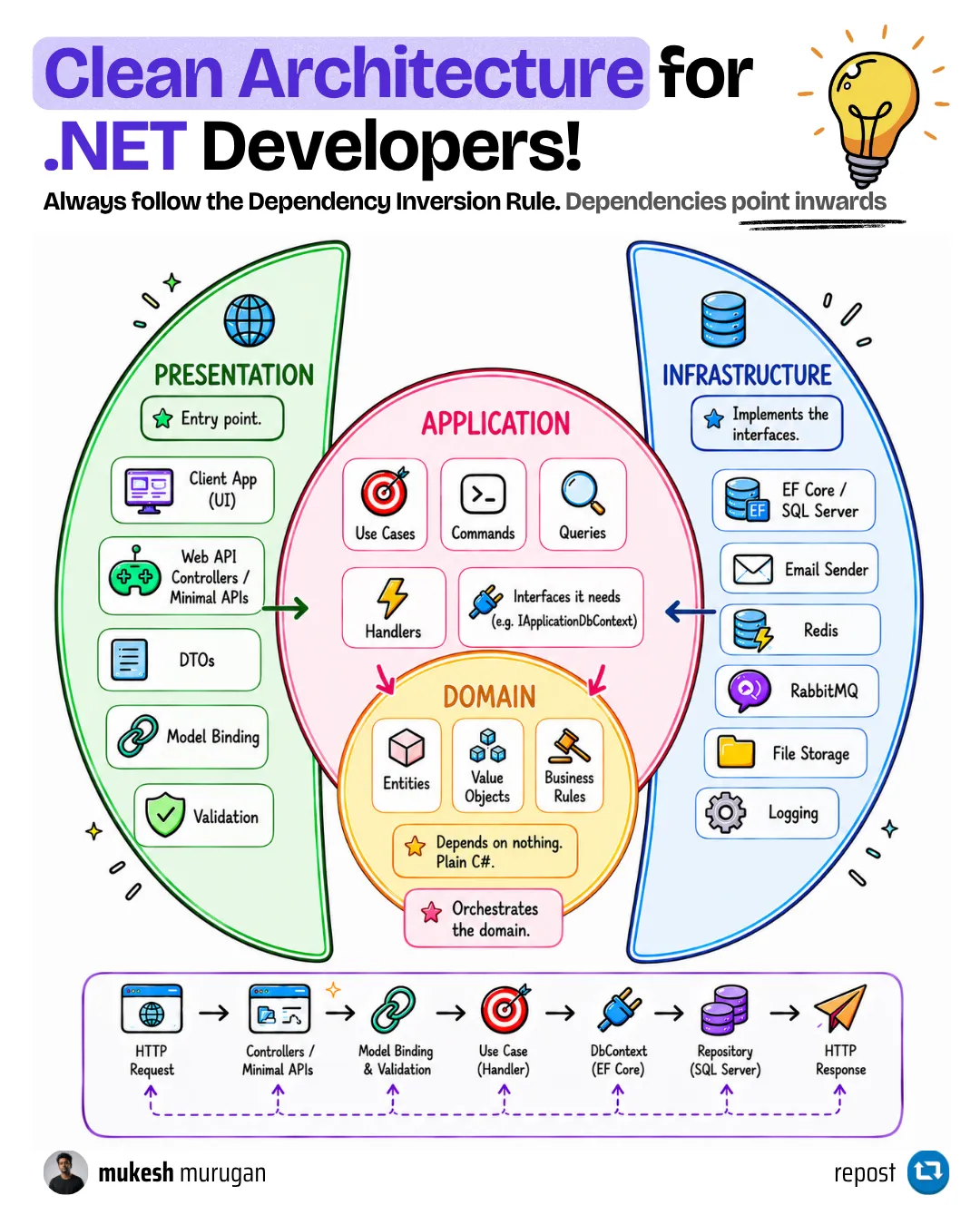
- Domain - Entities, value objects, enums, and the business rules that are always true. Zero dependencies on other projects or NuGet packages. This is the heart of your app.
- Application - Use cases and orchestration. It defines interfaces (like
IApplicationDbContext), DTOs, and services that coordinate the domain. It depends only on Domain. - Infrastructure - The implementations of those interfaces. The EF Core
DbContext, entity configurations, email senders, file storage, external API clients. It depends on Application. - Presentation (API) - The entry point. Minimal API endpoints, controllers, middleware, and the composition root where everything is wired together. It depends on Application and Infrastructure.
Notice the direction. Api → Infrastructure → Application → Domain. Every arrow points toward the Domain. The Domain points at nothing. This maps directly onto SOLID, especially the Dependency Inversion Principle: high-level modules (Application) do not depend on low-level modules (Infrastructure), both depend on abstractions (the interfaces defined in Application).
Here is a quick reference for what each layer owns and, just as important, what it must never contain:
| Layer | Owns | Never contains | Depends on |
|---|---|---|---|
| Domain | Entities, value objects, business rules | EF Core, HTTP, JSON, DI | Nothing |
| Application | Use cases, DTOs, interfaces | Concrete DB code, controllers | Domain |
| Infrastructure | DbContext, configs, integrations | API endpoints | Application |
| API | Endpoints, middleware, composition root | Business rules | Application, Infrastructure |
Onion Architecture in ASP.NET Core
Clean Architecture's direct ancestor. If you have seen the onion diagram before, this article shows where the two overlap and where they differ.
When Should You Use Clean Architecture?
This is where most tutorials go quiet, so let me be direct. Clean Architecture is worth its overhead when your business logic is complex enough that protecting it pays for the extra projects and indirection. It is not a default. It is a trade.
Use Clean Architecture when most of these are true:
- The domain is non-trivial - real rules, calculations, and workflows, not just create-read-update-delete over tables.
- The project will live for years - on long-lived products the extra structure pays off many times over.
- More than one or two developers - clear layer boundaries reduce merge pain and onboarding time.
- You expect the edges to change - new delivery mechanisms, swapped infrastructure, multiple front ends hitting the same core.
- Testing the core in isolation matters - the Application and Domain layers can be unit tested with no database and no web server.
That last point matters more than it sounds. Because the Domain and Application layers have no database or framework code in them, you can test your most important logic in milliseconds, using plain objects and no setup.
When Should You Not Use Clean Architecture?
Here is my honest take after shipping a lot of .NET APIs: most small services do not need Clean Architecture, and forcing it on them slows you down. Four projects for a small webhook receiver is too much.
Skip Clean Architecture when:
- It is mostly CRUD - if your endpoints just map JSON to tables and back, the layers add ceremony with no payoff. Reach for a single project, Vertical Slice Architecture, or a modular structure instead.
- It is a prototype or throwaway - you are validating an idea, not maintaining a product.
- It is a tiny solo project - the extra layers cost more than the mess they save you from.
- The team is new to the pattern - a misunderstood Clean Architecture (anemic domain, logic leaking into controllers) is worse than an honest simple structure.
A good signal: if you cannot name three real business rules that belong in the Domain layer, you probably do not need a Domain layer yet. Start simple, and move to Clean Architecture when the complexity is real. Refactoring into layers later is straightforward; ripping out unnecessary layers rarely happens because nobody wants to touch working code.
Here is the decision in one table:
| Situation | Recommendation |
|---|---|
| Complex domain, long-lived, multi-dev | Clean Architecture |
| CRUD-heavy API, simple rules | Single project or Vertical Slice |
| Prototype / spike | One project, no layers |
| Solo side project, small scope | One project, split later if needed |
| Microservice with rich logic | Clean Architecture (per service) |
The Proposed Folder Structure
Before writing code, here is the full layout I will build. The four core layers live under src/, and the two Aspire orchestration projects live under aspire/:
clean-architecture-dotnet/├── MovieManagement.slnx├── Directory.Packages.props # one place for all NuGet versions├── Directory.Build.props # shared MSBuild settings├── .editorconfig # shared code style├── src/│ ├── MovieManagement.Domain/ # Entities, rules. No dependencies.│ ├── MovieManagement.Application/ # Use cases, DTOs, interfaces.│ ├── MovieManagement.Infrastructure/ # DbContext, EF configs.│ └── MovieManagement.Api/ # Endpoints, composition root.├── aspire/│ ├── MovieManagement.AppHost/ # Orchestrates API + PostgreSQL.│ └── MovieManagement.ServiceDefaults/# Telemetry, health, resilience.└── tests/└── MovieManagement.Domain.Tests/ # Fast unit tests for the domain rules.The naming matters. Anyone opening this solution can read the dependency direction off the folder names. Domain at the top of src signals “start here, this is the core.”
Prerequisites
You will need three things installed:
- .NET 10 SDK - check with
dotnet --version. I am on10.0.203. - Docker Desktop - Aspire runs PostgreSQL in a container for you.
- An editor - Visual Studio 2026, VS Code with the C# Dev Kit, or JetBrains Rider.
You also need the Aspire project templates. Install them once:
dotnetnewinstallAspire.ProjectTemplatesThe full source for everything below lives in the course repository. Clone it if you would rather read along than type.
Step 1: Create the Solution and Projects
Start with an empty folder and create the six projects. The three inner layers and the API are plain class libraries and a web project; the Aspire projects come from the templates you just installed.
mkdirclean-architecture-dotnet && cdclean-architecture-dotnetdotnetnewclasslib-nMovieManagement.Domain-osrc/MovieManagement.Domaindotnetnewclasslib-nMovieManagement.Application-osrc/MovieManagement.Applicationdotnetnewclasslib-nMovieManagement.Infrastructure-osrc/MovieManagement.Infrastructuredotnetnewweb-nMovieManagement.Api-osrc/MovieManagement.Apidotnetnewaspire-apphost-nMovieManagement.AppHost-oaspire/MovieManagement.AppHostdotnetnewaspire-servicedefaults-nMovieManagement.ServiceDefaults-oaspire/MovieManagement.ServiceDefaultsNow set the dependency direction with project references. This is the most important step in the whole tutorial, because these references are what enforce the Dependency Rule:
dotnetaddsrc/MovieManagement.Applicationreferencesrc/MovieManagement.Domaindotnetaddsrc/MovieManagement.Infrastructurereferencesrc/MovieManagement.Applicationdotnetaddsrc/MovieManagement.Apireferencesrc/MovieManagement.Applicationsrc/MovieManagement.Infrastructureaspire/MovieManagement.ServiceDefaultsdotnetaddaspire/MovieManagement.AppHostreferencesrc/MovieManagement.ApiRead those references out loud and you can hear the architecture: Application references Domain, Infrastructure references Application, the API references both. The Domain references nothing. That one-way direction is the whole point.
Finally, create the solution file and add every project. I use the modern .slnx format, which is plain XML and far easier to read in diffs than the old .sln:
dotnetnewsln-nMovieManagement--formatslnxdotnetslnaddsrc/MovieManagement.Domainsrc/MovieManagement.Applicationsrc/MovieManagement.Infrastructuresrc/MovieManagement.Apiaspire/MovieManagement.AppHostaspire/MovieManagement.ServiceDefaultsStep 2: Add Central Package Management
When you have six projects, managing NuGet versions one csproj at a time is how you end up with three different EF Core versions in one solution. Central Package Management (CPM) moves every version number into a single Directory.Packages.props file at the solution root. Each project then references a package by name only, with no version.
Create Directory.Packages.props in the root folder:
<Project><PropertyGroup><ManagePackageVersionsCentrally>true</ManagePackageVersionsCentrally><CentralPackageTransitivePinningEnabled>true</CentralPackageTransitivePinningEnabled></PropertyGroup><ItemGroupLabel="EF Core + PostgreSQL"><PackageVersionInclude="Microsoft.EntityFrameworkCore"Version="10.0.8" /><PackageVersionInclude="Microsoft.EntityFrameworkCore.Design"Version="10.0.8" /><PackageVersionInclude="Npgsql.EntityFrameworkCore.PostgreSQL"Version="10.0.1" /></ItemGroup><ItemGroupLabel="API"><PackageVersionInclude="Microsoft.AspNetCore.OpenApi"Version="10.0.8" /><PackageVersionInclude="Scalar.AspNetCore"Version="2.14.14" /></ItemGroup><ItemGroupLabel="Aspire orchestration"><PackageVersionInclude="Aspire.Hosting.PostgreSQL"Version="13.3.5" /><PackageVersionInclude="Aspire.Npgsql.EntityFrameworkCore.PostgreSQL"Version="13.3.5" /></ItemGroup></Project>Now a project file only lists the package name. The Application project, for example, needs just EF Core:
<ProjectSdk="Microsoft.NET.Sdk"><ItemGroup><ProjectReferenceInclude="..\MovieManagement.Domain\MovieManagement.Domain.csproj" /></ItemGroup><ItemGroup><PackageReferenceInclude="Microsoft.EntityFrameworkCore" /></ItemGroup></Project>No version attribute anywhere except the central file. Upgrading EF Core across the whole solution is now a one-line change. The CentralPackageTransitivePinningEnabled flag also locks the versions of transitive dependencies, which kills a whole class of “works on my machine” version-drift bugs.
While I am here, I also add a Directory.Build.props to share the common compiler settings so I do not repeat them in six files:
<Project><PropertyGroup><TargetFramework>net10.0</TargetFramework><Nullable>enable</Nullable><ImplicitUsings>enable</ImplicitUsings><LangVersion>latest</LangVersion><EnforceCodeStyleInBuild>true</EnforceCodeStyleInBuild></PropertyGroup></Project>Step 3: Add a Shared .editorconfig
A team that argues about var versus explicit types in pull requests is wasting its energy. An .editorconfig file ends the argument by encoding the style once, and every editor and the build honor it. Drop this at the solution root:
root= true[*.cs]# Prefer file-scoped namespaces (one less level of indentation)csharp_style_namespace_declarations= file_scoped:warning# 'this.' is noise in modern C#dotnet_style_qualification_for_field= false:warningdotnet_style_qualification_for_property= false:warning# Modern language featurescsharp_style_prefer_primary_constructors= true:suggestioncsharp_prefer_braces= true:warningdotnet_style_prefer_collection_expression= true:suggestion# Interfaces start with Idotnet_naming_rule.interfaces_start_with_i.severity= warningdotnet_naming_rule.interfaces_start_with_i.symbols= interface_symboldotnet_naming_rule.interfaces_start_with_i.style= i_prefix_styledotnet_naming_symbols.interface_symbol.applicable_kinds= interfacedotnet_naming_style.i_prefix_style.required_prefix= Idotnet_naming_style.i_prefix_style.capitalization= pascal_caseCombined with EnforceCodeStyleInBuild from the previous step, style violations now show up as build warnings, so they never reach a reviewer. The full file in the repo has more rules, but this is the core.
Step 4: Build the Domain Layer
The Domain is where you start, because everything else depends on it. The rule for this project is strict: no NuGet packages, no references to any other project. Just C#.
First, a small base class so every entity has a strongly typed identifier. I use Guid.CreateVersion7(), the sequential GUID (UUID v7) introduced in .NET 9, because it indexes far better in PostgreSQL than the random GUIDs Guid.NewGuid() produced:
namespaceMovieManagement.Domain.Common;publicabstractclassEntity{publicGuidId { get; protectedset; } =Guid.CreateVersion7();}I also add one small exception type. The Domain throws this when a rule is broken, and later the API turns it into a clean 400 Bad Request instead of a 500 error:
namespaceMovieManagement.Domain.Common;// Thrown when a domain rule is broken (an empty title, a bad rating, and so on).publicsealedclassDomainException(stringmessage) : Exception(message);Now the Movie entity itself. This is where “light DDD” comes in. An anemic model is just a bag of public setters with no behavior - it is the most common way Clean Architecture goes wrong. Instead, I make the state private and expose intent through methods. You cannot create or mutate a Movie into an invalid state:
usingMovieManagement.Domain.Common;namespaceMovieManagement.Domain.Movies;publicsealedclassMovie : Entity{// EF Core needs a parameterless constructor. Keeping it private means the// rest of the application cannot create a Movie in an invalid state.privateMovie(){}privateMovie(stringtitle, stringdirector, DateOnlyreleaseDate, Genregenre, stringsynopsis){Title=title;Director=director;ReleaseDate=releaseDate;Genre=genre;Synopsis=synopsis;CreatedAtUtc=DateTime.UtcNow;}publicstringTitle { get; privateset; } =default!;publicstringDirector { get; privateset; } =default!;publicDateOnlyReleaseDate { get; privateset; }publicGenreGenre { get; privateset; }publicstringSynopsis { get; privateset; } =default!;publicdouble? AverageRating { get; privateset; }publicintRatingCount { get; privateset; }publicDateTimeCreatedAtUtc { get; privateset; }// A factory method is the only way to build a Movie. It enforces the rules// that must always be true, so an invalid Movie can never exist.publicstaticMovieCreate(stringtitle, stringdirector, DateOnlyreleaseDate, Genregenre, stringsynopsis){if (string.IsNullOrWhiteSpace(title)){thrownewDomainException("A movie must have a title.");}if (string.IsNullOrWhiteSpace(director)){thrownewDomainException("A movie must have a director.");}returnnewMovie(title.Trim(), director.Trim(), releaseDate, genre, synopsis?.Trim() ??string.Empty);}publicvoidUpdateDetails(stringtitle, stringdirector, DateOnlyreleaseDate, Genregenre, stringsynopsis){if (string.IsNullOrWhiteSpace(title)){thrownewDomainException("A movie must have a title.");}Title=title.Trim();Director=director.Trim();ReleaseDate=releaseDate;Genre=genre;Synopsis=synopsis?.Trim() ??string.Empty;}// Behavior lives on the entity, not in a service. The running average is a// business rule, so the Movie owns it.publicvoidAddRating(intscore){if (scoreis<1or>10){thrownewDomainException("A rating must be between 1 and 10.");}varrunningTotal= (AverageRating??0) *RatingCount+score;RatingCount++;AverageRating=Math.Round(runningTotal/RatingCount, 2);}}The Genre is a simple enum, also in the Domain:
namespaceMovieManagement.Domain.Movies;publicenumGenre{Action=1,Comedy=2,Drama=3,SciFi=4,Horror=5,Documentary=6}Look at AddRating. The rule that a rating is between 1 and 10, and the math for the running average, lives on the entity. A service does not get to compute the average and assign it. The Movie protects its own invariants. That is the difference between a domain model and a database row with extra steps.
Step 5: Build the Application Layer
The Application layer holds your use cases. It depends on the Domain and on EF Core abstractions, but it never references the Infrastructure project. The trick that makes this possible - and that lets me drop the repository pattern - is a single interface.
Why I Use DbContext Directly Instead of the Repository Pattern
Here is my strongest opinion in this article, and Microsoft agrees with it. In EF Core, DbContext already is the Unit of Work and DbSet<T> already is a repository, so wrapping them in a custom repository usually adds indirection without adding value. Microsoft states this plainly in their architecture guidance: “The Entity Framework DbContext class is based on the Unit of Work and Repository patterns and can be used directly from your code”.
The classic objection is “but then my Application layer depends on the Infrastructure.” It does not. I define an interface in the Application layer that exposes the DbSet I need, and the Infrastructure’s DbContext implements it:
usingMicrosoft.EntityFrameworkCore;usingMovieManagement.Domain.Movies;namespaceMovieManagement.Application.Common;// This interface is how the Application layer talks to the database without// depending on the Infrastructure project. It exposes the DbSet directly, so// services get the full power of EF Core and LINQ - no repository in between.publicinterfaceIApplicationDbContext{DbSet<Movie> Movies { get; }Task<int> SaveChangesAsync(CancellationTokencancellationToken=default);}The Application layer now has full LINQ and EF Core power - Include, AsNoTracking, projections, and so on - while still depending only on an interface it owns. This is the pattern the popular .NET Clean Architecture templates use, and it is far less code than a generic repository plus unit of work.
Repository Pattern in .NET 10 - Do You Really Need It?
The deep-dive on this exact decision: the 3 cases where I still use a repository, the 5 where I refuse, and the benchmark behind the call.
Next, the DTOs. The API should never expose the Movie entity directly, both because the entity has private setters and because you do not want your database shape leaking into your public contract. Records make these one-liners:
usingMovieManagement.Domain.Movies;namespaceMovieManagement.Application.Movies;publicrecordCreateMovieRequest(stringTitle, stringDirector, DateOnlyReleaseDate, GenreGenre, stringSynopsis);publicrecordUpdateMovieRequest(stringTitle, stringDirector, DateOnlyReleaseDate, GenreGenre, stringSynopsis);publicrecordAddRatingRequest(intScore);publicrecordMovieResponse(GuidId, stringTitle, stringDirector, DateOnlyReleaseDate, stringGenre, stringSynopsis, double? AverageRating, intRatingCount);A tiny mapping helper keeps the conversion in one place:
usingMovieManagement.Domain.Movies;namespaceMovieManagement.Application.Movies;internalstaticclassMovieMappings{publicstaticMovieResponseToResponse(thisMoviemovie) =>new(movie.Id,movie.Title,movie.Director,movie.ReleaseDate,movie.Genre.ToString(),movie.Synopsis,movie.AverageRating,movie.RatingCount);}Now the use cases themselves. The MovieService orchestrates the domain and the database. It depends on IApplicationDbContext through a primary constructor - no repository, no unit of work, just the interface:
usingMicrosoft.EntityFrameworkCore;usingMovieManagement.Application.Common;usingMovieManagement.Domain.Movies;namespaceMovieManagement.Application.Movies;publicsealedclassMovieService(IApplicationDbContextcontext) : IMovieService{publicasyncTask<MovieResponse> CreateAsync(CreateMovieRequestrequest, CancellationTokencancellationToken){varmovie=Movie.Create(request.Title, request.Director, request.ReleaseDate, request.Genre, request.Synopsis);context.Movies.Add(movie);awaitcontext.SaveChangesAsync(cancellationToken);returnmovie.ToResponse();}publicasyncTask<MovieResponse?> GetByIdAsync(Guidid, CancellationTokencancellationToken){varmovie=awaitcontext.Movies.AsNoTracking().FirstOrDefaultAsync(m=>m.Id==id, cancellationToken);returnmovie?.ToResponse();}publicasyncTask<IReadOnlyList<MovieResponse>> GetAllAsync(CancellationTokencancellationToken){// AsNoTracking skips change-tracking on read-only queries, which cuts// allocations and runs faster. Use it on every query that only reads.varmovies=awaitcontext.Movies.AsNoTracking().OrderByDescending(m=>m.ReleaseDate).ToListAsync(cancellationToken);returnmovies.Select(m=>m.ToResponse()).ToList();}publicasyncTask<bool> UpdateAsync(Guidid, UpdateMovieRequestrequest, CancellationTokencancellationToken){varmovie=awaitcontext.Movies.FirstOrDefaultAsync(m=>m.Id==id, cancellationToken);if (movieisnull){returnfalse;}movie.UpdateDetails(request.Title, request.Director, request.ReleaseDate, request.Genre, request.Synopsis);awaitcontext.SaveChangesAsync(cancellationToken);returntrue;}publicasyncTask<bool> AddRatingAsync(Guidid, AddRatingRequestrequest, CancellationTokencancellationToken){varmovie=awaitcontext.Movies.FirstOrDefaultAsync(m=>m.Id==id, cancellationToken);if (movieisnull){returnfalse;}// The Movie checks the score and updates its own average. A bad score// throws, and the API turns that into a 400.movie.AddRating(request.Score);awaitcontext.SaveChangesAsync(cancellationToken);returntrue;}publicasyncTask<bool> DeleteAsync(Guidid, CancellationTokencancellationToken){varmovie=awaitcontext.Movies.FirstOrDefaultAsync(m=>m.Id==id, cancellationToken);if (movieisnull){returnfalse;}context.Movies.Remove(movie);awaitcontext.SaveChangesAsync(cancellationToken);returntrue;}}The matching interface (IMovieService) and a small extension method to register it complete the layer:
usingMicrosoft.Extensions.DependencyInjection;usingMovieManagement.Application.Movies;namespaceMovieManagement.Application;publicstaticclassDependencyInjection{publicstaticIServiceCollectionAddApplication(thisIServiceCollectionservices){services.AddScoped<IMovieService, MovieService>();returnservices;}}Each layer exposing its own AddXxx() extension keeps the API’s Program.cs clean and makes the wiring obvious. If your service count grows, you can auto-register them with Scrutor’s assembly scanning instead of writing each line by hand.
Step 6: Build the Infrastructure Layer
The Infrastructure layer is where the abstractions get real implementations. Here, that means the EF Core DbContext. Crucially, it implements the IApplicationDbContext interface that lives in the Application layer:
usingMicrosoft.EntityFrameworkCore;usingMovieManagement.Application.Common;usingMovieManagement.Domain.Movies;namespaceMovieManagement.Infrastructure.Persistence;publicsealedclassApplicationDbContext(DbContextOptions<ApplicationDbContext> options): DbContext(options), IApplicationDbContext{publicDbSet<Movie> Movies=>Set<Movie>();protectedoverridevoidOnModelCreating(ModelBuildermodelBuilder){// Picks up every IEntityTypeConfiguration in this assembly automatically.modelBuilder.ApplyConfigurationsFromAssembly(typeof(ApplicationDbContext).Assembly);base.OnModelCreating(modelBuilder);}}Keep the mapping out of the DbContext itself by using a configuration class per entity. This scales far better than a giant OnModelCreating:
usingMicrosoft.EntityFrameworkCore;usingMicrosoft.EntityFrameworkCore.Metadata.Builders;usingMovieManagement.Domain.Movies;namespaceMovieManagement.Infrastructure.Persistence.Configurations;publicsealedclassMovieConfiguration : IEntityTypeConfiguration<Movie>{publicvoidConfigure(EntityTypeBuilder<Movie> builder){builder.ToTable("movies");builder.HasKey(m=>m.Id);builder.Property(m=>m.Title).HasMaxLength(200).IsRequired();builder.Property(m=>m.Director).HasMaxLength(150).IsRequired();builder.Property(m=>m.Synopsis).HasMaxLength(2000);// Store the enum as a readable string column instead of an int.builder.Property(m=>m.Genre).HasConversion<string>().HasMaxLength(40);}}Finally, the Infrastructure’s own DI extension. It maps the interface to the concrete DbContext. The DbContext itself gets registered in the API project by Aspire, so here I only bridge the interface:
usingMicrosoft.Extensions.DependencyInjection;usingMovieManagement.Application.Common;usingMovieManagement.Infrastructure.Persistence;namespaceMovieManagement.Infrastructure;publicstaticclassDependencyInjection{publicstaticIServiceCollectionAddInfrastructure(thisIServiceCollectionservices){services.AddScoped<IApplicationDbContext>(sp=>sp.GetRequiredService<ApplicationDbContext>());returnservices;}}That AddScoped<IApplicationDbContext> line is the key piece. When a MovieService asks for an IApplicationDbContext, it gets the real ApplicationDbContext - but it has no idea that is what it is getting, and no reference to the Infrastructure project. The Dependency Rule holds.
Step 7: Build the API Layer
The API is the composition root - the one place that is allowed to know about every layer and wire them together. I use Minimal APIs grouped by resource, which keeps endpoints thin and readable:
usingMovieManagement.Application.Movies;namespaceMovieManagement.Api.Endpoints;publicstaticclassMovieEndpoints{publicstaticIEndpointRouteBuilderMapMovieEndpoints(thisIEndpointRouteBuilderapp){vargroup=app.MapGroup("/movies").WithTags("Movies");group.MapPost("/", async (CreateMovieRequestrequest, IMovieServiceservice, CancellationTokencancellationToken) =>{varmovie=awaitservice.CreateAsync(request, cancellationToken);returnResults.Created($"/movies/{movie.Id}", movie);});group.MapGet("/", async (IMovieServiceservice, CancellationTokencancellationToken) =>Results.Ok(awaitservice.GetAllAsync(cancellationToken)));group.MapGet("/{id:guid}", async (Guidid, IMovieServiceservice, CancellationTokencancellationToken) =>{varmovie=awaitservice.GetByIdAsync(id, cancellationToken);returnmovieisnull?Results.NotFound() :Results.Ok(movie);});group.MapPut("/{id:guid}", async (Guidid, UpdateMovieRequestrequest, IMovieServiceservice, CancellationTokencancellationToken) =>{varupdated=awaitservice.UpdateAsync(id, request, cancellationToken);returnupdated?Results.NoContent() :Results.NotFound();});group.MapPost("/{id:guid}/ratings", async (Guidid, AddRatingRequestrequest, IMovieServiceservice, CancellationTokencancellationToken) =>{varrated=awaitservice.AddRatingAsync(id, request, cancellationToken);returnrated?Results.NoContent() :Results.NotFound();});group.MapDelete("/{id:guid}", async (Guidid, IMovieServiceservice, CancellationTokencancellationToken) =>{vardeleted=awaitservice.DeleteAsync(id, cancellationToken);returndeleted?Results.NoContent() :Results.NotFound();});returnapp;}}The endpoints know nothing about EF Core or the database. They take a DTO, call a service, and return a result. Every one of them depends only on IMovieService from the Application layer.
Now Program.cs ties everything together. Notice how short it is - each layer contributes its own registration call:
usingMovieManagement.Api.Endpoints;usingMovieManagement.Api.Infrastructure;usingMovieManagement.Application;usingMovieManagement.Infrastructure;usingMovieManagement.Infrastructure.Persistence;usingScalar.AspNetCore;varbuilder=WebApplication.CreateBuilder(args);// Aspire: OpenTelemetry, health checks, service discovery, resilient HTTP.builder.AddServiceDefaults();// Aspire reads the "moviesdb" connection string it injected and registers// ApplicationDbContext with the Npgsql provider - in a single call.builder.AddNpgsqlDbContext<ApplicationDbContext>("moviesdb");builder.Services.AddApplication();builder.Services.AddInfrastructure();builder.Services.AddOpenApi();// Turn a broken domain rule into a 400 response instead of a 500.builder.Services.AddProblemDetails();builder.Services.AddExceptionHandler<DomainExceptionHandler>();varapp=builder.Build();// DEMO ONLY: create and migrate the database, then seed sample data, so the app// runs with a single command. Never auto-migrate or auto-seed in production.if (app.Environment.IsDevelopment()){awaitapp.Services.InitializeDatabaseAsync();}app.UseExceptionHandler();app.MapDefaultEndpoints();if (app.Environment.IsDevelopment()){app.MapOpenApi();app.MapScalarApiReference();}app.MapMovieEndpoints();app.Run();I use Scalar instead of Swagger UI for the API docs. .NET 10 generates the OpenAPI document for you but no longer ships a built-in UI, so Scalar fills that gap with a single MapScalarApiReference() call. The AddNpgsqlDbContext call comes from Aspire and is doing real work: it registers ApplicationDbContext, configures the Npgsql provider, adds health checks, connection resiliency, and telemetry, all from the connection string Aspire injects. The InitializeDatabaseAsync() call applies migrations and seeds sample data when the app starts - it is a database concern, so I define it in Step 8. That is the next step.
Where Does Validation Go?
Look back at the Domain layer. When you create a movie with an empty title, Movie.Create throws a DomainException. If nothing catches it, the API returns a 500 Internal Server Error - which is wrong. A bad title is the caller’s mistake, so it should be a 400 Bad Request.
The fix is a global exception handler in the API layer. It catches a DomainException and turns it into a clean 400 with a standard ProblemDetails body. Every other exception falls through to the default 500:
usingMicrosoft.AspNetCore.Diagnostics;usingMicrosoft.AspNetCore.Mvc;usingMovieManagement.Domain.Common;namespaceMovieManagement.Api.Infrastructure;internalsealedclassDomainExceptionHandler(IProblemDetailsServiceproblemDetailsService) : IExceptionHandler{publicasyncValueTask<bool> TryHandleAsync(HttpContexthttpContext, Exceptionexception, CancellationTokencancellationToken){if (exceptionisnotDomainException){// Not a domain rule violation - let the default handler return a 500.returnfalse;}httpContext.Response.StatusCode=StatusCodes.Status400BadRequest;returnawaitproblemDetailsService.TryWriteAsync(newProblemDetailsContext{HttpContext=httpContext,Exception=exception,ProblemDetails=newProblemDetails{Status=StatusCodes.Status400BadRequest,Title="Invalid request",Detail=exception.Message}});}}This keeps the rule in the Domain (where it belongs) and the HTTP response in the API (where it belongs). The Domain never has to know what an HTTP status code is. The domain check is a backstop, though, not your first line of defense. For richer input checks - required fields, lengths, ranges - I add FluentValidation in the Application layer, which is the next section. The domain rules still stay in the entity.
FluentValidation in ASP.NET Core
The next layer of input validation: clean, reusable rules for your request DTOs before they reach the domain.
Input Validation with FluentValidation
The DomainException handler only catches broken domain rules, and it returns a single message. If a caller sends an empty title, a rating of 99, or a genre that does not exist, I want a clean 400 that names every bad field at once, not a generic error. That is the job of input validation, and it belongs in the Application layer - next to the use cases, before anything reaches the domain.
Add the two FluentValidation packages to Directory.Packages.props (FluentValidation and FluentValidation.DependencyInjectionExtensions), reference them from the Application project, then write one validator per request:
usingFluentValidation;namespaceMovieManagement.Application.Movies;internalsealedclassCreateMovieRequestValidator : AbstractValidator<CreateMovieRequest>{publicCreateMovieRequestValidator(){RuleFor(x=>x.Title).NotEmpty().MaximumLength(200);RuleFor(x=>x.Director).NotEmpty().MaximumLength(100);RuleFor(x=>x.ReleaseDate).NotEqual(default(DateOnly)).WithMessage("Release date is required.");RuleFor(x=>x.Genre).IsInEnum().WithMessage("Genre must be one of the supported values.");RuleFor(x=>x.Synopsis).MaximumLength(2000);}}internalsealedclassAddRatingRequestValidator : AbstractValidator<AddRatingRequest>{publicAddRatingRequestValidator(){RuleFor(x=>x.Score).InclusiveBetween(1, 10);}}UpdateMovieRequestValidator mirrors the create one. Register every validator in the assembly from the Application layer’s AddApplication method:
services.AddValidatorsFromAssembly(typeof(DependencyInjection).Assembly, includeInternalTypes: true);The includeInternalTypes: true matters because the validators are internal. Now run them. A small, reusable endpoint filter finds the request argument, validates it, and short-circuits with a 400 ValidationProblemDetails when it fails:
usingFluentValidation;namespaceMovieManagement.Api.Infrastructure;internalsealedclassValidationFilter<T>(IValidator<T> validator) : IEndpointFilterwhereT : class{publicasyncValueTask<object?> InvokeAsync(EndpointFilterInvocationContextcontext, EndpointFilterDelegatenext){varrequest=context.Arguments.OfType<T>().FirstOrDefault();if (requestisnull){returnResults.Problem("The request body was missing or could not be read.", statusCode: StatusCodes.Status400BadRequest);}varresult=awaitvalidator.ValidateAsync(request, context.HttpContext.RequestAborted);if (!result.IsValid){returnResults.ValidationProblem(result.ToDictionary());}returnawaitnext(context);}}Attach it to the endpoints that accept a body. The filter runs after model binding but before the handler, so an invalid request never reaches your service:
group.MapPost("/", /* ... */).AddEndpointFilter<ValidationFilter<CreateMovieRequest>>();group.MapPut("/{id:guid}", /* ... */).AddEndpointFilter<ValidationFilter<UpdateMovieRequest>>();group.MapPost("/{id:guid}/ratings", /* ... */).AddEndpointFilter<ValidationFilter<AddRatingRequest>>();One small nicety: by default System.Text.Json reads enums as numbers, so a client cannot post "genre": "Action". Add the string converter in Program.cs so input and output both use the name:
builder.Services.ConfigureHttpJsonOptions(options=>options.SerializerOptions.Converters.Add(newJsonStringEnumConverter()));Now posting an invalid movie returns a clean, field-level 400 instead of a 500:
{"type": "https://tools.ietf.org/html/rfc9110#section-15.5.1","title": "One or more validation errors occurred.","status": 400,"errors": {"Title": ["'Title' must not be empty."],"Score": ["'Score' must be between 1 and 10. You entered 99."]}}The split is clean: validation checks the shape of the request in the Application layer, the domain enforces the invariants that must always be true, and the DomainException handler stays as the backstop. Bad input is caught early, with a message that tells the caller exactly what to fix.
Step 8: Wire Up .NET Aspire
.NET Aspire is an orchestration layer for local development that wires your services and their dependencies (databases, caches, queues) together and gives you a live dashboard. Instead of manually running a PostgreSQL container, copying its connection string into appsettings.json, and hoping the ports line up, you describe the topology in code and Aspire handles the rest. Full details are in the Aspire documentation.
The AppHost project is where you declare what runs. Here I add PostgreSQL, create a database named moviesdb, and tell the API to reference it:
varbuilder=DistributedApplication.CreateBuilder(args);// Run PostgreSQL in a container with a persistent data volume.varpostgres=builder.AddPostgres("postgres").WithDataVolume();varmoviesdb=postgres.AddDatabase("moviesdb");// Start the API, hand it the database connection, and wait for the// database to be ready before the API boots.builder.AddProject<Projects.MovieManagement_Api>("api").WithReference(moviesdb).WaitFor(moviesdb);builder.Build().Run();That is the whole wiring. WithReference(moviesdb) is what makes the "moviesdb" connection string appear inside the API, which is exactly the name AddNpgsqlDbContext<ApplicationDbContext>("moviesdb") reads. WaitFor makes sure PostgreSQL is healthy before the API tries to connect, which kills the classic “connection refused on startup” race.
The ServiceDefaults project is the second half of Aspire. The API references it and calls builder.AddServiceDefaults(), which switches on OpenTelemetry traces and metrics, the /health and /alive endpoints, service discovery, and resilient HTTP clients - shared, consistent defaults for every service in the solution. The template generates it, so you rarely touch it.
Creating the Database Migration
With the model defined, generate the EF Core migration. Because the DbContext is registered by Aspire at runtime, I add a small IDesignTimeDbContextFactory in the Infrastructure project so the EF tools can build the context offline. Then:
dotnetefmigrationsaddInitialCreate--projectsrc/MovieManagement.Infrastructure--startup-projectsrc/MovieManagement.Api--output-dirPersistence/MigrationsThis generates the migration but does not apply it. The database is still empty. If you start the app and call an endpoint now, the query hits a Movies table that does not exist and the API returns a 500.
Apply Migrations and Seed Data on Startup
For a demo, the simplest fix is to apply any pending migrations the moment the app starts, then seed a few movies so the API has something to return. I put both in a small DatabaseInitializer in the Infrastructure layer - that layer owns persistence, so database setup belongs here, not in the API:
usingMicrosoft.EntityFrameworkCore;usingMicrosoft.Extensions.DependencyInjection;usingMicrosoft.Extensions.Logging;usingMovieManagement.Domain.Movies;namespaceMovieManagement.Infrastructure.Persistence;publicstaticclassDatabaseInitializer{publicstaticasyncTaskInitializeDatabaseAsync(thisIServiceProviderservices, CancellationTokencancellationToken=default){usingvarscope=services.CreateScope();varcontext=scope.ServiceProvider.GetRequiredService<ApplicationDbContext>();varlogger=scope.ServiceProvider.GetRequiredService<ILogger<ApplicationDbContext>>();// On a fresh database EF logs an error reading "__EFMigrationsHistory"// before that table exists - it catches it and creates the schema. Expected.logger.LogInformation("Applying database migrations...");awaitcontext.Database.MigrateAsync(cancellationToken);logger.LogInformation("Database migrations applied.");awaitSeedAsync(context, logger, cancellationToken);}privatestaticasyncTaskSeedAsync(ApplicationDbContextcontext, ILoggerlogger, CancellationTokencancellationToken){// Idempotent: if the table already has movies, leave the data untouched.if (awaitcontext.Movies.AnyAsync(cancellationToken)){logger.LogInformation("Database already seeded, skipping.");return;}Movie[] movies=[Movie.Create("Inception", "Christopher Nolan", newDateOnly(2010, 7, 16), Genre.SciFi,"A thief who steals corporate secrets through dream-sharing technology is given the inverse task of planting an idea."),Movie.Create("The Shawshank Redemption", "Frank Darabont", newDateOnly(1994, 10, 14), Genre.Drama,"Two imprisoned men bond over a number of years, finding solace and eventual redemption through acts of common decency."),Movie.Create("The Dark Knight", "Christopher Nolan", newDateOnly(2008, 7, 18), Genre.Action,"Batman sets out to dismantle the remaining criminal organizations that plague Gotham, only to face the Joker."),];context.Movies.AddRange(movies);awaitcontext.SaveChangesAsync(cancellationToken);logger.LogInformation("Seeded {Count} movies.", movies.Length);}}The log lines tell you exactly what happened on startup: Applying database migrations..., Database migrations applied., then Seeded 3 movies. (or Database already seeded, skipping. on later runs). One thing that looks alarming the first time: just before Database migrations applied. you will see an EF Core error reading __EFMigrationsHistory. That is expected - on a brand-new database that table does not exist yet, so EF’s query fails, EF catches it, and then creates the schema. It is noise, not a failure.
MigrateAsync runs the migration, not EnsureCreated - EnsureCreated skips the migrations system entirely and would leave you unable to migrate later. The seeder is idempotent: it checks for existing rows first, so a restart never duplicates data. The Program.cs call from Step 7 runs this once on startup, and WaitFor(moviesdb) in the AppHost guarantees PostgreSQL is healthy before it fires.
Never do this in production. Migrating on startup races when more than one instance boots at the same time, and it runs schema changes outside your control. Auto-seeding has the same problem. In production, apply migrations as an explicit, reviewed step in your deployment pipeline or a dedicated one-off migration job, and seed reference data the same way. The startup call here is a learning-project convenience, nothing more - which is why it is wrapped in an
IsDevelopment()check.
Running the Application
One command starts everything - the API, the PostgreSQL container, and the dashboard:
dotnetrun--projectaspire/MovieManagement.AppHostThe Aspire dashboard opens in your browser. You will see the postgres resource and the api resource come up, with live logs, traces, and metrics for each.
👁 The .NET Aspire dashboard with the API and PostgreSQL running from a single command
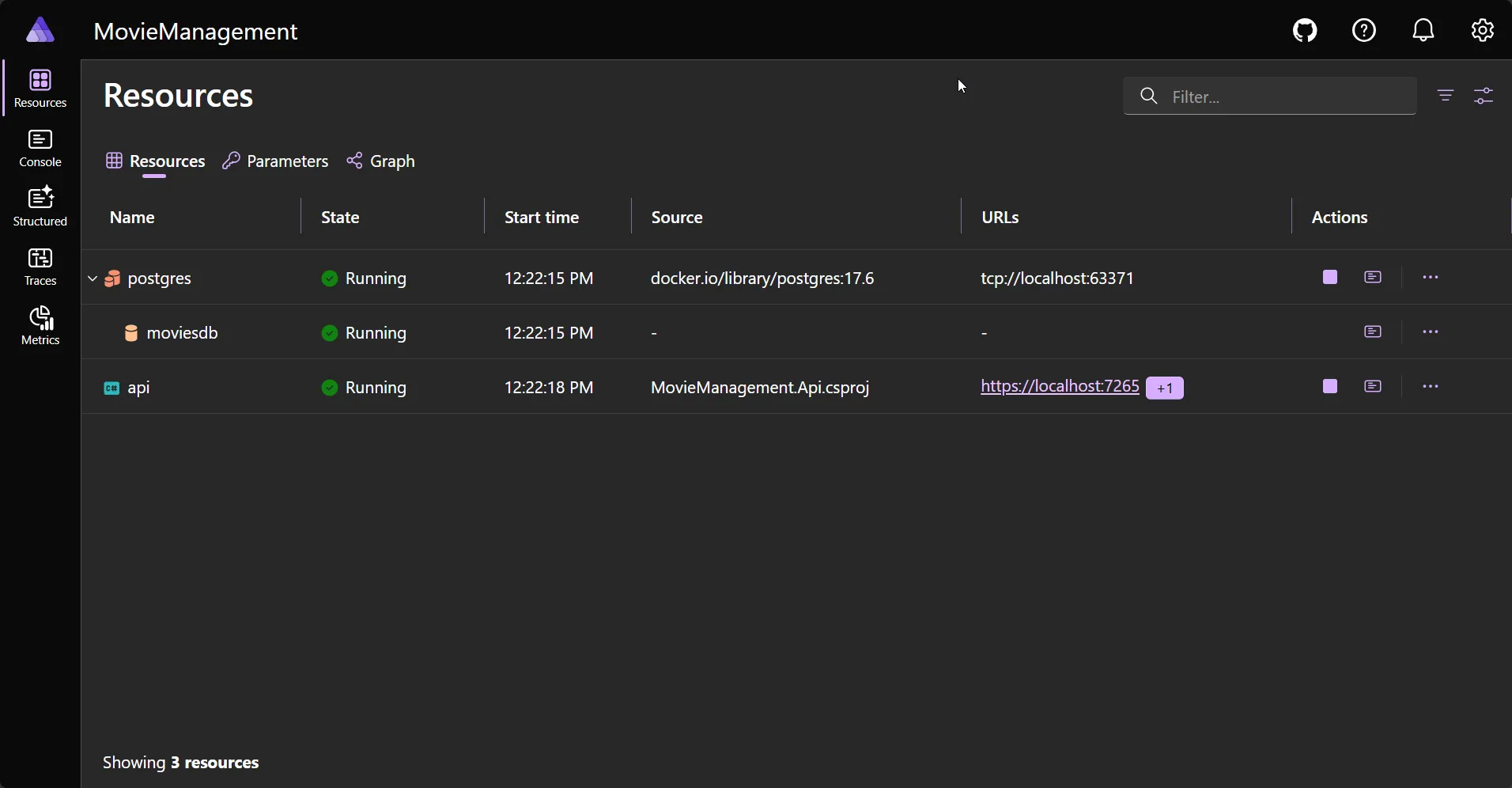
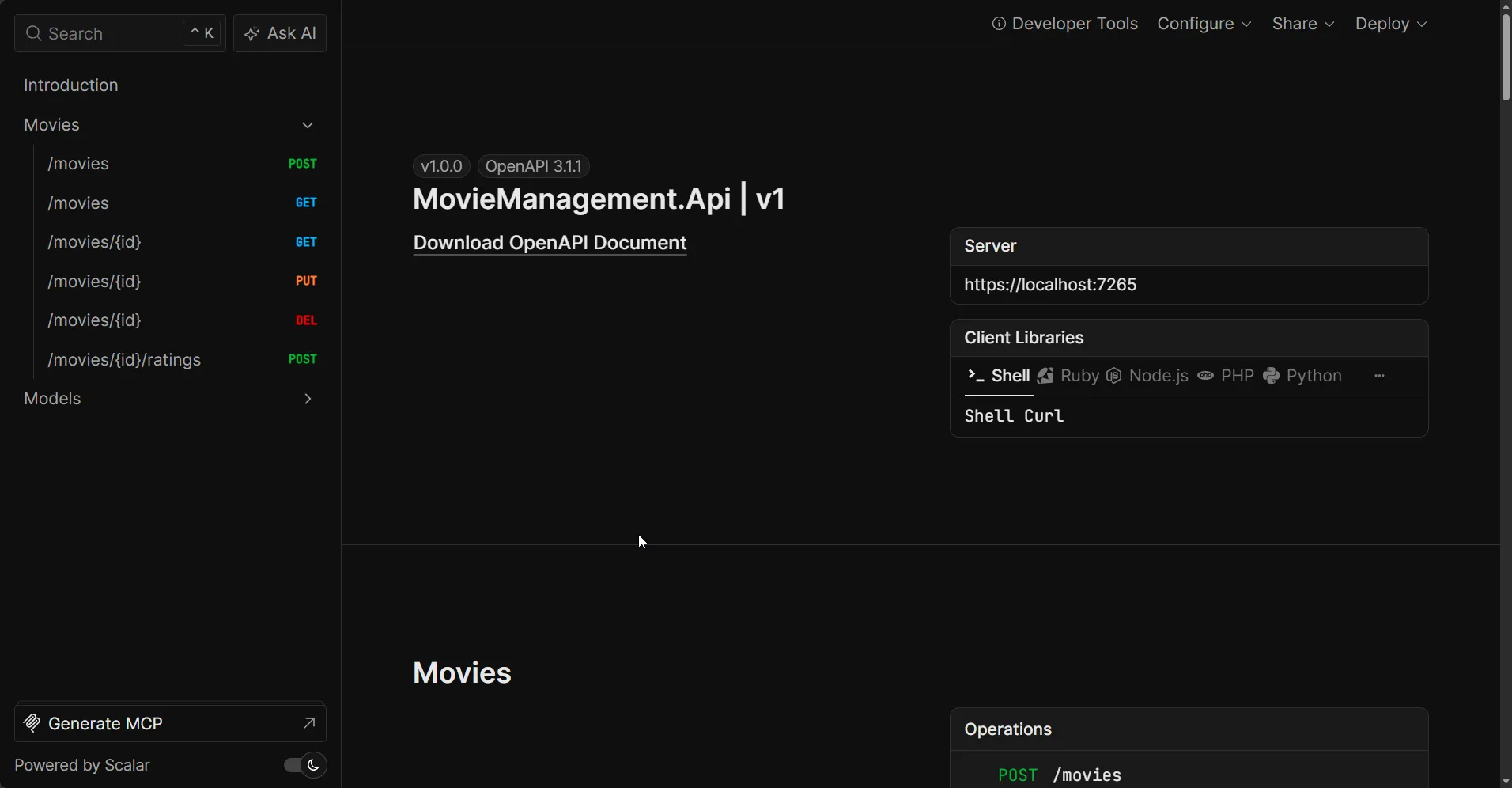
On the first boot, the app applies the migration and seeds three movies, so the database comes up ready with data. Click the API’s endpoint, append /scalar/v1, and you get the Scalar UI to try every movie endpoint - list them (you will see the three seeded movies), create one, fetch by id, update, delete.
👁 The Scalar UI rendering every movie endpoint from the generated OpenAPI document
I ran the full solution on .NET 10.0.203 with EF Core 10.0.8, Npgsql 10.0.1, and Aspire 13.3.5. It builds with zero errors, the 10 Domain unit tests pass, and the EF Core migration generates cleanly. The entire source - all six projects, the migration, central package management, and the editorconfig - is in the course repo.
Testing the Domain
Here is the payoff for all that structure. Because the Domain layer has no database and no web framework, you can test your most important code with plain objects. The tests run in milliseconds, need no PostgreSQL, and need no running API.
Add one test project that references only the Domain:
dotnetnewxunit-nMovieManagement.Domain.Tests-otests/MovieManagement.Domain.Testsdotnetaddtests/MovieManagement.Domain.Testsreferencesrc/MovieManagement.Domaindotnetslnaddtests/MovieManagement.Domain.TestsNow write tests for the rules that live on the Movie entity. No mocks, no setup, no database - just create a movie and check what it does:
usingMovieManagement.Domain.Common;usingMovieManagement.Domain.Movies;namespaceMovieManagement.Domain.Tests;publicclassMovieTests{// A small helper so each test starts from a valid movie.privatestaticMovieCreateValidMovie() =>Movie.Create(title: "Inception",director: "Christopher Nolan",releaseDate: newDateOnly(2010, 7, 16),genre: Genre.SciFi,synopsis: "A thief who steals secrets through dreams.");[Fact]publicvoidCreate_WithEmptyTitle_Throws(){varerror=Assert.Throws<DomainException>(() =>Movie.Create("", "Some Director", newDateOnly(2020, 1, 1), Genre.Drama, "Plot."));Assert.Equal("A movie must have a title.", error.Message);}[Fact]publicvoidAddRating_WithThreeScores_KeepsARunningAverage(){varmovie=CreateValidMovie();movie.AddRating(10);movie.AddRating(8);movie.AddRating(6);Assert.Equal(8, movie.AverageRating);Assert.Equal(3, movie.RatingCount);}[Theory][InlineData(0)][InlineData(11)][InlineData(-5)]publicvoidAddRating_OutsideOneToTen_Throws(intbadScore){varmovie=CreateValidMovie();Assert.Throws<DomainException>(() =>movie.AddRating(badScore));}}Run them:
dotnettestOn my machine the full set ran in 155 ms:
Passed! - Failed: 0, Passed: 10, Skipped: 0, Total: 10, Duration: 155 msThat speed is the whole point. These tests check real business rules - a movie must have a title, a rating must be 1 to 10, the average is computed correctly - and they do it without spinning up anything. When the rules live in the Domain and not scattered across services and controllers, this is what testing looks like.
Testing the layers that touch the outside world - the API endpoints and the real database - is a different job. That needs integration tests that send real HTTP requests through the running app and hit a real PostgreSQL database (spun up with Testcontainers). I will cover that end to end in a separate article, because it deserves its own walkthrough.
My Take: Keep It Boring on Purpose
I built fullstackhero, an open-source .NET Clean Architecture template, and I have used this structure on a lot of projects since. The mistake I see most is over-engineering the inside. People add MediatR, a generic repository, a unit of work, AutoMapper, and a specification pattern to a four-entity CRUD app and call it Clean Architecture. That is not clean. That is expensive.
The version in this article is deliberately boring. Plain service classes instead of MediatR handlers. DbContext through an interface instead of a repository. A hand-written mapping method instead of AutoMapper. Every one of those choices removes a dependency and a layer of indirection while keeping the architecture intact. The Dependency Rule is the only thing that is non-negotiable. Everything else is a tool you add when a real problem asks for it.
If you later need to split reads from writes, you can introduce CQRS without a library by adding query and command classes - and because your layers are already clean, that change touches only the Application layer. That is the whole reward for the upfront structure: changes stay local.
Key Takeaways
- Clean Architecture is four layers with one rule - Domain, Application, Infrastructure, Presentation, with dependencies pointing only inward toward the Domain.
- Project references enforce the rule - because the Domain references nothing, the compiler stops you from breaking the architecture.
- Use DbContext directly through an interface -
IApplicationDbContextgives the Application layer EF Core power without a repository, and without depending on Infrastructure. - Keep the domain rich, not anemic - put business rules and invariants on entities with private setters and factory methods, not in services.
- Do not reach for Clean Architecture by default - simple CRUD and prototypes are faster without it. Use it when the domain is complex and the project is long-lived.
- Aspire removes local-setup friction - one command runs the API and PostgreSQL together with a dashboard, health checks, and telemetry wired in.
Frequently Asked Questions
Troubleshooting
Projects.MovieManagement_Apidoes not exist in the AppHost. This type is generated by the Aspire SDK from the AppHost’s project reference to the API. Make sure theAppHostproject references theApiproject and rebuild. The generatedProjectsclass only appears after a successful build.- EF migration fails with “Unable to create a DbContext”. Because Aspire registers the
DbContextat runtime, the EF tools cannot build it at design time without help. Add anIDesignTimeDbContextFactory<ApplicationDbContext>in the Infrastructure project that returns a context configured withUseNpgsqland any connection string. - “connection refused” when the API starts. PostgreSQL was not ready yet. Add
.WaitFor(moviesdb)to the API resource in the AppHost so it waits for the database to report healthy before booting. - CPM error NU1008: package reference has a version. With Central Package Management on, no
PackageReferencemay carry aVersionattribute. Move the version intoDirectory.Packages.propsas aPackageVersionentry and remove it from the csproj. - The Application project will not reference Infrastructure - by design. If you find yourself wanting to add that reference, stop. You need an interface in Application that Infrastructure implements instead. That itch is the Dependency Rule doing its job.
Summary
Clean Architecture in .NET 10 is not complicated once you internalize the one rule: dependencies point inward, toward the Domain. The four layers - Domain, Application, Infrastructure, and API - each have a clear job, and the compiler enforces the boundaries through project references. I used DbContext directly behind an interface instead of a repository, kept the domain model rich with real behavior, pinned versions with Central Package Management, shared style with .editorconfig, and let .NET Aspire orchestrate the API and PostgreSQL with a single command.
The pattern earns its keep on complex, long-lived projects with real business rules. For simple CRUD, stay simple. When the complexity arrives, you now have a clean, tested, runnable starting point - and the full source is one clone away.
Clone the repo, run dotnet run --project aspire/MovieManagement.AppHost, and explore. If you want the next step, the CQRS without MediatR and dependency injection guides build directly on this foundation.
Happy Coding :)