CQRS (Command Query Responsibility Segregation) is one of the most impactful patterns you can adopt for building clean, scalable .NET APIs. In this article, I will walk you through implementing CQRS with the MediatR library in ASP.NET Core (.NET 10), building a complete CRUD API with commands, queries, and real-time notifications.
In this guide, I will build an ASP.NET Core 10 Web API with full CRUD operations using the CQRS Pattern and MediatR 14.1. Of the several design patterns available, CQRS is one of the most commonly used patterns that helps architect solutions following clean architecture principles. I have used this pattern across multiple production projects, and it consistently delivers cleaner code separation and easier testing. Let’s get into it.
Thinking of leaving MediatR? Read the exit ramp.
MediatR went commercial in July 2025. I built a custom CQRS dispatcher in .NET 10 that benchmarks 4.4x faster than MediatR 12 in about 100 lines of code.
What is CQRS?
CQRS (Command Query Responsibility Segregation) is a software architectural pattern that separates the read and write operations of a system into two distinct parts. In a CQRS architecture, the write operations (commands) and read operations (queries) are handled separately, using different models optimized for each operation. The recommended approach for implementing CQRS in .NET 10 is to pair it with the MediatR library, which provides an in-process mediator for request/response and notification patterns.
This pattern originated from the Command and Query Separation (CQS) Principle devised by Bertrand Meyer. It is defined on Wikipedia as follows.
It states that every method should either be a command that acts or a query that returns data to the caller, but not both. In other words, asking a question should not change the answer. More formally, methods should return a value only if they are referentially transparent and hence possess no side effects.
— Wikipedia
Traditional architectural patterns often use the same data model or DTO (Data Transfer Object) for both querying and writing to a data source. While this approach works well for basic CRUD (Create, Read, Update, Delete) operations, it can become limiting when faced with more complex requirements. As applications evolve and requirements grow in complexity, this simplistic approach may no longer be sufficient to handle the intricacies of the system.
In practical applications, there often exists a disparity between the data structures used for reading and writing data. For instance, additional properties may be required for updating data that are not needed for reading. This disparity can lead to challenges such as data loss during parallel operations. Consequently, developers may find themselves constrained to using a single DTO throughout the application’s lifespan, unless they introduce another DTO, which could potentially disrupt the existing application architecture.
The idea with CQRS is to enable an application to operate with distinct models for different purposes. In essence, you have one model for updating records, another for inserting records, and yet another for querying records. This approach provides flexibility in handling diverse and complex scenarios. With CQRS, you’re not limited to using a single DTO for all CRUD operations, allowing for more tailored and efficient data processing.
Here is a diagrammatic representation of the CQRS Pattern.
👁 CQRS Pattern - Command and Query Separation
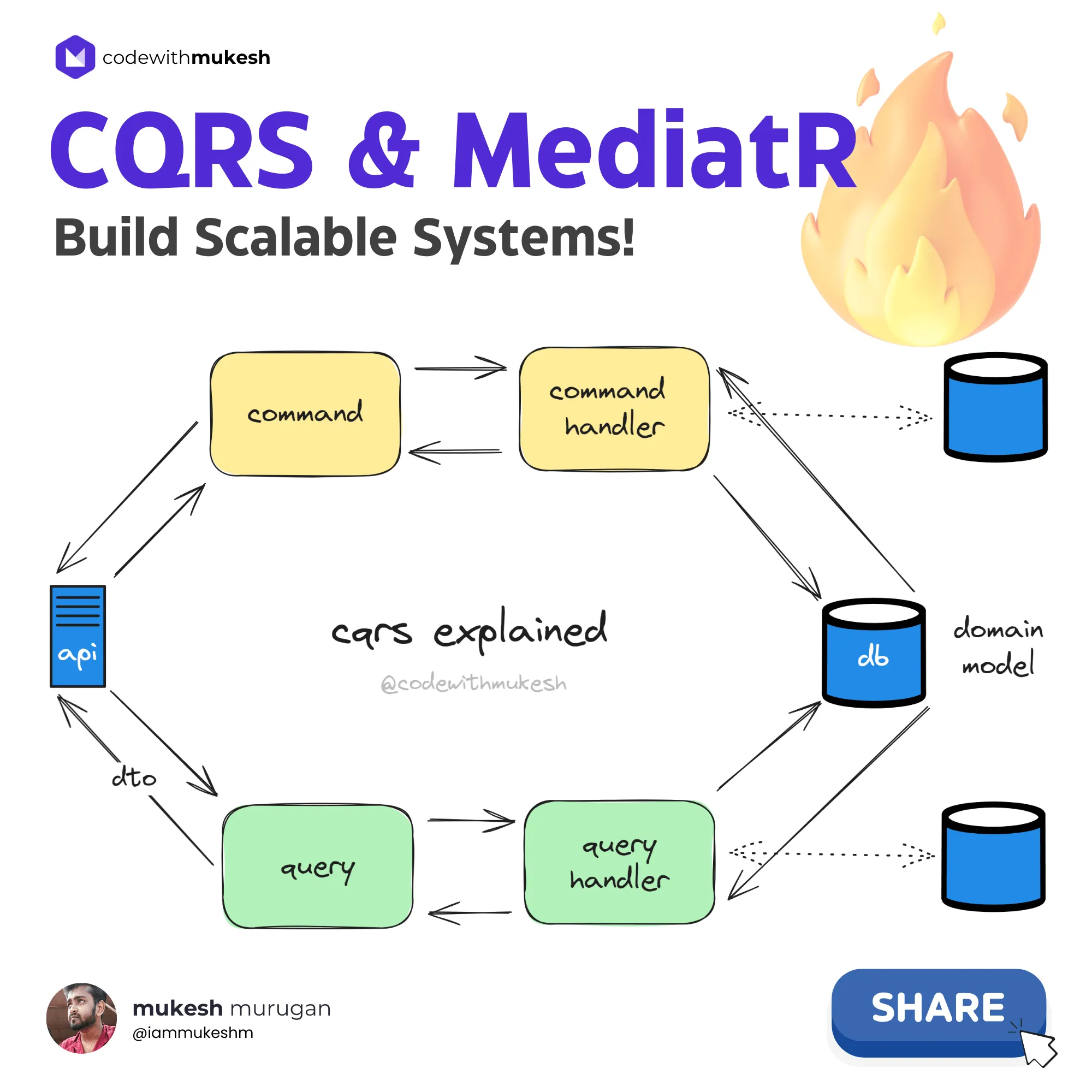
For instance, in a CRUD Application, the API operations split into two sets:
- Commands - Write, Update, Delete
- Queries - Get, List
Let’s say a CREATE operation comes in. It would trigger the handler that is meant to handle the create command. This handler would contain the persistence logic to write to the data source and would return the created Entity ID. The incoming command would be transformed into the required domain model, and written to the database.
In the case of querying, the query handler will come into action. The entity model returned from the database will be projected to a DTO (or a different model as designed), and be returned to the client. In case certain properties should not be exposed to the consumer, this is a very efficient approach.
You can also write to a different database and read from a different database if required using this pattern. According to Microsoft’s official CQRS documentation, this is particularly useful in event-sourced systems. But in this article, I will keep it simple and just rely on an In-Memory database for the demo.
This way, you are logically separating the workflows for writing and reading from a data source.
New to Entity Framework Core?
I have covered complete CRUD operations with EF Core in a detailed guide - great starting point if you are new to data access in .NET.
What Are the Benefits of CQRS?
There are quite a lot of advantages to using the CQRS Pattern for your application. A few of them are as follows.
Streamlined Data Transfer Objects
The CQRS pattern simplifies your application’s data model by using separate models for each type of operation, which enhances flexibility and reduces complexity.
Scalability
By segregating read and write operations, CQRS enables easier scalability. You can independently scale the read and write sides of your application to handle varying loads efficiently. In most production APIs, read operations account for 80-90% of total traffic, so being able to scale the read side independently (with read replicas, caching layers, or CDN) without touching the write side is a significant operational advantage.
Performance Enhancement
Since read operations typically outnumber write operations, CQRS allows you to optimize read performance by implementing caching mechanisms like Redis. This pattern inherently supports such optimizations, making it easier to enhance overall performance.
Caching in ASP.NET Core
Learn how to combine CQRS with MediatR pipeline behaviors to implement response caching for your query handlers.
Improved Concurrency and Parallelism
With dedicated models for each operation, CQRS ensures that parallel operations are secure, and data integrity is maintained. This is especially beneficial in scenarios where multiple operations need to be performed concurrently.
Enhanced Security
CQRS’s segregated approach helps in securing data access. By defining clear boundaries between read and write operations, you can implement more granular access control mechanisms, improving overall application security.
What Are the Downsides of CQRS?
Increased Complexity and Code Volume
Implementing the CQRS pattern often results in a significant increase in the amount of code required. This complexity arises from the need to manage separate models and handlers for read and write operations, which can be challenging to maintain and debug.
But, given the advantages of this pattern, the additional code complexity can be justified. By segregating read and write operations, CQRS enables developers to optimize each side independently, leading to a more efficient and maintainable system in the long run.
When to Use CQRS (and When Not To)
This is a judgment call I have made across several projects, and here is my take: CQRS is not for every application. The mistake I see most developers make is reaching for CQRS when a simple service layer would do the job.
Here is a decision matrix that I use to determine whether CQRS is the right fit:
| Criteria | Use CQRS | Skip CQRS |
|---|---|---|
| Read/Write asymmetry | Reads outnumber writes 10:1 or more | Reads and writes are roughly equal |
| Model complexity | Read and write models differ significantly | Same model works for both |
| Team size | Multiple developers working on the same domain | Solo developer or small team |
| Scalability needs | Read and write sides need independent scaling | Single-server deployment |
| Testing requirements | Need isolated unit tests per operation | Integration tests are sufficient |
| Domain complexity | Complex business rules for writes, simple reads | Simple CRUD operations |
My recommendation: If your API has fewer than 10 endpoints and the read/write models are identical, skip CQRS. You are adding ceremony without benefit. But once your application grows beyond simple CRUD, say you need different DTOs for create vs update vs read, or you want to add cross-cutting concerns like validation and caching per handler, CQRS with MediatR becomes the cleanest way to organize that complexity.
For reference, here is how the three common architectural approaches compare:
| Approach | Best For | Complexity | Scalability |
|---|---|---|---|
| Traditional CRUD | Small APIs, simple domains | Low | Limited |
| CQRS + MediatR | Medium-to-large APIs with distinct read/write patterns | Medium | High |
| CQRS + Event Sourcing | Complex domains requiring full audit trails | High | Very High |
In the projects I have worked on, CQRS + MediatR (without Event Sourcing) hits the sweet spot for most .NET Web APIs. It gives you clean separation without the overhead of managing event stores.
Without CQRS vs With CQRS
Before jumping into the implementation, let me show you the difference CQRS makes. Here is a typical endpoint without CQRS - everything crammed into a single endpoint handler:
// Bad - All logic in the endpoint, no separationapp.MapPost("/products", async (CreateProductRequestrequest, AppDbContextcontext) =>{// Validation, mapping, persistence, notification - all mixed togetherif (string.IsNullOrEmpty(request.Name)) returnResults.BadRequest();varproduct=newProduct { Name=request.Name, Description=request.Description, Price=request.Price };context.Products.Add(product);awaitcontext.SaveChangesAsync();// Need to add logging? Caching? Validation? This endpoint keeps growing.returnResults.Created($"/products/{product.Id}", product);});This works for small APIs, but once you have 20+ endpoints with validation, caching, audit logging, and different read/write models, these handlers become unmanageable. In a project I worked on with 45 endpoints, the service classes averaged 500+ lines each.
Now here is the CQRS approach - the same endpoint with MediatR:
// Better - Endpoint is a thin routing layer, logic lives in focused handlersapp.MapPost("/products", async (CreateProductCommandcommand, ISendermediatr, CancellationTokenct) =>{varproductId=awaitmediatr.Send(command, ct);returnResults.Created($"/products/{productId}", new { id=productId });});The endpoint is just 3 lines. The command handler, validation, caching, and notifications are all separate, focused classes. Each handler averages 15-25 lines and does exactly one thing. That is the power of CQRS with MediatR.
CQRS Pattern with MediatR in ASP.NET Core 10 Web API
Let’s build an ASP.NET Core 10 Web API to showcase the implementation and better understand the CQRS Pattern. I will push the implemented solution over to GitHub, to the .NET Series Repository. Would appreciate it if you star this repository.
I will have a set of Minimal API endpoints that do full CRUD operations for a Product Entity - Create, Read, Update, and Delete product records from the Database. Here, I use Entity Framework Core (EF Core 10) as the ORM (Object-Relational Mapper) to access data. For this demonstration, I will not plug into an actual database but use the InMemory Database provider.
PS - I will not be using any advanced architectural patterns, but let’s try to keep the code clean. The IDE I use is Visual Studio 2022 Community.
Dependency Injection in ASP.NET Core
Understanding DI is essential before working with MediatR, since all handlers are resolved from the DI container.
Setting Up the Project
Open up Visual Studio and create a new ASP.NET Core Web API Project targeting .NET 10.
Installing the Required Packages
Install the following packages to your API project via the terminal.
dotnetaddpackageMicrosoft.EntityFrameworkCore--version10.0.0dotnetaddpackageMicrosoft.EntityFrameworkCore.InMemory--version10.0.0dotnetaddpackageMediatR--version14.1.0Solution Structure
I am not going to create separate assemblies to demonstrate clean architecture, but I will cleanly organize the code within the same assembly. The CRUD operations will be separated via folders. This approach is almost a minimal Vertical Slice Architecture (VSA).
Clean Architecture in ASP.NET Core
If you want to take CQRS further with proper layered architecture, check out my Onion Architecture guide.
Domain
First up, let’s create the domain model. Add a new folder named Domain, and create a C# class named Product.
namespaceCqrsMediatr.Api.Domain;publicclassProduct{publicGuidId { get; init; }publicstringName { get; privateset; } =default!;publicstringDescription { get; privateset; } =default!;publicdecimalPrice { get; privateset; }// Parameterless constructor for EF CoreprivateProduct() { }publicProduct(stringname, stringdescription, decimalprice){Id=Guid.NewGuid();Name=name;Description=description;Price=price;}publicvoidUpdate(stringname, stringdescription, decimalprice){Name=name;Description=description;Price=price;}}This is a simple entity with a parameterized constructor that takes in the name, description, and price of the product. Notice the property accessors: Id uses init (set once during construction, never again), while Name, Description, and Price use private set so they can only be modified through the Update method. This encapsulation ensures that external code cannot mutate the entity’s state directly - domain models should own their mutation logic. EF Core works seamlessly with private set properties.
EF Core DbContext
Coming to the data part, as mentioned I will be using EF Core 10 and InMemory Database. Since I have already installed the required packages, let’s create the DbContext, so that I can interact with the data source. I will also take care of inserting some seed data into the InMemory database as soon as the application boots up.
Create a new folder named Persistence and add a new class, AppDbContext.
namespaceCqrsMediatr.Api.Persistence;publicclassAppDbContext(DbContextOptions<AppDbContext> options) : DbContext(options){publicDbSet<Product> Products { get; set; }protectedoverridevoidOnModelCreating(ModelBuildermodelBuilder){modelBuilder.Entity<Product>().HasKey(p=>p.Id);modelBuilder.Entity<Product>().HasData(newProduct("iPhone 16 Pro", "Apple's flagship smartphone with A18 Pro chip and titanium design", 1199.99m),newProduct("Dell XPS 16", "Dell's high-performance laptop with a 4K OLED InfinityEdge display", 1999.99m),newProduct("Sony WH-1000XM5", "Sony's premium wireless noise-canceling headphones with improved ANC", 399.99m));}}Here I am using a primary constructor to inject the DbContextOptions directly. In the OnModelCreating method, I specify the Primary Key of the Product table and add seed data using the HasData extension.
Registering the Entity Framework Core Database Context
Let’s register the DbContext to the DI (Dependency Injection) Container. Open up Program.cs and add in the following.
builder.Services.AddDbContext<AppDbContext>(options=>options.UseInMemoryDatabase("codewithmukesh"));Since I am using the InMemory database with HasData seed data, I also need to call EnsureCreated after building the app. This ensures the seed data gets loaded when the application starts.
varapp=builder.Build();// Seed the InMemory databaseusing (varscope=app.Services.CreateScope()){varcontext=scope.ServiceProvider.GetRequiredService<AppDbContext>();context.Database.EnsureCreated();}What is the Mediator Pattern?
In ASP.NET Core applications, Minimal API endpoints should ideally focus on handling incoming requests, routing them to the appropriate services or business logic components, and returning the responses. Keeping endpoints slim and focused helps in maintaining a clean and understandable codebase.
It’s a good practice to offload complex business logic, data validation, and other heavy lifting to separate handler classes. This separation of concerns improves the maintainability, testability, and scalability of your application.
By following this approach, you can also adhere to the Single Responsibility Principle (SRP) and keep your endpoints clean, focused, and easier to maintain.
The Mediator pattern plays a crucial role in reducing coupling between components in an application by facilitating indirect communication through a mediator object. This pattern promotes a more organized and manageable codebase by centralizing communication logic. According to Microsoft’s Microservices Architecture documentation, the Mediator pattern is a recommended approach for implementing command handlers in .NET applications.
In the context of CQRS, the Mediator pattern is particularly beneficial. CQRS separates the read and write operations of an application, and the Mediator pattern can help in coordinating these operations by acting as a bridge between the command (write) and query (read) sides.
What is MediatR?
MediatR is a popular library created by Jimmy Bogard that helps implement the Mediator Pattern in .NET. It’s an in-process messaging system that supports requests/responses, commands, queries, notifications, and events. As of version 14.1.0 (the latest at the time of writing), MediatR works seamlessly with .NET 10. With over 350 million NuGet downloads, it is the most widely adopted mediator library in the .NET ecosystem.
Important: MediatR is now a commercially licensed library. Starting from version 13.0, MediatR moved from the Apache license to a dual commercial/open-source model under Lucky Penny Software. It remains free for open-source projects, individuals, non-profits, and companies under $5M gross annual revenue - but you will need to register for a free license key at mediatr.io. For larger commercial use, a paid license is required. Check the MediatR GitHub repository for the latest licensing details. A missing license key does not break your application - it only emits log warnings at startup.
That said, CQRS as a pattern does not require MediatR. You can implement it with:
- Mediator - A source-generated, high-performance alternative that generates the mediator implementation at compile time, resulting in zero runtime overhead
- A custom implementation - The mediator pattern is straightforward enough to implement yourself with just an interface and a DI-based dispatcher. If you are interested in building your own lightweight mediator from scratch, drop a comment below and I will cover it in a dedicated article.
For this guide, I will use MediatR since it is the most documented and widely used option, and the concepts transfer directly to any alternative.
Registering MediatR
As I have already installed the required package, let’s register MediatR handlers to the application’s DI Container. Open up Program.cs file.
builder.Services.AddMediatR(cfg=>cfg.RegisterServicesFromAssembly(Assembly.GetExecutingAssembly()));This will register all the MediatR handlers that are available in the current assembly. When you expand your projects to have multiple assemblies, you will have to provide the assembly where you place your handlers. In Clean Architecture solutions, these handlers would ideally be located at the Application layer.
Implementing the CRUD Operations
CRUD essentially stands for Create, Read, Update, and Delete. These are the core components of RESTful APIs. Let’s see how I can implement them using the CQRS approach. Create a folder named Features/Products in the root directory of the Project and subfolders for Queries, DTOs, and Commands.
👁 Feature Folder Structure for CQRS with MediatR
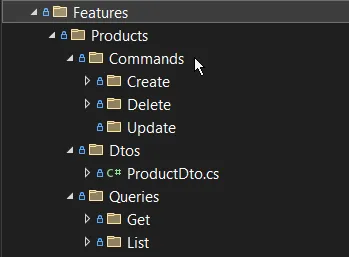
Each of these folders will house the required classes and services.
Feature Folder: Vertical Slice Architecture
This is a minimal demonstration of VSA (Vertical Slice Architecture), where I organize features by folders. Everything related to Product Creation belongs to the Features/Products/Commands/Create folder, and so on. This approach makes it easier to locate and maintain code related to specific features, as all related functionality is grouped. This can lead to improved code organization, readability, and maintainability, especially in larger projects.
Minimal APIs in ASP.NET Core
This article uses Minimal APIs for the endpoints. If you are new to this approach, check out my complete guide.
DTO
The Query APIs - Get and List - would return records related to the following DTO. Under Features/Products/DTOs, create a new class named ProductDto.
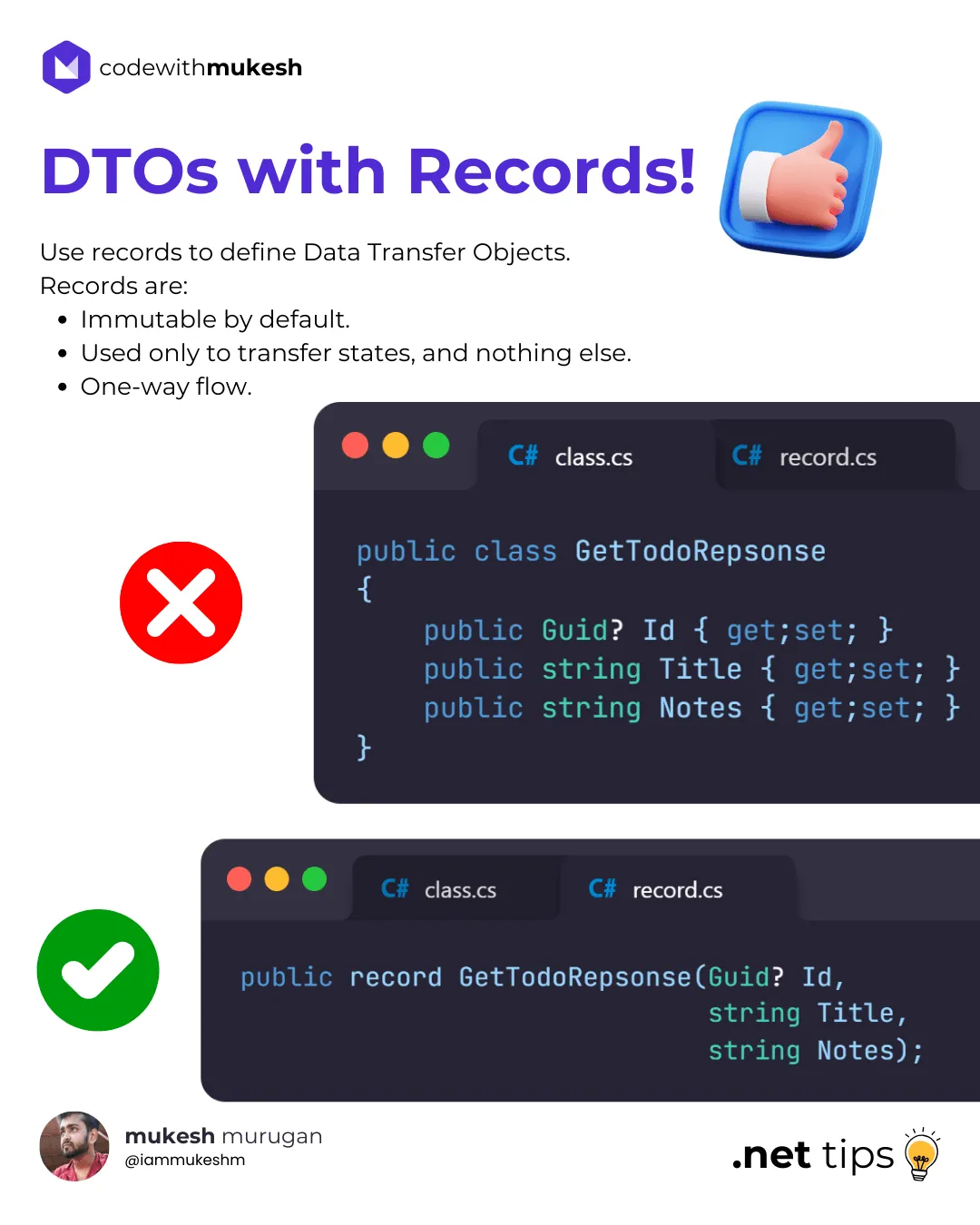
namespaceCqrsMediatr.Api.Features.Products.DTOs;publicrecordProductDto(GuidId, stringName, stringDescription, decimalPrice);Quick Tip: It’s recommended to use records to define Data Transfer Objects, as they are immutable by default!
👁 Using Records as DTOs in .NET 10
Queries
First up, let’s focus on building the queries and query handlers. As mentioned, there will be 2 parts for this: the Get and List endpoint. The Get endpoint would take in a particular GUID and return the intended Product DTO object, whereas the List operation would return a list of Product DTO objects.
List All Products
Under the Features/Products/Queries/List/ folder, create 2 classes named ListProductsQuery and ListProductsQueryHandler.
namespaceCqrsMediatr.Api.Features.Products.Queries.List;publicrecordListProductsQuery : IRequest<List<ProductDto>>;Every Query or Command object inherits from the IRequest<T> interface of the MediatR library, where T is the object to be returned. In this case, I will return List<ProductDto>.
Next, I need handlers for the Query. This is where the ListProductsQueryHandler comes into the picture. Whenever the LIST endpoint is hit, this handler will be triggered.
namespaceCqrsMediatr.Api.Features.Products.Queries.List;publicclassListProductsQueryHandler(AppDbContextcontext): IRequestHandler<ListProductsQuery, List<ProductDto>>{publicasyncTask<List<ProductDto>> Handle(ListProductsQueryrequest,CancellationTokencancellationToken){returnawaitcontext.Products.Select(p=>newProductDto(p.Id, p.Name, p.Description, p.Price)).ToListAsync(cancellationToken);}}To the primary constructor of this handler, I inject the AppDbContext instance for data access. All handlers implement IRequestHandler<T, R> where T is the incoming request (the Query itself), and R is the response (a list of products).
This interface requires implementing the Handle method. I use the DbContext to project the Product domain into a list of DTOs with ID, Name, Description, and Price. Note that I pass the CancellationToken to ToListAsync - this is important for proper request cancellation support in .NET 10.
Once I have created all the handlers, I will wire them up with the Minimal API endpoints.
Get Product By ID
Under the Features/Products/Queries/Get/ folder, create 2 classes named GetProductQuery and GetProductQueryHandler.
namespaceCqrsMediatr.Api.Features.Products.Queries.Get;publicrecordGetProductQuery(GuidId) : IRequest<ProductDto?>;This record query has a GUID parameter which will be passed on by the client. This ID will be used to query for products in the database.
namespaceCqrsMediatr.Api.Features.Products.Queries.Get;publicclassGetProductQueryHandler(AppDbContextcontext): IRequestHandler<GetProductQuery, ProductDto?>{publicasyncTask<ProductDto?> Handle(GetProductQueryrequest,CancellationTokencancellationToken){varproduct=awaitcontext.Products.FindAsync([request.Id], cancellationToken);if (productisnull){returnnull;}returnnewProductDto(product.Id, product.Name, product.Description, product.Price);}}In the Handle method, I use the ID to get the product from the database. If the result is empty, null is returned, indicating a not found result. Otherwise, I project the product data to a ProductDto object and return it.
Clean Architecture Template
Production-ready .NET 10 starter with Clean Architecture, CQRS, and more
Commands
Now that the queries and query handlers are in place, let’s build the commands.
Create New Product
Under the Features/Products/Commands/Create/ folder, create the following 2 files.
namespaceCqrsMediatr.Api.Features.Products.Commands.Create;publicrecordCreateProductCommand(stringName, stringDescription, decimalPrice) : IRequest<Guid>;The command takes in Name, Description, and Price. This Command object is expected to return the newly created product’s ID.
namespaceCqrsMediatr.Api.Features.Products.Commands.Create;publicclassCreateProductCommandHandler(AppDbContextcontext): IRequestHandler<CreateProductCommand, Guid>{publicasyncTask<Guid> Handle(CreateProductCommandcommand,CancellationTokencancellationToken){varproduct=newProduct(command.Name, command.Description, command.Price);awaitcontext.Products.AddAsync(product, cancellationToken);awaitcontext.SaveChangesAsync(cancellationToken);returnproduct.Id;}}The handler creates a Product Domain Model from the incoming command and persists it to the database. Finally, it returns the newly created product’s ID. Note that the GUID generation is handled as part of the Domain Object’s constructor.
Update Product
Under the Features/Products/Commands/Update/ folder, create the following files.
namespaceCqrsMediatr.Api.Features.Products.Commands.Update;publicrecordUpdateProductCommand(GuidId, stringName, stringDescription, decimalPrice): IRequest<bool>;The Update command takes in the product ID along with the updated Name, Description, and Price. It returns a boolean indicating whether the update was successful.
namespaceCqrsMediatr.Api.Features.Products.Commands.Update;publicclassUpdateProductCommandHandler(AppDbContextcontext): IRequestHandler<UpdateProductCommand, bool>{publicasyncTask<bool> Handle(UpdateProductCommandcommand,CancellationTokencancellationToken){varproduct=awaitcontext.Products.FindAsync([command.Id], cancellationToken);if (productisnull) returnfalse;product.Update(command.Name, command.Description, command.Price);awaitcontext.SaveChangesAsync(cancellationToken);returntrue;}}The handler fetches the existing product, calls the domain model’s Update method to apply the changes, and persists the update. If the product is not found, it returns false. This approach keeps the mutation logic inside the domain model, which is a cleaner pattern than setting properties directly in the handler.
FluentValidation with MediatR
Want to add input validation to your commands? I cover how to combine FluentValidation with MediatR pipeline behaviors.
Delete Product By ID
Next, I will have a feature to delete the product by specifying the ID. Create the following classes under Features/Products/Commands/Delete/.
namespaceCqrsMediatr.Api.Features.Products.Commands.Delete;publicrecordDeleteProductCommand(GuidId) : IRequest;The Delete Handler takes in the ID, fetches the record from the database, and tries to remove it. If the product with the mentioned ID is not found, it simply exits out of the handler code.
namespaceCqrsMediatr.Api.Features.Products.Commands.Delete;publicclassDeleteProductCommandHandler(AppDbContextcontext): IRequestHandler<DeleteProductCommand>{publicasyncTaskHandle(DeleteProductCommandrequest,CancellationTokencancellationToken){varproduct=awaitcontext.Products.FindAsync([request.Id], cancellationToken);if (productisnull) return;context.Products.Remove(product);awaitcontext.SaveChangesAsync(cancellationToken);}}Minimal API Endpoints
Now that all the required commands, queries, and handlers are in place, let’s wire them up with actual API endpoints. For this demonstration, I will use Minimal API endpoints.
Open up Program.cs and add in the following endpoint mappings.
app.MapGet("/products/{id:guid}", async (Guidid, ISendermediatr, CancellationTokenct) =>{varproduct=awaitmediatr.Send(newGetProductQuery(id), ct);if (productisnull) returnResults.NotFound();returnResults.Ok(product);});app.MapGet("/products", async (ISendermediatr, CancellationTokenct) =>{varproducts=awaitmediatr.Send(newListProductsQuery(), ct);returnResults.Ok(products);});app.MapPost("/products", async (CreateProductCommandcommand, ISendermediatr, CancellationTokenct) =>{varproductId=awaitmediatr.Send(command, ct);if (Guid.Empty==productId) returnResults.BadRequest();returnResults.Created($"/products/{productId}", new { id=productId });});app.MapPut("/products/{id:guid}", async (Guidid, UpdateProductCommandcommand, ISendermediatr, CancellationTokenct) =>{if (id!=command.Id) returnResults.BadRequest();varresult=awaitmediatr.Send(command, ct);returnresult?Results.NoContent() :Results.NotFound();});app.MapDelete("/products/{id:guid}", async (Guidid, ISendermediatr, CancellationTokenct) =>{awaitmediatr.Send(newDeleteProductCommand(id), ct);returnResults.NoContent();});The important thing to note here is that I am using the ISender interface from MediatR to send the commands/queries to their registered handlers. Alternatively, you can also use the IMediator interface, but ISender is far more lightweight, and you don’t always need the full IMediator interface. I would use IMediator only when the endpoint needs to perform more than simple request-response messaging, like publishing notifications.
Also notice that every endpoint injects a CancellationToken ct parameter and passes it to mediatr.Send(). ASP.NET Core automatically binds this to the request’s cancellation token, so if a client disconnects mid-request, the cancellation propagates all the way through MediatR into your handlers and EF Core queries. This is a best practice you should always follow in .NET 10.
Let’s explore the endpoints one by one.
- GET
/products/{id}- Takes a GUID parameter. I create a Query object with this ID and pass it through the MediatR pipeline. If the result is empty, a 404 Not Found status is returned. Otherwise, the valid product is returned. - GET
/products- Returns all products available in the database. You can build on this API by introducing parameters like page size and number for pagination and searching. - POST
/products- Creates a new product. It accepts theCreateProductCommand, which is passed to the handler via the MediatR pipeline. If the returning product ID is empty, a Bad Request is returned. Otherwise, a 201 Created response is returned. - PUT
/products/{id}- Updates an existing product. It validates that the route ID matches the command ID, sends the command to the handler, and returns NoContent on success or NotFound if the product doesn’t exist. - DELETE
/products/{id}- Sends the ID to theDeleteProductCommandHandlerand returns a NoContent response.
Pagination, Sorting and Searching
Want to add pagination to your list endpoint? I have covered this in detail with EF Core.
Testing the Endpoints via Scalar
I am done with the implementation. Now let’s test it using Scalar! Build and run your ASP.NET Core 10 application, and navigate to the Scalar API reference page at /scalar/v1.
Scalar is the modern replacement for Swagger UI in .NET 10. It provides a cleaner, faster API documentation interface with built-in request testing. If you are still using Swagger, I recommend switching to Scalar.
👁 Product API Endpoints in Scalar
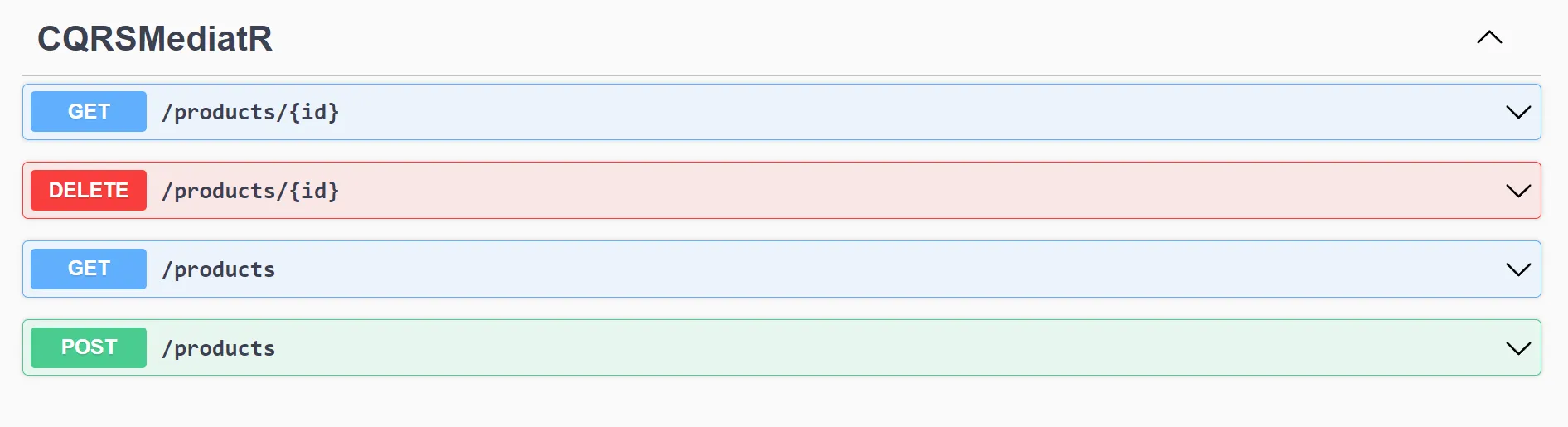
Let’s test each endpoint. First up, the LIST endpoint. This can be tested to verify if the initial seed data is as expected.
[{"id": "c2537bef-235d-4a72-9aaf-f5cf1ff2d080","name": "iPhone 16 Pro","description": "Apple's flagship smartphone with A18 Pro chip and titanium design","price": 1199.99},{"id": "93cfebdb-b3fb-415d-9aba-024cad28df5c","name": "Dell XPS 16","description": "Dell's high-performance laptop with a 4K OLED InfinityEdge display","price": 1999.99},{"id": "2fde15c1-48cb-4154-b055-0a96048fa392","name": "Sony WH-1000XM5","description": "Sony's premium wireless noise-canceling headphones with improved ANC","price": 399.99}]Next, let me create a new Product. Here is the product payload.
{"name": "Tesla Model Y","description": "Tesla's best-selling electric SUV with full self-driving capability","price": 45000}And here is the response.
{"id": "4eb60a75-1dfa-401d-8f65-c4750457d19d"}Let’s use this Product ID to test the Get By ID endpoint.
{"id": "4eb60a75-1dfa-401d-8f65-c4750457d19d","name": "Tesla Model Y","description": "Tesla's best-selling electric SUV with full self-driving capability","price": 45000}As you can see, I got the expected response. You can also test the UPDATE endpoint by sending a PUT request with the updated product details, and the DELETE endpoint to remove a product.
Now, let’s explore a few more important features of the MediatR library.
MediatR Notifications - Decoupled Event-Driven Systems
Up to now, I have looked into the request-response pattern of MediatR, which involves a single handler per request. But what if your requests need multiple handlers? For instance, every time you create a new product, you need logic to add/set stock, and another handler to perform audit logging. To build a stable and reliable system, you need to make sure that these handlers are decoupled and executed individually.
This is where notifications come in. Whenever you need multiple handlers to react to an event, notifications are your best option! According to the MediatR documentation, notifications enable a publish/subscribe pattern within your application process.
I will tweak the existing code to demonstrate this. I will add this functionality within the CreateProductCommandHandler to publish a notification, and register two other handlers against the new notification.
First up, create a new folder called Notifications, and add the following record.
namespaceCqrsMediatr.Api.Features.Products.Notifications;publicrecordProductCreatedNotification(GuidId) : INotification;Note that this record inherits from INotification of the MediatR library.
I will create two handlers that subscribe to this notification. Under the same folder, add these files.
namespaceCqrsMediatr.Api.Features.Products.Notifications;publicclassStockAssignedHandler(ILogger<StockAssignedHandler> logger): INotificationHandler<ProductCreatedNotification>{publicTaskHandle(ProductCreatedNotificationnotification,CancellationTokencancellationToken){logger.LogInformation("Handling notification for product creation with id: {ProductId}. Assigning stocks.",notification.Id);returnTask.CompletedTask;}}namespaceCqrsMediatr.Api.Features.Products.Notifications;publicclassAuditLogHandler(ILogger<AuditLogHandler> logger): INotificationHandler<ProductCreatedNotification>{publicTaskHandle(ProductCreatedNotificationnotification,CancellationTokencancellationToken){logger.LogInformation("Handling notification for product creation with id: {ProductId}. Writing audit log.",notification.Id);returnTask.CompletedTask;}}For demo purposes, I have just added simple log messages denoting that the handlers are triggered. Notice I am using structured logging with {ProductId} placeholder instead of string interpolation - this is a best practice for structured logging in .NET 10.
So, the idea is that, whenever a new product is created, a notification will be sent across, which would trigger the StockAssignedHandler and AuditLogHandler.
Structured Logging with Serilog
Want production-grade structured logging for your notification handlers? I cover Serilog setup with ASP.NET Core in detail.
To publish the notification, I will modify the POST endpoint code as follows.
app.MapPost("/products", async (CreateProductCommandcommand, IMediatormediatr, CancellationTokenct) =>{varproductId=awaitmediatr.Send(command, ct);if (Guid.Empty==productId) returnResults.BadRequest();awaitmediatr.Publish(newProductCreatedNotification(productId), ct);returnResults.Created($"/products/{productId}", new { id=productId });});At Line #5, I use the IMediator interface (not ISender) to create a new notification of type ProductCreatedNotification and publish it in-process. This will in turn trigger all handlers registered against this notification. Note the switch from ISender to IMediator here - the Publish method for notifications is only available on IMediator.
If you run the API and create a new product, you will be able to see the following log messages on the server.
👁 MediatR Notifications - Multiple Handlers Triggered

As you see, both handlers are triggered. This can be super important while building decoupled event-based systems.
Global Exception Handling
When notification handlers fail, you need proper exception handling. I cover global error handling with ProblemDetails in ASP.NET Core.
Key Takeaways
- CQRS separates reads from writes - commands handle mutations, queries handle data retrieval, each with their own optimized model
- MediatR provides the in-process mediator - it routes requests to handlers, keeping endpoints thin and business logic isolated
- Use
ISenderfor request/response,IMediatorwhen you also need to publish notifications - Notifications enable fan-out - one event, multiple handlers, fully decoupled
- Don’t use CQRS for simple CRUD apps - the pattern adds value only when read/write models diverge or cross-cutting concerns (validation, caching, logging) are needed per handler
What’s Next?
In the next article, I cover Pipeline Behaviors with MediatR and FluentValidation to build automatic input validation for every command that flows through the pipeline. I also have a guide on Response Caching with MediatR that shows how to cache query results using pipeline behaviors.
Repository Pattern in ASP.NET Core
Want to abstract your data access further? The Repository Pattern pairs well with CQRS for larger applications.
Compiled Queries in EF Core 10 - Boosting Performance for Hot Query Paths
For high-performance read queries, compiled queries can significantly reduce query compilation overhead in EF Core.
If you found this helpful, share it with your colleagues - and if there’s a topic you’d like to see covered next, drop a comment and let me know.
Happy Coding :)
Troubleshooting
MediatR handler not found - “No handler registered for request”
Cause: The handler assembly is not registered with MediatR. Ensure builder.Services.AddMediatR(cfg => cfg.RegisterServicesFromAssembly(Assembly.GetExecutingAssembly())) is called in Program.cs. If your handlers are in a different project, pass that project’s assembly instead.
Notification handlers not being triggered
Cause: You are using ISender.Send() instead of IMediator.Publish(). Notifications require the Publish method, which is only available on the IMediator interface, not ISender. Also verify your notification handlers implement INotificationHandler<T>, not IRequestHandler<T>.
DbContext disposed error in handlers
Cause: The AppDbContext is registered as Scoped by default, but you are trying to use it outside the request scope. Ensure your handlers are also registered as Scoped (which MediatR does automatically). If you are publishing notifications after SaveChangesAsync, the DbContext should still be available within the same request scope.
EF Core InMemory database not persisting data between requests
Cause: Each request creates a new InMemory database instance. Ensure you are using the same database name in UseInMemoryDatabase("codewithmukesh") and that AddDbContext is called with the correct configuration. For production applications, switch to a real database provider like SQL Server or PostgreSQL.
CancellationToken not propagating to EF Core queries
Cause: You are not passing the CancellationToken from the Handle method to EF Core methods like ToListAsync, FindAsync, and SaveChangesAsync. Always forward the cancellation token to support proper request cancellation.