Starting with .NET 9, ASP.NET Core no longer includes Swagger by default in web API templates. And with .NET 10, Microsoft has doubled down on native OpenAPI support - now generating OpenAPI 3.1 documents out of the box with improved transformer APIs and better tooling. If you’re wondering what changed, whether Swagger is truly dead (spoiler: it’s not), and what the best alternatives are, keep reading to find out!
TL;DR. .NET 10 ships with native OpenAPI 3.1 document generation via the
Microsoft.AspNetCore.OpenApipackage - no Swashbuckle needed. The recommended stack for .NET 10 Web APIs is:Microsoft.AspNetCore.OpenApifor document generation + Scalar for the UI. Scalar (Scalar.AspNetCore2.14.x) is the modern Swagger UI replacement - cleaner, faster, with better request/response visualization and dark mode by default. Swashbuckle 10.x still works on .NET 10 but is no longer in the default template. Use NSwag if you need client SDK generation; use Redoc if you publish public docs. The mistake most teams make is keeping Swashbuckle on new .NET 10 projects out of habit - the native pipeline is genuinely better.
Why Did ASP.NET Core Drop Swagger?
For years, Swashbuckle has been the go-to solution for generating OpenAPI documentation in ASP.NET Core. Microsoft even included it by default in Web API templates, making it easy to document and test APIs. However, over time, Swashbuckle faced maintenance challenges. With core contributors stepping away, unresolved issues piled up, and by the release of .NET 8, it lacked full support - leaving developers facing compatibility issues and uncertainty.
To address this, Microsoft moved away from Swashbuckle starting with .NET 9, introducing a native solution via the Microsoft.AspNetCore.OpenApi package. With .NET 10, this native support has matured significantly - now generating OpenAPI 3.1 documents by default (up from 3.0 in .NET 9), with improved transformer APIs and full Native AOT compatibility. This is an awesome move from Microsoft to make more first-class integrations for the aspects that we work with on a regular basis!
Now, does this mean Swagger is dead? Not quite. Swashbuckle is still actively maintained - version 10.x supports .NET 10 with opt-in OpenAPI 3.1 support. What happened is that ASP.NET Core dropped the official dependency on Swashbuckle from their templates. The library itself is alive and well as a community project. But with Microsoft’s native OpenAPI support getting better with every release, the reasons to reach for Swashbuckle are shrinking.
With improved built-in features like .http file support in Visual Studio and the Endpoints Explorer, developers now have more native ways to test and document APIs - making Swagger UI less of a necessity.
Here is Microsoft’s take on this: Read
Other advantages include,
- Native Support of OpenAPI 3.1.
- Lesser dependency.
- Full support for Minimal APIs.
- Native AOT compatibility.
- Backward compatibility.
What Exactly Changed?
The Swagger UI that you used to see is technically built on top of the Swagger / OpenAPI specification, which is generated by the Swashbuckle dependency. This API specification generation is what got replaced. Using Microsoft.AspNetCore.OpenApi, Microsoft now handles the entire OpenAPI document generation process natively. This way, there is no external dependency for the OpenAPI document, and the generation process is completely built-in.
In .NET 8, here is how the default ASP.NET Core WebAPI project template would look like, with Swagger Support.
builder.Services.AddEndpointsApiExplorer();builder.Services.AddSwaggerGen();...if (app.Environment.IsDevelopment()){app.UseSwagger();app.UseSwaggerUI();}And here is how it looks on a .NET 10 project.
builder.Services.AddOpenApi();...if (app.Environment.IsDevelopment()){app.MapOpenApi();}As you can see, Microsoft now natively supports OpenAPI document generation. In .NET 10, the generated documents use OpenAPI 3.1 by default (which aligns with JSON Schema draft 2020-12), a step up from the 3.0 spec used in .NET 9.
I created a .NET 10 WebAPI, and ran it. You can access the OpenAPI specification by navigating to the /openapi/v1.json endpoint.
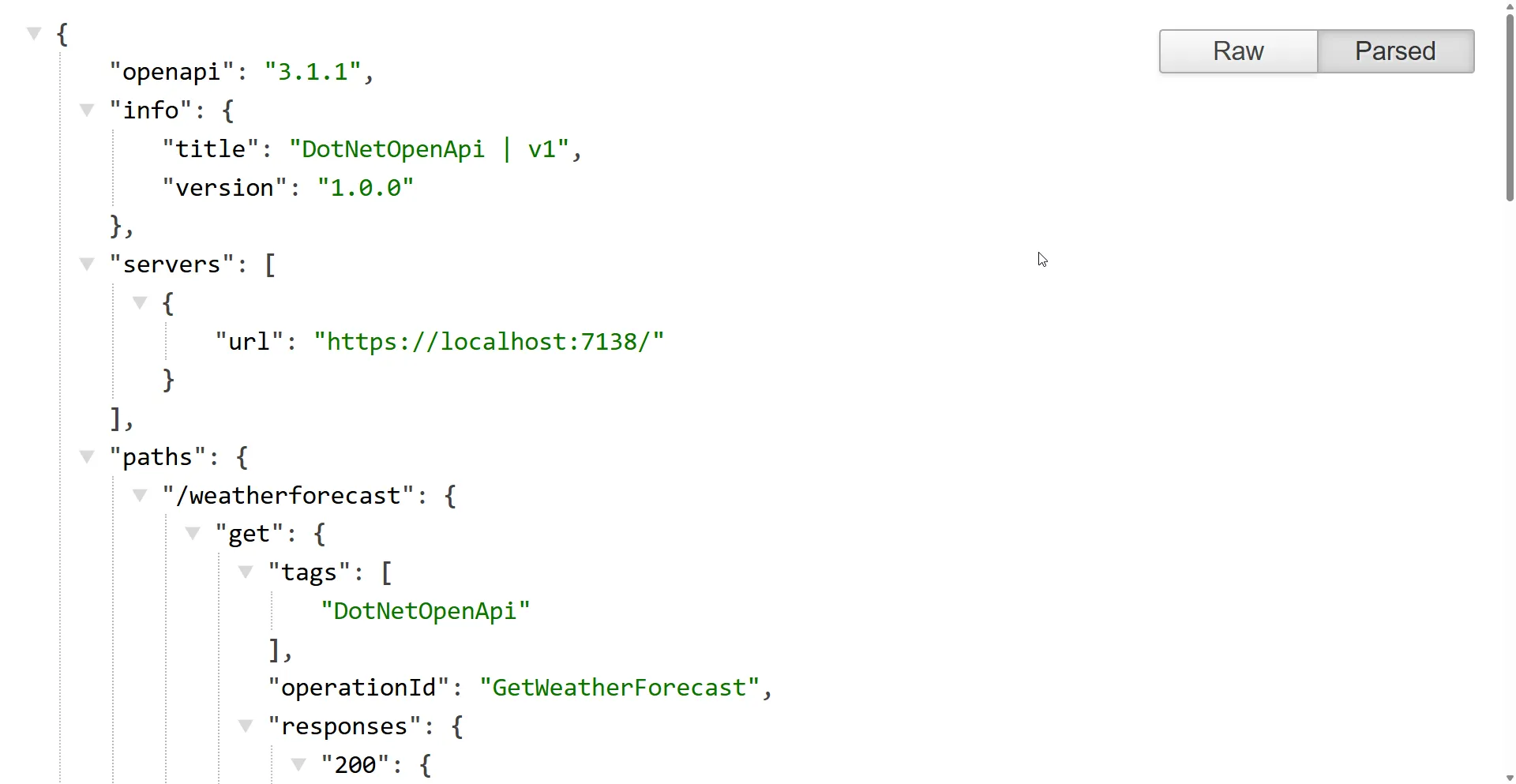
You’ll see an OpenAPI 3.1 document that includes paths, operations, and schemas generated from your application’s code. However, it may lack important details like descriptions and examples. To include these, you’ll need to add metadata manually, as explained in the next section.
Also note that now there is no UI by default that can visualize this specification.
You Can Still Use Swagger!
It’s important to understand that Microsoft has only removed the Swashbuckle dependency from their templates. The library itself is actively maintained - Swashbuckle.AspNetCore 10.x supports .NET 10 and can generate OpenAPI 3.1 documents (opt-in). Developers are still free to add it back to their projects by installing the NuGet package. Or better, since we already know that the OpenAPI specification is now generated by the Microsoft.AspNetCore.OpenApi package, you can simply attach SwaggerUI to read the new OpenAPI spec.
Simply install the Swashbuckle.AspNetCore package to your project, and add the following to your Program.cs.
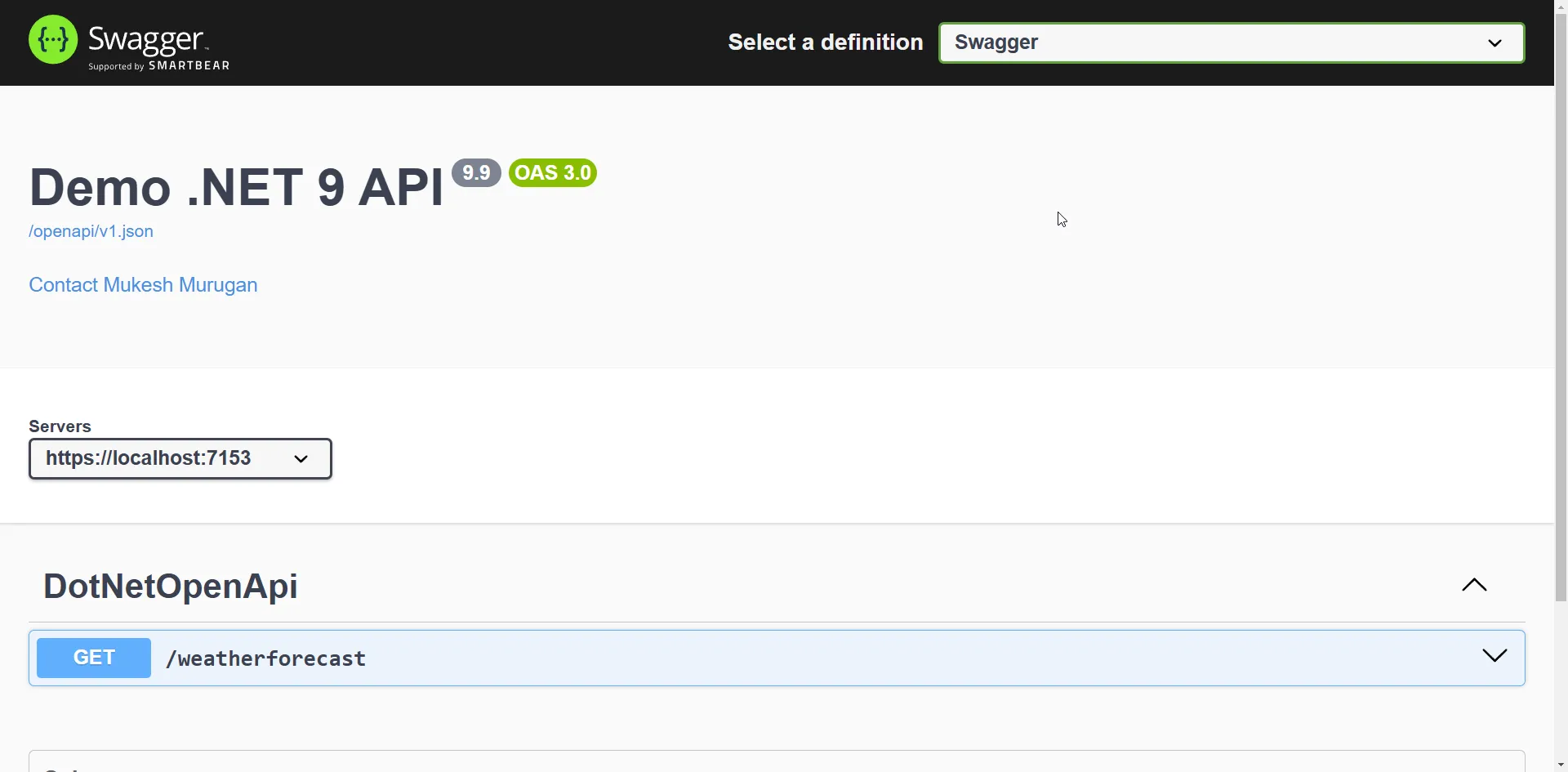
app.UseSwaggerUI(options=>options.SwaggerEndpoint("/openapi/v1.json", "Swagger"));Here, we point SwaggerUI to the new OpenAPI URL.
Now SwaggerUI will be accessible at /swagger.
What is OpenAPI?
OpenAPI is a widely adopted specification for defining and documenting HTTP APIs. It offers a standardized approach to describing API endpoints, request and response structures, authentication methods, and other critical details. By providing a clear and consistent format, OpenAPI enhances API readability and usability, enabling developers to collaborate more effectively and build reliable applications with greater ease.
Customizing OpenAPI Specification
As we used to do with Swagger, you can customize the specifications here as well.
Here’s how you can customize your OpenAPI specification in your .NET 10 project. You can add descriptions, terms of service, license details, and more to the OpenAPI document.
builder.Services.AddOpenApi(options=>{options.AddDocumentTransformer((document, context, cancellationToken) =>{document.Info.Version="10.0";document.Info.Title="Demo .NET 10 API";document.Info.Description="This API demonstrates OpenAPI customization in a .NET 10 project.";document.Info.TermsOfService=newUri("https://codewithmukesh.com/terms");document.Info.Contact=newOpenApiContact{Name="Mukesh Murugan",Email="mukesh@codewithmukesh.com",Url=newUri("https://codewithmukesh.com")};document.Info.License=newOpenApiLicense{Name="MIT License",Url=newUri("https://opensource.org/licenses/MIT")};returnTask.CompletedTask;});});You can also customize server URLs, security definitions, and schemas if needed:
options.AddDocumentTransformer((document, context, cancellationToken) =>{document.Servers.Add(newOpenApiServer{Url="https://api.codewithmukesh.com/v1",Description="Production Server"});returnTask.CompletedTask;});This way, you can fully customize your OpenAPI documentation just like you did with Swagger.
Add OpenAPI Metadata to Endpoints
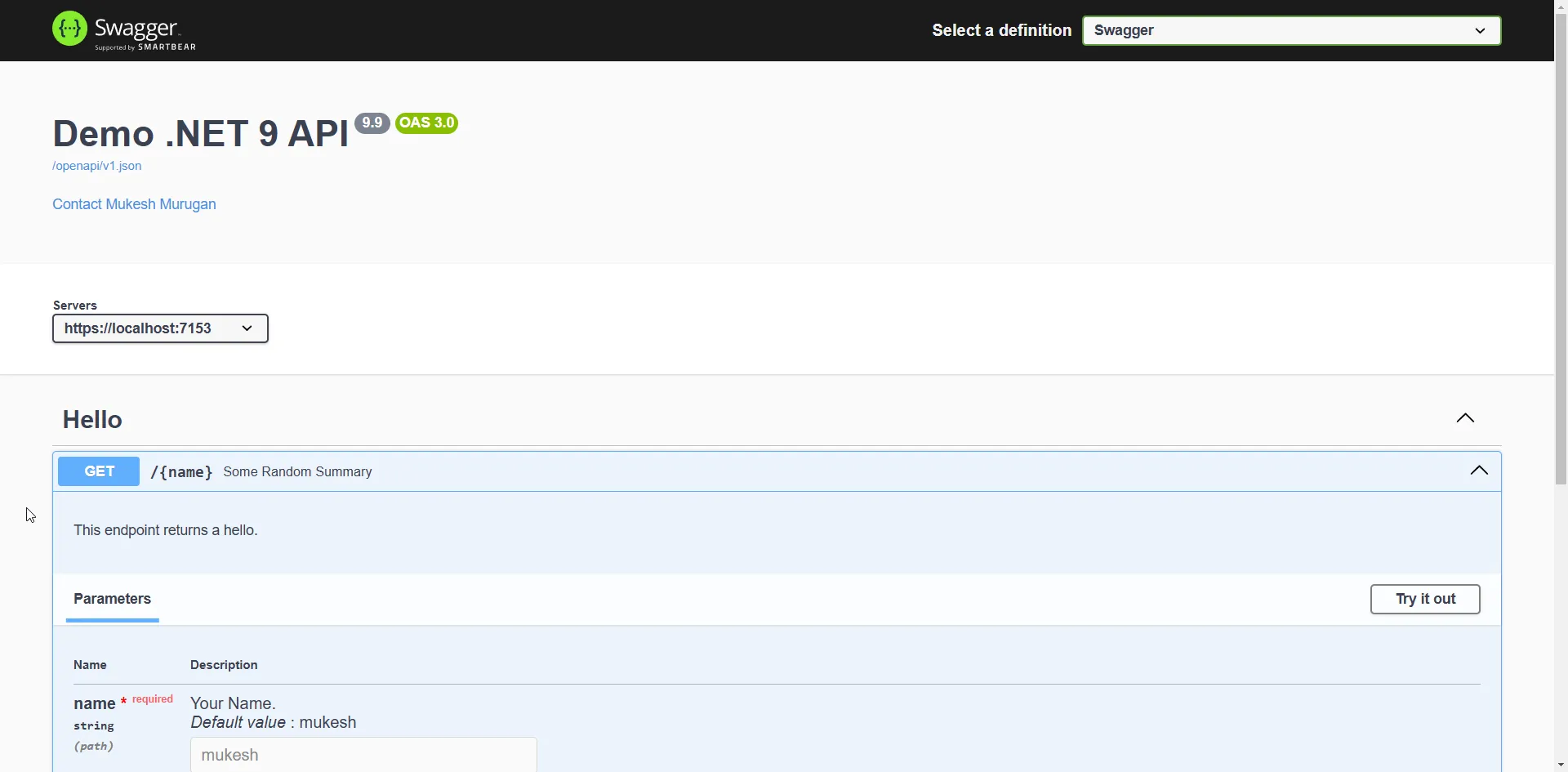
You can further customize OpenAPI metadata for minimal API endpoints in ASP.NET Core using attributes and fluent methods like WithSummary, WithDescription, and WithTags. Here’s an extended example that includes additional OpenAPI metadata such as request and response examples, and security definitions.
Note: In .NET 10, the WithOpenApi() extension method has been deprecated. Use AddOpenApiOperationTransformer instead if you need per-operation customization beyond what the fluent methods provide.
app.MapGet("/{name}",([Description("Your Name.")][DefaultValue("mukesh")]stringname) =>Results.Ok(new { Message=$"Hello {name}!" })).WithName("GetGreeting") // Assigns an operation ID.WithSummary("Greet the user by name") // Provides a short summary for the endpoint.WithDescription("This endpoint takes a name as input and returns a personalized greeting.") // Longer description.WithTags("Greetings") // Adds tags to categorize the endpoint.Produces(200, typeof(object)) // Defines a successful response with the expected type.Produces(400) // Defines possible HTTP 400 responses.ProducesProblem(500) // Defines a problem details response for failures.RequireAuthorization(); // Requires authentication for the endpointThe .RequireAuthorization() call above locks the endpoint behind authentication. If you need to set that up, see my guide on JWT authentication in ASP.NET Core.
Interview Questions PDF
100 real interview questions across 9 categories, junior to senior
Decision Matrix: Which API Documentation Stack Should You Use?
Picking the right OpenAPI/UI stack on .NET 10 isn’t obvious. Here’s my decision matrix based on building production APIs across all of these options.
| Stack | Document Generation | UI | Best For | Verdict |
|---|---|---|---|---|
Native Microsoft.AspNetCore.OpenApi + Scalar | Built-in, OpenAPI 3.1, AOT-ready | Scalar (modern, fast, dark mode default) | New .NET 10 Web APIs - the recommended default | The right choice for 90% of projects |
Native Microsoft.AspNetCore.OpenApi + Redoc | Built-in, OpenAPI 3.1 | Redoc (read-only, public-docs polish) | Public API documentation portals (Stripe-style) | When the docs are a customer-facing product, not just a dev tool |
| Swashbuckle 10.x + Swagger UI | Swashbuckle library | Swagger UI (legacy) | Legacy projects already on Swashbuckle | Keep it if you have it; don’t add it to new projects |
| NSwag | NSwag generates docs and TypeScript/C# clients | NSwag Studio + Swagger UI | Teams that need autogenerated SDK clients | Worth it specifically for the client-generation pipeline |
| Native OpenAPI + no UI in production | Built-in | None (UI disabled in prod) | Internal APIs that don’t need a runtime UI | The most secure default - serve /openapi/v1.json only, no UI exposed |
My take: I default to Native OpenAPI + Scalar on every new .NET 10 Web API. The native pipeline produces cleaner OpenAPI 3.1 documents than Swashbuckle, has zero third-party runtime dependency, and works with Native AOT. Scalar (Scalar.AspNetCore 2.14.x) is the UI Swagger UI should have been - readable by default, fast, and the request builder is genuinely better. The only reason I’d reach for Swashbuckle on a new project is if I needed a Swashbuckle-specific filter or extension that hasn’t been ported.
For public API docs, I’d switch the UI to Redoc - it’s read-only and looks polished enough to put in front of customers. For client SDK generation, NSwag is still the only good answer.
ASP.NET Core Web API CRUD with EF Core
Want to see Native OpenAPI + Scalar wired into a real CRUD API with .NET 10, EF Core, and PostgreSQL? Start here.
Alternatives to Swagger for API Testing
If for some reason you are not very comfortable with SwaggerUI, here are some of the community favorites for replacing Swagger from your .NET Projects.
Scalar - The New Crowd Favorite
Scalar has quickly become the crowd favorite in the .NET community, and for good reason.
Microsoft moved away from the Swagger UI, and if you try Scalar, you’ll likely see why. Scalar offers a more modern and user-friendly design, making it easier to configure. It provides powerful features such as generating client code for various programming languages, and it allows you to seamlessly add cookies, headers, and query parameters to API requests.
Scalar is an open-source platform for documenting and interacting with RESTful APIs. It offers an intuitive and interactive interface, making API exploration effortless. Scalar supports both OpenAPI and Swagger specifications, ensuring seamless integration with existing API ecosystems. With over 14K stars on GitHub, it has gained massive popularity among developers for its user-friendly design and powerful features.
Check out the repo - Scalar on GitHub.
Let’s get Scalar installed to your .NET 10 WebAPI.
Open up NuGet package manager, and install the Scalar.AspNetCore package.
Next, add the highlighted line of code to Program.cs.
At this point, you are free to remove any references to Swagger.
if (app.Environment.IsDevelopment()){app.MapOpenApi();app.MapScalarApiReference();}I also went ahead and modified my launchSettings.json to launch Scalar UI as soon as the app is launched. If you’re fuzzy on how launchSettings.json and the ASPNETCORE_ENVIRONMENT value work, I break it all down in environment-based configuration in ASP.NET Core.
"https": {"commandName": "Project","dotnetRunMessages": true,"launchBrowser": true,"launchUrl": "scalar/v1","applicationUrl": "https://localhost:7153;http://localhost:5231","environmentVariables": {"ASPNETCORE_ENVIRONMENT": "Development"}}That’s it! Now build and run your .NET 10 Web API. Navigate to /scalar to view your super cool new API Tester / Documentation.
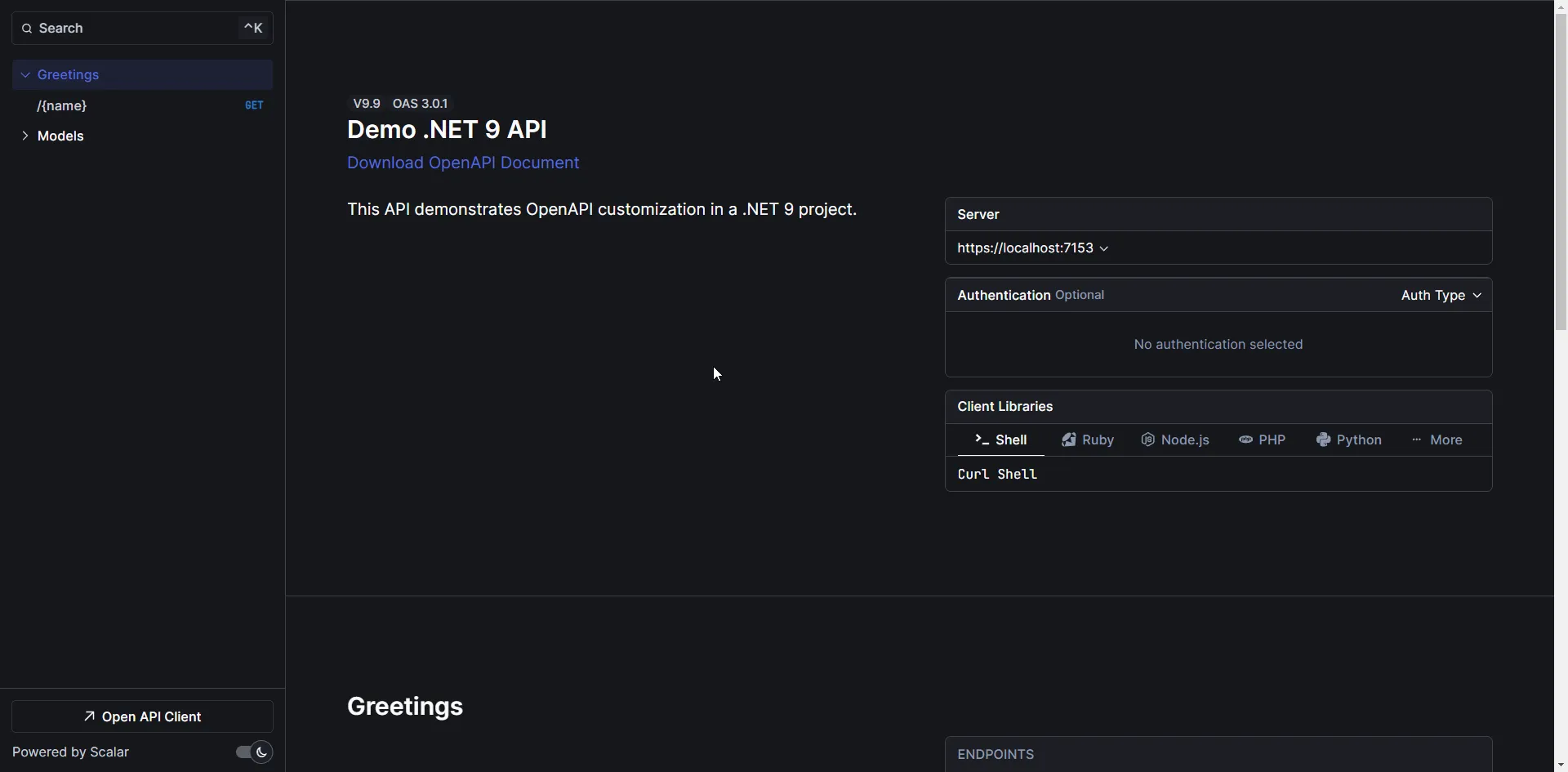
To the right side, you can see all the available endpoints listed, along with the related models. In our case, the Model is ProblemDetails, which we added as part of our Greetings Endpoint.
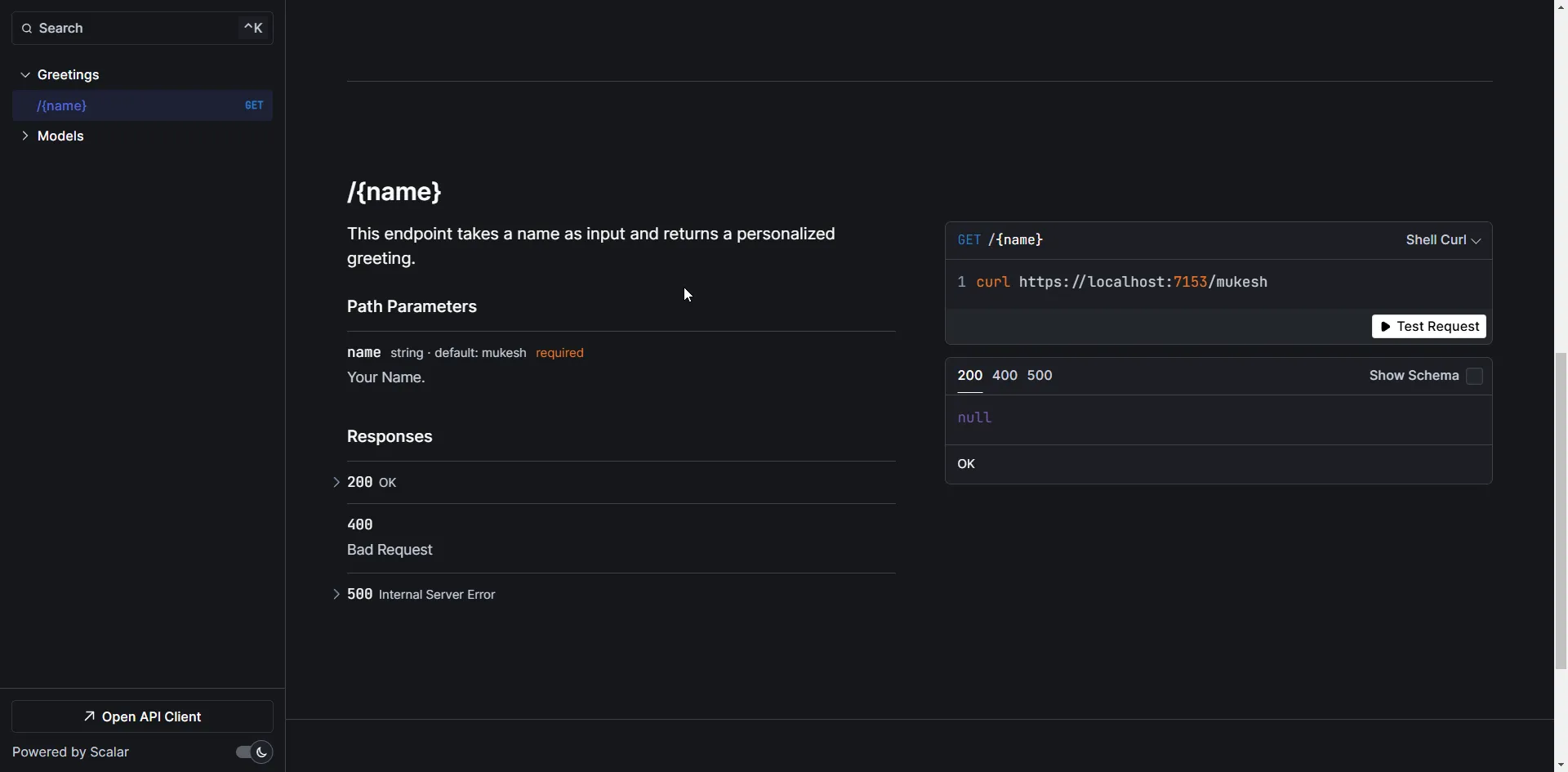
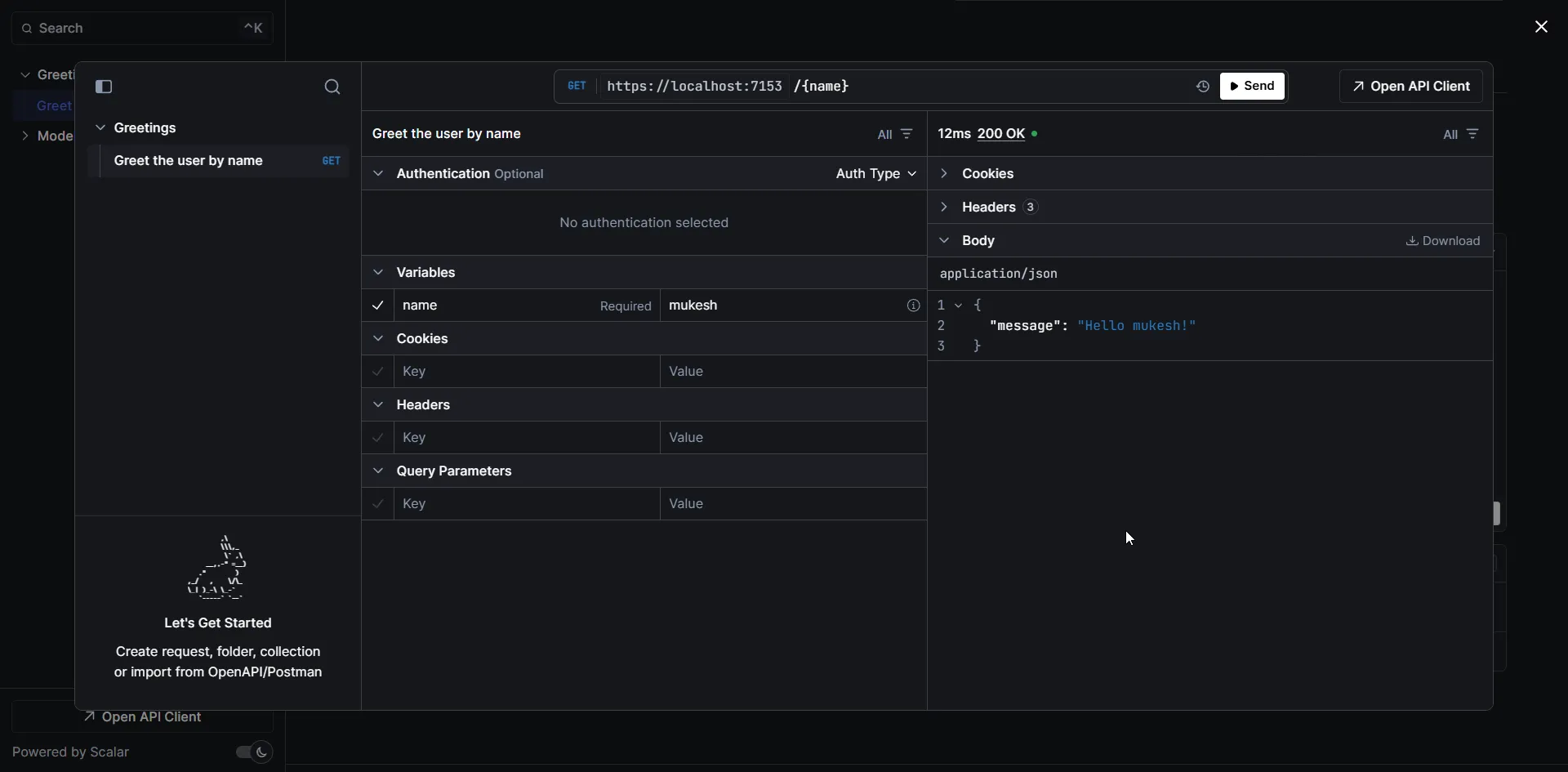
You can click on the Greetings GET Endpoint, and hit on Test Request. Also note that the client codes are included to access the API.
Here is the response I got while testing out the greetings endpoint.
Customizing Scalar
The best part of Scalar is the amount of customizations possible, right from the theme, to dark mode toggles, to CSS, everything can be changed. Even authentication can be configured using this.
app.MapScalarApiReference(options=>{options.WithTheme(ScalarTheme.Kepler).WithDarkModeToggle(true).WithClientButton(true);});You can further customize the looks of Scalar by the following: Read
I’m working on a dedicated deep-dive article about Scalar in .NET - covering authentication setup, advanced customization, themes, and more. Stay tuned!
Postman - Evergreen!
Postman remains one of the most popular tools for API testing and development, offering powerful features to simplify the process. One such feature is the ability to import OpenAPI specifications, allowing developers to quickly test and interact with their APIs without manual setup.
Importing an OpenAPI Spec into Postman
To import your .NET 10 API’s OpenAPI specification into Postman, follow these simple steps:
-
Export the OpenAPI Specification:
- In your .NET 10 application, ensure that OpenAPI is enabled by adding it in
Program.cs:builder.Services.AddOpenApi();app.MapOpenApi(); - Run the application and navigate to
/openapi/v1.jsonto get the OpenAPI specification file.
- In your .NET 10 application, ensure that OpenAPI is enabled by adding it in
-
Import the Spec into Postman:
- Open Postman and click on “Import” in the top-left corner.
- Choose the “Link” option and paste the URL to your Swagger JSON file (e.g.,
https://localhost:5001/openapi/v1.json). - Alternatively, download the
v1.jsonfile and import it directly.
-
Explore and Test the API:
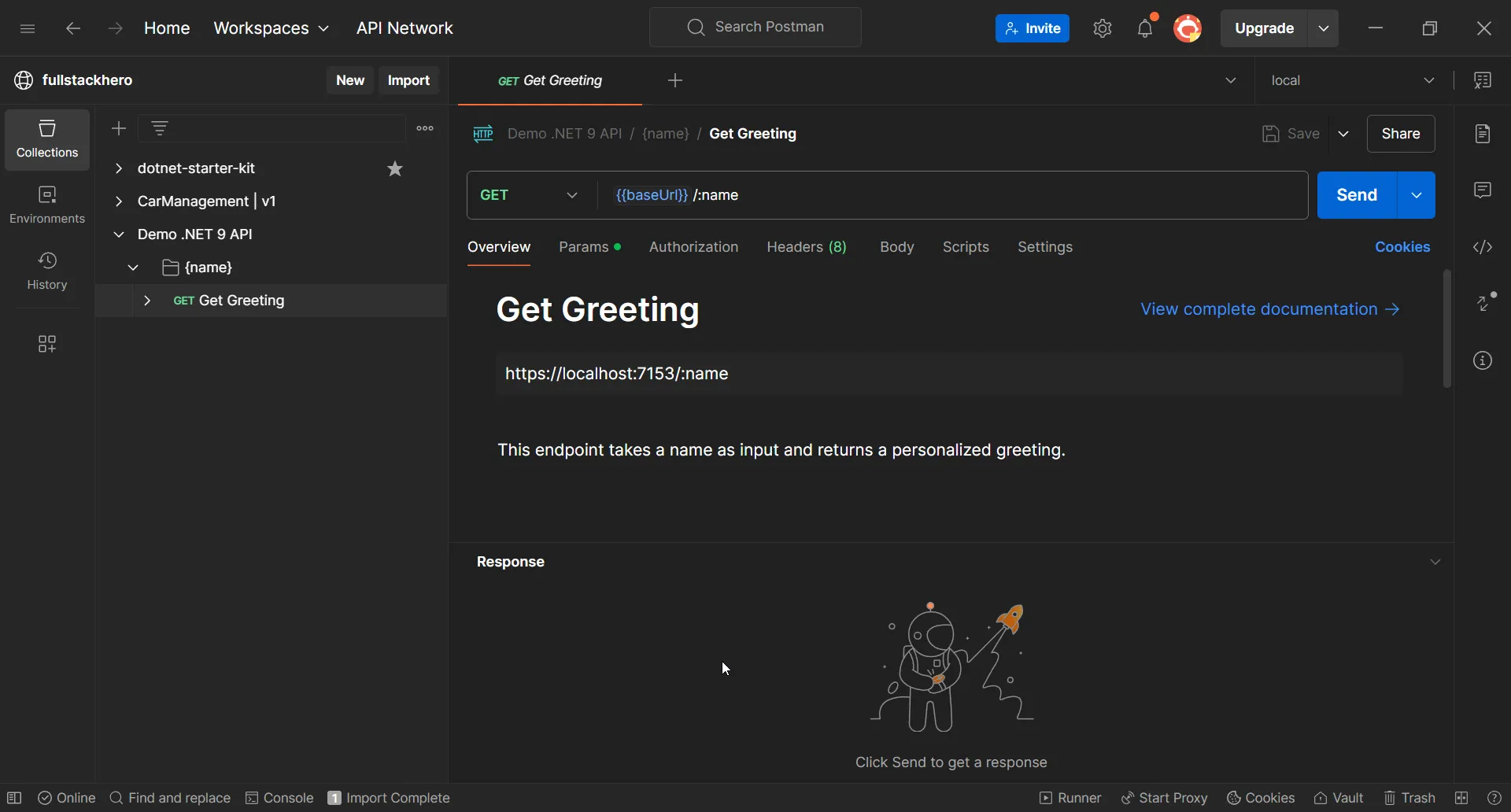
- Once imported, Postman will automatically generate a collection of endpoints based on the OpenAPI spec.
- You can easily send requests, view responses, and test different endpoints without manually configuring them.
- Postman allows adding authentication, headers, query parameters, and body data effortlessly.
Benefits of Using Postman for .NET API Testing
- Automated Request Generation: No need to manually configure requests; Postman sets everything up based on the spec.
- Environment Variables: Easily switch between development, staging, and production environments.
- Collaboration: Share API collections with your team to streamline testing efforts.
- Monitoring & Automation: Schedule API tests and monitor performance over time.
By leveraging Postman’s OpenAPI import feature, you can streamline your API testing workflow, making it easier to validate and debug your .NET APIs efficiently.
Key Takeaways
- The recommended stack for .NET 10 Web APIs is
Microsoft.AspNetCore.OpenApi+ Scalar. Native document generation, modern UI, zero third-party runtime dependencies for the docs, full Native AOT support. Microsoft.AspNetCore.OpenApigenerates OpenAPI 3.1 by default in .NET 10 (up from 3.0 in .NET 9). The transformer API replaces Swashbuckle’s filter pipeline cleanly.- Swagger isn’t dead - Swashbuckle 10.x still supports .NET 10 with opt-in OpenAPI 3.1. It’s just no longer the default and there’s no compelling reason to add it to new projects.
- Scalar (
Scalar.AspNetCore2.14.x) is the modern Swagger UI replacement - cleaner, faster, dark mode by default, and the request builder is better than Swagger UI’s. - Use NSwag specifically when you need client SDK generation (TypeScript, C#). For docs alone, native + Scalar is simpler.
- Disable the UI in production for internal APIs. Serve
/openapi/v1.jsononly - the spec is small, and exposing a UI gives attackers free reconnaissance.
Frequently Asked Questions
Related Articles
ASP.NET Core Web API CRUD with EF Core - Full Tutorial
See Native OpenAPI + Scalar wired into a real CRUD API with .NET 10, EF Core 10, and PostgreSQL. End-to-end implementation including AddOpenApi and MapScalarApiReference setup.
Minimal APIs in ASP.NET Core 10
Native OpenAPI integrates seamlessly with Minimal APIs via WithOpenApi() and TypedResults metadata. This guide covers everything Minimal APIs offer in .NET 10.
HTTP Status Codes in ASP.NET Core API Responses
OpenAPI documents are richer when you use TypedResults<T> with explicit status codes. This guide covers every status code and when to return it.
Global Exception Handling in ASP.NET Core
Pair Native OpenAPI with proper exception handling so the documented error responses match what your API actually returns. ProblemDetails is the standard.
Filters in ASP.NET Core
Endpoint filters in .NET 10 plug into the OpenAPI metadata pipeline cleanly. This guide covers when to use filters vs middleware vs Controllers.
FluentValidation in ASP.NET Core
OpenAPI documents your request schema, but they don't validate it. FluentValidation integrates cleanly with Minimal APIs and Native OpenAPI.
20 Tips From a Senior .NET Developer
Documentation is just one piece. This guide covers the other patterns I keep using across every .NET project - from configuration to caching to error handling.
Summary
In this article, I covered Microsoft’s strategic shift away from including Swagger/Swashbuckle by default in Web API templates, starting with .NET 9 and maturing further with .NET 10. The native solution through Microsoft.AspNetCore.OpenApi now generates OpenAPI 3.1 documents out of the box, supports Native AOT, and provides powerful transformer APIs - all without third-party dependencies.
Now, is Swagger dead? No. Swashbuckle is still actively maintained and supports .NET 10. But with Microsoft’s native OpenAPI support getting better with every release, and alternatives like Scalar offering a far superior UI experience, I see less and less reason to reach for Swashbuckle in new projects. My take: use the native Microsoft.AspNetCore.OpenApi for document generation, and pair it with Scalar for the UI.
If you found this information valuable for your .NET development journey, please share this article with your fellow developers and let them know about these important changes!
Happy Coding :)