
- Bahasa Indonesia
- Chi-Chewa
- Deutsch
- English
- Esperanto
- Nederlands
- Tagalog
- Tiếng Việt
- Türkçe
- català
- dansk
- español
- français
- galego
- italiano
- magyar
- polski
- português
- português do Brasil
- română
- sicilianu
- suomi
- svenska
- беларуская (тарашкевіца)
- русский
- українська
- հայերեն
- עברית
- العربية
- فارسی
- پښتو
- हिन्दी
- বাংলা
- ગુજરાતી
- ไทย
- 中文
- 日本語
- 한국어

This page is considered an official guideline on Wikimedia Commons.
It illustrates standards or behaviors which most editors agree with in principle and generally follow. Feel free to update the page as needed, but please use the discussion page to propose major changes.
- Marcar una edició com a patrullada consisteix a verificar que una edició compleixi les directrius de Commons.
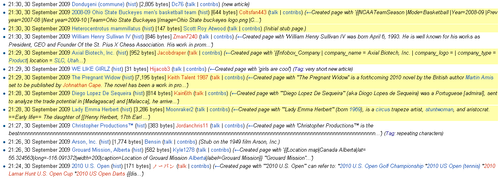
- Les pàgines de newly created pages|nova creació sense patrullar es ressalten en groc mentre que les modificacions sense patrullar s'indiquen amb un signe d'admiració.
- Els usuaris que no són patrullers no veuen les indicacions.


El dret d'usuari de patrullatge és un dret d'usuari específic que permet a l'usuari marcar les modificacions, les càrregues de fitxers i les creacions de pàgines com a patrullades.[1] Això es fa amb la finalitat de reduir l'endarreriment en la revisió de pàgines noves, fitxers nous i edicions sense control. Existeix la possibilitat de demanar l'opinió a altres patrulladors d'alguna cosa que ha estat revisada per un patrullador, que no sigui de vandalisme i que no quedi fora de l'àmbit del nostre projecte (o que s'hagi revertit/esborrat en aquests casos).
Els usuaris amb la dret de patrol veuran un enllaç com "[Mark as patrolled]" a l'extrem inferior dret de qualsevol pàgina nova o fitxer nou, i a la part dreta de qualsevol visualització de diferències, que encara no s'hagi patrullat. A més, les pàgines sense supervisió es ressaltaran en groc a Special:NewPages. Els fitxers no controlats a Special:NewFiles no estan marcats de cap manera, però es poden filtrar. Les edicions sense supervisió destaquen pel signe d'exclamació ! davant de la línia. Se suposa que els patrulladors han de comprovar si entren dins de l'àmbit del nostre projecte. Les pàgines o fitxers acceptables s'han de patrullar i, si no és possible, s'hauran de reorganitzar o esborrar pàgines o fitxers no acceptables. El dret s'atorga per defecte a qualsevol administrador, però es pot donar a usuaris de confiança si ho sol·liciten. És possible sol·licitar el dret d'usuari a un administrador específic o sol·licitar formalment el dret a Commons:Requests for rights.

- Per obtenir una llista de patrullers, consulteu Special:Listusers/patroller (actualment 688).
Com funciona el patrullatge d'una pàgina nova


Any pages highlighted in yellow on Special:NewPages has not yet been marked as patrolled. This means that it may not have been reviewed. When you check the page, you should mark it as patrolled if (a) you see that it is a good page or (b) before or after you tag it for deletion. If you are not sure about what to do with a page, do not mark it as patrolled; another editor will review it later.
To mark a page as patrolled, simply click the "[Mark this page as patrolled]" link in the bottom right corner of the page.
Què cal marcar com a patrullat?
- Anything that is appropriate for Commons.
- Problematic content, after it has been tagged for deletion.
El que no cal marcar com a patrullat
- Pages you are not sure about and no one else supports keeping (other than the author/uploader).
Com funciona l'edició de patrullatge?
From the Recent changes click the (diff)-link of any unpatrolled edit. Then in the diff-view review the edit by clicking the "[Mark this page as patrolled]" on the righthand side. After marking the edit as patrolled you can close the page, or (in the event of vandalism or otherwise contributions not in coherence with Commons guidelines) perform an undo or rollback.
In the diff-view one can tell whether or not a talk-page exists by the color of the link. Let the user know you reverted their edit by leaving a message. See also Commons:Counter Vandalism Unit#File.
Com funciona el patrullatge de fitxers?
Les fitxers carregats també es poden patrullar, des de la part inferior de la descripció. Aquesta és encara una nova característica per a la qual encara no s'han desenvolupat directrius específiques.
Autopatrullatge


Members of the autopatrolled group, called autopatrollers, have the autopatrol user right, which is similar to the patrol right, in that it is a specific user right which involves marking an action as patrolled. The differences are:
- that autopatrollers do not have the ability to actively mark actions as patrolled; instead, only their own actions are automatically marked as patrolled.
- some gadgets allowing to make a great number of modifications are accessible to autopatrollers[2] (for example: VisualFileChange).
This right is commonly granted to users who aren't necessarily involved in patrolling pages, edits or uploads, but who create a high level of quality pages or uploads that do not require patrolling by other users. This reduces the backlog of Newpage and Commons:Counter Vandalism Unit#Anonymous edits. This right is also granted to users who make a large amount of good edits that do not need to be patrolled, to reduce the clutter on Watchlists.
autopatrol originated as a pseudo-right which was automatically "used" when performing certain actions, without allowing any additional action. But despite maintaining its original name and purpose, autopatrol has also become an actual right on Wikimedia Commons. Since 2023, autopatrol is no longer just about patrolling; most accounts without this permission are not authorized to overwrite existing files (except some, including those they created themselves). For a list of the rights of the autopatrolled user group, see Commons:Requests for rights#Autopatrol.
You may request autopatrol at Commons:Requests for rights#Autopatrol.
Users with the patrol user right should not be granted this right, as they already have it (it is redundant). Membership of the image-reviewer user group includes the patrol and autopatrol user rights.
For a list of autopatrolled users, see Special:Listusers/autopatrolled (currently 7.946).
Altres notes
- A log of all patrols can be seen at Special:Log/patrol. It includes usernames, articles, and the revision reviewed, and may be sorted by username or by article title.
- Pages created and modified by administrators, bots, and users with
autopatrolright are automatically marked as "patrolled (automatic)". - There is a "Hide patrolled edits" option on Special:NewPages so that you can ignore pages that have already been reviewed.
- Even when the last few hours or even days have all been patrolled, there is still a big backlog. Pages expire from the unpatrolled queue after 720 hours (30 days).
- For those who patrol regularly there are a couple of gadgets available to assist (e.g. Popups and RTRC).
- Users with the (auto)patrol right also gain the ability to batch-upload more files at once with Upload Wizard (
mass-upload), are exempted from the abuse filter that prevents most users from uploading MP3 files on Commons and are able to move up to 32 pages per minute instead of 8. - Users with the autopatrol right also gain the technical ability to overwrite files uploaded by other accounts. However, they are expected to abide by COM:OVERWRITE when doing so, and repeated failure to comply with COM:OVERWRITE may result in revocation of the autopatrol right.
Classes CSS
There are three CSS classes related to patrolled edits:
- The class for non-patrolled articles in NewPages is
.not-patrolled, so colorblind users or users who prefer a different style can, for example, add.not-patrolled{border:2pxsolidblack}to their user CSS files. - The class for the exclamation mark is
.unpatrolled, for example.unpatrolled{display:none}hides them from the RecentChanges and your watchlist. - The class for the "Mark this page as patrolled" link in the lower-right corner of each new page is
.patrollink, you can style it in your user CSS file, for example:.patrollink{font:boldsmallsans-serif}
Notes
- ↑ Si us pregunteu sobre el patrullatge en altres llocs de Wikimedia, no tots els llocs de Wikimedia poden veure la secció 'wgUseRCPatrol' en Fitxer de configuració de Wikimedia. La Viquipèdia en anglès, però, aconsegueix ser una excepció en això (Phabricator:T21309), amb un dret d'usuari
autopatrol(anomenat 'autoreviewer', o usuari autopatrullat) sense la configuració $wgUseRCPatrol... - ↑ Help talk:VisualFileChange.js#Error in installation instructions?
Vegeu també
- Commons:Rollback – a similar user right to fight vandalism
- Special:Log/patrol – a log of any patrol
- Commons:Counter Vandalism Unit – more information on countervandalism and tools to make that easier