|
VOOZH | about |
|
VOOZH | about |
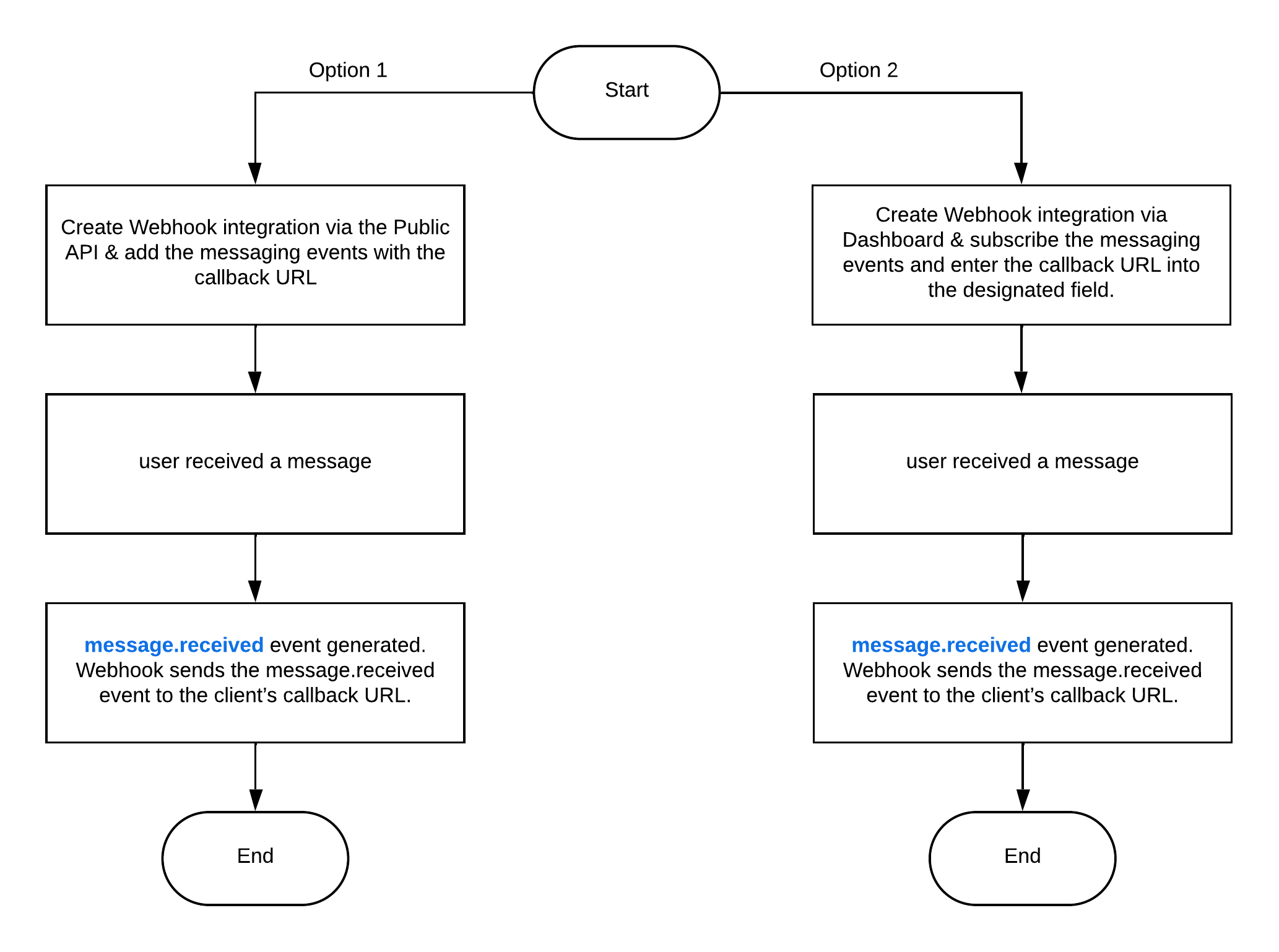
message.received callback
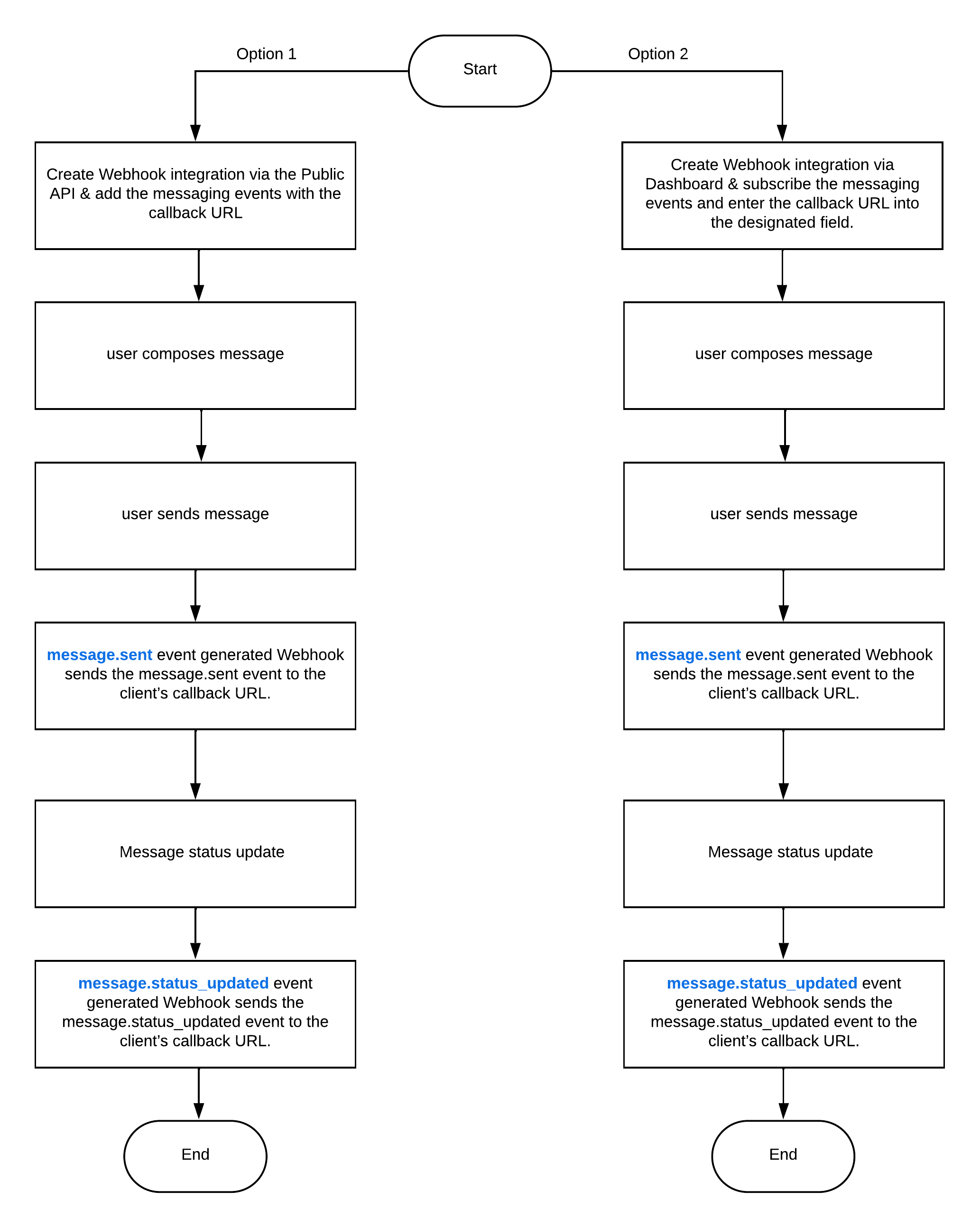
message.updated callback
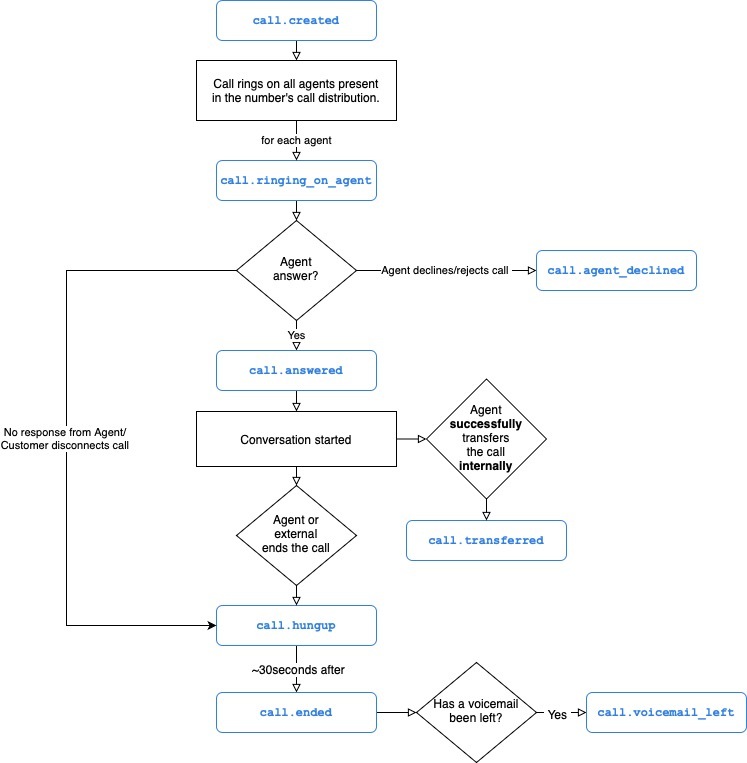
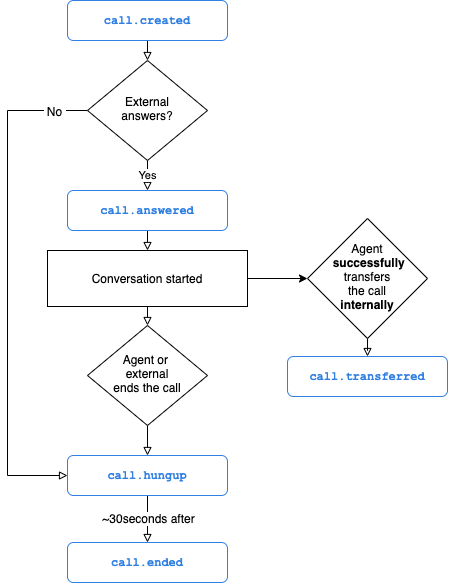
call.created
call.ringing_on_agent
call.agent_declined
call.answered
call.transferred
call.external_transferred
call.unsuccessful_transfer
call.hungup
call.ended
call.voicemail_left
call.commented
call.tagged
call.untagged
call.assigned
call.archived
call.hold
call.unhold
call.ivr_option_selected
call.comm_assets_generated
Just like you, we are enthusiastic builders and we love to automate things. At Aircall, we are building the next-gen business phone system and we know that one of the best ways to do that is to give you the ability to have the hands on Aircall features.
We are maintaining a Public API. This service allows any developers to retrieve and manage Aircall data with HTTP requests.
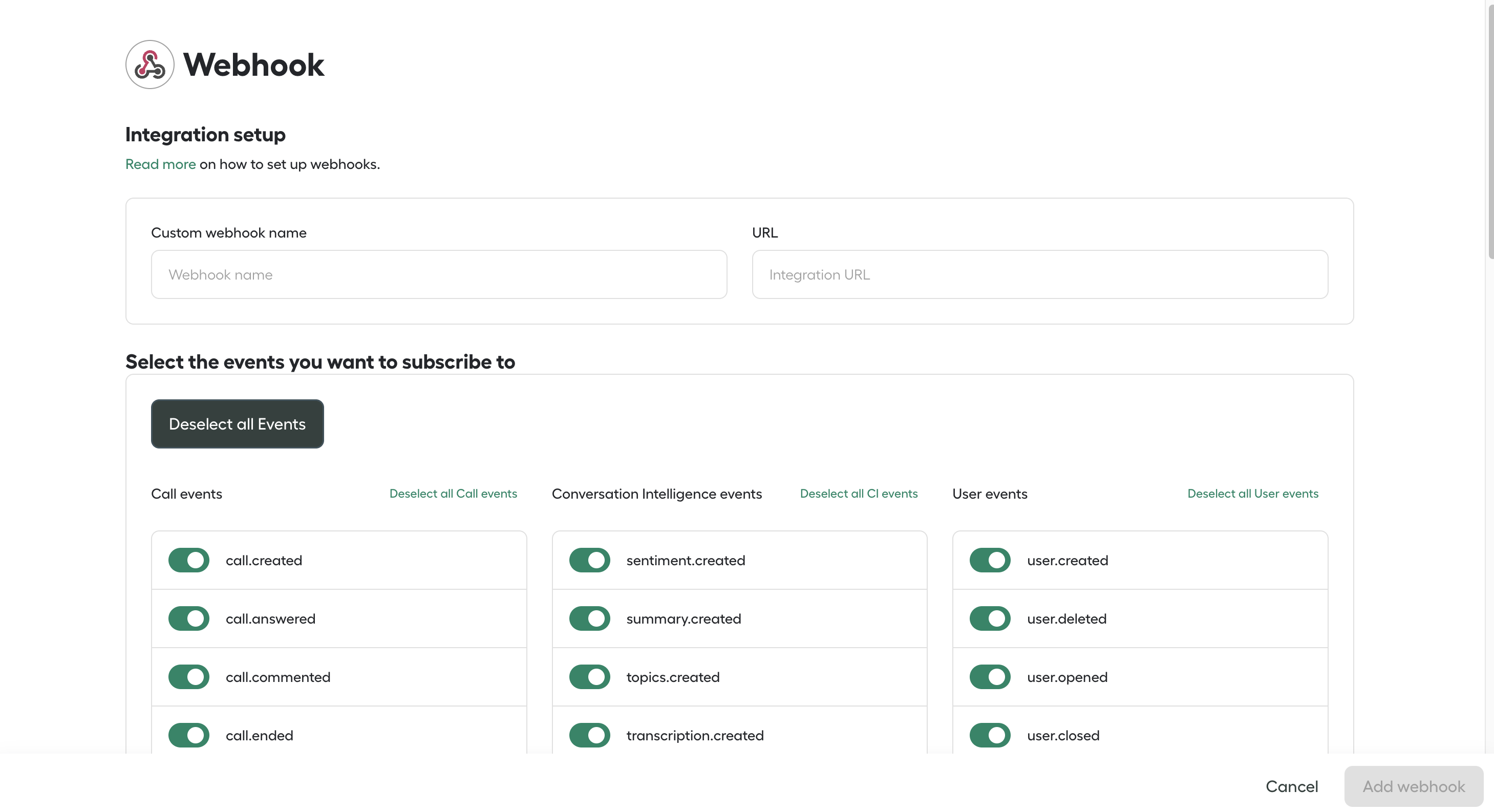
We are also supporting Webhooks. We can call back any endpoint of your choice, each time an event occurs on an Aircall account (contact added, call created, user switched off... see the Webhooks section for a complete list). Webhooks provide great scalability to your application and only requires setting up a public web server!
Want to see an example of how easy it is to connect with Aircall Public API and Webhooks? Take a look at our tutorials!
Our Engineering team is on Twitter, follow them @aircalltech!
Check the Changelog if you've already implemented something based on previous versions of this documentation.
Install one of many integrations built by our partners in our Marketplace!
as
Subscribe to updates
Please subscribe to stay updated with the latest API and webhook updates.
Aircall Public API is a classic REST API. It can be used with any programming languages and offers a fast, reliable and secure access to an Aircall account information.
The root endpoint of Aircall Public API is https://api.aircall.io/v1.
Please note that only HTTPS requests are valid as requests will communicate over SSL connection.
Each Public API request must be authenticated and should not exceed the rate limit, please check the Authentication and the rate limiting sections before jumping in our documentation!
RequestGET https://api.aircall.io
Response{
 "resource": "Aircall Documentation",
 "contact": "support@aircall.io"
}
With Aircall Public API, Authentication can be done through OAuth or Basic Auth.
If you want to build an App for companies using Aircall - this is mainly the case for Technology Partners - please use the OAuth flow. It is a requirement to be listed on the Aircall App Marketplace. You can create a partner-specific account by signing up here!
If you are an Aircall customer, building for your own Aircall account only, the Basic Auth flow will do the trick.
All endpoints behave similarly between the two authentication methods, unless indicated otherwise in the documentation.
Aircall built a powerful Ecosystem of apps, providing its customers an easy way to enhance their voice experience.
In Aircall, integrations are enabled at the Company level, which means they can only be set by an Admin user. It is possible to configure several instances of an integration on one Aircall account.
Aircall implemented the OAuth 2.0 authentication protocol so you can easily build an app on top of Aircall and deploy it on Aircall's Marketplace.
Beyond the added security and scalability, the Aircall OAuth flow will make your app visible to all customers in the Aircall Dashboard and provide a simple way for customers to install your app from Aircall or from your own website.
Want to know every secret about OAuth? Read the official documentation RFC 6750!
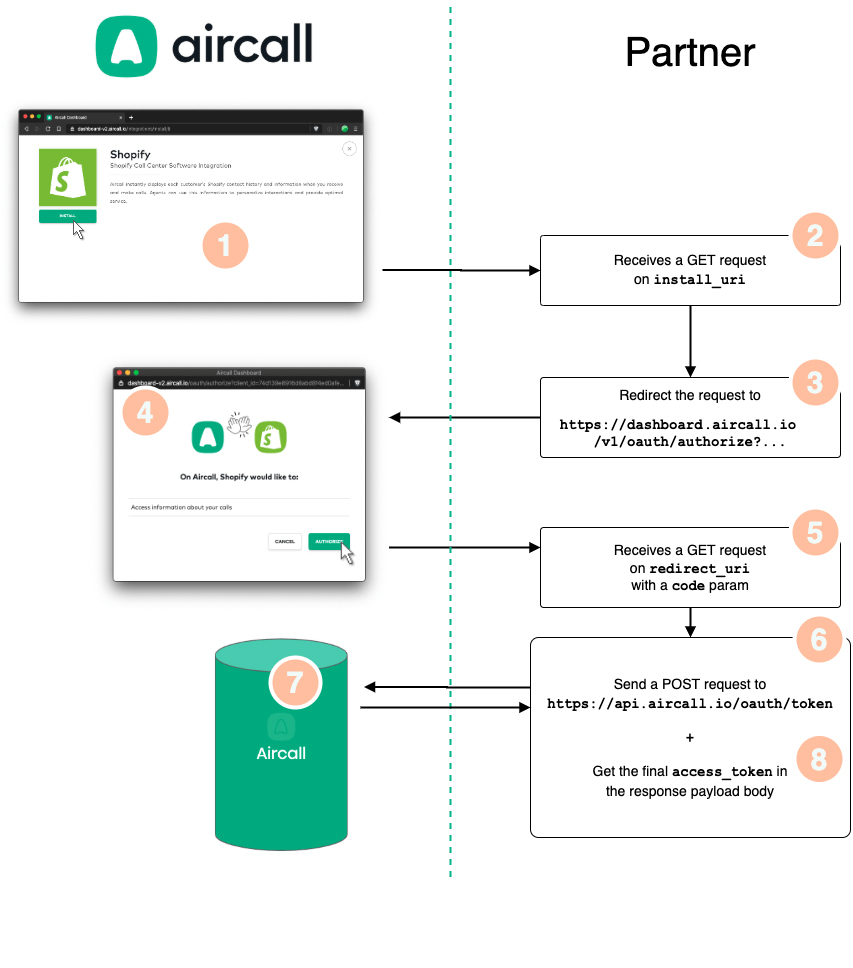
install_uri URI when starting the OAuth flow. This step is often used to display a Settings page, instructions on how to use the app or any useful information for the Admin.https://dashboard.aircall.io/oauth/authorize with client_id, redirect_uri, response_type=code and scope=public_api query params. See Step 3 of the OAuth flow.code to the redirect_uri URI, once they authorized the app, or the error if any.[DASHBOARD] /oauth/authorize and [API] /v1/oauth/token request.[API] /v1/oauth/token.access_token (see this endpoint).redirect_uri.Before starting building the OAuth flow for your app, you will need to get OAuth client_id and client_secret from Aircall. Click the start building button on top of the page and fill in the form. We will get back to you shortly.
When signing up, an
install_uri and a redirect_uri will be asked, make sure you have them ready. Read the OAuth flow first to understand what they are!
install_uri URL.GET request on the install_uri route. This step is often used to display a custom Settings page, instructions on how to use the app and/or any useful information for the Admin.
https://dashboard.aircall.io/oauth/authorize?client_id=XX&redirect_uri=YY&response_type=code&scope=public_api&state=ZZ
scope=public_api), Aircall loads the redirect_uri URL with a code parameter.GET request on the redirect_uri route with the code query param…[POST] https://api.aircall.io/v1/oauth/token request to Aircall's Public API with the proper body params (see here).[POST] request, create an access_token and sends it back to the Web server.access_token for further use!
Start the instructions at Step 3 if you want to trigger the install flow directly from your interface and not from the Aircall Dashboard.
Integrations can only be installed by users who are Admins on Aircall!
Check out our Ruby example app on Github to better understand how to implement the Aircall OAuth flow!
access_token via the Public APIOnce you get an OAuth authorization code from the OAuth flow, you need to convert it into a Public API access_token with the following request.
This access_token will then be used as a Bearer token in the Authorization header of each Public API requests you will make and does not expire.
client_id provided by Aircall. More information in the Oauth credentials section.client_secret provided by Aircall. More information in the Oauth credentials section.redirect_uri.authorization_code.RequestPOST https://api.aircall.io/v1/oauth/token { "client_id": YOUR_AIRCALL_CLIENT_ID, "client_secret": YOUR_AIRCALL_CLIENT_SECRET, "code": TMP_AUTHORIZATION_CODE, "redirect_uri": YOUR_REDIRECT_URI, "grant_type": "authorization_code" }
ResponseStatus: 200 OK

{
 "access_token": "2d492d492d492d492d492d492d492d",
 "token_type": "Bearer",
 "created_at": 1585868617
}
access_token
A /v1/ping endpoint is available to test the access_token retrieved via the Public API (as described here).
The access_token must be used in the Authorization HTTP header of your request, as a Bearer token.
Requestcurl -X GET https://api.aircall.io/v1/ping \ -H "Authorization: Bearer {YOUR_ACCESS_TOKEN}"
ResponseStatus: 200 OK

{
 "ping": "pong"
}
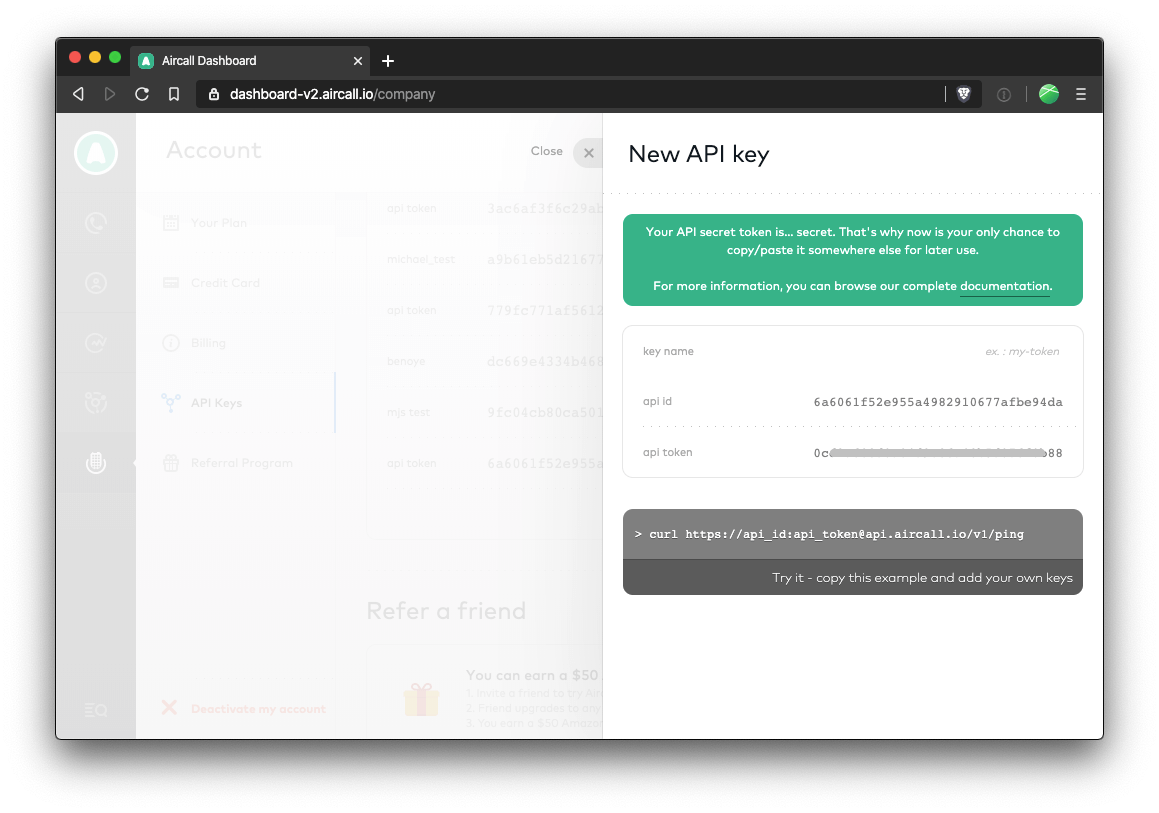
As an Aircall customer, an api_id and api_token are needed to use Aircall Public API: go to your Company's Settings page. In the API Keys section, click on Add a new API key and get your api_token and api_token.
Do not forget to copy/paste your api_token somewhere safe, we won't be able to retrieve it for you as Aircall does not store it in plain text!
If you are building an App for several companies using Aircall, please refer to the OAuth section.
Public API requests must be authenticated using HTTP Basic Authentication. The api_id is the username and the api_token is the password for each Public API requests.
The Authorization HTTP header is constructed as follows:
api_id and api_token are concatenated with a single colon :.Authorization: Basic YOUR_ENCODED_STRING.
Always prefer Base64 encoding in the
Authorization HTTP header rather than the following: https://api_id:api_token@api.aircall.io.
It is not recommended to authenticate requests passing the api_id and api_token in the URL for security reasons and as some programming languages and platforms do not support it!
Requestcurl -X GET https://api.aircall.io/v1/ping \ -H "Authorization: Basic {YOUR_ENCODED_STRING}"
ResponseStatus: 200 OK

{
 "ping": "pong"
}
Aircall limits the number of requests to its Public API to 120 requests per minute per company. The following headers are available in API headers' responses when the rate limit has been reached, giving more insight on your API usage:
| header | description |
|---|---|
| X-AircallApi-Limit | Limit of requests for the API key used. |
| X-AircallApi-Remaining | Remaining requests for this API key. |
| X-AircallApi-Reset | Timestamp when the counter will be reset. |
Contact us on support.aircall.io if you need to make more requests per minute, we will add a higher rate limit to your API keys!
When retrieving a list of objects with a [GET] request, results are being paginated by Aircall.
Pagination information will be presented in the meta object, available in the payload body and described below.
null.null.The two following attributes can be set in any URL query params to navigate from one page to the other:
Calls and Contacts are limited to 10,000 items, even with pagination on.
To pass over this limit, we encourage you to use the
from param as much as you can!
Response{
 "meta": {
 "count": 20,
 "total": 2234,
 "current_page": 1,
 "per_page": 20,
 "next_page_link": "https://api.aircall.io/v1/calls?page=2&per_page=20",
 "previous_page_link": null
 },
 ...
}
Aircall uses standard HTTP response codes to indicate the success or failure of an API request:
2xx codes indicate success4xx codes indicate an error that failed given the information provided5xx codes indicate an error with Aircall's serversAn error and a troubleshoot key will be present in the response payload body. The troubleshoot key is a readable description of the error.
More detailed HTTP response codes will be provided in endpoints documentation.
Response{
 "error": "...", // Title
 "troubleshoot": "..." // Verbose message
}
| code | description |
|---|---|
| 200 | OK - The request has succeeded. |
| 201 | Created - The request has been fulfilled and has resulted in one or more new resources being created. |
| 204 | No Content - Server has successfully fulfilled the request, no additional content sent in the response payload body. |
| 400 | Bad Request - Server cannot process the request due to something that is perceived to be a client error. |
| 403 | Forbidden - Lack of valid authentication credentials for the target resource. |
| 404 | Not Found - Server did not find the target resource. |
| 405 | Method Not Allowed - The method is known by the server but not supported. |
| 500 | Internal Server Error - Server encountered an unexpected condition. |
Aircall APIs and Webhooks are versioned to allow for continuous evolution and improvement while maintaining backward compatibility for existing integrations. API versions are indicated in the URL path. The webhook event names are now suffixed with “v2”.
For APIs, Aircall uses URL-based versioning, where the API version is included directly in the endpoint path. For example:
Version 1 endpoints: /v1/users, /v1/calls, etc.
Version 2 endpoints: /v2/users, etc.
For Webhook events, the version number is suffixed in the event name. For example:
Version 1 webhook event: user.connected
Version 2 webhook event: user.connected.v2
As of now, v2 of user APIs and webhook events is available
Every POST, PUT and DELETE HTTP request sent to Aircall Public API must specify the Content-Type entity header to application/json.
RequestHTTP headers:
{ "Content-Type": "application/json" }
Please refer to this section for announcements related to deprecation or changes as well as availability of new APIs and Webhooks.
| Title | Description | Changes effective from | Impacted/New Endpoints | Deprecation/Last Change Date |
|---|---|---|---|---|
| New Analytics Webhook Events | Two new webhook events let you be notified when an Analytics report export finishes, removing the need to poll the retrieve endpoint:
|
26-05-2026 |
analytics.report_created analytics.report_failed |
N/A |
| New Analytics Report Export Endpoints | Two new endpoints expose Aircall's analytics report exports via the public API. Reports are generated asynchronously: create an export job, poll for status, then download the CSV from a presigned URL.
|
20-05-2026 |
Create an Analytics Report Export Retrieve an Analytics Report Export |
N/A |
| New WhatsApp Message Endpoints | Four new endpoints are available for WhatsApp messaging via the public API:
|
15-05-2026 |
Send WhatsApp Message in Agent Conversation Send WhatsApp Message Skipping Aircall Inbox List WhatsApp Templates Get WhatsApp Line Status |
N/A |
| Trigger an Outbound Call endpoint | A new endpoint is available to programmatically place outbound calls from an Outbound Voice Agent. External systems can trigger AI Voice Agent outbound calls for appointment reminders, billing follow-ups, surveys, lead qualification and similar workflows. The agent must be configured in the Aircall Dashboard with a phone number and first message before the endpoint can be used. | 14-05-2026 | Trigger an Outbound Call | N/A |
| Mobile URL Schemes | The Aircall mobile apps now support the aircall:// URL scheme, allowing third-party applications to initiate calls directly within the Aircall app by pre-filling the dialpad.
|
27-03-2026 | Call (Android & iOS) | N/A |
| Send Group Message endpoints | Two new endpoints are available for group messages:
|
10-03-2026 |
Send Group Message Send Group Message in agent conversation |
N/A |
| New Group Message Webhook Events | Three new Webhook group message events are now available:
|
04-03-2026 |
group_message.sent group_message.received group_message.status_updated |
N/A |
| Deprecation of User V1 APIs and Events | User V1 APIs for List all Users, Retrieve a User, Create a User and Update a User as well as User V1 events will be deprecated and replaced by User V2 APIs and Events. | 25-02-2026 | 30-09-2026 | |
Deprecation of realtime_transcription endpoint |
The realtime_transcription endpoint is in its deprecation phase. As the deadline is approaching, update/migrate to transcription endpoint as soon as possible, to avoid service disruption. | 20-02-2026 | realtime_transcription | 31-03-2026 |
Updated Conversation Intelligence transcription endpoint |
transcription endpoint will support realtime mode to retrieve, at the end of the call, the content of the transcription generated for the agent during the call. |
20-02-2026 | transcription | N/A |
| Deprecation of Aircall Everywhere SDK V1 | The original SDK for the legacy Aircall Phone is in its deprecation phase. As the deadline is approaching, update/migrate to Aircall Everywhere SDK V2 as soon as possible, to avoid service disruption and access new features. | 04-29-2025 | CTI - Aircall Everywhere SDK V2 | May 20th, 2026 |
Deprecation of number.closed and number.open Webhook Events |
With the transition from legacy routing to Smartflows, the availability status-based number state (open/closed) is no longer used. As a result, the number.closed and number.opened webhook events are deprecated and will not be triggered for numbers using Smartflows. | These events have never been available for Smartflows numbers |
number.closed number.opened |
30-05-2025 |
Deprecation of Webhook property id
|
The web hook id property has been replaced by the new property Webhook_id. Its recommended to use the same to retrieve, update and delete Webhooks. The property Webhook_id will be returned on creation of a Webhook |
01-07-2023 | Retrieve a WebhookUpdate a WebhookDelete a Webhook | 15-04-2024 |
Deprecation of isAdmin Property during User Creation |
The isAdmin parameter is being deprecated from Create a User API and will no longer be available.
To assign Admin role to a User please use the role_ids parameter in the API
|
01-01-2024 | Create a User | 31-03-2024 |
| New Call Webhook Events | Two new Webhook Call events are available i.e.
|
04-03-2024 | call.ivr_option_selectedcall.comm_assets_generated | N/A |
| New Number Endpoints | One new Endpoint is available i.e.
|
05-15-2024 | Registration Status | N/A |
| New Message Webhook Events | Three new Webhook message events are available i.e.
|
03-06-2024 | message.sentmessage.receivedmessage.status_updated | N/A |
| New Message Endpoints | Four new Endpoints are available to use SMS/MMS capabilities via API i.e.
|
08-05-2024 | Fetch Number ConfigurationCreate Number ConfigurationDelete Number ConfigurationSend message | N/A |
| New Conversation Intelligence Event | New Conversation Intelligence event for Sentiment Analysis is available :
|
08-14-2024 | sentiment.created | N/A |
| New Conversation Intelligence Event | New Conversation Intelligence event for Call Transcription is available:
|
08-26-2024 | transcription.created | N/A |
| New Conversation Intelligence endpoints | Four new Endpoints are available to use Conversation Intelligence capabilities via API i.e.:
|
09-13-2024 | N/A | |
| New Conversation Intelligence Event | New Conversation Intelligence events for Call Summary and Key Topics are available:
|
10-24-2024 | summary.createdtopics.created | N/A |
| New Message Endpoint | One new Endpoint is available to use SMS capabilities capabilities via API i.e.:
|
11-25-2024 | N/A | |
| New Call Webhook Event | New Webhook Call event is available i.e.:
|
02-18-2025 | N/A | |
| New version of CTI - Aircall Everywhere | New version of Aircall Everywhere SDK V2 has been released which is based on Aircall Workspace App. | 04-29-2025 | CTI - Aircall Everywhere SDK V2 | N/A |
| New Conversation Intelligence endpoint and webhook | New endpoint and webhook is available to use Conversation Intelligence capabilities:
|
05-07-2025 | N/A | |
| Added whatsapp channel to message webhook events | Added whatsapp channel to message webhook events i.e.
|
06-04-2025 | N/A | |
| New Conversation Intelligence endpoint and webhook | New endpoint and webhook is available to use Conversation Intelligence capabilities:
|
07-23-2025 | N/A | |
| New participant type in Transcription endpoint and webhook | Voice virtual agent is available to use on Conversation Intelligence capabilities:
|
07-23-2025 | N/A | |
| New Conversation Intelligence webhook event | New webhook event is available for Conversation Intelligence:
|
07-24-2025 | ||
| New AI Voice Agent webhook events | Three new webhook events are available for AI Voice Agent interactions:
|
08-28-2025 | N/A | |
| New Realtime Transcription endpoint | New endpoint is available for Conversation Intelligence capabilities:
|
10-08-2025 | N/A | |
| New Real-time Transcription webhook event | New webhook event is available for Real-time Transcription:
|
10-08-2025 | N/A | |
| New AI Voice Agent webhook event | New webhook event is available for AI Voice Agent interactions:
|
10-30-2025 | N/A | |
| New Custom Summary webhook events | Two new webhook events are available for Custom Summaries:
|
07-11-2025 | N/A | |
| New Custom Summary API endpoint | New API endpoint is available to retrieve custom summary results:
|
13-11-2025 | N/A | |
| New Call Evaluations API endpoint | New API endpoint is available to retrieve call evaluations:
|
17-12-2025 | N/A | |
| New Call Evaluations Webhook Events | Two new webhook events are available for Call Evaluations:
|
17-12-2025 | ||
| New User V2 Webhook Events | New User V2 webhook events are available. These events provide the same functionality as User events but with an updated payload structure. The User V2 events do not include the numbers array in the response. Eight new webhook events are available.
|
01-20-2026 | N/A | |
| New User V2 APIs | New User V2 API endpoints are now available. These endpoints provide the same functionality as User APIs V1 but with an updated payload structure. The User V2 endpoints do not include the numbers array in the response.Five new APIs are available.
|
01-20-2026 | N/A |
Contact us on support.aircall.io if you need more info regarding these announcements.
In this section, we list all the available Public APIs.
Get all users associated to an Aircall account, or retrieve, create and update info about one specific User! You can also start outbound calls on a User's Phone app.
Users can be either Admins or Agents:
Users are assigned to Numbers.
first_name last_name.available, custom (= available according to their Working Hours and Timezone) or unavailable (= Do Not Disturb or other unavailable status). More availablility statuses can be retrieved, see the Availability table below.available or custom (available according to working hours or timezone) then substatus will be always_open. unavailable and doesn't select a substatus or unavailability reason in Phone App then it will be always_closed. unavailable and selects a substatus or unavailability reason in Phone App i.e. Out for lunch, On a break, In training, Back office or Other. The substatus will contain the exact substauts or unavailability reason selected.Etc/UTC. More details on Timezones here.en-US.
availableofflinedo_not_disturbin_callafter_call_work
Find a proper definition of each of those availability statuses in our Knowledge Base
and retrieve those granular availability statuses with this endpoint!
EndpointsGET /v1/usersList all Users
GET /v1/users/456Retrieve a User
GET /v1/users/john.doe@aircall.ioRetrieve a User
GET /v1/users/:idRetrieve a User
POST /v1/usersCreate a User
PUT /v1/users/:idUpdate a User
DELETE /v1/users/:idDelete a User
GET /v1/users/availabilitiesRetrieve list of Users availability
GET /v1/users/:id/availabilityCheck availability of a User
POST /v1/users/:id/callsStart an outbound call
POST /v1/users/:id/dialDial a phone number in the Phone
Fetch all Users associated to a Company and their information.
Looking for more granular availability statuses? Check the availability endpoint!
User V1 API will be deprecated soon. Please migrate to User V2 API.
created_at. Can be asc or desc.asc
Pagination params can be used on this request.
RequestGET /v1/users
ResponseStatus: 200 OK

{
 "meta": {
 "count": 3,
 "total": 3,
 "current_page": 1,
 "per_page": 20,
 "next_page_link": null,
 "previous_page_link": null
 },
 "users": [
 {
 "id": 456,
 "direct_link": "https://api.aircall.io/v1/users/456",
 "name": "John Doe",
 "email": "john.doe@aircall.io",
 "available": true,
 "availability_status": "available",
 "created_at": "2019-12-29T10:03:18.000Z",
 "time_zone": "America/New_York",
 "language": "en-US",
 "substatus": "always_opened",
 "wrap_up_time": 0,
 "extension": "001"
 },
 {
 "id": 457,
 "direct_link": "https://api.aircall.io/v1/users/457",
 "name": "Amy Rudd",
 "email": "amy.rudd@aircall.io",
 "available": true,
 "availability_status": "custom",
 "created_at": "2019-12-30T18:10:21.000Z",
 "time_zone": "Etc/UTC",
 "language": "en-US",
 "substatus": "always_opened",
 "wrap_up_time": 0,
 "extension": "002"
 },
 {
 "id": 458,
 "direct_link": "https://api.aircall.io/v1/users/458",
 "name": "Vera Martin",
 "email": "vera.martin@aircall.io",
 "available": false,
 "availability_status": "unavailable",
 "created_at": "20120-01-02T09:01:58.000Z",
 "time_zone": "Europe/Paris",
 "language": "fr-FR",
 "substatus": "always_opened",
 "wrap_up_time": 0,
 "extension": "003"
 }
 ]
}
Retrieve details of a specific User.
Looking for more granular availability statuses for a User? Check this dedicated endpoint.
User V1 API will be deprecated soon. Please migrate to User V2 API.
Retrieve by ID:
RequestGET /v1/users/456
Retrieve by email:
RequestGET /v1/users/john.doe@aircall.io
RequestGET /v1/users/:id
ResponseStatus: 200 OK

{
 "user": {
 "id": 456,
 "direct_link": "https://api.aircall.io/v1/users/456",
 "name": "John Doe",
 "email": "john.doe@aircall.io",
 "available": true,
 "availability_status": "available",
 "created_at": "2019-12-29T10:03:18.000Z",
 "time_zone": "America/New_York",
 "language": "en-US",
 "substatus": "always_opened",
 "wrap_up_time": 0,
 "extension": "001",
 "default_number_id": 1234,
 "numbers": [
 {
 "id": 1234,
 "direct_link": "https://api.aircall.io/v1/numbers/1234",
 "name": "French Office",
 "digits": "+33 1 76 11 11 11",
 "created_at": "2020-01-02T11:41:01.000Z",
 "country": "FR",
 "time_zone": "Europe/Paris",
 "open": true,
 "availability_status": "custom",
 "is_ivr": true,
 "live_recording_activated": true,
 "priority": null,
 "messages": {
 "welcome": "https://example.com/welcome.mp3",
 "waiting": "https://example.com/waiting_music.mp3",
 "ivr": "https://example.com/ivr_message.mp3",
 "voicemail": "https://example.com/voicemail.mp3",
 "closed": "https://example.com/closed_message.mp3",
 "callback_later": "https://example.com/callback_later.mp3",
 "unanswered_call": "https://example.com/unanswered_call.mp3",
 "after_hours": "https://example.com/closed_message.mp3",
 "ringing_tone": "https://example.com/waiting_music.mp3"
 }
 }
 ]
 }
}
Users can be created one at a time. After creation, a unique user ID will be included in the response's payload. An invitation email will be sent to the User, they will have to confirm their account before being able to use Aircall.
A
user.created Webhook event is sent on User creation. More information in the Webhooks section.
User V1 API will be deprecated soon. Please migrate to User V2 API.
available, custom or unavailable.available
owner, supervisor, admin or agent.agent
agent
0 secondsadmin. If a non-admin user ID is provided, the request will return a 400 error.| code | description |
|---|---|
| 422 | Mandatory attribute missing, check the troubleshoot field. |
RequestPOST /v1/users

{
 "email": "jeffrey.curtis@aircall.io",
 "first_name": "Jeffrey",
 "last_name": "Curtis"
}
ResponseStatus: 201 Created

{
 "user": {
 "id": 458,
 "direct_link": "https://api.aircall.io/v1/users/458",
 "name": "Jeffrey Curtis",
 "email": "jeffrey.curtis@aircall.io",
 "available": false,
 "availability_status": "available",
 "created_at": "2020-02-18T20:52:22.000Z",
 "time_zone": "Etc/UTC",
 "language": "en-US",
 "numbers": [],
 "wrap_up_time": 0
 }
}
Some fields can be updated via the Public API. For instance, a User's availability status could be automatically updated based on information from their calendar or a workforce management tool.
User V1 API will be deprecated soon. Please migrate to User V2 API.
available, custom or unavailable.unavailable: out_for_lunch, on_a_break, in_training, doing_back_office, other
owner, supervisor, admin or agent.agent.RequestPUT /v1/users/:id { "first_name": "Jeff Updated" }
ResponseStatus: 200 OK

{
 "user": {
 "id": 458,
 "direct_link": "https://api.aircall.io/v1/users/458",
 "name": "Jeff Updated Curtis",
 "email": "jeffrey.curtis@aircall.io",
 "available": false,
 "availability_status": "available",
 "created_at": "2020-02-18T20:52:22.000Z",
 "time_zone": "America/New_York",
 "language": "en-US",
 "numbers": [],
 "wrap_up_time": 55,
 "extension": "001",
 "substatus": "always_opened"
 }
}
When deleting a User, all data associated to them will also be destroyed and won't be recoverable.
A
user.deleted Webhook event is sent on User deletion. More information in the Webhooks section.
| code | description |
|---|---|
| 204 | User will be deleted in the next minutes, depending on how many calls and data are associated to them. |
| 422 | Server unable to process the request, error will be described in the troubleshoot field. |
RequestDELETE /v1/users/:id
ResponseStatus: 204 No Content
List the detailed availability of all Users, displayed in the Dashboard's Activity Feed.
Please refer to the User object definition to see all the possible values of the availability field.
Find a detailed definition of each availability status in our Knowledge Base.
created_at. Can be asc or desc.asc
RequestGET /v1/users/availabilities
ResponseStatus: 200 OK

{
 "meta": {
 "count": 3,
 "total": 3,
 "current_page": 1,
 "per_page": 20,
 "next_page_link": null,
 "previous_page_link": null
 },
 "users": [
 {
 "id": 456,
 "availability": "available"
 },
 {
 "id": 457,
 "availability": "offline"
 }
 {
 "id": 458,
 "availability": "do_not_disturb"
 }
 ]
}
Retrieve the detailed availability of a specific User, displayed in the Dashboard's Activity Feed.
Please refer to the User object definition to see all the possible values of the availability field.
Find a proper definition of each availability status in our Knowledge Base.
RequestGET /v1/users/:id/availability
ResponseStatus: 200 OK

{
 "availability": "after_call_work"
}
Outbound calls can be automatically started for a User from their Phone app. It is often used to build a Click-to-call feature!
A Number ID and a phone number to dial must be provided in the request's body.
The User must be available, not on a call and associated to the Number.
Number must be active (validated), inactive numbers can be seen in the Aircall Dashboard.
This feature is only available on Aircall Phone app on Desktop for now, not yet on iOS and Android.
Please note, the API doesn’t support multiple sessions. It is not recommended to use this API along with Aircall CTI or Web App when multiple tabs are open
| code | description |
|---|---|
| 204 | Success. |
| 400 | Number not found or invalid number to dial. |
| 405 | User not available. |
RequestPOST /v1/users/:id/calls

{
 "number_id": 123,
 "to": "+18001231234"
}
ResponseStatus: 204 No Content
Sending a request to this endpoint will fill the User's Phone app with the to params. They will then be able to start the call within the Phone app and will be free to choose from which Number they want to start the call from. It is often used to build a Click-to-dial feature!
User must be available and not on a call.
This feature is also available from the Aircall Everywhere CTI.
This feature is only available on Aircall Phone app on Desktop for now, not yet on iOS and Android.
| code | description |
|---|---|
| 204 | Success. |
| 400 | Invalid number to dial. |
| 405 | User not available. |
RequestPOST /v1/users/:id/dial

{
 "to": "+18001231234"
}
ResponseStatus: 204 No Content
Get all users associated to an Aircall account, or retrieve, create and update info about one specific User V2! You can also start outbound calls on an User V2's Phone app.
Users can be either Admins or Agents:
Please note User v2 object doesn't include a numbers object
first_name last_name.available, custom (= available according to their Working Hours and Timezone) or unavailable (= Do Not Disturb or other unavailable status). More availablility statuses can be retrieved, see the Availability table below.available or custom (available according to working hours or timezone) then substatus will be always_open. unavailable and doesn't select a substatus or unavailability reason in Phone App then it will be always_closed. unavailable and selects a substatus or unavailability reason in Phone App i.e. Out for lunch, On a break, In training, Back office or Other. The substatus will contain the exact substauts or unavailability reason selected.Etc/UTC. More details on Timezones here.en-US.last_call_id won't be available.
availableofflinedo_not_disturbin_callafter_call_work
Find a proper definition of each of those availability statuses in our Knowledge Base
and retrieve those granular availability statuses with this endpoint!
Fetch all Users V2 associated to a Company and their information.
Looking for more granular availability statuses? Check the availability endpoint!
created_at. Can be asc or desc.asc
Pagination params can be used on this request.
RequestGET /v2/users
ResponseStatus: 200 OK

{
 "meta": {
 "count": 3,
 "total": 3,
 "current_page": 1,
 "per_page": 20,
 "next_page_link": null,
 "previous_page_link": null
 },
 "users": [
 {
 "id": 456,
 "direct_link": "https://api.aircall.io/v2/users/456",
 "name": "John Doe",
 "email": "john.doe@aircall.io",
 "available": true,
 "availability_status": "available",
 "created_at": "2019-12-29T10:03:18.000Z",
 "time_zone": "America/New_York",
 "language": "en-US",
 "substatus": "always_opened",
 "wrap_up_time": 0,
 "extension": "001"
 },
 {
 "id": 457,
 "direct_link": "https://api.aircall.io/v2/users/457",
 "name": "Amy Rudd",
 "email": "amy.rudd@aircall.io",
 "available": true,
 "availability_status": "custom",
 "created_at": "2019-12-30T18:10:21.000Z",
 "time_zone": "Etc/UTC",
 "language": "en-US",
 "substatus": "always_opened",
 "wrap_up_time": 0,
 "extension": "002"
 },
 {
 "id": 458,
 "direct_link": "https://api.aircall.io/v2/users/458",
 "name": "Vera Martin",
 "email": "vera.martin@aircall.io",
 "available": false,
 "availability_status": "unavailable",
 "created_at": "20120-01-02T09:01:58.000Z",
 "time_zone": "Europe/Paris",
 "language": "fr-FR",
 "substatus": "always_opened",
 "wrap_up_time": 0,
 "extension": "003"
 }
 ]
}
Retrieve details of a specific User V2.
Looking for more granular availability statuses for a User V2? Check this dedicated endpoint.
Retrieve by ID:
RequestGET /v2/users/456
Retrieve by email:
RequestGET /v2/users/john.doe@aircall.io
RequestGET /v2/users/:id
ResponseStatus: 200 OK

{
 "user": {
 "id": 456,
 "direct_link": "https://api.aircall.io/v2/users/456",
 "name": "John Doe",
 "email": "john.doe@aircall.io",
 "available": true,
 "availability_status": "available",
 "created_at": "2019-12-29T10:03:18.000Z",
 "time_zone": "America/New_York",
 "language": "en-US",
 "substatus": "always_opened",
 "wrap_up_time": 0,
 "extension": "001",
 "default_number_id": 1234
 }
}
Users can be created one at a time. After creation, a unique user ID will be included in the response's payload. An invitation email will be sent to the User V2, they will have to confirm their account before being able to use Aircall.
A
user.created.v2 Webhook event is sent on User creation. More information in the Webhooks section.
available, custom or unavailable.available
owner, supervisor, admin or agent.agent
agent
0 seconds| code | description |
|---|---|
| 422 | Mandatory attribute missing, check the troubleshoot field. |
RequestPOST /v2/users

{
 "email": "jeffrey.curtis@aircall.io",
 "first_name": "Jeffrey",
 "last_name": "Curtis"
}
ResponseStatus: 201 Created

{
 "user": {
 "id": 458,
 "direct_link": "https://api.aircall.io/v2/users/458",
 "name": "Jeffrey Curtis",
 "email": "jeffrey.curtis@aircall.io",
 "available": false,
 "availability_status": "available",
 "created_at": "2020-02-18T20:52:22.000Z",
 "time_zone": "Etc/UTC",
 "language": "en-US",
 "wrap_up_time": 0
 }
}
Some fields can be updated via the Public API. For instance, a User V2's availability status could be automatically updated based on information from their calendar or a workforce management tool.
available, custom or unavailable.unavailable: out_for_lunch, on_a_break, in_training, doing_back_office, other
owner, supervisor, admin or agent.agent.RequestPUT /v2/users/:id { "first_name": "Jeff Updated" }
ResponseStatus: 200 OK

{
 "user": {
 "id": 458,
 "direct_link": "https://api.aircall.io/v2/users/458",
 "name": "Jeff Updated Curtis",
 "email": "jeffrey.curtis@aircall.io",
 "available": false,
 "availability_status": "available",
 "created_at": "2020-02-18T20:52:22.000Z",
 "time_zone": "America/New_York",
 "language": "en-US",
 "wrap_up_time": 55,
 "extension": "001",
 "substatus": "always_opened"
 }
}
Fetch all Numbers associated to a specific User V2.
created_at. Can be asc or desc.asc
Pagination params can be used on this request.
RequestGET /v2/users/:id/numbers
ResponseStatus: 200 OK

{
 "numbers": [
 {
 "id": 673,
 "direct_link": "https://api.aircall.io/v1/numbers/673",
 "name": "Matheus",
 "digits": "+33 1 76 42 03 02",
 "country": "FR",
 "time_zone": "Europe/Paris",
 "open": true,
 "availability_status": "open",
 "is_ivr": false,
 "live_recording_activated": false,
 "priority": 0,
 "messages": {
 "welcome": "https://example.com/welcome.mp3",
 "waiting": "https://example.com/waiting_music.mp3",
 "ivr": "https://example.com/ivr_message.mp3",
 "voicemail": "https://example.com/voicemail.mp3",
 "closed": "https://example.com/closed_message.mp3",
 "callback_later": "https://example.com/callback_later.mp3",
 "unanswered_call": "https://example.com/unanswered_call.mp3",
 "after_hours": "https://example.com/after_hours.mp3",
 "ringing_tone": "https://example.com/ringing_tone.mp3"
 },
 "created_at": "2016-12-28T10:15:05.000Z",
 "flow_editor_enabled": true
 },
 {
 "id": 719,
 "direct_link": "https://api.aircall.io/v1/numbers/719",
 "name": "Pokedex Twilio Staging",
 "digits": "+33 4 20 88 02 82",
 "country": "RO",
 "time_zone": "Europe/Paris",
 "open": true,
 "availability_status": "open",
 "is_ivr": false,
 "live_recording_activated": false,
 "priority": 0,
 "messages": {
 "welcome": "https://example.com/welcome.mp3",
 "waiting": "https://example.com/waiting_music.mp3",
 "ivr": "https://example.com/ivr_message.mp3",
 "voicemail": "https://example.com/voicemail.mp3",
 "closed": "https://example.com/closed_message.mp3",
 "callback_later": "https://example.com/callback_later.mp3",
 "unanswered_call": "https://example.com/unanswered_call.mp3",
 "after_hours": "https://example.com/after_hours.mp3",
 "ringing_tone": "https://example.com/ringing_tone.mp3"
 },
 "created_at": "2017-02-06T11:01:05.000Z",
 "flow_editor_enabled": true
 }
 ],
 "meta": {
 "count": 2,
 "total": 1872,
 "current_page": 2,
 "per_page": 2,
 "next_page_link": "https://api.aircall.io/v2/users/123/numbers?order=asc&page=3&per_page=2",
 "previous_page_link": "https://api.aircall.io/v2/users/123/numbers?order=asc&page=1&per_page=2"
 }
}
Users can be grouped in Teams and managed from the Dashboard.
Teams are only used in call distributions of Numbers.
More info on how to use Aircalls' Team feature in our Knowledge Base.
name must be unique in a company and the length of the string should be 64 characters maximum.available is not available in Teams endpoint. User's availability_status and default_number_id can be retrieved using List all Teams endpoint.Fetch all Teams associated to a company and their information.
created_at. Can be asc or desc.asc
Pagination params can be used on this request.
| code | description |
|---|---|
| 200 | Success. |
| 403 | Forbidden. Invalid API key or Bearer access token |
RequestGET /v1/teams
ResponseStatus: 200 OK

{
 "meta": {
 "count": 1,
 "total": 1,
 "current_page": 1,
 "per_page": 20,
 "next_page_link": null,
 "previous_page_link": null
 },
 "teams": [
 {
 "id": 678,
 "name": "Global Sales",
 "direct_link": "https://api.aircall.io/v1/teams/678",
 "created_at": "2020-03-10T08:31:43.000Z",
 "users": [
 {
 "id": 456,
 "direct_link": "https://api.aircall.io/v1/users/4c56",
 "name": "John Doe",
 "email": "john.doe@aircall.io",
 "availability_status": "available",
 "default_number_id": 1234,
 "created_at": "2019-12-29T10:03:18.000Z",
 "time_zone": "America/New_York"
 },
 {
 "id": 457,
 "direct_link": "https://api.aircall.io/v1/users/457",
 "name": "Amy Rudd",
 "email": "amy.rudd@aircall.io",
 "availability_status": "available",
 "default_number_id": 1234,
 "created_at": "2019-12-30T18:10:21.000Z",
 "time_zone": "Etc/UTC"
 }
 ]
 }
 ]
}
Retrieve details of a specific Team.
| code | description |
|---|---|
| 200 | Success. |
| 403 | Forbidden. Invalid API key or Bearer access token |
| 404 | Not found. Id does not exist |
RequestGET /v1/teams/:id
ResponseStatus: 200 OK

{
 "team": {
 "id": 678,
 "name": "Global Sales",
 "direct_link": "https://api.aircall.io/v1/teams/678",
 "created_at": "2020-03-10T08:31:43.000Z",
 "users": [
 {
 "id": 456,
 "direct_link": "https://api.aircall.io/v1/users/4c56",
 "name": "John Doe",
 "email": "john.doe@aircall.io",
 "created_at": "2019-12-29T10:03:18.000Z",
 "time_zone": "America/New_York"
 },
 {
 "id": 457,
 "direct_link": "https://api.aircall.io/v1/users/457",
 "name": "Amy Rudd",
 "email": "amy.rudd@aircall.io",
 "created_at": "2019-12-30T18:10:21.000Z",
 "time_zone": "Etc/UTC"
 }
 ]
 }
}
A name must be provided when creating a Team.
Please use the following endpoint to add Users to it.
| code | description |
|---|---|
| 201 | Success. |
| 400 | Company might have reached the maximum number of teams allowed on their plan. Name must be smaller than 64 characters and unique in the company. |
| 403 | Forbidden. Invalid API key or Bearer access token |
RequestPOST /v1/teams

{
 "name": "Support USA"
}
ResponseStatus: 201 Created

{
 "team": {
 "id": 679,
 "name": "Support USA",
 "direct_link": "https://api.aircall.io/v1/teams/679",
 "created_at": "2020-03-10T20:29:52.000Z",
 "users": []
 }
}
When deleting Teams, they will be removed from the Numbers call distribution.
Users and Calls won't be deleted.
| code | description |
|---|---|
| 204 | Success. |
| 403 | Forbidden. Invalid API key or Bearer access token |
| 404 | Not found. Id does not exist |
| 422 | Server unable to process the request, error will be described in the troubleshoot field. |
RequestDELETE /v1/teams/:id
ResponseStatus: 200 OK
Users can be added one by one to a Team.
| code | description |
|---|---|
| 201 | Success. |
| 403 | Forbidden. Invalid API key or Bearer access token |
| 404 | Not found. Either team_id or user_id does not exist |
| 422 | Server unable to process the request, error will be described in the troubleshoot field. |
RequestPOST /v1/teams/:team_id/users/:user_id
ResponseStatus: 201 Created

{
 "team": {
 "id": 679,
 "name": "Support USA",
 "direct_link": "https://api.aircall.io/v1/teams/679",
 "created_at": "2020-03-10T20:29:52.000Z",
 "users": [
 {
 "id": 456,
 "direct_link": "https://api.aircall.io/v1/users/4c56",
 "name": "John Doe",
 "email": "john.doe@aircall.io",
 "created_at": "2019-12-29T10:03:18.000Z",
 "time_zone": "America/New_York"
 }
 ]
 }
}
Users can be deleted one by one from a Team.
Calls made and received by this User won't be deleted.
| code | description |
|---|---|
| 200 | Success. |
| 403 | Forbidden. Invalid API key or Bearer access token |
| 404 | Not found. Either team_id or user_id does not exist |
| 422 | Server unable to process the request, error will be described in the troubleshoot field. |
RequestDELETE /v1/teams/:team_id/users/:user_id
ResponseStatus: 200 OK

{
 "team": {
 "id": 679,
 "name": "Support USA",
 "direct_link": "https://api.aircall.io/v1/teams/679",
 "created_at": "2020-03-10T20:29:52.000Z",
 "users": []
 }
}
Calls are an essential part of how Aircall users interact with the product. Our mission is to give real-time insights to make the call experience as delightful as possible!
There are three types of calls:
More information available on each type of Call at the bottom of this section.
Please refer to the User object if you are looking to start an outbound call or to dial a phone number!
Int64
sid attribute refers to call_uuid and has same value as call_uuid. sid is only available in Call APIscall_uuid attribute refers to sid and has same value as sid. call_uuid is only available in Call Webhook eventsended_at - started_at.anonymous call, the value is anonymous.https://assets.aircall.io/[recording,voicemail]/:call_id.recording is present, a unique short URL redirecting to it.https://short-urls.aircall.io/v1/:uuid.voicemail is present, a unique short URL redirecting to it.https://short-urls.aircall.io/v1/:uuid.out_of_opening_hours, short_abandoned, abandoned_in_ivr, abandoned_in_classic, no_available_agent or agents_did_not_answer.conference_participants in Call APIs and as participants in call Webhook eventsInbound calls are initiated by an external person, calling an Aircall Number. Once started, calls will follow the Call distribution tree defined in the Aircall Dashboard (see our Knowledge Base).
If an Inbound call is not answered, it is then considered as missed. All missed calls will have the missed_call_reason field defined in their payload, and the answered_at field will be null.
The duration field is computed by the following: ended_at - started_at. As the ringing time is included in it, use the ended_at - answered_at calculation to get the talking time of the call!
More info on Inbound calls lifecycle in the Webhook section.
Outbound calls are initiated by Agents from their Phone app, calling an external person.
If an Outbound call is not answered by the external person, the answered_at field will be null.
The duration field is computed by the following: ended_at - started_at. As the ringing time is included in it, use the ended_at - answered_at calculation to get the talking time of the call. If an outbound call is answered by a voicemail, it will be considered as answered (Aircall does not support Answering Machine Detection yet).
More info on Outbound calls lifecycle in the Webhook section.
Starting an outbound call from an Agent's Phone is feasible
with the Start Outbound Call endpoint, defined on the User object.
Internal calls are initiated by an Agent, calling another Agent. Those calls are not rendered in the Public API.
More info on how to use Intercall calls in our Knowledge Base.
Calls can be commented by Agents or via the Public API endpoint [POST] /v1/calls/:id/comments.
Here is the object description of a comment:
null if Comment is posted via Public API.EndpointsGET /v1/callsList all Calls GET /v1/calls/:idRetrieve a Call GET /v1/calls/searchSearch Calls POST /v1/calls/:id/transfersTransfer a Call POST /v1/calls/:id/commentsComment a Call POST /v1/calls/:id/tagsTag a Call PUT /v1/calls/:id/archiveArchive a Call PUT /v1/calls/:id/unarchiveUnarchive a Call POST /v1/calls/:id/pause_recordingPause recording on a Call POST /v1/calls/:id/resume_recordingResume recording on a Call DELETE /v1/calls/:id/recordingDelete Call recording DELETE /v1/calls/:id/voicemailDelete Call voicemail POST /v1/calls/:id/insight_cardsInsight Cards GET /v1/calls/:call_id/transcriptionRetrieve a transcription GET /v1/calls/:call_id/realtime_transcriptionRetrieve realtime transcription GET /v1/calls/:call_id/sentimentsRetrieve sentiments GET /v1/calls/:call_id/topicsRetrieve topics GET /v1/calls/:call_id/summaryRetrieve a summary GET /v1/calls/:call_id/custom_summary_resultRetrieve a custom summary result GET /v1/calls/:call_id/action_itemsRetrieve action items GET /v1/calls/:call_id/playbook_resultRetrieve a playbook result GET /v1/calls/:call_id/evaluationsRetrieve call evaluations
Fetch all Calls associated to a company and their information.
By default, Calls are ordered by ascending IDs - consider using the order=desc query param if you want to get the last calls made by an account!
Only six months of history is available. Please contact our Support team on support.aircall.io to get a one-time export of calls.
By default contact details are not added in response payload. To add the contact details in response set fetch_contact to
true in query parameters.
created_at. Can be asc or desc.asc
true, adds contacts details in response.true, adds short urls in response.true, it will ivr_options_selected at the same level of the call
Using the pagination system, you can retrieve up to 10,000 Calls. To pass over this limit, we encourage you to use the
from param as much as you can!
RequestGET /v1/calls
ResponseStatus: 200 OK

{
 "meta": {
 "count": 20,
 "total": 2234,
 "current_page": 1,
 "per_page": 20,
 "next_page_link": "https://api.aircall.io/v1/calls?order=asc&page=2&per_page=20",
 "previous_page_link": null
 },
 "calls": [
 {
 "id": 812,
 "sid": "CA1234567890",
 "direct_link": "https://api.aircall.io/v1/calls/812",
 "direction": "outbound",
 "status": "done",
 "missed_call_reason": null,
 "started_at": 1584998199,
 "answered_at": 1584998205,
 "ended_at": 1584998210,
 "duration": 11,
 "voicemail": null,
 "recording": null,
 "asset": null,
 "raw_digits": "+1 800-123-4567",
 "user": {
 "id": 456,
 "direct_link": "https://api.aircall.io/v1/users/456",
 "name": "John Doe",
 "email": "john.doe@aircall.io",
 "available": true,
 "availability_status": "available",
 "created_at": "2019-12-29T10:03:18.000Z",
 "time_zone": "America/New_York",
 "language": "en-US"
 },
 "contact": null,
 "archived": false,
 "assigned_to": null,
 "transferred_by": null,
 "transferred_to": null,
 "cost": "2.34",
 "number": {
 "id": 1234,
 "direct_link": "https://api.aircall.io/v1/numbers/1234",
 "name": "French Office",
 "digits": "+33 1 76 11 11 11",
 "created_at": "2020-01-02T11:41:01.000Z",
 "country": "FR",
 "time_zone": "Europe/Paris",
 "open": true,
 "availability_status": "custom",
 "is_ivr": true,
 "live_recording_activated": true,
 "priority": null,
 "messages": {
 ...
 }
 },
 "comments": [
 {
 "id": 735,
 "content": "Please call back this customer!",
 "posted_at": 1587994808,
 "posted_by": {
 "id": 456,
 "direct_link": "https://api.aircall.io/v1/users/456",
 "name": "Johnn Doe",
 "email": "john.doe@aircall.io",
 "available": true,
 "availability_status": "available",
 "created_at": "2019-12-29T10:03:18.000Z"
 }
 },
 ...
 ],
 "tags": [
 {
 "id": 678,
 "name": "General Inquiries",
 "created_at": 1587995020,
 "tagged_by": {
 "id": 456,
 "direct_link": "https://api.aircall.io/v1/users/456",
 "name": "Johnn Doe",
 "email": "john.doe@aircall.io",
 "available": true,
 "availability_status": "available",
 "created_at": "2019-12-29T10:03:18.000Z"
 }
 },
 ...
 ],
 "teams": [],
 "ivr_options_selected": [
 {
 "id": "5cb41cde-aed2-4357-a98c-e1b33d68851a",
 "title": "",
 "key": "1",
 "branch": "Default",
 "created_at": "2024-10-01T06:54:45.556Z",
 "transition_started_at": "2024-10-01T06:54:35.332Z",
 "transition_ended_at": "2024-10-01T06:54:45.513Z"
 }
 ]
 },
 {
 "id": 813,
 "direct_link": "https://api.aircall.io/v1/calls/813",
 "direction": "inbound",
 "status": "done",
 "missed_call_reason": "no_available_agent",
 "started_at": 1584998199,
 "answered_at": null,
 "ended_at": 1584998210,
 "duration": 22,
 "voicemail": null,
 "recording": null,
 "asset": null,
 "raw_digits": "+1 800-123-4567",
 "user": null,
 "contact": null,
 "archived": false,
 "assigned_to": null,
 "transferred_by": null,
 "transferred_to": null,
 "cost": "0",
 "number": {
 "id": 1234,
 "direct_link": "https://api.aircall.io/v1/numbers/1234",
 "name": "French Office",
 "digits": "+33 1 76 11 11 11",
 "created_at": "2020-01-02T11:41:01.000Z",
 "country": "FR",
 "time_zone": "Europe/Paris",
 "open": true,
 "availability_status": "custom",
 "is_ivr": true,
 "live_recording_activated": true,
 "priority": null,
 "messages": {
 ...
 }
 },
 "comments": [...],
 "tags": [...],
 "teams": [
 {
 "id": 678,
 "name": "Global Sales",
 "direct_link": "https://api.aircall.io/v1/teams/678",
 "created_at": "2020-03-10T08:31:43.000Z"
 }
 ],
 "ivr_options_selected": [
 {
 "id": "5cb41cde-aed2-4357-a98c-e1b33d68851a",
 "title": "",
 "key": "1",
 "branch": "Default",
 "created_at": "2024-10-01T06:54:45.556Z",
 "transition_started_at": "2024-10-01T06:54:35.332Z",
 "transition_ended_at": "2024-10-01T06:54:45.513Z"
 }
 ]
 }
 ...
 ]
}
Use this endpoint to asynchronously retrieve a Call data like duration, direction, status, timestamps, comments or tags…
To get Calls information in real time, we recommend using Calls Webhooks events - for instance to log information automatically in your database after a Call. By default contact details are not added in response payload. To add the contact details in response set fetch_contact to
true in query parameters.
true, adds contacts details in response.true, adds short urls in response.true, it will return ivr_options_selected at the same level of the callRequestGET /v1/calls/:id
ResponseStatus: 200 OK

{
 "call": {
 "id": 812,
 "sid": "CA1234567890",
 "direct_link": "https://api.aircall.io/v1/calls/812",
 "direction": "outbound",
 "status": "done",
 "missed_call_reason": null,
 "started_at": 1584998199,
 "answered_at": 1584998205,
 "ended_at": 1584998210,
 "duration": 11,
 "voicemail": null,
 "recording": null,
 "asset": null,
 "raw_digits": "+1 800-123-4567",
 "user": {
 "id": 456,
 "direct_link": "https://api.aircall.io/v1/users/456",
 "name": "John Doe",
 "email": "john.doe@aircall.io",
 "available": true,
 "availability_status": "available",
 "created_at": "2019-12-29T10:03:18.000Z",
 "time_zone": "America/New_York",
 "language": "en-US"
 },
 "contact": null,
 "archived": false,
 "assigned_to": null,
 "transferred_by": null,
 "transferred_to": null,
 "cost": "2.34",
 "number": {
 "id": 1234,
 "direct_link": "https://api.aircall.io/v1/numbers/1234",
 "name": "French Office",
 "digits": "+33 1 76 11 11 11",
 "created_at": "2020-01-02T11:41:01.000Z",
 "country": "FR",
 "time_zone": "Europe/Paris",
 "open": true,
 "availability_status": "custom",
 "is_ivr": true,
 "live_recording_activated": true,
 "priority": null,
 "messages": {
 ...
 }
 },
 "comments": [
 {
 "id": 735,
 "content": "Please call back this customer!",
 "posted_at": 1587994808,
 "posted_by": {
 "id": 456,
 "direct_link": "https://api.aircall.io/v1/users/456",
 "name": "Johnn Doe",
 "email": "john.doe@aircall.io",
 "available": true,
 "availability_status": "available",
 "created_at": "2019-12-29T10:03:18.000Z"
 }
 }
 ],
 "tags": [
 {
 "id": 678,
 "name": "General Inquiries",
 "created_at": 1587995020,
 "tagged_by": {
 "id": 456,
 "direct_link": "https://api.aircall.io/v1/users/456",
 "name": "Johnn Doe",
 "email": "john.doe@aircall.io",
 "available": true,
 "availability_status": "available",
 "created_at": "2019-12-29T10:03:18.000Z"
 }
 },
 ...
 ],
 "participants": [
 {
 "name": "John Doe",
 "id": 456,
 "type": "user"
 },
 {
 "name": "Jennifer Smith",
 "phone_number": "+33 7 49 88 29 71",
 "id": 5443,
 "type": "contact"
 },
 {
 "name": "Rafael Lopez",
 "id": 457,
 "type": "user"
 }
 ],
 "teams": [],
 "ivr_options_selected": [
 {
 "id": "5cb41cde-aed2-4357-a98c-e1b33d68851a",
 "title": "",
 "key": "1",
 "branch": "Default",
 "created_at": "2024-10-01T06:54:45.556Z",
 "transition_started_at": "2024-10-01T06:54:35.332Z",
 "transition_ended_at": "2024-10-01T06:54:45.513Z"
 }
 ]
 }
}
Search for specific Calls depending on several Query Params like user_id, phone_number or tags. Given a call transferred between A and B phone numbers, the call will not appear when filtering by A but it will for B.
Only six months of history is available. Please contact our Support team on support.aircall.io to get a one-time export of calls.
By default contact details are not added in response payload. To add the contact details in response set fetch_contact to
true in query parameters.
created_at. Can be asc or desc.asc.inbound or outbound.AND condition: Aircall will search for Calls matching all the tags present in this array.true, adds contacts details in response.true, adds short urls in response.true, it will return ivr_options_selected at the same level of the call
Using the pagination system, you can retrieve up to 10,000 Calls. To pass over this limit, we encourage you to use the
from param as much as you can!
RequestGET /v1/calls/search
ResponseStatus: 200 OK

{
 "meta": {
 "count": 3,
 "total": 2,
 "current_page": 1,
 "per_page": 20,
 "next_page_link": null,
 "previous_page_link": null
 },
 "calls": [
 {
 "id": 812,
 "sid": "CA1234567890",
 "direct_link": "https://api.aircall.io/v1/calls/812",
 "direction": "outbound",
 "status": "done",
 "missed_call_reason": null,
 "started_at": 1584998199,
 "answered_at": 1584998205,
 "ended_at": 1584998210,
 "duration": 11,
 "voicemail": null,
 "recording": null,
 "asset": null,
 "raw_digits": "+1 800-123-4567",
 "user": {
 "id": 456,
 "direct_link": "https://api.aircall.io/v1/users/456",
 "name": "John Doe",
 "email": "john.doe@aircall.io",
 "available": true,
 "availability_status": "available",
 "created_at": "2019-12-29T10:03:18.000Z",
 "time_zone": "America/New_York",
 "language": "en-US"
 },
 "contact": null,
 "archived": false,
 "assigned_to": null,
 "transferred_by": null,
 "transferred_to": null,
 "cost": "2.34",
 "number": {
 "id": 1234,
 "direct_link": "https://api.aircall.io/v1/numbers/1234",
 "name": "French Office",
 "digits": "+33 1 76 11 11 11",
 "created_at": "2020-01-02T11:41:01.000Z",
 "country": "FR",
 "time_zone": "Europe/Paris",
 "open": true,
 "availability_status": "custom",
 "is_ivr": true,
 "live_recording_activated": true,
 "priority": null,
 "messages": {
 ...
 }
 },
 "comments": [...],
 "tags": [...],
 "teams": [...],
 "ivr_options_selected": [...],
 },
 {
 "id": 813,
 "direct_link": "https://api.aircall.io/v1/calls/813",
 "direction": "inbound",
 "status": "done",
 "missed_call_reason": "no_available_agent",
 "started_at": 1584998199,
 "answered_at": null,
 "ended_at": 1584998210,
 "duration": 22,
 "voicemail": null,
 "recording": null,
 "asset": null,
 "raw_digits": "+1 800-123-4567",
 "user": null,
 "contact": null,
 "archived": false,
 "assigned_to": null,
 "transferred_by": null,
 "transferred_to": null,
 "cost": "0",
 "number": {
 "id": 1234,
 "direct_link": "https://api.aircall.io/v1/numbers/1234",
 "name": "French Office",
 "digits": "+33 1 76 11 11 11",
 "created_at": "2020-01-02T11:41:01.000Z",
 "country": "FR",
 "time_zone": "Europe/Paris",
 "open": true,
 "availability_status": "custom",
 "is_ivr": true,
 "live_recording_activated": true,
 "priority": null,
 "messages": {
 ...
 }
 },
 "comments": [...],
 "tags": [...],
 "teams": [...],
 "ivr_options_selected": [...],
 },

 ...
 ]
}
Calls can be transferred to another User, Team or phone number.
Transfers initiated through the API are only supported for scenarios where a call is transferred directly to a specific agent.
The transfer won’t reroute to other agents if the original transfer target is unavailable.
For more complex scenarios -such as those requiring multiple sequential transfers or fallback routing— we
recommend using the "Ring to via API" widget within Smartflows.
This widget allows for advanced routing logic and provides greater flexibility in managing call flows.
Only cold transfers are available via the Public API. Calls can be transferred to a single User, a single Team or a single external phone number:
call.transferred Webhook event will be sent.
If the agent to whom the call was transferred to is not available, call will be directed to the No one answers strategy: the Unanswered call message will be played.
To transfer a Call to a Team, provide a team ID in the request's body. A call.transferred Webhook event will be sent.
When transferring a call to a team, a dispatching strategy can be specified with parameter: dispatching_strategy:
The "simultaneous" strategy (default one if argument is not specified) will ring each available member simultaneously.
The "random" one will ring each available member one by one.
The "longest_idle" one will ring each available member one by one starting with the agent having the longest idle time.
To transfer an Incoming Call to an external phone number, provide a phone number in the request body. When transfer is initiated, a message will be played to the caller informing them that their call is being transferred. A call.transferred Webhook event will be sent without the transferred_to field in the payload.
Transfers to external phone numbers will only work for inbound calls that have not yet been answered.
call.unsuccessful_transfer Webhook event will be sent.
Only one of
user_id, team_id or number parameters are allowed for each request.
| code | description |
|---|---|
| 204 | Success. |
| 400 | Call already ended. |
| 400 | Invalid usage of dispatching strategy with user or external phone number. |
| 400 | Multiple transfer destinies set on request. |
| 404 | User or Call not found. |
RequestPOST /v1/calls/:id/transfers

{
 "user_id": 456
}
ResponseStatus: 204 No Content
Comments (also called Notes) can be added to Calls and a Call can have a maximum of five of them. After five comments added, those requests will fail with a 400 HTTP code. A comment posted via the Public API does not have an owner.
Once a Comment is posted on a Call, it cannot be updated nor deleted.
A
call.commented Webhook event will be sent every time a call is commented. More info in the Webhooks section.
| code | description |
|---|---|
| 201 | Success. |
| 400 | Maximum of 5 notes can be added to a Call. |
RequestPOST /v1/calls/:id/comments

{
 "content": "Please call back this customer!"
}
ResponseStatus: 201 Created
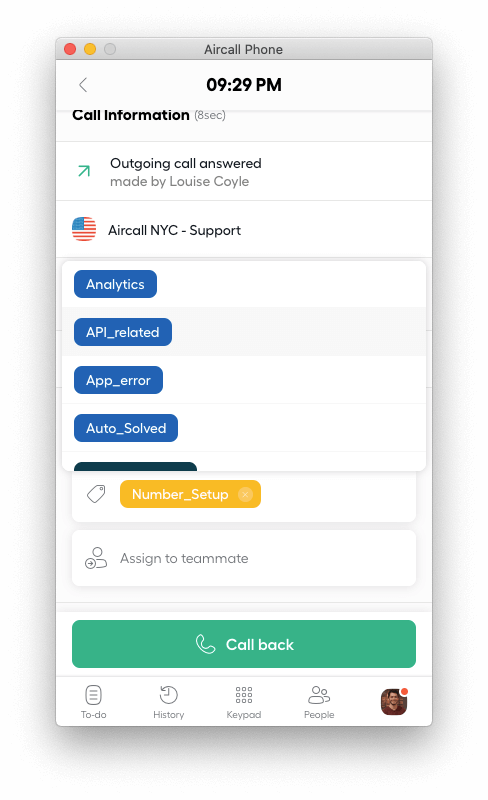
Tags are created in the Dashboard by Admins and calls can be tagged by Agent from the Phone.
A
call.tagged Webhook event will be sent every time a call is tagged. More info in the Webhooks section.
| code | description |
|---|---|
| 201 | Success. |
RequestPOST /v1/calls/:id/tags

{
 "tags": [545]
}
ResponseStatus: 201 Created
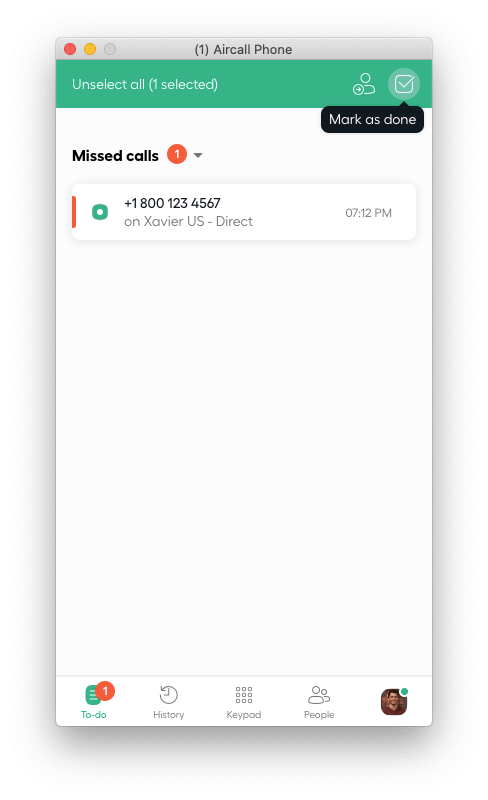
Missed calls non-archived will be displayed in the To-do view and can be marked as done (= archived).
A
call.archived Webhook event will be sent every time a call is archived. More info in the Webhooks section.
RequestPUT /v1/calls/:id/archive
ResponseStatus: 200 OK

{
 "call": {
 "id": 812,
 "sid": "CA1234567890",
 "direct_link": "https://api.aircall.io/v1/calls/812",
 "direction": "outbound",
 "status": "done",
 "missed_call_reason": null,
 "started_at": 1584998199,
 "answered_at": 1584998205,
 "ended_at": 1584998210,
 "duration": 11,
 "voicemail": null,
 "recording": null,
 "asset": null,
 "raw_digits": "+1 800-123-4567",
 "user": {
 "id": 456,
 "direct_link": "https://api.aircall.io/v1/users/456",
 "name": "John Doe",
 "email": "john.doe@aircall.io",
 "available": true,
 "availability_status": "available",
 "created_at": "2019-12-29T10:03:18.000Z",
 "time_zone": "America/New_York",
 "language": "en-US"
 },
 "contact": null,
 "archived": true,
 "assigned_to": null,
 "transferred_by": null,
 "transferred_to": null,
 "cost": "2.34",
 "number": {
 "id": 1234,
 "direct_link": "https://api.aircall.io/v1/numbers/1234",
 "name": "French Office",
 "digits": "+33 1 76 11 11 11",
 "created_at": "2020-01-02T11:41:01.000Z",
 "country": "FR",
 "time_zone": "Europe/Paris",
 "open": true,
 "availability_status": "custom",
 "is_ivr": true,
 "live_recording_activated": true,
 "priority": null,
 "messages": {
 ...
 }
 },
 "comments": [...],
 "tags": [...],
 "teams": [...]
 }
}
Archived calls can be placed back in the To-do view of the Phone app.
RequestPUT /v1/calls/:id/unarchive
ResponseStatus: 200 OK

{
 "call": {
 "id": 812,
 "sid": "CA1234567890",
 "direct_link": "https://api.aircall.io/v1/calls/812",
 "direction": "outbound",
 "status": "done",
 "missed_call_reason": null,
 "started_at": 1584998199,
 "answered_at": 1584998205,
 "ended_at": 1584998210,
 "duration": 11,
 "voicemail": null,
 "recording": null,
 "asset": null,
 "raw_digits": "+1 800-123-4567",
 "user": {
 "id": 456,
 "direct_link": "https://api.aircall.io/v1/users/456",
 "name": "John Doe",
 "email": "john.doe@aircall.io",
 "available": true,
 "availability_status": "available",
 "created_at": "2019-12-29T10:03:18.000Z",
 "time_zone": "America/New_York",
 "language": "en-US",
 },
 "contact": null,
 "archived": false,
 "assigned_to": null,
 "transferred_by": null,
 "transferred_to": null,
 "cost": "2.34",
 "number": {
 "id": 1234,
 "direct_link": "https://api.aircall.io/v1/numbers/1234",
 "name": "French Office",
 "digits": "+33 1 76 11 11 11",
 "created_at": "2020-01-02T11:41:01.000Z",
 "country": "FR",
 "time_zone": "Europe/Paris",
 "open": true,
 "availability_status": "custom",
 "is_ivr": true,
 "live_recording_activated": true,
 "priority": null,
 "messages": {
 ...
 }
 },
 "comments": [...],
 "tags": [...],
 "teams": [...]
 }
}
When live recording is active on a Call, it can be automatically paused via the Public API.
| code | description |
|---|---|
| 204 | Success. |
| 400 | Call has already ended. |
| 404 | Call not found. |
| 405 | Recording is disabled on the Call's number. |
RequestPOST /v1/calls/:id/pause_recording
ResponseStatus: 204 No Content
When live recording is active on a Call and has been paused, it can be automatically resumed via the Public API.
| code | description |
|---|---|
| 204 | Success. |
| 400 | Call has already ended. |
| 404 | Call not found. |
| 405 | Recording is disabled on the Call's Number. |
RequestPOST /v1/calls/:id/resume_recording
ResponseStatus: 204 No Content
Delete the recording of a specific Call. It takes between 10 and 15 minutes to delete a call recording from our servers.
Please note the recording can take up to 24 hours to be received. If it is not present, it will not be deleted. In this case retry the deletion later.
This action cannot be undone.
Important: If your account includes AI Assist or AI Assist Pro, deleting a call recording will also permanently delete the transcription and all AI-generated insights, including summaries, topics, action items, and sentiment analysis.
Check this endpoint to delete the voicemail of a Call.
RequestDELETE /v1/calls/:id/recording
ResponseStatus: 200 OK
Delete the voicemail of a specific Call. It can take up to 1 minute to delete a call voicemail from our servers.
Please note the voicemail can take up to 24 hours to be received. If it is not present, it will not be deleted. In this case retry the deletion later.
This action cannot be undone.
Check this endpoint to delete the live recording of a Call.
RequestDELETE /v1/calls/:id/voicemail
ResponseStatus: 200 OK
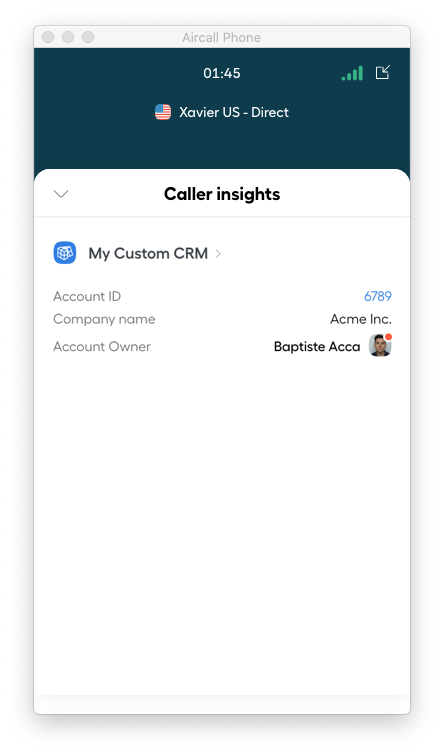
Insight Cards display custom data to Agents in their Phone apps during ongoing Calls.
Insight cards will only be seen on ongoing calls and are not stored after Calls are over.
Three types of content can be sent in an Insight Card:
title is a large text. It should describe the name of a custom app.shortText is a normal line in the Insight Card section.user is a user card in the Insight Card section displaying the name and availability of the user.
Please note Insight Card payload size should be less than 10KB.
More info on what Insight Cards are in our Knowledge Base.
title.title, shortText or user (check other tables).shortText.title, shortText or user (check other tables).text field can be preceded by a label if one is provided.user.title, shortText or user (check other tables).| code | description |
|---|---|
| 201 | Success. |
| 400 | Payload malformed or size greater than 10KB. |
| 404 | Call not found. |
RequestPOST /v1/calls/:id/insight_cards

{
 "contents": [
 {
 "type": "title",
 "text": "My Custom CRM",
 "link": "https://my-custom-crm.com"
 },
 {
 "type": "shortText",
 "label": "Account ID",
 "text": "6789",
 "link": "https://my-custom-crm.com/6789"
 },
 {
 "type": "shortText",
 "label": "Company name",
 "text": "Acme Inc."
 },
 {
 "type": "user",
 "label": "Account Owner",
 "user_id": 12345
 }
 ]
}
ResponseStatus: 201 Created
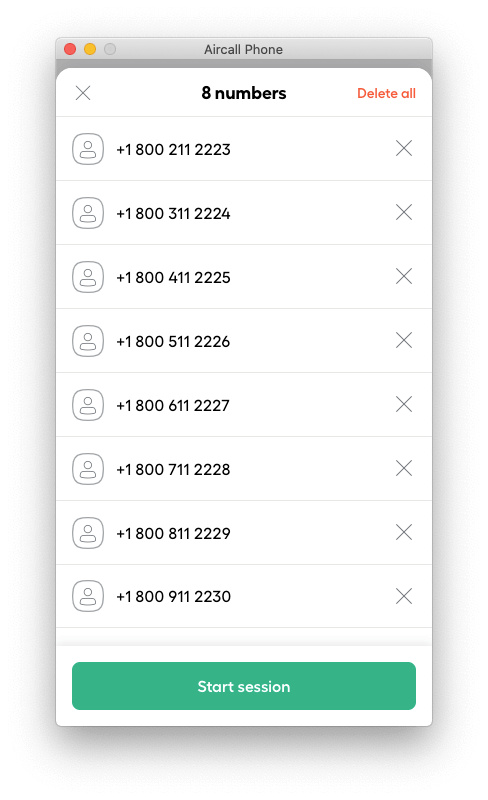
Dialer Campaigns refer to the Power Dialer feature. More info on how it works in our Knowledge Base.
Dialer Campaigns are composed of one or several phone numbers.
true if the number was called by the User.EndpointsGET /v1/users/:user_id/dialer_campaignRetrieve a Dialer Campaign POST /v1/users/:user_id/dialer_campaignCreate a Dialer Campaign DELETE /v1/users/:user_id/dialer_campaignDelete a Dialer Campaign GET /v1/users/:user_id/dialer_campaign/phone_numbersRetrieve phone numbers POST /v1/users/:user_id/dialer_campaign/phone_numbersAdd phone numbers DELETE /v1/users/:user_id/dialer_campaign/phone_numbers/:idDelete a phone number
A User can have only one active Dialer Campaign.
To list all the phone numbers associated to it, please refer to the Retrieve phone numbers endpoint.
| code | description |
|---|---|
| 404 | User has no active campaign. |
RequestGET /v1/users/:user_id/dialer_campaign
ResponseStatus: 200 OK

{
 "id": 75555,
 "number_id": null,
 "created_at": "2020-03-21T20:20:04.000Z"
}
Create an active Dialer Campaign for a User.
A User can have only one active Dialer Campaign.
| code | description |
|---|---|
| 422 | Must include at least one valid phone number. |
RequestPOST /v1/users/:user_id/dialer_campaign

{
 "phone_numbers": ["+19161112222", "+18001112222"]
}
ResponseStatus: 204 No Content
Dialer Campaign created by Agents or via the Public API can be deleted.
Phone numbers associated to it will be destroyed as well.
| code | description |
|---|---|
| 404 | User has no active campaign. |
RequestDELETE /v1/users/:user_id/dialer_campaign
ResponseStatus: 204 No Content
A Dialer Campaign is made of a list of phone numbers. Those lists can be retrieved thanks to the following request.
| code | description |
|---|---|
| 404 | User has no active campaign. |
RequestGET /v1/users/:user_id/dialer_campaign/phone_numbers
ResponseStatus: 200 OK

{
 "numbers": [
 {
 "id": 4671488,
 "number": "+18002112223",
 "called": false,
 "created_at": "2020-03-20T20:42:57.000Z"
 },
 {
 "id": 4671489,
 "number": "+18003112224",
 "called": false,
 "created_at": "2020-03-20T20:42:57.000Z"
 },
 {
 "id": 4671490,
 "number": "+18004112225",
 "called": false,
 "created_at": "2020-03-20T20:42:57.000Z"
 }
 ]
}
Phone numbers can be added to an Agent's active Dialer Campaign.
Those phone numbers will be automatically appended in the Phone app.
| code | description |
|---|---|
| 422 | Must include at least one valid phone number. |
RequestPOST /v1/users/:user_id/dialer_campaign/phone_numbers

{
 "phone_numbers": [
 "+19161112222",
 "+18001112222"
 ]
}
ResponseStatus: 204 No Content
Delete one phone number from a Dialer Campaign.
RequestDELETE /v1/users/:user_id/dialer_campaign/phone_numbers/:id
ResponseStatus: 204 No Content
Users (Admins) can buy Numbers from the Dashboard. They can then update the call distribution order, upload custom Music & Messages, enable or disable call recording...
null, 0 (no priority) or 1 (top priority). Default value is null
The messages object, present for each Number, represents the different audio files played during a call.
A custom file can be used for any of the following field by uploading it on a server with a public URL to it. Check our encoding recommendations on our Knowledge Base first!
Fetch all Numbers associated to a company and their information.
created_at. Can be asc or desc.asc
Pagination params can be used on this request.
RequestGET /v1/numbers
ResponseStatus: 200 OK

{
 "meta": {
 "count": 3,
 "total": 2,
 "current_page": 1,
 "per_page": 20,
 "next_page_link": null,
 "previous_page_link": null
 },
 "numbers": [
 {
 "id": 1234,
 "direct_link": "https://api.aircall.io/v1/numbers/1234",
 "name": "French Office",
 "digits": "+33 1 76 11 11 11",
 "created_at": "2020-01-02T11:41:01.000Z",
 "country": "FR",
 "time_zone": "Europe/Paris",
 "open": true,
 "availability_status": "custom",
 "is_ivr": true,
 "live_recording_activated": true,
 "priority": null,
 "messages": {
 "welcome": "https://example.com/welcome.mp3",
 "waiting": "https://example.com/waiting_music.mp3",
 "ivr": "https://example.com/ivr_message.mp3",
 "voicemail": "https://example.com/voicemail.mp3",
 "closed": "https://example.com/closed_message.mp3",
 "callback_later": "https://example.com/callback_later.mp3",
 "unanswered_call": "https://example.com/unanswered_call.mp3",
 "after_hours": "https://example.com/closed_message.mp3",
 "ringing_tone": "https://example.com/waiting_music.mp3"
 }
 },
 {
 "id": 2345,
 "direct_link": "https://api.aircall.io/v1/numbers/2345",
 "name": "UK office",
 "digits": "+44 20 0000 0000",
 "created_at": "2020-01-04T19:28:58.000Z",
 "country": "GB",
 "time_zone": "Europe/London",
 "open": true,
 "availability_status": "custom",
 "is_ivr": true,
 "live_recording_activated": false,
 "priority": null,
 "messages": {
 "welcome": "https://example.com/welcome.mp3",
 "waiting": "https://example.com/waiting_music.mp3",
 "ivr": "https://example.com/ivr_message.mp3",
 "voicemail": "https://example.com/voicemail.mp3",
 "closed": "https://example.com/closed_message.mp3",
 "callback_later": "https://example.com/callback_later.mp3",
 "unanswered_call": "https://example.com/unanswered_call.mp3",
 "after_hours": "https://example.com/closed_message.mp3",
 "ringing_tone": "https://example.com/waiting_music.mp3"
 }
 }
 ]
}
Retrieve details of a specific Number.
RequestGET /v1/numbers/:id
ResponseStatus: 200 OK

{
 "number": {
 "id": 1234,
 "direct_link": "https://api.aircall.io/v1/numbers/1234",
 "name": "French Office",
 "digits": "+33 1 76 11 11 11",
 "created_at": "2020-01-02T11:41:01.000Z",
 "country": "FR",
 "time_zone": "Europe/Paris",
 "open": true,
 "availability_status": "custom",
 "is_ivr": true,
 "live_recording_activated": true,
 "priority": null,
 "messages": {
 "welcome": "https://example.com/welcome.mp3",
 "waiting": "https://example.com/waiting_music.mp3",
 "ivr": "https://example.com/ivr_message.mp3",
 "voicemail": "https://example.com/voicemail.mp3",
 "closed": "https://example.com/closed_message.mp3",
 "callback_later": "https://example.com/callback_later.mp3",
 "unanswered_call": "https://example.com/unanswered_call.mp3",
 "after_hours": "https://example.com/closed_message.mp3",
 "ringing_tone": "https://example.com/waiting_music.mp3"
 },
 "users": [
 {
 "id": 456,
 "direct_link": "https://api.aircall.io/v1/users/456",
 "name": "John Doe",
 "email": "john.doe@aircall.io",
 "available": true,
 "availability_status": "available",
 "created_at": "2019-12-29T10:03:18.000Z",
 "time_zone": "America/New_York"
 }
 ]
 }
}
Updates a specific Number. Response will be the updated Number.
null.true if you want to enable call recording on the specified Number. It will enable both inbound AND outbound at the same time.null, 0 (no priority) or 1 (top priority). Default value is null
RequestPUT /v1/numbers/:id

{
 "name": "French Office UPDATED"
}
ResponseStatus: 200 OK

{
 "number": {
 "id": 1234,
 "direct_link": "https://api.aircall.io/v1/numbers/1234",
 "name": "French Office UPDATED",
 "digits": "+33 1 76 11 11 11",
 "created_at": "2020-01-02T11:41:01.000Z",
 "country": "FR",
 "time_zone": "Europe/Paris",
 "open": true,
 "availability_status": "custom",
 "is_ivr": true,
 "live_recording_activated": true,
 "priority": null,
 "messages": {
 "welcome": "https://example.com/welcome.mp3",
 "waiting": "https://example.com/waiting_music.mp3",
 "ivr": "https://example.com/ivr_message.mp3",
 "voicemail": "https://example.com/voicemail.mp3",
 "closed": "https://example.com/closed_message.mp3",
 "callback_later": "https://example.com/callback_later.mp3",
 "unanswered_call": "https://example.com/unanswered_call.mp3",
 "after_hours": "https://example.com/closed_message.mp3",
 "ringing_tone": "https://example.com/waiting_music.mp3"
 },
 "users": [
 {
 "id": 3456,
 "direct_link": "https://api.aircall.io/v1/users/3456",
 "created_at": "2019-12-29T10:03:18.000Z",
 "name": "John Doe",
 "email": "john.doe@aircall.io",
 "available": true,
 "availability_status": "available",
 "time_zone": "America/New_York"
 }
 ]
 }
}
A Number's Music & Messages URLs can be updated by using the same request as to update a Number. Response will be the targeted Number, with updated messages section.
messages object format below.
For more information on each
messages field, please refer to the Number object overview.
RequestPUT /v1/numbers/:id

{
 "messages": {
 "welcome": "https://example.com/welcome_NEW.mp3"
 }
}
ResponseStatus: 200 OK

{
 "number": {
 "id": 1234,
 "direct_link": "https://api.aircall.io/v1/numbers/1234",
 "name": "French Office UPDATED",
 "digits": "+33 1 76 11 11 11",
 "created_at": "2020-01-02T11:41:01.000Z",
 "country": "FR",
 "time_zone": "Europe/Paris",
 "open": true,
 "availability_status": "custom",
 "is_ivr": true,
 "live_recording_activated": true,
 "priority": null,
 "messages": {
 "welcome": "https://example.com/welcome.mp3",
 "waiting": "https://example.com/waiting_music.mp3",
 "ivr": "https://example.com/ivr_message.mp3",
 "voicemail": "https://example.com/voicemail.mp3",
 "closed": "https://example.com/closed_message.mp3",
 "callback_later": "https://example.com/callback_later.mp3",
 "unanswered_call": "https://example.com/unanswered_call.mp3",
 "after_hours": "https://example.com/closed_message.mp3",
 "ringing_tone": "https://example.com/waiting_music.mp3"
 },
 "users": [
 ...
 ]
 }
}
Fetch compliance status for:
for a specific Number.
Send message function & number configuration for such use case can be found under “Message” section here.
RequestGET /v1/numbers/:id/registration_status
ResponseStatus: 200 OK

{
 "status": "approved"
 "updatedAt": "2024-05-07T10:42:55.676Z",
}
The Conversation Intelligence object is a representation of different AI-generated entities such as Key Topics, Call Transcription, Sentiment Analysis etc.
Conversation Intelligence object is not updatable nor destroyable via Aircall Public API.
The Conversation Intelligence object and APIs can only be retrieved if a company has signed up for Aircall AI Package with AI Assist or AI Assist Pro.
Please note the attributes of Conversation Intelligence Object are different for Real-time Transcription webhook event. Please view the attribute lists below.
Attributes list for AI entities (Transcription, Sentiment, Topics, Summary, Action Items, Playbook Results)
id and call_id will have same value
Attributes list for realtime_transcription.utterances_received webhook event
67567). This is an internal ID, not a phone number string like +1234567890
inbound or outbound
internal or external
participant_type is internal
Attributes list for Summary Template Result (used in custom_summary.result_created and custom_summary.result_updated webhook events)
The
updated_at and updated_by fields are only present when a result has been manually updated after its initial creation. This is the key difference between custom_summary.result_created and custom_summary.result_updated webhook events.
The Call Evaluations object is a subset of the Conversation Intelligence Object that represents quality assurance evaluation data for calls. It contains scoring information, feedback, and detailed question-level assessments.
Call Evaluations object is not updatable nor destroyable via Aircall Public API.
The Call Evaluations object and APIs can only be retrieved if a company has signed up for Aircall AI Package with AI Assist or AI Assist Pro.
Please note the attributes of Call Evaluations Object are different between the API endpoint and webhook events. The retrieve call evaluations endpoint returns the full object, while the call_evaluation.created and call_evaluation.updated webhook events return a simplified subset.
Attributes list for Call Evaluations Object
null if AI-generatednull if AI-generated or never updatednull if not yet reviewednull if AI-generated
Attributes list for Evaluation Object (within the
evaluations array, only available for retrieve call evaluations)
name and description
null if AI-generatedscore_points, total_points, and normalized_score
Attributes list for Category Object (within the
categories array)
Attributes list for Question Object (within the
questions array)
BINARY or RATING
YES/NO/N/A for BINARY; EXCELLENT/GOOD/FAIR/POOR/VERY_POOR/N/A for RATING.Use this endpoint to retrieve a transcription after a call is ended.
To get transcription for a call in real time, we recommend you to subscribe to transcription.created event to be notified about availability of Transcription for a call. This can be useful if you want to be notified about when transcription is generated and will like to use API to retrieve and store it. Also, please note Transcription API doesn't contains any info related to the Calls. Please use Calls APIs to retrieve call details.
Retrieval of realtime transcriptions requires the AI Assist Pro package to be enabled for your company. Only calls with available transcriptions will return data. To get realtime transcription events, subscribe to realtime_transcription.utterances_received event.
async or realtime.| code | description |
|---|---|
| 200 | Success. |
| 400 | Validation error: invalid call_id. |
| 403 | Forbidden access: company is not active. |
| 403 | Forbidden access: company is not verified. |
| 404 | Transcription not found. |
| 500 | Internal server error: unknown error. |
RequestGET /v1/calls/:call_id/transcription
ResponseStatus: 200 OK

{
 "transcription": {
 "id": 68271,
 "call_id": 5237603,
 "call_created_at": "2024-07-26T13:30:54.000Z",
 "type": "call",
 "content": {
 "language": "en",
 "utterances": [
 {
 "start_time": 12.54,
 "end_time": 13.8,
 "text": "Okay,",
 "participant_type": "external",
 "phone_number": "+33679198915"
 },
 {
 "start_time": 238.08,
 "end_time": 239.48,
 "text": "Okay, I guess that's enough.",
 "participant_type": "internal",
 "user_id": 123
 }
 ]
 }
 }
}
realtime_transcription endpoint will be deprecated soon. Please migrate to transcription endpoint.
Use this endpoint to retrieve a realtime transcription of a specific call, including transcribed text from each participant with timestamps and associated metadata.
This endpoint requires the AI Assist Pro package to be enabled for your company. Only calls with available transcriptions will return data. Please note Realtime Transcription API doesn't contain any info related to the Calls. Please use Calls APIs to retrieve call details.
| code | description |
|---|---|
| 200 | Success. |
| 400 | Validation error: invalid call_id. |
| 403 | Forbidden access: company is not active. |
| 403 | Forbidden access: company is not verified. |
| 404 | Not found error: call_id not found. |
| 500 | Internal server error: unknown error. |
RequestGET /v1/calls/:call_id/realtime_transcription
ResponseStatus: 200 OK

{
 "call_id": 5237603,
 "call_uuid": "a1b2c3d4-e5f6-7890-abcd-ef1234567890",
 "content": {
 "language": "en-US",
 "utterances": [
 {
 "duration_ms": 3500,
 "participant_type": "internal",
 "text": "Hello, thank you for calling. How can I help you today?",
 "timestamp": 1633024800000,
 "user_id": 12345
 },
 {
 "duration_ms": 4200,
 "participant_type": "external",
 "text": "Hi, I'm calling about my recent order. It hasn't arrived yet.",
 "timestamp": 1633024803500,
 },
 {
 "duration_ms": 2800,
 "participant_type": "internal",
 "text": "I understand. Let me check that for you right away.",
 "timestamp": 1633024807700,
 "user_id": 12345
 }
 ]
 }
}
Use this endpoint to retrieve sentiments.
| code | description |
|---|---|
| 200 | Success. |
| 400 | Validation error: invalid call_id. |
| 403 | Forbidden access: company is not active. |
| 403 | Forbidden access: company is not verified. |
| 500 | Internal server error: unknown error. |
RequestGET /v1/calls/:call_id/sentiments
ResponseStatus: 200 OK

{
 "sentiment": {
 "id": 5237603,
 "call_id": 5237603,
 "participants": [
 {
 "phone_number": "+33679198915",
 "value": "POSITIVE",
 "type": "external"
 }
 ]
 }
}
Use this endpoint to retrieve topics from a call.
| code | description |
|---|---|
| 200 | Success. |
| 400 | Validation error: invalid call_id. |
| 403 | Forbidden access: company is not active. |
| 403 | Forbidden access: company is not verified. |
| 500 | Internal server error: unknown error. |
RequestGET /v1/calls/:call_id/topics
ResponseStatus: 200 OK

{
 "topic": {
 "id": 786,
 "call_id": 123,
 "created_at": "2024-08-27T10:54:16.000Z",
 "content": [
 "payment",
 "billing"
 ]
 }
}
Use this endpoint to retrieve summary from a call.
| code | description |
|---|---|
| 200 | Success. |
| 400 | Validation error: invalid call_id. |
| 403 | Forbidden access: company is not active. |
| 403 | Forbidden access: company is not verified. |
| 500 | Internal server error: unknown error. |
RequestGET /v1/calls/:call_id/summary
ResponseStatus: 200 OK

{
 "summary": {
 "id": 974,
 "call_id": 786,
 "created_at": "2024-08-27T10:54:16.000Z",
 "content": "Short summary of the call"
 }
}
Use this endpoint to retrieve the custom summary result for a specific call.
This endpoint requires the AI Assist Pro package to be enabled for your company.
| code | description |
|---|---|
| 200 | Success. |
| 400 | Validation error: invalid call_id. |
| 403 | Forbidden access: company is not active. |
| 403 | Forbidden access: company is not verified. |
| 404 | Not found error: call_id not found. |
| 500 | Internal server error: unknown error. |
RequestGET /v1/calls/:call_id/custom_summary_result
ResponseStatus: 200 OK

{
 "id": 999,
 "custom_summary": {
 "name": "BANT"
 },
 "language": "en",
 "call_id": "12345",
 "number_id": 789,
 "summary_template_results": [
 {
 "name": "Budget",
 "type": "OPTIONS",
 "content": "content",
 "ai_generated": true,
 "created_at": "2024-08-28T12:49:12.000Z"
 },
 {
 "name": "Authority",
 "type": "DISCOVERY",
 "content": "content",
 "ai_generated": false,
 "created_at": "2024-08-28T12:49:12.000Z",
 "updated_at": "2025-08-28T12:49:12.000Z",
 "updated_by": 123
 }
 ]
}
Use this endpoint to get action items from a call.
| code | description |
|---|---|
| 200 | Success. |
| 400 | Validation error: invalid call_id. |
| 403 | Forbidden access: company is not active. |
| 403 | Forbidden access: company is not verified. |
| 404 | Not found error: call_id not found. |
| 500 | Internal server error: unknown error. |
RequestGET /v1/calls/:call_id/action_items
ResponseStatus: 200 OK

{
 "call_id": 123,
 "action_items: [{
 "ai_generated": false,
 "content": "Send email to customer next week with updated offer details.",
 "created_at": "2024-08-28T12:32:16.000Z",
 "created_by": 74550,
 "id": 1,
 "updated_at": "2024-08-28T12:49:12.000Z",
 "updated_by": 74550
 }, {
 "ai_generated": true,
 "content": "Schedule meeting for next monday to discuss final agreement.",
 "created_at": "2024-08-27T10:54:16.000Z",
 "id": 2
 }]
}
Use this endpoint to get playbook result from a call. You'll need to subscribe to AI Assist Pro to generate and to call this endpoint.
true, adds playbook details in response.| code | description |
|---|---|
| 200 | Success. |
| 400 | Validation error: invalid call_id. |
| 403 | Forbidden access: company is not active. |
| 403 | Forbidden access: company is not verified. |
| 404 | Not found error: call_id not found. |
| 500 | Internal server error: unknown error. |
RequestGET /v1/calls/:call_id/playbook_result
ResponseStatus: 200 OK

{
 "id": 1,
 "call_id": 974,
 "user_id": 786,
 "number_id": 35550,
 "adherence_score": 0,
 "playbook_result_topics": [
 {
 "name": "Budget",
 "result": "content"
 },
 {
 "name": "Authority",
 "result": "content"
 },
 {
 "name": "Need",
 "result": "content"
 },
 {
 "name": "Timing",
 "result": "content"
 }
 ],
 "created_at": 1753095768.
 "playbook": {
 "id": 2,
 "name": "BANT",
 "language": "en"
 }
}
Use this endpoint to retrieve the evaluations for a specific call.
This endpoint requires the AI Assist Pro or AI Assist package to be enabled for your company.
This endpoint returns the Call Evaluations Object. Please refer to the Call Evaluations Object definition for full attribute details.
| code | description |
|---|---|
| 200 | Success. |
| 400 | Validation error: invalid call_id. |
| 401 | Unauthorized access: invalid API Key. |
| 403 | Forbidden access: company cannot access this feature. |
| 404 | Not found error: call_id not found. |
| 500 | Internal server error: unknown error. |
RequestGET /v1/calls/:call_id/evaluations
ResponseStatus: 200 OK

{
 "id": 456,
 "call_id": 456,
 "ai_generated": false,
 "created_at": "2025-11-18T10:00:00.000Z",
 "updated_at": "2025-11-18T10:30:00.000Z",
 "created_by": 101,
 "updated_by": 102,
 "reviewed_at": "2025-11-18T10:05:00.000Z",
 "evaluations": [
 {
 "scorecard": {
 "name": "Customer Service Evaluation",
 "description": "Standard customer service evaluation scorecard"
 },
 "feedback": "Great job handling the customer!",
 "reviewee_user_id": 456,
 "reviewer_user_id": 789,
 "score": {
 "score_points": 18,
 "total_points": 20,
 "normalized_score": 90
 },
 "categories": [
 {
 "name": "Communication Skills",
 "order": 1,
 "score": {
 "score_points": 18,
 "total_points": 20,
 "normalized_score": 90
 },
 "questions": [
 {
 "text": "Did the agent greet the caller?",
 "type": "BINARY",
 "order": 1,
 "strictness": 1,
 "ai_enabled": true,
 "answer": "YES",
 "score": {
 "score_points": 10,
 "total_points": 10,
 "normalized_score": 100
 },
 "feedback": "Agent greeted warmly"
 },
 {
 "text": "How was the agent's tone?",
 "type": "RATING",
 "order": 2,
 "strictness": 2,
 "ai_enabled": false,
 "answer": "GOOD",
 "score": {
 "score_points": 8,
 "total_points": 10,
 "normalized_score": 80
 },
 "feedback": "Tone was professional throughout"
 }
 ]
 }
 ]
 }
 ]
}
The Content object is a representation of the content of Conversation Intelligence
Content are not updatable nor destroyable via Aircall Public API.
Content information is only present in transcriptions, summaries, topics, action items and it can be accessed inside the conversation intelligence object
Please note the attributes of Content Object are different for each type of Conversation Intelligence.
Attributes list for Transcription Object
en, en-US, en-GB, en-AU, fr-FR, fr, es-ES, es, de-DE, de, nl-NL, nl, it-IT, it
external or internal
internal participantexternal participant
Attributes list for Summary Object
Attributes list for Topics Object
Attributes list for Action Items Object
Messages including SMS, MMS, and WhatsApp are an essential part of how Aircall users interact with the product. Our mission is to make the communication experience as delightful as possible!
There are two types of messages:
Message objects are neither updatable nor destroyable via Aircall Public API.
The attributes specific for whatsapp won’t be present if this is an SMS or MMS.
string , file_type stringand presigned_url string fields are also required.EndpointsPOST /v1/numbers/:id/messages/configurationCreate Number Configuration GET /v1/numbers/:id/messages/configurationFetch Number Configuration DELETE /v1/numbers/:id/messages/configurationDelete Number Configuration POST /v1/numbers/:id/messages/native/sendSend Message in agent conversation POST /v1/numbers/:id/messages/sendSend Message Skipping Aircall Inbox POST /v1/numbers/:id/messages/group/native/sendSend Group Message in agent conversation POST /v1/numbers/:id/messages/group/sendSend Group Message Skipping Aircall Inbox
Create or update the number configuration to allow a number to use the Send Message Skipping Aircall Inbox or Send WhatsApp Message Skipping Aircall Inbox endpoints.
Use the type field to specify whether the number is being configured for SMS (sms the default) or WhatsApp (whatsapp).
Once numbers are configured, they won't be able to send or receive messages via Aircall apps.
Numbers meant to be used with Send message in agent conversation or Send WhatsApp Message in Agent Conversation do not require to be configured.
For US long codes and US/CA toll free lines, numbers must be registered before SMS configuration. See here to check registration status.
Set a callbackURL that will be used not only to retrieve the status of messages sent, to get the messages received. Webhooks to retrieve messages activity expose messages sent and received with numbers that are active using the configuration exposed in this section. See Message Callbacks for the full payload structure and examples.
sms, whatsapp. Defaults to sms.Response type values
| type | description |
|---|---|
Public Api |
The number is configured for SMS messaging. |
WhatsApp Public Api |
The number is configured for WhatsApp messaging. |
| code | description |
|---|---|
| 200 | Success. |
| 400 | Validation error: the line is not covered. |
| 400 | Validation error: IVR lines are not supported. |
| 400 | Validation error: line is not SMS capable. |
| 403 | Forbidden access: line does not belong to the company. |
| 403 | Forbidden access: company is not active. |
| 403 | Forbidden access: company is not verified. |
| 403 | Forbidden access: line does not have WhatsApp capability. |
RequestPOST /v1/numbers/:id/messages/configuration

{
 "callbackUrl": "yourCallbackUrl",
 "type": "sms"
}
ResponseStatus: 200 OK

{
 "token": "token",
 "callbackUrl": "yourCallbackUrl",
 "type": "Public Api"
}
Fetch settings associated to a number Numbers and their information for Aircall Messaging public api.
| code | description |
|---|---|
| 200 | Success. |
| 403 | Forbidden access: line does not belong to the company. |
| 404 | Validation Error: Line not configured for Public Api. |
RequestGET /v1/numbers/:id/messages/configuration
ResponseStatus: 200 OK

{
 "token": "token",
 "callbackUrl": "yourCallbackUrl",
 "type": "PublicApi",
}
Delete configuration associated to a number Numbers for Aircall Messaging public api.
| code | description |
|---|---|
| 204 | Success. |
| 403 | Forbidden access: line does not belong to the company. |
| 404 | Validation Error: Line not configured for Public Api. |
RequestDELETE /v1/numbers/:id/messages/configuration
ResponseStatus: 204 No Content
When a number is configured using the Create Number Configuration endpoint with a callbackUrl, Aircall will POST callback payloads to that URL for two events:
message.received — an inbound message arrived on the number.message.updated — the delivery status of an outbound message changed.
Callbacks are distinct from Aircall Webhooks. Callbacks are sent to the URL configured via the Create Number Configuration endpoint.
Delivery semantics
Aircall expects a 2xx HTTP response within 5 seconds. There is no automatic retry on failure. The token field in the payload can be used to verify the request comes from Aircall.
Callback payload envelope
| attributes-field | type | description |
|---|---|---|
| resource | String | Always "message". |
| event_name | String | Either "message.received" or "message.updated". |
| timestamp | Integer | Unix timestamp of the event in milliseconds. |
| token | String | The token returned when the number configuration was created. Use it to authenticate incoming requests. |
| data | Object | A Message object plus the additional fields below. |
Additional fields in data
The data object contains the standard Message attributes plus the following callback-specific ones:
"Code <code> (<description>)".message.updated callbacks.whatsapp object below.whatsapp objectWhen the message is a WhatsApp message, the data object includes a whatsapp field with the following attributes:
"text", "image", "location", "button").latitude (Number), longitude (Number), and optionally label (String) and address (String).text (String) and payload (String).external_user object below.external_user objectWhen the contact has a WhatsApp Username, the whatsapp object includes an external_user field with the following attributes:
When a WhatsApp user has chosen to hide their phone number, the raw_digits field will contain their BSUID instead of a valid phone number. Use the bsuid field from the external_user object as the stable identifier for that contact in this case.
| attributes-field | type | description |
|---|---|---|
| bsuid | String | The WhatsApp Business Solution User ID (BSUID), a stable identifier for the contact. |
| username | String | The contact's WhatsApp username, or null. |
| profile_name | String | The contact's WhatsApp profile display name, or null. |
message.received callbackSent when an inbound message arrives on the configured number. Applies to SMS, MMS, and WhatsApp.
For WhatsApp messages, the data object includes a whatsapp field.
Payload{
 "resource": "message",
 "event_name": "message.received",
 "timestamp": 1722317361216,
 "token": "your_token",
 "data": {
 "id": "wamid.xxxxxxxxxxxxxxxxxxxxxxxxxxxxxxxx",
 "status": "received",
 "direction": "inbound",
 "raw_digits": "+13001234567",
 "body": "Hello, I need help with my order.",
 "media_url": [],
 "direct_link": "https://api.aircall.io/v1/numbers/123/messages/wamid.xxxxxxxxxxxxxxxxxxxxxxxxxxxxxxxx",
 "created_at": 1722317361216,
 "sent_at": 1722317361216,
 "updated_at": 1722317361216,
 "number": {
 "id": 123,
 "direct_link": "https://api.aircall.io/v1/numbers/123",
 "name": "Support Line",
 "digits": "+18005550100",
 "country": "US",
 "time_zone": "America/New_York",
 "open": true,
 "created_at": "2023-01-15T10:00:00.000Z"
 },
 "whatsapp": {
 "type": "text",
 "external_user": {
 "bsuid": "US.abc123def456",
 "username": "john.doe",
 "profile_name": "John Doe"
 }
 }
 }
}
message.updated callbackSent when the delivery status of an outbound message changes. Applies to SMS and WhatsApp.
For failed deliveries, the data object includes an error field with a description in the format "Code <code> (<description>)".
Payload{
 "resource": "message",
 "event_name": "message.updated",
 "timestamp": 1722317400000,
 "token": "your_token",
 "data": {
 "id": "SMxxxxxxxxxxxxxxxxxxxxxxxxxxxxxxxx",
 "status": "delivered",
 "direction": "outbound",
 "raw_digits": "+13001234567",
 "body": "Your appointment is confirmed for tomorrow at 10am.",
 "direct_link": "https://api.aircall.io/v1/numbers/123/messages/SMxxxxxxxxxxxxxxxxxxxxxxxxxxxxxxxx",
 "created_at": 1722317400000,
 "sent_at": 1722317400000,
 "updated_at": 1722317400000,
 "number": {
 "id": 123,
 "direct_link": "https://api.aircall.io/v1/numbers/123",
 "name": "Support Line",
 "digits": "+18005550100",
 "country": "US",
 "time_zone": "America/New_York",
 "open": true,
 "created_at": "2023-01-15T10:00:00.000Z"
 }
 }
}
Send a text message from an Aircall SMS-capable number that will be stored and added in the agents’ conversation. If no conversation with the recipient already exists, it will be created.
Any agent added to this number will be able to see the messages sent from this endpoint in their Aircall apps and they will be able to continue the conversation with the recipients.
Any number configured for use with Send Message Skipping Aircall Inbox won’t be able to use this endpoint. The configuration would need to be deleted first.
This endpoint is not meant for high volume use cases or non-conversational use cases. For such use cases use Send Message Skipping Aircall Inbox. Too many messages sent via this endpoint will disrupt agents work within the Aircall apps.
| code | description |
|---|---|
| 200 | Success. |
| 400 | Validation error: the line is not covered. |
| 400 | Validation error: the carrier line is not supported. |
| 400 | Validation error: IVR lines are not supported. |
| 400 | Validation error: line is not SMS capable. |
| 400 | Validation error: the phone number is not sms capable. |
| 400 | Validation error: the conversation between this line and this external number is not allowed. |
| 400 | Validation error: the message does not have content. |
| 400 | Validation error: message length exceeds the maximum of 1600 characters. |
| 400 | Validation error: the receiver should be different from the sender. |
| 403 | Forbidden access: messaging public api is not enabled for this company. |
| 403 | Forbidden access: line does not belong to the company. |
| 403 | Forbidden access: public api sms is not enabled for this line. |
| 403 | Forbidden Exception: the line exceeded number of messages limit. |
| 403 | Forbidden Exception: the line exceeded number of message limit for company on trial. |
| 403 | Forbidden access: company is not active. |
| 403 | Forbidden access: company is not verified. |
| 500 | Outbound message xxxx not sent. |
RequestPOST /v1/numbers/:id/messages/native/send

{
 "to": "+130...",
 "body": "text you want to send",
}
ResponseStatus: 200 OK

{
 "id": "messageId",
 "status": "pending",
 "direct_link": "https://api.aircall.io/v1/numbers/:lineId/messages/:messageId",
 "direction": "outbound",
 "created_at": 1722317361216,
 "sent_at": 1722317361216,
 "updated_at": 1722317361216,
 "raw_digits": "+130...",
 "media_url": ["", ""],
 "body": "text you want to send",
 ...number object,
}
Send a text message or a multimedia message from a public api configured number.
Numbers not configured won't be able to send messages via API. Number can be configured from here.
| code | description |
|---|---|
| 200 | Success. |
| 400 | Validation error: the line is not covered. |
| 400 | Validation error: the carrier line is not supported. |
| 400 | Validation error: IVR lines are not supported. |
| 400 | Validation error: line is not SMS capable. |
| 400 | Validation error: the phone number is not sms capable. |
| 400 | Validation error: the conversation between this line and this external number is not allowed. |
| 400 | Validation error: the message does not have content. |
| 400 | Validation error: message length exceeds the maximum of 1600 characters. |
| 400 | Validation error: the receiver should be different from the sender. |
| 403 | Forbidden access: messaging public api is not enabled for this company. |
| 403 | Forbidden access: line does not belong to the company. |
| 403 | Forbidden access: public api sms is not enabled for this line. |
| 403 | Forbidden Exception: the line exceeded number of messages limit. |
| 403 | Forbidden Exception: the line exceeded number of message limit for company on trial. |
| 403 | Forbidden access: company is not active. |
| 403 | Forbidden access: company is not verified. |
| 500 | Outbound message xxxx not sent. |
RequestPOST /v1/numbers/:id/messages/send

{
 "to": "+130...",
 "body": "text you want to send",
 "mediaUrl": ["", ""]
}
ResponseStatus: 200 OK

{
 "id": "messageId",
 "status": "pending",
 "direct_link": "https://api.aircall.io/v1/numbers/:lineId/messages/:messageId",
 "direction": "outbound",
 "created_at": 1722317361216,
 "sent_at": 1722317361216,
 "updated_at": 1722317361216,
 "raw_digits": "+130...",
 "media_url": ["", ""],
 "body": "text you want to send",
 ...number object
}
Send a group text message from an Aircall SMS-capable number that will be stored and added in the group conversation. If no group conversation with the recipients already exists, it will be created.
Any agent added to this number will be able to see the messages sent from this endpoint in their Aircall apps and they will be able to continue the conversation with the recipients.
Any number configured for use with Send Group Message Skipping Aircall Inbox won’t be able to use this endpoint. The configuration would need to be deleted first.
Group messaging supports up to 10 participants total per group conversation, including the sender.
This endpoint is not meant for high volume use cases or non-conversational use cases. For such use cases use Send Group Message Skipping Aircall Inbox. Too many messages sent via this endpoint will disrupt agents work within the Aircall apps.
| code | description |
|---|---|
| 200 | Success. |
| 400 | Validation error: the line is not covered. |
| 400 | Validation error: the carrier line is not supported. |
| 400 | Validation error: IVR lines are not supported. |
| 400 | Validation error: line is not SMS capable. |
| 400 | Validation error: the phone number is not sms capable. |
| 400 | Validation error: the conversation between this line and this external number is not allowed. |
| 400 | Validation error: the message does not have content. |
| 400 | Validation error: message length exceeds the maximum of 1600 characters. |
| 400 | Validation error: the receiver should be different from the sender. |
| 403 | Forbidden access: messaging public api is not enabled for this company. |
| 403 | Forbidden access: line does not belong to the company. |
| 403 | Forbidden access: public api sms is not enabled for this line. |
| 403 | Forbidden Exception: the line exceeded number of messages limit. |
| 403 | Forbidden Exception: the line exceeded number of message limit for company on trial. |
| 403 | Forbidden access: company is not active. |
| 403 | Forbidden access: company is not verified. |
| 500 | Outbound message xxxx not sent. |
RequestPOST /v1/numbers/:id/messages/group/native/send

{
 "body": "text you want to send",
 "participants":["+130...","+130...."]
}
ResponseStatus: 200 OK

{
 "group_message_id":"8f3c2c4e-9c6c-4c8e-9b4a-2c1f7e3d9c52",
 "status": "pending",
 "direct_link": "https://api.aircall.io/v1/numbers/:lineId/messages/:messageId",
 "direction": "outbound",
 "created_at": 1722317361216,
 "sent_at": 1722317361216,
 "group_conversation_id":"c4b8c1c0-0c6e-4c3f-9c1c-5c2f8e7a91d4",
 "updated_at": 1722317361216,
 "participants":["+130...","+130..."]
 "media_url": [],
 "body": "text you want to send",
 ...number object,
}
Send a group message with text or multimedia from a public api configured number.
Numbers not configured won't be able to send group conversations via API. Number can be configured from here.
This endpoint does not support sending both media and a text body in the same request; use one or the other.
Group messaging supports up to 10 participants total per group conversation, including the sender.
| code | description |
|---|---|
| 200 | Success. |
| 400 | Validation error: the line is not covered. |
| 400 | Validation error: the carrier line is not supported. |
| 400 | Validation error: IVR lines are not supported. |
| 400 | Validation error: line is not SMS capable. |
| 400 | Validation error: the phone number is not sms capable. |
| 400 | Validation error: the conversation between this line and this external number is not allowed. |
| 400 | Validation error: the message does not have content. |
| 400 | Validation error: message length exceeds the maximum of 1600 characters. |
| 400 | Validation error: the receiver should be different from the sender. |
| 403 | Forbidden access: messaging public api is not enabled for this company. |
| 403 | Forbidden access: line does not belong to the company. |
| 403 | Forbidden access: public api sms is not enabled for this line. |
| 403 | Forbidden Exception: the line exceeded number of messages limit. |
| 403 | Forbidden Exception: the line exceeded number of message limit for company on trial. |
| 403 | Forbidden access: company is not active. |
| 403 | Forbidden access: company is not verified. |
| 500 | Outbound group conversation xxxx not sent. |
RequestPOST /v1/numbers/:id/messages/group/send

{
 "participants":["+130...","+130...."]
 "body": "text you want to send",
}

POST /v1/numbers/:id/messages/group/send

{
 "participants":["+130...","+130...."]
 "mediaUrl": ["", ""]
}
ResponseStatus: 200 OK

{
 "group_message_id":"8f3c2c4e-9c6c-4c8e-9b4a-2c1f7e3d9c52",
 "status": "pending",
 "direct_link": "https://api.aircall.io/v1/numbers/:lineId/messages/:messageId",
 "direction": "outbound",
 "created_at": 1722317361216,
 "sent_at": 1722317361216,
 "updated_at": 1722317361216,
 "participants":["+130...","+130..."]
 "group_conversation_id":"c4b8c1c0-0c6e-4c3f-9c1c-5c2f8e7a91d4",
 "media_url": ["", ""],
 "body": "text you want to send",
 ...number object
}
Send a WhatsApp message from an Aircall WhatsApp-capable number that will be stored and visible in the agents' conversation inbox. If no conversation with the recipient already exists, it will be created.
Any agent added to this number will be able to see the messages sent from this endpoint in their Aircall apps and will be able to continue the conversation with the recipients.
This endpoint supports text messages and template messages.
This endpoint is not meant for high-volume or non-conversational use cases. For such use cases use Send WhatsApp Message Skipping Aircall Inbox. Too many messages sent via this endpoint will disrupt agents' work within the Aircall apps.
Any line registered for use with Send WhatsApp Message Skipping Aircall Inbox cannot use this endpoint. The configuration must be deleted first.
templateParams is presentkey (String) and value (String).key (String) and value (String).| code | description |
|---|---|
| 200 | Success. |
| 400 | Validation error: the message does not have content. |
| 400 | Validation error: message length exceeds the maximum of 4096 characters. |
| 403 | Forbidden access: company is not active. |
| 403 | Forbidden access: company is not verified. |
| 403 | Forbidden access: line does not belong to the company. |
| 403 | Forbidden access: line does not have WhatsApp capability. |
| 404 | Template not found. |
| 429 | Rate limit exceeded for WhatsApp channel. |
| 500 | Outbound message not sent. |
RequestPOST /v1/messages/send/whatsapp/native

{
 "lineId": 123,
 "externalNumber": "+130...",
 "text": "Text you want to send."
}

POST /v1/messages/send/whatsapp/native

{
 "lineId": 123,
 "externalNumber": "+130...",
 "templateParams": {
 "id": "1234",
 "body": [
 {"key": "{{1}}", "value": "Jordan"},
 {"key": "{{2}}", "value": "2026-06-15"}
 ]
 }
}
ResponseStatus: 200 OK

{
 "id": "550e8400-e29b-41d4-a716-446655440000",
 "status": "sent",
 "direction": "outbound",
 "created_at": 1722317361216,
 "sent_at": 1722317361216,
 "updated_at": 1722317361216,
 "raw_digits": "+130...",
 "direct_link": "https://api.aircall.io/v1/numbers/:lineId/messages/:messageId",
 "body": "text you want to send",
 ...number object
}
Send a WhatsApp message (text, media, or template) from a WhatsApp-capable number directly to a recipient, without storing the message in the Aircall agent inbox.
This endpoint is designed for high-volume or non-conversational use cases, such as notifications or automated messages. For conversational use cases where agents need visibility, use Send WhatsApp Message in Agent Conversation.
Licence requirement: The company must have an active whatsapp_messaging addon. If the addon is not active, the request will be rejected with a 403 error. Contact your Aircall account manager to enable this addon.
You can send one of the following per request:
- A text message (text)
- A media message (mediaUrl)
- A template message (templateParams)
Providing both text/mediaUrl and templateParams in the same request is not allowed.
templateParams. Can only be sent within an open 24-hour conversation window. Outside the window, use templateParams to initiate contact. Sending text outside the window returns 200 but delivers error 63016 to your registered webhook.templateParams.text and mediaUrl.templateParams is presentkey (String) and value (String).key (String) and value (String).| code | description |
|---|---|
| 200 | Success. |
| 400 | Validation error: text/media and templateParams cannot both be provided. |
| 400 | Validation error: the message does not have content. |
| 400 | Validation error: message length exceeds the maximum of 4096 characters. |
| 403 | Forbidden access: messaging public api is not enabled for this company. |
| 403 | Forbidden access: public api whatsapp is not enabled for this line. |
| 403 | Forbidden access: line does not belong to the company. |
| 403 | Forbidden access: line does not have WhatsApp capability. |
| 403 | Forbidden access: company is not active. |
| 403 | Forbidden access: company is not verified. |
| 403 | Forbidden access: whatsapp_messaging addon is not active for this company. |
| 404 | Template not found. |
| 422 | Expected carrier rejection: outbound message not sent. |
| 429 | Rate limit exceeded for WhatsApp channel. |
| 500 | Outbound message not sent. |
RequestPOST /v1/messages/whatsapp/send

{
 "lineId": 123,
 "to": "+130...",
 "text": "Text you want to send."
}

POST /v1/messages/whatsapp/send

{
 "lineId": 123,
 "to": "+130...",
 "templateParams": {
 "id": "1234",
 "body": [
 {"key": "{{1}}", "value": "Jordan"},
 {"key": "{{2}}", "value": "123456"}
 ]
 }
}
ResponseStatus: 200 OK

{
 "id": "SMxxxxxxxxxxxxxxxxxxxxxxxxxxxxxxxx",
 "status": "sent",
 "direction": "outbound",
 "created_at": 1722317361216,
 "sent_at": 1722317361216,
 "updated_at": 1722317361216,
 "raw_digits": "+130...",
 "direct_link": "https://api.aircall.io/v1/numbers/:lineId/messages/:messageId",
 "media_url": [],
 "body": "text you want to send",
 ...number object
}
Retrieve a paginated list of WhatsApp templates associated with a WhatsApp-capable number. The number must be registered for WhatsApp to use this endpoint.
Results can be filtered by template status and category, and are paginated using a token-based cursor.
UTILITY, MARKETING, AUTHENTICATION.nextToken from a previous response to fetch the next page.asc, desc.Template statuses
| status | description |
|---|---|
APPROVED |
The template has been approved by Meta and is ready to use for sending messages. |
REJECTED |
The template was rejected by Meta and cannot be used to send messages. |
PAUSED |
The template has been paused by Meta due to low quality ratings or policy violations and cannot currently be used. |
FLAGGED |
The template has been flagged for quality issues. It can still be used but may be paused if quality does not improve. |
PENDING_DELETION |
The template is scheduled for deletion and will no longer be available. |
| code | description |
|---|---|
| 200 | Success. |
| 400 | Validation error: invalid query parameter value. |
| 403 | Forbidden access: line does not belong to the company. |
| 403 | Forbidden access: line is not configured to use whatsapp. |
RequestGET /v1/numbers/:id/templates
ResponseStatus: 200 OK

{
 "templates": [
 {
 "id": 1,
 "wabaId": "123456789",
 "name": "order_confirmation",
 "category": "UTILITY",
 "status": "APPROVED",
 "language": "en",
 "twilioType": "text",
 "createdAtTimestamp": 1722317361216,
 "updatedAtTimestamp": 1722317361216,
 "isFavourite": false,
 "template": { ... }
 }
 ],
 "pageInfo": {
 "currentToken": 0,
 "nextToken": 10,
 "totalCount": 50
 }
}
Retrieve the current WhatsApp registration and health status of a WhatsApp-capable number. Use this endpoint to check whether a number is online, its messaging limit tier, and whether it can currently send messages.
| response-field | type | description |
|---|---|---|
| wabaId | String | The WhatsApp Business Account ID associated with this number. |
| status | String | Registration status of the number. See status descriptions below. |
| canSendMessage | Boolean | Whether the number is currently able to send messages. |
| messagingLimitTier | String | Meta's messaging limit tier for this number (e.g. TIER_50, TIER_250, TIER_1K). |
| qualityRating | String | Quality rating assigned by Meta. Possible values: GREEN, YELLOW, RED. Optional field. |
| businessVerificationStatus | String | Business verification status. Possible values: VERIFIED, NOT_VERIFIED. Optional field. |
Status values
| status | description |
|---|---|
ONLINE |
The number is registered and active on WhatsApp. |
OFFLINE |
The number is registered but currently offline. |
NOT_REGISTERED |
The number has not been registered with WhatsApp. |
| code | description |
|---|---|
| 200 | Success. |
| 403 | Forbidden access: line does not belong to the company. |
| 403 | Forbidden access: company is not active. |
| 403 | Forbidden access: company is not verified. |
| 403 | Forbidden access: line does not have WhatsApp capability. |
RequestGET /v1/numbers/:id/whatsapp_status
ResponseStatus: 200 OK

{
 "wabaId": "123456789",
 "status": "ONLINE",
 "canSendMessage": true,
 "messagingLimitTier": "TIER_1K",
 "qualityRating": "GREEN",
 "businessVerificationStatus": "VERIFIED"
}
Contacts are a core part of Aircall experience.
Every time Agents are on a call, Aircall fetches their contact information from different sources.
Please note that contacts created by third-party integrations will not be accessible from the public-api, but you will still be able to see them in the phone app (mobile & desktop)
To better understand how contacts sync from third-party integrations works, you can have a look at this article from our knowledge base.
Contacts CSV files can be uploaded by Agents in the Phone app.
More info here.
work, home...work, home...
Emojis can't be used in Contact's attributes (they will be removed).
Please note that in the payload of Contact Webhook Events, the
created_at and updated_at attributes will contain timestamps in UTC format (i.e., YYYY-MM-DDTHH:mm:ssZ)
EndpointsGET /v1/contactsList all Contacts
GET /v1/contacts/searchSearch Contacts
GET /v1/contacts/:idRetrieve a Contact
POST /v1/contactsCreate a Contact
POST /v1/contacts/:idUpdate a Contact
DELETE /v1/contacts/:idDelete a Contact
POST /v1/contacts/:id/phone_detailsAdd phone number to a Contact
PUT /v1/contacts/:id/phone_details/:phone_number_idUpdate a phone number from a Contact
DELETE /v1/contacts/:id/phone_details/:phone_number_idDelete a phone number from a Contact
POST /v1/contacts/:id/email_detailsAdd email to a Contact
PUT /v1/contacts/:id/email_details/:email_idUpdate an email from a Contact
DELETE /v1/contacts/:id/email_details/:email_idDelete an email from a Contact
Fetch all the shared Contacts associated to a company with their phone numbers and emails information.
created_at otherwise. Can be asc or desc.asc
created_at or updated_at.created_at
Using the pagination system, you can retrieve up to 10,000 Contacts. To pass over this limit, we encourage you to use the
from param as much as you can!
RequestGET /v1/contacts
ResponseStatus: 200 OK

{
 "meta": {
 "count": 2,
 "total": 2,
 "current_page": 1,
 "per_page": 20,
 "next_page_link": null,
 "previous_page_link": null
 },
 "contacts": [
 {
 "id": 710,
 "direct_link": "https://api.aircall.io/v1/contacts/710",
 "first_name": "Vicente",
 "last_name": "Abad",
 "company_name": null,
 "information": null,
 "is_shared": true,
 "created_at": 1400691054,
 "updated_at": 1444336506,
 "emails": [],
 "phone_numbers": [
 {
 "id": 3367,
 "label": "Mobile",
 "value": "+34664673697"
 }
 ]
 },
 {
 "id": 711,
 "direct_link": "https://api.aircall.io/v1/contacts/711",
 "first_name": "Margaret",
 "last_name": "Morrison",
 "company_name": "TeleWorm",
 "information": null,
 "is_shared": true,
 "created_at": 1400692007,
 "updated_at": 1444336507,
 "emails": [],
 "phone_numbers": [
 {
 "id": 3368,
 "label": "Mobile",
 "value": "+34768776683"
 },
 {
 "id": 3369,
 "label": "Work",
 "value": "+49111000460"
 }
 ],
 "emails": [
 {
 "id": 3200,
 "label": "Work",
 "value": "m.morrison@teleworm.es"
 }
 ]
 }
 ]
}
Search within a company's shared Contacts with extra query parameters.
created_at otherwise. Can be asc or desc.asc
created_at or updated_at.created_at
Using the pagination system, you can retrieve up to 10,000 Contacts. To pass over this limit, we encourage you to use the
from param as much as you can!
RequestGET /v1/contacts/search
ResponseStatus: 200 OK

{
 "meta": {
 "count": 1,
 "total": 1,
 "current_page": 1,
 "per_page": 20,
 "next_page_link": null,
 "previous_page_link": null
 },
 "contacts": [
 {
 "id": 711,
 "direct_link": "https://api.aircall.io/v1/contacts/711",
 "first_name": "Margaret",
 "last_name": "Morrison",
 "company_name": "TeleWorm",
 "information": null,
 "is_shared": true,
 "created_at": 1400692007,
 "updated_at": 1444336507,
 "emails": [],
 "phone_numbers": [
 {
 "id": 3368,
 "label": "Mobile",
 "value": "+34768776683"
 },
 {
 "id": 3369,
 "label": "Work",
 "value": "+49111000460"
 }
 ],
 "emails": [
 {
 "id": 3200,
 "label": "Work",
 "value": "m.morrison@teleworm.es"
 }
 ]
 }
 ]
}
Retrieve details of a specific Contact.
Only shared contacts can be found.
RequestGET /v1/contacts/:id
ResponseStatus: 200 OK

{
 "contact": {
 "id": 710,
 "direct_link": "https://api.aircall.io/v1/contacts/710",
 "first_name": "Vicente",
 "last_name": "Abad",
 "company_name": null,
 "information": null,
 "is_shared": true,
 "created_at": 1400691054,
 "updated_at": 1444336506,
 "emails": [],
 "phone_numbers": [
 {
 "id": 3367,
 "label": "Mobile",
 "value": "+34664673697"
 }
 ]
 }
}
Contacts created via Aircall Public API will be automatically shared across the company.
phone_numbers is required when creating a Contact.
label and value must be set. Limit of 20 emails, beyond, a 400 error will be returnedlabel and value must be set. Limit of 20 phone numbers, beyond, a 400 error will be returned
Duplicate calls to POST /v1/contacts with the same payload will create duplicate contacts.
RequestPOST /v1/contacts

{
 "first_name": "Gary",
 "last_name": "Jennings",
 "information": "external_custom_id:87123",
 "phone_numbers": [
 {
 "label": "Work",
 "value": "+19001112222"
 }
 ],
 "emails": [
 {
 "label": "Office",
 "value": "gary.jennings@acme.com"
 }
 ]
}
ResponseStatus: 201 Created

{
 "contact": {
 "id": 719,
 "direct_link": "https://api.aircall.io/v1/contacts/719",
 "first_name": "Gary",
 "last_name": "Jennings",
 "company_name": null,
 "information": "external_custom_id:87123",
 "is_shared": true,
 "created_at": 1585083040,
 "updated_at": 1585083040,
 "emails": [
 {
 "id": 9170,
 "label": "Office",
 "value": "gary.jennings@acme.com"
 }
 ],
 "phone_numbers": [
 {
 "id": 9171,
 "label": "Work",
 "value": "+19001112222"
 }
 ]
 }
}
Update a shared Contact. Response will be the updated Contact.
To update a Contact's phone numbers or emails, please use the appropriate endpoints described below.
This request is a
POST method, and not a PUT method!
RequestPOST /v1/contacts/:id

{
 "first_name": "Vicente UPDATED",
 "company_name": "Lerox Inc."
}
ResponseStatus: 200 OK

{
 "contact": {
 "id": 710,
 "direct_link": "https://api.aircall.io/v1/contacts/710",
 "first_name": "Vicente UPDATED",
 "last_name": "Abad",
 "company_name": "Lerox Inc.",
 "information": null,
 "is_shared": true,
 "created_at": 1400691054,
 "updated_at": 1444336506,
 "emails": [],
 "phone_numbers": [
 {
 "id": 3367,
 "label": "Mobile",
 "value": "+34664673697"
 }
 ]
 }
}
Delete a contact from the Company.
Only shared contacts can be deleted.
RequestDELETE /v1/contacts/:id
ResponseStatus: 204 No Content
Phone numbers can be added one by one to a Contact (with a limit of 20, beyond 20 numbers, a 400 error will be returned).
Phone number's value will be normalized before being stored.
RequestPOST /v1/contacts/:id/phone_details

{
 "label": "Work",
 "value": "+19161110000"
}
ResponseStatus: 201 Created

{
 "phone_detail": {
 "id": 5200,
 "label": "Work",
 "value": "19161110000"
 }
}
Phone number's value will be normalized before being stored.
The value field must be sent each time a phone number is updated.
RequestPUT /v1/contacts/:id/phone_details/:phone_number_id

{
 "label": "Home UPDATED",
 "value": "+19161110011"
}
ResponseStatus: 202 Accepted

{
 "phone_detail": {
 "id": 5200,
 "label": "Home UPDATED",
 "value": "19161110011"
 }
}
Phone numbers can be removed from a Contact by using the following endpoint.
RequestDELETE /v1/contacts/:id/phone_details/:phone_number_id
ResponseStatus: 204 No Content
Emails can be added one by one to a Contact (with a limit of 20, beyond 20 emails, a 400 error will be returned).
RequestPOST /v1/contacts/:id/email_details

{
 "value": "v.lightner@example.com"
}
ResponseStatus: 201 Created

{
 "email_detail": {
 "id": 5201,
 "label": "Work",
 "value": "v.lightner@example.com"
 }
}
The value field must be sent each time an email address is updated.
RequestPUT /v1/contacts/:id/email_details/:email_id

{
 "value": "v.updated@example.com"
}
ResponseStatus: 202 Accepted

{
 "email_detail": {
 "id": 5201,
 "label": "Work",
 "value": "v.updated@example.com"
 }
}
Email addresses can be removed from a Contact by using the following endpoint.
RequestDELETE /v1/contacts/:id/email_details/:email_id
ResponseStatus: 204 No Content
Calls can be tagged by Agents from the Phone app.
Tags can be created either by Admins from their Dashboard, or via the Public API, and are made of a name and a color.
Emojis can't be used in Tag's attributes (they will be removed).
Fetch all Tags associated to a company and their information.
Pagination params can be used on this request.
| code | description |
|---|---|
| 200 | Success. |
| 403 | Forbidden. Invalid API key or Bearer access token |
RequestGET /v1/tags
ResponseStatus: 200 OK

{
 "meta": {
 "count": 3,
 "total": 3,
 "current_page": 1,
 "per_page": 20,
 "next_page_link": null,
 "previous_page_link": null
 },
 "tags": [
 {
 "id": 678,
 "name": "General Inquiries",
 "color": "#0662B5",
 "description": null
 },
 {
 "id": 679,
 "name": "Feedback",
 "color": "#008f6c",
 "description": null
 },
 {
 "id": 680,
 "name": "Spam Call",
 "color": "#FCBB26",
 "description": null
 }
 ]
}
Retrieve details of a specific Tag.
| code | description |
|---|---|
| 200 | Success. |
| 403 | Forbidden. Invalid API key or Bearer access token |
| 404 | Not found. Id does not exist |
RequestGET /v1/tags/:id
ResponseStatus: 200 OK

{
 "tag": {
 "id": 678,
 "name": "General Inquiries",
 "color": "#0662B5",
 "description": null
 }
}
Aircall will perform validation before inserting new Tag (like presence of a name).
| code | description |
|---|---|
| 201 | Success. |
| 400 | Invalid payload/Bad Request. |
| 403 | Forbidden. Invalid API key or Bearer access token |
RequestPOST /v1/tags

{
 "name": "VIP Customer",
 "color": "#00B388"
}
ResponseStatus: 201 Created

{
 "tag": {
 "id": 681,
 "name": "VIP Customer",
 "color": "#00B388",
 "description": null
 }
}
Some fields can be updated via the Public API.
| code | description |
|---|---|
| 200 | Success. |
| 400 | Invalid payload/Bad Request. |
| 403 | Forbidden. Invalid API key or Bearer access token |
| 404 | Not found. Id does not exist |
RequestPUT /v1/tags/:id

{
 "name": "Tier 2 Customer"
}
ResponseStatus: 200 OK

{
 "tag": {
 "id": 681,
 "name": "Tier 2 Customer",
 "color": "#00B388",
 "description": null
 }
}
Tag will be removed from Calls.
| code | description |
|---|---|
| 204 | Success. |
| 403 | Forbidden. Invalid API key or Bearer access token |
| 404 | Not found. Id does not exist |
| 422 | Server unable to process the request, error will be described in the troubleshoot field. |
RequestDELETE /v1/tags/:id
ResponseStatus: 204 No Content
This section describes only REST endpoints related to Webhooks.
If you want to know more about Webhook events and how to use them, please refer to this section.
Aircall Public API allows any developer to fetch, create, update and delete Webhooks for an Aircall account.
With OAuth, only the webhook linked to the token is accessible.
With Basic Auth, webhooks created through the Aircall's dashboard and Basic Auth API requests are accessible.
Webhooks are mainly composed of a custom_name and a list of events (see full events list here).
Use the token field to identify from which Aircall account a Webhook is sent from!
Webhook.active, events will be sent to the url.true.Fetch all Webhooks associated to a company and their information.
Old Webhook “Id” can be used to retrieve new “Webhook_id” (UUID).
created_at. Can be asc or desc.asc
Pagination params can be used on this request.
| code | description |
|---|---|
| 200 | Success. |
| 403 | Forbidden. Invalid API key or Bearer access token |
RequestGET /v1/webhooks
ResponseStatus: 200 OK

{
 "meta": {
 "count": 2,
 "total": 2,
 "current_page": 1,
 "per_page": 20,
 "next_page_link": null,
 "previous_page_link": null
 },
 "webhooks": [
 {
 "webhook_id": "c2501111-8a69-4342-bb34-bcd6cfe564ab",
 "direct_link": "https://api.aircall.io/v1/webhooks/1001",
 "created_at": "2020-04-01T15:56:18.000Z",
 "url": "https://my-server.example.com/webhooks/calls",
 "active": true,
 "token": "abc123def456ghi789",
 "events": [
 "call.assigned",
 "call.transferred",
 "call.ringing_on_agent"
 ]
 },
 {
 "webhook_id": "c2501111-8a69-4342-bb34-bcd6cfe564ac",
 "direct_link": "https://api.aircall.io/v1/webhooks/1002",
 "created_at": "2020-04-02T09:14:31.000Z",
 "url": "https://my-server.example.com/webhooks/numbers",
 "active": true,
 "token": "4567ghi789abc123def",
 "events": [
 "number.opened",
 "number.closed"
 ]
 }
 ]
}
Retrieve details of a specific Webhook.
Old Webhook “Id” can be used to retrieve new “Webhook_id” (UUID).
| code | description |
|---|---|
| 200 | Success. |
| 403 | Forbidden. Invalid API key or Bearer access token |
| 404 | Not found. Id does not exist |
RequestGET /v1/webhooks/:webhook_id
ResponseStatus: 200 OK

{
 "webhook": {
 "webhook_id": "c2501111-8a69-4342-bb34-bcd6cfe564ab",
 "direct_link": "https://api.aircall.io/v1/webhooks/1001",
 "created_at": "2020-04-01T15:56:18.000Z",
 "url": "https://my-server.example.com/webhooks/calls",
 "active": true,
 "token": "abc123def456ghi789",
 "events": [
 "call.assigned",
 "call.transferred",
 "call.ringing_on_agent"
 ]
 }
}
Webhook creation can be done either from the Aircall Dashboard or via the Public API. Webhook have a list of events attached to it, linked to Calls, Users, Contacts and/or Numbers.
A company can have up to 100 Webhooks maximum.
events field is empty, all events will be attached to this webhook.| code | description |
|---|---|
| 201 | Success. |
| 400 | Either url param is missing, company reached their maximum Webhooks count (100) or events are not valid. |
| 403 | Forbidden. Invalid API key or Bearer access token |
RequestPOST /v1/webhooks

{
 "custom_name": "My Custom Workflow",
 "url": "https://my-server.example.com/webhooks/contacts",
 "events": [
 "contact.created",
 "contact.updated",
 "contact.deleted"
 ]
}
ResponseStatus: 201 Created

{
 "webhook": {
 "webhook_id": "c2501111-8a69-4342-bb34-bcd6cfe564ab",
 "direct_link": "https://api.aircall.io/v1/webhooks/26316",
 "created_at": "2020-03-24T19:51:24.000Z",
 "url": "https://my-server.example.com/webhooks/contacts",
 "active": true,
 "events": [
 "contact.created",
 "contact.updated",
 "contact.deleted"
 ],
 "token": "df76g76dpziygs567f0"
 }
}
Webhook objects can be updated either from the Aircall Dashboard or via the Public API.
This endpoint is also useful to re-activate Webhooks that are automatically disabled by Aircall (more info in the Webhook usage section).
If the
events field is not specified, Webhook will be registered to all events by default. If you don't want the events array to be overridden by the default value then please specify query param events_action=add.
Old Webhook “Id” can be used to retrieve new “Webhook_id” (UUID).
add or remove to Add or Remove Events along with event name in events arrayevents field is empty, all events will be attached to this webhook.true to re-activate a Webhook or false to disable it.| code | description |
|---|---|
| 200 | Success. |
| 400 | Either url param is missing, company reached their maximum Webhooks count (100) or events are not valid. |
| 403 | Forbidden. Invalid API key or Bearer access token |
| 404 | Bad request - please provide valid Webhook_id |
RequestPUT /v1/webhooks/:webhook_id

{
 "url": "https://my-new-server.example.com/webhooks/contacts",
 "events": [
 "contact.created",
 "contact.updated",
 "contact.deleted"
 ]
}
ResponseStatus: 200 OK

{
 "webhook": {
 "webhook_id": "c2501111-8a69-4342-bb34-bcd6cfe564ac",
 "direct_link": "https://api.aircall.io/v1/webhooks/26316",
 "created_at": "2020-03-24T19:51:24.000Z",
 "url": "https://my-new-server.example.com/webhooks/contacts",
 "active": true,
 "events": [
 "contact.created",
 "contact.updated",
 "contact.deleted"
 ],
 "token": "df76g76dpziygs567f0"
 }
}
Webhook objects can be deleted either from the Aircall Dashboard or via the Public API. Aircall will stop sending events and configuration of the Webhook will be lost.
Old Webhook “Id” can be used to retrieve new “Webhook_id” (UUID).
| code | description |
|---|---|
| 204 | Success. |
| 403 | Forbidden. Invalid API key or Bearer access token |
| 404 | Not found. Id does not exist |
RequestDELETE /v1/webhooks/:webhook_id
ResponseStatus: 204 No Content
Company information can be retrieved with this GET request.
| code | description |
|---|---|
| 200 | Success. |
| 403 | Forbidden. Invalid Bearer access token |
RequestGET /v1/company
ResponseStatus: 200 OK

{
 "company": {
 "name": "Acme Inc.",
 "users_count": 146,
 "numbers_count": 28
 }
}
The Integration object is a brief representation of the state of an integration with its name, logo, status, amount of Numbers connected and User that installed it.
Integrations are not updatable nor destroyable via Aircall Public API. The only way to do so is via the Aircall Dashboard.
status == "active".null if the user was deletedIntegration information can be retrieved with this GET request. The return of this endpoint is the integration associated to the accessToken.
This information can only be retrieved for integrations built by aircall, or 3rd party using OAuth. Integrations using Basic Auth aren’t retrievable through this endpoint.
| code | description |
|---|---|
| 200 | Success. |
| 403 | Forbidden. Invalid Bearer access token |
| 403 | Forbidden. Cannot be used with API KEY (Oauth only) |
| 404 | Not found. Integration does not exist anymore |
RequestGET /v1/integrations/me
ResponseStatus: 200 OK

{
 "integration": {
 "id": 1234,
 "name": "My app",
 "logo": "https://cdn.aircall.io/applications/standard/staging/ico_91.svg",
 "company_id": 1,
 "status": "active",
 "active": true,
 "created_at": "2020-11-02T15:38:16.000+00:00",
 "updated_at": "2020-11-02T15:38:29.000+00:00",
 "deleted_at": null,
 "number_ids": [123456],
 "numbers_count": 1,
 "custom_name": null,
 "user": {
 "id": 456,
 "direct_link": "https://api.aircall.io/v1/users/456",
 "name": "John Doe",
 "email": "john.doe@aircall.io",
 "available": true,
 "availability_status": "available",
 "created_at": "2019-12-29T10:03:18.000Z",
 "time_zone": "America/New_York",
 "language": "en-US"
 }
 },
 }
}
Use this endpoint to enable the integration associated to the access token and activate webhooks on it.
When an integration is first installed, it is enabled by default. This endpoint is handy to programmatically re-enable an integration that has been disabled.
If used upon the installation of your integration, with the install true query parameter, this will redirect the user who installed it to your integration settings page in the dashboard at the end of the flow, instead of the aircall integration list. This isn’t mandatory as part of the install flow.
This endpoint can only be used for integrations built by aircall, or 3rd party using OAuth. Integrations using Basic Auth cannot be enabled through this endpoint.
| query-params-field | type | description |
|---|---|---|
| install | Boolean | Pass if first time enabled to see the integration in the dashboard |
| code | description |
|---|---|
| 204 | Success. |
| 403 | Forbidden. Invalid Bearer access token |
| 403 | Forbidden. Cannot be used with API KEY (Oauth only) |
RequestPOST /v1/integrations/enable
ResponseStatus: 204 OK
Use this endpoint to disable the integration associated to the access token and de-activate webhooks on it.
This endpoint can only be used for integrations built by aircall, or 3rd party using OAuth. Integrations using Basic Auth cannot be disabled through this endpoint.
<!-- URL -->
| code | description |
|---|---|
| 204 | Success. |
| 403 | Forbidden. Invalid Bearer access token |
| 403 | Forbidden. Cannot be used with API KEY (Oauth only) |
RequestPOST /v1/integrations/disable
ResponseStatus: 204 OK
The Participant object is a representation of a member in a conference call. A conference call is a call involving more than two participants.
Participant are not updatable nor destroyable via Aircall Public API.
Participant information is only present in conference calls and it can be accessed inside the call object or the conversation intelligence object
Please note
participants attribute is referred as conference_participants in Call APIs and as participants in call Webhook events.
Also, the attributes of Participant Object for Call and Conversation Intelligence Object are different. Please view the Participant Object attributes list for Call and Conversation Intelligence Object below.
Attributes list for Call Object
Attributes list for Conversation Intelligence Object
The IVR Option object represents an IVR-related input collected from a Smartflow-enabled number. This includes inputs from traditional keypad-based IVR menus as well as entries submitted through the Input IVR widget.
IVR Option objects are read-only and cannot be updated or deleted via the Aircall Public API.
These objects are available within the call object.
fallback. If the "Display caller’s input" setting is disabled in the Input IVR widget, the actual input value will not be included in this attribute.
IVR Object is only available for call done in
last 2 months from current date
All timestamps are in ISO 8601 format
IVR object is available when adding
fetch_call_timeline is set to “true” in query parameter for Retrieve a Call, List all calls, Search calls Apis
The AI Voice Agent object represents data related to calls handled by AI Voice Agents, including call lifecycle events, escalation information, and answers to intake questions.
AI Voice Agent object is not updatable nor destroyable via Aircall Public API.
AI Voice Agent information is accessible through webhook events when calls are processed through Aircall's AI Voice Agent system.
id and call_id will have same valueai_voice_agent.started and ai_voice_agent.ended eventsai_voice_agent.started and ai_voice_agent.ended eventsai_voice_agent.started and ai_voice_agent.ended eventsai_voice_agent.ended eventai_voice_agent.ended event. answered - call was successfully answered. escalated - call was escalated to agent. disconnected - disconnected before completion. caller_hung_up - caller hung up before completion.ai_voice_agent.escalated eventai_voice_agent.summary eventai_voice_agent.started and ai_voice_agent.ended events. inbound - call was initiated by the external caller. outbound - call was initiated by the AI Voice Agent.ai_voice_agent.summary event and only present for outbound calls.ai_voice_agent.summary event and only present for outbound calls. (e.g. HUMAN_ANSWERED)
AI Voice Agent data is available through webhook events: ai_voice_agent.started, ai_voice_agent.ended, ai_voice_agent.escalated, and ai_voice_agent.summary
An Outbound Voice Agent places calls to contacts on behalf of your company. Instead of answering incoming calls, the agent proactively dials out — triggered by an external system like a CRM, scheduling tool, or automation platform via this endpoint.
Common use cases include appointment reminders, billing follow-ups, post-service surveys, and lead qualification.
Before using this endpoint, configure your Outbound Voice Agent in the Aircall Dashboard. The agent must have a connected phone number and a first message defined.
Outbound calls are subject to the limits below. Requests are queued until a slot is available; if
expiration_seconds elapses before a slot opens, the call is dropped and never placed.
| limit | value | notes |
|---|---|---|
| API rate limit | 120 requests / minute / company | Standard Aircall API rate limit. Caps how fast requests can be submitted; accepted requests are queued and placed when concurrency allows. |
| Per-company concurrency | 5 concurrent calls | Maximum outbound agent calls a single company can have in flight at any time. |
| Per-number concurrency | 1 concurrent call | Each agent has a dedicated phone number (1:1); that number can only host one live call at a time. |
+ is optional. Spaces, dashes, and parentheses are stripped automatically.+15551234567, 15551234567, +1 (555) 123-4567.campaign-{date}-{customer_id}. A key cannot be reused even if the original request failed — generate a new key for each retry.{{variable}} placeholders in the agent's first message and voicemail message. See Template Variables for details.{{variable}} in the first message and voicemail message must have a corresponding key — otherwise the call is rejected.60. Max: 86400 (24 hours). Default: 3600 (1 hour).| code | description |
|---|---|
| 202 | Call request accepted and queued. |
| 400 | Invalid request. Missing template variables, invalid phone number format, or other validation error. Check error_message in the response. |
| 403 | Outbound calling is not enabled for this company. |
| 404 | Agent not found. Verify the agent ID is correct. |
| 409 | Duplicate idempotency key, or agent does not have a phone number assigned. |
| 422 | Missing required field (contact_phone or idempotency_key). |
| 500 | Unexpected server error. |
| 503 | Internal service error. Retry with a new idempotency key. |
RequestPOST /v1/outbound-calls/agents/:agent_id

{
 "contact_phone": "+15551234567",
 "idempotency_key": "appt-reminder-2024-03-15-cust-12345",
 "context": {
 "first_name": "Jane",
 "appointment_date": "March 20th at 2:00 PM"
 },
 "expiration_seconds": 3600
}
ResponseStatus: 202 Accepted

{
 "id": "01ARZ3NDEKTSV4RRFFQ69G5FAV",
 "idempotency_key": "appt-reminder-2024-03-15-cust-12345",
 "status": "PENDING",
 "virtual_agent_id": "agent-abc123"
}
The context object in the Trigger an Outbound Call request provides values for any {{variable}} placeholders used in the agent's first message or voicemail message.
Every {{variable}} in the first message and voicemail message must have a corresponding key in context — otherwise the call is rejected.
Values can be strings, numbers, or dates.
Datetime handling: If a context value is a UTC datetime in ISO 8601 format (e.g., 2024-03-20T14:30:00Z), the system automatically converts it to natural language. In this case, a timezone key is required in the context so the system knows what local time to use.
If the datetime includes an offset (e.g., 2024-03-20T10:30:00-04:00), no timezone key is needed. You can also pass dates pre-formatted as plain strings.
{{variable}} placeholders.2024-03-20T14:30:00Z). Not needed if datetime includes an offset or is pre-formatted. Example: America/New_York.RequestPOST /v1/outbound-calls/agents/:agent_id { "contact_phone": "+15551234567", "idempotency_key": "appt-reminder-2024-03-15-cust-12345", "context": { "first_name": "Jane", "appointment_date": "2024-03-20T14:30:00Z", "timezone": "America/New_York" } }
ResponseThe agent will say: "March 20th at 10:30 AM"
(converted from UTC to Eastern time)
Each outbound call request creates an event that progresses through these statuses:
error_message in the response for the specific reason.
Normal flow: PENDING → INITIATED → IN_PROGRESS → COMPLETED
Outbound calls are logged in the Conversation Center like standard calls. AI Voice Agent webhook events are emitted for outbound calls with an additional
direction field.
The Analytics API exposes Aircall's analytics data through the public API as asynchronous exports. Generating a report is a two-step flow:
exportID and a status of PENDING.status becomes COMPLETED (or FAILED). When complete, the response includes a presigned downloadUrl you can use to fetch the file.Twelve report types are supported, covering call history, user status history, and a range of user-activity breakdowns. The set of filters available is the same regardless of the report type; only the resulting file's columns differ. End-to-end completion typically takes seconds to a few minutes depending on the date range and report.
Exports are always scoped to the authenticated company — you cannot retrieve data for other companies.
The Analytics API requires the Analytics+ entitlement on the company. Requests from companies without this entitlement are rejected with a
403.
The
downloadUrl returned on a completed export is a presigned, time-limited URL. Once downloadUrlExpiresAt has passed, the link stops working — re-call the retrieve endpoint to obtain a fresh URL while the export remains available.
PENDING, COMPLETED, FAILED.status is FAILED.CSV. Only present once the job has progressed past PENDING.exportOptions.exportName.PENDING.true when the generated file is delivered as a ZIP archive (typically for larger exports).PENDING.status is COMPLETED. Expires at downloadUrlExpiresAt.downloadUrl stops working, in UTC.status is COMPLETED. Re-poll the retrieve endpoint to mint a fresh URL.The value passed as reportName when creating an export selects the report's contents. All filters apply uniformly across report types.
| report-name | contents | granularity |
|---|---|---|
| CALLS_HISTORY | Raw call log with timestamps, direction, duration, IVR path, participants, and tags. | One row per call. |
| USER_STATUS_HISTORY | Raw user-status events (Available, After-Call Work, paused, offline, …) with timestamps. | One row per status change. |
| USER_ACTIVITY_AVAILABILITY_BREAKDOWN | Time spent in each availability status, per user. | Aggregated per user / per breakdown period. |
| USER_ACTIVITY_AVERAGE_AFTER_CALL_WORK_TIME_PER_USER | Average After-Call Work (ACW) time, per user. | Aggregated per user / per breakdown period. |
| USER_ACTIVITY_AVERAGE_INBOUND_IN_CALL_TIME_PER_USER | Average in-call time on inbound calls, per user. | Aggregated per user / per breakdown period. |
| USER_ACTIVITY_AVERAGE_OUTBOUND_IN_CALL_TIME_PER_USER | Average in-call time on outbound calls, per user. | Aggregated per user / per breakdown period. |
| USER_ACTIVITY_CALL_VOLUME_AND_TIME | Call volume and total in-call time, per user. | Aggregated per user / per breakdown period. |
| USER_ACTIVITY_CALLS_HANDLED | Number of calls handled, per user, broken down by outcome. | Aggregated per user / per breakdown period. |
| USER_ACTIVITY_PERCENTAGE_OF_TIME_IN_EACH_STATUS | Share of time spent in each status, per user (percentage). | Aggregated per user / per breakdown period. |
| USER_ACTIVITY_RINGING_ATTEMPTS_PER_USER | Ringing attempts received, per user. | Aggregated per user / per breakdown period. |
| USER_ACTIVITY_WORK_TIME_AND_AVAILABILITY | Total work time and availability time, per user. | Aggregated per user / per breakdown period. |
| USER_ACTIVITY_RINGING_ATTEMPTS | Drilldown of ringing attempts across users. | Row-level. |
Submit a new asynchronous export job for one of the supported Analytics report types. The response returns an exportID you can use to poll the job with Retrieve an Analytics Report Export.
The filter object is shared across all report types — only the resulting file's columns change with reportName. Provide exactly one of filter.dateFilter.relative or filter.dateFilter.absoluteRange to scope the date window. Exports are always scoped to the authenticated company; you cannot query data for other companies.
This endpoint requires the Analytics+ entitlement. Requests from companies without this entitlement are rejected with
403.
Instead of polling Retrieve an Analytics Report Export, you can subscribe to the
analytics.report_created and analytics.report_failed webhook events to be notified when the job completes.
Date ranges are silently clipped when they exceed retention boundaries — no error is returned. For
CALLS_HISTORY, dates older than 6 months are clipped to the boundary; for USER_STATUS_HISTORY, dates older than 7 days are clipped. Always verify the date range covered by the output CSV before relying on the data.
input.filterFilters have different scope depending on the report type. The notes column flags applicability when a filter is not used by every report — these filters are accepted (no validation error) but silently ignored when set on a report that doesn't use them. Metric reports inherit the filters that apply to their underlying data (call-based filters for call-based metrics, status filters for status-based metrics).
Array filters always take an array, even when filtering on a single value: "teamIDs": [12345], not "teamID": 12345.
relative or absoluteRange.timezone.LAST_MONTH, LAST_WEEK, THIS_MONTH, THIS_WEEK, TODAY, YESTERDAY. Mutually exclusive with absoluteRange.relative. Both fromDate and toDate are required when set.YYYY-MM-DD.2026-01-01.YYYY-MM-DD.fromDate.dateFilter.relative and to bucket date-breakdown rows.Europe/Paris.teamFilterOption.teamIDs should be interpreted.USERS_BELONG_TO_TEAM (calls handled by current team members), CALLS_ROUTED_TO_TEAM (calls routed to the team queue, regardless of who picked up). Defaults to USERS_BELONG_TO_TEAM when teamIDs is set. Applies to all reports.0–23), evaluated in timezone.0–23).0–23). Must be >= min.CALLS_HISTORY and call-based metric reports.CALLS_HISTORY and call-based metric reports.CALLS_HISTORY and call-based metric reports.CALLS_HISTORY and call-based metric reports.CALLS_HISTORY and call-based metric reports.min or max must be set when duration is present. Applies to CALLS_HISTORY and call-based metric reports.0.1. Must be strictly greater than min when both are set.0. Applies to CALLS_HISTORY and call-based metric reports.CALLS_HISTORY and call-based metric reports.CALLS_HISTORY and call-based metric reports.true, include only calls with an AI Voice Agent intervention; if false, exclude them.CALLS_HISTORY and call-based metric reports.true, include only calls that left a voicemail; if false, exclude them.CALLS_HISTORY and call-based metric reports.ALL, EXTERNAL, INTERNAL. Defaults to ALL. Applies to ringing-attempt metric reports only.USER_STATUS_HISTORY and status-based metric reports.USER_STATUS_HISTORY and status-based metric reports.input.filter.callTypes itemsINBOUND, OUTBOUND.ABANDONED, ANSWERED, ANSWERED_BY_AI, CONNECTED, CONNECTED_AI, NOT_CONNECTED, NOT_CONNECTED_AI, OUTSIDE_BUSINESS_HOURS, UNANSWERED.ABANDONED_BEFORE_10_SECONDS, ABANDONED_DURING_WELCOME_MESSAGE, ABANDONED_IN_IVR, ALL_AGENTS_UNAVAILABLE, CALLBACK_REQUEST, OUTSIDE_BUSINESS_HOURS, USERS_DID_NOT_ANSWER.Supported user status values for userStatuses and nextUserStatuses: AFTER_CALL_WORK, AVAILABLE, DO_NOT_DISTURB, DOING_BACK_OFFICE, IN_CALL, IN_TRAINING, OFFLINE, ON_A_BREAK, ON_MOBILE, OTHER, OUT_FOR_LUNCH, RINGING.
input.optionsHOURLY, DAILY, WEEKLY, MONTHLY. Defaults to DAILY. Applies to USER_ACTIVITY_* metric reports.0. Defaults to 30. Applies to call-based metric reports.ABANDONED_BEFORE_10_SECONDS, ABANDONED_DURING_WELCOME_MESSAGE, ABANDONED_IN_IVR, ALL_AGENTS_UNAVAILABLE, CALLBACK_REQUEST, OUTSIDE_BUSINESS_HOURS, USERS_DID_NOT_ANSWER. Defaults to every unanswered reason except OUTSIDE_BUSINESS_HOURS (so out-of-hours unanswered calls do not count against your SLA by default). Applies to call-based metric reports.input.exportOptionsCSV is supported. Defaults to CSV.reportName and a timestamp.| code | description |
|---|---|
| 200 | Export job created successfully. |
| 400 | Validation error. Common causes: missing reportName or filter, both dateFilter.relative and dateFilter.absoluteRange set (or neither), absoluteRange.toDate before fromDate, duration.max not greater than duration.min. |
| 403 | Analytics+ entitlement is not active for this company. |
| 500 | Unexpected server error. |
RequestPOST /v1/analytics/report/export

{
 "input": {
 "reportName": "CALLS_HISTORY",
 "filter": {
 "dateFilter": {
 "absoluteRange": {
 "fromDate": "2026-05-01",
 "toDate": "2026-05-15"
 }
 },
 "timezone": "Europe/Paris",
 "teamIDs": [4242],
 "userIDs": [1001, 1002],
 "callTypes": [
 {
 "direction": "INBOUND",
 "outcomes": ["ANSWERED", "ABANDONED"]
 }
 ],
 "duration": { "min": 30 },
 "withVoicemail": false
 },
 "options": {
 "dateBreakdown": "DAILY",
 "slaTimeToAnswerInSeconds": 20
 },
 "exportOptions": {
 "format": "CSV",
 "exportName": "calls-history-may-2026"
 }
 }
}
ResponseStatus: 200 OK

{
 "exportID": "9d3f2a1e-2b6c-4f0a-9c3e-1a2b3c4d5e6f",
 "createdAt": "2026-05-20T09:35:12.000Z",
 "status": "PENDING"
}
Returns the current state of an Analytics report export job. While the job is processing, the response carries status: PENDING. Once it has finished, the response includes the final status and — on success — a presigned downloadUrl you can use to fetch the generated file.
Poll roughly every minute while status is PENDING. End-to-end completion typically takes seconds to a few minutes depending on the date range and report.
The
downloadUrl is presigned and time-limited (currently ~1 hour from completion; check downloadUrlExpiresAt for the exact expiry). Once it has passed, the link stops working — re-call this endpoint to mint a fresh URL while the export is still available on Aircall's storage.
When
status is FAILED, no data is generated and there is nothing to download. Read errorMessage before retrying — most failures are deterministic (invalid filters, unsupported combinations) and a retry with the same payload will fail again.
Once the job has completed, the response carries the download URL:
ResponseStatus: 200 OK

{
 "exportID": "9d3f2a1e-2b6c-4f0a-9c3e-1a2b3c4d5e6f",
 "createdAt": "2026-05-20T09:35:12.000Z",
 "status": "COMPLETED",
 "format": "CSV",
 "exportName": "calls-history-may-2026",
 "isZipCompressed": false,
 "downloadUrl": "https://aircall-analytics-exports.s3.amazonaws.com/...",
 "downloadUrlExpiresAt": "2026-05-20T10:35:12.000Z"
}
If the job failed, status is FAILED and errorMessage describes the reason:
ResponseStatus: 200 OK

{
 "exportID": "9d3f2a1e-2b6c-4f0a-9c3e-1a2b3c4d5e6f",
 "createdAt": "2026-05-20T09:35:12.000Z",
 "status": "FAILED",
 "errorMessage": "Report generation failed: too many rows for the requested date range"
}
| code | description |
|---|---|
| 200 | Export job found. Inspect status to know whether to keep polling, download the file, or surface an error. |
| 404 | No export job exists for the given export_id, or the export has expired and is no longer available. |
| 500 | Unexpected server error. |
RequestGET /v1/analytics/report/export/:export_id
ResponseStatus: 200 OK

{
 "exportID": "9d3f2a1e-2b6c-4f0a-9c3e-1a2b3c4d5e6f",
 "createdAt": "2026-05-20T09:35:12.000Z",
 "status": "PENDING"
}
Webhooks allow Aircall to provide and send real-time information to other applications.
Aircall Webhooks are designed to notify external system each time an event occurs on an Aircall account, like when a call is started, when a user is created and even when a contact is updated!
With that in mind, any developer can build automated tasks, specific to any businesses, based on these events.
user.createduser.deleteduser.connecteduser.disconnecteduser.openeduser.closeduser.wut_startuser.wut_enduser.created.v2user.deleted.v2user.connected.v2user.disconnected.v2user.opened.v2user.closed.v2user.wut_start.v2user.wut_end.v2message.sentmessage.receivedmessage.status_updatedgroup_message.sentgroup_message.receivedgroup_message.status_updatedcall.createdcall.ringing_on_agentcall.agent_declinedcall.answeredcall.transferredcall.external_transferredcall.unsuccessful_transfercall.hungupcall.endedcall.voicemail_leftcall.assignedcall.archivedcall.taggedcall.untaggedcall.commentedcall.holdcall.unholdcall.ivr_option_selectedcall.comm_assets_generatedsentiment.createdsummary.createdtopics.createdtranscription.createdaction_item.createdplaybook_result.createdplaybook_result.updatedrealtime_transcription.utterances_receivedcustom_summary.result_createdcustom_summary.result_updatedcall_evaluation.createdcall_evaluation.updatedClick on an event's name to get more information on how and when it is triggered by Aircall!
The following steps describe how to register a server endpoint to start receiving Webhook events. Up to 100 Webhooks can be registered per account!
Your Webhook URL must be behind a SSL certificate and start with
https.
Aircall will start sending events to your server right after the Webhook creation, make sure your server is up and running.
Make sure your server can receive
POST requests, reads JSON format and always answers a 200 HTTP Code!
During development, you can create SSH tunnels to your local environment. At Aircall, we use and recommend ngrok which is free and open-source.
Once the endpoints are registered, a simple web server is needed in order to receive events.
Then, Aircall will send a POST request to the Webhook's URL each time an event occurs with a JSON payload body.
The Web server must be publicly available, Aircall does not provide a list of static IP addresses to whitelist.
Please note an event will be delivered at least once, if generated, but events might not be delivered in a specific sequence/order
If webhook delivery fails, Aircall will retry the event up to 50 times. If the issue persists after all retries, the webhook will be automatically disabled and no further events will be sent. A notification will also appear on the Aircall Dashboard indicating that the webhook has been disabled.
Once disabled, Aircall will continue retrying the failed events for up to 12 hours. If a successful response is received for any of the failed events during this period, the webhook will be automatically re-enabled.
Admin users can receive email notifications when a webhook is disabled or re-enabled by turning on email notifications in User Settings within the Aircall Dashboard.
A request is considered failed if the server responds with an HTTP status code outside the 2xx range, or if the request times out. To prevent your webhook from being deactivated, ensure your server always returns a 200 HTTP status code.
Aircall's HTTP requests sent to external web servers are set up to timeout after 5 seconds.
If the integration is built using the OAuth authentication method, Admins will be able to filter from which Numbers they want to receive Call events from on their Aircall Dashboard.
If the integration is using the Basic Auth method, Call webhook events will be sent for all Numbers of a Company.
Webhook events are sent with a JSON payload attached.
This payload mixes the JSON formatting of an Aircall's object (User, Number, Call, Contact) and some metadata like an absolute timestamp or the name of the event.
number, user, contact or call.resource at the timestamp value.Payload{ "resource": "number", "event": "number.closed", "timestamp": 1585001020, "token": "45XXYYZZa08", "data": { "id": 456, "direct_link": "https://api.aircall.io/v1/numbers/123", "name": "My first Aircall Number", "digits": "+33 1 76 36 06 95", "country": "FR", "time_zone": "Europe/Paris", "open": false, "users": [ { "id": 456, "direct_link": "https://api.aircall.io/v1/users/456", "name": "Madelaine Dupont", "email": "madelaine.dupont@aircall.io", "available": false, "language": "en-US" } ] } }
The following events refers to the User object.
Users can be invited by Aircall Admin users, from the Aircall Dashboard, or via the Public API (see here).
This version of User events V1 will be deprecated soon. Please migrate to User events V2.
user.createdSent when new users are invited in an Aircall company.
Payload{
 "event": "user.created",
 "resource": "user",
 "timestamp": 1585601319,
 "token": "45XXYYZZa08",
 "data": {
 // the User v1 object
 }
}
user.deletedSent when users are deleted from an Aircall company by Admin users.
Payload{
 "event": "user.deleted",
 "resource": "user",
 "timestamp": 1589609314,
 "token": "45XXYYZZa08",
 "data": {
 // the User v1 object
 }
}
user.connectedSent when users open their Aircall Phone.
Payload{
 "event": "user.connected",
 "resource": "user",
 "timestamp": 158555000,
 "token": "45XXYYZZa08",
 "data": {
 // the User v1 object
 }
}
user.disconnectedSent when users close their Aircall Phone.
Payload{
 "event": "user.disconnected",
 "resource": "user",
 "timestamp": 1585603000,
 "token": "45XXYYZZa08",
 "data": {
 // the User v1 object
 }
}
user.openedSent when users become available according to their working hours.
Payload{
 "event": "user.opened",
 "resource": "user",
 "timestamp": 158556187,
 "token": "45XXYYZZa08",
 "data": {
 // the User v1 object
 }
}
user.closedSent when users become unavailable according to their working hours.
For receiving substatus or unavailability reason selected by a user on Phone App in
user.closed event, please reach out to Aircall support team at support.aircall.io to enable it for your company. Also, please note that this will result in two user.closed events being sent to you i.e. 1st one with just availability_status and 2nd one with substatus as selected by user in Phone App. So please ensure to handle the two events at your end and not to treat them as duplicate events.
Payload{
 "event": "user.closed",
 "resource": "user",
 "timestamp": 158554819,
 "token": "45XXYYZZa08",
 "data": {
 // the User v1 object
 }
}
user.wut_startSent when a user starts their wrap-up time (WUT) work according to their settings.
If wrap up time is set as zero and have mandatory call tagging enabled,
user.wut_start event will be sent if user tags the call at the end of the call. However if call was tagged during the call(having mandatory call tagging enabled), the event would not be sent.
Payload{
 "event": "user.wut_start",
 "resource": "user",
 "timestamp": 158554819,
 "token": "45XXYYZZa08",
 "data": {
 // the User v1 object
 }
}
user.wut_endSent when a user finishes their wrap-up time (WUT) work according to their settings.
If wrap up time is set as zero and have mandatory call tagging enabled,
user.wut_end event will be sent if user tags the call at the end of the call. However if call was tagged during the call(having mandatory call tagging enabled), the event would not be sent.
Payload{
 "event": "user.wut_end",
 "resource": "user",
 "timestamp": 158554819,
 "token": "45XXYYZZa08",
 "data": {
 // the User v1 object
 }
}
user.created.v2Sent when new users are invited in an Aircall company.
Payload{
 "event": "user.created.v2",
 "resource": "user",
 "timestamp": 1585601319,
 "token": "45XXYYZZa08",
 "data": {
 // the User v2 object
 }
}
user.deleted.v2Sent when users are deleted from an Aircall company by Admin users.
Payload{
 "event": "user.deleted.v2",
 "resource": "user",
 "timestamp": 1589609314,
 "token": "45XXYYZZa08",
 "data": {
 // the User v2 object
 }
}
user.connected.v2Sent when users open their Aircall Phone.
Payload{
 "event": "user.connected.v2",
 "resource": "user",
 "timestamp": 158555000,
 "token": "45XXYYZZa08",
 "data": {
 // the User v2 object
 }
}
user.disconnected.v2Sent when users close their Aircall Phone.
Payload{
 "event": "user.disconnected.v2",
 "resource": "user",
 "timestamp": 1585603000,
 "token": "45XXYYZZa08",
 "data": {
 // the User v2 object
 }
}
user.opened.v2Sent when users become available according to their working hours.
Payload{
 "event": "user.opened.v2",
 "resource": "user",
 "timestamp": 158556187,
 "token": "45XXYYZZa08",
 "data": {
 // the User v2 object
 }
}
user.closed.v2Sent when users become unavailable according to their working hours.
For receiving substatus or unavailability reason selected by a user on Phone App in
user.closed event, please reach out to Aircall support team at support.aircall.io to enable it for your company. Also, please note that this will result in two user.closed events being sent to you i.e. 1st one with just availability_status and 2nd one with substatus as selected by user in Phone App. So please ensure to handle the two events at your end and not to treat them as duplicate events.
Payload{
 "event": "user.closed.v2",
 "resource": "user",
 "timestamp": 158554819,
 "token": "45XXYYZZa08",
 "data": {
 // the User v2 object
 }
}
user.wut_start.v2Sent when user start their wrap up time (WUT) work according to their setting.
If wrap up time is set as zero and have mandatory call tagging enabled,
user.wut_start event will be sent if user tags the call at the end of the call. However if call was tagged during the call(having mandatory call tagging enabled), the event would not be sent.
Cold transferring a call to a teammate transfers the existing call leg and does not have any wrap-up time associated with it, so this event will not be generated for such calls. However, if a call is cold transferred to an internal Aircall number or an external line, this event will be generated as wrap-up time is required in these cases.
Payload{
 "event": "user.wut_start.v2",
 "resource": "user",
 "timestamp": 158554819,
 "token": "45XXYYZZa08",
 "data": {
 // the User v2 object
 }
}
user.wut_end.v2Sent when user finishes their wrap up time (WUT) work according to their setting.
If wrap up time is set as zero and have mandatory call tagging enabled,
user.wut_end event will be sent if user tags the call at the end of the call. However if call was tagged during the call(having mandatory call tagging enabled), the event would not be sent.
Cold transferring a call to a teammate transfers the existing call leg and does not have any wrap-up time associated with it, so this event will not be generated for such calls. However, if a call is cold transferred to an internal Aircall number or an external line, this event will be generated as wrap-up time is required in these cases.
Payload{
 "event": "user.wut_end.v2",
 "resource": "user",
 "timestamp": 158554819,
 "token": "45XXYYZZa08",
 "data": {
 // the User v2 object
 }
}
The following events refers to the Call object.
If your app is using the OAuth authentication method, Admins will be able to filter from which Numbers they want to receive Call events from on their Aircall Dashboard.
If your app is using the Basic Auth method, Call webhook events will be sent for all Numbers of a Company. You can implement this logic on your server!
Here is a diagram showing when call events are being triggered during inbound calls:
Here is a diagram showing when call events are being triggered during outbound calls:
Please note the following attributes have different naming conventions in Call APIs and Webhook events :
i. sid and call_uuid - Both refers to same value but in call APIs attribute is called sid and in case of call events its called call_uuid.
ii. participants and conference_participants - Both refers to same value but in call APIs attribute is called conference_participants and in case of call events its called participants.
Payload{
 "resource": "call",
 "event": "call.created",
 "timestamp": 1732622896,
 "token": "cebcaac65XXXXXXXXXx",
 "data": {
 "id": 123,
 "direct_link": "https://api.aircall.io/v1/calls/123",
 "direction": "outbound",
 "call_uuid": "CAed058bba60a84d62c77cee898a852b05",
 "status": "initial",
 "missed_call_reason": null,
 "started_at": 1732622895,
 "answered_at": null,
 "ended_at": null,
 "duration": 0,
 "cost": "0",
 "hangup_cause": null,
 "voicemail": null,
 "voicemail_short_url": null,
 "recording": null,
 "recording_short_url": null,
 "asset": null,
 "raw_digits": "+1 800-123-4567",
 "participants":[
 {
 "phone_number" : "+1 800-123-4567"
 "type" : "external"
 },
 {
 "phone_number" : "+3512345678"
 "type" : "external"
 },
 {
 "id" : 123,
 "name": "John Doe",
 "type" : "user"
 }
 ],
 "user": {
 //the User Object
 },
 "contact": {
 //the Contact Object
 },
 "number": {
 //the Number Object
 }
}
}
call.createdSent when a call is started.
Please note in an IVR flow, the customer should link an Integration to either Parent or Child number in IVR Widget to receive only one call.created event. If Child number is linked to Integration then please reach out to Aircall Support team on support.aircall.io to inform and get IVR Call redirection enabled for Child number.
Linking both Parent and Child will result in duplicate call.created event generated for each number and should be handled by the customer at their end.
Payload{
 "event": "call.created",
 "resource": "call",
 "timestamp": 1585001000,
 "token": "45XXYYZZa08",
 "data": {
 // the Call object
 }
}
call.ringing_on_agentSent when calls start ringing on Agents' Phone or on a Team. In case a call rings on a team, Team name along with other details will be included in the Teams attribute.
Payload{
 "event": "call.ringing_on_agent",
 "resource": "call",
 "timestamp": 1585001010,
 "token": "45XXYYZZa08",
 "data": {
 // the Call object
 }
}
call.agent_declinedSent when Agents decline inbound calls.
Payload{
 "event": "call.agent_declined",
 "resource": "call",
 "timestamp": 1585001020,
 "token": "45XXYYZZa08",
 "data": {
 // the Call object
 }
}
call.answeredFor inbound calls, this event is sent only when one Agent picks the call up.
For outbound calls, this event is sent only when the external person picks the call up.
The call
direction is in the data object present in the payload.
Payload{
 "event": "call.answered",
 "resource": "call",
 "timestamp": 1585001020,
 "token": "45XXYYZZa08",
 "data": {
 // the Call object
 }
}
call.transferredCalls can be transferred either by Agents from their Aircall Phone, or via the Public API (see here).
If the external party does not answer the call,
call.transferred event will not be sent and call will return back to the original agent.
If a call is transferred to an internal number by dialling it in Aircall Phone, then it will be considered as an external transfer and not as internal transfer. In this scenario,
call.external_transferred event will be sent instead of call.transferred event.
More details on Transferring calls in our Knowledge Base.
Payload{
 "event": "call.transferred",
 "resource": "call",
 "timestamp": 1585001030,
 "token": "45XXYYZZa08",
 "data": {
 // the Call object
 }
}
call.external_transferredCalls can be transferred to an external number via Ring To widget in the Call Routing flow or by Agents from their Aircall Phone.
transferred_to field in the payload, instead it will have a new field external_transferred_to which will be a string indicating the external number.external_caller_number which will be a string indicating the caller's number.
In case of call transferred via Aircall Phone, If the external party does not answer the call,
call.external_transferred event will not be sent and call will return back to the original agent.
Payload{
 "event": "call.external_transferred",
 "resource": "call",
 "timestamp": 1585001030,
 "token": "45XXYYZZa08",
 "data": {
 // the Call object
 "external_transferred_to": "919205152487", //New field
 "external_caller_number" : "+3253281310" //New field
 }
}
call.unsuccessful_transferCalls can be transferred either by Agents from their Aircall Phone, or via the Public API (see here).
More details on Transferring calls in our Knowledge Base.
Payload{
 "event": "call.unsuccessful_transfer",
 "resource": "call",
 "timestamp": 1585001030,
 "token": "45XXYYZZa08",
 "data": {
 // the Call object
 }
}
call.hungupSent immediately after calls are hung up.
Some fields present in the payload body might be null as Aircall needs ~30sec to gather extra data like the duration and recording files.
This event must only be used to know when a call is hung up whereas
call.ended and call.voicemail_left can be used to retrieve extra data such as the recording file, call duration etc.
Payload{
 "event": "call.hungup",
 "resource": "call",
 "timestamp": 1585001040,
 "token": "45XXYYZZa08",
 "data": {
 // the Call object
 }
}
call.endedSent ~30sec after calls are actually hung up as Aircall server needs time to gather and process extra data like duration and recording files.
This event must only be used to retrieve all calls information whereas
call.hungup can be used to know in real time when a call is ended.
If the call or voicemail recording link is missing in call.ended event then the event call.comm_assets_generated can be referred/subscribed to, to receive the recording links when they are available.
Payload{
 "event": "call.ended",
 "resource": "call",
 "timestamp": 1585002050,
 "token": "45XXYYZZa08",
 "data": {
 // the Call object
 }
}
call.voicemail_leftSent ~30sec after calls end if a voicemail is present. Voicemail file will be included in the data object under the voicemail and asset fields.
Payload{
 "event": "call.voicemail_left",
 "resource": "call",
 "timestamp": 1585002050,
 "token": "45XXYYZZa08",
 "data": {
 // the Call object
 }
}
call.commentedCalls can be commented, either by Agents from their Aircall Phone, or via the Public API (see here).
This event is sent when this action is performed and a new comment is created on a Call.
If the call is ongoing and the action is done by the agent in the in-call view, this event will be triggered at the end of the call.
Payload{
 "event": "call.commented",
 "resource": "call",
 "timestamp": 1585601319,
 "token": "45XXYYZZa08",
 "data": {
 // the Call object
 }
}
call.taggedCalls can be tagged either by Agents from their Aircall Phone, or via the Public API (see here).
This event is sent when this action is performed.
If the call is ongoing and the action is done by the agent in the in-call view, this event will be triggered at the end of the call.
Payload{
 "event": "call.tagged",
 "resource": "call",
 "timestamp": 1585601319,
 "token": "45XXYYZZa08",
 "data": {
 // the Call object
 }
}
call.untaggedTags can be removed from calls by Agents from their Aircall Phone.
This event is sent when this action is performed and does not apply on ongoing calls.
Payload{
 "event": "call.untagged",
 "resource": "call",
 "timestamp": 1585601319,
 "token": "45XXYYZZa08",
 "data": {
 // the Call object
 }
}
call.assignedCalls can be assigned to an Agent by another Agent, from the Aircall Phone.
This event is sent when this action is performed.
Payload{
 "event": "call.assigned",
 "resource": "call",
 "timestamp": 1585601319,
 "token": "45XXYYZZa08",
 "data": {
 // the Call object
 }
}
call.archivedCalls can be archived (=mark as done) either by Agents from their Aircall Phone, or via the Public API (see here).
This event is sent when this action is performed.
Payload{
 "event": "call.archived",
 "resource": "call",
 "timestamp": 1585601319,
 "token": "45XXYYZZa08",
 "data": {
 // the Call object
 }
}
call.holdSent when a call is put on hold.
Payload{
 "event": "call.hold",
 "resource": "call",
 "timestamp": 1585001000,
 "token": "45XXYYZZa08",
 "data": {
 // the Call object
 }
}
call.unholdSent when a call is removed from on hold.
Payload{
 "event": "call.unhold",
 "resource": "call",
 "timestamp": 1585001000,
 "token": "45XXYYZZa08",
 "data": {
 // the Call object
 }
}
call.ivr_option_selectedSent when a caller makes a selection in an IVR step within a Smartflow. This includes both:
Use this event to track which routing path a caller chose during these IVR interactions.
Note: If the "Display caller’s input" setting is disabled in the Input IVR widget, the actual input value will not be included in the event payload.
Payload{
 "event": "call.ivr_option_selected",
 "resource": "call",
 "timestamp": 1585001040,
 "token": "45XXYYZZa08",
 "data": {
 // the Call object
 }
}
call.comm_assets_generatedThis event is sent when communication assets for a call i.e. call recording or voicemail is generated. Only one event per call is sent. This event can be referenced if call recording or voicemail link is not available in call.ended event.
This event will be sent only when a call is recorded or a voicemail is left.
Payload{
 "event": "call.comm_assets_generated",
 "resource": "call",
 "timestamp": 1585001040,
 "token": "45XXYYZZa08",
 "data": {
 // the Call object
 }
}
The following events refers to the Number object.
Numbers can be bought and deleted by Aircall Admin users.
number.createdSent when new numbers are created on Aircall accounts.
Payload{
 "event": "number.created",
 "resource": "number",
 "timestamp": 1585601319,
 "token": "45XXYYZZa08",
 "data": {
 // the Number object
 }
}
number.deletedSent when numbers are deleted from Aircall accounts by Admin users.
Payload{
 "event": "number.deleted",
 "resource": "number",
 "timestamp": 1589609314,
 "token": "45XXYYZZa08",
 "data": {
 // the Number object
 }
}
number.openedNote: This event has been deprecated and is no longer supported for numbers using Smartflows. Time-based routing should now be managed using the Time Rule and Date Rule widgets within Smartflows.
Payload{
 "event": "number.opened",
 "resource": "number",
 "timestamp": 158556187,
 "token": "45XXYYZZa08",
 "data": {
 // the Number object
 }
}
number.closedNote: This event has been deprecated and is no longer supported for numbers using Smartflows. Time-based routing should now be managed using the Time Rule and Date Rule widgets within Smartflows.
Payload{
 "event": "number.closed",
 "resource": "number",
 "timestamp": 158554819,
 "token": "45XXYYZZa08",
 "data": {
 // the Number object
 }
}
The following events refers to the Message object. This covers messaging events for SMS, MMS, and WhatsApp.
Messages can be sent to or received from Aircall numbers.
Here is a diagram showing when message events are being triggered during inbound message:
Here is a diagram showing when message events are being triggered during outbound message:
message.sentSent when a new message is sent from Aircall accounts.
Payload{
 "event": "message.sent",
 "resource": "message",
 "timestamp": 1585601319,
 "token": "45XXYYZZa08",
 "data": {
 // the Message object
 // the Number object
 // the Contact object
 }
}
message.receivedSent when a new message is received to Aircall accounts.
Payload{
 "event": "message.received",
 "resource": "message",
 "timestamp": 1589609314,
 "token": "45XXYYZZa08",
 "data": {
 // the Message object
 // the Number object
 // the Contact object
 }
}
message.status_updatedSent when the message from Aircall accounts has an updated status.
Payload{
 "event": "message.status_updated",
 "resource": "message",
 "timestamp": 158556187,
 "token": "45XXYYZZa08",
 "data": {
 // the Message object
 // the Number object
 // the Contact object
 }
}
group_message.sentSent when a new group message is sent from an Aircall number to a group conversation.
Payload{
 "resource": "message",
 "event": "group_message.sent",
 "timestamp": 1772530502,
 "token": "45XXYYZZa08",
 "data": {
 "id": "a3f7c821-4e92-4b1d-8c6f-0d5e2a9b3f74",
 "group_conversation_id": "b8d2e047-7f3a-4c85-9e1d-6a4b0c7f2e38",
 "participants": [
 "12025550147",
 "13105550293",
 "16465550812"
 ],
 "body": "test",
 "status": "sent",
 "created_at": "2026-03-03T09:35:00.520Z",
 "number": {
 // the Number object - the Aircall number that sent the message
 }
 }
}
group_message.receivedSent when a new group message is received on an Aircall number from a group conversation.
Payload{
 "resource": "message",
 "event": "group_message.received",
 "timestamp": 1772530510,
 "token": "45XXYYZZa08",
 "data": {
 "id": "c1b4d763-2a85-4f09-b7e3-9c8d1f5a6e20",
 "group_conversation_id": "e9f3a512-6c74-48b2-a0d5-3b7e9c1f8d46",
 "external_number": "+1 312 555 0174", // The external number that sent the message
 "participants": [
 "13125550174",
 "12125550389",
 "14155550621"
 ],
 "body": "test",
 "status": "received",
 "created_at": "2026-03-03T09:35:03.475Z",
 "number": {
 // the Number object - The Aircall number that received the message
 }
 }
}
group_message.status_updatedSent when the delivery status of a group message has been updated. One event is triggered per external participant in the group conversation.
Payload{
 "resource": "message",
 "event": "group_message.status_updated",
 "timestamp": 1772530514,
 "token": "45XXYYZZa08",
 "data": {
 "id": "a3f7c821-4e92-4b1d-8c6f-0d5e2a9b3f74",
 "group_conversation_id": "b8d2e047-7f3a-4c85-9e1d-6a4b0c7f2e38",
 "external_number": "+1 646 555 0293",
 "status": "delivered",
 "number": {
 // the Number object - the Aircall number that sent the message
 }
 }
}
The following events refers to the Contact object.
Contacts can be created, updated and deleted via the Aircall Phone and via the Public API (see here).
Please note that in the payload of Contact Webhook Events, the
created_at and updated_at attributes will contain timestamps in UTC format (i.e., YYYY-MM-DDTHH:mm:ssZ)
contact.createdSent when new contacts are created on an Aircall account.
Payload{
 "event": "contact.created",
 "resource": "contact",
 "timestamp": 1585601319,
 "token": "45XXYYZZa08",
 "data": {
 // the Contact object
 }
}
contact.updatedSent when contacts are updated on an Aircall account.
Payload{
 "event": "contact.updated",
 "resource": "contact",
 "timestamp": 158561587,
 "token": "45XXYYZZa08",
 "data": {
 // the Contact object
 }
}
contact.deletedSent when contacts are deleted on an Aircall account.
Payload{
 "event": "contact.deleted",
 "resource": "contact",
 "timestamp": 158562010,
 "token": "45XXYYZZa08",
 "data": {
 // the Contact object
 }
}
The following events refer to the Integration object.
Integrations can be created and deleted by Aircall Admin users.
integration.deletedSent when an integration is deleted. This event is only sent for webhooks created by applications that use Aircall OAuth credentials.
This event is useful for technology partners, to make sure uninstall flows are synced between Aircall and their application. When the integration is deleted in Aircall, we recommend deleting it on your side as well.
Payload{
 "event": "integration.deleted",
 "resource": "integration",
 "timestamp": 158554819,
 "token": "45XXYYZZa08",
 "data": {
 "integration_id": 42,
 "company_id": 1
 }
}
The following events refers to the Conversation Intelligence object.
Conversation Intelligence Events are AI-generated events related to AI entities such as Call Summary, Key Topics, Call Transcription, Sentiment Analysis, Next Actions, Playbook results etc.
sentiment.createdSent after Sentiment Analysis is generated for a Call and indicates customer’s sentiment/mood on the call.
This event is only generated when a company has signed up for Aircall AI package
Payload{
 "event": "sentiment.created",
 "resource": "conversation_intelligence",
 "timestamp": 1585001000,
 "token": "45XXYYZZa08",
 "data": {
 // the Conversation Intelligence object
 }
}
summary.createdSent after call summary is generated for a call.
This event is only generated when a company has signed up for Aircall AI package
Payload{
 "event": "summary.created",
 "resource": "conversation_intelligence",
 "timestamp": 1585001000,
 "token": "45XXYYZZa08",
 "data": {
 // the Conversation Intelligence object
 }
}
topics.createdSent after Key topics for a Call are generated.
This event is only generated when a company has signed up for Aircall AI package
Payload{
 "event": "topics.created",
 "resource": "conversation_intelligence",
 "timestamp": 1585001000,
 "token": "45XXYYZZa08",
 "data": {
 // the Conversation Intelligence object
 }
}
transcription.createdSent after Transcription is generated for a Call.
Transcription won't be available via transcription.created event. It will only notify availability of Transcription for a call. Please use Retrieve a Transcription API to fetch the Transcription for a specific Call.
This event is only generated when a company has signed up for Aircall AI package
Payload{
 "event": "transcription.created",
 "resource": "conversation_intelligence",
 "timestamp": 1585001000,
 "token": "45XXYYZZa08",
 "data": {
 // the Conversation Intelligence object
 }
}
action_item.createdSent after Transcription is generated for a Call. Several action items can be generated for the same call.
This event is only generated when a company has signed up for Aircall AI package
Payload{
 "event": "action_item.created",
 "resource": "conversation_intelligence",
 "timestamp": 1585001000,
 "token": "45XXYYZZa08",
 "data": {
 // the Conversation Intelligence object
 }
}
playbook_result.createdSent after playbook is generated for a Call.
This event is only generated when a user has purchased a license for AI Assist Pro
Payload{
 "event": "playbook_result.created",
 "resource": "conversation_intelligence",
 "timestamp": 1585001000,
 "token": "45XXYYZZa08",
 "data": {
 // the Conversation Intelligence object
 }
}
playbook_result.updatedSent after playbook result is updated for a Call.
This event is only generated when a user has purchased a license for AI Assist Pro
Payload{
 "event": "playbook_result.updated",
 "resource": "conversation_intelligence",
 "timestamp": 1585001000,
 "token": "45XXYYZZa08",
 "data": {
 // the Conversation Intelligence object
 }
}
realtime_transcription.utterances_receivedSent when utterances are received in real-time during active calls whenever speech is transcribed. This enables live call monitoring, real-time analytics, and immediate assistance features.
For complete call transcription tracking, combine this event with call.created and call.ended events.
This event is only generated when a company has signed up for AI Assist Pro and has real-time transcription enabled
Payload{
 "resource": "conversation_intelligence",
 "event": "realtime_transcription.utterances_received",
 "timestamp": 1693483200000,
 "token": "webhook-token",
 "data": {
 // the Conversation Intelligence object
 }
}
custom_summary.result_createdSent after custom summary is generated for a Call.
This event is only generated when a user has purchased a license for AI Assist Pro
Payload{
 "event": "custom_summary.result_created",
 "resource": "conversation_intelligence",
 "timestamp": 1585001000,
 "token": "45XXYYZZa08",
 "data": {
 // the Conversation Intelligence object
 }
}
custom_summary.result_updatedSent after custom summary is updated for a Call.
This event is only generated when a user has purchased a license for AI Assist Pro
Payload{
 "event": "custom_summary.result_updated",
 "resource": "conversation_intelligence",
 "timestamp": 1585001000,
 "token": "45XXYYZZa08",
 "data": {
 // the Conversation Intelligence object
 }
}
call_evaluation.createdSent after a call evaluation is created.
This event is only generated when a user has purchased a license for AI Assist or AI Assist Pro
The
data field contains a subset of the Call Evaluations Object. To retrieve the full evaluation details including scorecard, categories, and questions, use the Retrieve call evaluations endpoint.
Payload{
 "event": "call_evaluation.created",
 "resource": "conversation_intelligence",
 "timestamp": 1585001000,
 "token": "45XXYYZZa08",
 "data": {
 "call_id": 123,
 "created_at": "2025-11-18T10:00:00Z",
 "updated_at": "2025-11-18T10:00:00Z",
 "created_by": 101,
 "updated_by": null,
 "scorecard_name": "some name",
 "ai_generated": true,
 "reviewee_id": 123,
 "reviewer_id": null
 }
}
call_evaluation.updatedSent after a call evaluation is updated.
This event is only generated when a user has purchased a license for AI Assist or AI Assist Pro
The
data field contains a subset of the Call Evaluations Object. To retrieve the full evaluation details including scorecard, categories, and questions, use the Retrieve call evaluations endpoint.
Payload{
 "event": "call_evaluation.updated",
 "resource": "conversation_intelligence",
 "timestamp": 1585001000,
 "token": "45XXYYZZa08",
 "data": {
 "call_id": 123,
 "created_at": "2025-11-18T10:00:00Z",
 "updated_at": "2025-11-18T10:00:00Z",
 "created_by": 101,
 "updated_by": 102,
 "scorecard_name": "some name",
 "ai_generated": true,
 "reviewee_id": 123,
 "reviewer_id": 343
 }
}
The following events refer to AI Voice Agent interactions and call handling.
AI Voice Agent Events are generated when calls are processed through Aircall's AI Voice Agent system, providing detailed information about voice agent interactions to help integrations better log and handle call information when AI Voice Agents are involved in the call flow.
Payload{
 "resource": "ai_voice_agent",
 "event": "ai_voice_agent.started",
 "timestamp": 1585001000,
 "token": "45XXYYZZa08",
 "data": {
 "id": 123456789,
 "call_id": 123456789,
 "call_uuid": "CAxxxxxxxxxxxxxxxxxxxxxxxxxxxxxxxxx",
 "company_id": 1,
 "ai_voice_agent_id": "01XXXXXXXXXXXXXXXXXXXXXXXx",
 "ai_voice_agent_session_id": "xxxxxxxx-xxxx-xxxx-xxxx-xxxxxxxxxxxx",
 "ai_voice_agent_name": "AI Voice Agent",
 "number_id": 123456,
 "external_caller_number": "+1234567890",
 "aircall_number": "+0987654321",
 "created_at": 1585001000,
 "started_at": 1585001000,
 "initial_direction": "outbound"
 }
}
ai_voice_agent.startedThis event will be sent as soon as a call handled by AI Voice Agent has initiated/started.
This event is generated only if your Smartflow number has set up AI Voice Agent.
Payload{
 "resource": "ai_voice_agent",
 "event": "ai_voice_agent.started",
 "timestamp": 1585001000,
 "token": "45XXYYZZa08",
 "data": {
 // the AI Voice Agent object
 }
}
ai_voice_agent.endedThis event will be sent when a call handled by AI Voice Agent has ended.
This event is generated only if your Smartflow number has set up AI Voice Agent.
Payload{
 "resource": "ai_voice_agent",
 "event": "ai_voice_agent.ended",
 "timestamp": 1585001000,
 "token": "45XXYYZZa08",
 "data": {
 // the AI Voice Agent object
 "ended_at": 1585001030,
 "call_end_reason": "escalated",
 "initial_direction": "outbound"
 }
}
ai_voice_agent.escalatedThis event will be sent when a call handled by AI Voice Agent has been escalated or transferred to a human agent.
This event is generated only if your Smartflow number has set up AI Voice Agent.
Payload{
 "resource": "ai_voice_agent",
 "event": "ai_voice_agent.escalated",
 "timestamp": 1585001000,
 "token": "45XXYYZZa08",
 "data": {
 // the AI Voice Agent object
 "escalation_reason": "Caller requested to speak with support"
 }
}
ai_voice_agent.summaryThis event will be sent on completion of a call handled by AI Voice Agent only if the agent successfully collected answers to intake questions configured on the agent (e.g., 'What is your full name?', 'What is your email address?').
This event is generated only if your Smartflow number has set up AI Voice Agent.
Payload{
 "resource": "ai_voice_agent",
 "event": "ai_voice_agent.summary",
 "timestamp": 1585001000,
 "token": "45XXYYZZa08",
 "data": {
 // the AI Voice Agent object
 "extracted_data": {
 "question": "what is your name"
 "answer": "John Doe"
 },
 "outbound_idempotency_key": "b3d7c1a2-4f5e-6a7b-8c9d-0e1f2a3b4c5d",
 "call_outcome": "HUMAN_ANSWERED"
 }
}
The following events refer to asynchronous Analytics report exports. Subscribe to them to be notified when an export job started via Create an Analytics Report Export finishes, instead of polling the Retrieve an Analytics Report Export endpoint.
exportID returned by Create an Analytics Report Export.JSON.parse to inspect. Treat the inner structure as opaque; the field set may evolve.analytics.report_created. Currently always CSV.exportOptions.exportName, or auto-generated).analytics.report_created.true when the generated file is delivered as a ZIP archive (typically for larger exports).analytics.report_created.analytics.report_created. Expires at download_url_expires_at.download_url stops working, in UTC.analytics.report_created. Re-call Retrieve an Analytics Report Export with the same id to mint a fresh URL while the export remains available.EXPORT_QUERY_FAILED.analytics.report_failed.id as a reference for support tickets.analytics.report_failed.Payload{ "resource": "analytics", "event": "analytics.report_created", "timestamp": 1779730051, "token": "c779a2c9606c440f8adfb449654c7d8e", "data": { "id": "48c50ec9-751b-4f54-8790-c6881fe8de25", "created_at": "2026-05-25T17:27:30.610Z", "input_params": "{\"filter\":{...},\"options\":{...},\"dateRange\":{...},\"exportOptions\":{...}}", "format": "CSV", "export_name": "user-activity-availability-breakdown", "is_zip_compressed": false, "download_url": "https://aircall-analytics-exports.s3.amazonaws.com/exports/48c50ec9-751b-4f54-8790-c6881fe8de25/user-activity-availability-breakdown.csv?X-Amz-Signature=...", "download_url_expires_at": "2026-05-25T18:27:30.608Z" } }
analytics.report_createdThis event is sent when an Analytics report export job finishes successfully. The payload includes a presigned download_url for the generated file — subscribe to this event to skip the GET polling loop.
download_url is presigned and time-limited (validity window indicated by download_url_expires_at). If the URL has expired by the time you process the event, call Retrieve an Analytics Report Export with the same id to mint a fresh URL while the export remains available.
Payload{
 "resource": "analytics",
 "event": "analytics.report_created",
 "timestamp": 1779730051,
 "token": "c779a2c9606c440f8adfb449654c7d8e",
 "data": {
 "id": "48c50ec9-751b-4f54-8790-c6881fe8de25",
 "created_at": "2026-05-25T17:27:30.610Z",
 "input_params": "{\"filter\":{...},\"options\":{...},\"dateRange\":{...},\"exportOptions\":{...}}",
 "format": "CSV",
 "export_name": "user-activity-availability-breakdown",
 "is_zip_compressed": false,
 "download_url": "https://aircall-analytics-exports.s3.amazonaws.com/exports/48c50ec9-751b-4f54-8790-c6881fe8de25/user-activity-availability-breakdown.csv?X-Amz-Signature=...",
 "download_url_expires_at": "2026-05-25T18:27:30.608Z"
 }
}
analytics.report_failedThis event is sent when an Analytics report export job fails. The payload includes error_code (a stable machine-readable identifier such as EXPORT_QUERY_FAILED) and error_message (a human-readable description that includes the export id for support reference).
Failures are usually deterministic — read error_message before retrying, as a retry with the same payload will often produce the same outcome.
Payload{ "resource": "analytics", "event": "analytics.report_failed", "timestamp": 1779729574, "token": "c779a2c9606c440f8adfb449654c7d8e", "data": { "id": "38c8bb97-775d-484c-b0ac-0ed6cbb0658d", "created_at": "2026-05-25T17:19:30.334Z", "input_params": "{\"filter\":{...},\"options\":{...},\"dateRange\":{...},\"exportOptions\":{...}}", "error_code": "EXPORT_QUERY_FAILED", "error_message": "Failed to retrieve data for your export. Reference: 38c8bb97-775d-484c-b0ac-0ed6cbb0658d" } }
In this section, you will find documentation for integrating with the Aircall mobile applications on Android and iOS.
The aircall:// URL scheme enables external applications to launch the Aircall mobile app. By using a formatted URL, any client application can hand off an action to Aircall by pre-filling the relevant information.
Available since Aircall for iOS v9.9.0.
The aircall:// URL scheme enables external applications to launch the Aircall iOS app directly. When triggered, it brings the Aircall app to the foreground, allowing users to quickly switch to Aircall from any third-party application without navigating through the home screen.
This is useful for CRM or helpdesk integrations that need to bring the Aircall app into focus before or after performing other actions.
This URL scheme does not accept any parameters. It simply opens the Aircall app.
Opens the Aircall app:
aircall://
UIApplication.shared.open will return false in its completion handler.// Swift
if let url = URL(string: "aircall://") {
UIApplication.shared.open(url, options: [:]) { success in
if !success {
// Aircall app is not installed
}
}
}
You can check if the Aircall app is installed before attempting to open the URL by calling
UIApplication.shared.canOpenURL(url). Note that this requires adding aircall to the LSApplicationQueriesSchemes array in your app's Info.plist.
aircall://
Available since Aircall for Android v8.2.0 and iOS v9.9.0.
The aircall://call URL scheme allows external applications to trigger outbound calls from within the Aircall mobile app. By using a formatted URL, any client application can hand off a call to Aircall by pre-filling the dialpad.
| Parameter | Required | Format | Description |
|---|---|---|---|
to |
Yes | E.164 | The destination phone number to call (e.g., +14155552671). |
from |
No | E.164 | The Aircall line to place the call from. Defaults to the user's current line. |
Phone numbers must be in E.164 format, which includes a leading
+ followed by the country code and subscriber number (e.g., +33612345678). See Dealing with phone numbers for more details.
Basic call (default line):
Initiates a call to a US number using the user's default Aircall line:
aircall://call?to=+14155552671
Call with a specific line:
Initiates a call to a French number, placing it from a specific Aircall line:
aircall://call?to=+33612345678&from=+33140000001
from parameter is provided, Aircall will attempt to place the call from that line. If the line does not belong to the authenticated user, the call falls back to the default line.from parameter is omitted, Aircall uses the user's currently selected default line.
The user must be logged into the Aircall app and have an active session for the URL scheme to work. If the user is not authenticated, the app will prompt them to log in first.
Android (Kotlin):
// Kotlin
val uri = Uri.parse("aircall://call?to=+33655445566&from=+33112233445")
val intent = Intent(Intent.ACTION_VIEW, uri)
startActivity(intent)
Android (Java):
// Java
Uri uri = Uri.parse("aircall://call?to=+33655445566&from=+33112233445");
Intent intent = new Intent(Intent.ACTION_VIEW, uri);
startActivity(intent);
iOS (Swift):
// Swift
if let url = URL(string: "aircall://call?to=+33655445566&from=+33112233445") {
UIApplication.shared.open(url, options: [:]) { success in
if !success {
// Aircall app is not installed
}
}
}
On iOS, you can check if the Aircall app is installed before attempting to open the URL by calling
UIApplication.shared.canOpenURL(url). Note that this requires adding aircall to the LSApplicationQueriesSchemes array in your app's Info.plist.
aircall://call?to=This changelog is here to present fields and endpoints that have been added overtime.
priority field of the Number object now typically returns 0 (no priority) instead of null when no priority is configured. All values documented for priority (null, 0, 1) remain valid. Affects GET /v1/numbers, GET /v1/numbers/{id}, GET /v1/users/{user_id}, and GET /v2/users/{user_id}/numbers.initial_direction attribute to ai_voice_agent.ended event.initial_direction attribute to ai_voice_agent.started event and outbound_idempotency_key and call_outcome attributes to ai_voice_agent.summary event.automatic_callback_call_id attribute to Call object, available via call.created, call.answered, call.archived, call.assigned, call.hungup and call.ended Webhook events only.aircall:// URL scheme (Android v8.2.0+, iOS v9.9.0+).whatsapp channel to message webhook events : message.sent, message.received and message.status_updated.substatus parameter in the Update a User
external_caller_number attribute to Call Object and call.external_transferred eventcost attribute in Call.recording_short_url and voicemail_short_url attributes in Call object for Call retrieve, list and search endpoints when using fetch_short_urls=true query parameter.substatus attribute to User object for Webhook events.events_action to Update Webook endpoint.[GET] /v1/numbers/:id/registration_status to Number endpoints.id parameter in the Webhook endpoint.isAdmin parameter in the Create a User endpoint.wrap_up_time input parameter for User's Create and Update methods.webhook_id for Webhook endpoints.priority parameter on Number. This property is used during routing to dequeue the agent's tasks. Can be null, 0 (no priority) or 1 (top priority). Default null
[POST] /v1/contacts, phone_numbers parameter is mandatory to create a contact.transferred_by parameter on Call
call.unsuccessful_transfer event Webhook
integration.deleted Webhook event.[GET] v1/calls/:id endpoint. The participant is a representation of a member in a conference call.dispatching_strategy parameter on Call transfer.[GET] v1/integrations/me endpoint. The user is the one that installed the integration.language attribute on User object.anonymous .[DELETE] v1/calls/:id/recording, it takes between 10 and 15 minutes to delete a call's recording from our servers.time_zone parameter on User object.user type to the Insight Card model.[POST] /v1/calls/:id/metadata and [POST] /v1/calls/:id/link endpoints, available on the Call object.number parameter for external call transfers via Public API.[DELETE] /v1/teams/:id endpoint on Team object.cost parameter on Call object.call.voicemail_left Webhook event.[DELETE] /v1/users/:id endpoint on User object.live_recording_activated to Number.is_shared attribute to Contact object.[POST] /v1/users/:id/dial endpoint for User object.call.agent_declined Webhook event.call.ringing_on_agent Webhook event.[POST] /v1/users/:id/calls endpoint for User object.asset attribute to the Call object.[POST] /v1/calls/:id/pause_recording and [POST] /v1/calls/:id/resume_recording endpoints for Call object.[POST] /v1/calls/:id/tags endpoint for Tags.user_id and phone_number query params on [GET] /v1/calls/search search endpoint. Add call.transferred Webhook event.[POST] /v1/calls/:id/comments route to add a comment to a call.call.hungup event to Webhooks object.is_ivr parameter on Number object.order_by parameter on Contact list.user.connected and user.disconnected events for Webhooks.information field on Contact object.call.answered event for Webhooks.In this section, we will describe a few non-essential things to know when working with Aircall Public API, like Timezones, Phone numbers formats and emojis.
Looking to build a more advanced integration with Aircall? Aircall Everywhere is a JavaScript SDK that lets you embed and control the Workspace app in your website.
The Workspace app will be loaded in a HTML iframe and will send events to your main page when incoming calls are ringing, when calls are answered, when agents log in... You can also send instructions to the Workspace app such as dial a number or exit the keyboard! The full list of events is available on GitHub.
A demo website is available here and the full documentation of it is available on GitHub!
import AircallWorkspace from 'aircall-everywhere';
const aircallWorkspace = new AircallWorkspace({
onLogin: settings => {
console.log('phone loaded');
doStuff();
},
onLogout: () => {},
domToLoadWorkspace: '#workspace',
integrationToLoad: 'zendesk',
size: 'big'
});
Following the release of the Aircall Workspace, the SDK pointing to the Phone application has been deprecated on May 20th 2026. To use the SDK embedding the Workspace application, please refer to the following section - CTI - Aircall Everywhere SDK V2
Aircall uses international phone number formatting in its Public API.
But dealing with phone number formatting can be complex and time consuming. We recommend using libphonenumber, built by Google, complete and up-to-date!
It extracts useful information from any phone number, like the number's type (mobile, toll-free, landline...), the country, the international/national/e164 format...
Aircall uses several providers under the hood to buy and configure phone numbers all around the World.
As each provider is specific, Aircall does not offer SIP trunking capabilities or any advanced voice feature via its Public API yet!
The best way to get access to the audio data is to get the recording mp3 file URL at the end of a Call.
Aircall dates and times are rendered in UTC.
Timezones listed in Aircall's products follow the tz database format.
We love emojis, but they don't fit well everywhere in our products (yet!). You can display emojis in Insight Cards, to make caller insights displayed on the phone more compelling 💅 . For the rest, the Public API will return an error if you try to update any string with an emoji 😱