Controls in Divinity Original Sin 2 (DOS 2) are available for both keyboard and mouse, as well as controllers. The game also supports split-screen co-op, which can be easily set up using controllers, allowing players to easily jump into shared gameplay.
Important Notes about DOS 2 Controls
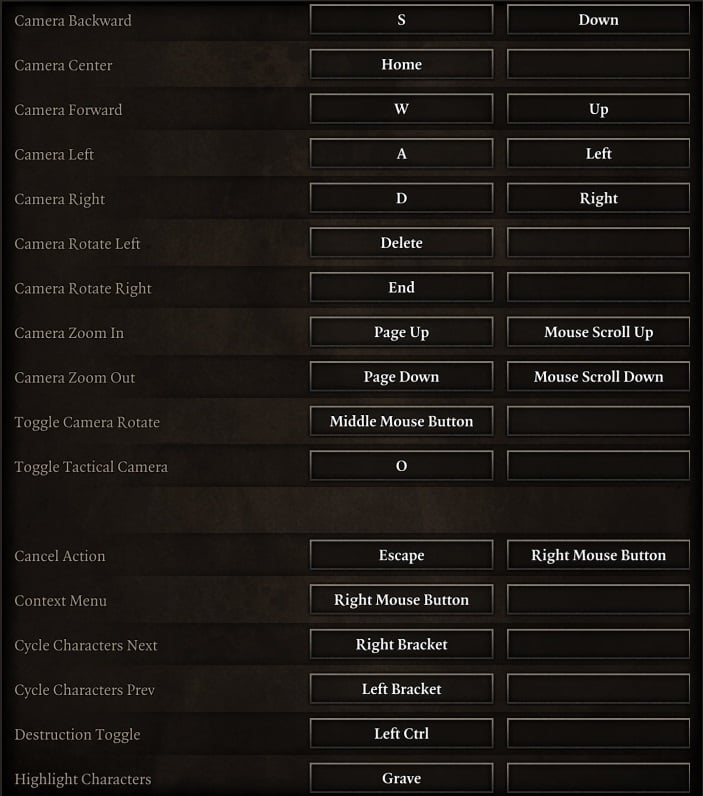
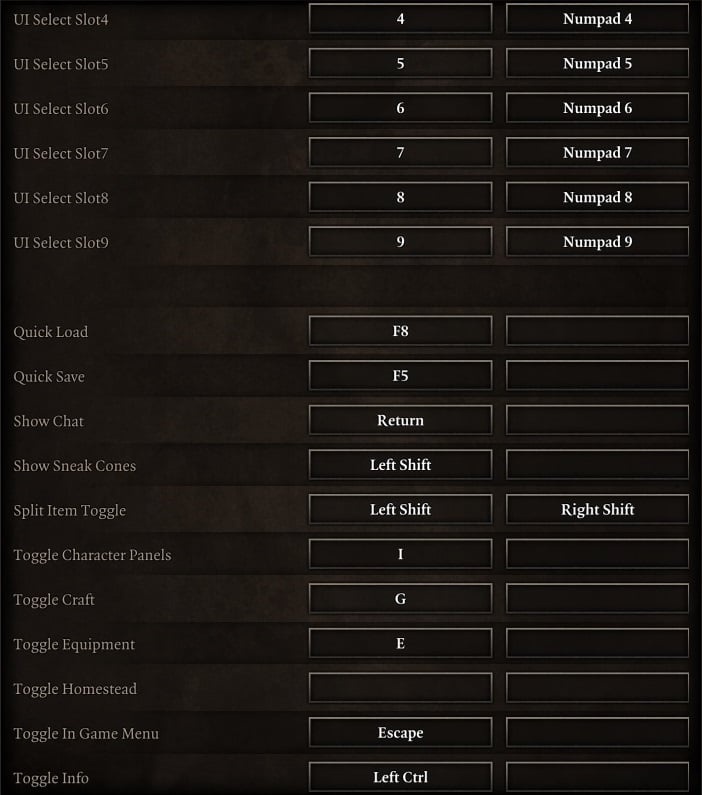
- Quick Load loads the last save, which isn't necessarily the last Quick Save.
- Turning tactical view on has a different effect during conversations, moving the camera to a medium distance from the speakers that may be more comfortable than talking with the camera a long way away. However, the effect is temporary, reverting when the camera moves to center on a change of speaker.
- Movement during combat that uses any part of the last action point will automatically end the character's turn (PC).
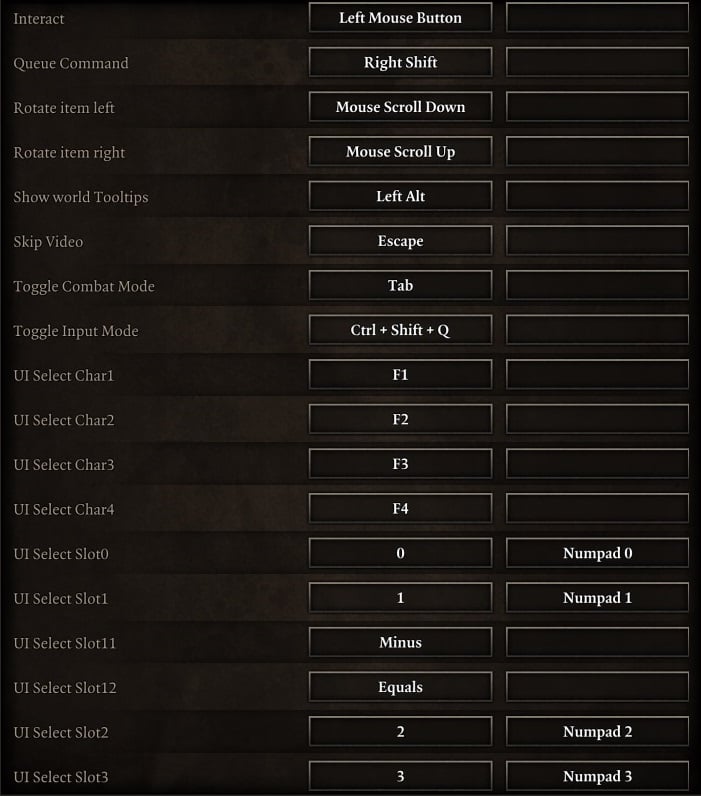
- Characters can be turned to face a particular target by starting the process of an action but not completing it. This can be useful to minimize the possibility of a backstab or increase the AP cost to achieve it.
- Sneak cones from non-hostile characters will sometimes not break sneaking. However, you can't always tell which cone is from which character or which characters are non-hostile.
- While sneaking sneak cones show regardless of the use of the show sneak cones key.
Controls in Divinity Original Sin 2
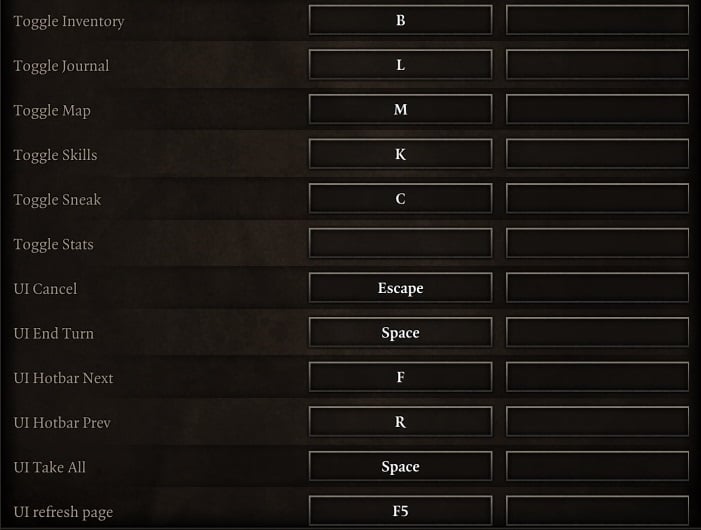
Divinity Original Sin 2 PC Controls




jak upravím klávesové zkratky?
wie kann man retype snelltaste?
0
+10
-1Please add iPad touch controls
2
+10
-1how do you select many things and move it to a bag or another characters bag thank you for any helpo you might give
0
+10
-1grassyknoll
How would u move with WASD when you have to turn the camera so much? Doesn't even make sense for this type of game. It would be like using WASD in Diablo to move. Also unless I'm wrong since it has been a while since I've tried to use a PS$ controller on PC but don't you have to run a program like pinnacle or DS3 to make ur controller map to the game controls properly? Should be able to rebind buttons from PS4 controller in there if having issues opening the map, and all of those controller programs make your PS4 controller emulate an Xbox controller so the game thinks your using an Xbox controller which is why you don't see the icons for the PS controller. Someone may have made custom game files to change the icons in the game to that of a PS controller but I'm not sure. In response to someone else below you can rebind your keys...has worked since the game launched. And to ppl complaining about how to play the game well this site is a great resource but the basic game/controls are pretty intuitive especially if you've ever played a Baulders Gate type of game before. The biggest issue I'd say is with the lack of an in-game glossary/index that went a bit more in-depth about game mechanics.
3
+10
-1Please tell me where to find directions to play. Like, what the hell is the Ping? Where does one learn how to read the map radar? How to do ANYTHING???? There are no directions with the downloaded Steam game on PC. I have no idea what to do with the game, there's no fucking directions, and feel I just lost good money.
9
+12
-1Why can't we customize the hotkeys like you can e.g. in Starcraft ?
0
+10
-1Is there anyway to make PS4 controller buttons show instead of Xbox buttons in the steam PC version of the game?
6
+12
-1Please fix the map button for ps4 controllers on steam
6
+13
-1WASD PLEASE!!!!
0
+10
-1Please add a way to move your character with WASD.
0
+10
-1How do you set up couch co-op with one person using a controller and the other the PC keyboard?
0
+10
-1