The 8 best AI tools for knowledge base management in 2026


Last edited June 11, 2026

What "knowledge base management" actually means now
For most of the last decade, knowledge base management meant gardening: writing articles, organizing them into categories, and nagging people to keep them current. The work was mostly human, and the tool was mostly a filing cabinet.
AI changed the job in three concrete ways, and the tools in this list each lean on a different one:
- Answering, not just storing. Instead of returning ten article links, an AI layer reads your docs and writes a direct, cited answer. This is the headline feature in every tool here, and it's why AI search has quietly replaced the old search box.
- Maintaining, not just authoring. The newer wave (Slite, Document360, Guru) actively flags stale or contradictory content and routes it to an owner, so the knowledge base stays trustworthy without a full-time librarian.
- Reaching, not just sitting there. The best setups push answers into Slack, Teams, or the helpdesk, because a knowledge base nobody visits is a knowledge base nobody reads.
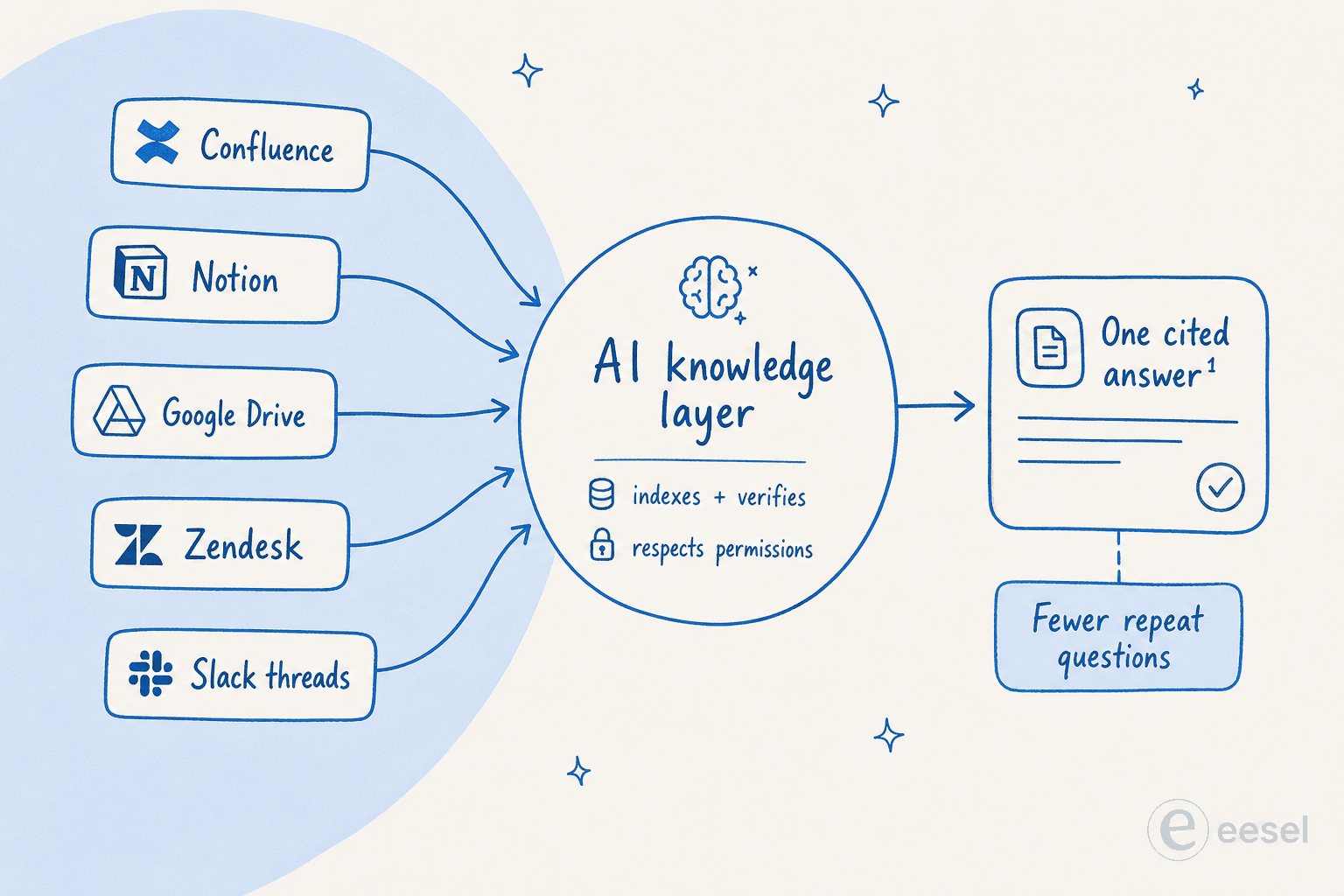
The reason this matters for your shortlist: a tool that's brilliant at authoring (Notion AI) is a different animal from one built for maintaining a public help center (Document360) or one built for reaching employees in Slack (Tettra). Buy for the job you actually have. If you want the deeper background first, our primer on AI-powered knowledge base management covers the mechanics.
How we picked
We're the team behind eesel AI, so we live in this category. For each tool we went through the live product and docs, pulled current pricing (where it's public), and read the user reviews on G2, Capterra, and Reddit to find the complaints that only show up after a few months of real use. We've tried to be straight about where each tool wins, including the ones that compete with us, and honest about where eesel isn't the right fit either.
One note before the list: we don't cover every "AI wiki" on the market. We picked the eight that real support, ops, and IT teams actually shortlist, across the three jobs above.
The 8 best AI tools for knowledge base management at a glance
| Tool | Best for | Knowledge it manages | Where answers appear | Starting price | Free option |
|---|---|---|---|---|---|
| eesel AI | AI on top of the knowledge you already have | Helpdesk, docs, tickets, Confluence, Google Docs, 100+ sources | Inside your helpdesk, Slack, Teams, chat widget | $0.40 / resolution, no seats | $50 free usage, no card |
| Guru | Governed internal knowledge at scale | Internal cards + 100+ connected sources | Slack, Teams, browser extension | Quote only | No |
| Notion AI | Teams whose docs already live in Notion | Notion workspace + connected apps | Inside Notion | $20 / user / mo (Business) | Trial credits only |
| Atlassian Rovo | Companies already on Confluence + Jira | Confluence, Jira + 100+ connectors | Inside Atlassian apps, browser extension | Included from ~$5 / user / mo | Free plan excludes AI |
| Document360 | Public help centers and product docs | Document360 articles, files, FAQs | Help center, in-app widget, MCP | Quote only | 14-day trial |
| Slite | Self-maintaining internal wikis | Slite docs + connected tools (Pro) | Slite, Slack | $10 / user / mo | 14-day trial |
| Tettra | Slack-first teams drowning in repeat questions | Tettra pages + Google Docs | Slack (the bot, Kai) | $8 / user / mo | 30-day trial |
| Glean | Large enterprises with knowledge everywhere | Everything, via enterprise connectors | Glean assistant, in-context | Quote only | No |
A pattern worth clocking before you read on: half this list (Guru, Glean, Document360) won't tell you the price without a sales call, and most of the rest charge per seat to read the knowledge base. Hold that thought for the pricing section.
1. eesel AI
Best for: teams who already have knowledge scattered across a helpdesk, docs, and past tickets and want AI answers without migrating any of it.

We'll get our own tool out of the way first, and we'll be specific about who it isn't for. eesel AI is not a wiki. You don't write articles in it. It's the AI layer that sits on top of the knowledge you already have, and that's the whole point.
Where every other tool on this list wants to be your knowledge base, eesel connects to the ones you've already built: your Confluence space, Google Docs, your help center, Slack, and crucially your history of past support tickets, which is usually the richest and most-ignored knowledge source in any company. It learns from all of them at once, then answers questions inside the tools your team already uses, whether that's Zendesk, Slack, Microsoft Teams, or a chat widget on your site.
The reason this matters for knowledge base management specifically: the hardest part of any KB project is never the software, it's getting the knowledge in and keeping it current. If your goal is to answer questions rather than to own a tidy wiki, skipping the migration is a genuinely different starting line. One example from our own customers, GroundTruth manages a huge knowledge base with eesel AI without rebuilding it inside a new tool.
Pricing: usage-based, with no per-seat fees and no platform fee on self-serve. A "regular" task like a resolved ticket or chat is $0.40, and you start with $50 of free usage and no credit card. A team routing 1,000 tickets a month pays about $400, and you can roll it out to a fraction of your volume first.
Pros:
- Learns from your existing sources (helpdesk, docs, tickets, Confluence, Google Docs) with no migration.
- Answers appear inside your helpdesk and chat tools, not in yet another tab.
- Usage-based pricing means a quiet month is a cheap month, with no seat tax for read-only users.
- You can simulate it on thousands of past tickets before going live, so you see the resolution rate before you commit.
Cons:
- It's a question-answering and automation layer, not an authoring tool. If you want to write and structure docs from scratch, you still need a wiki underneath (and eesel will happily read it).
- Usage-based billing is less predictable than a flat per-seat number if your volume swings a lot, though the spend cap guards against surprises.
Our take: if you already have knowledge and just want it to answer questions in the right place, eesel is the most direct path, because it sidesteps the migration that sinks most KB projects. If what you actually need is a brand-new wiki to write in, one of the tools below is your foundation, and eesel is the layer you add later.
2. Guru
Best for: mid-market and enterprise teams that need governed, verified internal knowledge, not just search.
Guru is one of the most thought-through tools here, and its angle is governance. Every piece of knowledge (a "Card") has an owner, a verification interval, and gets auto-flagged when it goes stale. Its Knowledge Agents answer questions with citations and inherit permissions from the source system, so people never see content they shouldn't. It also exposes your governed knowledge to other AI tools through an MCP server, and connects 100+ sources like SharePoint, Confluence, and Salesforce.
That governance layer is the real product, and it's genuinely good. It's also the catch: the verification system creates ongoing admin work and assumes you have a designated knowledge manager. As the team's own research notes, search quality "depends heavily on consistent tagging, folder structure, and verification cadence." Without that hygiene, large knowledge bases get harder to search, not easier.
Pricing: Guru has gone fully enterprise-only. The pricing page publishes no numbers, there's no free tier, and every deployment starts with a sales call. Historical self-serve pricing sat around $250/month minimum (a 10-seat floor at ~$25/seat), but that's no longer listed. For the fuller picture, see our Guru pricing breakdown.
Pros:
- Best-in-class verification and governance, so answers stay trustworthy over time.
- Permission-aware AI answers with citations.
- Strong Slack and Teams presence plus an MCP server for other AI tools.
Cons:
- Internal-only: every reader needs a paid seat, so it can't double as a public help center.
- No public pricing, no free tier, no self-serve trial.
- Real maintenance overhead, and a Capterra-cited cluster of complaints about occasional crashes and inconsistent formatting.
Our take: if knowledge accuracy carries regulatory stakes and you have someone to own governance, Guru is excellent and worth the sales call. If you just want fast, accurate answers without standing up a governance program, it's heavier than you need. Our Guru review and Guru vs Confluence comparison go deeper, and our list of Guru alternatives covers lighter options.
3. Notion AI
Best for: teams whose docs, notes, and databases already live in Notion.
Notion AI isn't a standalone product, it's an AI layer over the Notion workspace you already use. If your company brain already lives in Notion, that context is the differentiator: you can ask questions about your own pages, get AI meeting notes generated automatically, and let an agent batch-edit databases. You can even switch the underlying model between Claude and GPT.
Notion AI had a weak reputation for years, but the mood shifted after the Business 3.0 keynote. A September 2025 thread titled "Notion AI is finally worth the upgrade" marked the turn, with the database-editing agent and meeting notes cited as the killer features. The persistent complaint to watch: users report the AI doesn't reliably "see" every database entry, with one May 2025 thread documenting it missing hundreds of journal entries. That indexing gap matters if your knowledge is data-heavy.
"It'll crash partway through" on complex tasks.
That quote, from r/Notion, is a recurring note on heavier jobs. Worth knowing before you lean on it for big batch operations.
Pricing: full Notion AI now requires the Business plan at $20/user/month (billed annually), per the Notion pricing page. The old standalone AI add-on is gone. A solo user pays $240/year, which is more than ChatGPT Plus without the workspace. The free and Plus plans only include trial AI credits.
Pros:
- Unmatched if your knowledge already lives in Notion, because the AI has your full workspace context.
- Genuinely strong meeting notes and database-editing agent.
- Model choice between Claude and GPT.
Cons:
- Requires the $20/seat Business plan for real AI, with no cheaper add-on.
- Database indexing isn't reliable for data-heavy use cases.
- It's an authoring and productivity tool, not a customer-facing knowledge base or a helpdesk answer engine.
Our take: an easy yes if you're already a Notion shop and want AI over your own pages. If your knowledge is spread across other tools, the context advantage disappears and you're paying $20/seat for a generic assistant. Our Notion AI review and notes on Notion AI limitations have the detail, and if you need answers beyond the workspace, Notion enterprise search is the relevant feature.
4. Atlassian Rovo (Confluence AI)
Best for: companies already standardized on Confluence and Jira.
If your knowledge base is Confluence, the AI you want is probably already included. Rovo is Atlassian's AI, and it comes built into Confluence Standard, Premium, and Enterprise at no extra charge. It gives you Rovo Search across Atlassian apps and 100+ connectors, Rovo Chat for cited natural-language answers, and Rovo Agents for recurring tasks like onboarding and page cleanup. The whole thing runs on Atlassian's "Teamwork Graph," and answers respect existing permissions.
Being native to Confluence is Rovo's biggest strength and its sharpest limit. It reads both Confluence pages and Jira ticket history to answer a question, which standalone tools can't easily do. But it mostly lives inside Atlassian's surfaces. There's no native Slack or Teams bot that lets employees ask Confluence questions without switching context, which is a real friction for chat-first teams. Atlassian's own trust docs also caution that Rovo can be wrong, warning against relying on it "in cases where you need current and accurate information about people, places, and facts."
Pricing: Rovo is included in paid Confluence Cloud plans, which start around $5.42/user/month (Standard) and ~$10.44/user/month (Premium), per the Confluence pricing page. The catch is credits: Standard gives a thin 25 Rovo credits/user/month, which active teams burn through fast, pushing you to Premium (70) or Enterprise (150). The free plan gets no Rovo at all.
Pros:
- Included free in paid Confluence plans, with no separate AI subscription.
- Deep, native context across Confluence and Jira.
- Permission-aware answers and no-code custom agents via Rovo Studio.
Cons:
- No native Slack or Teams bot, so chat-first teams must switch context.
- Stingy 25-credit allowance on Standard.
- Answer quality is strongest for Confluence-stored knowledge and patchier across other sources.
Our take: if you're already an Atlassian shop, Rovo is the obvious default and the price is hard to argue with. If your team lives in Slack, or your knowledge is spread well beyond Confluence, you'll feel the walls. Our Confluence Copilot guide and Confluence alternatives roundup cover the trade-offs, and there's a dedicated Atlassian knowledge base walkthrough too.
5. Document360
Best for: teams publishing a public help center or product documentation.
Where Guru and Tettra are internal-first, Document360 is built for documentation you ship to the outside world: help centers, user manuals, SOPs, and API docs. It's used in 150+ countries by names like McDonald's and HP, and its AI layer, branded Eddy, is unusually broad. There's an AI writing agent that turns video, audio, or a prompt into structured articles, an "Ask Eddy" conversational search that cites every source, an AI chatbot add-on that can pull from your KB plus Zendesk or Freshdesk tickets, and an MCP server to connect your docs to ChatGPT, Claude, or Copilot.
It earns a strong 4.7/5 on G2 (Quality of Support scores particularly high), and reviewers like the editor and support. The recurring criticisms: small teams find it pricey, the AI search isn't always as "smart" as hoped, and deeper CSS customization gets fiddly.
Pricing: here's the frustrating part. Document360's pricing page publishes no dollar figures at all anymore. The three tiers (Professional, Business, Enterprise) all route through "Get a quote," and the page explicitly says cost "depends on the features and AI capabilities you require." There's a 14-day trial, but you can't comparison-shop without talking to sales. The AI Chatbot is a paid add-on on top.
Pros:
- Purpose-built for public-facing documentation, which most tools here aren't.
- Genuinely broad AI feature set (writing agent, cited search, chatbot, MCP).
- Strong 4.7/5 G2 rating and praised support.
Cons:
- No public pricing, so budgeting requires a sales call.
- AI search quality draws mixed reviews.
- The AI chatbot is an extra-cost add-on, not included.
Our take: if your main job is a polished, public help center with AI search baked in, Document360 is one of the best dedicated platforms for it. If your need is internal Q&A or answers inside a helpdesk, it's aimed at a different target. Either way, pair it with our guide to building an AI knowledge base chatbot to see how the answer layer should behave.
6. Slite
Best for: mid-size teams that want an internal wiki that maintains itself.
Slite pitches itself as a "self-maintaining knowledge base," and that framing is the most interesting thing about it. Its AI search, "Ask," answers questions from verified, permission-aware docs and cites sources, and on the Pro plan it extends across connected tools like Slack, Jira, and Google Drive. The standout is the Slite Agent: it actively fact-checks existing docs, flags contradictions, and proposes fixes, which directly attacks the "our wiki is full of stale junk" problem. One customer, Agorapulse, says that after rolling out Ask, "that amount of [Slack] questions has been divided by 10."
It's well-liked, with 4.7/5 on both G2 and Capterra, and reviewers consistently call out how much easier it is to adopt than Confluence or Notion. The limits are mostly about the AI quotas: the Basic plan throttles you to 30 questions per user per month, and the Pro Agent runs on a 50-credit/seat model that isn't clearly explained, so heavy automation can hit ceilings.
Pricing: refreshingly transparent. Basic is $10/user/month and Pro is $20/user/month (annual), per the Slite pricing page, with a 14-day trial. Cross-tool AI search and the self-maintaining Agent require Pro.
Pros:
- The self-maintaining Agent genuinely reduces the stale-content burden.
- Verified, permission-aware, cited answers, with Slack-native answers on Pro.
- Easy onboarding and strong 4.7/5 ratings, plus public pricing.
Cons:
- Basic's 30-question cap is tight for active teams.
- The Pro Agent's credit model is opaque.
- It's an internal wiki, not a customer-facing bot or a helpdesk layer.
Our take: if you want a clean internal wiki that fights its own entropy, Slite is one of the most thoughtful picks here, and the pricing is honest. Teams comparing it head-to-head should read our Confluence vs Guru vs Slite breakdown.
7. Tettra
Best for: Slack-first teams buried in the same repeated questions.
Tettra is the most focused tool on this list, and that focus is its strength. It's an internal knowledge base built around a Slack bot named Kai, serving 20,000+ organizations, mostly in the 10 to 250-person range. The clever bit is the loop: when Kai can't answer something, it creates a knowledge-gap ticket and routes it to the right expert, who answers once. That answer feeds back into the KB, and the question stops recurring. Over time, the repeat questions in Slack quietly disappear. It can also turn a Slack thread into a KB article with one click.
It rates 4.6/5 on G2 across 161 reviews, with praise for ease of use and Kai's quality. Two limits to know going in. First, the editor is basic, with no embedded spreadsheets or rich content blocks, so it's for text-heavy docs, not technical specs. Second, and this is a real gotcha, the Microsoft Teams integration is dead: the integration page 404s, and a February 2026 case study from perfectwikiforteams.com confirms it "isn't even present in the Teams app store." Tettra is Slack or nothing.
Pricing: the cheapest published option here. Scaling is $8/user/month (annual) with a 10-user minimum, so the floor is $960/year, per the Tettra pricing page. There's a 30-day trial but no free tier (the free Basic plan was discontinued in 2024). SSO and SCIM are paid add-ons on Scaling.
Pros:
- The gap-routing loop genuinely kills repeat Slack questions over time.
- Lowest published per-seat price in the category.
- Dead simple to adopt for small Slack-first teams.
Cons:
- No Microsoft Teams support at all.
- Basic editor and search that degrades on large knowledge bases.
- 10-user minimum and no free tier, with SSO/SCIM as extras.
Our take: for a small, Slack-centric team that mostly needs to stop answering the same five questions, Tettra is a tight, affordable fit. If you're on Teams, or you need rich docs or a customer-facing KB, look elsewhere.
8. Glean
Best for: large enterprises whose knowledge is scattered across dozens of systems.
Glean is the enterprise heavyweight, and it's a slightly different animal: less "knowledge base" and more "AI search and assistant across everything your company runs on." It connects all your systems (Confluence, Slack, Google Drive, SharePoint, Salesforce, GitHub, and more), then layers search, an assistant, and agents on top, with permissions and governance built in. Its pitch leans hard on efficiency, framing pre-connected context as a way to cut token spend at scale.
The proof points are enterprise-grade. Booking.com made Glean its first company-wide AI platform across 14,000 employees, and Zillow reports 1.5+ hours saved weekly per user at 80% adoption. It carries the certifications big buyers need (SOC 2 Type II, ISO 27001, HIPAA, ISO 42001). This is not a tool for a 30-person team, and it doesn't pretend to be.
Pricing: quote-only. Glean's pricing page publishes no tiers or per-seat numbers, with a single "Get a Demo" path, consistent with its single-tenant, deploy-in-your-cloud model. Secondary sources have floated rough figures in the $40 to $50 per user per month range, but that's unconfirmed by Glean and shouldn't be treated as official.
Pros:
- Best-in-class enterprise search breadth across dozens of systems.
- Serious security and governance credentials for regulated buyers.
- Real, documented enterprise outcomes at companies like Booking.com and Zillow.
Cons:
- Enterprise-only, with no public pricing and no free tier.
- Overkill (and likely unaffordable) for small and mid-size teams.
- Built for horizontal search across everything, not for managing a single curated knowledge base.
Our take: if you're a large enterprise where employees genuinely can't find anything across a dozen systems, Glean is the gold standard for enterprise AI search. For everyone else, it's a bigger (and pricier) hammer than the problem needs.
How to choose the right one
If your eyes glazed over somewhere around the fourth pricing table, here's the shortcut. The decision really comes down to where your knowledge lives and who needs the answers.
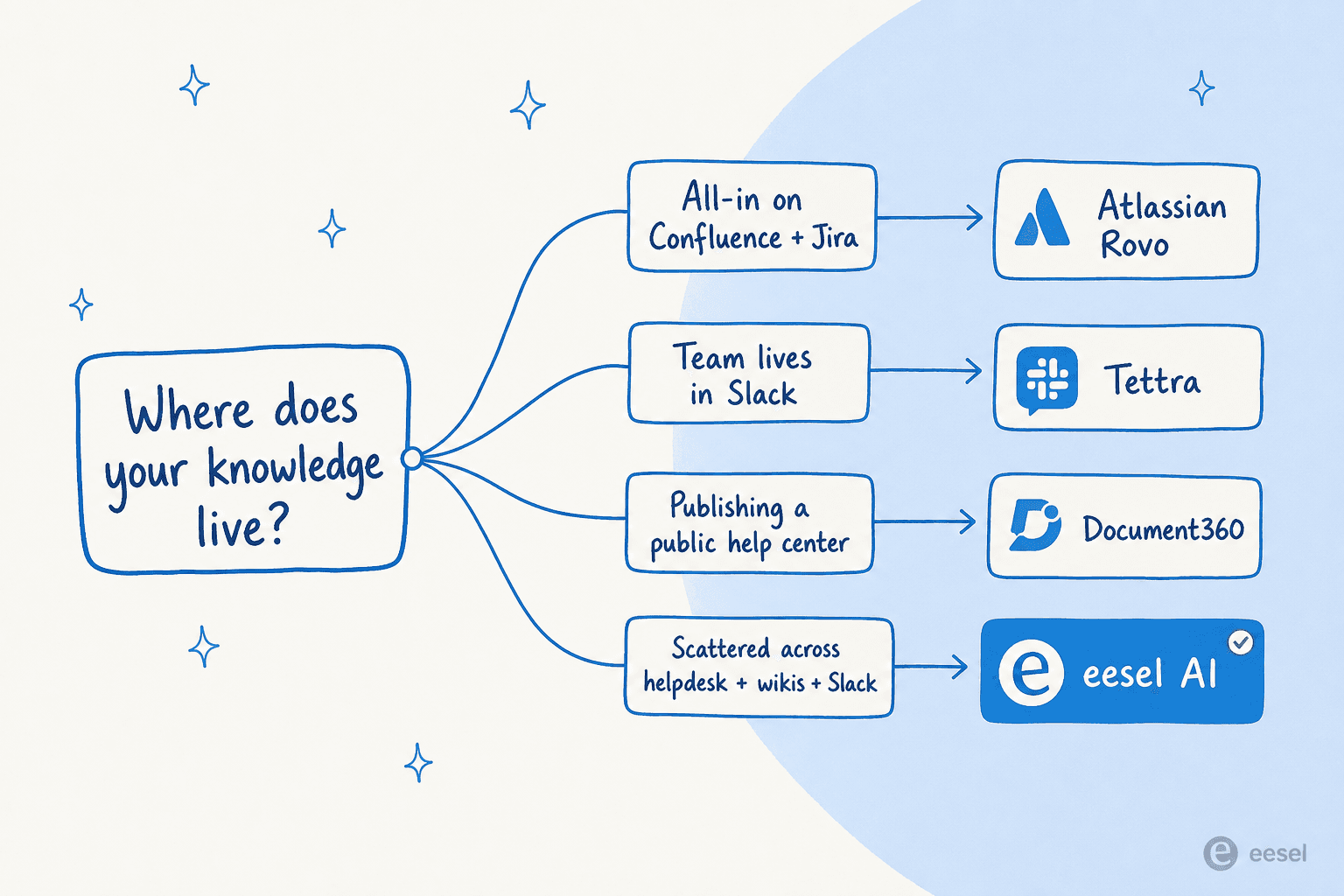
- Already all-in on Confluence and Jira? Use Rovo. It's included and it already has your context.
- Your team lives in Slack and asks the same things daily? Tettra (Slack-only) or Slite (Slack plus connected tools).
- Publishing a public help center? Document360 is the dedicated platform.
- Everything lives in Notion already? Notion AI, no contest.
- A big enterprise where nobody can find anything? Glean.
- Knowledge scattered across a helpdesk, docs, tickets, and Slack, and you don't want to migrate it? That's the eesel AI case.
Then there's the question that cuts across all of them: the pricing model. Half this category hides its price behind a sales call, and most of the rest charge per seat just to read the knowledge base. That seat math is sneaky. If you want 200 people to be able to ask questions but only 10 to write, you're often paying for 200 readers.
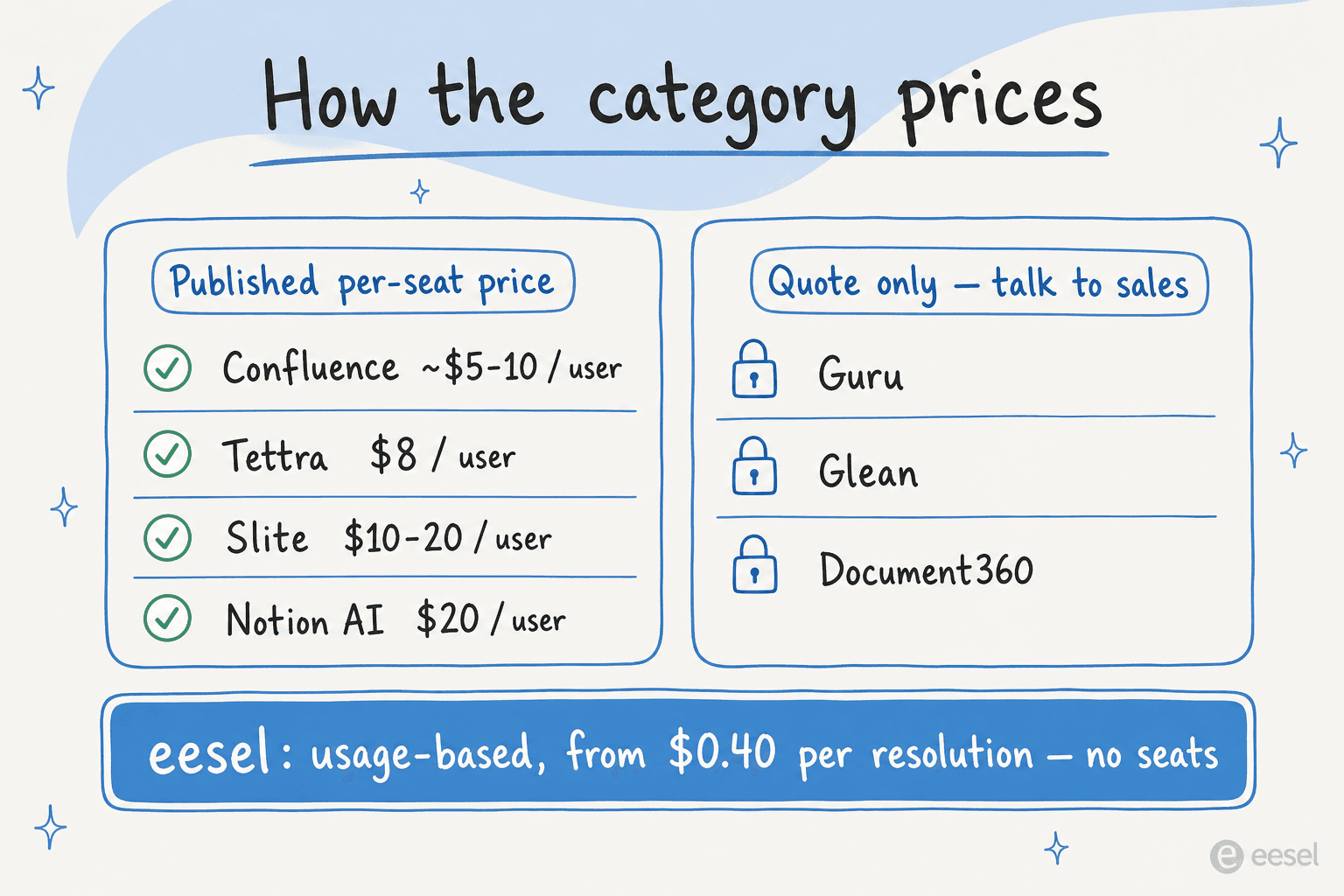
That's worth weighing against a usage-based model, where you pay for answers given rather than seats provisioned. Neither is automatically cheaper, but they fail in opposite directions: per-seat punishes you for having a big audience, usage-based punishes you for a runaway-busy month (which a spend cap fixes). Match the model to your shape.
Try eesel
If the recurring theme of this list bugged you, the migration, the seat tax, the "now move all your knowledge into our tool" assumption, that's the exact problem eesel AI was built around.

Instead of being another knowledge base to fill and pay seats for, eesel connects to the sources you already have (your helpdesk, docs, Confluence, Google Docs, and years of past tickets) and answers questions inside the tools your team already uses. The differentiator we'd point to: you can simulate it on thousands of your real historical tickets before going live, so you see the actual resolution rate up front instead of taking a leap of faith. And because it's billed per resolution with no seat fees, letting your whole company ask questions doesn't multiply the bill.
You can start with $50 of free usage, no credit card, and point it at your existing knowledge to see what it answers. If you're still mapping the basics, our guides on how to train AI on your knowledge base and the best AI documentation assistant tools are good companions.
Frequently Asked Questions

Share this article

Article by
Riellvriany Indriawan
Riell is a designer and writer at eesel AI with about two years of experience researching CX platforms, AI chatbots, and helpdesk software. She combines her design background with a sharp eye for how these tools actually look and feel in practice — making her comparisons unusually visual and user-focused.