AI knowledge base article writer: how to actually use one (2026)


Last edited June 23, 2026

What an AI knowledge base article writer actually does
Strip away the marketing and the job is narrow: take knowledge that's trapped in tickets, chats, and half-finished docs, and turn it into a clean, structured article a customer can read and self-serve from.
That's a different job from a general AI writer or an AI content generator aimed at blog posts. A blog post can be loosely true and still do its job. A knowledge base article that's loosely true generates a ticket, or worse, a wrong action by the customer. So the bar is accuracy first, polish second.
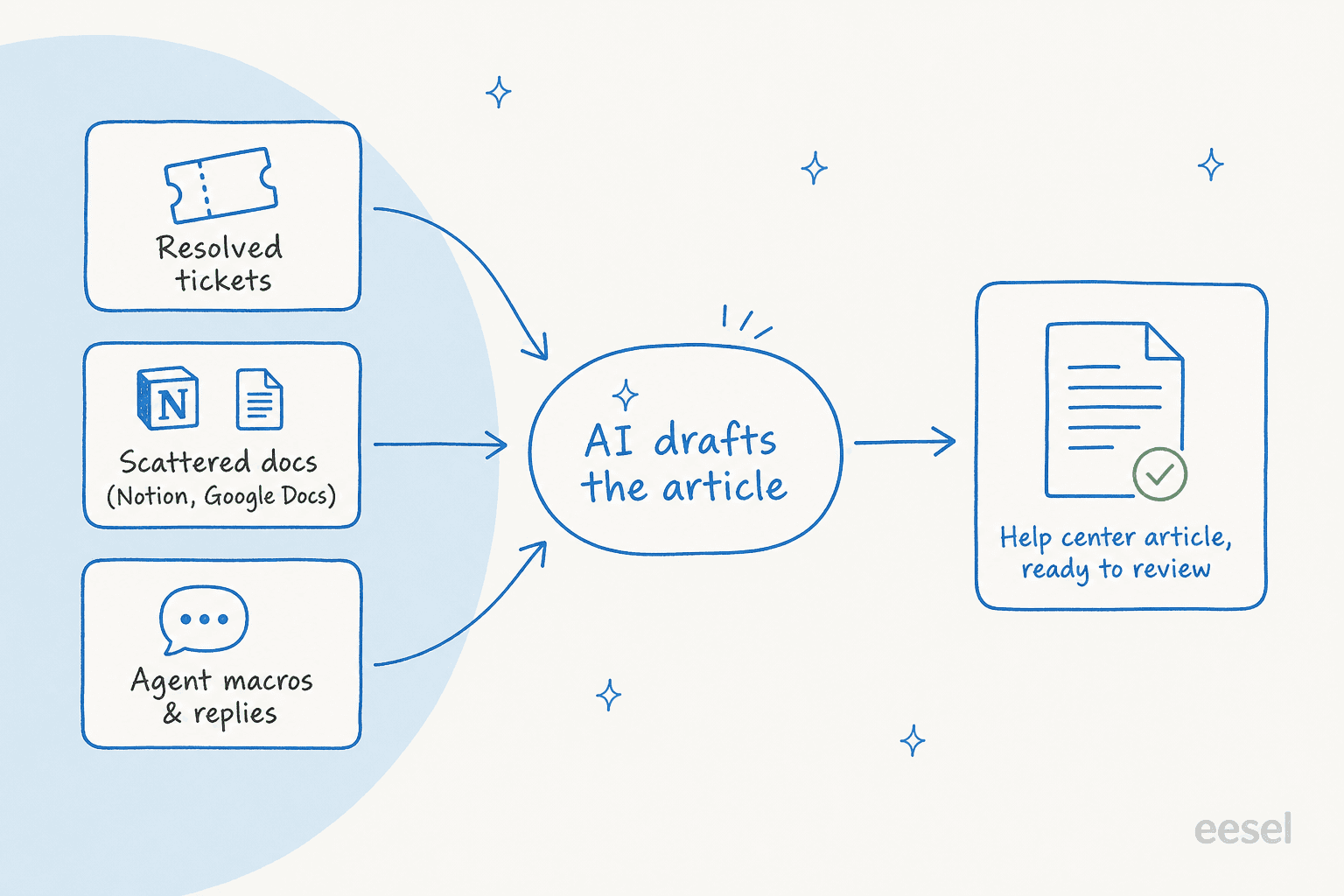
In practice a decent writer does three things:
- Pulls from your sources, not its imagination. Resolved tickets, your existing help center, internal docs in Notion or Google Docs, agent macros, release notes. The article is a restructuring of what you already know, with the AI handling the structure.
- Writes in your voice and format. Step lists for how-tos, short answers for FAQs, the headings and tone your existing articles use. This is where brand voice training matters, so a new article doesn't read like a different company wrote it.
- Tells you what to write next. The best ones look at what customers search for and what they ask in tickets, then surface the topics where you have no article yet.
That last one is the part teams sleep on, and it's usually where the time actually gets saved.
The mistake that quietly wastes the whole effort
Here's the failure I've seen sink more knowledge base projects than any model limitation: the articles get written for the wrong reader.
I've sat in calls with a support manager at a bus-tracking service running a couple hundred Zendesk tickets a month, whose entire knowledge base was written for administrators, while every single ticket came from riders. The docs were technically accurate and completely useless to the people writing in. An AI pointed at those docs just produces more articles for administrators, faster. You've automated the wrong thing.
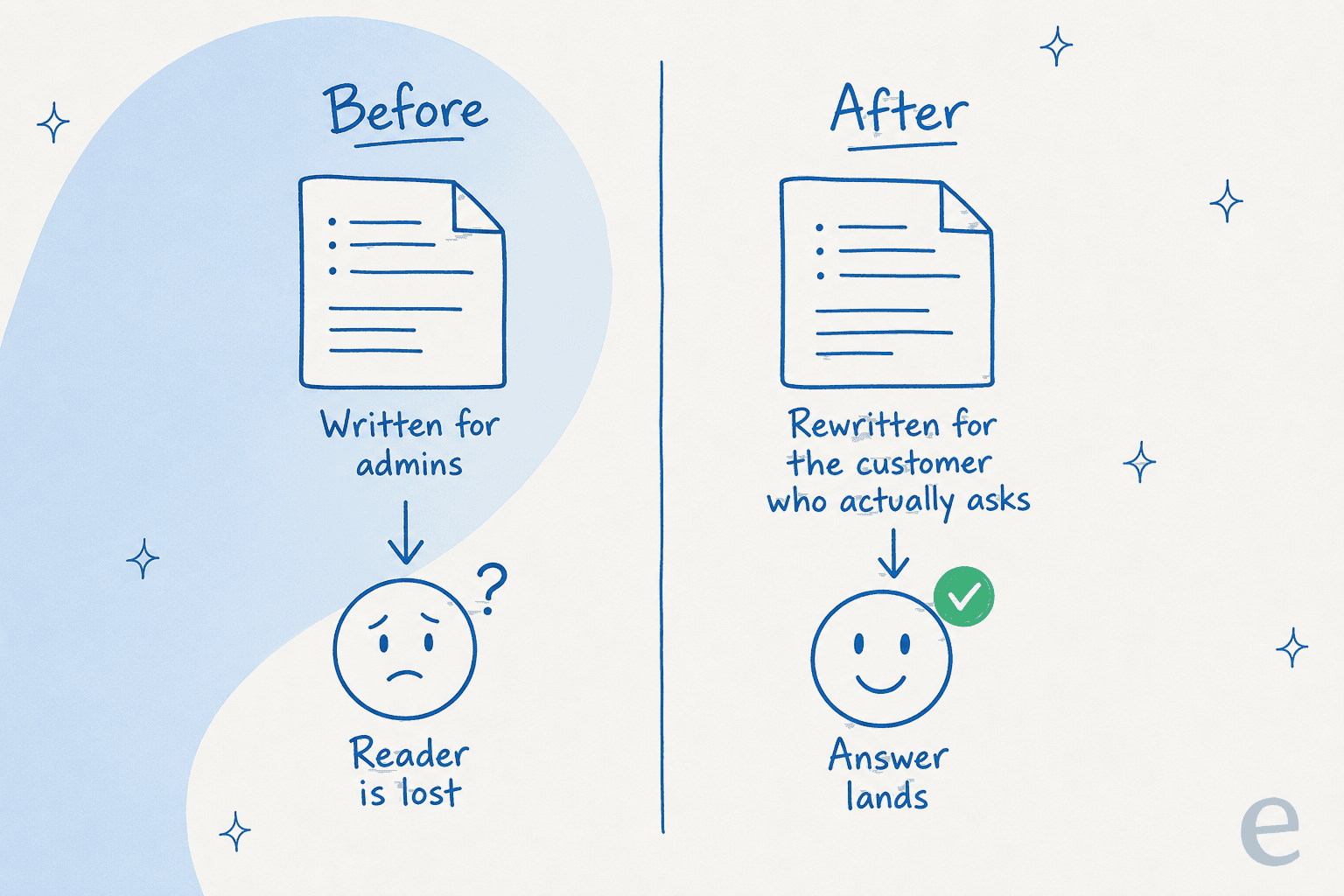
This is exactly why feeding the AI your resolved tickets beats feeding it your existing docs. Tickets carry the question in the customer's own words, the phrasing they actually use, the thing they were confused about. An article generated from that source answers the real question. An article generated from an internal spec answers a question nobody asked.
So before you judge any tool, check what it's reading from. A writer that only ingests your current docs will faithfully reproduce whatever's wrong with them. The point of an AI knowledge base article writer is to close the gap between what you've documented and what people are actually asking, not to multiply your existing docs.
How the good ones actually work
Once the sources are right, the mechanism that separates a useful tool from a toy is grounding: does the AI write only from retrieved content, or does it fall back on its training data when it can't find an answer?
This is the same problem that makes an AI knowledge base chatbot trustworthy or dangerous, and it's worth understanding because the writing side has the identical risk. When retrieval returns nothing and the model answers anyway, you get confident fiction. We've watched paying customers' bots invent product claims and send them to real people, simply because the knowledge base had no matching entry and the model filled the silence. An article writer with the same flaw will happily draft a how-to for a feature that doesn't exist.
So the questions that matter for any AI documentation assistant:
- Does it cite the source doc behind each section, so a reviewer can check it?
- Does it decline, or flag, when it has no grounded source instead of guessing?
- Can it train on your knowledge base and your past tickets together, not just one or the other?
If you only take one thing from this section: a tool that admits "I don't have a source for this" is worth more than one that always has an answer. The confident one is the one that gets you in trouble.
Build it yourself, or buy it?
A fair question, especially if you've got engineers: why not wire up the OpenAI or Claude API to your docs and write your own? Karel at GENERAL BYTES, who connects eesel AI to Confluence and Telegram, put the tradeoff plainly:
"We could try to write our own LLM application but we didn't want to invest our time into that. We wanted something that we would not have to maintain."
Karel, GENERAL BYTES (case study)
That's the honest math. The first draft of a retrieval-plus-writing pipeline is a weekend. Keeping it accurate as your docs change, your product ships, and your edge cases pile up is a permanent job. For most teams the maintenance is the cost, not the build.
A workflow that produces articles worth keeping
Tools aside, here's the loop I'd actually run. It works whether you're using a purpose-built tool or stitching together AI help with writing by hand.
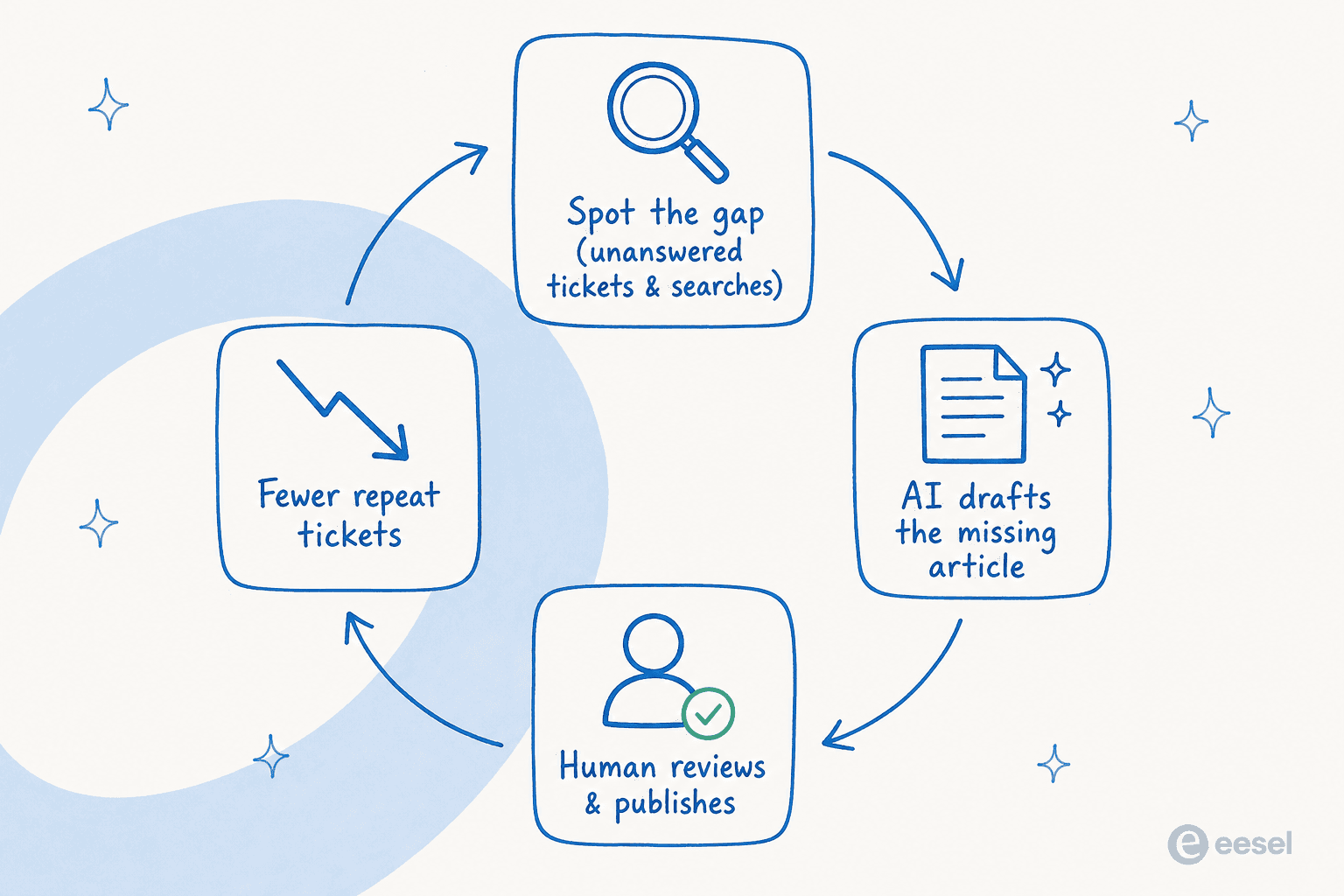
- Find the gap before you write. Don't start from a content calendar, start from demand. Pull the tickets that keep coming back and the search queries that hit a help center gap. Those are your article topics, ranked by how much pain they're causing.
- Draft from the resolved ticket, not the spec. Feed the AI the actual conversation where an agent solved it. The reply your agent already wrote is 80% of the article, in the customer's language.
- Keep a human in the review seat. AI drafts, a person approves. This isn't ceremony, it's where you catch the one wrong number or the step that changed last release. The reviewer should be checking facts, not rewriting prose.
- Publish into the source your support already reads. An article only deflects tickets if your agents and your bot can both see it. That's the case for keeping writing and answering on one platform.
- Refresh on a schedule. Use AI to flag outdated help center content so you fix the stale article before a customer finds it. This is the difference between a knowledge base and a graveyard.
Run that loop and the article count stops being the metric. Repeat tickets going down is.
Which approach fits your team?
Most teams land in one of three spots depending on volume and where their knowledge already lives. Quick gut-check:
Where does your knowledge live right now?
Where it goes wrong
A few pitfalls worth naming, because they're predictable:
- Stale content nobody owns. AI makes writing cheap, which means it's easy to publish 200 articles and update none. A bigger knowledge base that's out of date is worse than a small one that's current. This is really a knowledge base management problem, and it's the one that bites quietly.
- Audience drift. We covered it above, but it recurs: every few months, check that new articles still match how customers phrase things, not how your product team does.
- The wiki that becomes a swamp. Internal docs and customer-facing articles are different jobs. If you're also wrangling an internal knowledge base, keep the two clearly separated, or your AI will blend internal jargon into public articles.
- One-source tunnel vision. A writer that only reads docs misses tickets; one that only reads tickets misses your release notes. Strong AI knowledge management for support teams pulls from everything at once.
None of these are model problems. They're process problems, and a tool that builds the loop into how it works saves you from most of them.
Try eesel for the writing and the answering
If you want the article-writing and the ticket-answering to run off the same brain, that's the bet eesel AI makes. It connects to your help desk and your docs, whether that's Zendesk, HubSpot, Confluence, or Jira, learns from your past tickets, and drafts replies and articles grounded in that content rather than guessing.
The piece that ties to this whole post: because the same engine that drafts articles also answers tickets, the gaps surface naturally. When the AI can't confidently answer something, that's your next article, already identified. One customer manages a genuinely large knowledge base with eesel AI doing exactly this, and another team told us their agents stopped digging through Notion and Google Docs entirely because the AI does the retrieval for them.

You can plug it into your existing stack, point it at your tickets and docs, and watch it draft against your real history before you commit. It's free to try, and it works like a teammate who already read your help center. If you're still comparing options, our roundup of AI knowledge base tools and knowledge management software lays out the field, and our take on the benefits of an AI-powered knowledge base covers the why.
Frequently Asked Questions

Share this article